 Connexion


See what you missed in Daily Tech Insider from Oct. 19–23.
The post This Week in Tech: AI Agents Clock In as Apple Buyers Wait and IT Scrambles appeared first on TechRepublic.
At the 2026 OCP Global Summit, Nvidia opened up its Vera Rubin rack designs, released open-source AI factory software, and announced plans with Cisco for a new pluggable-optics specification. Here's why openness has become a scaling requirement, and what IT pros should do about it.
The post Nvidia’s OCP Moves Highlight How Openness Can Help Scale AI appeared first on TechRepublic.
Telkom Indonesia is shifting more than 90% of its network infrastructure under InfraNexia as it expands wholesale fiber access beyond TelkomGroup.
The post Telkom Consolidates More Than 90% of Its Network as Indonesia’s Fiber Push Expands appeared first on TechRepublic.
Hana Financial’s new headquarters runs private 5G across 16 floors, giving roughly 3,000 employees secure wireless access to internal systems.
The post Private 5G Moves Into Banking at Hana Financial’s 16-Floor Headquarters appeared first on TechRepublic.
See what you missed in Daily Tech Insider from Aug. 31–Sept. 4.
The post Powerful AI, Cyberthreats, and Industry Upheaval Define This Week in Tech appeared first on TechRepublic.
Johor’s data center pipeline has reached 8,542 MW, but a 0.7% colocation vacancy rate, grid constraints, and water demand mean regional IT buyers need to separate announced capacity from infrastructure they can actually deploy.
The post Malaysia Data Center Growth Surges as Johor Capacity Tightens appeared first on TechRepublic.
Viettel is gaining early access to Qualcomm’s developing 6G platform, but the agreement does not yet amount to a commercial chipset or network launch.
The post Viettel Becomes Qualcomm’s First 6G Early Access Partner appeared first on TechRepublic.
US mobile speeds jumped sharply in early 2026, but carrier rankings alone do not show which network will perform best for enterprise workloads.
The post US Mobile Speeds Jump 74% as Verizon and T-Mobile Split RootMetrics Honors appeared first on TechRepublic.
SpaceX’s proposed Gen3 network could expand satellite capacity for enterprise connectivity, but the FCC has not approved the 100,000-satellite request. Deployment, pricing and service availability remain unresolved.
The post SpaceX Seeks FCC Approval for 100,000 Gen3 Satellites appeared first on TechRepublic.
AI data centers are running into a network bottleneck as GPU clusters expand. For infrastructure teams, fabric design, congestion control, and interoperability now matter as much as power, cooling, and accelerator supply.
The post AI Data Centers Face a Networking Bottleneck as GPU Clusters Grow appeared first on TechRepublic.
Elon Musk denied a report that SpaceX showed investors an AI device prototype, but the Starlink-xAI connection gives IT teams a reason to monitor the platform risk.
The post Elon Musk Denies SpaceX AI Device Report as Starlink Strategy Questions Grow appeared first on TechRepublic.
Cisco executives said agentic AI could triple network traffic, creating new infrastructure and security demands for enterprises.
The post Cisco Warns Agentic AI Will Put New Pressure on Enterprise Networks appeared first on TechRepublic.
The rise of AI must be supported by Wi-Fi networking that can deliver next-generation services in real time.
The post Cisco: AI Growth Is Turning Wi-Fi Into Enterprise Infrastructure appeared first on TechRepublic.
The FCC bans new foreign-made routers over national security risks, a move that could reshape the US tech supply chain and impact pricing and availability.
The post US Bans New Foreign-Made Routers, Citing ‘Unacceptable’ Security Risks appeared first on TechRepublic.
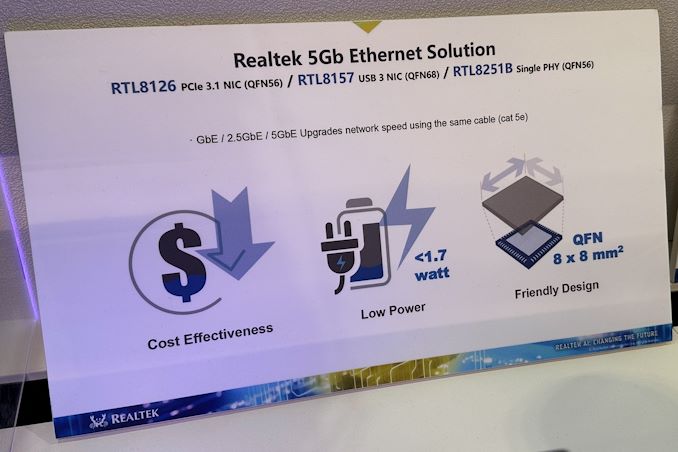
One of the more subtle trends at this year's Computex was that the majority of high-end motherboards now come equipped with a 5GbE network controller. At present, this might be considered a limited benefit as 5GbE and 10GbE switches and routers are still pretty expensive. But Realtek is planning on tackling the issue from both ends, as the company is preparing a hardware platform for sub-$100 5GbE switches.
Realtek’s quad-port 5GbE switch platform consists of five key chips: one RTL9303 switch system-on-chip, and four RTL8251B 5GbE physical interfaces (PHYs). The chips are accompanied by various other components, such as power management ICs, but in general it relies solely on in-house developed components, which is why it can be made so cheap.
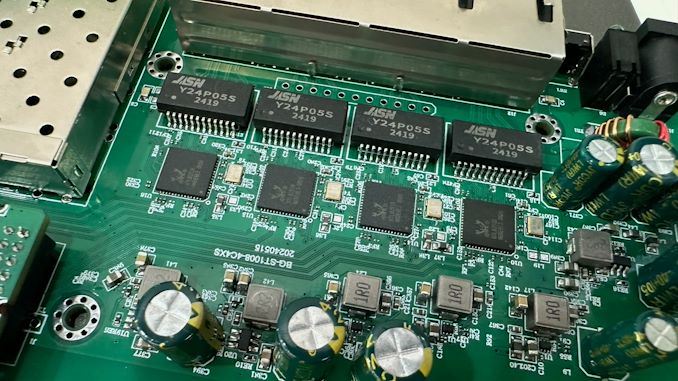
RealTek's platform is meant for home and small offices, which is reflected in the switch's feature set. This is a simple, unmanaged switch with a handful of ports, making it ideal for linking up a few systems, while enterprise users will likely find it a bit too basic.
Segmenting the market like this is ultimately critical for bringing down the price of hardware. The bulk of 5GbE/10GbE switches on the market today are more enterprise-focused managed switches, which carry more features and a price premium to match. So developing a stripped-down platform for cheaper consumer switches is a huge development that should finally make it economical for consumers to adopt faster networking hardware, similar to 2.5GbE a few years ago.
At present, 2.5GbE switches are running at around $20/port, so RealTek's sub-$100 target for a 4-port switch aims to bring 5GbE in at just a slightly higher price tag of $25/port. Or, compared to the handful of unmanaged 10GbE switches on the market, which average $60/port, this will be less than half the price (though at half the bandwidth).
The proliferation of cheap 5GbE network switches will also mark a notable inflection point in Ethernet hardware design, as it's the fastest standard that is rated to work the ubiquitous Cat 5e cable. The NBASE-T standard was penned almost a decade ago in order to cover the missing-middle between 1GbE and 10GbE, while getting more bandwidth out of existing, widely-deployed Cat 5e cabling. So with the release of consumer 5GbE gear, the standard's goals are finally coming to fruition – though it does mean we're finally reaching the end of the road for the oldest network cabling still widely in use.
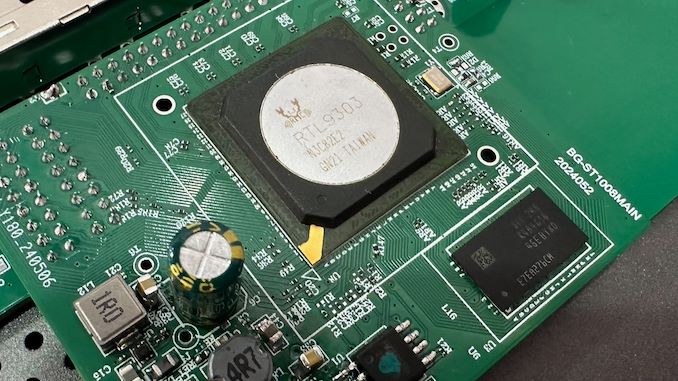
For now, Realtek is only talking about one customer offering a sub-$100 5GbE switch this September, but something tells me that other partners of the company will come up with similar devices soon enough. As a result of the competition, prices could get even lower, which is always good for buyers.
These benefits should also funnel into Wi-Fi 7 routers, to a limited extent. Wired backhaul speeds need to keep pace with ever-faster Wi-Fi standards in order to keep those newer radios fed, so it's not a coincidence that cheaper 5GbE is finally coming right as Wi-Fi 7 is taking off.
Overall, the company's 5GbE switch platform is part of a larger ecosystem of 5GbE hardware that Realtek was showing off at Computex. In addition to RTL8251B 5GbE PHYs and RTL9303 switch SoC, the company is also preparing their RTL8126 PCIe 3.1 network controller, and RTL8157 NIC for USB dongles.

Sometimes, you may need to temporarily disable IPv6 in the Linux using net.ipv6.conf.all.disable_ipv6 kernel variable for testing purposes. You can use the sysctl command to turn IPv6 connectivity on or off without rebooting the system. For example, observe how your app or network reacts when IPv6 connectivity is suddenly lost and only IPv4 is available.
Love this? sudo share_on: Twitter - Facebook - LinkedIn - Whatsapp - Reddit
The post How to temporarily disable IPv6 in Linux appeared first on nixCraft.

The Ultra Ethernet Consortium (UEC) has announced this week that the next-generation interconnection consortium has grown to 55 members. And as the group works towards developing the initial version of their ultra-fast Ethernet standard, they have released some of the first technical details on the upcoming standard.
Formed in the summer of 2023, the UEC aims to develop a new standard for interconnection for AI and HPC datacenter needs, serving as a de-facto (if not de-jure) alternative to InfiniBand, which is largely under the control of NVIDIA these days. The UEC began to accept new members back in November, and just in five months' time it gained 45 new members, which highlights massive interest for the new technology. The consortium now boasts 55 members and 715 industry experts, who are working across eight technical groups.
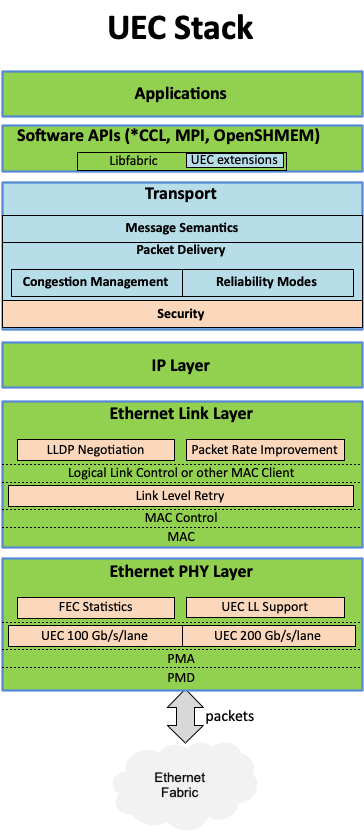
There is a lot of work at hand for the UEC, as the group has laid out in their latest development blog post, as the consortium works to to build a unified Ethernet-based communication stack for high-performance networking supporting artificial intelligence and high-performance computing clusters. The consortium's technical objectives include developing specifications, APIs, and source code for Ultra Ethernet communications, updating existing protocols, and introducing new mechanisms for telemetry, signaling, security, and congestion management. In particular, Ultra Ethernet introduces the UEC Transport (UET) for higher network utilization and lower tail latency to speed up RDMA (Remote Direct Memory Access) operation over Ethernet. Key features include multi-path packet spraying, flexible ordering, and advanced congestion control, ensuring efficient and reliable data transfer.
These enhancements are designed to address the needs of large AI and HPC clusters — with separate profiles for each type of deployment — though everything is done in a surgical manner to enhance the technology, but reuse as much of the existing Ethernet as possible to maintain cost efficiency and interoperability.
The consortium's founding members include AMD, Arista, Broadcom, Cisco, Eviden (an Atos Business), HPE, Intel, Meta, and Microsoft. After the Ultra Ethernet Consortium (UEC) began to accept new members in October, 2023, numerous industry heavyweights have joined the group, including Baidu, Dell, Huawei, IBM, Nokia, Lenovo, Supermicro, and Tencent.
The consortium currently plans to release the initial 1.0 version of the UEC specification publicly sometime in the third quarter of 2024.
"There was always a recognition that UEC was meeting a need in the industry," said J Metz, Chair of the UEC Steering Committee. "There is a strong desire to have an open, accessible, Ethernet-based network specifically designed to accommodate AI and HPC workload requirements. This level of involvement is encouraging; it helps us achieve the goal of broad interoperability and stability."
While it is evident that then Ultra Ethernet Consortium is gaining support across the industry, it is still unclear where other industry behemoths like AWS and Google stand. While the hardware companies involved can design Ultra Ethernet support into their hardware and systems, the technology ultimately exists to serve large datacenter and HPC system operators. So it will be interesting to see what interest they take in (and how quickly they adopt) the nascent Ethernet backbone technology once hardware incorporating it is ready.
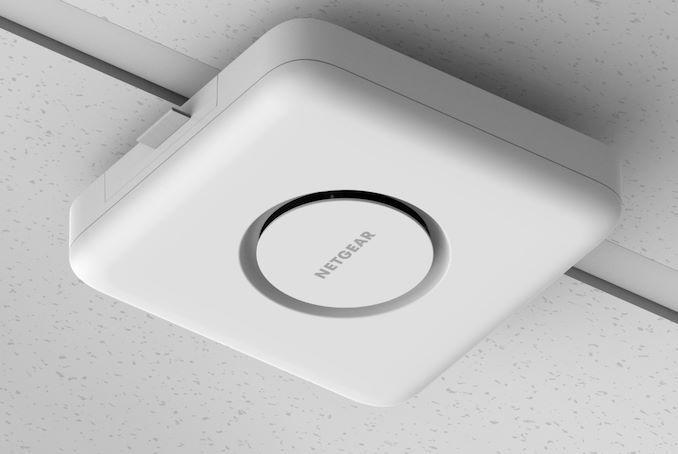
Wi-Fi 7 products have slowly started gaining market traction, particularly in the residential market (home consumer segment). The SMB / SME / enterprise market is traditionally a few quarters behind this, given the longer validation cycles. Earlier this year, Ubiquiti Networks introduced their first Wi-Fi 7 access point - the U7 Pro. Today, NETGEAR Business is launching the WBE750 Wi-Fi 7 Access Point (AP) in the Pro Wi-Fi lineup for businesses with heavy wireless Internet use.
The benefits of Wi-Fi 7 (802.11be) have been covered in multiple pieces earlier. The presence of a relatively interference-free 6 GHz band, wider channels (up to 320 MHz wide), and technical improvements to address interference and latency make the new standard an attractive upgrade for Wi-Fi users.
Unlike the Ubiquiti UniFi U7 Pro's entry-level focus (with 2x2 configurations in the 2.4 GHz, 5 GHz, and 6 GHz bands), the WBE750 opts for 4x4 configurations in each of the three bands. Correspondingly, the AP is able to support more concurrent connected clients (600 vs. 300), and obviously provide more bandwidth (18.4 Gbps vs. 9.2 Gbps theoretical). The pricing is also correspondingly higher ($700 vs. $190). The WBE750 also incorporates a NBASE-T (10 GbE / 5 GbE / 2.5 GbE / 1 GbE) RJ-45 uplink port with PoE++ support. Eight SSIDs are supported per channel.
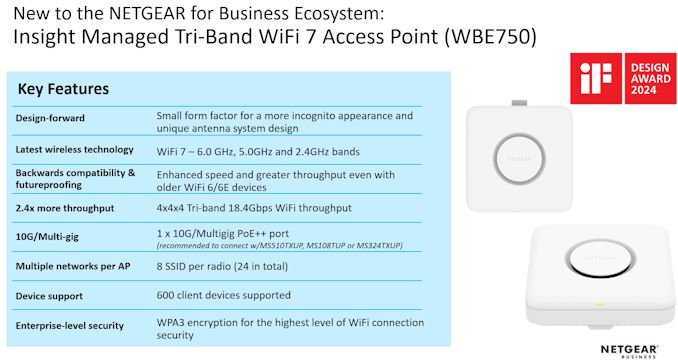
Similar to other networking equipment vendors in this space, NETGEAR is also pushing for recurring subscription-based revenue with the product. A 1-year subscription to the single-pane cloud-based management interface (NETGEAR Insight) is included in the $700 purchase price.
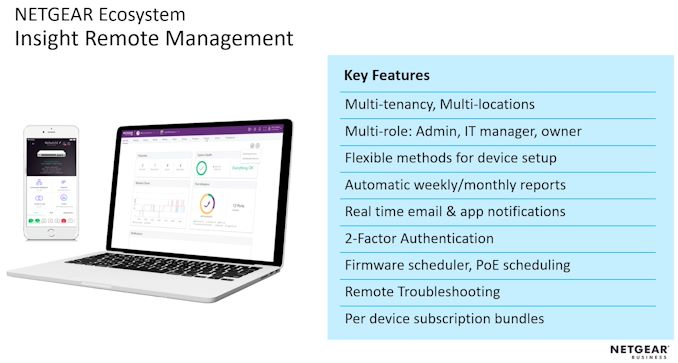
NETGEAR Insight is particularly useful for professional installers who can manage multiple sites on the go, even from a mobile device.
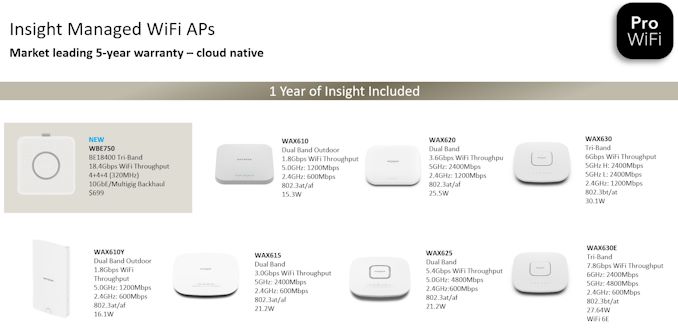
The WBE750 joins a number of other Wi-Fi 6 / 6E APs in the Pro Wi-Fi line serving a wide range of deployment requirements. NETGEAR has been introducing multiple products in their Insight-manageable line over the last few quarters. As a result, they are able to offer a total network solution (gateways / routers / switches / APs) that can be managed from a single pane. As part of its Pro focus, NETGEAR is offering free site design services to installers along with expert technical support. NETGEAR's Pro WiFi Design Services (network design, product selection guide, troubleshooting, and training support) aims to be a key differentiation aspect compared to other similar offerings in the SMB / SME market.
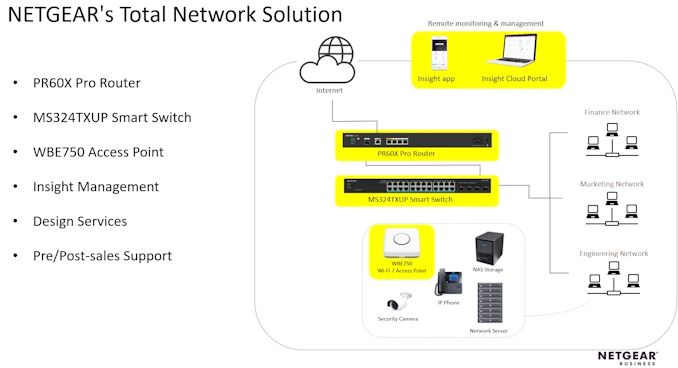
The WBE750 is powered by a Qualcomm solution - the Waikiki Wi-Fi 7 chipset incorporated in the Networking Pro 1220 platform.
The new WBE750 AP is available for purchase today for $700.
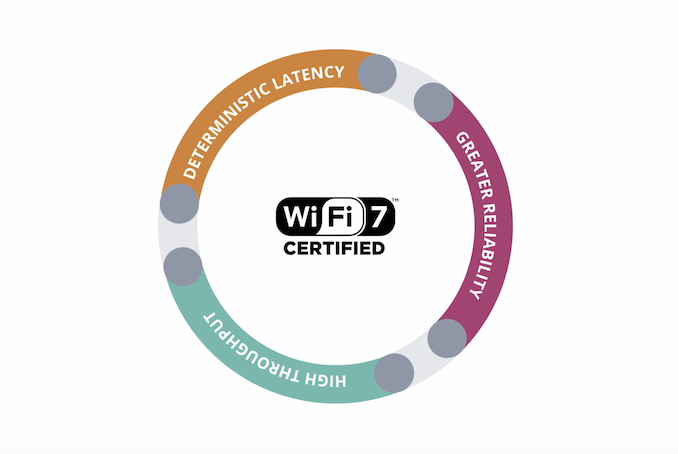
The final approval of the 802.11be standard may only be scheduled for December 2024, but that has not put a spanner in the works of the Wi-Fi Alliance in creating a Wi-Fi 7 certification program.
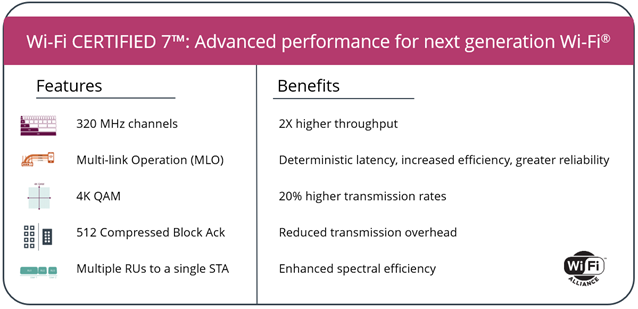
At the 2024 CES, the program was officially announced with products based on silicon from Broadcom, Intel, Mediatek, and Qualcomm obtaining the Wi-Fi CERTIFIED 7 tag. Broadcom, Mediatek, and Qualcomm have already been through two generations of Wi-Fi 7 products, and it is promising to finally see Wi-Fi 7 exit draft status. This enables faster adoption on the client side, as well. The key features of Wi-Fi CERTIFIED 7 are based on the efforts of the IEEE 802.11be EHT (Extremely High Throughput) working group.
The introduction of 6 GHz support in Wi-Fi 6E in select regions opened up channels that were hitherto unavailable for in-home wireless use. Wi-Fi CERTIFIED 7 brings in support for 320 MHz channels. These ultra-wide channels are available only in the 6 GHz band.
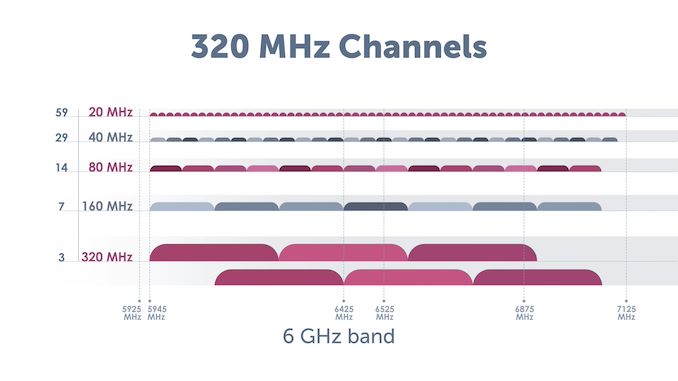
These channels are responsible for the high throughput promised in Wi-Fi CERTIFIED 7. However, the non-availability of 6 GHz in many regions has proved to be a deterrent for client device vendors. Many of these companies do not want to spend extra for features that are not available across all geographies. It is likely that many client devices (particularly on the smartphone side) will ship without support for 320 MHz channels initially.
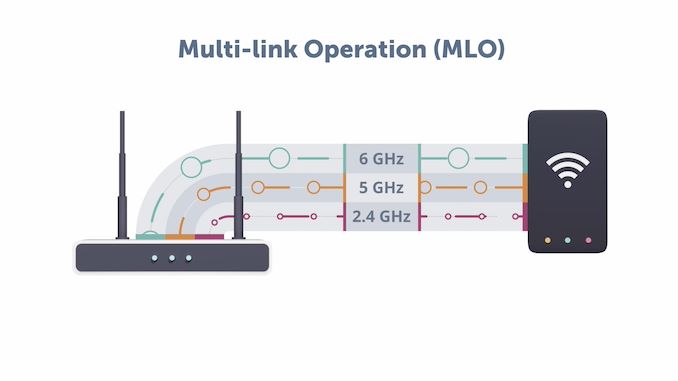
Multi-Link Operation (MLO) is yet another technique to boost available bandwidth for a single client. Wi-Fi CERTIFIED 7 allows clients to connect to the access point through multiple bands at the same time. It also increases the reliability of connections.
Wi-Fi 7 also brings in 4K QAM , allowing up to 12 bits to be encoded per symbol. This represents an increase in spectral efficiency of 20% over Wi-Fi 6 (which only required support for 1024 QAM).
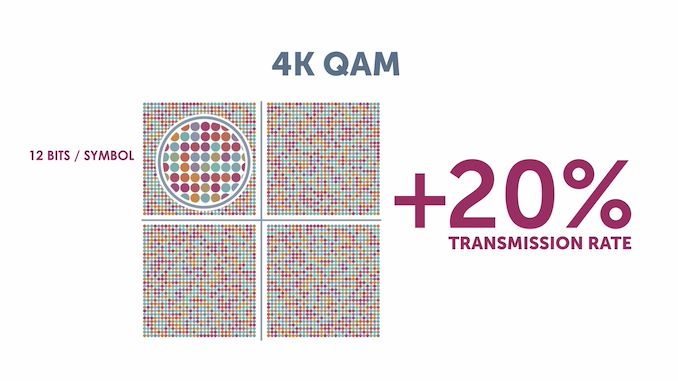
Dense constellations require extremely sophisticated circuitry at both the transmitter (linear power amplifiers) and receiver ends (to avoid symbol decoding without errors). Those are part of the advancements that we can see in Wi-Fi CERTIFIED 7 devices.
Some of the other key updates in Wi-Fi CERTIFIED 7 include support for 512 compressed block acks, multiple resouce units to a single station / client, and triggered uplink access.
802.11n introduced the concept of block acks at the MAC layer where multiple wireless 'frames' (MAC Protocol Data Units or MPDUs to be more exact) can be acknowledged by the receiver in one response. The ack indicates the missed MPDUs, if any, in the previously transmitted set. In Wi-Fi 6, the limit for the number of MPDUs per block ack was 256. In Wi-Fi 7, this has been pushed up to 512. Spreading out this communication allows for better resource usage.
Wi-Fi 6 introduced the concept of resource units in the OFDMA scheme wherein the radio channel gets partitioned into smaller frequency allocations called RUs. These allow small packets to be transmitted to multiple users at the same time. In Wi-Fi 6, each user could get only one RU. Wi-Fi 7 allows for better efficiency by enabling allocation of non-contiguous RUs to a single user.
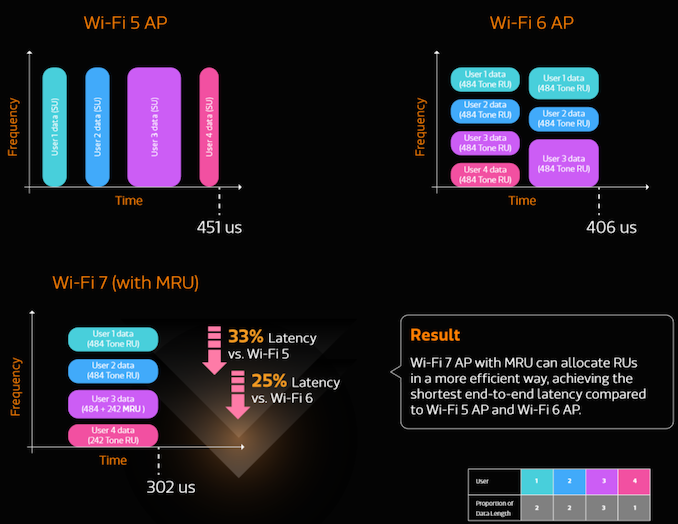
Benefits of Multiple RU Allocation to a Single User (Source: Mediatek)
Wi-Fi 6 introduced the concept of triggered uplink access, allowing clients to simultaneously transmit data back to the access point in an independent manner. This transmission is synchronized by the AP sending out a trigger frame containing the resource unit allocation information for each client. Wi-Fi 7 optimizes this scheme further for QoS requirements and latency-sensitive streams.
In the meanwhile, the 802.11 working group has already started the ground work for Wi-Fi 8. 802.11bn (ultra-high reliability or UHR) aims to bring more resilience to high-speed Wi-Fi networks by allowing multi-link operation distributed over multiple access points, coordination between multiple access points, and power saving features on the access point side.
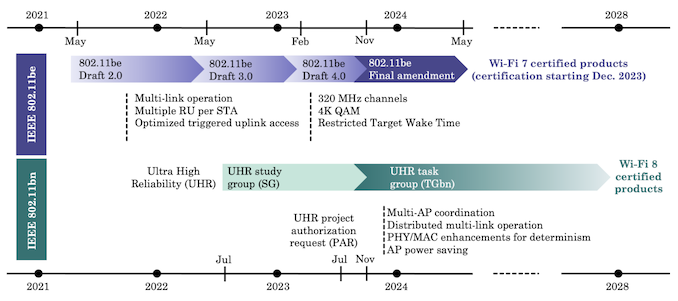
Timeline for 802.11bn (EHR): Wi-Fi 8 Deployments in 2027 - 2028? (Source: What Will Wi-Fi 8 Be? A Primer on IEEE 802.11bn Ultra High Reliability [PDF])
The Wi-Fi Alliance expects a wide range of application scenarios for Wi-Fi 7, now that certification is in place.
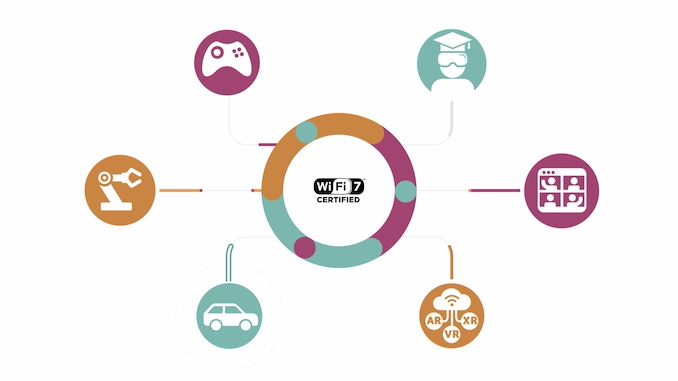
These include mobile gaming, video conferencing, industrial IoT, automotive, multi-user AR / VR / XR, immersive e-training modules, and other use-cases. Wi-Fi 6 brought in a number of technological advancements to Wi-Fi, and Wi-Fi 7 has added to that. Unfortunately, AR / VR / XR has been trying to break into the mainstream for quite some time, but has met with muted success. It is one of the primary single-client use-cases that can benefit from features like MLO in Wi-Fi 7.
Advancements in spectral efficiency over the last few generations have helped greatly in enterprise deployments. These are scenarios where it is necessary to service a large number of clients with a single access point while maintaining acceptable QoS. User experience in MDUs (multi-dwelling units / apartments) where multiple wireless networks jostle with each other has also improved. That said, vendors are still in search of the ideal single-client scenario to bring out the benefits of Wi-Fi 7 - wireline speeds have largely been stagnant over the last decade, and there are very few ISPs offering gigabit speeds at reasonable prices or over a wide enough area. Both wireline and wireless technologies have to evolve in tandem to bring consumer benefit and pull them in with attractive use-cases. As it currently stands, the pace of progress in Wi-Fi has largely surpassed wired networks over the last couple of decades.

The market launch of Ubiquiti's first Wi-Fi 7 product in their UniFi lineup has been hotly anticipated since its FCC filings became public late last year. Unlike traditional consumer gear, Ubiquiti's UniFi lineup of software-defined networking products targets prosumers, businesses, and enterprises by splitting the functionality of a traditional home Wi-Fi router into separate gateways, switches, and access points. This allows end-users to update different components at different points in time based on requirements. This makes sense for many large-area deployments, as the pace of technological advancements in the wireless space and wired space are quite different.
Ubiquiti's UniFi lineup is generally not known for being on the cutting-edge, which makes it suitable for scenarios where stability and scalability are more important than raw performance. Wi-Fi 7 products have been around for a while, even from vendors operating in the same space as Ubiquiti Networks. Ubiquiti is taking a very different approach to Wi-Fi 7 by introducing an affordable model first up.
The U7 Pro, priced at just $189, eschews the 4x4 radio configurations driving up the price of other Wi-Fi 7 APs / wireless routers. Instead, it opts for 2x2 radios in 2.4 GHz, 5 GHz, and 6 GHz bands, allowing it to retail at a sub-$200 price point. This ceiling-mount AP covers up to 1500 sq. ft, and supports more than 300 clients. It is equipped with a single 2.5 GbE port and uses the same port for power. A PoE+ switch is required on the uplink side, as the U7 Pro has a maximum power consumption of 21W.
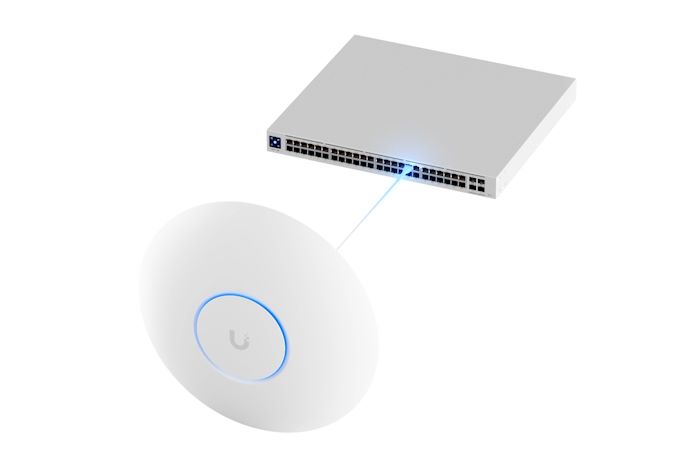
The 2x2 configuration in each radio allows up to 688 Mbps on the 2.4 GHz band, 2882 Mbps on the 5 GHz band, and up to 5765 Mbps on the 6 GHz band. The 6 GHz band supports the high throughput thanks to the use of 240 and 320 MHz-wide channels as per the 802.11be (Wi-Fi 7) standard.
The UniFi U7 Pro utilizes a Qualcomm Wi-Fi 7 chipset - most likely the Networking Pro 620 series with the IPQ9554 WiSoC (quad-core Cortex-A73 @ 1.5 GHz) and the QCN9272 / 6272 Waikiki series of radios. There is an Immersive Home Wi-Fi 7 platform from Qualcomm with similar radio support for 6 streams, but using a quad-core Cortex A53 @ 1.5 GHz. We have reached out to Ubiquiti to confirm the actual platform, though our educated guess leans towards the Networking Pro 620.
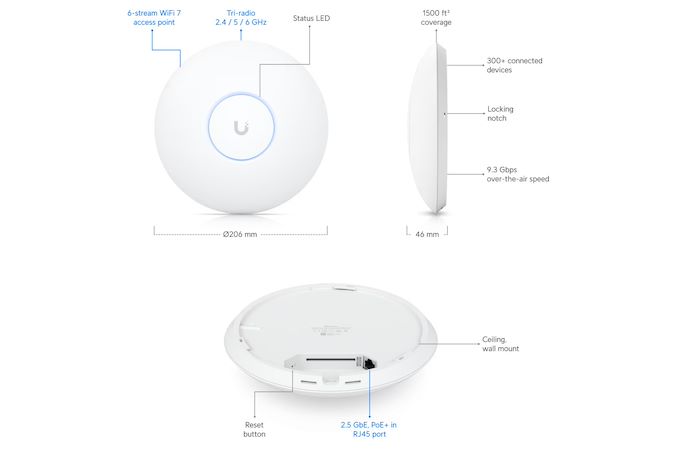
The U7 Pro requires either a UniFi Console running UniFi OS v3.2+ with UniFi Network application v8.0.7 or newer, or a self-hosted controller running UniFi Network v8.0.7+. Bluetooth is notably absent from the specifications, which may be an impediment to some users who have adopted Ubiquiti's line of Bluetooth-enabled sensors that rely on APs with BT support to integrate with the rest of the UniFi network. Another aspect to keep in mind is that the 2x2 operation in the 5 GHz band means that the theoretically available bandwidth in that spectrum (2882 Mbps) is lower than the equivalent in the U6 Pro (which has a 4x4 configuration in the same band for 4.8 Gbps). This may influence deployment choice based on the mix of client devices expected to connect to the AP. Multi-Link Operation (MLO), which is one of the key advantages of Wi-Fi 7 over Wi-Fi 6, is also scheduled to appear only in a later firmware update even though the product is available for purchase today.
Wi-Fi has seen rapid advancements over the last decade, starting with the introduction of 802.11ac (Wi-Fi 5). 802.11ax (Wi-Fi 6) came with significant improvements in total throughput. The Wi-Fi 6E standard brought 6 GHz operation (where allowed) to consumers. A few years back, Wi-Fi 7 silicon was announced with multi-gigabit throughput and significant latency improvements. On the device side, consumers grappling with range issues typically used to augment their networks with extenders, while prosumers opted for multiple access points backed by a single router. In recent years, we have seen the rise of a new category of products - Wi-Fi systems / mesh networking kits. These bundles consisting of a router with one or more satellites attempted to make the setting up of a network extender-based configuration more user friendly and provide them with a seamless and unified product experience.
The category has seen significant investment from traditional vendors like Netgear, TP-Link, etc., big vendors like Google (Google Wi-Fi and Nest Wi-Fi), as well as startups like eero (now, part of Amazon) and Plume. Netgear had jumped on the mesh-networking bandwagon quite early, and has enjoyed significant market success with their Orbi series of products. Unlike some of the other mesh networking vendors, Netgear uses a dedicated backhaul and also provides optional support for wired backhauls. While this provided tangible benefits over shared wireless backhauls, the costs associated with the additional radio has usually put the Orbi kits in the premium category.
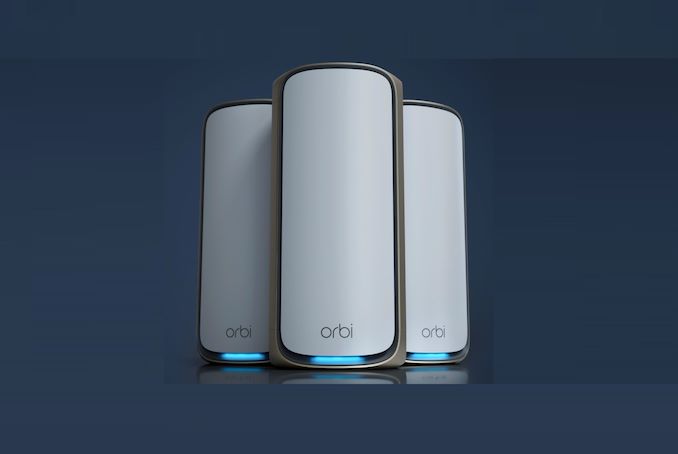
The company last updated its Orbi lineup in October 2021 with the launch of the RBKE960 Wi-Fi 6E mesh system based on Qualcomm's Networking Pro Series 1610 (integrating the IPQ8074 WiSoC and QCN9074 radios).Today, the company is introducing the Orbi 970 series with Wi-Fi 7 support. Building upon their experience with the RBKE960, Netgear has further optimized the antenna design and placement, and also enhanced the backhaul connection in a newly designed slim chassis with a smaller footprint.
The quad-band design involves two 4x4 5 GHz, one 4x4 6 GHz, and one 4x4 2.4 GHz channels. The enhanced backhaul scheme in the Orbi 970 involves use of multi-link operation (MLO). The router and the satellite communicate using the dedicated 5 GHz backhaul channel along with the 6 GHz band. Multi-link operation is a new Wi-Fi 7 feature, and Netgear is taking advantage of that by using it in conjunction with their traditional dedicated backhaul channel. It must be noted that the 6 GHz channel is used for both fronthaul and backhaul.
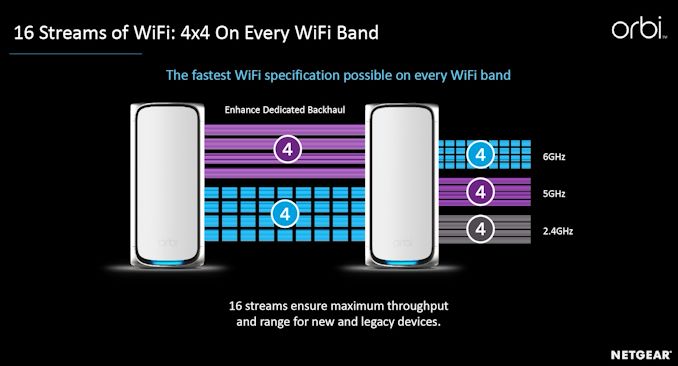
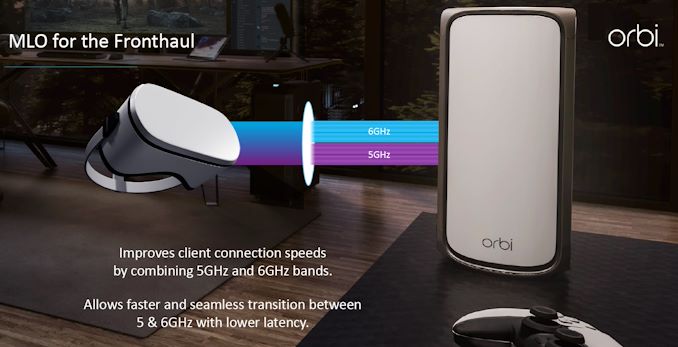
Netgear also demonstrated practical backhaul bandwidth of around 10 Gbps with this enhanced backhaul scheme. MLO is also available for fronthaul communication, assuming the client device supports it.
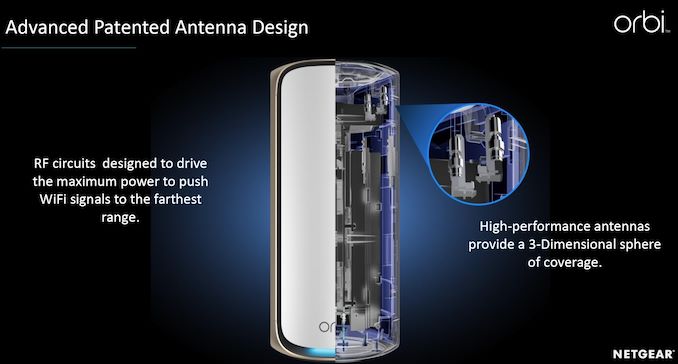
The company has been making incremental improvements to the antenna placement for optimizing coverage, and the trend continues with the new industrial design. Each router / satellite includes 12 high-performance internal antennas complemented by high-power amplifiers.
The availability of 320 MHz channels and the 16-stream support enable Netgear to advertise the Orbi 970 series as a BE27000 system, with theoretical total bandwidth of 27 Gbps.
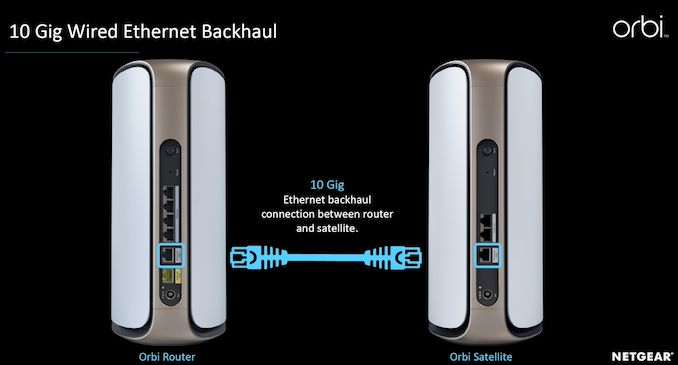
The router comes with 4x 2.5G + 1x 10G LAN ports and a 10G WAN port, while the satellite is equipped with 2x 2.5G + 1x 10G LAN ports. The 10G LAN ports on the router and satellite can be used to create a wired backhaul.
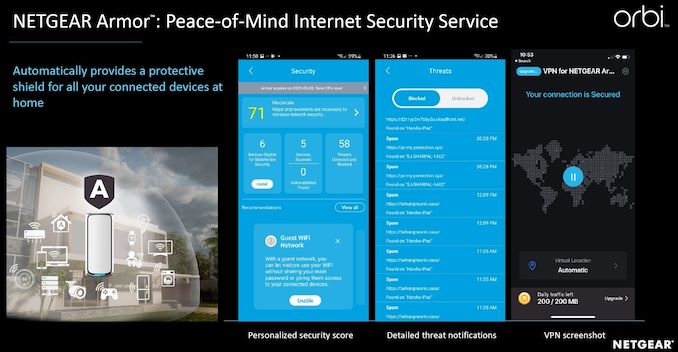
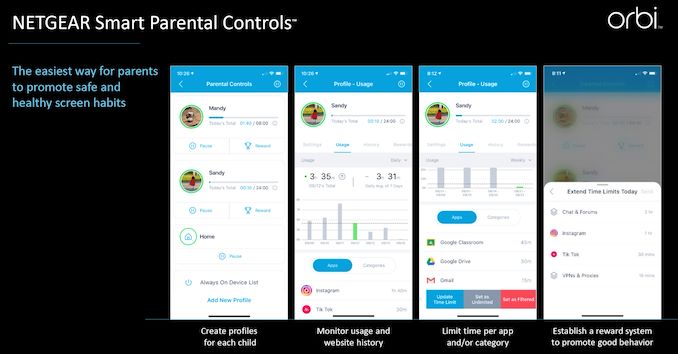
As is usual for Orbi kits, the setup is done via a smartphone app. Netgear also provides a couple of value additions - 1 year of Netgear ARMOR powered by Bitdefender - a security / VPN solution, and a free month of a subscription-based Smart Parental Controls application.
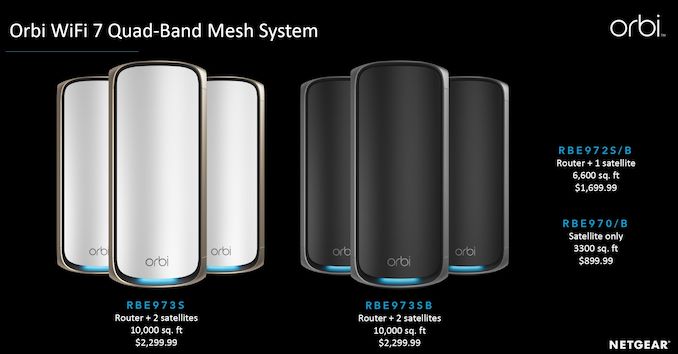
Netgear claims that a router and two satellites are enough to cover 10000 sq. ft., with each additional satellite providing an extra 3300 sq. ft. Pricing ranges from $2300 for the 3-piece kit to $900 for each satellite.
Similar to previous Orbi kits, the Orbi 970 also utilizes a Qualcomm platform. The Wi-Fi 7 Networking Pro series was launched in May 2022, and our coverage detailed some of the key features such as MLO, AFC for optimized 6 GHz performance, and adaptive interference puncturing to allow channels to operate in a disjointed state in order to maximize bandwidth in the presence of interference. All of these features are present in the Orbi 970 routers and satellites, which utilize the Networking Pro 1620 platform.
The kits are available for purchase today. Netgear has taken its time to perfect the firmware and app prior to release, as Wi-Fi 7 mesh kits from TP-Link (Deco) and Linksys (Velop) are already in the market. Interestingly, TP-Link also has a BE33000 Deco BE95 quad-band kit priced at $1200 for a 2-pack (compared to the $1700 for a similar Orbi 970 configuration). The key difference is that the Deco BE95 uses two 6 GHz channels instead of the two 5 GHz channels in the Orbi 970. So, while the availability of higher channel width in 6 GHz enables the Deco BE95 to advertise more available bandwidth (33 Gbps vs. 27 Gbps), range in the 6 GHz band might not be enough for optimal coverage. Of course, usage of a wired backhaul might result in the Deco BE95 providing overall better performance. The other mesh kits (from both TP-Link and Linksys) are BE11000 / BE22000 tri-band kits and don't compete against the Orbi 970 series.
The pricing of the flagship mesh kits has slowly been creeping upwards every generation, but the increasing number of radios and antennas that need to be accommodated in the design leave vendors without much choice. With pricing between $1700 and $2300, the Orbi 970 series might not be for everyone. But, it is bound to be cheaper (and possibly more performant) than creating a wired backbone, installing a router, and complementing it with multiple low-cost access points.
This week the Linux Foundation has announced that the group will be overseeing the formation of a new Ethernet consortium, with a focus on adapting and refining the technology for high performance computing workloads. Backed by founding members AMD, Arista, Broadcom, Cisco, Eviden, HPE, Intel, Meta and Microsoft, the new Ultra Ethernet Consortium will be working to improve Ethernet to meet the low latency and scalability requirements that HPC and AI systems need – and which the group says current Ethernet technology isn't quite up to the task for.
The top priority of the new group will be to define and develop what they are calling the Ultra Ethernet Transport (UET) protocol, a new transport-layer protocol for Ethernet that will better address needs of AI and then HPC workloads.
Ethernet is certainly one of the most ubiquitous technologies around, but demands of AI and HPC clusters are growing so fast that the technology will run out of steam in the future. The size of large AI models is increasing rapidly. GPT-3 was trained with 175 billion of parameters back in 2020. Today GPT-4 is said to be accommodating already a trillion of parameters. Models with the larger number of parameters require larger clusters and then these clusters send larger messages over the network. As a result, the higher bandwidth and the shorter latency these network feature, the more efficient the cluster can operate.
"Many HPC and AI users are finding it difficult to obtain the full performance from their systems due to weaknesses in the system interconnect capabilities," said Dr. Earl Joseph, CEO of Hyperion Research.
At a high level, the new Ultra Ethernet Consortium is looking to refine Ethernet in a surgical manner, improving and altering only those bits and pieces necessary to achieve their goals. At its onset, the consortium is looking at improving both the software and physical layers of Ethernet technology — but without altering its basic structure to ensure cost efficiency and interoperability.
Technical goals of the consortium include developing specifications, APIs, and source code to define protocols, interfaces, and data structures for Ultra Ethernet communications. In addition, the consortium aims to update existing link and transport protocols and create new telemetry, signaling, security, and congestion mechanisms to better address needs of large AI and HPC clusters. Meanwhile, since AI and HPC workloads have a number of differences, UET will have separate profiles for appropriate deployments.
"Generative AI workloads will require us to architect our networks for supercomputing scale and performance," said Justin Hotard, executive vice president and general manager, HPC & AI, at Hewlett Packard Enterprise. "The importance of the Ultra Ethernet Consortium is to develop an open, scalable, and cost-effective ethernet-based communication stack that can support these high-performance workloads to run efficiently. The ubiquity and interoperability of ethernet will provide customers with choice, and the performance to handle a variety of data intensive workloads, including simulations, and the training and tuning of AI models."
The Ultra Ethernet Consortium is hosted by the Linux Foundation, though the real work will be undertaken by its members. Between AMD, Cisco, Intel, and other founders, these companies all either design high-performance CPUs, compute GPUs, and network infrastructure for AI and HPC workloads or build supercomputers or clusters for AI and HPC applications, thus have plenty of experience with appropriate technologies. The work of UEC is set to be conducted by four working groups that will work on Physical Layer, Link Layer, Transport Layer, and Software Layer.
And while the group is not explicitly talking about Ultra Ethernet in relation to any competing technologies, the members of the founding board – or rather, who's not a founding member – is telling. The performance goals and HPC focus of Ultra Ethernet would have it coming into direct competition with InfiniBand, which has for over a decade been the networking technology of choice for low-latency, HPC-style networks. While developed by its own trade association, NVIDIA is said to have an outsized influence on the group vis-a-vie their Mellanox acquisition a few years ago, and they are noticeably the odd man out of the new group. The company makes significant use of both Ethernet and InfiniBand internally, using both for their scalable DGX SuperPod systems.
As for the proposed Ultra Ethernet standards, UEC members are already plotting plans how to integrate the upcoming UET technology into their products.
"We are particularly encouraged by the improved transport layer of UEC and believe our portfolio is primed to take advantage of it," said Mark Papermaster, CTO of AMD in a blog post. "UEC allows for packet-spraying delivery across multiple paths without causing congestion or head-of-line blocking, which will enable our processors to successfully share data across clusters with minimal incast issues or the need for centralized load-balancing. Lastly, UEC accommodates built-in security for AI and HPC workloads that in turn help AMD capitalize on our robust security and encryption capabilities."
Meanwhile, for now UEC does not say when it expects to finalize the UET specification. It's expected that the group will seek certification from the IEEE, who maintains the various Ethernet standards, so there is an additional set of hoops to jump through there.
Finally, the UEC has noted that it is looking for additional members to round out the group, and will begin accepting new member applications from Q4 2023. Along with NVIDIA, there are several other tech giants involved in AI or HPC work that are not part of the group, so that would be their next best chance to join the consortium.
Source: The Linux Foundation, The Register
Wi-Fi 7 has been gaining slow traction in the market over the last few quarters. Despite a large number of product announcements towards the end of last year (including the usual suspects - ASUS, Netgear, and TP-LINK), only TP-LINK seems to have started actual shipment to end users. On the silicon side, Mediatek was the first to announce both access point and client platforms under the Filogic 880 / Filogic 380 solutions in early 2022. Broadcom followed suit with the BCM67263 / BCM6726 for residential APs, BCM43740 / BCM43720 for enterprise APs, and the BCM4398 for client devices. Qualcomm was not to be left behind, and launched their Wi-Fi 7 Networking Pro series in May 2022 (after introducing the client-focused FastConnect 7800 in February 2022). Over the last year, Qualcomm has been marketing their FastConnect 7800 and Networking Pro Series Wi-Fi 7 platform as the only solution in the market to support the high-band simultaneous multi-link operation mode.
Today, Broadcom is announcing their second-generation Wi-Fi 7 platform, with the aim of addressing cost-effectiveness and achieving competitive parity.
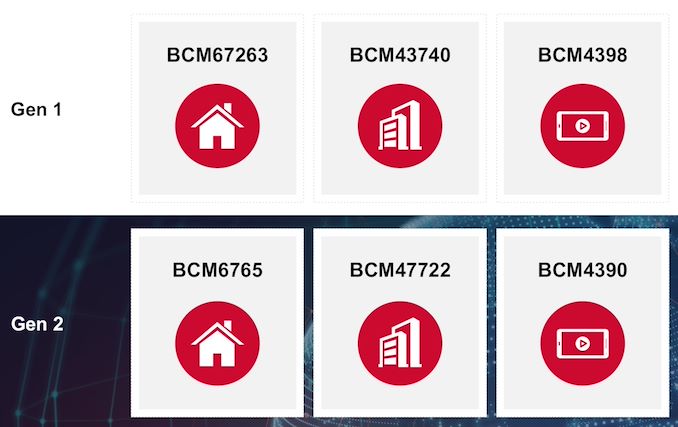
The first-generation products in the AP category in the above comparison were both quad-stream. In order to optimize cost and get deployed in a wider range of products, the two new AP platforms have a dual 2x2 configuration and can operate in all three bands simultaneously. PHY rate drops from 11.5 Gbps to 8.64 Gbps because of the reduction in stream count.
| Broadcom 2nd Gen. 802.11be (Wi-Fi 7) Access Point Radios Specifications | |||
| BCM6765 | BCM47722 | ||
| Target Market | Residential Wi-Fi APs | Enterprise Wi-Fi APs | |
| Operational Bands | 2.4 GHz, 5 GHz, and 6 GHz | ||
| Stream Count | Dual 2x2 | ||
| Max. Channel Width | 320 MHz | ||
| PHY Rate | 8.64 Gbps | ||
| Additional Radios / Protocol Support | BLE, Zigbee, and Thread | ||
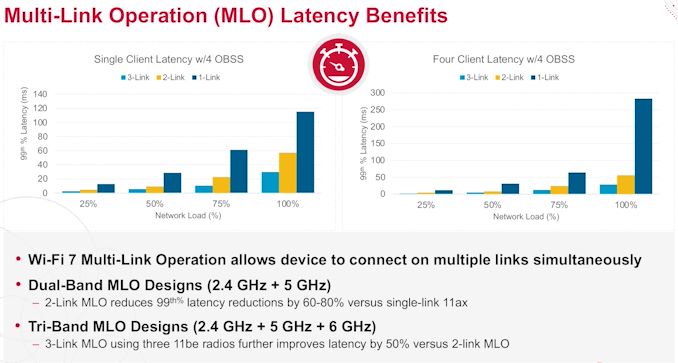
The enterprise Wi-Fi AP platform (BCM47722) now integrates Bluetooth and Zigbee / 802.15.4 support in order to cater to IoT requirements. Both AP platforms come with an integrated quad-core ARMv8 CPU and 10G PHY, which pulls in some of the features from the BCM4916 network processor used in the first-generation platforms. Some of the other key features include the ability of the platforms to support simultaneous operation in any of the three bands, integrated 2.4 GHz power amplifiers and miscellaneous updates to reduce power consumption. The new platforms enable tri-band MLO, which provides significant latency benefits, particularly in highly congested networks.
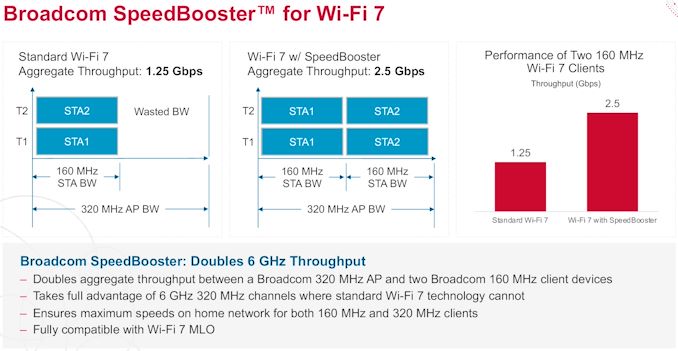
On the client side, the BCM4390 is being offered as a cost-effective Wi-Fi 7 / Bluetooth combo chip alternative to the BCM4398 introduced last year. While it continues to be a dual-stream 2.4 GHz and 5 GHz or 6 GHz radio configuration, channel width support is cut down to 160 MHz from 320 MHz. PHY rate is 3.2 Gbps (compared to 6.05 Gbps for the BCM4398). However, the key benefits over the BCM4398 include the integration of Bluetooth Denver, Thread, and Zigbee support. In addition to the client multi-link operation supported in BCM4398, the new BCM4390 also supports Broadcom's proprietary SpeedBooster technology to allow for better utilization of available bandwidth when multiple 160 MHz BCM4390-based client devices talk to a Broadcom-based Wi-Fi 7 AP with 320 MHz channel support.
Almost all of the currently shipping Wi-Fi 7 residential routers are based on Broadcom's first-generation AP platforms. One of the downsides from a market adoption perspective has been the pricing, with most models being sold for upwards of $600. The new platform from Broadcom should help a bit in that aspect with the reduced stream counts and other cost optimizations. Broadcom's press release has quotes from the usual OEMs (Arcadyan and Sercomm) as well as vendors like ASUS. As sampling for the new silicon is already under way, we should be seeing more attractively-priced Wi-Fi 7 products in a couple of quarters.
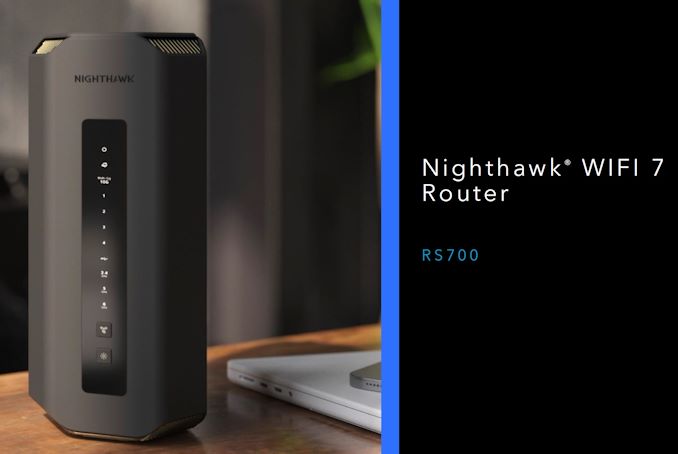
Wireless networking has seen rapid strides over the last couple of years with the opening up of the 6 GHz spectrum for Wi-Fi purposes. Silicon vendors updated their Wi-Fi 6 (802.11ax) solutions with support for the new band and router / access point vendors followed suit. Last year saw the introduction of Wi-Fi 7 silicon based on 802.11be from all the major silicon vendors - Broadcom, Qualcomm, and Mediatek. Intel also provided hints about their upcoming Wi-Fi 7 client platform in their interoperability demo with Broadcom's AP design. Following this, companies such as TP-Link and ASUS (RT-BE96U and ROG Rapture GT-BE98) started to divulge details of their first-generation Wi-Fi 7 products. TP-Link's offerings have been up for pre-order since January, with shipment originally slated for Q1 2023. Today, Netgear is announcing their first Wi-Fi 7 product - the Nighthawk RS700 wireless router.
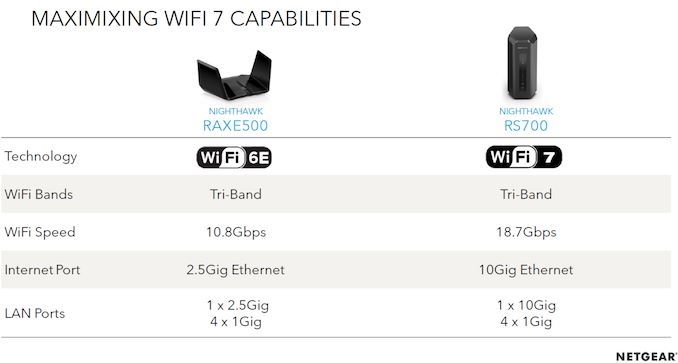
As a refresher, Wi-Fi 7 brings a host of improvements to the wireless experience with faster speeds (true multi-gigabit, making it necessary to equip the routers with wired 10G ports), lower latency, and better efficiency in channel utilization (particularly with multiple clients in the picture). The standard also allows multi-link operation with the clients being able to connect to the AP over different bands simultaneously. All Wi-Fi 7 routers have to be tri-band (2.4 GHz, 5 GHz, and 6 GHz support) to bring out all the benefits of the new standard. Compared to their Wi-Fi 6E flagship Nighthawk, the RS700 boasts of almost double the wireless throughput, and comes with 10G WAN and LAN ports. It is based on Broadcom's Wi-Fi 7 platform (BCM4916 network SoC + BCM67263 / BCM6726 radios).
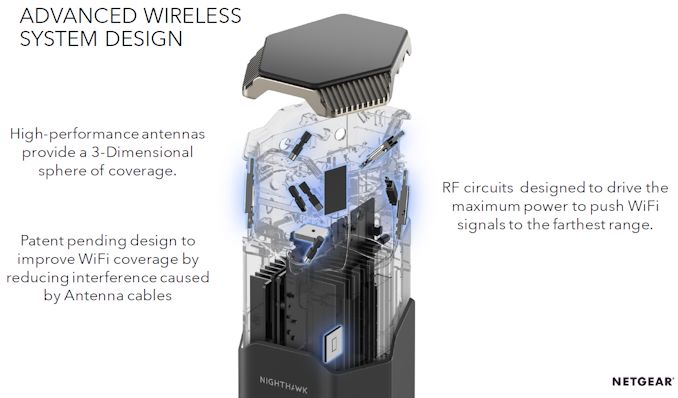
While ASUS continues to adopt their spider-style antenna design for their Wi-Fi 7 offerings, we saw TP-Link completely revamp the industrial design for their high-end offering to support the new standard. Netgear has also moved to a new design style for the Nighthawk RS700 with a tower form-factor. In addition to complementing the fanless design by aiding in convection (with the aid of strategically placed vents), Netgear claims that the new design also allows for optimal placement of the antennae for reduced inteference.
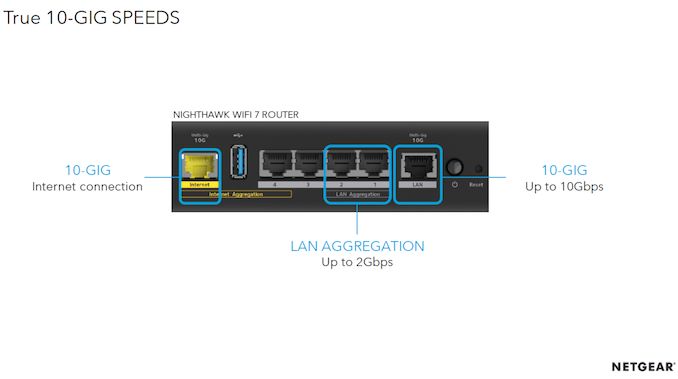
Netgear supports link aggregation on both LAN and WAN sides, with the latter feature in place for use with the first-generation 1200 Mbps cable modems (such as the Netgear CM1200) that came with dual 1 Gbps ports instead of a single 2.5 Gbps NBASE-T port. A USB 3.0 port to attach a storage drive or printer is also in the mix.
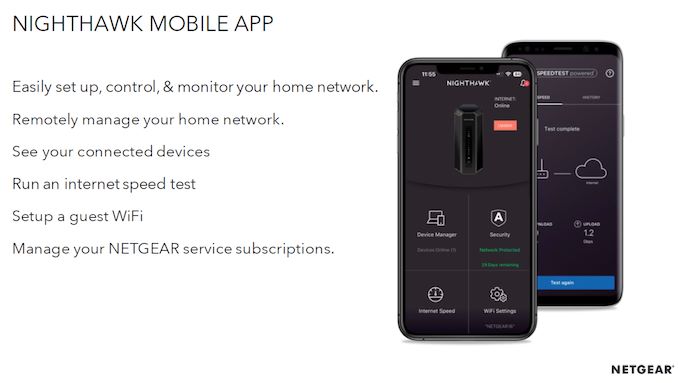
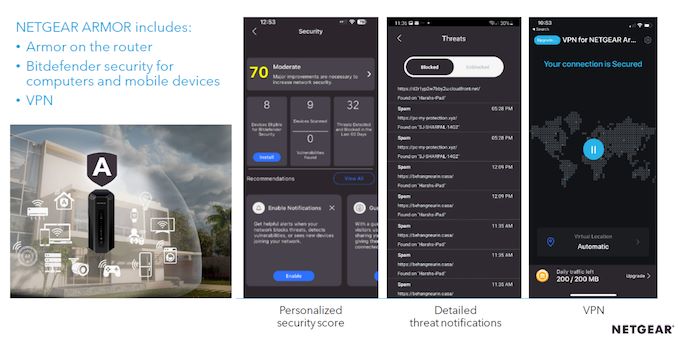
The Nighthawk mobile app will continue serving the product family for easy management via Android / iOS devices, and a local web UI will also be available. Netgear is also including a 1-year subscription to their ARMOR cybersecurity product for protection against online threats as well as VPN features.
The Nighthawk RS700 is available for pre-order today, but availability is slated for Q2 2023. The company claims that the router can support upwards of 200 simultaneous client devices and blanket a 3500 sq. ft. home with full coverage - more than enough for the vast majority of consumer households. However, customers used to standard Nighthawk features such as out of the box mesh networking support, multiple wireless networks (in addition to the standard main and guest networks), and parental controls will have to wait for firmware updates in the second half of the year. Priced at $700, the RS700 costs the same as the announced pricing for the TP-Link Archer BE900. However, TP-Link manages to include more wireless streams (and correspondibgly higher wireless throughput), multiple USB ports and 4x 2.5 Gbps along with a SFP+ / RJ-45 10G combo at the same price point. In any case, both vendors are promising most of the features in future firmware updates, and there are no concrete shipping dates yet. A more informed value proposition comparison can only be made after the products are in the hands of the end customers.
The transition to 2.5Gbps Ethernet has not been an easy one for Intel. The company's I225/I226 2.5 GbE Ethernet controllers (codename Foxville), a prevalent choice on Intel platform motherboards for the last few years, has presented a fair share of issues since its introduction, including random networking disconnections and stuttering. And while Intel has been working through the issues with multiple revisions of the hardware, they apparently haven't hammered out all of the bugs yet, as evidenced by the latest bug mitigation suggestion from the company. In short, Intel is suggesting that users experiencing connection issues on the latest I226-V controller disable some of the its energy efficiency features, which appear to be a major contributor in the connection stability issues I226-V has been seeing.
To mitigate the connection problems on the I226-V Ethernet controller, Intel is advising affected users to disable Energy-Efficient Ethernet (EEE) mode through Windows Device Manager. The same guidance applies to Linux users as well. EEE mode aims to lower power consumption when the Ethernet connection is in an idle state. The issue is that EEE mode seems to activate when an Ethernet connection is in active use, causing it to drop out momentarily.
And while deactivating EEE does reportedly improve connection stability, deactivating it doesn't seem to be the ultimate solution. Intel has received reports that some users still experienced disconnections with EEE mode disabled. Furthermore, disabling EEE mode forgoes its intended benefits – such as reducing power draw by up to 50% when an Ethernet connection is idling – so it's not an option that cost-conscious consumers would normally want to disable.
Intel has also released an updated driver set for the I226-V/I225-V family of Ethernet controllers that automatically makes this adjustment. Specifically, the patch deactivates EEE mode for connection speeds above 100 Mbps, but users may have to disable it entirely if the workaround doesn't work with their combination of hardware. MSI and Asus have already deployed the new Ethernet driver for their respective Intel 700-series motherboards, so other vendors shouldn't take long to do the same.
In the interim, Intel will continue investigating the root cause and provide a concrete solution for motherboards with the I226-V Ethernet controller. The Foxville family of Intel Ethernet controllers has a long history of connectivity quirks – going back to the original I225-V in 2019 and E3100 in 2020 – ultimately requiring multiple hardware revisions (B1, B2, & B3 steppings) before finding solutions to many of its issues. As a result, it's not off the table that the I226-V Ethernet controller may suffer the same fate.
ChatGPT (short for Chat Generative Pre-trained Transformer) is a chatbot by OpenAI. It provides answers to your queries using learning techniques based on AI/ML. Unfortunately, ChatGPT deny access when connected via VPN (Virtual Private Network) such as WireGuard or OpenVPN, and you will be blocked with the following message:

Let us see how to skip the ChatGPT domain from WireGuard or OpenVPN access while you can access corporate resources behind VPN.
Love this? sudo share_on: Twitter - Facebook - LinkedIn - Whatsapp - Reddit
The post How to skip ChatGPT from WireGuard or OpenVPN on Linux appeared first on nixCraft.
Ubiquiti Networks is a popular vendor of networking-related equipment in the SMB / SME space. Their gear is immensely popular among prosumers too, thanks to the combination of ease of use and the ability to customize for specific requirements. I have been running an Ubiquiti UniFi installation at home for the last five years or so, and recently had the opportunity to create a new deployment in another country. There were two main reasons to go with Ubiquiti for the new location - a single management plane for both sites, and the ability to easily create a site-to-site VPN. More than three months into the deployment, I ended up encountering a host of issues worthy of documentation to help folks who might encounter them in their own installations. This article gives an overview of the various site-to-site VPN options available with Ubiquiti's gear, and things to keep in mind while adopting them.
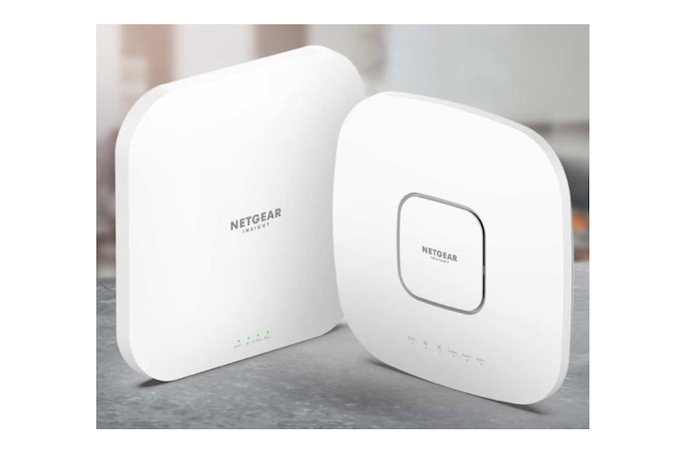
Netgear has been at the forefront of the SDVoE (Software-Defined Video over Ethernet) initiative with multiple AV switches serving the growing market. The ProAV lineup of managed switches have been sold primarily in a B2B setting by the Netgear Business division. These switches are increasingly becoming part of luxury residential installations requiring an AV-over-IP solution. As part of the CEDIA Expo 2022, Netgear is announcing a new 'Netgear Home Solutions' push. The intention is to take the same lineup of Netgear AV products sold by Netgear Business and target it towards both commercial and residential installations.
As part of this initiative, Netgear will be selling ProAV Managed Switches and ProWiFi Access Points to residential installers, along with the Pro version of Insight Remote Management and Pro Support. While the ProAV Managed Switches are already in the market, the new WAX628 and WAX638E APs are complementary to the currently existing members of the Insight Access Point Portfolio.
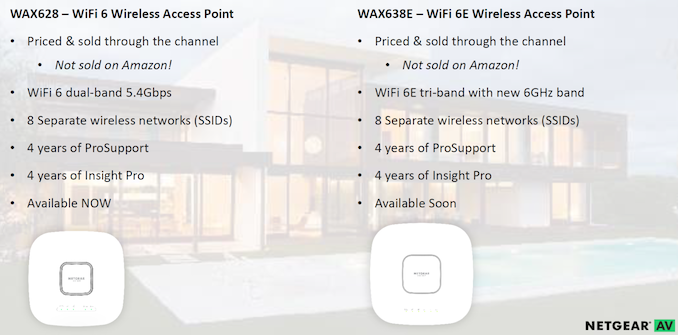
The WAX628 (already available for residential installers) slots in-between the dual-band AX3600 WAX620 and the tri-band AX6000 WAX630. This AX5400 dual-band solution supports 160 MHz channel bandwidth, and is accompanied by the AX7800 WAX638E which adds 6 GHz band support to the mix. The Wi-Fi 6E AP is slated to come to the market in the next few months.
Netgear is promising margin protection for installers by selling the ProAV and ProWiFi products only through the channel and not via Amazon or other e-tailers. Since these products are going to reach end-consumers through custom installers who have their own cost structures, the lack of any pricing information from Netgear is not surprising.
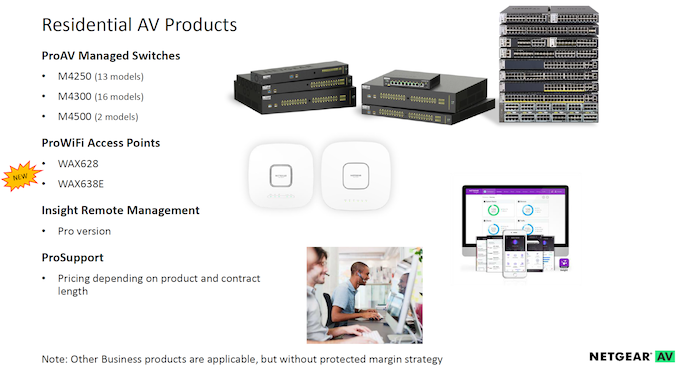
Netgear's traditional consumer Wi-Fi router market has evolved rapidly over the last few years. Despite the success of Orbi (in both the consumer and SMB markets), new entrants like eero have gained significant mind and market share. In this context, Netgear has to look towards services and expand into new markets in order to maintain and build upon their technical leadership. Forays into lucrative niches like the residential installer market are not surprising.
Mediatek was one of the first vendors to demonstrate working 802.11be-compliant silicon under the Filogic lineup in January 2022. As part of the announcements at this week's Computex, the company provided additional technical details along with part numbers. The Filogic 880 platform will service access points, routers, and gateways, while the Filogic 380 will be seen in the client devices.
The 802.11 Working Group focused on extremely high throughput when starting work on 802.11be. This has been achieved primarily through a combination of three different aspects:
It must be noted that wider channels are available only in the 5 GHz and 6 GHz bands. Theoretically, these aspects allow for up to around 46 Gbps of wireless throughput. 802.11be also aims to enable usage of Wi-Fi for real-time applications by including features for low-latency communications such as Multi-link operation (MLO). This allows a client and an access point to simultaneously communicate over multiple channels that might even belong to different bands.
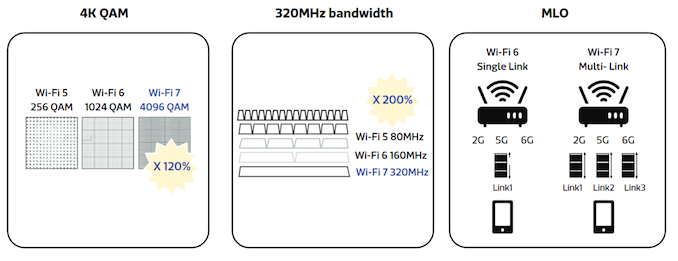
Source: Mediatek Wi-Fi 7 Whitepaper
802.11ax introduced OFDMA to split the channel into multiple resource units (RUs), allowing multiple clients to receive data packets simultaneously. Wi-Fi 7 brings in a Multiple RU (MRU) feature that allows punctured RUs (at a 20 MHz granularity). Puncturing enables interference mitigation, and also increases the OFDMA efficiency.
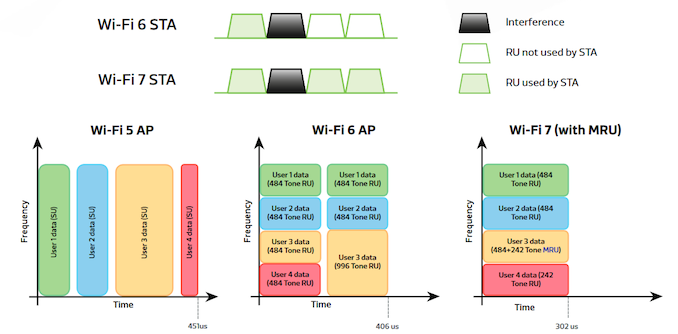
Source: Mediatek Wi-Fi 7 Whitepaper
The benefits of MRU are brought out in the above picture - on top, puncturing allows improvement in spectral efficiency, and hence, data bandwidth. Below that, we see obvious latency benefits when multiple clients are simultaneously active.
Interference and co-existence with non-Wi-Fi users of the same spectrum is handled using automatic frequency coordination (AFC). While Broadcom's pledge of support for the Open AFC initiative, and Qualcomm providing its own turnkey solution for its customers, Mediatek has only indicated that the Filogic 880 platform supports AFC, with no additional details.
Mediatek's Filogic 880 platform services the Wi-Fi 7 access point and wireless router market. Similar to its competitor's offerings, the platform supports all the major Wi-Fi 7 features - 320 MHz bandwidth in the 6GHz band, 4K-QAM, Multi-link operation (MLO), Automatic Frequency Coordination (AFC), and Multiple Resource Units.
The platform supports up to five bands with independent RFICs that communicate with the Filogic 680 Wi-Fi 7 baseband chip. While traditional routers may use only three bands, mesh systems and premium routers can make use of the support for two additional bands. At the heart of the reference design is a 1.8 GHz quad-core Cortex A73-based WiSoC. It also includes a network processing unit (NPU) with hardware-accelerated QoS and tunneling offload engines. The WiSoC doesn't include an integrated switch, though. Designs are expected to adopt an external switch to translate one of the two 10Gbps USXGMII ports to either a single 10GbE, or a mix of NBASE-T and Gigabit Ethernet ports. Various other high-speed I/Os are also available in the WiSoC.
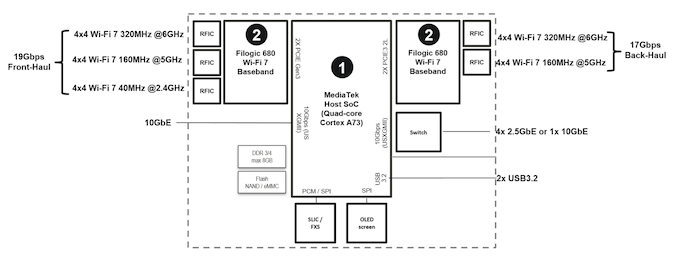
Unlike Qualcomm (whose announcement of the Wi-Fi 7 Networking Pro product suite was covered earlier this month), Mediatek is adopting an open approach in terms of making technical details of the platform available to the public. Broadcom also adopted a similar approach while introducing their product suite.
The Filogic 880 platform's WiSoC is fabricated in a 6nm process. According to Mediatek, this delivers significant power efficiency compared to its competitors (without public knowledge of the fabrication process for Qualcomm's and Broadcom's offerings and/or public availability of their platforms, this claim is difficult to evaluate).
The MAC/baseband is implemented in the Filogic 680 part. Here, Mediatek opts for an interesting approach The 6GHz band also adopts a 4T5R (quad-transmit, penta-receive) antenna configuration to boost throughput and range, particularly for backhauls in mesh systems. The Filogic 680 contains the MAC and baseband logic for all three bands, and also includes MLO control. Mediatek contends that this approach is better than the scheme of discrete MAC/PHYs for each band between the WiSoC and the basebad/RFIC, and putting the MLO logic in the WiSoC - in terms of latency (claims of up to 100x improvement) as well as board design cost.
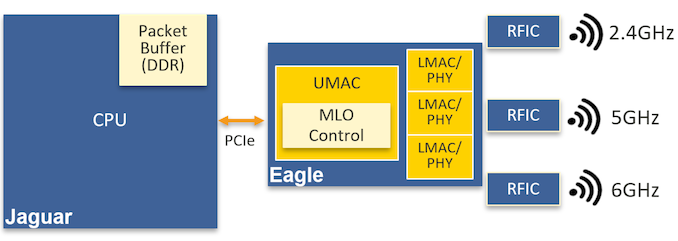
Mediatek's reference design is a four-layer PCB, which should lead to a lower cost for its customers. Mediatek claims that the multi-chip MAC / PHY / baseband approach of its competitors results in higher cost due to more complex PCBs (six or eight layer PCBs). These aspects should be readily evident to end users when routers / APs based on platforms from different vendors come to the market.
On the client side, Mediatek is announcing the Filogic 380 combo solution with support for Wi-Fi 7 and Bluetooth 5.3. This combo single-chip solution is also built on a 6nm process. The 2x2 solution supports speeds up to 6.5Gbps with dual-band dual-concurrent operation. 320 Mhz bandwidth, 4K-QAM, MLO, and MRU are supported.
Mediatek also indicated support for an extra receive antenna to improve performance and range for Bluetooth 5.3 connectivity by enabling MRC (multiple receive combining). Bluetooth LE audio is also supported. The Filogic 380 also includes coexistence technology to ensure that BT and Wi-Fi can both operate in the 2.4GHz band without interference. Host connectivity is either via PCIe 4.0 x1 or USB 3.0.
Mediatek is currently demonstrating both platforms at Computex 2022. Based on Mediatek's claims, it appears that routers and APs based on the Filogic 880 should hit very attractive price points without sacrificing anything in terms of performance or features. Products based on the new Filogic platforms should start appearing in the market within a few quarters.

Like every other solo developer and sysadmin, I do stuff using ssh. Some stuff is automated using scripts, and others require ssh login. For example, one of my scripts logs into my Linux and FreeBSD server using public ssh keys and does a particular type of work for me. I have a dedicated user account for that purpose called autovivek on Raspberry PI 4 for Ansible and custom script automation. Here is how it works:
{rpi4:~}$ ssh autovivek@192.168.2.17 /path/to/taks1
In other cases, it sends scripts and then executes them on the remote server named 192.168.2.17. Sounds good, right? So, when I need to make backups and other tasks, I lock down the autovivek user account on the server so that it will not modify data on disks. For example, here is how to lock down a user account:
{linux-server:~}$ sudo usermod -L -e 1 autovivek

## OR ##

{freebsd-server:~}$ sudo pw lock -n autovivek
However, I soon discovered that a user named autovivek can still log into the server and make changes despite being locked down on both Linux and FreeBSD servers.
Love this? sudo share_on: Twitter - Facebook - LinkedIn - Whatsapp - Reddit
The post A cautionary tale about locking Linux & FreeBSD user accounts appeared first on nixCraft.
The last few months have seen multiple vendors launch products in the Wi-Fi 7 (802.11be) space. Mediatek demonstrated working 802.11be-compliant silicon under the Filogic lineup earlier this year. Concrete technical details and part numbers were not announced during the event. Last month, Broadcom introduced a comprehensive Wi-Fi 7 portfolio, detailing multiple 802.11be radios for access points, a networking SoC built keeping 802.11be bandwidth in mind, and a client radio for mobile applications.
The 802.11 Working Group's focus with 802.11be has been on extremely high throughput. This has been achieved primarily through a combination of three different aspects:
It must be noted that wider channels are available only in the 5 GHz and 6 GHz bands.
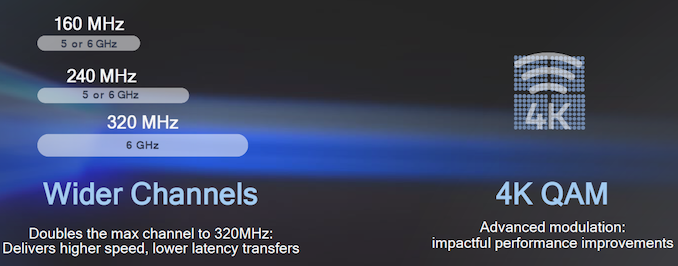
Theoretically, these aspects allow for up to around 46 Gbps of wireless throughput. 802.11be also aims to enable usage of Wi-Fi for real-time applications by including features for low-latency communications such as Multi-link operation (MLO). This allows a client and an access point to simultaneously communicate over multiple channels that might even belong to different bands.
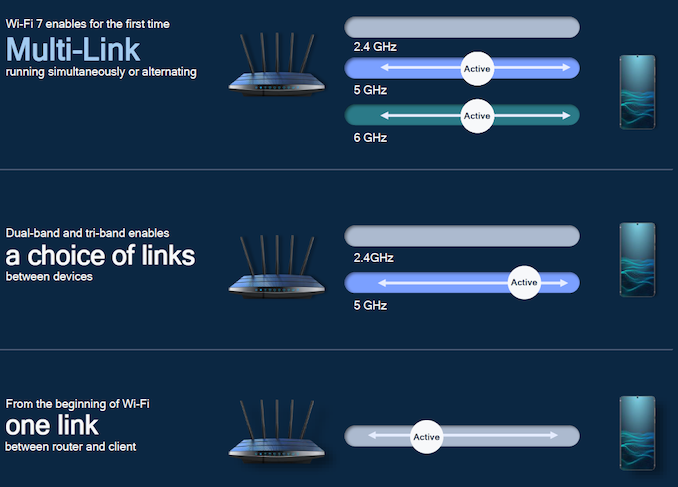
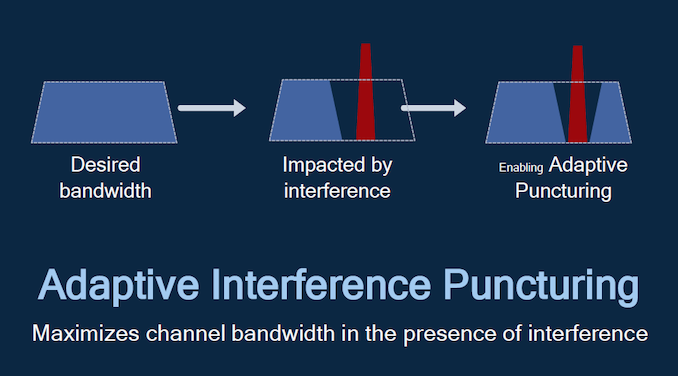
The 802.11be specifications also allow for better performance in environments with heavy interference by permitting adaptive puncturing - the desired channel need not be necessarily contiguous. This improves on the preamble puncturing feature already available as part of the 802.11ax specifications.
Interference and co-existence with non-Wi-Fi users of the same spectrum is handled using automatic frequency coordination (AFC). Unlike the Open AFC initiative (of which Broadcom is a part), Qualcomm is opting to provide its own turnkey solution for its customers.
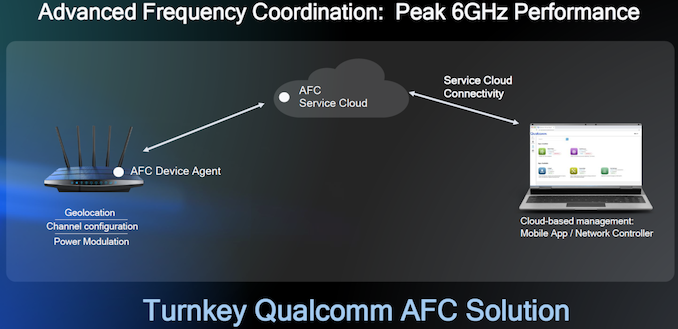
As expected, AFC will require the device agent to be connected to the Internet for channel configuration and power modulation purposes.
At MWC 2022, Qualcomm had provided details of their 802.11be client silicon targeting mobile devices. The FastConnect 7800 is expected to become available in H2 2022, and integrates Bluetooth 5.3 support with key Wi-Fi 7 features. Today, the company is introducing its Wi-Fi 7 Networking Pro Series access point platforms to expand its Wi-Fi 7 portfolio.
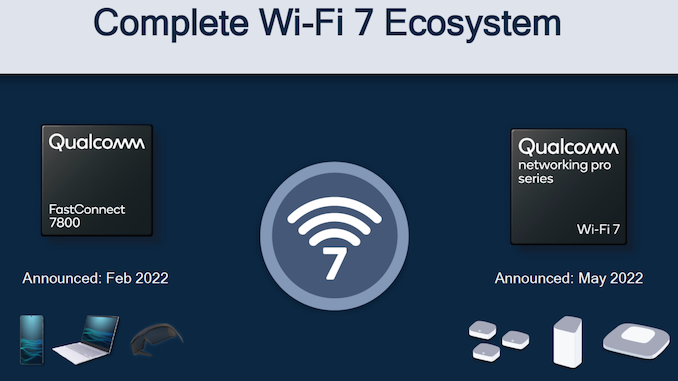
Qualcomm started marketing its Wi-Fi solutions under the Networking Pro and FastConnect monikers back in 2019, with the launch of its Wi-Fi 6 solutions. The 2nd generation products catered to the Wi-Fi 6E ecosystem, and it comes as no surprise that today's 3rd Gen. launch focuses on Wi-Fi 7.
The introduction of the Networking Pro tag has contributed to opaqueness in the composition of the router / AP platforms from a end-consumer perspective. Unlike Broadcom's public announcement of core details of the networking SoC, and characteristics of the various radio options for its reference designs, Qualcomm provides these details only to their customers. Eventually, these details do become public after market availability of the products. For example, the Networking Pro 800 platform's breakdown is available here - we see a core WiSoC with integrated MAC and baseband coupled with discrete radios. Therefore, it is disappointing that Qualcomm has not given us much to analyze in today's announcements beyond basic product specifications. These high-level feature specifications match the features in Broadcom's products announced last month.
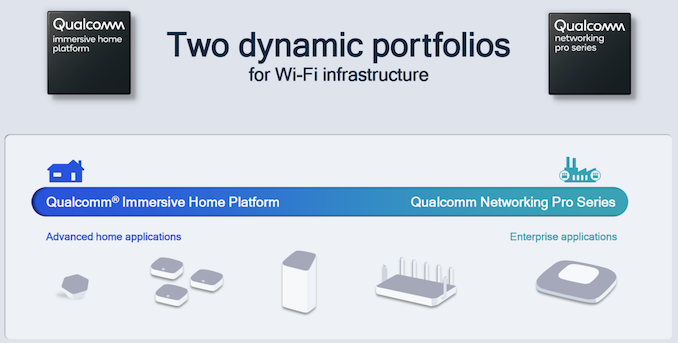
It must be noted that Qualcomm also provides the 'Immersive Home' platform for entry-level Wi-Fi routers. These are typically similar to the 'Networking Pro' platforms, except for cut-down stream counts and reduced WiSoC capabilities in terms of CPU core counts and frequencies. Given that Qualcomm refused to provide any details of CPU core counts or frequencies for the Networking Pro series being launched today, we need to wait for an official announcement related to their Wi-Fi 7 portfolio for the cost-sensitive segment.
The 3rd Gen. Networking Pro series consists of four members, with stream counts ranging from 6 in the Networking Pro 620 to 16 in the Networking Pro 1620. Radio options exist for two or four streams in each of the 2.4 GHz, 5 GHz, and 6 GHz bands.
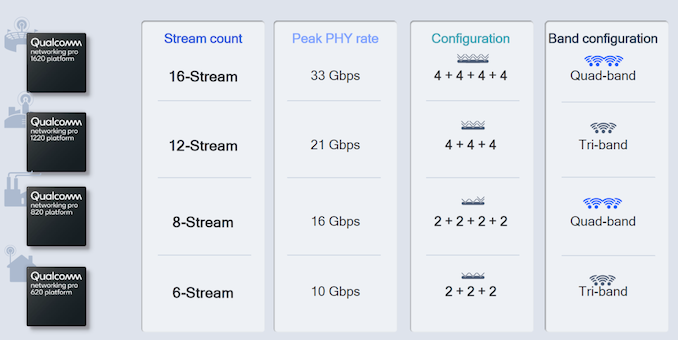
Qualcomm claims peak system PHY rates of up to 33 Gbps, and per-channel wireless PHY rates of more than 10 Gbps, with the capability of supporting more than 500 users in each channel.
The availability of 6 GHz spectrum for Wi-Fi is not universal. Qualcomm indicated that different configurations of the Networking Pro 3rd Gen series are possible, based on the allocation.
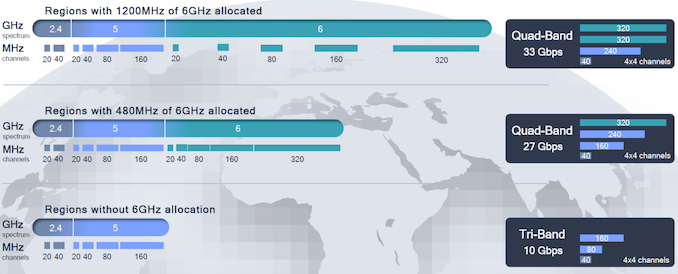
Qualcomm's Wi-Fi 7 Networking Pro series will allow its customers to create a wide range of enterprise-class and premium wireless access points / routers. The platforms are already sampling - we should be seeing market availability of BE10000, BE16000, BE21000, and BE33000 Wi-Fi routers based on them in a few quarters.
5G-based fixed wireless access is fast becoming an attractive option for many consumers - sometimes even as the primary broadband connection. Qualcomm's strengths in 5G will act as an asset from a bundling perspective for integrated Wi-Fi 7 / 5G platforms. However, Broadcom has significant presence with service providers for 10G PON and DOCSIS 4.0. It is likely that those high-speed ISPs will find Broadcom's possible bundled offerings attractive for their Wi-Fi 7-capable consumer gateways. While we wait for Mediatek and MaxLinear (to whom Intel sold their Home Gateway Platform Division) to reveal their Wi-Fi 7 cards fully, it appears that initial battle will be between products based on Qualcomm's 3rd Gen. Networking Pro series and those using Broadcom's Wi-Fi 7 portfolio.

The last few years have seen heightened consumer focus on wireless networking. The industry has also been quite busy, enabling the operation of Wi-Fi 6 (802.11ax) in the 6GHz band with Wi-Fi 6E. In parallel, the 802.11 Working Group had started work on 802.11be with a focus on extremely high throughput (EHT). Wi-Fi 7 is set to become the consumer-facing moniker for 802.11be.
802.11be aims to achieve high throughput primarily through a combination of three aspects:
Theoretically, these aspects allow for up to around 46 Gbps of wireless throughput. 802.11be also aims to enable usage of Wi-Fi for real-time applications by including features for low-latency communications such as Multi-link operation (MLO). This allows a client and an access point to simultaneously communicate over multiple channels that might even belong to different bands. Interference and co-existence with non-Wi-Fi users of the same spectrum is handled using automatic frequency coordination (AFC).
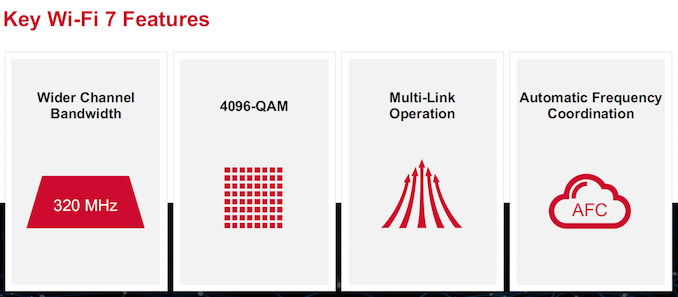
A number of additional features targeting these two thrust areas are under consideration for the final standard. However, multiple silicon vendors have already started introducing silicon supporting variations of the aspects included in the first 802.11be draft specifications.
Mediatek was one of the first vendors to demonstrate working 802.11be-compliant silicon earlier this year. Though Mediatek indicated that the products would be marketed under the Filogic lineup, concrete technical details and part numbers were not announced. At MWC 2022, Qualcomm provided details of their 802.11be client silicon targeting mobile devices. The FastConnect 7800 is expected to become available in H2 2022, and integrates Bluetooth 5.3 support with key Wi-Fi 7 features.
Broadcom is announcing a comprehensive portfolio of products targeting various Wi-Fi 7 markets today.
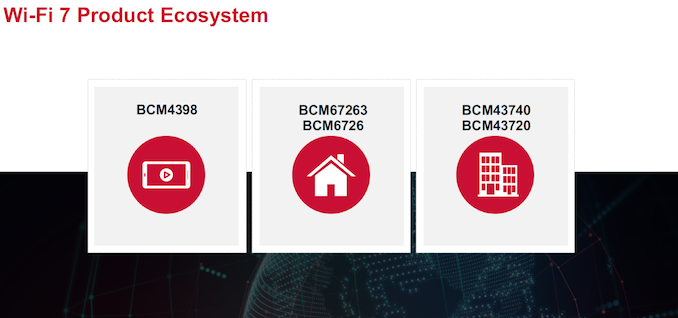
The table below summarize the key features of the products targeting access points. All of these support 4K-QAM and Multi-Link Operation.
| Broadcom 802.11be (Wi-Fi) Access Point Radios Specifications | ||||
| BCM67263 | BCM6726 | BCMN43740 | BCMN43720 | |
| Target Market | Residential Wi-Fi APs | Enterprise Wi-Fi APs | ||
| Operational Band | 6 GHz | 2.4 GHz (or) 5 GHz (or) 6 GHz | ||
| Stream Count | 4 | 2 | ||
| Max. Channel Width | 320 MHz | 160 MHz | 320 MHz | 160 MHz |
| PHY Rate | 11.5 Gbps | 5.75 Gbps | 11.5 Gbps | 2.88 Gbps |
The AP products support AFC in order to ensure that 6GHz range is not affected (the APs are mandated to receive regularly scheduled clearance from a central authority to prevent interference with 6 GHz spectrum users). Broadcom has applied to be an AFC operator and will offer AFC service with their chips. This will use Open AFC code. Broadcom also believes a vibrant Wi-Fi 7 ecosystem requires an AFC service that the device makers can use independent of the chip vendor. Organizations such as the Wi-Fi Alliance, and Wireless Broadband Alliance have applied to be AFC operators, with Open AFC already gaining traction in this.
Tying these together in Broadcom's Wi-Fi 7 router reference design is the BCM4916 network processor. This ARM v8-compatible quad-core SoC includes a dual-issue Runner packet processor (DI-XRDP), an integrated NBASE-T (up to 10G) Ethernet PHY for WAN or LAN, four integrated 1GbE PHYs, three USXGMII interfaces, multiple USB ports, and a 32-bit DDR3/DDR4 DRAM interface.
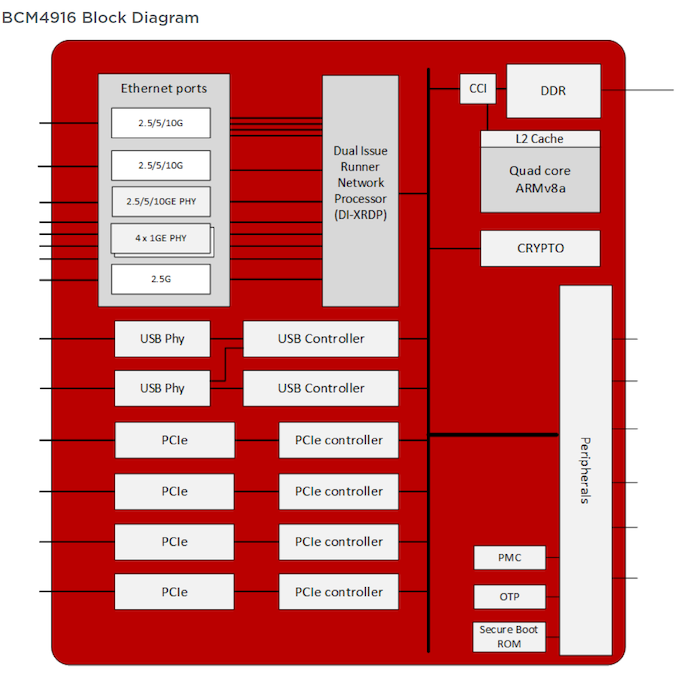
The quad-core CPU is a custom Broadcom design with 64KB of L1 cache and 1MB of L2 cache, providing up to 24K DMIPS horsepower. Without the knowledge of exact clock speeds, it is difficult to compare against the standard Cortex cores from ARM. Based on the DMIPS number, this appears to slot in-between a Cortex-A53 and an A57, but does not include the ARM v8.2 features of the A55.
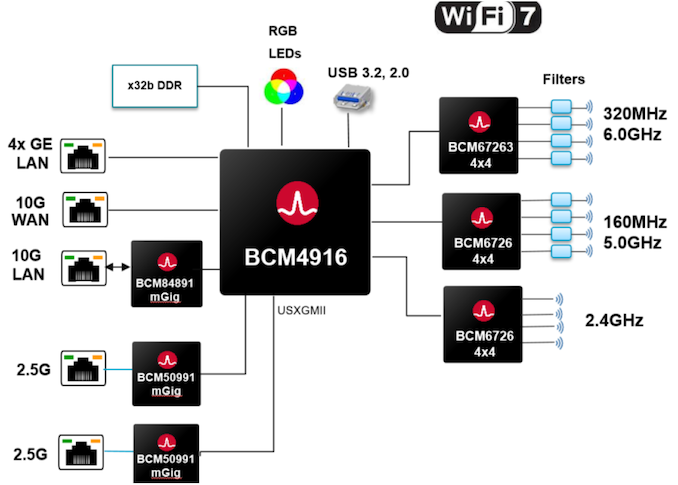
Broadcom's customers can play around with the radio configuration in the above design to create products at different price points. Tri-band support becomes compulsory in Wi-Fi 7. The extremely high throughput enabled by this means that 10G support on the WAN/LAN side and NBASE-T support on the LAN front will become the de-facto standard for routers and APs in the coming years.
Broadcom is also introducing the BCM4398 - an integrated Wi-Fi 7 and Bluetooth 5 combo chip targeting smartphones and other mobile applications. It supports two streams of Wi-Fi 7, channel width of up to 320 MHz, and a 6.05 Gbps PHY rate. On the client side, one of the key user-visible updates is low-latency operation. Broadcom claims that the BCM4398 can achieve sub-millisecond latencies for lightly congested environments in the 6 GHz band. The client multi-link operation feature can keep both uplink and downlink latencies between 5 and 10ms in situations where both 5 and 6 GHz bands are highly congested. This provides determinism for AR/VR knowing that worst case latencies will be down to a few milliseconds even during heavy congestion.
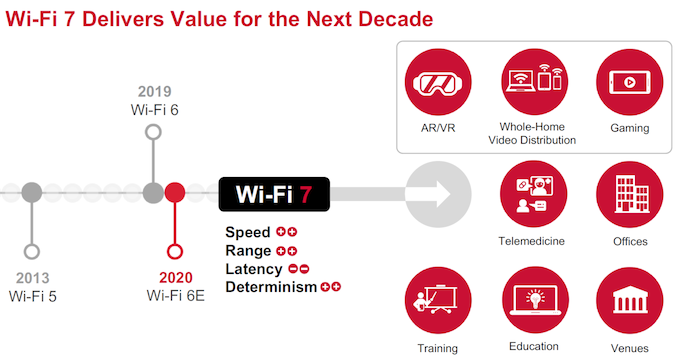
Broadcom is the first vendor to announce a complete portfolio of Wi-Fi 7 products, with sampling for key customers already in progress. The new products should give end-consumers a taste of the values delivered by Wi-Fi 7 for different applications a few quarters from now.
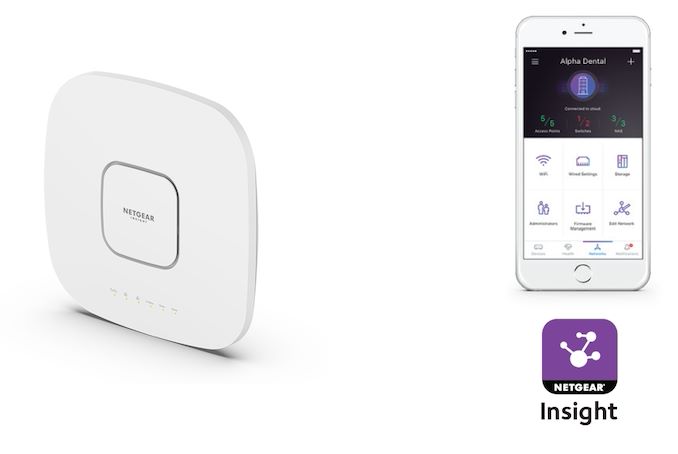
Netgear has been building up a portfolio of software-defined networking (SDN) products over the last few years. The introduction of the cloud-based Insight management feature to their lineup of SMB products has made their lineup of routers, switches, and access points appeal to a wider customer base. SMB-focused versions of leading technologies often lag their consumer counterparts by a year or so, and updates to flagship offerings are often spaced apart. However, Netgear's Wi-Fi 6 WAX630 (introduced in June 2021) is receiving a Wi-Fi 6E upgrade / companion today in the form of the WAX630E.
The Qualcomm-based WAX630E is one of the first reasonably-priced SMB Wi-Fi 6E APs for SMBs and micro-businesses. Many announced and leaked offerings in the Wi-Fi 6E space have been delayed (with FCC certification being a stumbling block), allowing Netgear's offering to become available for purchase ahead of the competition. The advantages of Wi-Fi 6E have been covered in multiple articles previously - including the original Wi-Fi Alliance announcement coverage, and Netgear's first Wi-Fi 6E product in the consumer space last year. The availability of a much wider interference-free spectrum in 6 GHz - up to seven usable 160 MHz - means that consumer experience is bound to be much better. The downside is the reduced range due to power limitations (APs at 30 dBm max., and clients at 24 dBm max.).
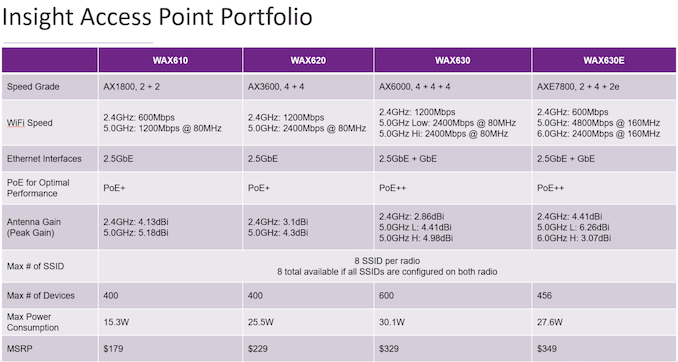
On the technical front, the WAX630E replaces the third 4x4 5GHz band of the WAX630 with a 2x2 6GHz radio. The 2.4 GHz radio configuration has also been reduced to 2x2 in the WAX630E from the 4x4 in the WAX630. These updates have allowed Netgear to price the WAX630E very competitively at $350 - a reasonable premium of $20 over the WAX630's $330. The reduced number of radios also allows the WAX630E to sport lower maximum power consumption compared to the WAX630 (27.6W vs. 30.1W). However, the availability of 160MHz channels enables the AP to be marketed as an AX7800 device (600 Mbps for the 2x2 2.4 GHz, 4800 Mbps for the 4x4 5 GHz, and 2400 Mbps for the 2x2 6 GHz radios). The AP has a 3000 sq. ft. coverage area. The WAX630E retains the same physical footprint as the WAX630, though it is slight heavier.
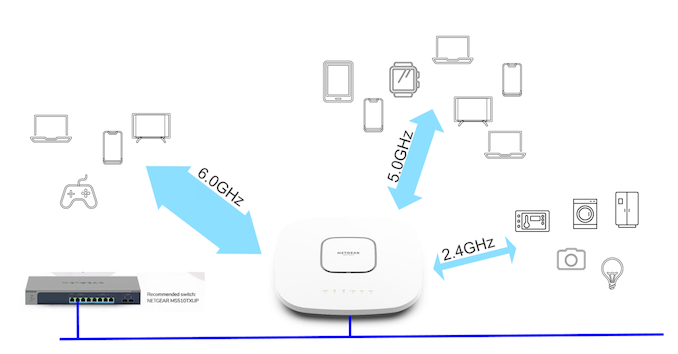
The AP supports PoE++ over the 2.5GbE LAN port (an extra 1Gbps LAN port is also available). Netgear recommends the Insight-managed MS510TXUP NBASE-T PoE++ switch for use with the WAX630E. The introduction of the new AP provides a wider range of options for Netgear's customers, whose needs with respect to required number of clients and client types to support, speeds, and pricing may vary.
Netgear believes that cloud-based management of Wi-Fi 6E APs will be a must in the long-run. Outdoor APs will eventually need to figure out a solution for ensuring that they do not interfere with other licensed 6 GHz band users. FCC mandates that real-time geolocation database cross-checks need to be performed by APs, which might be a challenge without regular updates to the database. While the WAX630E is not affected by this (due to its indoor nature), cloud-based management / real-time connection to a database maintained by the vendor might become essential moving forward. Netgear's Insight provides IT administrators with a centralized dashboard for multi-location installations, allowing for both local and remote management. Netgear is touting scalability and easy-to-use multi-location support as advantages over solutions requiring local controllers.
The WAX630E is available for pre-order today - $350 for the PoE variant, and $370 for the one with a power adapter included. The units are expected to ship early next month.

At home or in a cloud environment, IP addresses are assigned dynamically by the DHCP server. Setting a static IP address on your Alpine Linux server is required for various reasons. For instance, Alpine Linux is configured as a DHCP server or KVM server to host multiple VMs. Static IP address makes it easy to work with port forwarding, firewalling, and HTTPS server too. This quick tutorial will explain how to set up a static IP address on Alpine Linux.
Love this? sudo share_on: Twitter - Facebook - LinkedIn - Whatsapp - Reddit
The post How to configure static IP address on Alpine Linux appeared first on nixCraft.
How do I check or find NetworkManager version on Linux distribution?
The post How to find NetworkManager version on Linux appeared first on nixCraft.

Linode is an original cloud platform and founded before AWS. Back then, we used to call them VPS (Virtual Private Server). Recently they added a new firewall feature to control network access to my Linode server from the Cloud. Let us test drive Linode cloud firewall.
The post Linode cloud firewall: Do you need it to protect the Linux server? appeared first on nixCraft.

On Linux, we encrypt our partitions and entire disk using Linux Unified Key Setup-on-disk-format (LUKS) for security and privacy reasons. We unlock LUKS protected disk by providing a passphrase at boot time. You need to be in front of your computer or use a remote console to open the encrypted disk under Linux at boot time. However, if your system is in the basement, remote datacenter/office, or upstairs office, you won't able to unlock and boot your Linux box. We can use the Dropbear SSH server for LUKS encrypted Debian or Ubuntu or any other Linux distro via SSH to solve this problem. Let us see how to unlock LUKS using Dropbear SSH keys in Linux at boot time.
The post How to unlock LUKS using Dropbear SSH keys remotely in Linux appeared first on nixCraft.

The last ten years in the computer and IT security world are crippled with so many vulnerabilities. We saw massive cloud computing adoption and end-users using mobile devices with high speed 4G LTE networks. A threat actor may have exploited such weakness in modern computers and networks. Let us look into top vulnerabilities and the attack surface in this decade (2010-2020) that affected Linux/Unix, macOS, IT, cloud-computing, and computers in general.
The post Significant vulnerabilities that crippled IT world this decade (2010-2020) appeared first on nixCraft.
How do I display dropped packets per interface on Linux operating systems from the command line option? How can I determine why a Linux server is dropping packets?
The post How to show dropped packets per interface on Linux appeared first on nixCraft.

I followed your Ubuntu LXD tutorial, and I noticed LXD automatically created firewall and NAT rules. Is there any way to disable this feature? I want to manage a firewall using custom rule sets. How can I disable firewall and NAT rules on the LXD bridge under Linux?
The post How to disable firewall and NAT rules on the LXD bridge appeared first on nixCraft.

How do I configure my Ubuntu 20.4 LTS and add network bridge (br0) with the nmcli command? How can I create a Linux network bridge on Ubuntu Linux 20.04 LTS server for KVM (Kernel-based Virtual Machine)?
The post Ubuntu 20.04 add network bridge (br0) with nmcli command appeared first on nixCraft.


How do I configure my CentOS 8 and add network bridge (br0) with the nmcli command? How can I create a Linux network bridge on CentOS Linux 8 server for KVM (Kernel-based Virtual Machine)?
The post CentOS 8 add network bridge (br0) with nmcli command appeared first on nixCraft.

How do I install Squid Proxy Server on Ubuntu 20.04 LTS Linux server for web clients? How can I filter out internet traffic for LAN users such as blocking domains, unwanted URLs, office hours for Internet access, and more using Squid running on Ubuntu server?
The post How to install Squid Proxy Server on Ubuntu 20.04 LTS Linux appeared first on nixCraft.
Let's Encrypt is a non-profit certificate authority that provides X.509 certificates for Transport Layer Security (TLS) encryption free of cost. The TLS certificate is valid for 90 days only. However, Due to the bug, they need to revoke many (read as "certain") Let’s Encrypt TLS/SSL certificates. Let us see how to find out if you are affected by this bug and how you can fix it to avoid any problems with your TLS/SSL certificates.
The post Letsencrypt is revoking certificates on March 4 appeared first on nixCraft.
How do I allow Linux processes to bind to IP address that doesn't exist yet on my Linux systems or server?
The post Linux bind IP that doesn’t exist with net.ipv4.ip_nonlocal_bind appeared first on nixCraft.
How do I see Time-To-Live (TTL) for a DNS record using Linux, macOS, *BSD, or Unix-like systems command line option? How do I find my DNS TTL?
The post How to see Time-To-Live (TTL) for a DNS record appeared first on nixCraft.
How do I test and validate DNSSEC using the dig command line under Linux, macOS, *BSD, and Unix-like systems?
The post How to test and validate DNSSEC using dig command line appeared first on nixCraft.

How do I Install Nginx on CentOS 8 Linux server? How can configure the latest version of Nginx web server on a CentOS Enterprise Linux 8 server using the CLI and host a static site?
The post How to install and use Nginx on CentOS 8 appeared first on nixCraft.

 Lateo.net - Flux RSS en pagaille (pour en ajouter : @ moi)


