 Connexion


Windows 11 offers controls for diagnostic data, location access, clipboard syncing, and personalized recommendations. Here's how to review seven privacy settings and understand their trade-offs.
The post 7 Windows 11 Privacy Settings You Should Check in 2026 appeared first on TechRepublic.
Hammer, l'outil dont je vais vous parler aujourd'hui, est né d'un manuscrit perdu. En septembre 2020, son développeur Adam Brown vivait dans un van et écrivait dans des coins souvent très isolés, avec un logiciel gratuit qui se présentait comme fonctionnant hors ligne. Mais malheureusement, au bout d'une semaine sans réseau, le soft a cessé de fonctionner.
De retour en ville quelques jours plus tard, il a alors remis la main sur une connexion, et le logiciel est reparti, mais son manuscrit avait disparu !
Alors, dégoûté, il s'est dit qu'il allait coder son propre éditeur offline pour éviter que ça se reproduise, car hé, on n'est jamais aussi bien servi que par soi-même ! Et c'est pourquoi quand vous écrivez avec Hammer , chaque scène est un fichier texte enregistré sur votre disque dans le répertoire que vous avez spécifiquement choisi. Et c'est pareil pour tout ce qui est contenu annexe comme les notes et les fiches d'encyclopédie qui accompagnent les scènes.

Grâce à Hammer, qui est un logiciel gratuit sous licence MIT, vos idées sont rassemblées sous la forme d'un projet d'écriture avec tout ce qu'il faut pour prendre des notes, mettre des tags, faire des liens...etc.

L'éditeur de Hammer, avec la scène, son plan et ses notes sur le même écran.
Pour autant ce n'est pas un bloc-notes déguisé. Les scènes se réordonnent au glisser-déposer, ce qui est pratique quand vous décidez que deux personnages doivent se croiser trois chapitres plus tôt. L'encyclopédie catalogue les personnages, les lieux et les événements avec leurs images, et Hammer lit vos scènes pour repérer tout seul qui apparaît où.

La synchronisation entre vos appareils, elle, est totalement optionnelle. Et depuis la dernière version, le serveur de sync a une
image Docker officielle
. Un petit docker compose up -d et c'est en route, avec un volume pour vos données et le PostgreSQL embarqué directement dans le conteneur.
Si vous débutez en auto-hébergement , sachez quand même que le serveur ne parle que HTTP en local alors que les clients Hammer exigent du HTTPS, donc il faudra mettre en place un reverse proxy ou un certificat devant.


Et si vous n'avez pas envie de gérer un serveur, sachez que l'instance officielle hammer.ink est utilisable si vous êtes abonné au Patreon du projet. Vous pouvez aussi vous en passer et poser le dossier dans Syncthing ou Dropbox, mais ça ne marchera qu'entre vos ordinateurs, car les clients mobiles (Android / iOS) Hammer supportent uniquement le protocole intégré.
Bref, un super outil pour les écrivains, les journalistes et autres producteurs de contenu qui aiment bosser offline. Et si Hammer s'arrête de fonctionner un jour, votre roman sera encore avec vous.


[Deal du jour] Avis aux amateurs de piraterie et d’aventures en monde ouvert : Assassin’s Creed Black Flag Resynced profite déjà d’une belle réduction, et passe carrément sous les 40 €.

La sortie d’Assassin’s Creed Black Flag Resynced vient bousculer notre classement de la saga d’Ubisoft. Le remake parvient-il à surpasser Shadows, Odyssey ou la trilogie Ezio ? On donne la réponse ici dans notre TOP ultime de la franchise.

Si vous faites un petit sondage pour savoir quel est le meilleur épisode d'Assassin's Creed, il y a de fortes chances que le nom de Black Flag revienne très (trop ?) souvent, ce qui est assez ironique quand on sait que le jeu n'aurait jamais dû exister. Mais ça, c'est une autre histoire… Celle qui nous intéresse aujourd'hui, c'est l'arrivée d'un remake de cet épisode charnière dont l'ambition n'est sans doute pas à la hauteur du mythe. Notre test.

Ubisoft ouvre gratuitement l’essai de son abonnement Ubisoft+ Premium pendant quelques jours. De quoi piocher dans les 19 Assassin’s Creed disponibles dans l'abonnement avant la sortie du remake Black Flag Resynced.
rsync vient de sortir sa version 3.4.3, un correctif censé boucher plusieurs trous de sécurité. Sauf que pour une partie des utilisateurs, leurs sauvegardes incrémentales se sont mises à mal fonctionner juste après la mise à jour.
En fouillant le code, certains ont remarqué un détail qui ne leur a pas plu. Depuis la version 3.4.1, des dizaines de modifications (des "commits", les unités de changement de code) sont signées "tridge and claude". Comprendre Andrew Tridgell, le créateur historique de rsync, et Claude, l'assistant IA d'Anthropic, le concurrent direct d'OpenAI.
Pour situer, rsync est un outil de synchronisation et de sauvegarde de fichiers qui tourne sur les serveurs Unix et Linux depuis les années 90. Une brique discrète mais utilisée par d'innombrables entreprises, hébergeurs et services informatiques. Quand il déraille, ce sont des sauvegardes entières qui sautent.
D'où la réaction épidermique. Sur GitHub, la plateforme où vit le code source, quelqu'un a ouvert un message au titre sans équivoque, "Please Do Not Vibe Fuck Up This Software". En clair, prière de ne pas bousiller ce logiciel à coups de "vibe coding", cette mode qui consiste à confier des bouts de code à une IA et à faire confiance au résultat sans trop vérifier.
Tridgell a reconnu les régressions. Elles touchent surtout des configurations bien précises, le mode serveur avec l'option chroot désactivée, qu'il décrit comme des "cas d'usage valides mais inhabituels" que la suite de tests du projet ne couvrait tout simplement pas.
Sauf que voilà, il refuse l'étiquette du développeur qui aurait bâclé. "Je n'ai pas juste vibe-codé la conversion de la suite de tests en Python. Je suis un ingénieur logiciel avec 40 ans d'expérience", a-t-il écrit dans un billet intitulé "rsync and outrage".
Concrètement, l'IA a surtout servi à réécrire la vieille batterie de tests, jusque-là en scripts shell, vers le langage Python, pour pouvoir mieux vérifier la sécurité du code. Un travail de fond fastidieux.
Tridgell affirme avoir conçu lui-même l'architecture du nouveau système, utilisé Claude mais aussi Codex d'OpenAI et Gemini de Google pour abattre le gros du débroussaillage répétitif, puis relu et validé chaque ligne produite à la main.
Et il n'a aucune intention d'arrêter. Une version 3.4.4 pourrait corriger les régressions, à moins qu'il ne passe directement à la 3.5, plus ambitieuse côté sécurité. Avec les mêmes outils IA.
Au passage, il rappelle un truc que les mainteneurs de logiciels libres vivent au quotidien, ils croulent sous les signalements de failles de sécurité, dont une bonne partie sont eux-mêmes pondus par des IA. L'IA crée la charge et propose dans la foulée de la résorber.
Source : The Register

Compare the best Dropbox alternatives for 2026, including free storage, security, collaboration features, pricing, and business file-sharing tools.
The post Best Dropbox Alternatives for 2026: Free & Premium Tools appeared first on TechRepublic.

En marge de la publication des premiers avis sur Assassin's Creed Black Flag Resynced, Ubisoft a rappelé qu'il s'agit bien d'un remake, lequel sera fidèle à l'œuvre d'origine.
The world's leading space powers desperately want to know what the others are up to high above the equator. For more than a decade, the US military has operated a fleet of "inspector" satellites designed to sidle up to other spacecraft in geosynchronous orbit and take pictures. China started launching its satellites for a similar mission in 2018.
Ars has written about these activities in geosynchronous orbit (GEO) before, but the last few months have seen a couple of interesting developments. First, Russia has now joined the fray with the recent arrival of its own suspected inspector (or attack) satellite in GEO. Second, the US Space Force is poised to order more—perhaps many more—reconnaissance satellites of its own to send into the geosynchronous belt.
GEO is special. The laws of orbital mechanics mean a satellite in this type of orbit, some 22,000 miles (36,000 kilometers) over the equator, moves around the Earth at the same rate as the planet's rotation, causing it to hover over the same location. Commercial and military-owned geosynchronous satellites typically spend years in the same location, or slot, to provide communications services to users.



Pour le lancement du remake d'Assassin’s Creed Black Flag prévu en juillet 2026, Ubisoft lance une immense chasse au trésor grandeur nature, avec à la clé un butin de 500 000 $ (425 000 €) à empocher, soit tout de même l'équivalent de presque 6 000 exemplaires d'Assassin's Creed Black Flag Resynced.

Ubisoft en dévoile un peu plus sur les combats et le parkour du remake d’Assassin’s Creed Black Flag, annoncés comme modernisés, tout en respectant « les fondements du jeu original ».

Le remake d’Assassin’s Creed Black Flag est assurément une bonne nouvelle, mais un autre épisode de la licence mériterait tout autant, sinon davantage, de revenir sur le devant de la scène. De nouvelles rumeurs évoquent, une fois encore, un potentiel remake du tout premier opus.
Vous synchronisez 4 ou 5 dossiers vers plusieurs serveurs avec rsync ? Alors vous connaissez ce sketch quand un job mouline pendant que les autres font la queue, parce que rsync de base c'est mono-thread et ça avance en file indienne.
Hé bien y'a un petit utilitaire Python qui dégoupille tout ça, pondu par overflowy. Ça s'appelle parallel-rsync et le nom annonce la couleur !
L'idée c'est de pouvoir empiler plusieurs jobs rsync en parallèle, avec une config YAML pour piloter le tout. Vous décrivez vos sources et destinations dans sync.yml, vous lancez parallel-rsync -c sync.yml --workers 4 --max-per-host 2, et hop, ça parallélise.
Le bougre tourne sur un ThreadPoolExecutor Python 3 qui spawn N processus rsync système avec un cap global et un cap par hôte. Et pendant ce temps, des barres de progression vous affichent l'avancement de chaque transfert sans que la console parte en sucette.

La dernière fois, je vous parlais de rsyncy qui collait juste une barre de progression à un rsync solo mais là, on monte clairement d'un cran avec une orchestration multi-cibles.
--workers cap c'est donc le nombre total de processus rsync simultanés (4 par défaut). --max-per-host limite la concurrence par destination (2 par défaut, histoire de ne pas saturer un seul serveur, parce que oui, balancer 8 rsync sur la même machine c'est juste se tirer une balle dans le pied côté I/O).
--timeout met une laisse à chaque rsync, --dry-run ajoute le flag à toutes les commandes pour tester avant de tirer, et --no-progress débraye les barres si vous voulez juste les logs. Côté logging, --log-file et --log-level font également le job.
Par contre y'a pas de retry automatique donc si une session SSH coupe en plein transfert, faudra relancer à la main. C'est logique mais un peu dommage.
Sur un homelab, ce genre de config YAML permet de résoudre le problème des synchros récurrentes avec un seul fichier centralisé au lieu de 8 scripts shell.
Notez aussi que le repo build un binaire universel via cosmofy , qui empaquette le tout en un exécutable cross-platform Windows, macOS et Linux d'un coup. Du coup, pas besoin d'installer Python sur la machine cible. Carrément pratique pour distribuer sur des serveurs où vous n'avez pas envie de gérer un environnement Python complet avec pip et un venv.
Petit point d'attention quand même : rsync lui-même doit être installé sur la machine qui lance le binaire, ce qui est natif sous macOS et Linux mais nécessite WSL ou Cygwin sous Windows.
Y'avait déjà
msrsync
qui découpe les transferts en buckets,
parsyncfp
qui s'appuie sur fpart pour grouper par taille, et la classique combine find . -type f | parallel -j10 rsync que tout sysadmin a bricolée un jour pour gratter de la bande passante. De son côté, overflowy se place plutôt sur le créneau "config déclarative" pour orchestrer plusieurs rsync entre sources et cibles.
Le code est sous licence MIT et tout se passe sur le repo GitHub . À tester si vous orchestrez régulièrement plusieurs rsync à la main.


[Précommande] Annoncé officiellement en mars dernier, le remake d'Assassin's Creed Black Flag se dévoile enfin via une longue vidéo de présentation. Le jeu est déjà disponible en précommande.

Annoncé officiellement le 4 mars dernier alors que c'était un des secrets les moins bien gardés de l'histoire d'Assassin's Creed, le remake de Black Flag, Resynced, a enfin été dévoilé largement à la faveur d'une longue vidéo qui, sans rassurer totalement, a le mérite de répondre à beaucoup de questions.

Alors que la présentation officielle est attendue pour ce jeudi 23 avril, Assassin's Creed Black Flag Resynced fait encore l'objet de fuites. Mais il faut se méfier des images qui traînent sur le web.
Google’s March Android update introduces Wi-Fi Sync, game trials, and Wear OS upgrades, making devices more seamless, secure, and connected.
The post Google’s Android Update Brings ‘Wi-Fi Sync’ to Phones, Tablets, and Chromebooks appeared first on TechRepublic.
Microsoft is investigating issues with Outlook and Microsoft 365 after users report login failures and missing emails, alongside known bugs in classic Outlook.
The post Microsoft Outlook and 365 Hit by Widespread Outages, Users Report Login and Email Failures appeared first on TechRepublic.
Hey there! I’ve just come back from a two-week vacation, Liz and Helen are both off sick, and I’m not 100% sure I remember how to do my job.
So, while I figure out how to social media and word write, here’s this absolutely wonderful video from Ian Charnas, showing how he hacked his car windscreen wipers to sync with his stereo.
FINALLY! Wipers Sync to Music
In this video, I modify my car so the windshield wipers sync to the beat of whatever music I’m listening to. You can own this idea!
Ian will be auctioning off the intellectual property rights to his dancing wipers on eBay, will all proceeds going to a charity supporting young makers.

The post Musically synced car windscreen wipers using Raspberry Pi appeared first on Raspberry Pi.
 Shell script to set up an LXD (Linux Containers) VM lab for testing purpose
 Linux/Unix bash shell script to purge Cloudflare url/images from the…
 Shell script to update all lxd container hypervisor
Shell script to reset ebtables on Linux
Shell script to update all lxd container hypervisor
Shell script to reset ebtables on Linux
 Shell script to update original visitor IP for nginx when using Cloudflare
Django comes with a variety of command line utilities that can be either invoked using django-admin.py or the
convenient manage.py script. A nice thing about it is that you can also add your own commands. Those management
commands can be very handy when you need to interact with your application via command line using a terminal and it can
also serve as an interface to execute cron jobs. In this tutorial you are going to learn how to code your own commands.
Just before we get started, let’s take a moment to familiarize with Django’s command line interface. You are probably
already familiar with commands like startproject, runserver or collectstatic. To see a complete list of commands
you can run the command below:
python manage.py helpOutput:
Type 'manage.py help <subcommand>' for help on a specific subcommand.

Available subcommands:

[auth]
    changepassword
    createsuperuser

[contenttypes]
    remove_stale_contenttypes

[django]
    check
    compilemessages
    createcachetable
    dbshell
    diffsettings
    dumpdata
    flush
    inspectdb
    loaddata
    makemessages
    makemigrations
    migrate
    sendtestemail
    shell
    showmigrations
    sqlflush
    sqlmigrate
    sqlsequencereset
    squashmigrations
    startapp
    startproject
    test
    testserver

[sessions]
    clearsessions

[staticfiles]
    collectstatic
    findstatic
    runserver
We can create our own commands for our apps and include them in the list by creating a management/commands directory inside an app directory, like below:
mysite/                                   <-- project directory
 |-- core/                                <-- app directory
 |    |-- management/
 |    |    +-- commands/
 |    |         +-- my_custom_command.py  <-- module where command is going to live
 |    |-- migrations/
 |    |    +-- __init__.py
 |    |-- __init__.py
 |    |-- admin.py
 |    |-- apps.py
 |    |-- models.py
 |    |-- tests.py
 |    +-- views.py
 |-- mysite/
 |    |-- __init__.py
 |    |-- settings.py
 |    |-- urls.py
 |    |-- wsgi.py
 +-- manage.py
The name of the command file will be used to invoke using the command line utility. For example, if our command was
called my_custom_command.py, then we will be able to execute it via:
python manage.py my_custom_commandLet’s explore next our first example.
Below, a basic example of what the custom command should look like:
management/commands/what_time_is_it.py
from django.core.management.base import BaseCommand
from django.utils import timezone

class Command(BaseCommand):
    help = 'Displays current time'

    def handle(self, *args, **kwargs):
        time = timezone.now().strftime('%X')
        self.stdout.write("It's now %s" % time)
Basically a Django management command is composed by a class named Command which inherits from BaseCommand. The
command code should be defined inside the handle() method.
See how we named our module what_time_is_it.py. This command can be executed as:
python manage.py what_time_is_itOutput:
It's now 18:35:31You may be asking yourself, how is that different from a regular Python script, or what’s the benefit of it. Well, the main advantage is that all Django machinery is loaded and ready to be used. That means you can import models, execute queries to the database using Django’s ORM and interact with all your project’s resources.
Django make use of the argparse, which is part of Python’s standard
library. To handle arguments in our custom command we should define a method named add_arguments.
The next example is a command that create random user instances. It takes a mandatory argument named total, which
will define the number of users that will be created by the command.
management/commands/create_users.py
from django.contrib.auth.models import User
from django.core.management.base import BaseCommand
from django.utils.crypto import get_random_string

class Command(BaseCommand):
    help = 'Create random users'

    def add_arguments(self, parser):
        parser.add_argument('total', type=int, help='Indicates the number of users to be created')

    def handle(self, *args, **kwargs):
        total = kwargs['total']
        for i in range(total):
            User.objects.create_user(username=get_random_string(), email='', password='123')
Here is how one would use it:
python manage.py create_users 10The optional (and named) arguments can be passed in any order. In the example below you will find the definition of an argument named “prefix”, which will be used to compose the username field:
management/commands/create_users.py
from django.contrib.auth.models import User
from django.core.management.base import BaseCommand
from django.utils.crypto import get_random_string

class Command(BaseCommand):
    help = 'Create random users'

    def add_arguments(self, parser):
        parser.add_argument('total', type=int, help='Indicates the number of users to be created')

        # Optional argument
        parser.add_argument('-p', '--prefix', type=str, help='Define a username prefix', )

    def handle(self, *args, **kwargs):
        total = kwargs['total']
        prefix = kwargs['prefix']

        for i in range(total):
            if prefix:
                username = '{prefix}_{random_string}'.format(prefix=prefix, random_string=get_random_string())
            else:
                username = get_random_string()
            User.objects.create_user(username=username, email='', password='123')
Usage:
python manage.py create_users 10 --prefix custom_useror
python manage.py create_users 10 -p custom_userIf the prefix is used, the username field will be created as custom_user_oYwoxtt4vNHR. If not prefix, it will be
created simply as oYwoxtt4vNHR – a random string.
Another type of optional arguments are flags, which are used to handle boolean values. Let’s say we want to add an
--admin flag, to instruct our command to create a super user or to create a regular user if the flag is not present.
management/commands/create_users.py
from django.contrib.auth.models import User
from django.core.management.base import BaseCommand
from django.utils.crypto import get_random_string

class Command(BaseCommand):
    help = 'Create random users'

    def add_arguments(self, parser):
        parser.add_argument('total', type=int, help='Indicates the number of users to be created')
        parser.add_argument('-p', '--prefix', type=str, help='Define a username prefix')
        parser.add_argument('-a', '--admin', action='store_true', help='Create an admin account')

    def handle(self, *args, **kwargs):
        total = kwargs['total']
        prefix = kwargs['prefix']
        admin = kwargs['admin']

        for i in range(total):
            if prefix:
                username = '{prefix}_{random_string}'.format(prefix=prefix, random_string=get_random_string())
            else:
                username = get_random_string()

            if admin:
                User.objects.create_superuser(username=username, email='', password='123')
            else:
                User.objects.create_user(username=username, email='', password='123')
Usage:
python manage.py create_users 2 --adminOr
python manage.py create_users 2 -aLet’s create a new command now named delete_users. In this new command we will be able to pass a list of user ids and the command should delete those users from the database.
management/commands/delete_users.py
from django.contrib.auth.models import User
from django.core.management.base import BaseCommand

class Command(BaseCommand):
    help = 'Delete users'

    def add_arguments(self, parser):
        parser.add_argument('user_id', nargs='+', type=int, help='User ID')

    def handle(self, *args, **kwargs):
        users_ids = kwargs['user_id']

        for user_id in users_ids:
            try:
                user = User.objects.get(pk=user_id)
                user.delete()
                self.stdout.write('User "%s (%s)" deleted with success!' % (user.username, user_id))
            except User.DoesNotExist:
                self.stdout.write('User with id "%s" does not exist.' % user_id)
Usage:
python manage.py delete_users 1Output:
User "SMl5ISqAsIS8 (1)" deleted with success!We can also pass a number of ids separated by spaces, so the command will delete the users in a single call:
python manage.py delete_users 1 2 3 4Output:
User with id "1" does not exist.
User "9teHR4Y7Bz4q (2)" deleted with success!
User "ABdSgmBtfO2t (3)" deleted with success!
User "BsDxOO8Uxgvo (4)" deleted with success!We could improve the previous example a little big by setting an appropriate color to the output message:
management/commands/delete_users.py
from django.contrib.auth.models import User
from django.core.management.base import BaseCommand

class Command(BaseCommand):
    help = 'Delete users'

    def add_arguments(self, parser):
        parser.add_argument('user_id', nargs='+', type=int, help='User ID')

    def handle(self, *args, **kwargs):
        users_ids = kwargs['user_id']

        for user_id in users_ids:
            try:
                user = User.objects.get(pk=user_id)
                user.delete()
                self.stdout.write(self.style.SUCCESS('User "%s (%s)" deleted with success!' % (user.username, user_id)))
            except User.DoesNotExist:
                self.stdout.write(self.style.WARNING('User with id "%s" does not exist.' % user_id))
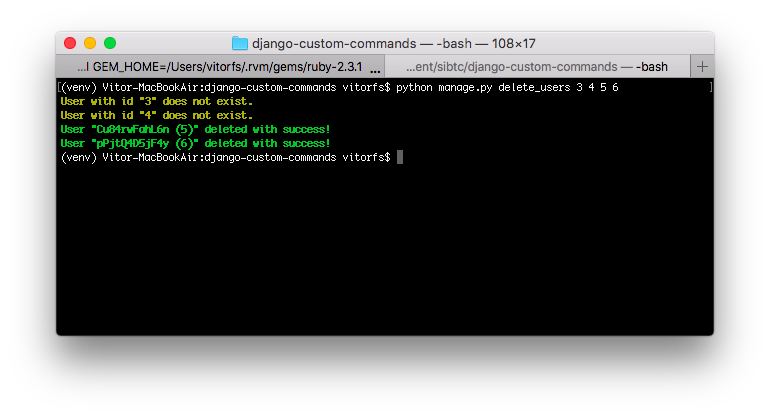
Usage is the same as before, difference now is just the output:
python manage.py delete_users 3 4 5 6Output:
Below a list of all available styles, in form of a management command:
from django.core.management.base import BaseCommand

class Command(BaseCommand):
    help = 'Show all available styles'

    def handle(self, *args, **kwargs):
        self.stdout.write(self.style.ERROR('error - A major error.'))
        self.stdout.write(self.style.NOTICE('notice - A minor error.'))
        self.stdout.write(self.style.SUCCESS('success - A success.'))
        self.stdout.write(self.style.WARNING('warning - A warning.'))
        self.stdout.write(self.style.SQL_FIELD('sql_field - The name of a model field in SQL.'))
        self.stdout.write(self.style.SQL_COLTYPE('sql_coltype - The type of a model field in SQL.'))
        self.stdout.write(self.style.SQL_KEYWORD('sql_keyword - An SQL keyword.'))
        self.stdout.write(self.style.SQL_TABLE('sql_table - The name of a model in SQL.'))
        self.stdout.write(self.style.HTTP_INFO('http_info - A 1XX HTTP Informational server response.'))
        self.stdout.write(self.style.HTTP_SUCCESS('http_success - A 2XX HTTP Success server response.'))
        self.stdout.write(self.style.HTTP_NOT_MODIFIED('http_not_modified - A 304 HTTP Not Modified server response.'))
        self.stdout.write(self.style.HTTP_REDIRECT('http_redirect - A 3XX HTTP Redirect server response other than 304.'))
        self.stdout.write(self.style.HTTP_NOT_FOUND('http_not_found - A 404 HTTP Not Found server response.'))
        self.stdout.write(self.style.HTTP_BAD_REQUEST('http_bad_request - A 4XX HTTP Bad Request server response other than 404.'))
        self.stdout.write(self.style.HTTP_SERVER_ERROR('http_server_error - A 5XX HTTP Server Error response.'))
        self.stdout.write(self.style.MIGRATE_HEADING('migrate_heading - A heading in a migrations management command.'))
        self.stdout.write(self.style.MIGRATE_LABEL('migrate_label - A migration name.'))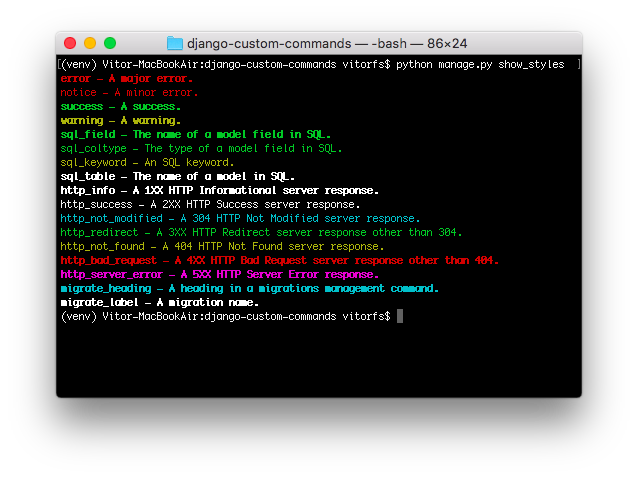
If you have a task that must run periodically, like generating a report every Monday. Or let’s say you have a Web scrapper that collects data from some Website every 10 minutes. You can define this code as a management command and simply add it to your server’s crontab like this:
# m h  dom mon dow   command
0 4 * * * /home/mysite/venv/bin/python /home/mysite/mysite/manage.py my_custom_command
The example above will execute the my_custom_command every day at 4 a.m.
The examples above should be enough to get you started. More advanced usage will boil down to knowing how to use the argparse features. And of course, Django’s official documentation on management commands is the best resource.
You can find all the code used in this tutorial on GitHub.

 Lateo.net - Flux RSS en pagaille (pour en ajouter : @ moi)