 Connexion


Get the key details on Google Fitbit Edge, including health tracking, Gemini coaching, battery life, US pricing, compatibility, and which version to buy.
The post Google Fitbit Edge Cheat Sheet: Price, Features, Battery Life, and More appeared first on TechRepublic.
Google's $180 Fitbit Edge replaces the Charge 6 with a larger screen, more workout modes, and a replaceable battery, but drops NFC. Is it worth upgrading?
The post Google’s $180 Fitbit Edge Replaces Charge 6: What’s New? appeared first on TechRepublic.
Get the key details on Apple Watch Series 12, including health features, AI tools, battery life, pricing, compatibility, and which model may suit you best.
The post Apple Watch Series 12 Cheat Sheet: What’s New, What It Costs, and Which Model to Choose appeared first on TechRepublic.
Compare the best Whoop alternatives in 2026, including Garmin, Oura, Fitbit, Amazfit, and Polar for sleep, recovery, fitness, and value.
The post Best Whoop Alternatives in 2026: Oura, Garmin, Fitbit, and More appeared first on TechRepublic.
Garmin is rolling out free smartwatch updates with fall detection, hands-free controls, new running tools, and more. See which watches qualify.
The post Garmin Smartwatches Receive Free Upgrade: Here’s What Owners Get appeared first on TechRepublic.
Apple is reportedly testing a screen-free fitness tracker to rival Whoop, although the experimental wearable may not arrive before 2028 at the earliest.
The post Apple Reportedly Developing Screen-Free Fitness Tracker to Rival Whoop appeared first on TechRepublic.
Xiaomi Smart Band 11 keeps the Band 10’s display size and 21-day battery claim but adds more brightness, a thinner design, and new health features.
The post Xiaomi Smart Band 11 vs Smart Band 10: What Actually Changed? appeared first on TechRepublic.


Life360's new QR pet tag costs $7.99 once, while Pet GPS adds live tracking and escape alerts with a paid membership. Here's where each fits.
The post Life360’s $8 Pet Tag vs Pet GPS: What Each One Does appeared first on TechRepublic.
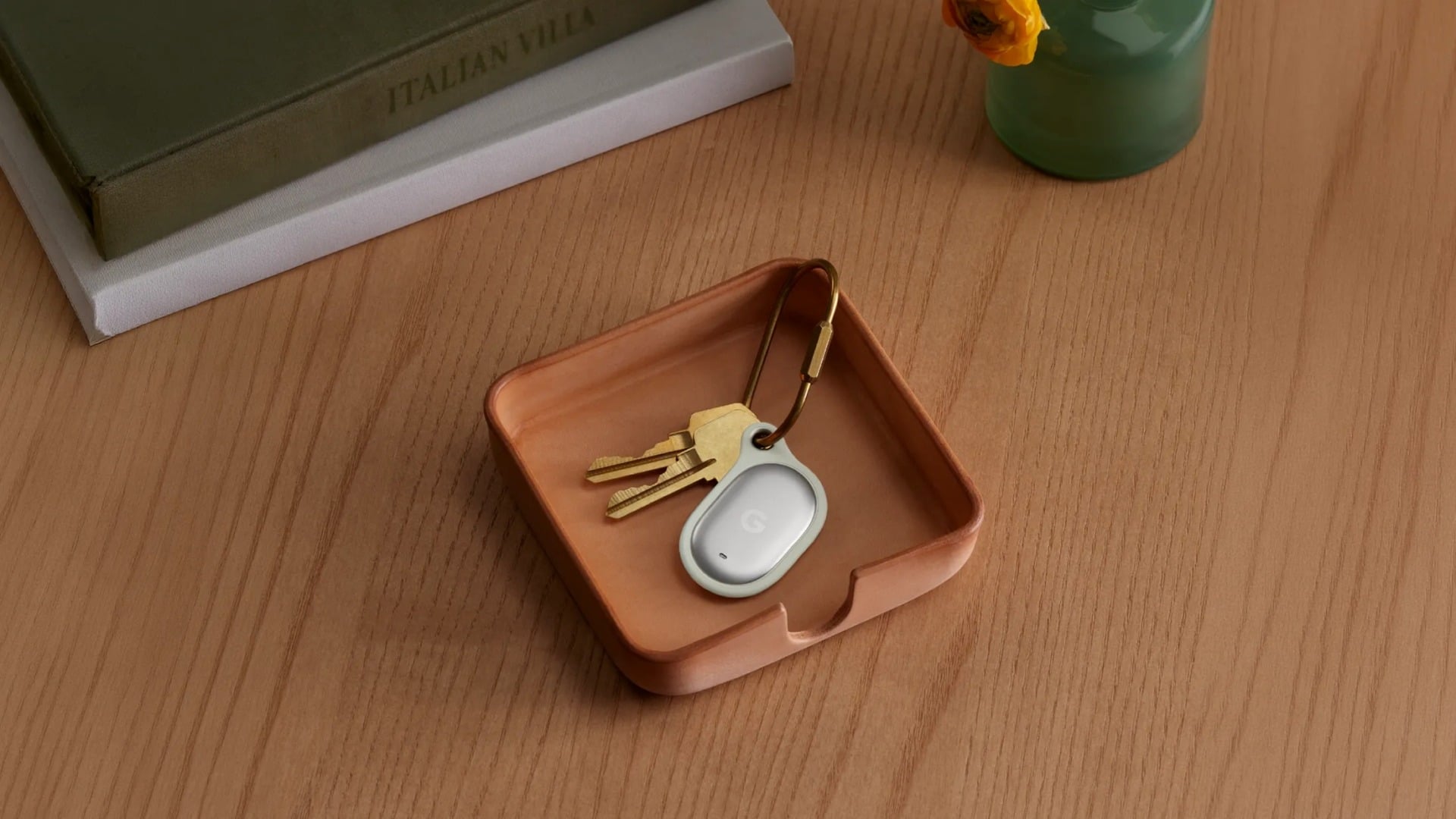

Fitbit Air offers $99 sleep-first tracking, Pixel Watch 4 pairing, and a cheaper Whoop alternative, but Google’s AI coaching remains unproven.
The post Fitbit Air vs Pixel Watch 4: Which Should You Wear at Night? appeared first on TechRepublic.


Google’s rumored Fitbit Air could launch soon as a screen-free fitness band, while leaks point to a broader Google Health rebrand.
The post Leak Points to Google’s ‘Fitbit Air’ as a Screen-Free Wearable for Health Tracking appeared first on TechRepublic.
5 euros. C'est le prix du tracker Bluetooth qu'un journaliste néerlandais a caché dans une carte postale et envoyé à une frégate de la marine royale des Pays-Bas. Le navire, le HNLMS Evertsen, est un bâtiment de défense antiaérienne affecté à la protection du porte-avions français Charles de Gaulle en Méditerranée. Sa valeur est estimée à 585 millions de dollars.
Le journaliste, de la chaîne régionale Omroep Gelderland, a simplement utilisé le système postal officiel que le ministère de la Défense néerlandais met à disposition pour envoyer du courrier aux soldats et marins en mission.
Les instructions sont publiques, détaillées, et librement accessibles en ligne. Les cartes postales et enveloppes ne sont pas passées aux rayons X, contrairement aux colis. Du coup, le tracker est arrivé à bord sans être détecté.
Le tracker a fonctionné pendant environ 24 heures. Il a montré le navire quittant le port d'Héraklion en Crète, naviguant d'abord vers l'ouest le long de la côte, puis bifurquant vers l'est en direction de Chypre. Pour un groupe aéronaval en mission, la position d'un navire d'escorte est une information opérationnelle sensible, et un adversaire qui sait où se trouve l'Evertsen peut en déduire la zone probable du porte-avions Charles de Gaulle.
Le ministère de la Défense a réagi en interdisant les cartes de voeux contenant des piles dans le courrier militaire, forcément. C'est la réponse directe au test bien sûr, mais bon, l'info qui gêne le plus c'est que le système de courrier militaire néerlandais ne filtre pas le contenu des enveloppes classiques, c'est un peu étonnant.
Bref, seulement 5 euros de matériel et un timbre ont suffi à localiser un navire de guerre en pleine mission. Le rapport coût-efficacité est quand même étonnant.
Source : Business AM

Perplexity's AI search engine encourages users to go deeper with their prompts by engaging in chat sessions that a lawsuit has alleged are often shared in their entirety with Google and Meta without users' knowledge or consent.
"This happened to every user regardless of whether or not they signed up for a Perplexity account," the lawsuit alleged, while stressing that "enormous volumes of sensitive information from both subscribed and non-subscribed users" are shared.
Using developer tools, the lawsuit found that opening prompts are always shared, as are any follow-up questions the search engine asks that a user clicks on. Privacy concerns are seemingly worse for non-subscribed users, the complaint alleged. Their initial prompts are shared with "a URL through which the entire conversation may be accessed by third parties like Meta and Google."


Dave Akerman of High Altitude Ballooning came up with a stratospherically cool application for Raspberry Pi Pico. In this guest blog, he shows you how to build and code a weather balloon tracker.
My main hobby is flying weather balloons, using GPS/radio trackers to relay their position to the ground, so they can be tracked and hopefully recovered. Trackers minimally consist of a GPS receiver feeding the current position to a small computer, which in turn controls a radio transmitter to send that position to the ground. That position is then fed to a live map to aid chasing and recovering the flight.
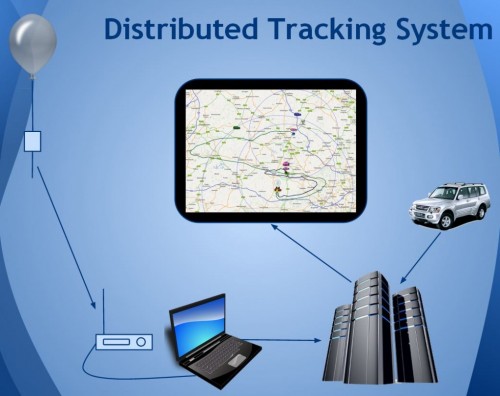
This essential role of the tracker computer is thus a simple one, and those making their own trackers can choose from a variety of microcontrollers chips and boards, for example Arduino boards, PIC microcontrollers or the BBC Microbit. Anything with a modest amount of code memory, data memory, processor power and I/O (serial, SPI etc depending on choice of GPS and radio) will do. A popular choice is Raspberry Pi, which, whilst a sledgehammer to crack a nut for tracking, does make it easy to add a camera.

When I see a new type of processor board, I feel duty bound to make it into a balloon tracker, so when I was asked to help test the new Raspberry Pi Pico, doing so was my first thought. It has plenty of I/O – SPI ports, I2C and serial all available – plus a unique ability (not that I need it for now) to add extra peripherals using the programmable PIO modules, so there was no doubt that it would be very usable. Also, having much more memory than typical microcontrollers, it offers the ability to add functions that would normally need a full Raspberry Pi board – for example on-board landing prediction. More on that later.
So a basic tracker has a GPS receiver and radio transmitter. To connect these to the Raspberry Pi Pico, I used a prototyping board where I mounted a UBlox GPS receiver, LoRa radio transmitter, and sockets for the Pico itself.
I don’t use breadboards as they are prone to intermittent connections that then waste programming time chasing a “bug” that’s actually a hardware problem. Besides, trackers need to be robust so I would need to solder one together eventually anyway.
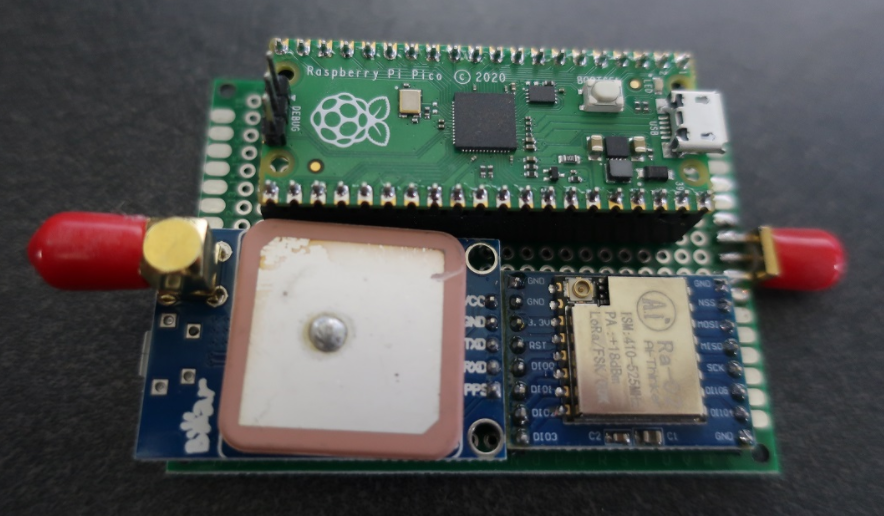
The particular UBlox GPS module I had handy only has a serial port brought out, so I couldn’t use I2C. No matter because, unlike most Arduino boards, the Raspberry Pi Pico isn’t limited to a single serial port.
The LoRa module connects via SPI and a single GPIO pin which the module uses to send its status (e.g. packet sent – ready to send next packet) to the Raspberry Pi Pico.
Finally, with the tracker working, I added an I2C environmental sensor to the board via a pin header, so the sensor can be placed in free air outside the tracker.
I decided to use C for my tracker rather than Python, for a variety of reasons. The main one is that I have plenty of existing C tracker code to work from, for Arduino and Raspberry Pi, but not so much Python. Secondly, I figured that most of the testers would be using Python so there might be more of a need to test the C toolchain.
The easiest route to getting the C/C++ toolchain working is to install on a Raspberry Pi 4. I couldn’t quite get the VSCode integration working (finger trouble I think) but anyway I’m quite happy to code with an editor and separate build window. So what I ended up with was Notepadd++ on my Windows PC to edit the code, with the source on a Raspberry Pi 4. I then had an ssh window open to run the compile/link steps, and a separate one running the debugger. The debugger downloads the binary to the Raspberry Pi Pico via the latter’s debug port.
For regular debug output from the program I connected a Raspberry Pi Pico serial port to an FTDI USB Serial TTL adapter connected back to my PC – see the image below.

At some point I’ll revisit this setup. First, it’s now possible to printf to a virtual USB serial port, so that frees up that Raspberry Pi Pico serial port. Secondly, I need to get that VSCode integration working.
My Raspberry Pi and Arduino tracker programs work slightly differently. On the Raspberry Pi, to separate the code for the different functions (GPS, radio, sensors etc) I use a separate thread for each. That allows for example a new packet to be sent to the radio transmitter without delay, even if a slow operation is running concurrently elsewhere.
On the Arduino, with no threads available, the code is still split into separate modules but each one is coded to run quickly without waiting in a loop for a peripheral to respond. For example some temperature sensors can take a second or so to take a measurement, and it’s vital not to sit in a loop waiting for the result.
The C toolchain for Raspberry Pi Pico doesn’t, by default, support threaded code unfortunately. Rather than rebuild it with support added, I opted for the approach I use with Arduino. So the main code starts with initialising each module individually, and then sits in a tight loop calling each module once per loop. It’s then up to each module to return control swiftly so that the loop keeps running quickly and no module is kept waiting for long.
The GPS code uses a serial port to receive NMEA data from the GPS. NMEA is the standard ASCII protocol used by pretty much every GPS module that exists, and includes the current date, time, latitude, longitude, altitude and other data. All we need to do is confirm that the data is valid, then read and store these key values. The other important function is to ensure that the GPS module is in the correct “flight mode” so that it works at high altitude – without this then it will stop providing new positions about 18km altitude.
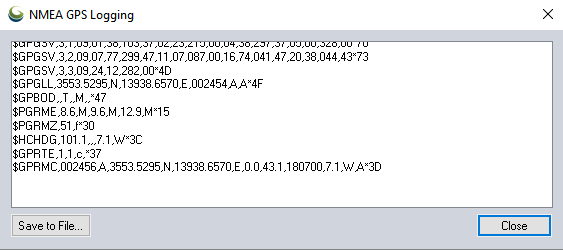
The LoRa radio code checks to see when the module is not transmitting, then builds a new telemetry message containing the above GPS data plus the name of the balloon, any other sensor data, and the landing prediction (see later).
This message is passed to the LoRa chip via SPI, then the chip switches on its radio and modulates the radio signal with the telemetry data. Once the message has been sent then the chip switches on its DIO0 output which is connected to the Raspberry Pi Pico so it knows when it can send another message.
All messages are received on the ground (in this case by a Pi LoRa receiver) and then uploaded to an internet database that in turn drives a live Google map (see image below).

Usefully for balloon trackers, the Raspberry Pi Pico can be powered directly from battery via an on-board buck-boost converter.
The input voltage connects through a potential divider to an analog sense input (ADC3) to allow for easy measurement of the battery voltage. Note that the ADC reference voltage is the 3.3V rail, which is noisy especially when used to power external devices such as the GPS and LoRa both of which have rather spiky power consumption requirements, so the code averages out many measurements.
An alternative would be to add a precise reference voltage to the ADC but I went for the zero cost software option.

The board temperature can also be measured, this time using ADC4. That’s less useful though for a tracker than an external temperature measurement, so I added a BME280 device for that. The Raspberry Pi Pico samples include code for the BME connected via SPI, but I chose I2C so I needed to replace the SPI calls with I2C calls. Pretty easy. The BME280 returns pressure – probably the most interesting environmental measurement for a balloon tracker – and humidity too.
So far, everything I’ve done could also be done on a basic AVR chip e.g. the Arduino Mini Pro, with some spare room. However, one very useful extra is to add a prediction of the landing point.
We use online flight prediction prior to launch, to determine roughly where the balloon will land (within a few miles) so we know it’s safe to launch without landing near a city for example. This uses a global wind prediction database plus some flight parameters (e.g. ascent rate and burst altitude) to predict the path of the balloon from launch to landing. It can be very accurate if those parameters are followed through on the flight itself.

Of course the actual flight never quite follows the plan – for example the launch might be later than planned, and in changing wind conditions that itself can move the landing point by miles. So it’s useful to have a live prediction during that flight, and indeed we have that, using the same wind database.
However, since it’s online, and 3G/4G can be patchy when chasing a balloon, it’s useful to have an independent landing prediction. This can be done in the tracker itself, by storing the wind speed and direction (deduced from GPS positions) on the way up, measuring the descent rate after burst, applying that to an atmospheric density model to plot the future descent rate to the ground, and then calculating the effect of the wind during descent and finally producing a landing position.
Typical Arduino boards don’t have enough memory to store the measured wind data, but the Raspberry Pi Pico has more than enough. I ported my existing code which:
Phew. Now we know pretty much everything about how balloon trackers work. Thanks Dave! Also, if you want to go on your own near-space flight, check out High Altitude Ballooning.
The post Raspberry Pi Pico balloon tracker appeared first on Raspberry Pi.
Tom Lee decided to combine his household with his sister-in-law during lockdown so that she could help him make childcare more manageable. The problem was, Tom’s household was a smidge frantic in the mornings, as the family struggled to be up and ready in time for his sister-in-law’s arrival.
Enter this Raspberry Pi–powered tracking device, which tells Tom when the family car is on its way with childcare support. The DIY appliance helps his household manage childcare routines like clockwork.
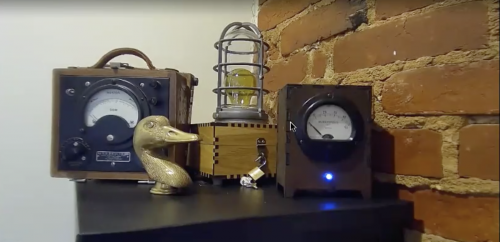
When the family car is moving, a light turns on, and an antique electrical meter points to 30…20…10 to show the estimated minutes until the driver arrives. The movements of the car come in from a cellular Sinotrack OBD2 dongle pointed at a traccar server running on Raspberry Pi 3.
Tom explains: “I have not found traccar to be the greatest to work with, but you can make it forward everything it decodes to your own script pretty easily.”
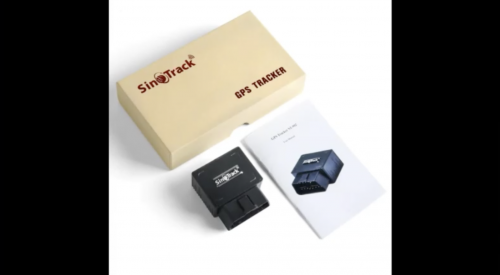
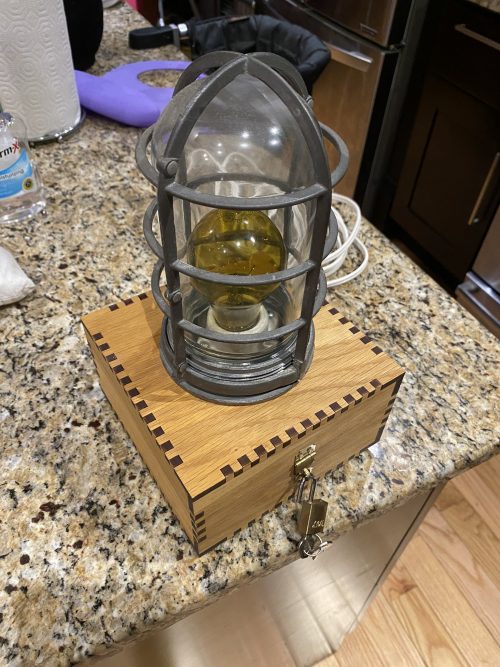
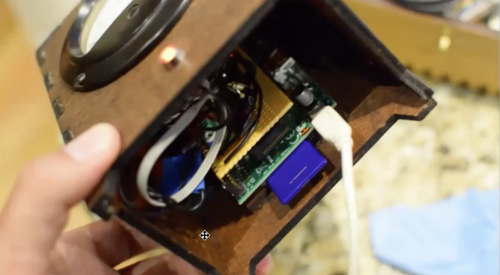
The case (below) is a lasercut design Tom had made by online laser cutting business Ponoko.
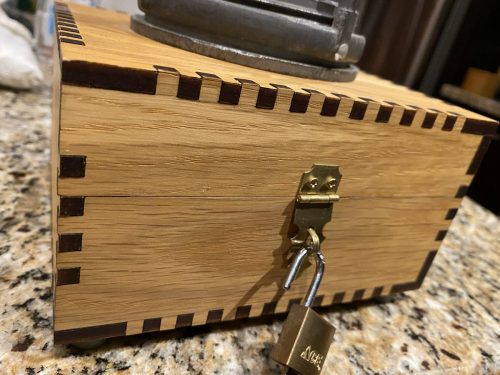
Inside there’s a solid state relay and a first-generation Raspberry Pi (hidden under the black cable in the photo below). This Raspberry Pi model doesn’t have wireless connectivity, and Tom found that getting wireless working was a bit tricky for this project.
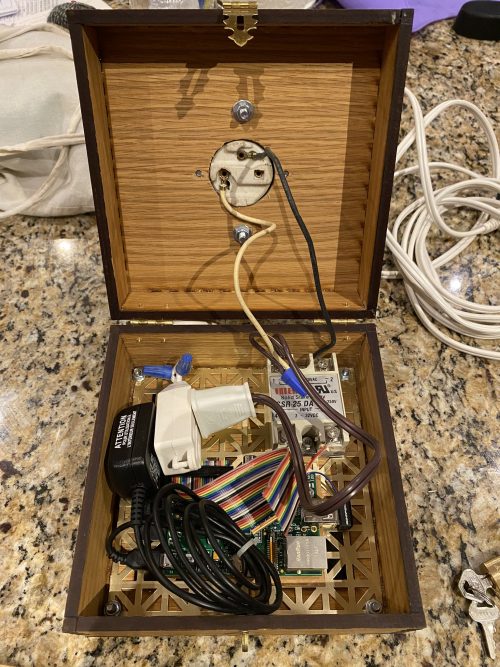
Tom produced a nice long webinar to show you exactly how this all works. So if you’d like to give this project a try, watch it for yourself.
Oh, and he’s only gone and uploaded every single bit of code you’ll need on GitHub (what an angel):
The post Steampunk ‘Help is coming’ Raspberry Pi alert system appeared first on Raspberry Pi.
‘Track-o-punches’ tracks the number of punches thrown during workouts with Raspberry Pi and a Realsense camera, and it also displays your progress and sets challenges on a touchscreen.
In this video, Cisco shows you how to set up the Realsense camera and a Python virtual environment, and how to install dependencies and OpenCV for Python on your Raspberry Pi.
A Realsense robotic camera tracks the boxing glove as it enters and leaves the frame. Colour segmentation means the camera can more precisely pick up when Cisco’s white boxing glove is in frame. He walks you through how to threshold images for colour segmentation at this point in the video.
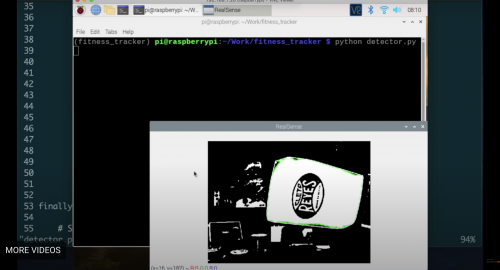
All this data is then crunched on Raspberry Pi. Cisco’s code counts the consecutive frames that the segmented object is present; if that number is greater than a threshold, the code sees this as a particular action.
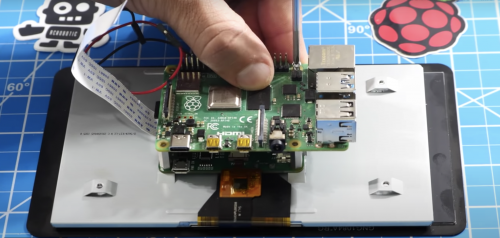
Cisco used this data to set punch goals for the user. The Raspberry Pi computer is connected to an official Raspberry Pi 7″ Touch Display in order to display “success” and “fail” messages as well as the countdown clock. Once a goal is reached, the touchscreen tells the boxer that they’ve successfully hit their target. Then the counter resets and a new goal is displayed. You can manipulate the code to set a time limit to reach a punch goal, but setting a countdown timer was the hardest bit to code for Cisco.
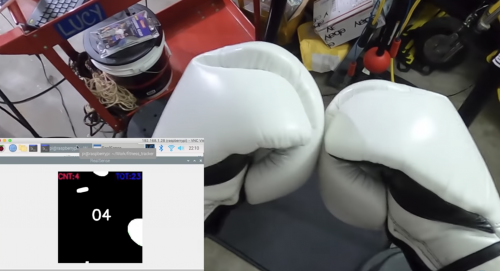
A mobile power source makes it easier to set up a Raspberry Pi wherever you want to work out. Cisco 3D-printed a mount for the Realsense camera and secured it on the ceiling so it could look down on him while he punched.
The post Track your punches with Raspberry Pi appeared first on Raspberry Pi.
On my holidays this year I enjoyed a walk in the Brecon Beacons. We set out nice and early, walked 22km through some of the best scenery in Britain, got a cup of tea from the snack van on the A470, and caught our bus home. “I enjoyed that walk,” I thought, “and I’d like to do one like it again.” What I DIDN’T think was, “I’d like to do that walk again, only I’d like it to be nearly three times as long, and it definitely ought to have about three times more ascent, or else why bother?”
Alan Peaty is a bit more hardcore than me, so, a couple of weekends ago, he set out on the Brecon Beacons 10 Peaks Ultramarathon: “10 peaks; 58 kilometres; 3000m of ascent; 24 hours”. He went with his friend Neil and a Raspberry Pi Zero in an eyecatching 3D-printed case.
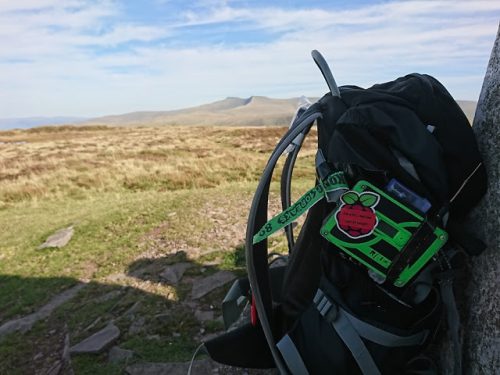
“The brick”, nestling on a backpack, with sunlit Corn Du and Pen y Fan in the background
The Raspberry Pi Zero ensemble – lovingly known as the brick or, to give it its longer name, the Rosie IoT Brick or RIoT Brick – is equipped with a u-blox Neo-6 GPS module, and it also receives GPS tracking info from some smaller trackers built using ESP32 microcontrollers. The whole lot is powered by a “rather weighty” 20,000mAh battery pack. Both the Raspberry Pi and the ESP32s were equipped with “all manner of additional sensors” to track location, temperature, humidity, pressure, altitude, and light level readings along the route.
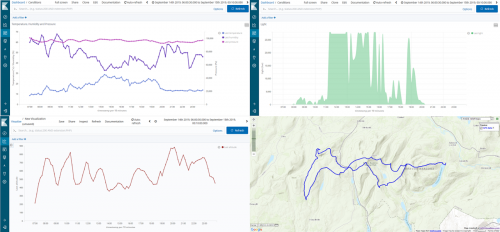
Where the route crosses over itself is the most fervently appreciated snack van in Wales
Via LoRa and occasional 3G/4G from the many, many peaks along the route, all this data ends up on Amazon Web Services. AWS, among other things, hosts an informative website where family members were able to keep track of Alan’s progress along windswept ridges and up 1:2 gradients, presumably the better to appreciate their cups of tea and central heating. Here’s a big diagram of how the kit that completed the ultramarathon fits together; it’s full of arrows, dotted lines, and acronyms.
Alan, Neil, the brick, and the rest of their gear completed the event in an impressive 18 hours and one minute, for which they got a medal.

Well earned
You can follow the adventures of this project, its antecedents, and the further evolutions that are doubtless to come, on the Rosie the Red Robot Twitter feed. And you can find everything to do with the project in this GitHub repository, so you can complete ultramarathons while weighed down with hefty power bricks and bristling with homemade tracking devices, too, if you like. Alan is raising money for Alzheimer’s Research UK with this event, and you can find his Brecon Beacons 10 Peaks JustGiving page here.
The post Tracking the Brecon Beacons ultramarathon with a Raspberry Pi Zero appeared first on Raspberry Pi.

 Lateo.net - Flux RSS en pagaille (pour en ajouter : @ moi)