 Connexion


The Raspberry Pi Foundation’s mission is to make computing and digital making accessible to all. To support young people at risk of educational disadvantage because they don’t have access to computing devices outside of school, we’ve set up the Learn at Home campaign. But access is only one part of the story. To learn more about what support these young people need across organisations and countries, we set up a panel discussion at the Tapia Celebration of Diversity in Computing conference.
The three panelists provided a stimulating discussion of some key issues in supporting young people in low-income areas in the UK, USA, and Guyana to engage with computing, and we hope their insights are of use to educators, youth workers, and organisations around the world.
Our panellists represent three different countries, and all have experience of teaching in schools and/or working with young people outside of the formal education system. Because of the differences between countries in terms of access to computing, having this spread of expertise and contexts allowed the panelists to compare lessons learned in different sectors and locations.

Panelist Lenandlar Singh is a Senior Lecturer in the Department of Computer Science at the University of Guyana. In Guyana, there is a range of computing-related courses for high school students, and access to optional qualifications in computer science at A level (age 17–18).

Panelist Yolanda Payne is a Research Associate at the Constellations Center at Georgia Tech, USA. In the US, computing curricula differ across states, although there is some national leadership through associations, centres, and corporations.

Christina Watson is Assistant Director of Design at UK Youth*, UK. The UK has a mandatory computing curriculum for learners aged 5–18, although curricula vary across the four home nations (England, Scotland, Wales, Northern Ireland).
As the moderator, I posed the following three questions, which the panelists answered from their own perspectives and experiences:
One of the aspects of the discussion that really stood out was the number of similarities across the panellists’ different contexts.
The first of these similarities was the lack of access to computing amongst young people from low-income families, particularly in more rural areas, across all three countries. These access issues concerned devices and digital infrastructure, but also the types of opportunities in and out of school that young people were able to engage with.

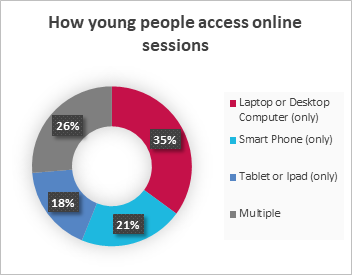
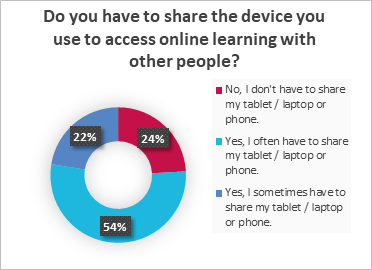
Christina (UK) shared results from a survey conducted with Aik Saath, a youth organisation in the UK Youth network (see graphs below). The results highlighted that very few young people in low-income areas had access to their own device for online learning, and mostly their access was to a smartphone or tablet rather than a computer. She pointed out that youth organisations can struggle to provide access to computing not only due to lack of funding, but also because they don’t have secure spaces in which to store equipment.
Lenandlar (Guyana) and Christina (UK) also discussed the need to improve the digital skills and confidence of teachers and youth workers so they can support young people with their computing education. While Lenandlar spoke about recruitment and training of qualified computing teachers in Guyana, Christina suggested that it was less important for youth workers in the UK to become experts in the field and more important for them to feel empowered and confident in supporting young people to explore computing and understand different career paths. UK Youth found that partnering with organisations that provided technical expertise (such as us at the Raspberry Pi Foundation) allowed youth workers to focus on the broader support that the young people needed.
Both Yolanda (US) and Lenandlar (Guyana) discussed the restrictive nature of the computing curriculum in schools, agreeing with Christina (UK) that outside of the classroom, there was more freedom for young people to explore different aspects of computing. All three agreed that introducing more fun and relevant activities into the curriculum made young people excited about computing and reduced stereotypes and misconceptions about the discipline and career. Yolanda explained that using modern, real-life examples and role models was a key part of connecting with young people and engaging them in computing.
Yolanda (US) advocated strongly for listening to students and their communities to help understand what is meaningful and relevant to them. One example of this approach is to help young people and their families understand the economics of technology, and how computing can be used to support, develop, and sustain businesses and employment in their community. As society has become more reliant on computing and technology, this can translate into real economic impact.
Both Yolanda (US) and Lenandlar (Guyana) emphasised the importance of providing opportunities for digital making, allowing students opportunities to become creators rather than just consumers of technology. They also highly recommended providing relevant contexts for computing and identifying links with different careers.
The panellists also discussed the importance of partnering with other education settings, with tech companies, and with non-profit organisations to provide access to equipment and opportunities for students in schools that have limited budgets and capacity for computing. These links can also highlight key role models and help to build strong relationships in the community between businesses and schools.
All of the panellists agreed that non-formal settings provided opportunities for further exploration and skill development outside of a strict curriculum. Christina (UK) particularly highlighted that these settings helped support young people and families who feel left behind by the education system, allowing them to develop practical skills and knowledge that can help their whole family. She emphasised the strong relationships that can be developed in these settings and how these can provide relatable role models for young people in low-income areas.
After the presentation, the panelists responded to the audience’s questions with some practical tips and suggestions for engaging young people in low-income communities with computing:
For anyone wishing to learn computing knowledge and skills, and the skills you need to teach young people in and out of school about these topics, we provide a wide range of free online training courses to cover all your needs. Educators in England can also access the free CPD that we and our consortium partners offer through the National Centre for Computing Education.
To help you support your learners in and out of school to engage with computing in ways that are meaningful and relevant for them, we recently published a guide on culturally relevant teaching.
We also support a worldwide network of volunteers to run CoderDojos, which are coding clubs for young people in local community spaces. Head over to the CoderDojo website to discover more about the free materials and help we’ve got for you.
We would like to thank our panellists Lenandlar Singh, Yolanda Payne, and Christina Watson for sharing their time and expertise, and the Tapia conference organisers for providing a great platform to discuss issues of diversity, equality, and inclusion in computing.
*UK Youth is a leading charity working across the UK with an open network of over 8000 youth organisations. The charity has influence as a sector-supporting infrastructure body, a direct delivery partner, and a campaigner for social change.
The post Perspectives on supporting young people in low-income areas to access and engage with computing appeared first on Raspberry Pi.
James Bruton (or @xrobotosuk on Instagram) built an IoT-controlled e-paper message board using Raspberry Pi. Updating it is easy: just edit a Google sheet, and the message board will update with the new data.
This smart message board uses e-paper, which has very low power consumption. Combining this with the Google Docs API (which allows you to write code to read and write to Google Docs) and Raspberry Pi makes it possible to build a message board that polls a Google Sheet and updates whenever there’s new data. This guide helped James write the Google Docs API code.
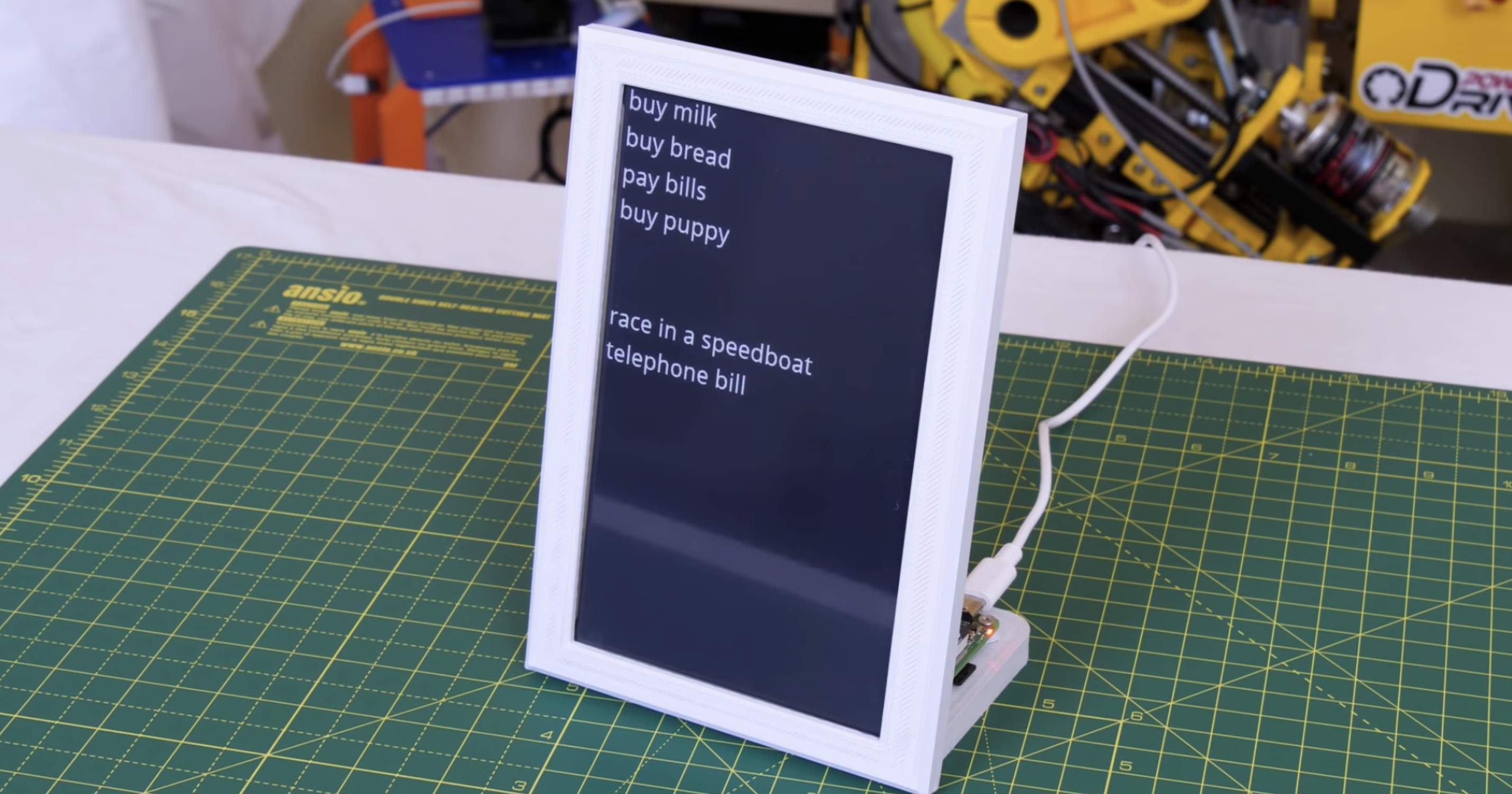
James’s original plan was to hook up his Raspberry Pi to a standard monitor and use Google Docs so people could update the display via mobile app. However, a standard monitor consumes a lot of power, due to its backlight, and if you set it to go into sleep mode, people would just walk past it and not see updates to the list unless they remember to wake the device up.
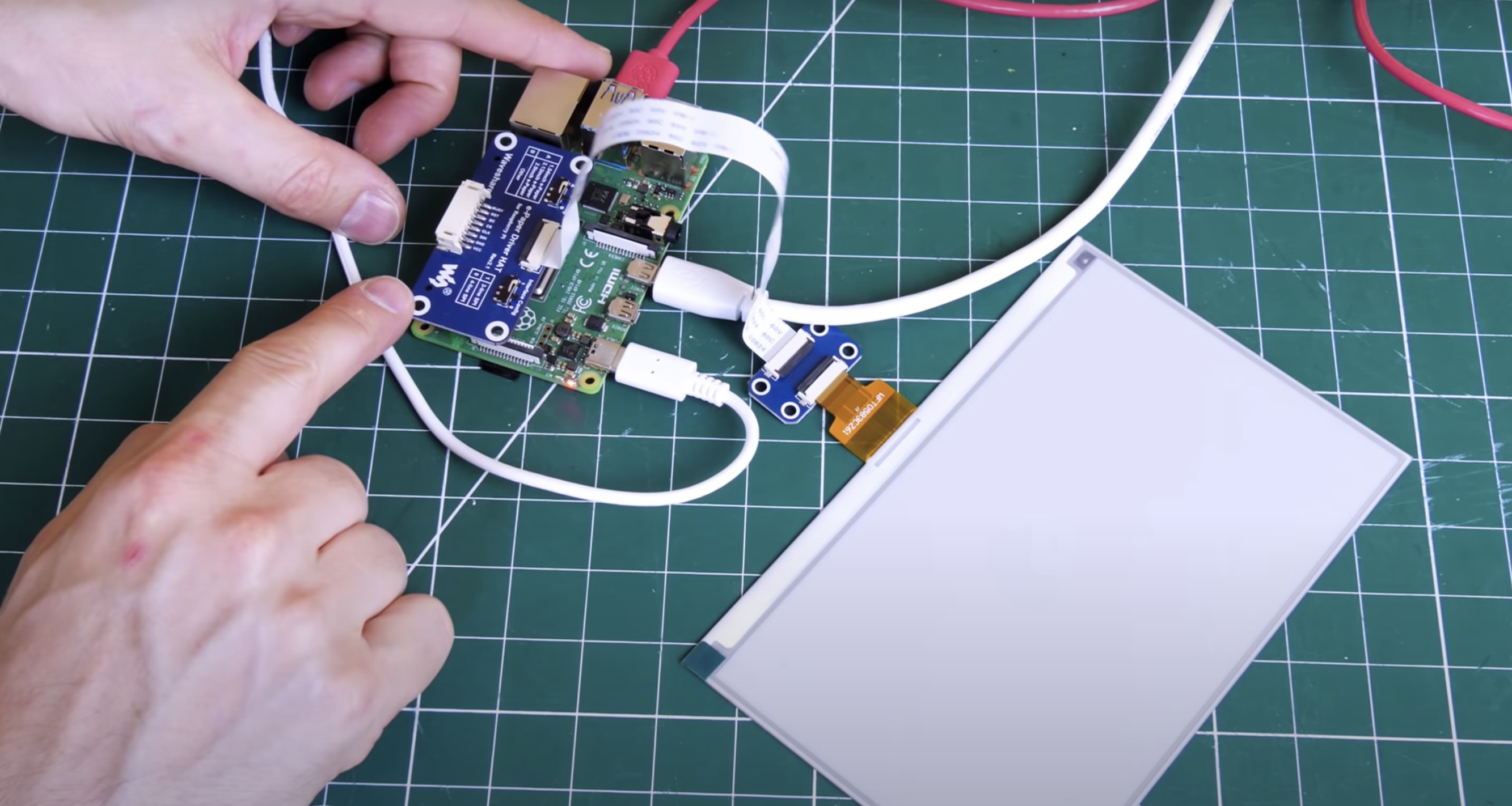
Enter e-paper (the same stuff used for Kindle devices), which only consumes power when it’s updating. Once you’ve got the info you want on the e-paper, you can even disconnect it entirely from your power source and the screen will still display whatever the least update told it to. James’s top tip for your project: go for the smallest e-paper display possible, as those things are expensive. He went with this one, which comes with a HAT for Raspberry Pi and a ribbon cable to connect the two.
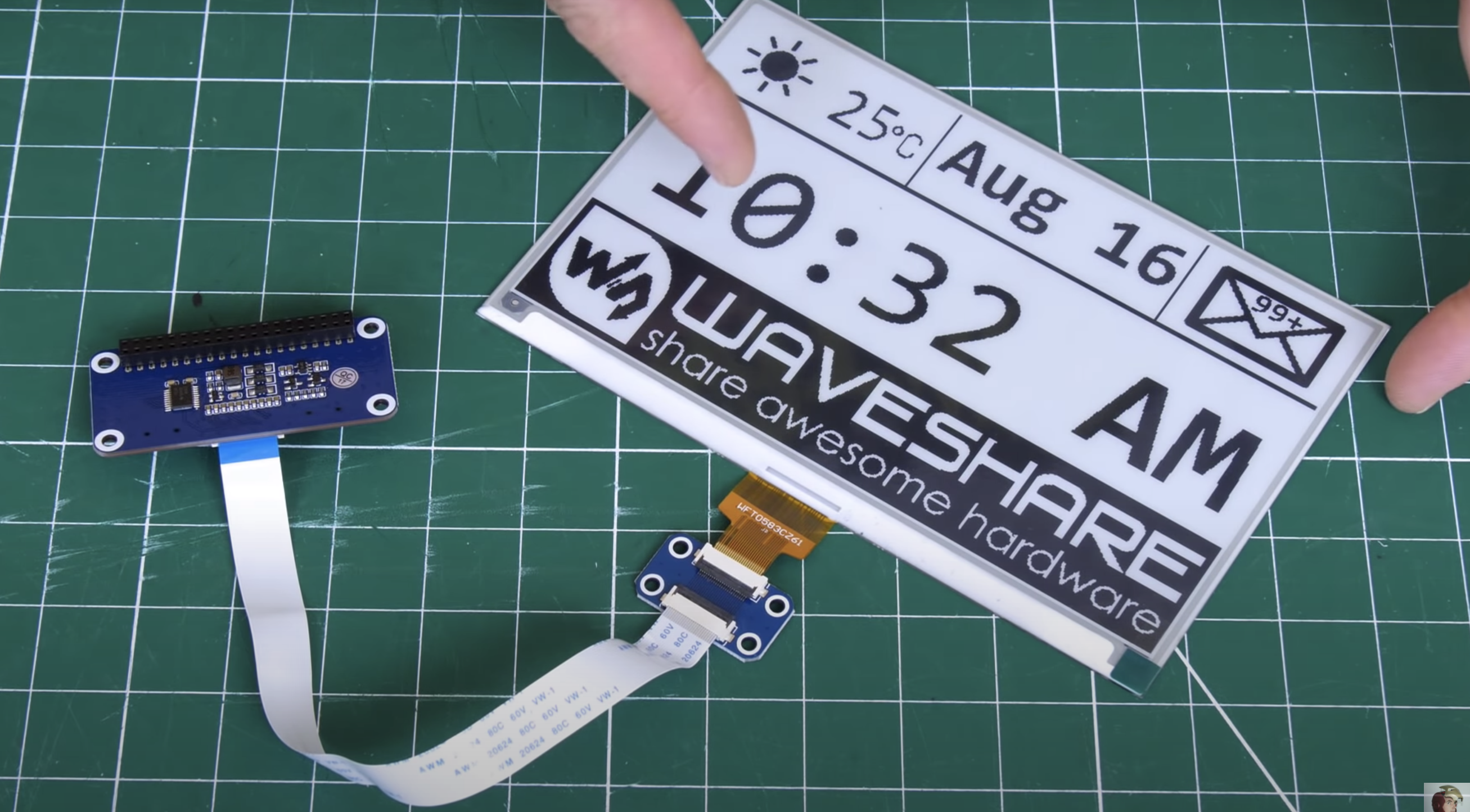
The HAT has an adaptor for plugging into the Raspberry Pi GPIO pins, and a breakout header for the SPI pins. James found it’s not as simple as enabling the SPI on his Raspberry Pi and the e-paper display springing to life: you need a bit of code to enable the SPI display to act as the main display for the Raspberry Pi. Luckily, the code for this is on the wiki of Waveshare, the producer of HAT and display James used for this project.
A 3D-printed case, which looks like a classic photo frame but with a hefty in-built stand to hold it up and provide enough space for the Raspberry Pi to sit on, is home to James’s finished smart to-do list. The e-paper is so light and thin it can just be sticky-taped into the frame.
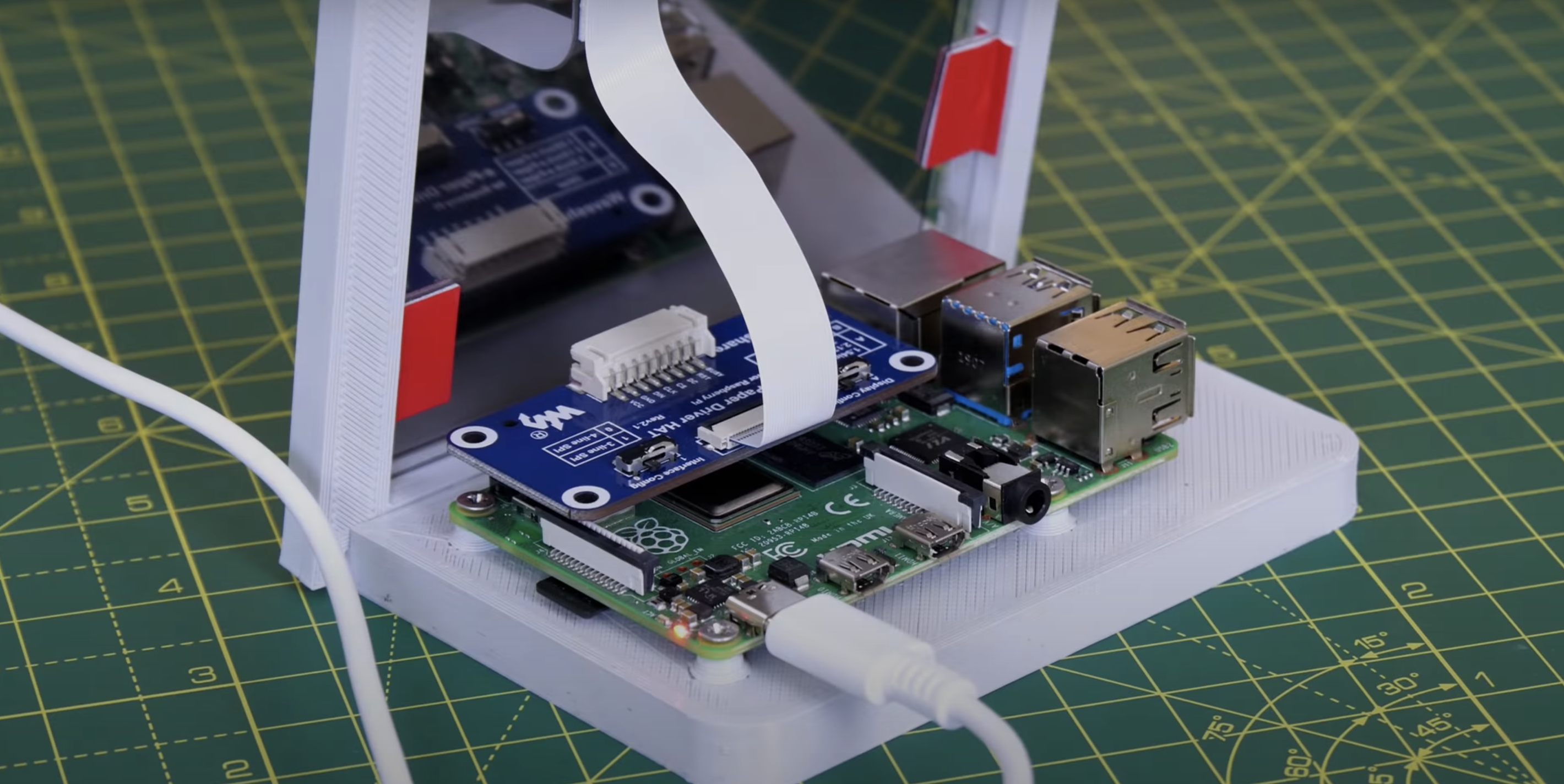
James’s creation is powered by Raspberry Pi 4, but you don’t need that much power, and he’s convinced you’ll be fine with any Raspberry Pi model that has 40 GPIO pins.
Extra points for this maker, as he’s put all the CAD files and code you’ll need to make your own e-paper message board on GitHub.
If you’re into e-paper stuff but are wedded to your handwritten to-do lists, then why not try building this super slow movie player instead? The blog squad went *nuts* for it when we posted it last month.
The post Build an e-paper to-do list with Raspberry Pi appeared first on Raspberry Pi.

 Lateo.net - Flux RSS en pagaille (pour en ajouter : @ moi)