 Connexion


Depuis ce week-end, bonne nouvelle les zamis, puisque ce bon vieux ffmpeg sait maintenant fabriquer des images qui n'ont jamais été filmées. Oui oui ! Et ça c'est possible grâce à un filtre qui s'appelle fruc_vulkan, qui permet de calculer le mouvement entre deux images grâce au bloc dédié des GeForce RTX, pour ensuite synthétiser ce qui manque entre les deux. Grâce à ça, un 24 images par seconde ressort sans souci en version 60 images par seconde.
La cadence de sortie se paramètre, donc vous pouvez aussi faire du 25 vers du 50, du 30 vers 60, ou n'importe quelle valeur intermédiaire. C'est donc beaucoup plus souple que le filtre équivalent côté AMD, frc_amf, qui ne sait que doubler la fréquence et ne fonctionner qu'en DirectX...
Fabriquer ce genre d'images intercalaires n'a rien de neuf, cela dit... L'outil RIFE convertissait déjà du 24 fps en 96 en 2020. Mais ce qui change ici, c'est qu'il n'y a plus de chaîne externe, plus d'aller-retour par des milliers de PNG, puisque tout tient dans le graphe de filtres, entre le décodage et l'encodage.
Le filtre logiciel historique de ffmpeg, minterpolate, existe pourtant depuis des années mais c'était loin d'être du temps réel. Alors que là, le vrai gain avec cette nouvelle feature, c'est qu'on passe en full temps réel. Ça veut dire que sur un catalogue à réencoder, l'interpolation cesse d'être l'élément qui bloque toute la chaîne de conversion.
Pour l'essayer il vous faut une RTX 30 ou plus récente. Il faut aussi compiler une version de développement car ce filtre est arrivé après la sortie de ffmpeg 9.0, ce qui veut dire que pour le moment, il n'est dans aucune release et ne sera dans aucun paquet avant la prochaine.
La commande suit ensuite le motif habituel des filtres Vulkan, qui veulent les images en mémoire GPU :
ffmpeg -init_hw_device vulkan=vk:0 -filter_hw_device vk -i entree.mp4 -vf "format=yuv420p,hwupload,fruc_vulkan=fps=60,hwdownload,format=yuv420p" sortie.mp4
L'auteur du filtre prévient quand même qu'en 2160p24, les réglages par défaut ne suivront pas en temps réel et qu'il faudra alors descendre la qualité d'estimation du mouvement. Ça s'écrit comme ceci :
fruc_vulkan=fps=60:perf=medium:grid=2
En traitement par lots maintenant, la question ne se pose pas, c'est juste plus lent.
Maintenant, les pros de l'encodage, redescendez de votre chaise parce que j'ai quand même quelques mauvaises nouvelles... Tout d'abord, on n'a aucune stat indépendante sur le débit ou la qualité. Et il y a aussi un défaut que l'auteur du patch documente lui-même... En fait, dans les zones sans texture, le moteur invente un mouvement faux mais cohérent, qui laisse des "fantômes" autour des objets. La parade existe heureusement, mais c'est une heuristique, qui demande quelques réglages à la main sur des échantillons.
Et il y a aussi un coût qu'on oublie... Car doubler la cadence, c'est donner deux fois plus d'images à avaler à l'encodeur, donc, il y a toujours une espèce de goulot d'étranglement. Et puis après il y a le rendu... un film de cinéma en 24 images par seconde qu'on monte à 60 prend immédiatement un aspect téléfilm que les cinéastes détestent !! Imaginez l'Odyssée de Nolan avec l'aspect visuel de Plus Belle La Vie... Ahahaha. Après sur de l'animation ou un ralenti, ça se défend bien sûr mais sur du cinéma, c'est un choix à prendre et pas une amélioration. En tout cas, c'est mon avis.
Ah et dernier point, parce que la confusion est déjà partout dans les commentaires sur le net : Tout ça se passe à l'encodage ! Je répète : A L'ENCODAGE ! Le fichier qui sort de ffmpeg est une vidéo NORMALE. Absolument personne n'aura besoin d'une carte graphique GeForce pour la regarder ! OK ? 😘
Source : Phoronix

Today we have a guest post from Igalia’s Iago Toral, who has spent the past year working on the Mesa graphic driver stack for Raspberry Pi 4.
It’s been nearly a year since we first announced that we were developing a Vulkan driver for the latest generation of Raspberry Pi devices (Raspberry Pi 4, Raspberry Pi 400, and Compute Module 4).
In June we released the source code for our prototype driver, and last month we announced that the driver had been successfully merged to Mesa upstream.
Today we have some very exciting news to share: as of 24 November the V3DV Vulkan Mesa driver for Raspberry Pi 4 has demonstrated Vulkan 1.0 conformance.
Khronos describes the conformance process as a way to ensure that its standards are consistently implemented by multiple vendors, so as to create a reliable platform for application developers. For each standard, Khronos provides a large conformance test suite (CTS) that implementations must pass successfully to be declared conformant; in the case of Vulkan 1.0, the CTS contains over 100,000 tests.
Vulkan 1.0 conformance is a major milestone in bringing Vulkan to Raspberry Pi, but it isn’t the end of the journey. Our team continues to work on all fronts to expand the Vulkan feature set, improve performance, and fix bugs. So stay tuned for future Vulkan updates!
The post Vulkan update: we’re conformant! appeared first on Raspberry Pi.
Today we have another guest post from Igalia’s Iago Toral, who has spent the past year working on the Mesa graphic driver stack for Raspberry Pi 4.
Four months ago we announced that work on the Vulkan effort for Raspberry Pi 4 (v3dv) was progressing well, and that we were moving the development to an open repository.
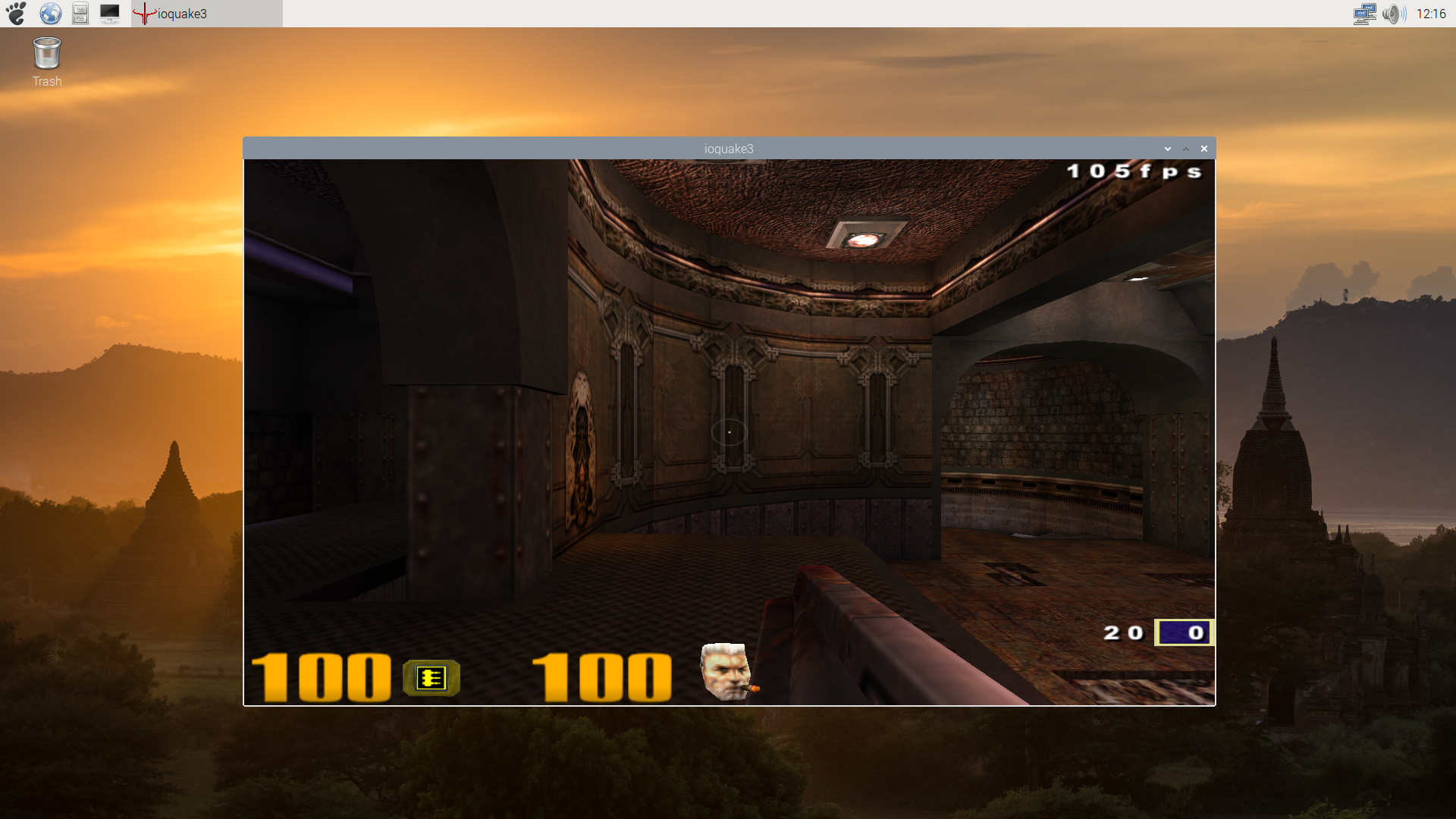
vkQuake3 on Raspberry Pi 4
This week, the Vulkan driver for Raspberry Pi 4 has been merged with Mesa upstream, becoming one of the official Vulkan Mesa drivers. This brings several advantages:
We said back in June that we were passing over 70,000 tests from the Khronos Conformance Test Suite for Vulkan 1.0, and that we had an implementation for a significant subset of the Vulkan 1.0 API. Now we are passing over 100,000 tests, and have implemented the full Vulkan 1.0 API. Only a handful of CTS tests remain to be fixed.
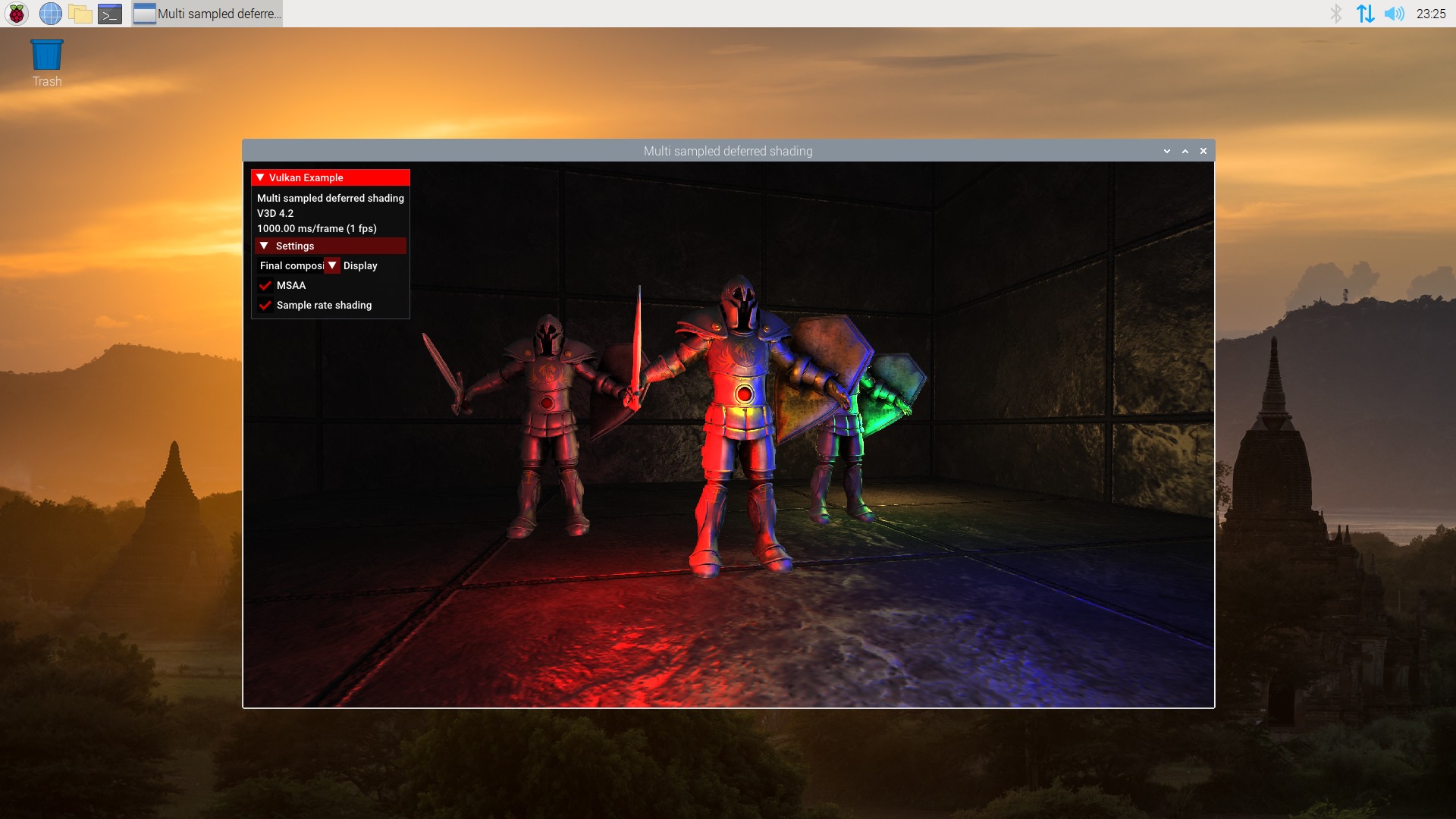
Sascha Willems’ deferred multisampling demo
This doesn’t mean that our work is done, of course. Although the CTS is a really complete test suite, it is not the same as a real use case. As mentioned some of our updates, we have been testing the driver with Vulkan ports of the original Quake trilogy, but deeper and more detailed testing is needed. So the next step will be to test the driver with more use cases, and fixing any bugs or performance issues that we find during the process.
The post Vulkan update: merged to Mesa appeared first on Raspberry Pi.
Today we have a guest post from Igalia’s Iago Toral, who has spent the past year working on the Mesa graphic driver stack for Raspberry Pi 4.
It is almost five months since we announced the Vulkan effort for Raspberry Pi 4. It was great to see how many people were excited about this, and today we would like to give you a status update on our progress over these last months.
When we announced the effort back in January we were at the point of rendering a coloured triangle, which required only minimal coverage of the Vulkan 1.0 API in the driver. Today, we are passing over 70,000 tests from the Khronos Conformance Test Suite for Vulkan 1.0 and we have an implementation for a significant subset of the Vulkan 1.0 API.
While I could detail here all the features that we have implemented, I am sure that list would get long and boring very quickly for most of you. So, instead, we would like to show you our progress through pics taken from a bunch of the popular Vulkan demos by Sascha Willems running on Raspberry Pi 4:
Hopefully that is more entertaining than a feature checklist and will help you visualize better where we are now compared to January’s coloured triangle.
Before you get too excited though, while these demos are nice, they are still a far cry from actual games and applications. We still have a lot of work to do before the driver can handle these more complex workloads. Even some of Sascha’s demos don’t run yet, whether because of driver bugs or unimplemented Vulkan features. We still have a lot of work ahead of us.
I would also like to give you an overview of some of the things we will be working on in the coming months:
Our first priority is to support the basic Vulkan 1.0 feature set. This will involve, at least, supporting compute shaders, input attachments, texel buffers, storage images, pipeline caches, and multisampling. There are some other features that we need to support in Vulkan 1.0, such as robust buffer access etc, but those are probably the largest ones we are currently missing.
Once we are feature-complete we will probably move focus to CTS conformance, which will be all about bugfixing, and making sure we handle spec corner cases. And once we are close to conformance, the driver should hopefully be stable and robust enough that we should probably start testing actual Vulkan applications and games to drive further bugfixing work.
Finally, there will be a lot of performance tuning and optimization work that we will probably tackle in the last stages of development.
So as I said before, we still have a long way to go!
Before we end this post, I would also like to share another important piece of news: starting today, we are moving development of the driver to an open repository. You can find instructions on how to build and install the driver here. I know this is something that many of you have been asking for, and I am sorry that it took us a few months to get here. But I think that now that we have a more stable driver infrastructure in place, and we don’t feel like we are constantly making large changes every other day, development should be a lot friendlier to external contributors than it may have been a few months ago.
So that’s everything we wanted to share today – I hope you are still excited about Vulkan and looking forward to future updates. In the meantime, if you have questions or are interested in contributing to the driver, join us on irc.freenode.net, #videocore channel.
The post Vulkan update: now with added source code appeared first on Raspberry Pi.
Following on from our recent announcement that Raspberry Pi 4 is OpenGL ES 3.1 conformant, we have some more news to share on the graphics front. We have started work on a much requested feature: an open-source Vulkan driver!
Standards body Khronos describes Vulkan as “a new generation graphics and compute API that provides high-efficiency, cross-platform access to modern GPUs”. The Vulkan API has been designed to better accommodate modern GPUs and address common performance bottlenecks in OpenGL, providing graphics developers with new means to squeeze the best performance out of the hardware.
The “first triangle” image is something of a VideoCore graphics tradition: while I arrived at Broadcom too late to witness the VideoCore III version, I still remember the first time James and Gary were able to get a flawless, single-tile, RGB triangle out of VideoCore IV in simulation. So, without further ado, here’s the VideoCore VI Vulkan version.
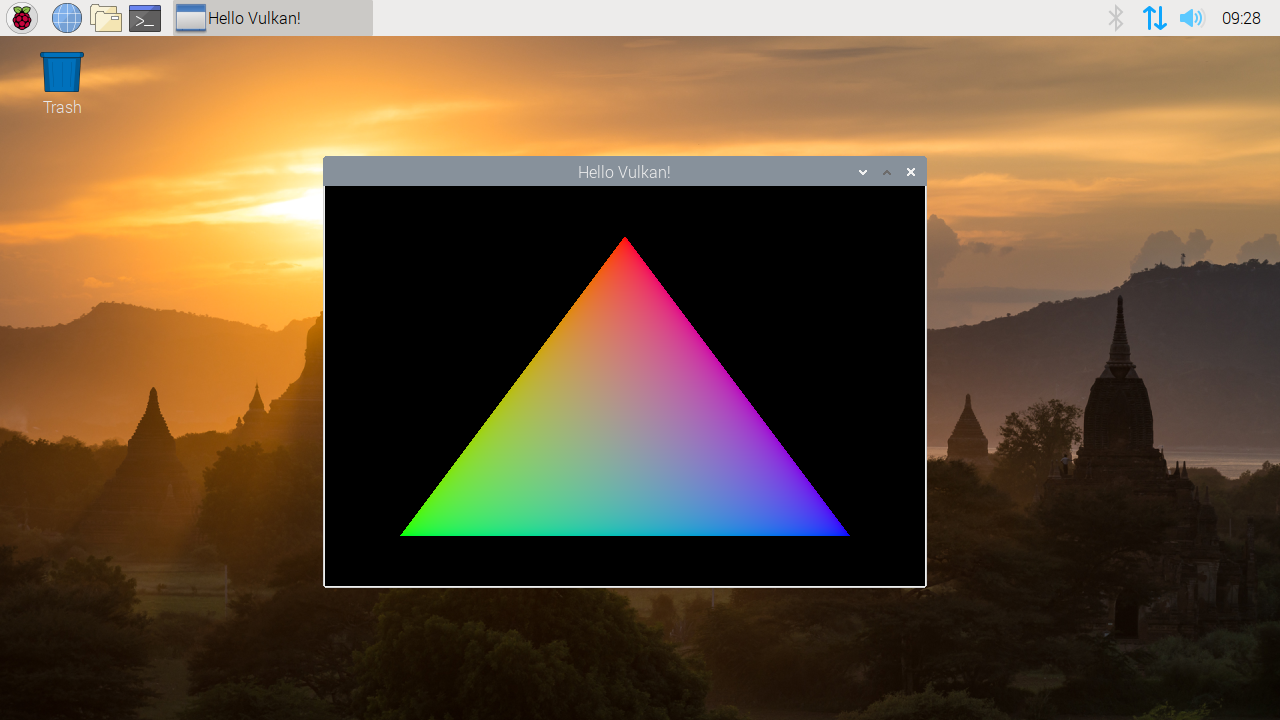
First triangle out of Vulkan
Before you get too excited, remember that this is just the start of the development process for Vulkan on Raspberry Pi. While there have been community efforts in the direction of Vulkan support (originally on VideoCore IV) as far back as 2018, Igalia has only been working on this new driver for a few weeks, and we still have a very long development roadmap ahead of us before we can put an actual driver in the hands of our users. So don’t hold your breath, and instead look forward to more news from us and Igalia as they make further development progress.
The post Vulkan is coming to Raspberry Pi: first triangle appeared first on Raspberry Pi.


 Lateo.net - Flux RSS en pagaille (pour en ajouter : @ moi)