 Connexion


Thermal Grizzly continue de développer son catalogue dans toutes les directions. Qu'il s'agisse de pâte thermique classique, de waterblocks plutôt accessibles ou haut de gamme, voire des accessoires de surveillance des connecteurs 12V-2x6, la marque allemande touche à tout. Mais avec l'annonce du godet TG x CENS GPU LN2 Container, l'entreprise fondée par Roman Hartung, aussi connu sous le pseudonyme der8auer, signe un véritable retour aux sources en s'adressant directement à la niche de l'overclocking extrême sous azote liquide. Développé avec CENS pour l'overclocking extrême Conçu en collaboration avec Clemens Nüssler, CENS pour les intimes et accessoirement double champion de la G.SKILL OC World Cup et spécialiste du bench sous LN2 (notamment sur RTX 3090 Ti et RTX 4090), ce godet a été pensé pour répondre aux exigences de l'overclocking extrême moderne. Il promet un contrôle thermique rapide et précis, capable de maintenir des températures contrôlées comme de descendre jusqu'à -196 °C en full-pot. […]
Lire la suiteVoilà un retour qui devrait faire plaisir aux amateurs d'overclocking extrême. Vince « K|NGP|N » Lucido, véritable légende de la discipline et longtemps indissociable des cartes graphiques EVGA, annonce officiellement son retour aux affaires. Et ce retour pourrait bien se faire avec ASUS. KINGPIN vient de lancer une nouvelle chaîne YouTube entièrement consacrée au hardware et, surtout, à l'overclocking extrême. Il confirme également avoir déjà reçu du matériel ASUS et Corsair et évoque des discussions avec des responsables haut placés chez ASUS. Bref, KINGPIN contre-attaque et la Force semble désormais être du côté d'ASUS. Une nouvelle chaîne entièrement consacrée à l'overclocking KINGPIN a donc créé une nouvelle chaîne baptisée Overclock Kingpin. Avec cette nouvelle chaîne, ce dernier veut séparer ses activités autour du E-Bike de celles consacrées au hardware. Cette nouvelle chaîne accueillera donc ses contenus PC et principalement ses sessions d'overclocking extrême. Vince Lucido explique disposer désormais d'un nouvel espace enfin calme et sans cours de Kung-Fu K-Pop, mais aussi suffisamment grand pour installer tout son matériel et reprendre sérieusement une activité qu'il pratique depuis plus de 25 ans. […]
Lire la suiteVous trouvez que votre watercooling manque un peu de puissance pour refroidir votre processeur ou votre carte graphique ? Alphacool a peut-être la solution avec son nouveau ES Chiller 700, un système de refroidissement qui ne fait clairement pas dans la demi-mesure. Ici, nous ne parlons plus d'un simple radiateur accompagné de quelques ventilateurs, mais carrément d'un groupe froid avec compresseur, capable d'offrir une puissance de refroidissement maximale de 700 watts. Bref, de quoi faire du gros gros froid sur ton proco ou ton GPU. Un compresseur et 700 watts de capacité de refroidissement Le ES Chiller 700 vient enrichir la gamme Enterprise Solutions d'Alphacool et vise principalement les serveurs et les stations de travail, même si rien n'empêchera les plus motivés de l'intégrer à une grosse configuration. Son fonctionnement est assez différent d'un watercooling traditionnel puisque le liquide est activement refroidi grâce à un système à compresseur. La machine est capable de prendre en charge jusqu'à 700 watts et assure également la circulation du liquide grâce à une pompe directement intégrée. Cette dernière propose une hauteur de refoulement maximale de 10 mètres, ce qui permet de se passer totalement d'une pompe supplémentaire dans la boucle. […]
Lire la suiteI wanted a clock that, annoyingly, didn't seem to exist.
Since childhood, my bedside clocks have been a series of red, seven-segment LED clock-radio specials from Walmart or Target. They are invariably cheap, simple, and long-lived—but they require manual intervention at the start and end of Daylight Saving Time and whenever the power flickers. After a recent power flicker, as I found myself standing by the sideboard holding down "TIME" and mashing the "HOUR" button, frustration boiled over, and I thought to myself, "We're a quarter of the way through the 21st century. There has to be a better way!"
My perfect clock would be self-setting. It would offer auto-DST adjustment (or not, depending on how this bill fares!). It would manage drift and always show the exact sub-second time. It would show that time on a red seven-segment display—not blue, not green, not yellow, and absolutely not white. And I shouldn't have to install any privacy-destroying garbage apps to make it work.
See why Deputy leads my best time and attendance software picks for 2026, plus options for field crews, small teams, low-cost time tracking, and QuickBooks users.
The post 5 Best Time and Attendance Software in 2026 appeared first on TechRepublic.
Une carte graphique NVIDIA RTX 5090 D vient d'être flashée à plus de 4 Ghz ! La queen est dans la place ! La carte est évidemment en provenance de GALAX, alors que le constructeur traversait une période légèrement trouble récemment, cette actualité nous rappelle à quel point ses composants sont adorés des overclockeurs ! La Team OGS a réussi à pousser le GPU de sa GALAX HOF OC LAB RTX 5090D à plus de 4 Ghz, avec une marque validée à 4002 Mhz, tandis que la mémoire était fixée à 870 Mhz. Il s'agit d'une RTX 5090D, version 1, la carte propose deux connecteurs 12 VHPWR, dispose de 36 phases d'alimentation, mesure 349.4 × 160 × 68 mm et propose des sorties vidéos DisplayPort 2.1b (UHBR20) x3 et HDMI 2.1a x1. La team a utilisé un godet Bitspower Strata LN2 Pot, couplé à de la pâte thermique Grizzly thermique Kryonaut Extreme et bien évidement quelques litres de LN2 ! Outre cette fréquence remarquable, la Team OGS s'est adjugée un record du monde GPUPI, en 35.377 secondes. […]
Lire la suiteAs remote and hybrid work becomes more popular, there are a number of reasons for organizations to use employee monitoring software.
The post The 10 Best Employee Monitoring Software Choices (2026) appeared first on TechRepublic.
Une ASUS ROG Astral RTX 5090 a été poussée à 3,7 Ghz, ce qui lui a permis de s'offrir trois records du monde ! Et tou cela avec un unique connecteur 12 VHPWR ! Et oui, la performance en est d'autant plus remarquable, point de mod afin de greffer un second connecteur 12 VHPWR, l'overclockeur SPLAVE s'est "contenté" de la configuration d'origine de la carte d'ASUS, il n'a pas non plus eu recours aux quelques modèles qui, d'origine bénéficient de deux connecteurs 12 VHPWR, tels que la RTX 5090 Lightning de MSI ou la RTX 5090 MATRIX d'ASUS ou les HOF de GALAX. Ce choix est indéniablement limitant puisque un unique connecteur n'apporte que 600 Watts, auxquels on additionne les 75 Watts du port Pci-e, ce qui est assez éloigné des Bios orientés overclocking qui dépassent les 2000 Watts. Rassurez-vous, SPLAVE a tout de même apporté quelques modifications à la carte d'ASUS, en démontant le système de refroidissement de base, afin d'installer un godet, pour jouer avec de l'azote liquide, en effet, le refroidissement de la gamme ASTRAL a beau proposé quatre ventilateurs (souvenez-vous de notre test de la ASUS ROG Astral GeForce RTX 5080), rien ne vaut l'azote liquide dans une quête de records du monde. […]
Lire la suiteA sci-fi writer wanted to add some realism to his fiction. The result: a Raspberry Pi-based Martian timepiece. Rosie Hattersley clocks in from the latest issue of The MagPi Magazine.
Ever since he first clapped eyes on Mars through the eyepiece of a telescope, Philip Ide has been obsessed with the Red Planet. He’s written several books based there and, many moons ago, set up a webpage showing the weather on Mars. This summer, Phil adapted his weather monitor and created a Raspberry Pi-powered Mars Clock.
After writing several clocks for his Mars Weather page, Phil wanted to make a physical clock: “something that could sit on my desk or such like, and tell the time on Mars.” It was to tell the time at any location on Mars, with presets for interesting locations “plus the sites of all the missions that made it to the surface – whether they pancaked or not.”
Another prerequisite was that the clock had to check for new mission file updates and IERS bulletins to see if a new leap second had been factored into Universal Coordinated Time.
“Martian seconds are longer,” explains Phil, “so everything was pointing at software rather than a mechanical device. Raspberry Pi was a shoo-in for the job”. However, he’d never used one.
“I’d written some software for calculating orbits and one of the target platforms was Raspberry Pi. I’d never actually seen it run on a Raspberry Pi but I knew it worked, so the door was already open.” He was able to check his data against a benchmark NASA provided. Knowing that the clocks on his Mars Weather page were accurate meant that Phil could focus on getting to grips with his new single-board computer.
He chose a 2GB Raspberry Pi 4 and official-inch touchscreen with a SmartiPi Touch 2 case. “Angles are everything,” he reasons. He also added a fan to lower the CPU temperature and extend the hardware’s life. Along with a power lead, the whole setup cost £130 from The Pi Hut.
Since his Mars Clock generates a lot of data, he made it skinnable so the user can choose which pieces of information to view at any one time. It can display two types of map – Viking or MOLA – depending on the co-ordinates for the clock. NASA provides a web map-tile service with many different data sets for Mars, so it should be possible to make the background an interactive map, allowing you to zoom in/out and scroll around. Getting these to work proved rather a headache as he hit incompatibilities with the libraries.
Phil wrote most of the software himself, with the exception of libraries for the keyboard and FTP which he pulled from GitHub. Here’s all the code.
He used JavaScript running on the Node.js/Electron framework. “This made for rapid development and is cross-platform, so I could write and test it on Windows and then move it to the Raspberry Pi,” he says. With the basic code written, Phil set about paring it back, reducing the number and duration of CPU time-slices the clock needed when running. “I like optimised software,” he explains.
His decades as a computer programmer meant other aspects were straightforward. The hardware is more than capable, he says of his first ever experience of Raspberry Pi, and the SmartiPi case makers had done a brilliant job. Everything fit together and in just a few minutes his Raspberry Pi was working.
Since completing his Mars Clock Phil has added a pi-hole and a NAS to his Raspberry Pi setup and says his confidence using them is such that he’s now contemplating challenging himself to build an orrery (a mechanical model of the solar system). “I have decades of programming experience, but I was still learning new things as the project progressed,” he says. “The nerd factor of any given object increases exponentially if you make it yourself.”
Check out page 26 in the latest issue of The MagPi Magazine for a step-by-step and to learn more about the maker, Phillip. You can read a PDF copy for free on The MagPi Magazine website if you’re not already a subscriber.
The post Mars Clock appeared first on Raspberry Pi.
One of our Approved Resellers in the Netherlands, Daniël from Raspberry Store, shared this Raspberry Pi–powered prayer reminder with us. It’s a useful application one of his customers made using a Raspberry Pi purchased from Daniël’s store.
As a Raspberry Pi Official Reseller, I love to see how customers use Raspberry Pi to create innovative products. Spying on bird nests, streaming audio to several locations, using them as a menu in a restaurant, or in a digital signage-solution… just awesome. But a few weeks ago, a customer showed me a new usage of Raspberry Pi: a prayer clock for mosques.
Made by Mawaqit, this is a narrowcasting solution with a Raspberry Pi at its heart and can be used on any browser or smartphone.
This project is simple in hardware terms. You just need Raspberry Pi 3 or Raspberry Pi 4, a TV screen, and a HDMI cable.
If you do not have an internet connection, you’ll also need an RTC clock
With the HDMI cable, Raspberry Pi can broadcast the clock — plus other useful info like the weather, or a reminder to silence your phone — on a wall in the mosque. Awesome! So simple, and yet I have not seen a solution like this before, despite Mawaqit’s application now being used in 51 countries and over 4609 mosques. And, last I checked, it has more than 185,000 active users!
You’ll need to install the pre-configured system image and flash the mawaqit.xz system image onto your Raspberry Pi’s SD card.
There are then two options: connected and offline. If you set yourself up using the connected option, you’ll be able to remotely control the app from your smartphone or any computer and tablet, which will be synchronised across all the screens connected to Raspberry Pi. You can also send messages and announcements. The latest updates from Mawaqit will install automatically.
If you need to choose the offline option and you’re not able to use the internet at your mosque, it’s important to equip your Raspberry Pi with RTC, because Raspberry Pi can’t keep time by itself.
All the software, bits of command line code, and step-by-step guidance you’ll need are available on this web page.
The Mawaqit project is free of charge, and the makers actually prohibit harnessing it for any monetary gain. The makers even created an API for you to create your own extentions — how great is that? So, if you want your own prayer clock for in a mosque, school, or just at home, take a look at Mawaqit.net.
The post Raspberry Pi prayer reminder clock appeared first on Raspberry Pi.
Nixie tubes: these electronic devices, which can display numerals or other information using glow discharge, made their first appearance in 1955, and they remain popular today because of their cool, vintage aesthetic. Though lots of companies manufactured these items back in the day, the name ‘Nixie’ is said to derive from a Burroughs corporation’s device named NIX I, an abbreviation of ‘Numeric Indicator eXperimental No. 1’.
We liked this recent project shared on reddit, where user farrp2011 used Raspberry Pi to make his Nixie tube display smart enough to tell the time.
A still from Farrp2011’s video shows he’s linked the bulb displays up to tell the time
Farrp2011’s set-up comprises six Nixie tubes controlled by Raspberry Pi 3, along with eight SN74HC shift registers to turn the 60 transistors on and off that ground the pin for the digits to be displayed on the Nixie tubes. Sounds complicated? Well, that’s why farrp2011 is our favourite kind of DIY builder — they’ve put all the code for the project on GitHub.
Tales of financial woe from users trying to source their own Nixie tubes litter the comments section on the reddit post, but farrp2011 says they were able to purchase the ones used in this project for about about $15 each on eBay. Here’s a closer look at the bulbs, courtesy of a previous post by farrp2011 sharing an earlier stage of project…
Farrp2011 got started with one, then two Nixie bulbs before building up to six for the final project
Digging through the comments, we learned that for the video, farrp2011 turned their house lights off to give the Nixie tubes a stronger glow. So the tubes are not as bright in real life as they appear. We also found out that the drop resistor is 22k, with 170V as the supply. Another comments section nugget we liked was the name of the voltage booster boards used for each bulb: “Pile o’Poo“.
Upcoming improvements farrp201 has planned include displaying the date, temperature, and Bitcoin exchange rate, but more suggestions are welcome. They’re also going to add some more capacitors to help with a noise problem and remove the need for the tubes to be turned off before changing the display.
And for extra nerd-points, we found this mesmerising video from Dalibor Farný showing the process of making Nixie tubes:
The post Retro Nixie tube lights get smart appeared first on Raspberry Pi.
What’s worse than a clock that doesn’t work? One that makes an “unbearably loud screeching noise” every minute of every day is a strong contender.
That was the aural nightmare facing YouTuber Burke McCabe. But rather than just fix the problem, he decided, in true Raspberry Pi community fashion, to go one step further. Because why not?
Burke showing YouTube viewers his invention
On the back of the clock, alongside the built-in mechanism controlling the clock’s arms, Burke added a Raspberry Pi to control a motor, which he hooked up to a webcam. The webcam was programmed using open computer vision library OpenCV to detect whenever a human face comes into view. Why would a clock need to know when someone looks at it? We’ll come to that.
First up, more on how that webcam works. OpenCV detects when a pair of eyes is in view of the webcam for three consecutive frames. You have to be really looking at it, not just passing it – that is, you have to be trying to tell the time. When this happens, the Raspberry Pi rotates the attached motor 180 degrees and back again.
But why? Well:
A clock that falls off the wall when you look at it
hello #invention #robot #raspberrypi
Burke has created a clock which, when you look at it to tell the time, falls off the wall.
We know: you want your own. So do we. Thankfully, Burke responded to calls in the comments on his original video for a more detailed technical walkthrough, and, boy, did he deliver.
How I made A clock that falls off the wall when you look at it
I dunno why I sounded depressed in this video Original Video – https://www.youtube.com/watch?v=R3HUuf6LGQE&t=41s The Code – https://github.com/SmothDragon/Fa…
In his walkthrough video, you get a good look at Burke’s entire setup, including extra batteries to make sure your Raspberry Pi gets enough juice, advice on how to get to grips with the code, and even the slots your different coloured wires need to go in. And so very, very much duct tape. Who’s going to start a GoFundMe to get Burke the glue gun sticks he so desperately needs? And hit subscribe for his YouTube channel while you’re at it!
The post This clock really, really doesn’t want to tell you the time appeared first on Raspberry Pi.
Designed to celebrate a new home, Instaclock uses two Raspberry Pi computers to great visual effect. Rosie Hattersley introduces maker Riccardo Cereser’s eyecatching build in issue #92 of The MagPi, out now.
There is nothing like a deadline to focus the mind! Copenhagen-based illustrator and UX designer Riccardo Cereser was about to move into a new apartment with his girlfriend, and was determined his new home would have a unique timepiece. Instaclock is the result.
Having studied at the Copenhagen Institute of Interactive Design, Italian-born Riccardo was keen that his new apartment would include an object that reflected his skills. He began sketching out ideas in Photoshop, starting with the idea of images representing numbers. “A hand showing fingers; a bicycle wheel resembling the number 0; candles on a cake; or the countdown numbers that appear in the beginning of a recording…” he suggests.
Having decided the idea could be used for an interactive clock, he quickly worked out how such an image-based concept might work displaying the hour, minutes, and seconds on displays in three wooden boxes.
Next, he set off around Copenhagen. “I started taking photos of anything that could resemble a number, aiming to create sets of ten pictures each based on a specific theme,” he recalls. “I then thought how awesome it would be to be able to switch the theme and create new sets on the go, potentially by using Instagram.”
This, Riccardo explains, is how the project became known as Instaclock. He was able to visualise his plan using Photoshop and made a prototype for his idea. It was clear that there was no need to display seconds, for example. Minute-by-minute updates would be fine.
Next up was figuring out how to call up and refresh the images displayed. Riccardo had some experience of using Raspberry Pi, and had even made a RetroPie games console. He also had a friend on the interactive design course who might just be able to help
Creative coder Andreas Refsgaard soon got involved, and was quickly able to come up with a Processing sketch for Instaclock.
Having spent dozens of hours looking into how an API might be used to pull in specific images for his clock, Riccardo was grateful that Andreas immediately grasped how it could be done. Riccardo then set parameters in cron for each Raspberry Pi used, so the Instaclock loaded images at startup and moved on to the next image set every ten seconds.
Because Riccardo wanted Instaclock to be as user-friendly as possible, they also added a rule that shuts a screen down if the button on top of it is pressed for ten seconds or more. The script was one he got from The MagPi.
One of the most fun aspects of this project was the opportunity to photograph, draw, or source online images that represent numerals. It was also the most time-consuming, of course. Images reside in Dropbox folders, so can be accessed from anywhere. Deciding on a suitable set of screens to display them, and boxes or frames for them, could also have dragged on but for an impromptu visit to Ikea. Riccardo fortuitously found that the Waveshare screens he selected would fit neatly into the store’s Dragan file organiser boxes. He was then able to laser-cut protective overlays secured with tiny magnets.
Find more fantastic projects, tutorials, and reviews in The MagPi #92, out now! You can get The MagPi #92 online at our store, or in print from all good newsagents and supermarkets. You can also access The MagPi magazine via our Android and iOS apps.
Don’t forget our super subscription offers, which include a free gift of a Raspberry Pi Zero W when you subscribe for twelve months.
And, as with all our Raspberry Pi Press publications, you can download the free PDF from our website.
The post Instaclock | The Magpi 92 appeared first on Raspberry Pi.
I have a soft spot for Raspberry Pi word clocks. True, they may not be as helpful as your standard clock face if you need to tell the time super quickly, but at least they’re easier to read than this binary clock built by engineerish.
“But Alex,” I hear you cry, “word clocks are so done. We’re over them. They’re so 2018. What’s so special about a word clock that you feel it to be worthy of a blog post?”
And the answer, dear reader, is Snake, the best gosh darn game to ever grace the screen of a mobile phone, ever — sorry, Candy Crush.
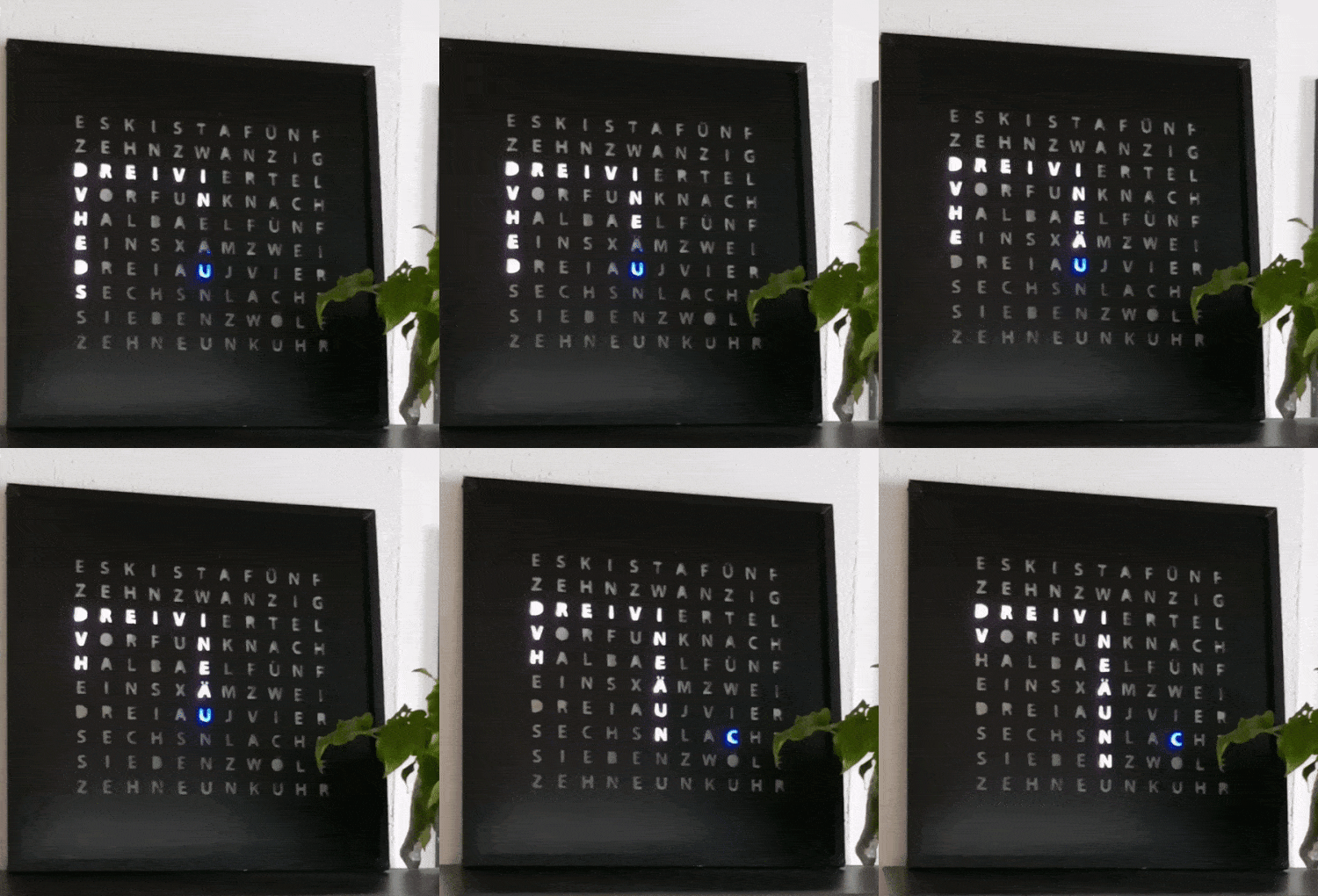
If you’re looking to build a word clock using your Raspberry Pi, here’s a great tutorial from Benedikt Künzel. And, if you’re looking to upgrade said word clock to another level and introduce it to Snake, well, actually, there isn’t a tutorial for that, yet, but there’s a whole conversation going on about it on Reddit, so you should check that out.
There is, however, a tutorial for coding your own game of Snake Slug on the Raspberry Pi Sense HAT here. So give that a whirl!
Until tomorrow, fair reader, adieu.
The post Playing Snake on a Raspberry Pi word clock appeared first on Raspberry Pi.


 Lateo.net - Flux RSS en pagaille (pour en ajouter : @ moi)