 Connexion


Since joining the Raspberry Pi Foundation as a Code Club Community Manager for Scotland earlier this year, I have seen first-hand the passion, dedication, and commitment of the Scottish community to support the digital, personal, and social skills of young people.

Code Club launched in schools in 2012 to give opportunities to children to share and develop their love of coding through free after-school clubs. Now we have clubs across the world connecting learners in having fun with digital technologies.
One of my first visits was to St. Mark’s Primary School in East Renfrewshire, where I met an amazing Code Club leader called Ashley Guy. Ashley only got involved in Code Club this year, but has already launched three clubs at her school!
I went to visit her Primary 2 and 3’s club, where the children were working on creating animations in Scratch to celebrate Code Club’s tenth birthday. It was a real joy to see the young children so engaged with our projects. The young coders worked both independently and together to create their own animations.
One of the girls I spoke to made a small error while coding her project, but she smiled and said, “I made a mistake, but that’s okay because that’s how we learn!” She showed just the kind of positive, problem-solving mindset that Code Club helps to cultivate.
Another school doing something incredible at their Code Club, led by Primary 7 teacher Fiona Lindsay, is Hillside School in Aberdeenshire. I love seeing the fun things they get up to, including celebrating Code Club’s 10th birthday in style with an impressive Code Club cake.
Fiona and her club are using the Code Club projects and resources to create their own exciting and challenging games. They’ve taken part in several of our online codealongs, and they also held an event at the school to showcase their great work — which even got the children’s parents coding!
Some of the young people who attend Code Club at Hillside School sent us videos about their experiences, why they come to Code Club, and what it means to them. Young coder Abisola describes Code Club in one word:
Young coder Crystal said, “We can experiment with what we know and make actual projects… At Code Club we learn about new blocks in Scratch and what blocks and patterns go together to make something.” Here is Crystal sharing her favourite part of Code Club:
Obuma also attends the Code Club at Hillside School. She shared what she gains from attending the sessions and why she thinks other young people should join a Code Club too:
“At Code Club we improve our teamwork skills, because there’s a lot of people in Code Club and most of the time you work together to create different things… Join [Code Club] 100%. It is so fun. It might not be something everyone would want to try, but if you did try it, then you would enjoy it.”
Obuma, young coder at Hillside School’s Code Club
One of the things I’ve enjoyed most as part of the Code Club team has been running an UK-wide online codealong to celebrate STEM Clubs Week. The theme was outer space, so our ‘Lost in space’ project in Scratch was the ideal fit.
During this practical coding session, classes across Scotland, England, and Wales had great fun coding the project together to animate rockets that move around space. We were thrilled by the feedback from teachers.
“The children really enjoyed the session. They are very proud of their animations and some children went on to extend their programs. All [the] children said they would love to do more codealongs!”
Teacher who took part in an online Code Club codealong
Thank you to everyone who got involved in the codealong. See you again at the next one.
To help you start your Code Club year with ease and fun, we will be launching new free resources for you and your club members. There’ll be a special pack filled with step-by-step instructions and engaging activities to kickstart your first session back, and a fun sticker chart to help young coders mark their progress.
We would love to see you at our practical and interactive online workshop ‘Ten reasons why coding is fun for everyone’ on Thursday 15 September at 16:00–17:00 BST, which will get you ready for National Coding Week (19–23 September). Come along to the workshop to get useful guidance and tips on how to engage everyone with coding.
We will also be holding lots of other exciting activities and sessions throughout the upcoming school term, including for World Space Week (4–10 October), the Moonhack coding challenge in October, and World Hello Day in November. So keep an eye on our Twitter @CodeClubUK for live updates.
Whether you’re interested in learning more about Code Club in Scotland, you have a specific question, or you just want to say hi, I’d love to hear from you. You can contact me at scotland@codeclub.org, or @CodeClubSco on Twitter. I’ll also be attending the Scottish Education Expo on 21 and 22 September along with other Code Club team members, so come along and say hello.
With the new school term approaching, now is a great time to register and start a Code Club at your school. You can find out more on our website, codeclub.org, or contact us directly at support@codeclub.org
The post Say “aye” to Code Club in Scotland appeared first on Raspberry Pi.
Our mission at the Raspberry Pi Foundation is to help learners get creative with technology and develop the skills and confidence they need to make things that matter to them using code and physical computing. One of the ways in which we do this is by offering learners a catalogue of more than 250 free digital making projects! Some of them have been translated into 30 languages, and they can be used with or without a Raspberry Pi computer.
Over the last 18 months, we’ve been developing an all-new format for these educational projects, designed to better support young people who want to learn coding, whether at home or in a coding club, on their digital making journey.
In the design process of the new project format, we combined:
While designing the new format for our free projects, we found that, as well as support and opportunities to practise while acquiring new skills and knowledge, learners need a learning journey that lets them gradually develop and demonstrate increasing independence.
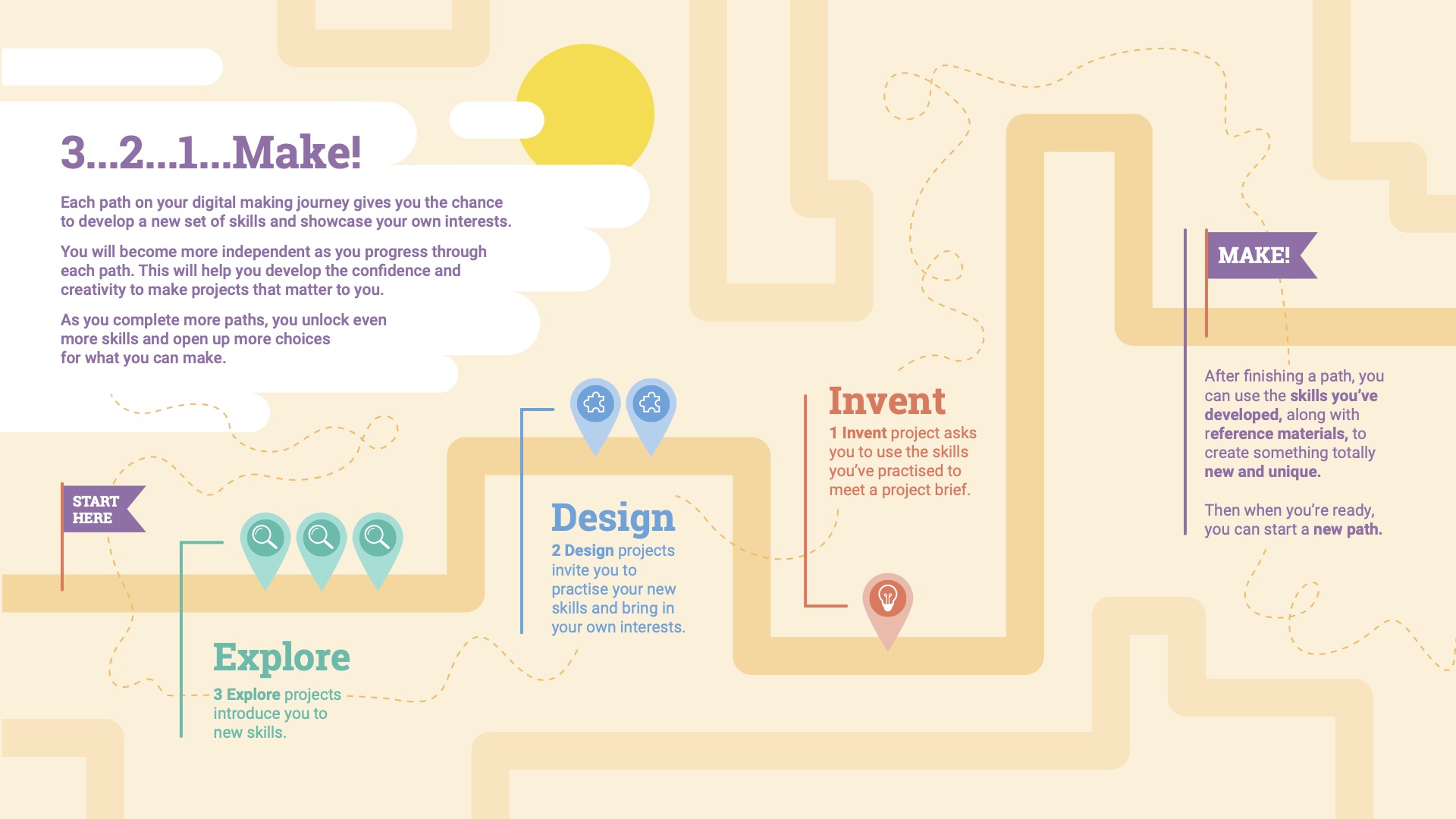
Therefore, each of our new learning paths is designed to scaffold learners’ success in the early stages, and then lets them build upon this learning by providing them with more open-ended tasks and inspirational ideas that learners can adapt or work from. Each learning path is made up of six projects, and the projects become less structured as learners progress along the path. This allows learners to practise their newly acquired skills and use their creativity and interests to make projects that matter to them. In this way, learners develop more and more independence, and when they reach the final project in the path, they are presented with a simple project brief. By this time they have the skills, practice, and confidence to meet this brief any way they choose!
The four new paths we’re sharing with you today focus on the Scratch language (including a physical computing path!), with a Python and a web development path coming very soon, and even more learning content in development.
When a learner is ready to develop a new set of coding skills, they choose one of our new paths to embark on. Each path is made up of three different types of projects in a 3-2-1 structure:
As a result of working through a path, learners are empowered to make their own ideas and create solutions to situations they or their communities face, with increased independence. And in order to develop more skills, learners can work through more paths, giving them even more choice about what they create in the future.
We’ve also introduced some new features to add interactivity, choice, and authenticity to each project in a path:
You can discover our new paths on our projects site right now!
We’ll be adding more content regularly, including completely new Python programming and web development paths coming very soon!
As always, we’d love to know what you think: here’s a feedback form for you to share comments you have about our new content!
For feedback specific to an individual project, you can use the feedback link in the footer of that project’s page as usual.
The post New free resources for young people to become independent digital makers appeared first on Raspberry Pi.


 Lateo.net - Flux RSS en pagaille (pour en ajouter : @ moi)