 Connexion


In November, our first-ever Kenya Partner Showcase brought together all our partners from across the country for two days of collaboration, learning, and shared strategy. What stood out to us most from the event was not just the diversity of work that the Kenyan partners are doing in computing education, but also the clear alignment that is emerging across partners, government, and communities.

Partners used the Showcase to present sessions about their journeys implementing the Foundation’s programmes, sharing achievements and insights that strengthened the collective learning space. The conversations during our two days together reflected a maturing ecosystem and demonstrated how structured government buy-in is accelerating adoption of our localised Computing Curriculum and influencing national policy spaces.
“Through these programmes, we are equipping young people to become future-ready leaders of integrity and impact.” – Betty Oloo Anderson, National Executive Officer, Kenya Girl Guides Association
It was encouraging to see how far computing education has evolved since we began working with Kenyan partners in 2023, signalling the collective effort and commitment driving this work forward.
The sessions revealed a powerful shift already taking place in classrooms, with partners demonstrating how embedding The Computing Curriculum into Teacher Professional Development frameworks is building teacher confidence and elevating the quality of classroom instruction through stronger digital competencies and culturally relevant pedagogy. The partner presentation on Experience AI, our AI literacy programme, was especially powerful. It reframed the national dialogue from questioning whether AI might take over the classroom to recognising the real capacities and limitations of AI tools, and the central role teachers play in guiding young people to use and create AI tools in safe, ethical ways.
“Running Raspberry Pi Foundation programmes has been a transformative journey. It has challenged us to innovate, document rigorously, and continually place learners at the center of every decision. The structured support, tools, and community of practice have enabled us to deliver programmes with greater impact and accountability.” Joel Kahindi, Programme Coordinator, STEAMLabs Africa
Hands-on demonstrations, from physical computing with Raspberry Pi Pico to teacher development transitions from Scratch to Python, highlighted how practical computing is taking root in both formal and non-formal learning environments.
Partners from remote and underserved regions shared how locally contextualised computing tools and programmes we offer are reaching learners in ASAL (arid and semi-arid land) regions, strengthening literacy and digital confidence even in low-resource settings. Complementing this, curriculum-focused partners highlighted how structured computing resources are being adapted for ASAL contexts, reinforcing foundational skills at scale. Efforts around community-centred connectivity are enabling schools, especially in underserved communities, to finally access reliable high-speed internet.
“Through [our partnership with the Raspberry Pi Foundation], we are not only strengthening our programmes but also expanding our vision for what meaningful learning can look like across underserved communities.” – Joel Kahindi, Programme Coordinator, STEAMLabs Africa
A notable pattern that emerged was how existing collaborations are now opening doors to new ones, with partners building on their relationship with us to form additional partnerships for devices, connectivity, and shared learning, creating a more holistic digital ecosystem for learners.
A major anchor of the Showcase was the Code Club co-creation sprint. Implementing partners worked through real barriers and opportunities: easier onboarding for educators, continuous training, integrating clubs into school calendars, learner-led ownership, and sustainable models that last beyond donor funding. There was strong interest in forming a unified Code Club Kenya partner network to streamline communication, resource-sharing, and visibility, and our team is now exploring what it would take to bring this to life.
One message echoed across sessions: the power of telling real stories. Partners expressed a shared desire to spotlight creator projects, Code Club leader journeys, and regional experiences more consistently, through social media, case studies and impact stories, and shared platforms, to make progress visible and inspire more schools to adopt computing and digital skills.
By the close of the Showcase, the takeaway was clear: Kenya’s digital learning ecosystem is no longer a set of isolated efforts — it is a coordinated network that shares priorities, evidence-based insights, and a commitment to scaling impact together. As one partner reflected, “This Showcase created a space for joint learning and will help us scale our impact across the country.” It felt evident, too, that bringing these voices into one room is itself part of the work. For us at the Foundation, this Showcase reaffirmed the responsibility and privilege of stewarding a network that is shaping what the future of learning computing in Kenya can look like.
The Showcase marks the beginning of a new, aligned chapter for computing education in Kenya, one driven by collaboration, clarity, and a shared belief that we go further when we go together. With shared priorities for 2026, the momentum continues, and we will be continuing to highlight where this collective work is headed next.
We want to thank you to all our partners — Frontier Counties Development Council (FCDC), STEAMLabs Africa, Young Scientists Kenya, Kenya Girl Guides Association, Oasis Mathare, Futures Infinite, EmpServe Kenya, Kenya Connect, Tech Kidz Africa, Riara University, and M-Lugha — for your leadership, dedication, and unwavering belief in what is possible when we learn and build together.
This Showcase was a reflection of your work, your commitment to learners, and your vision for a digitally empowered Kenya. We are grateful for your continued partnership and excited for all that lies ahead.
The post Fostering Kenya’s computing education ecosystem appeared first on Raspberry Pi Foundation.
The Hello World podcast is back, accompanying the latest issue of Hello World magazine. This new three-part miniseries explores some of the topics from issue 27 of Hello World, which focuses on integrating computing education across the curriculum.
Whether you’re a seasoned educator or just starting your journey with computing education, this podcast audio and video series is full of insights, inspiration, and practical tips from educators and experts around the world.
If you’re already subscribed, the new episodes will appear automatically in your favourite podcast app every Tuesday.
In our first episode, Raspberry Pi Foundation CEO Philip Colligan, CBE, sits down with teacher Janine Kirk to discuss why, in the age of AI, it’s more important than ever for young people to learn to code. Their conversation draws on ideas from our downloadable position paper, which is also featured in issue 27 of Hello World magazine.
Next week, we’ll bring you the buzz from the Computer Science Teachers Association’s annual conference in Cleveland, USA. We’re speaking with educators at the conference to hear how they’re integrating computer science across subjects, and you’ll hear their top classroom tips for teaching CS in context.
The miniseries wraps up with an in-depth discussion about AI education around the world. Hosted by Ben Garside, Senior Learning Manager for Experience AI, the conversation features Leonida Soi, Learning Manager in Kenya; Monika Katkute-Gelzine, CEO of Vedliai in Lithuania; and Aimy Lee, COO of Penang Science Cluster in Malaysia. Monika and Aimy work with us in our global Experience AI partner programme.
Each of these three podcast episode builds on the themes in the latest Hello World issue, where you’ll find inspiration and practical tips from educators who are integrating CS across a variety of subjects and for all school ages.
Subscribe to the Hello World podcast wherever you get your podcasts to never miss an episode, and to help us reach more teachers. If you’re subscribe to Hello World magazine (it’s free), we’ll also let you know when new podcast episodes are available.
And, don’t forget to share this new podcast series with your fellow educators.
The post New Hello World podcast series: Bringing computer science into every classroom appeared first on Raspberry Pi Foundation.
While in some countries, such as England, computing is taught as a standalone subject, in others, like the USA, computing concepts are integrated across the school curriculum. In our brand-new issue of Hello World, out today for free, educators share ways to integrate computer science into your classroom.
The argument for making computing and computer science (CS) standalone has often been about quality. We’ve heard educators say that teaching CS as part of other subjects can be hard, especially if you don’t have a CS background. On the other hand, integrating computer science into other subjects can offer a more accessible entry point for young people, broadening participation in CS education. And the critical thinking and problem-solving skills young people gain through computer science can enhance their learning of any subject.
As digital technology increasingly shapes our world, it may be that thoughtful cross-curricular CS education is the most effective way to empower all young people to become confident and critical technology users.
Issue 27 of Hello World features a range of practical articles with ideas for integrating CS over a variety of subjects at the primary, elementary, and high-school levels.
For example:
Also in this issue:
And much, much more.
Jake Baskin, Executive Director of the Computer Science Teachers Association, says in this issue of Hello World: “If you’re a teacher who is implementing CS principles in your classroom, you are a computer science teacher.”
Whether CS is your specialist subject or not, Hello World is full of ideas from your fellow educators on how to inspire your students.
The Hello World podcast is also back, with a miniseries in audio and video focused on integrated CS. If you’re subscribed via a podcast app, the three new episodes will show up in your feed on Tuesdays. Or you can already listen to the new episodes today via the exclusive links inside issue 27.
We hope you enjoy this issue of Hello World. Please get in touch with your article ideas or what you would like to see in the magazine.
The post Hello World 27 out now: Integrated computer science appeared first on Raspberry Pi Foundation.
Experience CS is a brand-new, free, integrated computer science curriculum for elementary and middle school educators and anyone working with students aged 8 to 14. A key design principle for Experience CS is that any educator can use it. You don’t need a computer science qualification or previous experience in teaching computer science classes to deliver engaging and creative learning experiences for your students. That’s why, as US Executive Director, I’m especially pleased to announce the launch of the first six units in the curriculum today.
Read on to explore the new learning materials available and how you can start using them in your school.
Experience CS enables educators to teach computer science through a curriculum that integrates CS concepts and knowledge into core subjects such as math, science, and social studies. Ashly Tritch, computer science immersion specialist at Olson Middle School in Bloomington, MN, USA, said, “Cross-curricular computer science is important because it shows students how coding and tech skills can be used in other subjects like math, science, or even art. It helps make learning more interesting and helps kids understand how computer science connects to real life. The lessons that the Raspberry Pi Foundation is creating will be super engaging, with fun and creative activities that keep students curious and excited to learn.”
Six integrated computer science units are available to access, with more on the way. The units have been released in beta, and we would love to hear your feedback as we continue to make updates to the lesson materials. Each of the units includes an overview with a summary of the topics covered and a series of six to eight lessons, including lesson plans, slide decks, student-facing materials, and starter projects within our Code Editor for Education.
We have designed the units to be cross-curricular, so students can learn about computer science concepts while deepening their understanding of related subject area content. For example, in “The me project,” grade 4 students (ages 9–10) explore the basics of Scratch, personalise sprites, and develop programs to create an animation that tells a story all about them. The project could be integrated into language arts lessons, enabling young learners to explore visual representation and write their own unique stories. In the “Smart communities” unit, students in grade 6 (ages 11–12) explore ways in which computing and technology can be used to create environments that are responsive to the needs of community members; this could be included within science or technology lessons.
Initially, the curriculum and resources have been mapped to national and local standards in the US and Canada, including the K–12 Computer Science Teachers Association Standards for Students, but they are available for teachers and students anywhere in the world to use.
You can register for a free Raspberry Pi Foundation account to start downloading the learning materials, including lesson plans, slide decks, student activity sheets and assessment criteria.
Experience CS has been built from the ground up to support safe, confident computing lessons in real classrooms. It includes self-directed creative projects using the popular programming language Scratch. We have built a version of Scratch that is especially for schools. That means it doesn’t have the community and sharing features that are central to the full Scratch platform. Instead, everything runs in a closed, classroom-ready environment that supports safeguarding policies and fits with school filtering systems. Simple and intuitive learning management features enable teachers to create accounts, set assignments, and review progress.
On the “Getting Started” page, teachers will find everything they need, including helpful videos and tutorials. The next webinar takes place on 16th July, where we will walk you through all six units available at launch and show you how easy it is to get started with the learning materials. Whether you’re a CS teacher, general education teacher, administrator, or someone who works with school-aged young people, this session will give you the practical tools and guidance you need to bring Experience CS to life in your classroom or program.
No matter your experience or skill level, the Experience CS content has been designed to be easy to use. However, we also provide professional development (PD) opportunities to help build confidence in teaching computer science.
Teachers anywhere in the world can access free online courses offering flexible, self-paced learning to help you confidently teach block-based programming with effective, inclusive computing pedagogy. Our new course will develop your understanding of semantic waves while highlighting research-backed activities and examples directly from Experience CS units.
Experience CS is supported by Google and builds on the fantastic work they have done to support educators and students through CS First. The team behind Experience CS includes educators with significant experience in teaching CS in elementary and middle school settings, and it is based on extensive classroom testing and research. We will continue to develop and improve the curriculum and resources in response to feedback from teachers and students. If you would like to help shape the future of Experience CS by testing new features and providing valuable feedback to improve the programme, sign up for the mailing list.
We can’t wait for you to explore Experience CS. We will continue to release more curriculum units as well as make the materials available in French and Spanish. Get a head start ready for the next school year by registering for a free Raspberry Pi Foundation account, which will allow you immediate access to all the lesson materials, and then create your school account to begin creating classes, add a scratch project to a class, manage student accounts and view student work.
The post Experience CS: A free integrated curriculum for computer science appeared first on Raspberry Pi Foundation.
Worldwide, the use of generative AI systems and related technologies is transforming our lives. From marketing and social media to education and industry, these technologies are being used everywhere, even if it isn’t obvious. Yet, despite the growing availability and use of generative AI tools, governments are still working out how and when to regulate such technologies to ensure they don’t cause unforeseen negative consequences.
How, then, do we equip our young people to deal with the opportunities and challenges that they are faced with from generative AI applications and associated systems? Teaching them about AI technologies seems an important first step. But what should we teach, when, and how?
The researchers at the Raspberry Pi Foundation have been looking at research that will help inform curriculum design and resource development to teach about AI in school. As part of this work, a number of research themes have been established, which we would like to explore with educators at a face-to-face symposium.
These research themes include the SEAME model, a simple way to analyse learning experiences about AI technology, as well as anthropomorphisation and how this might influence the formation of mental models about AI products. These research themes have become the cornerstone of the Experience AI resources we’ve co-developed with Google DeepMind. We will be using these materials to exemplify how the research themes can be used in practice as we review the recently published UNESCO AI competencies.
Most importantly, we will also review how we can help teachers and learners move from a rule-based view of problem solving to a data-driven view, from computational thinking 1.0 to computational thinking 2.0.
Over ten years ago, teachers in England experienced a large-scale change in what they needed to teach in computing lessons when programming was more formally added to the curriculum. As we enter a similar period of change — this time to introduce teaching about AI technologies — we want to hear from teachers as we collectively start to rethink our subject and curricula.
We think it is imperative that educators’ voices are heard as we reimagine computer science and add data-driven technologies into an already densely packed learning context.
On Saturday, 1 February 2025, we are running a Research and Educator Community Symposium in collaboration with the Raspberry Pi Computing Education Research Centre.
In this symposium, we will bring together UK educators and researchers to review research themes, competency frameworks, and early international AI curricula and to reflect on how to advance approaches to teaching about AI. This will be a practical day of collaboration to produce suggested key concepts and pedagogical approaches and highlight research needs.
This symposium focuses on teaching about AI technologies, so we will not be looking at which AI tools might be used in general teaching and learning or how they may change teacher productivity.
It is vitally important for young people to learn how to use AI technologies in their daily lives so they can become discerning consumers of AI applications. But how should we teach them? Please help us start to consider the best approach by signing up for our Research and Educator Community Symposium by 9 December 2024.
When: Saturday, 1 February 2025 (10am to 5pm)
Where: Raspberry Pi Foundation Offices, Cambridge
Who: If you have started teaching about AI, are creating related resources, are providing professional development about AI technologies, or if you are planning to do so, please apply to attend our symposium. Travel funding is available for teachers in England.
Please note we expect to be oversubscribed, so book early and tell us about why you are interested in taking part. We will notify all applicants of the outcome of their application by 11 December.
The post Teaching about AI in schools: Take part in our Research and Educator Community Symposium appeared first on Raspberry Pi Foundation.
Today our friends Mitch Resnick and Natalie Rusk from MIT’s Lifelong Kindergarten group tell you about OctoStudio, their free mobile app for children to create with code. Find their companion article for teachers in the upcoming issue of Hello World magazine, out for free on Monday 1 July.
When people see our new OctoStudio coding app, they often say that it reminds them of Scratch, the world’s most popular coding platform for kids. That’s not surprising, since the group of us developing OctoStudio were also involved in creating Scratch, with its distinctive building-block approach to programming. But there’s an important difference.
The difference is that we designed OctoStudio specifically for mobile phones and tablets, based on requests from educators in communities where children and families don’t have access to laptops and desktop computers, but do have access to mobile devices.
OctoStudio takes advantage of special features of mobile phones and tablets, such as built-in sensors, so young people can create projects that respond to shaking or tilting, or even ‘beam’ signals between devices. And because of the small size of mobile devices, children and families can create projects anytime anywhere, and integrate digital coding with physical making.
OctoStudio makes it easy for beginners to start creating. Children can choose a character from a diverse collection of emojis, draw their own in the OctoStudio paint editor, or take and edit a photo. With just a couple coding blocks, they can make their characters move, jump, speak, or glow — and respond to shaking, tilting, or tapping on the phone or tablet:
Since our Lifelong Kindergarten group at the MIT Media Lab launched OctoStudio as a free app in October 2023, we’ve been delighted by the creativity and diversity of projects that children around the world have created with OctoStudio. As examples, we’d like to share with you three different projects from three different continents.
When Xavier, a 10-year-old in Rwanda, started using OctoStudio, he was intrigued with the ‘When I shake’ block. He realized that he could create a step tracker project, by sensing how the phone shook each time he took a step.
From the emoji library in OctoStudio, Xavier selected a rabbit, and he programmed it to grow a little bit each time he took a step. The more steps, the bigger the rabbit. To test the project, Xavier ran around in a circle. When he looked at the rabbit again, he saw how big it had grown and exclaimed: “Now it’s mega huge!” After finishing his project, Xavier made and posted a video tutorial to show others how to make their own step tracker using only 5 coding blocks.
One popular way to get started with OctoStudio is to make a favorite animal out of craft materials, take a photo of it, then bring your creation to life on the screen with OctoStudio coding blocks. As part of the Brazilian Creative Learning Network, educators Renato Barboza and Simone Lederman offer creative learning workshops in which children design creatures using a combination of natural materials and modeling clay. In these ‘fantastical creatures’ workshops, facilitators ask questions to encourage participants to design not only the creatures, but also develop ideas about how their creatures interact within their environment.
For example, two sisters created imaginary creatures, one with long sticks for arms, the other with big eyes and wings made from leaves. The sisters then took photos and made their creatures come to life in OctoStudio, making them jump, glow, and fly. They recorded sounds and explained more about their creatures, including where they live and what they like to eat.
OctoStudio also opens up the possibility of projects involving multiple mobile devices, using the new ‘beam’ block to send signals between the devices (via Bluetooth). For example, children can make a character in a story or game look like it’s jumping from one device to another by sending a beam signal when the character reaches the edge of the screen.
Thawin, an elementary school student in Thailand, decided to use the ‘beam’ block to create a project about caring for the environment. He embedded one tablet in a cardboard cutout of a watering can, and programmed it to beam a signal each time he shook it as if he were sprinkling water. Then, he added a tree emoji to another tablet, and programmed the tree to grow each time it received a beam signal. He proudly shared his project with his classmates: each time someone shook the watering can, the tree grew.
To get started with OctoStudio, you can download it for free from app stores for Android and iOS phones and tablets. The app is translated into more than 25 languages, and comes with sample projects and mini-tutorials.
Here are some resources for learning and exploring more:
You can share your OctoStudio stories, photos, and videos on social media using @octostudioapp or #octostudio. We can’t wait to hear about your and your children’s experiences!
The post Create anytime, anywhere with OctoStudio appeared first on Raspberry Pi Foundation.
Over the past months, we’ve been working with two partner organisations, Team4Tech and Kenya Connect, to support computing education across the rural county of Machakos, Kenya.
In line with our 2025 strategy, we have started work to improve computing education for young people in Kenya and South Africa. We are especially eager to support communities that experience educational disadvantage. One of our projects in this area is in partnership with Team4Tech and Kenya Connect. Together we have set up the Dr Isaac Minae EdTech Hub in the community Kenya Connect supports in the rural county of Machakos, and we are training teachers so they can equip their learners with coding and physical computing skills.
“Watching teachers and students find joy and excitement in learning has been tremendous! The Raspberry Pi Foundation’s hands-on approach is helping learners make connections through seeing how technology can be used for innovation to solve problems. We are excited to be partnering with Raspberry Pi Foundation and Team4Tech in bringing technology to our rural community.”
– Sharon Runge, Executive Director, Kenya Connect
We are providing the Wamunyu community with the hardware and the skills and knowledge training they need to use digital technology to create solutions to problems they see. The training will make sure that teachers across Machakos can sustain the EdTech Hub and computing education activities independently. This is important because we want the community to be empowered to solve problems that matter to them and for all the local young people to have opportunities that are open to their peers in Nairobi, Kisumu, Mombasa, and other cities in Kenya.
In October this year, we travelled to Wamunyu to help Kenya Connect set up and launch the Dr Isaac Minae EdTech Hub, for which we provided hardware including Raspberry Pi 400 computers and physical computing kits with Raspberry Pi Pico microcontrollers, LEDs, buzzers, buttons, motors and more. We also held a teacher training session to start setting up the local educators with the skills and knowledge they need to teach coding and physical computing. In the training, educators brought a range of experiences with using computers. Some were unfamiliar with computer hardware, but at the end of the training session, they all had designed and created physical computing projects using electronic circuits and code. It was hugely inspiring to work with these teachers and see their enthusiasm and commitment to learning.
Through our two-year partnership with Kenya Connect, we aim to reach at least 1000 learners between the ages of 9 to 14 from 62 schools in Machakos county. We will work with at least 150 teachers to build their knowledge, skills, and confidence to teach coding, digital making, and robotics, and to run after-school Code Clubs. We’ll help teachers offer learning experiences based on our established learning paths to their students, and these experiences will include basic coding skills aligned to Kenya’s Competency Based Curriculum (CBC). We are putting particular focus on adapting our learning content so that teachers in Machakos can offer culturally relevant educational activities in their community.
“Our partnership with the Raspberry Pi Foundation will open up new avenues for teachers to learn coding and physical computing. This is in line with the current Competency Based Curriculum that requires students to start learning coding at an early age. Though coding is entrenched in the curriculum, teachers are ill-prepared and schools lack devices. We are so grateful to the Raspberry Pi Foundation for providing teachers and students access to devices and the Raspberry Pi learning paths.”
– Patrick Munguti, Director of Education and Technology, Kenya Connect
Next up for our work on this project is to continue supporting Kenya Connect to scale the program in the county.
In all our work in Sub-Saharan Africa, we are committed to strengthening and growing our partnerships with locally led youth and community organisations, the private sector, and the public sector, in line with our mission to open up more opportunities for young people to realise their full potential through the power of computing and digital technologies.
Our work in Sub-Saharan Africa is generously funded by the Ezrah Charitable Trust.
The post Training teachers and empowering students in Machakos, Kenya appeared first on Raspberry Pi.
In our current series of research seminars, we are exploring how computing can be connected to other subjects using cross-disciplinary approaches. In July 2022, our speakers were Professor Yasmin Kafai from the University of Pennsylvania and Elaine Griggs, an award-winning teacher from Pembroke High School, Massachusetts, and we heard about their use of e-textiles to engage learners and broaden participation in computing.
The spaces where young people learn about computing have sometimes been referred to as clubhouses to relate them to the places where sports or social clubs meet. A computing clubhouse can be a place where learners come together to take part in computing activities and gain a sense of community. However, as Yasmin pointed out, research has found that computing clubhouses have also often been dominated by electronics and robotics activities. This has led to clubhouses being perceived as exclusive spaces for only the young people who share those interests.
Yasmin’s work is motivated by the idea of building new clubhouses that include a wide range of computing interests, with a specific focus on spaces for e-textile activities, to show that diverse uses of computing are valued.
Yasmin’s research into learning through e-textiles has taken place in formal computing lessons in high schools in America, by developing and using a unit from the Exploring Computer Science curriculum called “Stitching the Loop”. In the seminar, we were fortunate to be joined by Elaine, a computer science and robotics teacher who has used the scheme of work in her classroom. Elaine’s learners have designed wearable electronic textile projects with microcontrollers, sensors, LEDs, and conductive thread. With these materials, learners have made items such as paper circuits, wristbands, and collaborative banners, as shown in the examples below.
The hands-on, project-based approach in the e-textile unit has many similarities with the principles underpinning the work we do at the Raspberry Pi Foundation. However, there were also two specific teaching approaches that were embedded in Elaine’s teaching in order to promote equitable learning in the computing classroom:
As teachers with a set of learning outcomes to deliver, we can often feel a certain pressure to structure lessons so that our learners spend the most time on activities that we feel will deliver those outcomes. I was very interested to hear how in these e-textile projects, there was a deliberate choice to foreground the aesthetics. When learners spent time designing their artefacts and could link it to their own interests, they had a sense of personal ownership over what they were making, which encouraged them to persevere and overcome any difficulties with sewing, code, or electronics.
My personal reflection was that creating a digital textiles project based on a set template could be considered the equivalent of teaching programming by copying code. Both approaches would increase the chances of a successful output, but wouldn’t necessarily increase learners’ understanding of computing concepts, nor encourage learners to perceive computing as a subject where everyone belongs. I was inspired by the insights shared at the seminar about how prioritising design time can lead to more diverse representations of making.
Elaine told us that learners were encouraged to create a digital portfolio which included photographs of the different stages of their project, examples of their code, and reflections on the problems that they had solved during the project. In the picture below, the learner has shared both the ‘wrong’ and ‘right’ versions of their code, along with an explanation of how they debugged the error.
Yasmin explained the equity-oriented theories underpinning the digital portfolio teaching approach. The learners’ reflections allowed deeper understanding of the computing and electronics concepts involved and helped to balance the personalised nature of their artefacts with the need to meet learning goals.
Yasmin also emphasised how important it was for learners to take part in a series of projects so that they encountered computing and electronics concepts more than once. In this way, reflective journalling can be seen as an equitable teaching approach because it helps to move learners on from their initial engagement into more complex projects. Thinking back to the clubhouse model, it is equally important for learners to be valued for their complex e-textile projects as it is for their complex robotics projects, and so portfolios of a series of e-textile projects show that a diverse range of learners can be successful in computing at the highest levels.
If you’re thinking about ways of introducing e-textile activities to your learners, there are some useful resources here:
We’re having a short break in the seminar series but will be back in September when we’ll be continuing to find out more about cross-disciplinary approaches to computing.
In our next seminar on Tuesday 6 September 2022 at 17:00–18:30 BST / 12:00–13:30 EST / 9:00–10:30 PST / 18:00–19:30 CEST, we’ll be hearing all about the links between computing and dance, with our speaker Genevieve Smith-Nunes (University of Cambridge). Genevieve will be speaking about data ethics for the computing classroom through biometrics, ballet, and augmented reality (AR) which promises to be a fascinating perspective on bringing computing to new audiences.
The post Using e-textiles to deliver equitable computing lessons and broaden participation appeared first on Raspberry Pi.
When we teach children and young people about computing, do we consider how the subject has developed over time, how it relates to our students’ lives, and importantly, what our values are? Professor Pratim Sengupta shared some of the research he and his colleagues have been working on related to these questions in our June 2022 research seminar.
Pratim revealed a complex landscape where we as educators can be easily trapped by what may seem like good intentions, thereby limiting learning and excluding some students. His presentation, entitled Computational heterogeneity in STEM education, introduced me to the concept of technocentrism and profoundly impacted my thinking about the essence of programming and how I research it. In this blog post, particularly for those unable to attend this stimulating seminar, I give my simplified view of the rich philosophy shared by Pratim, and my fledgling steps to admit to my technocentrism and overcome it.
Between May 2022 and November 2022, we are hosting a new series of free research seminars about teaching computing in different ways and in different contexts. This second seminar of the series was well attended with participants from the USA, Asia, Africa, and Europe, including teachers, researchers, and industry professionals, who contributed to a lively and thought-provoking discussion.
Pratim is a learning scientist based in Canada with a long and distinguished career. He has studied how to teach computational modelling in K-12 STEM classrooms and investigates the complexity of learning. Grounded in working with teachers and students, he brings together computing, science, education, and social justice. Based on his work at Northwestern University, Vanderbilt University, and now with the Mind, Matter and Media lab at the University of Calgary, Pratim has published hundreds of academic papers over some 20 years. Pratim and his team challenge how we focus on making technological artefacts — code for code’s sake — in computing education, and refocuses us on the human experience of coding and learning to code.
Pratim started the seminar by giving us an overview of some of the key ideas that underpin the way that computing is usually taught in schools, including technocentrism (Figure 1).
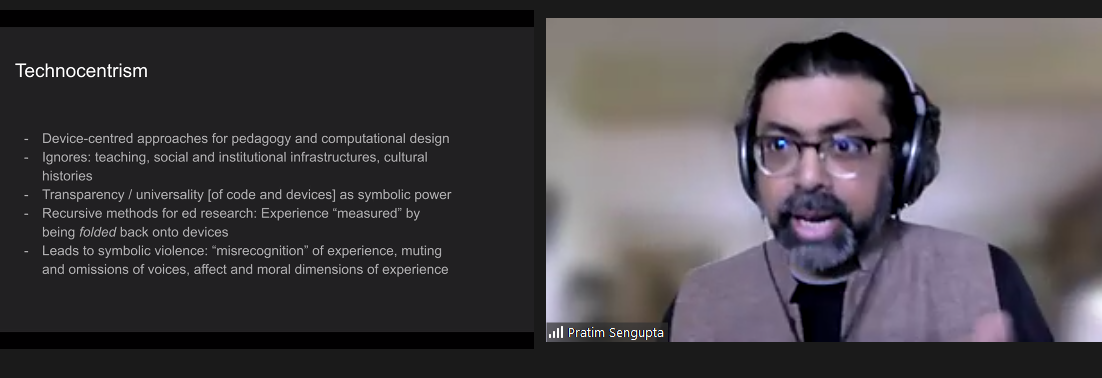
I have come to a simplified understanding of technocentrism. To me, it appears to be a way of looking at how we learn about computer science, where one might:
Pratim recounted several research activities that he and his team have engaged with. These examples highlight instances of potential technocentrism and investigate how we might overcome it.
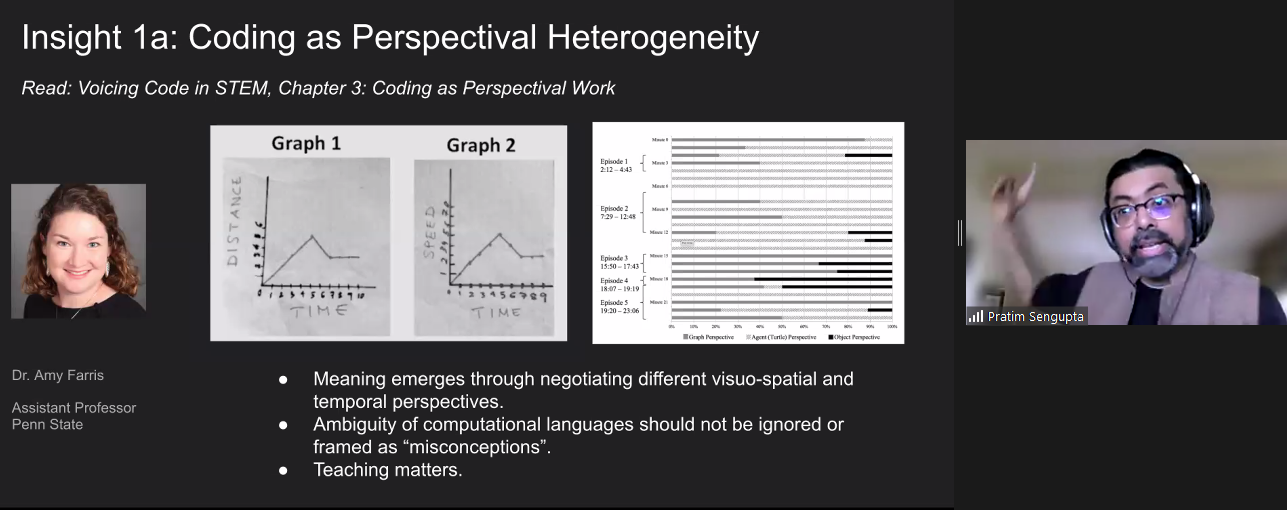
In the first example research activity, Pratim explained how in maths and physics lessons, middle school students were asked to develop models to solve time and distance problems. Rather than immediately coding a potential solution, the researcher and teacher supported the learners to spend much time developing a shared perspective to understand and express the problems first. Students grappled with different ways of representing the context, including graphs and diagrams (see Figure 2). Gradually and carefully, teachers shifted students to recognise what was important and what was not, to move them toward a meaningful language to describe and solve the problems.
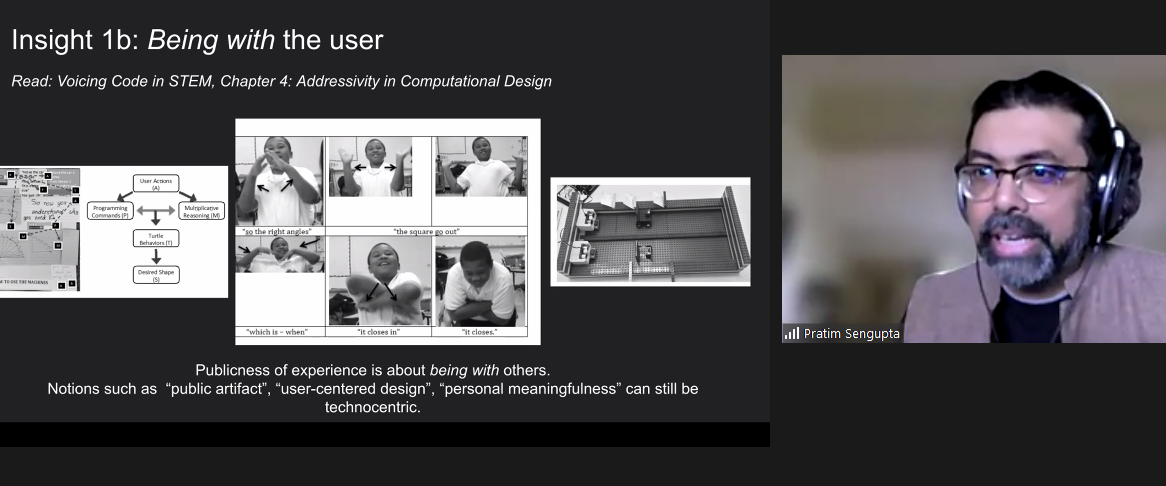
In a second example research activity, students were asked to build a machine that draws shapes using sensors, motors, and code. Rather than jumping straight to a solution, the students spent time with authentic users of their machines. Throughout the process, students worked with others, expressing the context through physical movement, clarifying their thoughts by drawing diagrams, and finding the sweet spot between coding, engineering design, and maths (see Figure 3).
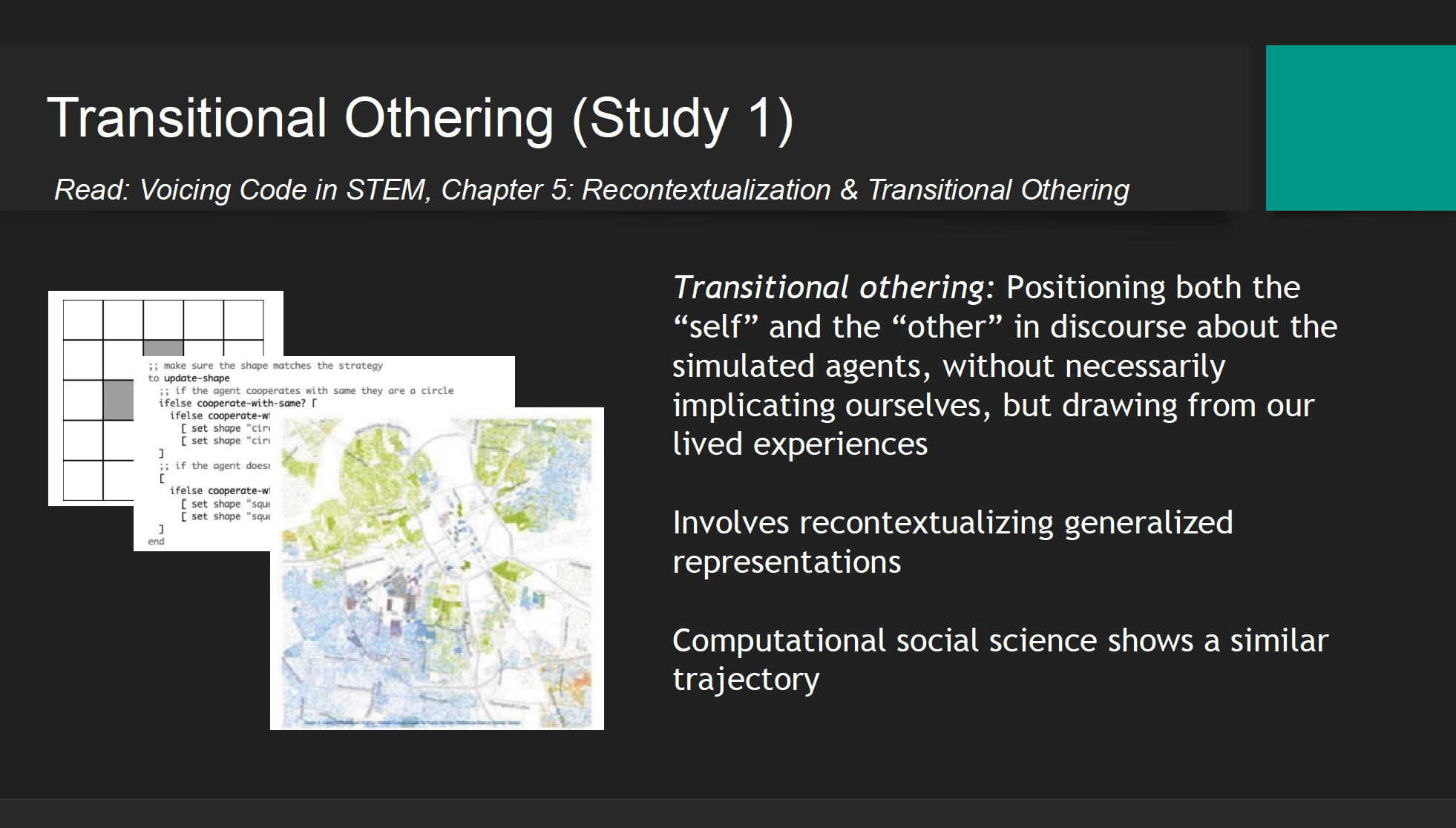
In a third example research activity, racial segregation of US communities was discussed with pre-service teachers. The predominately white teachers found talking about the topic very difficult at the beginning of the activity. To overcome this hesitancy, teachers were first asked to work with a simulation that modelled the process of segregation through abstracted dots (or computational agents), a transitional other. Following this hypothetical representation, the context was then recontextualised through a map of real data points of the ethnicity of residents in an area of the US. This kind of map is called a Racial Dot Map based on US census data. When the teachers were able to interpret the link between the abstracted dot simulation and the real-world data they were able to talk about racism and segregation in a way they could not do before. The initial simulation and the recontextualisation were a pedagogical tool to reveal racism and provide a space where students felt comfortable discussing their values and beliefs that would otherwise have remained implicit.
Pratim shared four implications of this research for computing pedagogy (see Figure 5).
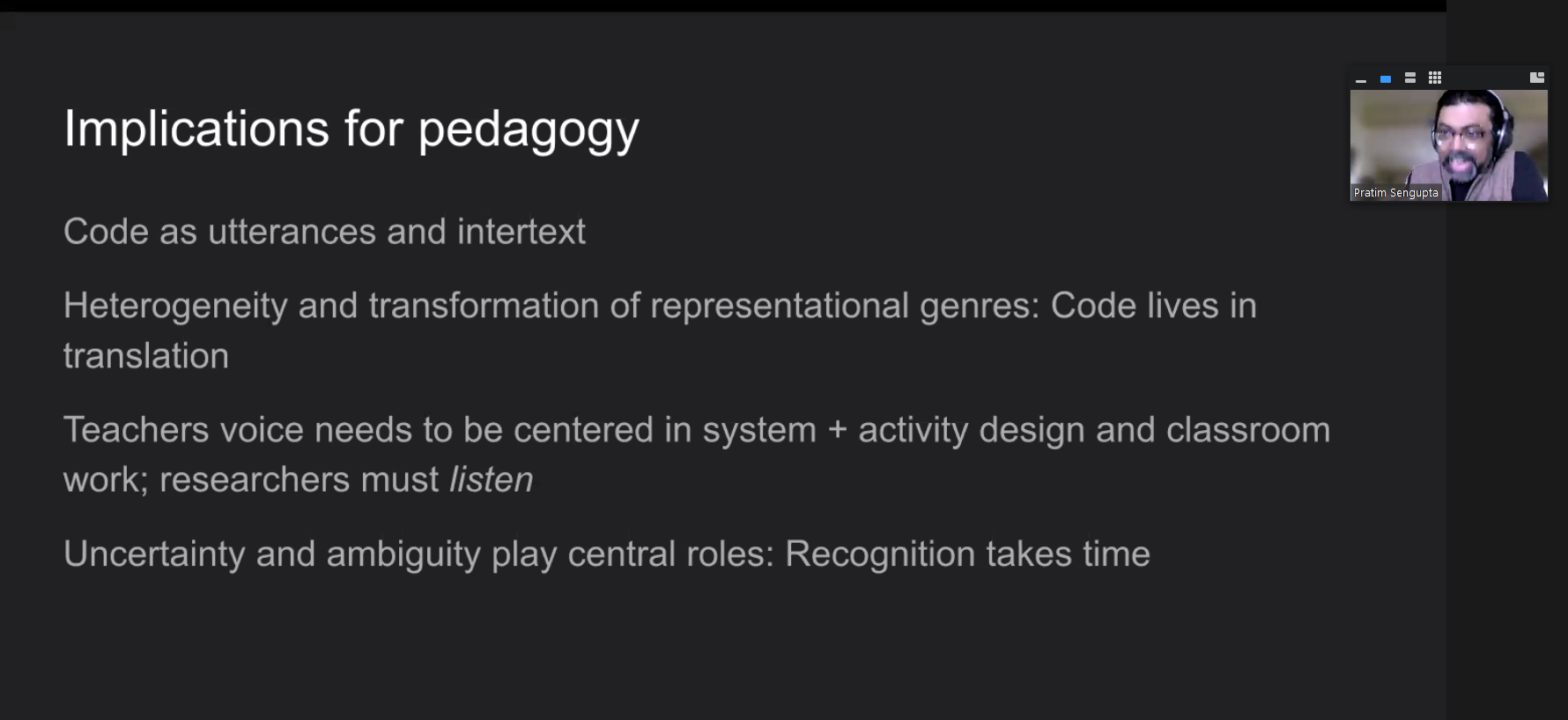
As a researcher of pedagogy, these points provide takeaways that I can relate to my own research practice:
Listening to Pratim share his research on the teaching and learning of computing and the pitfalls of technocentrism has made me think deeply about how I view computer science as a subject and do research about it. I have shared some of my reflections in this blog, and I plan to incorporate the underlying theory and ideas in my ongoing research projects.
If you would like to find out more about Pratim’s work, please look over his slides, watch his presentation, read the upcoming chapter in our seminar proceedings, or respond to this blog by leaving a comment so we can discuss!
We have another four seminars in our current series on cross-disciplinary computing.
At our next seminar on 12 July 2022 at 17:00–18:30 BST / 12:00–13:30 EDT / 9:00–10:30 PDT / 18:00–19:30 CEST, we will welcome Prof. Yasmin Kafai and Elaine Griggs, who are going to present research on introductory equity-oriented computer science with electronic textiles for high school students.
We look forward to meeting you there.
[1] You can learn more in the Hello World article where our Chief Learning Officer Sue Sentance talks about the block model.
The post Are you technocentric? Shifting from technology to people appeared first on Raspberry Pi.
Congratulations to the thousands of creators from 46 countries who participated in Coolest Projects Global 2022. Their projects awed and inspired us. Yesterday STEM advocate and television host Fig O’Reilly helped us celebrate each and every one of these creators in our online event. Check out the gallery to see all the amazing projects.
During the celebration, Fig also revealed which projects were picked by the special judges as their favourites from among the 2092 projects in this year’s showcase gallery. Let’s meet the special judges and check out their picks!
Ruth Amos is an inventor, entrepreneur, and EduTuber. She co-founded the #GirlsWithDrills movement and ‘Kids Invent Stuff’, a YouTube channel where 5- to 11-year-olds see their invention ideas become reality with the help of engineers.
Here are Ruth’s favourites:
Shawn Brown is an award-winning engineer, designer, and YouTuber. He’s also a practical pioneer for neurodiversity and innovation — raising awareness of learning differences and promoting science, engineering, and invention to young people. Together with Ruth, Shawn co-runs the YouTube channel ‘Kids Invent Stuff.’
Here are Shawn’s favourites:
Richa Shrivastava is the Director of Maker’s Asylum. It is India’s first community makerspace that fosters innovation through purpose-based learning, based on the United Nations Sustainable Development Goals.
Here are Richa’s favourites:
Elaine Atherton is Director of Scratch Education Collaborative. Elaine was first introduced to Scratch as an instructional coach while working with teachers in North Carolina. “It was amazing to see the kids so excited about what they were creating. I wanted to help them transfer that same energy to designing, making, and sharing other things, too — I wanted them to stretch their creativity.”
Here are Elaine’s favourites:
Broadcom Foundation has partnered with us for Coolest Projects Global to encourage young people who are solving problems that impact their communities. Their projects could relate to health, sanitation, energy, climate change, or other challenges set out in the United Nations Sustainable Development Goals. Broadcom Coding with Commitment illuminates how coding is a language, skill set, and invaluable tool for college and careers.
The Broadcom Coding with Commitment recognition goes to A Guide to Climate Change, a website created by Sabrina in the United Kingdom. Sabrina’s site not only provides vital information about the effects of climate change, but also gives users a visual to show how important it is to lower our carbon footprint. Congratulations to Sabrina for using her coding skills to give people a guide to understanding climate change in an easily digestible and stylish project webpage.
You can explore all the young tech creators’ projects — games, hardware builds, Scratch projects, mobile apps, websites, and more — in our showcase gallery now.
All creators who are taking part this year can now log into their Coolest Projects accounts to:
The support of our Coolest Projects Global sponsors has enabled us to make this year’s online showcase the inspiring experience it is for the young people taking part. We want to say a big thank you to all of them!
The post Coolest Projects Global 2022: Celebrating young tech creators & creative ideas appeared first on Raspberry Pi.
From May to November 2022, our seminars focus on the theme of cross-disciplinary computing. Through this seminar series, we want to explore the intersections and interactions of computing with all aspects of learning and life, and think about how they can help us teach young people. We were delighted to welcome Prof. Mark Guzdial (University of Michigan) as our first speaker.
Mark has worked in computer science (CS) education for decades and won many awards for his research, including the prestigious ACM SIGCSE Outstanding Contribution to Computing Education award in 2019. He has written literally hundreds of papers about CS education, and he authors an extremely popular computing education research blog that keeps us all up to date with what is going on in the field.
In his talk, Mark focused on his recent work around developing task-specific programming (TSP) languages, with which teachers can add a teaspoon (also abbreviated TSP) of programming to a wide variety of subject areas in schools. Mark’s overarching thesis is that if we want everyone to have some exposure to CS, then we need to integrate it into a range of subjects across the school curriculum. And he explained that this idea of “adding a teaspoon” embraces some core principles; for TSP languages to be successful, they need to:
Mark neatly summarised this as ‘being both usable and useful’.
We can learn a lot from going back in time and reflecting on the history of computing. Mark started his talk by sharing the views of some of the eminent computer scientists of the early days of the subject. C. P. Snow maintained, way back in 1961, that all students should study CS, because it was too important to be left to a small handful of people.
Alan Perlis, also in 1961, argued that everyone at university should study one course in CS rather than a topic such as calculus. His reason was that CS is about process, and thus gives students tools that they can use to change the world around them. I’d never heard of this work from the 1960s before, and it suggests incredible foresight. Perhaps we don’t need to even have the debate of whether computer science is for everyone — it seems it always was!
In many of our seminars over the last two years, we have heard about the need to broaden participation in computing in school. Although in England, computing is mandatory for ages 5 to 16 (in theory, in practice it’s offered to all children from age 5 to 14), other countries don’t have any computing for younger children. And once computing becomes optional, numbers drop, wherever you are.
Mark shared with us that in US high schools, only 4.7% of students are enrolled in a CS course. However, students are studying other subjects, which brought him to the conclusion that CS should be introduced where the students already are. For example, Mark described that, at the Advanced Placement (AP) level in the US, many more students choose to take history than CS (399,000 vs 114,000) and the History AP cohort has more even gender balance, and a higher proportion of Black and Hispanic students.
A solution to low uptake of CS being proposed by Mark and his colleagues is to add a little computing to other subjects, and in his talk he gave us some examples from history and mathematics, both subjects taken by a high proportion of US students. His focus is on high school, meaning learners aged 14 and upwards (upper secondary in Europe, or key stage 4 and 5 in England). To introduce a teaspoon of CS to other subjects, Mark’s research group builds tools using a participatory design approach; his group collaborates with teachers in schools to identify the needs of the teachers and students and design and iterate TSP languages in conjunction with them.
Mark demonstrated a number of TSP language prototypes his group has been building for use in particular contexts. The prototypes seem like simple apps, but can be classified as languages because they specify a process for a computational agent to execute. These small languages are designed to be used at a specific point in the lesson and should be learnable in ten minutes. For example, students can use a small ‘app’ specific to their topic, look at a script that generates a visualisation, and change some variables to find out how they impact the output. Students may also be able to access some program code, edit it, and see the impact of their edits. In this way, they discover through practical examples the way computer programs work, and how they can use CS principles to help build an understanding of the subject area they are currently studying. If the language is never used again, the learning cost was low enough that it was worth the value of adding computation to the one lesson.
You can try out the TSP language prototypes Mark shared yourself, which will give you a good idea of how much a teaspoon is!
DV4L: For history students, the team and participating teachers have created a prototype called DV4L, which visualises historical data. The default example script shows population growth in Africa. Students can change some of the variables in the script to explore data related to other countries and other historical periods. A example lesson activity illustrates how a teacher might incorporate this TSP language into a lesson.
Pixel Equations: Mathematics and engineering students can use the Pixel Equations tool to learn about the way that pictures are made up of individual pixels. This can be introduced into lessons using a variety of contexts. One example lesson activity looks at images in the contexts of maps. This prototype is available in English and Spanish.
Counting Sheets: Another example given by Mark was Counting Sheets, an interactive tool to support the exploration of counting problems, such as how many possible patterns can come from flipping three coins.
Have a go yourself. What subjects could you imagine adding a teaspoon of computing to?
We’d love you to join us for the next seminar in our series on cross-disciplinary computing. On 7 June, we will hear from Pratim Sengupta, of the University of Calgary, Canada. He has conducted studies in science classrooms and non-formal learning environments, focusing on providing open and engaging experiences for anyone to explore code. Pratim will share his thoughts on the ways that more of us can become involved with code when we open up its richness and depth to a wider audience. He will also introduce us to his ideas about countering technocentrism, a key focus of his new book.
We will shortly be sharing details about the official in-person launch event of the Raspberry Pi Computing Education Research Centre at the University of Cambridge on 20 July 2022. And guess who is going to be coming to Cambridge, UK, from Michigan to officially cut the ribbon for us? That’s right, Mark Guzdial. More information coming soon on how you can sign up to join us for free at this launch event.
The post A teaspoon of computing in every subject: Broadening participation in computer science appeared first on Raspberry Pi.
We are delighted to launch our next series of free online seminars, this time on the topic of cross-disciplinary computing, running monthly from May to November 2022. As always, our seminars are for all researchers, educators, and anyone else interested in research related to computing education.
What do we mean by cross-disciplinary computing? Through this upcoming seminar series, we want to embrace the intersections and interactions of computing with all aspects of learning and life, and think about how they can help us teach young people. The researchers we’ve invited as our speakers will help us shed light on cross-disciplinary areas of computing through the breadth of their presentations.
At the Raspberry Pi Foundation our mission is to make computing accessible to all children and young people everywhere, and because computing and technology appear in all aspects of our and young people’s lives, in this series of seminars we will consider what computing education looks like in a multiplicity of environments.
We start the new series on 3 May, and are beyond delighted to be kicking off with a talk from Mark Guzdial (University of Michigan). Mark has worked in computer science education for decades and won many awards for his research, including the prestigious ACM SIGCSE Outstanding Contribution to Computing Education award in 2019. Mark has written hundreds of papers about computer science education, and he authors an extremely popular computing education research blog that keeps us all up to date with what is going on in the field.
Recently, he has been researching the ways in which programming education can be integrated into other subjects, so he is a perfect speaker to start us thinking about our theme of cross-disciplinary computing. His talk will focus on how we can add a teaspoon of computing to history and mathematics classes.
On 7 June, our speaker will be Pratim Sengupta (University of Calgary), who I feel will really challenge us to think about programming and computing education in a new way. He has conducted studies in science classrooms and non-formal learning environments which focus on providing open and engaging experiences for the public to explore code, for example through the Voice your Celebration installation. Recently, he has co-authored a book called Voicing Code in STEM: A Dialogical Imagination (MIT Press, availabe open access).
In Pratim’s talk, he will share his thoughts about the ways that more of us can become involved with code through opening up its richness and depth to a wider public audience, and he will introduce us to his ideas about countering technocentrism, a key focus of his new book. I’m so looking forward to being challenged by this talk.
On 12 July, we will hear from Yasmin Kafai (University of Pennsylvania), who is another legend in computing education in my eyes. Yasmin started her long career in computing education with Seymour Papert, internationally known for his work on Logo and on constructionism as a theoretical lens for understanding the way we learn computing. Yasmin was part of the team that created Scratch, and for many years now has been working on projects revolving around digital making, electronic textiles, and computational participation.
In Yasmin’s talk she will present, alongside a panel of teachers she’s been collaborating with, some of their work to develop a high school curriculum that uses electronic textiles to introduce students to computer science. This promises to be a really engaging and interactive seminar.
In August we will take a holiday, to return on 6 September to hear from the inspirational Genevieve Smith-Nunes (University of Cambridge), whose research is focused on dance and computing, in particular data-driven dance. Her work helps us to focus on the possibilities of creative computing, but also to think about the ethics of applications that involve vast amounts of data.
Genevieve’s talk will prompt us to think about some really important questions: Is there a difference in sense of self (identity) between the human and the virtual? How does sharing your personal biometric data make you feel? How can biometric and immersive development tools be used in the computing classroom to raise awareness of data ethics? Impossible to miss!
Do enter all these dates in your diary so you don’t miss out on participating — we are very excited about this series. Sign up below, and ahead of every seminar, we will send you the information for joining.
As usual, the seminars will take place online on a Tuesday at 17:00 to 18:30 local UK time.
The post Exploring cross-disciplinary computing education in our new seminar series appeared first on Raspberry Pi.
This intelligent arm learns how to move naturally, based on what the wearer is doing, as Phil King discovers in the latest issue of The MagPi, out now.
Known for his robotic creations, popular YouTuber James Bruton is also a keen Iron Man cosplayer, and his latest invention would surely impress Tony Stark: an intelligent prosthetic arm that can move naturally and autonomously, depending on the wearer’s body posture and limb movements.
“It’s a project I’ve been thinking about for a while, but I’ve never actually attempted properly,” James tells us. “I thought it would be good to have a work stream of something that could be useful.”
To obtain the body movement data on which to base the arm’s movements, James considered using a brain computer, but this would be unreliable without embedding electrodes in his head! So, he instead opted to train it with machine learning.
For this he created a motion capture suit from 3D-printed parts to gather all the data from his body motions: arms, legs, and head. The suit measures joint movements using rotating pieces with magnetic encoders, along with limb and head positions – via a special headband – using MPU-6050 inertial measurement units and Teensy LC boards.
Collected by a Teensy 4.1, this data is then fed into a machine learning model running on the suit’s Raspberry Pi Zero using AOgmaNeo, a lightweight C++ software library designed to run on low-power devices such a microcontrollers.
“AOgmaNeo is a reinforcement machine learning system which learns what all of the data is doing in relation to itself,” James explains. “This means that you can remove any piece of data and, after training, the software will do its best to replace the missing piece with a learned output. In my case, I’m removing the right arm and using the learned output to drive the prosthetic arm, but it could be any limb.”
While James notes that AOgmaNeo is actually meant for reinforcement learning,“in this case we know what the output should be rather than it being unknown and learning through binary reinforcement.”
To train the model, James used distinctive repeated motions, such as walking, so that the prosthetic arm would later be able to predict what it should do from incoming sensor data. He also spent some time standing still so that the arm would know what to do in that situation.
With the machine learning model trained, Raspberry Pi Zero can be put into playback mode to control the backpack-mounted arm’s movements intelligently. It can then duplicate what the wearer’s real right arm was doing during training depending on the positions and movements of other body parts.
So, as he demonstrates in his YouTube video, if James starts walking on the spot, the prosthetic arm swings the opposite way to his left arm as he strides along, and moves forward as raises his left leg. If he stands still, the arm will hang down by his side. The 3D-printed hand was added purely for aesthetic reasons and the fingers don’t move.
James admits that the project is highly experimental and currently an early work in progress. “I’d like to develop this concept further,” he says, “although the current setup is slightly overambitious and impractical. I think the next step will be to have a simpler set of inputs and outputs.”
While he generally publishes his CAD designs and code, the arm “doesn’t work all that well, so I haven’t this time. AOgmaNeo is open-source, though (free for personal use), so you can make something similar if you wished.” What would you do with an extra arm?
You can grab the brand-new issue right now from the Raspberry Pi Press store, or via our app on Android or iOS. You can also pick it up from supermarkets and newsagents. There’s also a free PDF you can download.
The post Machine Learning Prosthetic Arm | The MagPi #110 appeared first on Raspberry Pi.
Today we’re announcing two brand-new, fantastic, free online courses for educators in the USA. And to kickstart their learning journey, we are giving qualified US-based educators the chance to get a free Raspberry Pi Pico microcontroller hardware kit. This is all thanks to our partners at Infosys Foundation USA, who are committed to expanding access to computer science and maker education in public schools across the United States.
You can find both new courses on the Pathfinders Online Institute platform, which supports US classroom educators to bring high-quality computer science and maker education content to their kindergarten through 12th grade students. And best of all, the platform is completely free!
The first course we’ve created for you is called Programming essentials in Scratch. It supports teachers to introduce the essentials of programming to fourth to eighth grade students. The course covers the key concepts of programming, such as variables, selection, and iteration. In addition to learning how to teach programming effectively, teachers will also discover how to inspire their students and help them create music, interactive quizzes, dance animations, and more.
Our second new course for you is called Design, build, and code a rover with Raspberry Pi Pico. It gives teachers of fourth to eighth grade students everything they need to start teaching physical computing in their classroom. Teachers will develop their students’ knowledge of the subject by using basic circuits, coding a Raspberry Pi Pico microcontroller to work with motors and LEDs, and designing algorithms to navigate a rover through a maze. By the end of the course, teachers will have all the resources they need to inspire students and help them explore practical programming, system design, and prototyping.
And thanks to the generous support of Infosys Foundation USA, we’re able to provide qualified educators with a FREE kit of materials to participate in the Design, build, and code a rover with Raspberry Pi Pico course. We’re especially excited about this because the kit includes our first-ever microcontroller, Raspberry Pi Pico. This offer is available to 1,000 US-based K–12 public or charter school teachers on a first-come, first-served basis.
To claim your kit, just create a free account on Pathfinders Online Institute and start the course. On the first page of the course, you’ll receive instructions on how to apply for a free kit.
If you’re not a qualified educator, or if you’ve missed out on the opportunity to get the free hardware, we still welcome you to join the course! You can find the materials yourself, or purchase the kit from our partners at PiShop.us.
All of us at the Raspberry Pi Foundation want to thank the Infosys Foundation USA team for collaborating with us on this new resource and learning opportunity for educators. We appreciate and share their commitment to support computer science and maker education.
The post Free computer science courseware and hardware for American educators appeared first on Raspberry Pi.
Want to dabble in the Internet of Things but don’t know where to start? Well, our friends at Microsoft have developed something fun and free just for you. Here’s Senior Cloud Advocate Jim Bennett to tell you all about their brand new online curriculum for IoT beginners.
IoT — the Internet of Things — is one of the biggest growth areas in technology, and one that, to me, is very exciting. You start with a device like a Raspberry Pi, sprinkle some sensors, dust with code, mix in some cloud services and poof! You have smart cities, self-driving cars, automated farming, robotic supermarkets, or devices that can clean your toilet after you shout at Alexa for the third time.
It feels like every week there is another survey out on what tech skills will be in demand in the next five years, and IoT always appears somewhere near the top. This is why loads of folks are interested in learning all about it.
In my day job at Microsoft, I work a lot with students and lecturers, and I’m often asked for help with content to get started with IoT. Not just how to use whatever cool-named IoT services come from your cloud provider of choice to enable digital whatnots to add customer value via thingamabobs, but real beginner content that goes back to the basics.
This is why a few of us have spent the last few months locked away building IoT for Beginners. It’s a free, open source, 24-lesson university-level IoT curriculum designed for teachers and students, and built by IoT experts, education experts and students.
The lessons are grouped into projects that you can build with a Raspberry Pi so that you can deep-dive into use cases of IoT, following the journey of food from farm to table.
You’ll build projects as you learn the concepts of IoT devices, sensors, actuators, and the cloud, including:
Grab your Raspberry Pi and some sensors from our friends at Seeed Studio and get building. Without further ado, please meet IoT For Beginners: A Curriculum!
The post Learn the Internet of Things with “IoT for Beginners” and Raspberry Pi appeared first on Raspberry Pi.
Machine learning can sound daunting even for experienced Raspberry Pi hobbyists, but Microsoft and Adafruit Industries are determined to make it easier for everyone to have a go. Microsoft’s Lobe tool takes the stress out of training machine learning models, and Adafruit have developed an entire kit around their BrainCraft HAT, featuring Raspberry Pi 4 and a Raspberry Pi Camera, to get your own machine learning project off to a flying start.
Adafruit’s BrainCraft HAT fits on top of Raspberry Pi 4 and makes it really easy to connect hardware and debug machine learning projects. The 240 x 240 colour display screen also lets you see what the camera sees. Two microphones allow for audio input, and access to the GPIO means you can connect things likes relays and servos, depending on your project.
Microsoft Lobe is a free tool for creating and training machine learning models that you can deploy almost anywhere. The hardest part of machine learning is arguably creating and training a new model, so this tool is a great way for newbies to get stuck in, as well as being a fantastic time-saver for people who have more experience.
Get started with one of three easy, medium, and hard tutorials featured on the lobe-adafruit-kit GitHub.
Lady Ada demonstrated Bakery: a machine learning model that uses an Adafruit BrainCraft HAT, a Raspberry Pi camera, and Microsoft Lobe. Watch how easy it is to train a new machine learning model in Microsoft Lobe from this point in the Microsoft Build Keynote video.
Bakery identifies different baked goods based on images taken by the Raspberry Pi camera, then automatically identifies and prices them, in the absence of barcodes or price tags. You can’t stick a price tag on a croissant. There’d be flakes everywhere.
Running this project on Raspberry Pi means that Lady Ada was able to hook up lots of other useful tools. In addition to the Raspberry Pi camera and the HAT, she is using:
All of this running on Raspberry Pi, and made super easy with Microsoft Lobe and Adafruit’s BrainCraft HAT. Adafruit’s Microsoft Machine Learning Kit for Lobe contains everything you need to get started.
And finally, watch Microsoft CTO Kevin Scott introduce Limor Fried, aka Lady Ada, owner of Adafruit Industries. Lady Ada joins remotely from the Adafruit factory in Manhattan, NY, to show how the BrainCraft HAT and Lobe work to make machine learning accessible.
The post Machine Learning made easy with Raspberry Pi, Adafruit and Microsoft appeared first on Raspberry Pi.
Researchers at the University of Cape Town set about developing an affordable wireless endoscope camera to rival expensive, less agile options.
Endoscopic cameras are used to look at organs inside your body. A long, thin, flexible tube with a light at the end is fed down your throat (for example), and an inside view of all your organs is transmitted to a screen for medical review.
Problem is, these things are expensive to build. Also, the operator is tethered by camera wires and power cables.
With this low-cost prototype, the camera is mounted at the end with LEDs instead of fibre-optic lights. The device is battery powered, and can perform for two hours without needing a charge. Traditional endoscopes require external camera cables and a hefty monitor, so this wireless option saves space and provides much more freedom. Weighing in at just 184g, it’s also much more portable.
The prototype incorporates a 1280 × 720 pixel high-definition tube camera, and transmits video to a standard laptop for display. Perhaps this idea could be developed to support an even more agile display, such as a phone or a touchscreen tablet.
This Raspberry Pi-powered wireless option also saves thousands of dollars. It was built for just $230, whereas contemporary wired options cost around $28,000.
Urologists at the University of Cape Town created the prototype. J. M. Lazarus & M. Ncube hope their design will be more accessible to medical settings that have less money available. You can read their research paper for an in-depth look at the whole process.
The researchers focused on open-source resources to keep the cost low; we’ll learn more about the RaspAP software they used below. Affordability also led them to Raspberry Pi Zero W which, at just $10, is able to handle high-definition video.
Billz, who shared the project on reddit, is one of the developers of RaspAP.
RaspAP is a wireless setup and management system that lets you get a wireless access point up and running quickly on Raspberry Pi. Here, the Raspberry Pi is receiving images sent from the camera and transmitting them to a display device.
There is also Quick installer available for RaspAP. It creates a default configuration that “just works” on all Raspberry Pis with onboard wireless.
We wonder what other medical equipment could be greatly improved by developing an affordable wireless version?
The post Low-cost Raspberry Pi Zero endoscope camera appeared first on Raspberry Pi.
Sam Battle aka LOOK MUM NO COMPUTER couldn’t resist splashing out on a clear Macintosh case for a new project in his ‘Cosmo’ series of builds, which inject new life into retro hardware.
This time around, a Raspberry Pi, running facial recognition software, and one of our Camera Modules enable Furby-style eyes to track movement, detect faces, and follow you around the room.
He loves a good Furby does Sam. Has a whole YouTube playlist dedicated to projects featuring them. Seriously.
Our favourite bit of the video is when Sam meets Raspberry Pi for the first time, boots it up, and says:
“Wait, I didn’t know it was a computer. It’s an actual computer computer. What?!”
The eyes are ping pong balls cut in half so you can fit a Raspberry Pi Camera Module inside them. (Don’t forget to make a hole in the ‘pupil’ so the lens can peek through).
The Raspberry Pi and display screen are neatly mounted on the side of the Macintosh so they’re easily accessible should you need to make any changes.
All the hacked, repurposed junky bits sit inside or are mounted on swish 3D-printed parts.
Add some joke shop chatterbox teeth, and you’ve got what looks like the innards of a Furby staring at you. See below for a harrowing snapshot of Zach’s ‘Furlexa’ project, featured on our blog last year. We still see it when we sleep.
It wasn’t enough for Furby-mad Sam to have created a Furby look-a-like face-tracking robot, he needed to go further. Inside the clear Macintosh case, you can see a de-furred Furby skeleton atop a 3D-printed plinth, with redundant ribbon cables flowing from its eyes into the back of the face-tracking robot face, thus making it appear as though the Furby is the brains behind this creepy creation that is following your every move.
Eventually, Sam’s Raspberry Pi–powered creation will be on display at the Museum of Everything Else, so you can go visit it and play with all the “obsolete and experimental technology” housed there. The museum is funded by the Look Mum No Computer Patreon page.
The post These Furby-‘controlled’ Raspberry Pi-powered eyes follow you appeared first on Raspberry Pi.
Just in time for the holidays, we’ve updated Raspberry Pi Imager to add some new functionality.
You can go to our software page to download and install the new version 1.5 release of Raspberry Pi Imager and use it now.
We haven’t done telemetry in Imager before, and since people tend — rightly — to be concerned about applications gathering data, we want to explain exactly what we are doing and why: we’re logging which operating systems and categories people download, so we can make sure the most popular options are easy enough to find in Raspberry Pi Imager’s menu system.
We don’t record any personal data, such as your IP address; the information we collect allows us to see the number of downloads of each operating system over time, and nothing else. You’ll find more detailed information, including how to opt out of telemetry, in the Raspberry Pi Imager GitHub README.md.
You can see which OSes are most often downloaded too, on our stats page.
As you can see, the default recommended Raspberry Pi OS image is indeed the most downloaded option. The recently released Ubuntu Desktop for Raspberry Pi 4 and Raspberry Pi 400 is the most popular third-party operating system.
The post Raspberry Pi Imager update appeared first on Raspberry Pi.
Well, in a year as disrupted and strange as 2020, it’s nice to know that there are some things you can rely on, for example the traditional end-of-year new release of Raspberry Pi OS, which we launch today. Here’s a run-through of the main new features that you’ll find in it.
We’ve updated the Chromium browser to version 84. This has taken us a bit longer than we would have liked, but it’s always quite a lot of work to get our video hardware acceleration integrated with new releases of the browser. That’s done now, so you should see good-quality video playback on sites like YouTube. We’ve also, given events this year, done a lot of testing and tweaking on video conferencing clients such as Google Meet, Microsoft Teams, and Zoom, and they should all now work smoothly on your Raspberry Pi’s Chromium.
There’s one more thing to mention on the subject of web browsers. We’ve been shipping Adobe’s Flash Player as part of our Chromium install for several years now. Flash Player is being retired by Adobe at the end of the year, so this release will be the last that includes it. Most websites have now stopped requiring Flash Player, so this hopefully isn’t something that anyone notices!
From this release onwards, we are switching Raspberry Pi OS to use the PulseAudio sound server.
First, a bit of background. Audio on Linux is really quite complicated. There are multiple different standards for handling audio input and output, and it does sometimes seem that what has happened, historically, is that whenever anyone wanted to use audio in Linux, they looked at the existing libraries and programs and went “Hmmm… I don’t like that, I’ll write something new and better.” This has resulted in a confused mass of competing and conflicting software, none of which quite works the way anyone wants it to!
The most common audio interface, which lies underneath most Linux systems somewhere, is called ALSA, the Advanced Linux Sound Architecture. This is a fairly reliable low-level audio interface — indeed, it is what Raspberry Pi OS has used up until now — but it has quite a lot of limitations and is starting to show its age. For example, it can only handle one input and one output at a time. So for example, if ALSA is being used by your web browser to play sound from a YouTube video to the HDMI output on your Raspberry Pi, nothing else can produce sound at the same time; if you were to try playing a video or an audio file in VLC, you’d hear nothing but the audio from YouTube. Similarly, if you want to switch the sound from your YouTube video from HDMI to a USB sound card, you can’t do it while the video is playing; it won’t change until the sound stops. These aren’t massive problems, but most modern operating systems do handle audio in a more flexible fashion.
More significant is that ALSA doesn’t handle Bluetooth audio at all, so various other extensions and additional bits of software are required to even get audio into and out of Bluetooth devices on an ALSA-based system. We’ve used a third-party library called bluez-alsa for a few years now, but it’s an additional piece of code to maintain and update, so this isn’t ideal.
PulseAudio deals with all of this. It’s a piece of software that sits as a layer between all the audio hardware and all the applications that send and receive audio, and it automatically routes everything to the right places. It can mix the audio from multiple applications together, so you can hear VLC at the same time as YouTube, and it allows the output to be moved around between different devices while it is playing. It knows how to talk to Bluetooth devices, and it greatly simplifies the job of managing default input and output devices, so it makes it much easier to make sure audio ends up where it is supposed to be!
One area where it is particularly helpful is in managing audio input and output streams to web browsers like Chromium; in our testing, the use of PulseAudio made setting up video conferencing sessions much easier and more reliable, particularly with Bluetooth headsets and webcam audio.
The good news for Raspberry Pi users is that, if we’ve got it right, you shouldn’t even notice the change. PulseAudio now runs by default, and while the volume control and audio input/output selector on the taskbar looks almost identical to the one in previous releases of the OS, it is now controlling PulseAudio rather than ALSA. You can use it just as before: select your output and input devices, adjust the volume, and you’re good to go.
There is one small change to the input/output selector, which is the menu option at the bottom for Device Profiles. In PulseAudio, any audio device has one or more profiles, which select which outputs and inputs are used on any device with multiple connections. (For example, some audio HATs and USB sound cards have both analogue and digital outputs — there will usually be a profile for each output to select where the audio actually comes out.)
Profiles are more important for Bluetooth devices. If a Bluetooth device has both an input and an output (such as a headset with both a microphone and an earphone), it usually supports two different profiles. One of these is called HSP (HeadSet Profile), and this allows you to use both the microphone and the earphone, but with relatively low sound quality — equivalent to that you hear on a mobile phone call, so fine for speech but not great for music. The other profile is called A2DP (Advanced Audio Distribution Profile), which gives much better sound quality, but is output-only: it does not allow you to use the microphone. So if you are making a call, you want your Bluetooth device to use HSP, but if you are listening to music, you want it to use A2DP.
We’ve automated some of this, so if you select a Bluetooth device as the default input, then that device is automatically switched to HSP. If you want to switch a device which is in HSP back to A2DP, just reselect it from the output menu. Its microphone will then be deactivated, and it will switch to A2DP. But sometimes you might want to take control of profiles manually, and the Device Profiles dialog allows you to do that.
(Note that if you are only using the Raspberry Pi’s internal sound outputs, you don’t need to worry about profiles at all, as there is only one, and it’s automatically selected for you.)
Some people who have had experience of PulseAudio in the past may be a little concerned by this change, because PulseAudio hasn’t always been the most reliable piece of software, but it has now reached the point where it solves far more problems than it creates, which is why many other Linux distributions, such as Ubuntu, now use it by default. Most users shouldn’t even notice the change; there may be occasional issues with some older applications such as Sonic Pi, but the developers of these applications will hopefully address any issues in the near future.
One thing which has always been missing from Raspberry Pi OS is an easy way to connect to and configure printers. There is a Linux tool for this, called CUPS, the Common Unix Printing System. (It’s actually owned by Apple and is the underlying printing system used by macOS X, but it is still free software and available for use by Linux distributions.)
CUPS has always been available in apt, so could be installed on any Raspberry Pi, but the standard web-based interface is a bit unfriendly. Various third-party front-end tools have been written to make CUPS a bit easier to use, and we have decided to use one called system-config-printer. (Like PulseAudio, this is also used as standard by Ubuntu.)
So both CUPS and system-config-printer are now installed as part of Raspberry Pi OS. If you are a glutton for punishment, you can access the CUPS web interface by opening the Chromium browser and going to http://localhost:631, but instead of doing that, we suggest just going into the Preferences section in the main menu and opening Print Settings.
This shows the system-config-printer dialog, from which you can add new printers, remove old ones, set one as the default, and access the print queue for each printer, just as you should be familiar with from other operating systems.
Like most things in Linux, this relies on user contributions, so not every printer is supported. We’ve found that most networked printers work fine, but USB printers are a bit hit-and-miss as to whether there is a suitable driver; in general, the older your printer is, the more likely it is to have a CUPS driver available. The best thing to do is to try it and see, and perhaps ask for help on our forums if your particular printer doesn’t seem to work.
This fills in one of the last things missing in making Raspberry Pi a complete desktop computer, by making it easy to set up a printer and print from applications such as LibreOffice.
One of the areas we have tried to improve in the Desktop this year is to make it more accessible to those with visual impairments. We added support for the Orca screen reader at the start of the year, and the display magnifier plugin over the summer.
While there are no completely new accessibility features this time, we have made some improvements to Orca support in applications like Raspberry Pi Configuration and Appearance Settings, to make them read what they are doing in a more helpful fashion; we’ve also worked with the maintainers of Orca to raise and fix a few bugs. It’s still not perfect, but we’re doing our best!
One of the benefits of switching to PulseAudio is that it now means that screen reader audio can be played through Bluetooth devices; this was not possible using the old ALSA system, so visually-impaired users who wish to use the screen reader with a Bluetooth headset or external speaker can now do so.
One feature we have added is an easy way to install Orca; it is still available through Recommended Software as before, but given that is not easy to navigate for a visually-impaired person, there is now a keyboard shortcut: just hold down
And if you can’t remember that shortcut, when you first boot a new image, if you don’t do anything for thirty seconds or so, the startup wizard will now speak to you to remind you how to do it…
Finally, we had hoped to be able to say that Chromium was now compatible with Orca; screen reader support was being added to versions 8x. Unfortunately, for now this seems to only have been added for Windows and Mac versions, not the Linux build we use. Hopefully Google will address this in a future release, but for now if you need a web browser compatible with Orca, you’ll need to install Firefox from apt.
We’ve added a couple of options to the Raspberry Pi Configuration tool.
On the System tab, if you are running on Raspberry Pi with a single status LED (i.e. a Raspberry Pi Zero or the new Raspberry Pi 400), there is now an option to select whether the LED just shows that the power is on, or if it flickers off to show drive activity.
On the Performance tab, there are options to allow you to control the new Raspberry Pi Case Fan: you can select the GPIO pin to which it is connected and set the temperature at which it turns on and off.
The latest image can be installed on a new card using the Raspberry Pi Imager, or can be downloaded from our Downloads page.
To apply the updates to an existing image, you’ll need to enter the usual commands in a terminal window:
sudo apt update
sudo apt full-upgrade
(It is safe to just accept the default answer to any questions you are asked during the update procedure.)
Then, to install the PulseAudio Bluetooth support, you will need to enter the following commands in the terminal window:
sudo apt purge bluealsa
sudo apt install pulseaudio-module-bluetooth
Now reboot.
To swap over the volume and input selector on the taskbar from ALSA to PulseAudio, after your Raspberry Pi has restarted, right-click a blank area on the taskbar and choose Add / Remove Panel Items. Find the plugin labelled Volume Control (ALSA/BT) in the list, select it and click Remove; then click the Add button, find the plugin labelled Volume Control (PulseAudio) and click Add. Alternatively, just open the Appearance Settings application from the Preferences section of the Main Menu, go to the Defaults tab and press one of the Set Defaults buttons.
Some people have reported that some applications are ignoring the effect of the PulseAudio output switcher. This is probably caused by an old ALSA configuration file still being on the system. Once you have updated, execute the following in a terminal window, which should fix this:
rm ~/.asoundrc
To remove the old Audio Preferences application, which will not work with PulseAudio, do:
sudo apt purge pimixer
We are also aware that the output from the Raspberry Pi’s internal audio device is in mono in the image; this is now fixed. To get the fix, do an update in a terminal window:
sudo apt update
sudo apt full-upgrade
reboot
Some users have reported that in a dual-monitor setup, switching the audio output to the AV Jack causes problems – this is being investigated at the moment.
As ever, do let us know what you think in the comments.
The post New Raspberry Pi OS release — December 2020 appeared first on Raspberry Pi.
You in the community seemed so impressed with this recent Boston Dynamics–inspired build that we decided to feature another. This time, maker Harry was inspired by Boston Dynamics’ research robot Handle, which stands 6.5 ft tall, travels at 9 mph and jumps 4 feet vertically. Here’s how Harry made his miniature version, MABEL (Multi Axis Balancer Electronically Levelled).
MABEL has individually articulated legs to enhance off-road stability, prevent it from tipping, and even make it jump (if you use some really fast servos). Harry is certain that anyone with a 3D printer and a “few bits” can build one.
MABEL builds on the open-source YABR project for its PID controller, and it’s got added servos and a Raspberry Pi that helps interface them and control everything.
Thanks to a program based on the open-source YABR firmware, an Arduino handles all of the PID calculations using data from an MPU-6050 accelerometer/gyro. Raspberry Pi, using Python code, manages Bluetooth and servo control, running an inverse kinematics algorithm to translate the robot legs perfectly in two axes.
If you want to attempt this project yourself, the files for all the hard 3D-printed bits are on Thingiverse, and all the soft insides are on GitHub.
IKSolve is the class that handles the inverse kinematics functionality for MABEL (IKSolve.py) and allows for the legs to be translated using (x, y) coordinates. It’s really simple to use: all that you need to specify are the home values of each servo (these are the angles that, when passed over to your servos, make the legs point directly and straight downwards at 90 degrees).
MABEL is designed to work by listening to commands on the Arduino (PID contoller) end that are sent to it by Raspberry Pi over serial using pySerial. Joystick data is sent to Raspberry Pi using the Input Python library. Harry first tried to get the joystick data from an old PlayStation 3 controller, but went with the PiHut’s Raspberry Pi Compatible Wireless Gamepad in the end for ease.
Keep up with Harry’s blog or give Raspibotics a follow on Twitter, as part 3 of his build write-up should be dropping imminently, featuring updates that will hopefully get MABEL jumping!
The post Boston Dynamics’ Handle robot recreated with Raspberry Pi appeared first on Raspberry Pi.
This is a ‘Spot Micro’ walking quadruped robot running on Raspberry Pi 3B. By building this project, redditor /thetrueonion (aka Mike) wanted to teach themself robotic software development in C++ and Python, get the robot walking, and master velocity and directional control.
Mike was inspired by Spot, one of Boston Dynamics’ robots developed for industry to perform remote operation and autonomous sensing.
The mini ‘Spot Micro’ bot rocks a three-axis angle command/body pose control mode via keyboard and can achieve ‘trot gait’ or ‘walk gait’. The former is a four-phase gait with symmetric motion of two legs at a time (like a horse trotting). The latter is an eight-phase gait with one leg swinging at a time and a body shift in between for balance (like humans walking).
Mike breaks down how they got the robot walking, right down to the order the servos need to be connected to the PCA9685 control board, in this extensive walkthrough.
And yes, this is one of those magical projects with all the code you need stored on GitHub. The software is implemented on a Raspberry Pi 3B running Ubuntu 16.04. It’s composed on C++ and Python nodes in a ROS framework.
Mike isn’t finished yet: they are looking to improve their yellow beast by incorporating a lidar to achieve simple 2D mapping of a room. Also on the list is developing an autonomous motion-planning module to guide the robot to execute a simple task around a sensed 2D environment. And finally, adding a camera or webcam to conduct basic image classification would finesse their creation.
The post Mini Raspberry Pi Boston Dynamics–inspired robot appeared first on Raspberry Pi.
We spied New Orleans–based Raspberry Pi–powered home brewing analysis and were interested in how this project could help other at-home brewers perfect their craft.
When you’re making beer, you want the yeast to eat up the sugars and leave alcohol behind. To check whether this is happening, you need to be able to track changes in gravity, known as ‘gravity curves’. You also have to do yeast cell counts, and you need to be able to tell when your beer has finished fermenting.
“We wanted a way to skip the paper and pencil and instead input the data directly into the software. Enter the Raspberry Pi!”
Patrick Murphy
Patrick Murphy and co. created a piece of software called Aleproof which allows you to monitor all of this stuff remotely. But before rolling it out, they needed somewhere to test that it works. Enter the ‘Danger Shed’, where they ran Aleproof on Raspberry Pi.
A Raspberry Pi 3 Model B+ spins their Python-based program on Raspberry Pi OS and shares its intel via a mounted monitor.
Here’s what Patrick had to say about what they’re up to in the Danger Shed and why they needed a Raspberry Pi:
“I am the founder and owner of Arithmech, a small software company that develops Python applications for brewers. Myself and a few buddies (all of us former Army combat medics) started our own brewing project called Danger Shed Ales & Mead to brew and test out the software on real-world data. We brew in the shed and record data on paper as we go, then enter the data into our software at a later time.”
“We wanted a way to skip the paper and pencil and instead input the data directly into the software. Enter the Raspberry Pi! The shed is small, hot, has leaks, and is generally a hostile place for a full-size desktop computer. Raspberry Pi solves our problem in multiple ways: it’s small, portable, durable (in a case), and easily cooled. But on top of that, we are able to run the code using PyCharm, enter data throughout the brewing process, and fix bugs all from the shed!”
“The Raspberry Pi made it easy for us to set up our software and run it as a stand-alone brewing software station.”
The post This Raspberry Pi–powered setup improves home brewing appeared first on Raspberry Pi.
One of our Approved Resellers in the Netherlands, Daniël from Raspberry Store, shared this Raspberry Pi–powered prayer reminder with us. It’s a useful application one of his customers made using a Raspberry Pi purchased from Daniël’s store.
As a Raspberry Pi Official Reseller, I love to see how customers use Raspberry Pi to create innovative products. Spying on bird nests, streaming audio to several locations, using them as a menu in a restaurant, or in a digital signage-solution… just awesome. But a few weeks ago, a customer showed me a new usage of Raspberry Pi: a prayer clock for mosques.
Made by Mawaqit, this is a narrowcasting solution with a Raspberry Pi at its heart and can be used on any browser or smartphone.
This project is simple in hardware terms. You just need Raspberry Pi 3 or Raspberry Pi 4, a TV screen, and a HDMI cable.
If you do not have an internet connection, you’ll also need an RTC clock
With the HDMI cable, Raspberry Pi can broadcast the clock — plus other useful info like the weather, or a reminder to silence your phone — on a wall in the mosque. Awesome! So simple, and yet I have not seen a solution like this before, despite Mawaqit’s application now being used in 51 countries and over 4609 mosques. And, last I checked, it has more than 185,000 active users!
You’ll need to install the pre-configured system image and flash the mawaqit.xz system image onto your Raspberry Pi’s SD card.
There are then two options: connected and offline. If you set yourself up using the connected option, you’ll be able to remotely control the app from your smartphone or any computer and tablet, which will be synchronised across all the screens connected to Raspberry Pi. You can also send messages and announcements. The latest updates from Mawaqit will install automatically.
If you need to choose the offline option and you’re not able to use the internet at your mosque, it’s important to equip your Raspberry Pi with RTC, because Raspberry Pi can’t keep time by itself.
All the software, bits of command line code, and step-by-step guidance you’ll need are available on this web page.
The Mawaqit project is free of charge, and the makers actually prohibit harnessing it for any monetary gain. The makers even created an API for you to create your own extentions — how great is that? So, if you want your own prayer clock for in a mosque, school, or just at home, take a look at Mawaqit.net.
The post Raspberry Pi prayer reminder clock appeared first on Raspberry Pi.
Raspberry Pi is excited to bring the Khronos OpenVX 1.3 API to our line of single-board computers. Here’s Kiriti Nagesh Gowda, AMD‘s MTS Software Development Engineer, to tell you more.
OpenVX™ is an open, royalty-free API standard for cross-platform acceleration of computer vision applications developed by The Khronos Group. The Khronos Group is an open industry consortium of more than 150 leading hardware and software companies creating advanced, royalty-free acceleration standards for 3D graphics, augmented and virtual reality, vision, and machine learning. Khronos standards include Vulkan®, OpenCL™, SYCL™, OpenVX™, NNEF™, and many others.
The Khronos Group and Raspberry Pi have come together to work on an open-source implementation of OpenVX™ 1.3, which passes the conformance on Raspberry Pi. The open-source implementation passes the Vision, Enhanced Vision, & Neural Net conformance profiles specified in OpenVX 1.3 on Raspberry Pi.
Application developers may always freely use Khronos standards when they are available on the target system. To enable companies to test their products for conformance, Khronos has established an Adopters Program for each standard. This helps to ensure that Khronos standards are consistently implemented by multiple vendors to create a reliable platform for developers. Conformant products also enjoy protection from the Khronos IP Framework, ensuring that Khronos members will not assert their IP essential to the specification against the implementation.
OpenVX enables a performance and power-optimized computer vision processing, especially important in embedded and real-time use cases such as face, body, and gesture tracking, smart video surveillance, advanced driver assistance systems (ADAS), object and scene reconstruction, augmented reality, visual inspection, robotics, and more. The developers can take advantage of using this robust API in their application and know that the application is portable across all the conformant hardware.
Below, we will go over how to build and install the open-source OpenVX 1.3 library on Raspberry Pi 4 Model B. We will run the conformance for the Vision, Enhanced Vision, & Neural Net conformance profiles and create a simple computer vision application to get started with OpenVX on Raspberry Pi.
The OpenVX 1.3 implementation is available on GitHub. To build and install the library, follow the instructions below.
Git clone the project with the recursive flag to get submodules:
git clone --recursive https://github.com/KhronosGroup/OpenVX-sample-impl.gitNote: The API Documents and Conformance Test Suite are set as submodules in the sample implementation project.
Use the Build.py script to build and install OpenVX 1.3:
cd OpenVX-sample-impl/
python Build.py --os=Linux --venum --conf=Debug --conf_vision --enh_vision --conf_nn
Build and run the conformance:
export OPENVX_DIR=$(pwd)/install/Linux/x32/Debug
export VX_TEST_DATA_PATH=$(pwd)/cts/test_data/
mkdir build-cts
cd build-cts
cmake -DOPENVX_INCLUDES=$OPENVX_DIR/include -DOPENVX_LIBRARIES=$OPENVX_DIR/bin/libopenvx.so\;$OPENVX_DIR/bin/libvxu.so\;pthread\;dl\;m\;rt -DOPENVX_CONFORMANCE_VISION=ON -DOPENVX_USE_ENHANCED_VISION=ON -DOPENVX_CONFORMANCE_NEURAL_NETWORKS=ON ../cts/
cmake --build .
LD_LIBRARY_PATH=./lib ./bin/vx_test_conformanceUse the open-source samples on GitHub to test the installation.
The post OpenVX API for Raspberry Pi appeared first on Raspberry Pi.
Wow, DIY-Maxwell, wow. This reddit user got their hands on one of our new Raspberry Pi High Quality Cameras and decided to upgrade their homemade microscope with it. The brains of the thing are also provided by a Raspberry Pi.
Here’s what a penny looks like under this powerful microscope:
Check out this video from the original reddit post to see the microscope in action.
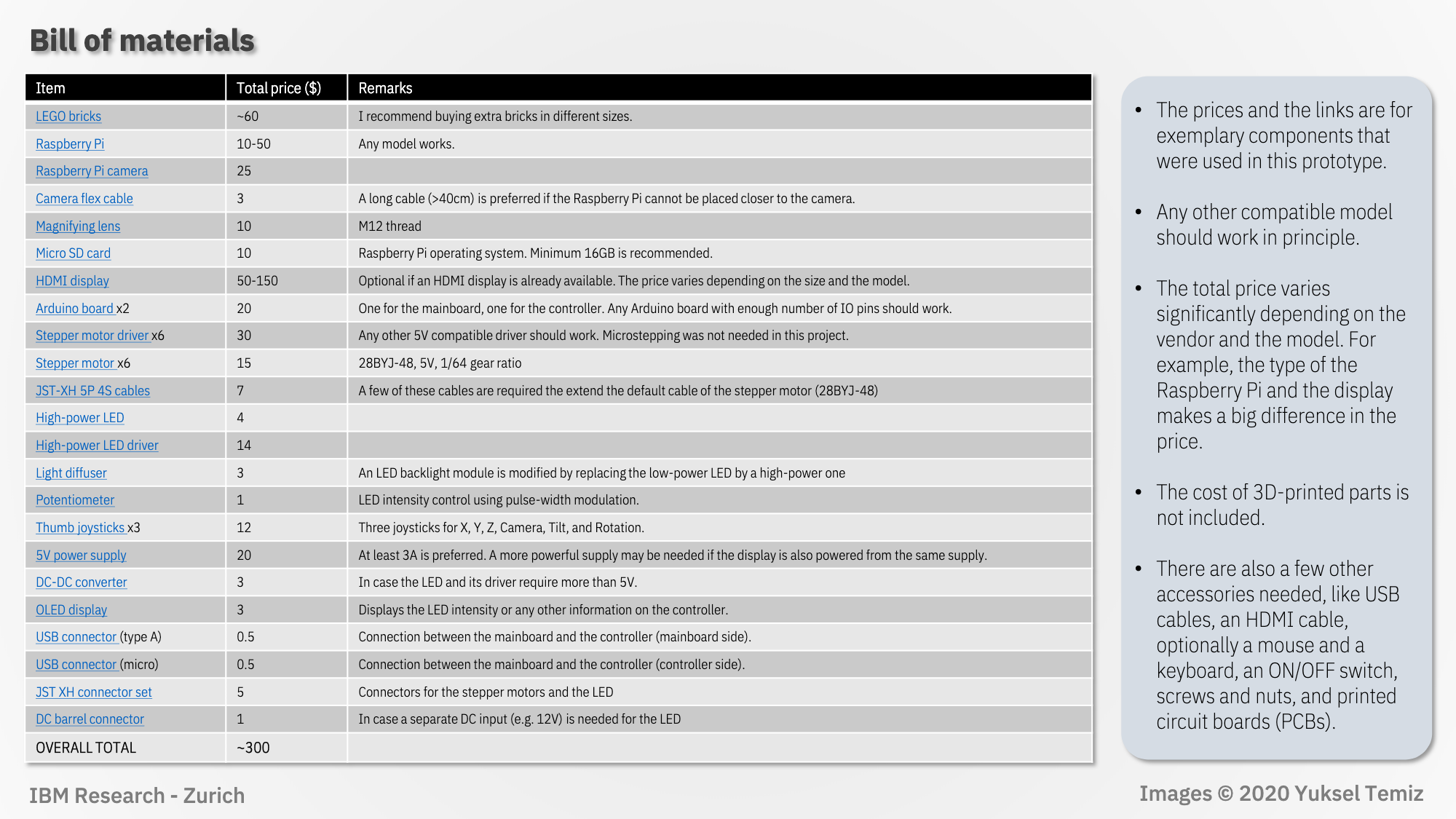
Click image to enlarge
The user has put together very detailed, image-led build instructions walking you through how to create the linear actuators, camera setup, rotary stage, illumination, title mechanism, and electronics.
The project uses a program written in Python 3 (MicroscoPy.py) to control the microscope, modify camera settings, and take photos and videos controlled by keyboard input.
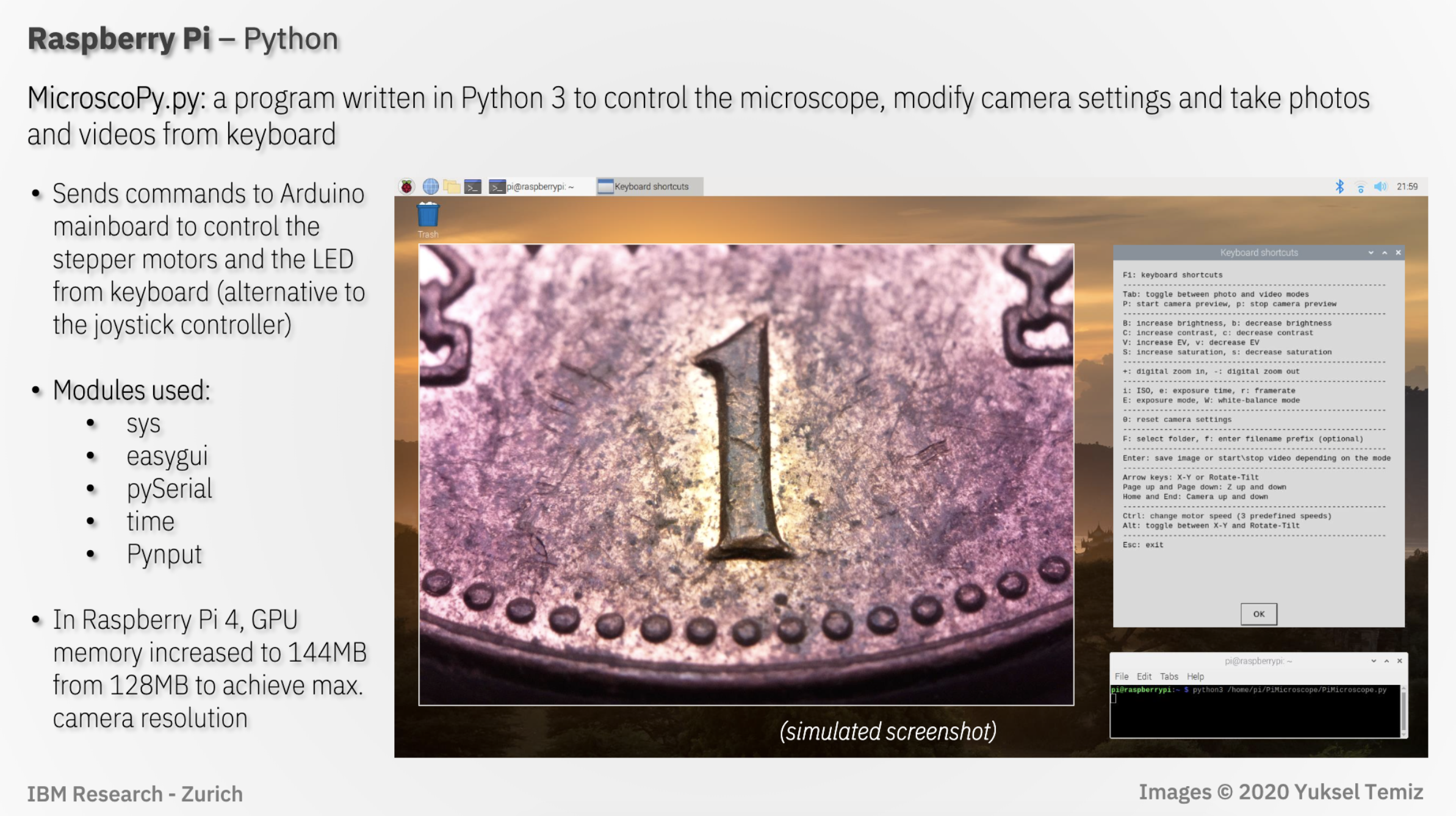
Click image to enlarge
Here is a quick visual to show you the exact ports you need for this project on whatever Raspberry Pi you have:
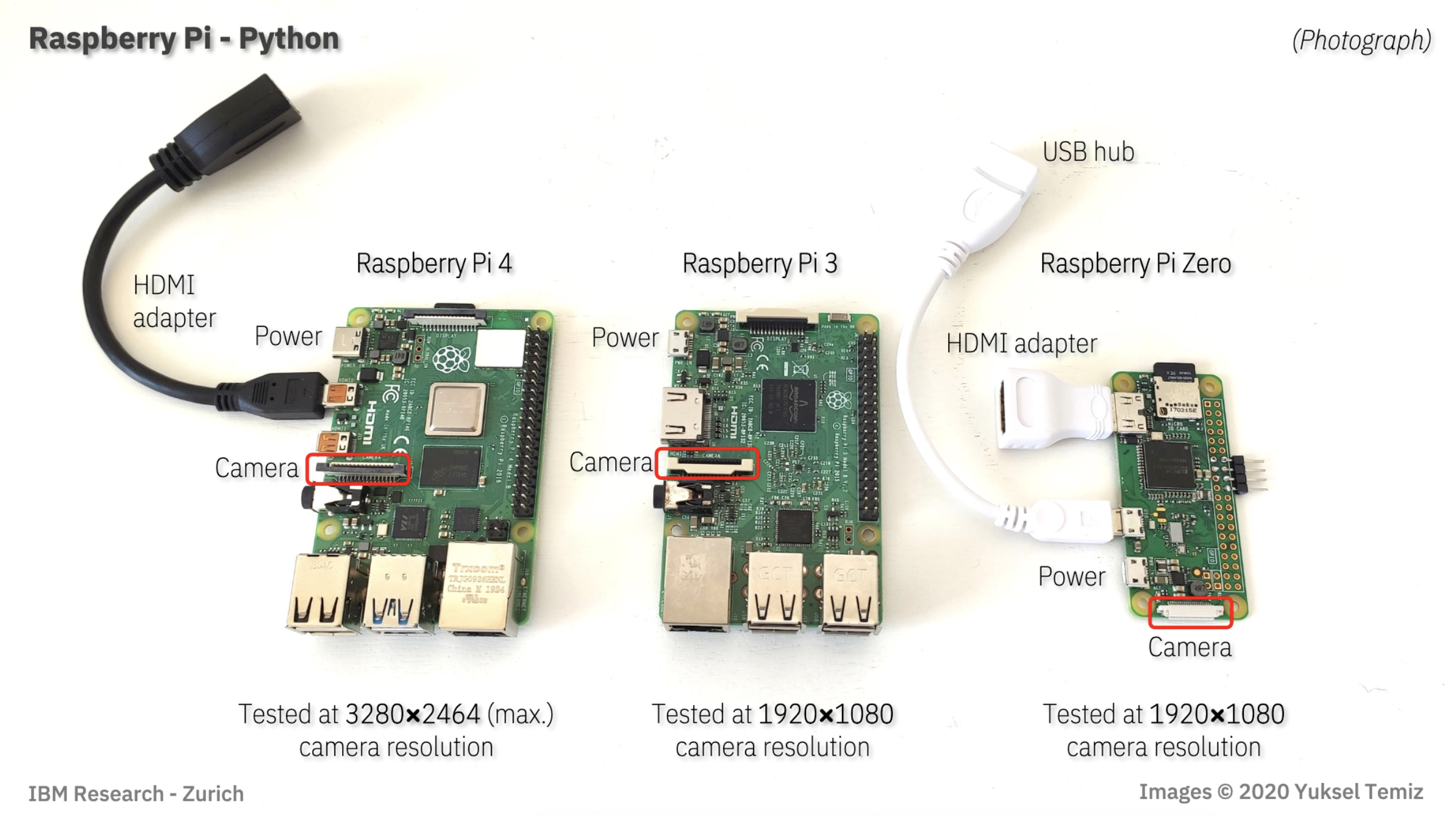
Click image to enlarge
In the comments of the original reddit post, DIY_Maxwell explains that $10 objective lens used in the project limited the Raspberry Pi High Quality Camera’s performance. They predict you can expect even better images with a heavier investment in the lens.
The project is the result of a team at IBM Research–Europe, in Zurich, who develop microfluidic technologies for medical applications, needing to provide high-quality photos and videos of their microfluidic chips.
In a blog for IEEE Spectrum, IBM team member Yuksel Temiz explains: “Taking a photo of a microfluidic chip is not easy. The chips are typically too big to fit into the field of view of a standard microscope, but they have fine features that cannot be resolved using a regular camera. Uniform illumination is also critical because the chips are often made of highly reflective or transparent materials. Looking at publications from other research groups, it’s obvious that this is a common challenge. With this motivation, I devoted some of my free time to designing a multipurpose and compact lab instrument that can take macro photos from almost any angle.”
Here’s the full story about how the Raspberry Pi-powered creation came to be.
And for some extra-credit homework, you can check out this document comparing the performance of the microscope using our Raspberry Pi Camera Module v2 and the High Quality Camera. The key takeaway for those wishing to upgrade their old projects with the newer camera is to remember that it’s heavier and 50% bigger, so you’ll need to tweak your housing to fit it in.
The post Raspberry Pi High Quality Camera powers up homemade microscope appeared first on Raspberry Pi.
A member of the Raspberry Pi community in Ontario, Canada spotted this story from the University of Toronto on CBC News. Engineers have created a device that enables healthcare workers to monitor COVID-19 patients continuously without the need to enter their hospital rooms.
Up-to-date information can be checked from any nursing station computer or smartphone. This advance could prove invaluable in conserving Personal Protective Equipment (PPE) supplies, which staff have to don for each hospital room visit. It also allows for the constant monitoring of patients at a time when hospital workers are extremely stretched.
Mount Sinai Hospital approached the University of Toronto’s engineering department to ask for their help in finding a way to monitor vital signs both continuously and remotely. A team of three PhD students, led by Professor Willy Wong, came up with the solution in just three days.
The simple concept involves connecting a Raspberry Pi 4 to standard finger-clip monitors, already in use across the hospital to monitor the respiratory status of COVID-19 patients. The finger clips detect what light is absorbed by the blood in a patient’s finger. Blood absorbs different colours of light to different degrees depending on how well oxygenated it is, so these measurements tell medical staff whether patients might be having difficulty with breathing.
The Raspberry Pi communicates this information over a wireless network to a server that Wong’s team deployed, allowing the nurses’ station computers or doctors’ smartphones to access data on how their patients are doing. This relieves staff of the need enter patients’ rooms to check the data output on bedside monitors.
Photo by Professor Wong, sourced from CBC News
Feedback has been unanimously positive since several prototypes were deployed in a trial at Mount Sinai. And a local retirement home has been in touch to ask about using the invention to help care for their residents. Professor Wong says solutions like this one are a “no-brainer” when trying to monitor large groups of people as healthcare workers battle COVID-19. “This was a quintessentially electrical and computer engineering problem,” he explains.
Professor Wong’s team included PhD candidates Bill Shi, Yan Li, and Brian Wang.
The University of Toronto is also home to engineers who are currently developing an automated, more sensitive and rapid test for COVID-19. You can read more about their project, which is based on quantum dots – nano-scale particles that bind to different components of the virus’s genetic material and glow brightly in different colours when struck by light. This gives multiple data points per patient sample and provides increased confidence in test results.
The post University of Toronto supports COVID-19 patient monitoring with Raspberry Pi appeared first on Raspberry Pi.
On Wednesday, we hosted the first-ever Cambridge Computing Education Research Symposium online. Research in computing education, particularly in school and for young people, is a young field compared to maths and science education, and we do not have much in terms of theoretical foundations. It is not a field that has received a lot of funding, so we cannot yet look to large-scale, longitudinal, empirical studies for evidence. Therefore, further research on how best to teach, learn, and assess computing is desperately needed. We also need to investigate ways of inspiring and motivating all young people in an area which is increasingly important for their future.
That’s why at the Raspberry Pi Foundationwe have made research a key part of our new strategy, and that’s why we worked with the University of Cambridge to hold this event.
This was to be our first large-scale research event, held jointly with the University of Cambridge Department of Computer Science and Technology. Of course, current circumstances made it necessary for us to turn the symposium from a face-to-face into an online event at short notice.
An enthusiastic team took on the challenge, and we were delighted with how well the way the day went! You can see what participants shared throughout the day on Twitter.
Our keynote speaker was Dr Natalie Rusk of MIT and the Scratch Foundation, who shared her passion for digital creativity using Scratch.
We were excited to see images from early versions of Scratch and how it had developed over the years. Plus, Natalie revealed the cat blocks that were available on 1 April only — I had completely forgotten the day of the symposium was April Fools’ Day! The focus of Natalie’s presentation was on creativity, invention, tinkering, and the development of ideas over time, and she explored case studies of two ‘Scratchers’ who took a very different approach to working in the Scratch community on projects. The talk was well received by all.
We heard from researchers from a range of institutions on topics under these themes:
Highlights for me were Ethel Tshukudu’s analysis of the way students transfer from one programming language to another, in which she draws on semantic transfer theory; and Paul Curzon’s application of Karl Maton’s semantic wave theory (taken from linguistics) to computing education.
The symposium’s focus was computing for young people, and much of the research presented was directly grounded in work with teachers and students in learning situations. Lynne Blair shared an interesting study highlighting female participation in A level computer science classes, which found the feeling of a lack of belonging among young women, a finding that echoes existing research around computing education and gender. Fenia Aivaloglou from the University of Leiden, Netherlands, considered the barriers faced by learners and teachers in extra-curricular code clubs, and Alison Twiner and Jo Shillingworth from the University of Cambridge shared a study on engaging young people in work-related computing projects.
We also heard how tools for supporting learners are developing, for example machine learning techniques to process natural language answers to questions on the free online learning platforms Isaac Computer Science and Isaac Physics.
For the poster sessions, we divided into separate sessions so that the poster presenters could display and discuss their posters with a smaller group of people. This enabled more in-depth discussion about the topic being presented, which participants appreciated at this large online event. The 11 posters covered a wide range of topics from data visualisations in robotics to data-driven dance.
We showcased some of our own work on progression mapping with learning graphs for the NCCE Resource Repository; the Isaac Computer Science A level content platform; and our research into online learning with our free online courses for teachers.
From having successfully hosted this event online, we learned many lessons that we want to put into practice in future online events being offered by the Raspberry Pi Foundation.
There’s a plethora of tools available, and they all have their pros and cons (we used Google Meet). It’s my view that the tool is less important than the preparation needed for a large-scale online event, which is significant! The organising team hosted technical run-throughs with all presenters in the two days before the event, and instigated a ‘green room’ for all presenters to check their setups again five to ten minutes before their speaking slot. This helped to avoid a whole myriad of potential technical difficulties.
I’m so grateful to the great team at the Raspberry Pi Foundation, who worked behind the scenes all day to make sure that the participants and presenters got the most out of the event!
If you’re interested in receiving a regular update about these and other research activities of ours, sign up to our newsletter.
We look forward to building a community of researchers and to sharing more of our work with you over the coming years.
The post Cambridge Computing Education Research Symposium – recap of our online event appeared first on Raspberry Pi.
Are you an academic, researcher, student, or educator who is interested in computing education research? Then come and join us in Cambridge, UK on 1 April 2020 for discussion and networking at our first-ever research symposium.
Dr Natalie Rusk from the MIT Media Lab is our keynote speaker
At the Raspberry Pi Foundation, we carry out research that deepens our understanding of how young people learn about computing and digital making and helps to increase the impact of our work and advance the field of computing education.
As part of our research work, we are launching the Cambridge Computing Education Research Symposium, a new one-day symposium hosted jointly by us and the University of Cambridge.
The theme of the symposium is school-level computing education, both formal and non-formal. The symposium will offer an opportunity for researchers and educators to share their work, meet others with similar interests, and build collaborative projects and networks.
The William Gates Building in Cambridge houses the Department of Computer Science and Technology (Computer Laboratory) and will be the symposium venue
The symposium will take place on 1 April 2020 at the Department of Computer Science and Technology. The day will include a range of talks and a poster session, as well as a keynote speech from Dr Natalie Rusk, Research Scientist at the MIT Media Laboratory and one of the creators of the Scratch programming language.
Registration for the symposium is now open: book your place today!
When you register to attend, you’ll also have the chance to sign up for one of two parallel workshops taking place on 31 March 2020 at the Raspberry Pi Foundation office in Cambridge.
Workshop 1 concerns the topic of gender balance in computing, while in workshop 2, we’ll consider what research-in-practice looks like in the computing classroom.
The workshops will draw on the experiences of everyone who is participating, and they’ll provide a forum for innovative ideas and new opportunities for collaboration to emerge.
You’re also invited to join us on the evening of 31 March for an informal networking event over food and drink at the Raspberry Pi Foundation office — a great chance to meet, mingle, and make connections ahead of the symposium day.
Register for the symposium to secure your place at these events! We look forward to meeting you there.
The post Attend our Cambridge Computing Education Research Symposium appeared first on Raspberry Pi.
When we invited Estefannie Explains It All to present at Coolest Projects International, she decided to make something cool with a Raspberry Pi to bring along. But being Estefannie, she didn’t just make something a little bit cool. She went ahead and made Raspberry Pi Zero-powered Jurassic Park goggles, or, as she calls them, the world’s first globally triggered, mass broadcasting, photon-emitting and -collecting head unit.
Make your own Jurassic Park goggles using a Raspberry Pi // MAKE SOMETHING
Is it heavy? Yes. But these goggles are not expensive. Follow along as I make the classic Jurassic Park Goggles from scratch!! The 3D Models: https://www.thingiverse.com/thing:3732889 My code: https://github.com/estefanniegg/estefannieExplainsItAll/blob/master/makes/JurassicGoggles/jurassic_park.py Thank you Coolest Projects for bringing me over to speak in Ireland!! https://coolestprojects.org/ Thank you Polymaker for sending me the Polysher and the PolySmooth filament!!!!
Estefannie’s starting point was the set of excellent 3D models of the iconic goggles that Jurassicpaul has kindly made available on Thingiverse. There followed several 3D printing attempts and lots of sanding, sanding, sanding, spray painting, and sanding, then some more printing with special Polymaker filament that can be ethanol polished.
Estefannie soldered rings of addressable LEDs and created custom models for 3D-printable pieces to fit both them and the goggles. She added a Raspberry Pi Zero, some more LEDs and buttons, an adjustable headgear part from a welding mask, and – importantly – four circles of green acetate. After quite a lot of gluing, soldering, and wiring, she ended up with an entirely magnificent set of goggles.
Here, they’re modelled magnificently by Raspberry Pi videographer Brian. I think you’ll agree he cuts quite a dash.
Estefannie wrote a Python script to interact with Twitter, take photos, and provide information about the goggles’ current status via the LED rings. When Estefannie powers up the Raspberry Pi, it runs a script on startup and connects to her phone’s wireless hotspot. A red LED on the front of the goggles indicates that the script is up and running.
Once it’s running, pressing a button at the back of the head unit makes the Raspberry Pi search Twitter for mentions of @JurassicPi. The LEDs light up green while it searches, just like you remember from the film. If Estefannie’s script finds a mention, the LEDs flash white and the Raspberry Pi camera module takes a photo. Then they light up blue while the script tweets the photo.
All the code is available on Estefannie’s GitHub. I love this project – I love the super clear, simple user experience provided by the LED rings, and there’s something I really appealing about the asynchronous Twitter interaction, where you mention @JurassicPi and then get an image later, the next time googles are next turned on.
If you read the beginning of this post and thought, “wait, what’s Coolest Projects?” then be sure to watch to the end of Estefannie’s video to catch her excellentCoolest Projects mini vlog. And then sign up for updates about Coolest Projects events near you, so you can join in next year, or help a team of young people to join in.
The post Estefannie’s Jurassic Park goggles appeared first on Raspberry Pi.
Low-cost open labware is a good thing in the world, and I was particularly pleased when micropalaeontologist Martin Tetard got in touch about the Raspberry Pi-based microscope he is developing. The project is called microscoPI (what else?), and it can capture, process, and store images and image analysis results. Martin is engaged in climate research: he uses microscopy to study tiny fossil remains, from which he gleans information about the environmental conditions that prevailed in the far-distant past.
microscoPI: a microcomputer-assisted microscope
microscoPI a project that aims to design a multipurpose, open-source and inexpensive micro-computer-assisted microscope (Raspberry PI 3). This microscope can automatically take images, process them, and save them altogether with the results of image analyses on a flash drive. It it multipurpose as it can be used on various kinds of images (e.g.
Martin repurposed an old microscope with a Z-axis adjustable stage for accurate focusing, and sourced an inexpensive X/Y movable stage to allow more accurate horizontal positioning of samples under the camera. He emptied the head of the scope to install a Raspberry Pi Camera Module, and he uses an M12 lens adapter to attach lenses suitable for single-specimen close-ups or for imaging several specimens at once. A Raspberry Pi 3B sits above the head of the microscope, and a 3.5-inch TFT touchscreen mounted on top of the Raspberry Pi allows the user to check images as they are captured and processed.
The Raspberry Pi runs our free operating system, Raspbian, and free image-processing software ImageJ. Martin and his colleagues use a number of plugins, some developed themselves and some by others, to support the specific requirements of their research. With this software, microscoPI can capture and analyse microfossil images automatically: it can count particles, including tiny specimens that are touching, analyse their shape and size, and save images and results before prompting the user for the name of the next sample.
microscoPI is compact – less than 30cm in height – and it’s powered by a battery bank secured under the base of the microscope, so it’s easily portable. The entire build comes in at under 160 Euros. You can find out more, and get in touch with Martin, on the microscoPI website.
The post A low-cost, open-source, computer-assisted microscope appeared first on Raspberry Pi.


 Lateo.net - Flux RSS en pagaille (pour en ajouter : @ moi)