 Connexion


When we saw Alex Glow’s name in the latest issue of HackSpace magazine, we just had to share their project. HackSpace #45 celebrates the best Raspberry Pi builds of all time, and we remembered spotting Alex’s wearable robotic owl familiar back in the day. For those of you yet to have had the pleasure, meet Archimedes…

Back in 2018, Hackster’s Alex Glow built Archimedes, an incredible robot companion using a combination of Raspberry Pi Zero W and Arduino with the Google AIY Vision Kit for its ‘brain’.
An updated model, Archie 2, using Raspberry Pi 3B, ESP32-powered Matrix Voice, and an SG90 micro-servo motor saw the personable owl familiar toughen up – Alex says the 3D-printed case is far more durable – as well as having better voice interaction options using Matrix HAL (for which installer packages are provided for Raspberry Pi and Python), plus Mycroft and Snips.ai voice assistant software.
Other refinements included incorporating compact discs into the owl’s wings to provide an iridescent sheen. Slots in the case allowed Alex to feed through cable ties to attach Archie’s wings, which she says now “provide a lively bounce to the wings, in tune with his active movements (as well as my own).”
Each month, HackSpace magazine brings you the best projects, tips, tricks and tutorials from the makersphere. You can get it from the Raspberry Pi Press online store or your local newsagents.
As always, every issue is free to download from the HackSpace magazine website.
The post Archimedes the AI robot | HackSpace #45 appeared first on Raspberry Pi.
We’re excited to share another incredible story from the community — the second in our new series of inspirational short films that celebrate young tech creators across the world.
These stories showcase some of the wonderful things that young people are empowered to do when they learn how to create with technology. We hope that they will inspire many more young people to get creative with technology too!
This time, you will meet an accomplished, young community member who is on a quest to encourage more girls to join her and get into digital making.
For as long as she can remember, Avye (13) has enjoyed creating things. It was at her local CoderDojo that seven-year-old Avye was introduced to the world of robotics. Avye’s second-ever robot, the Raspberry Pi–powered Voice O’Tronik Bot, went on to win the Hardware category at our Coolest Projects UK event in 2018.
Coding and digital making have become an integral part of Avye’s life, and she wants to help other girls discover these skills too. She says, “I believe that it’s important for girls and women to see and be aware of ordinary girls and women doing cool things in the STEM world.” Avye started running her own workshops for girls in their community and in 2018 founded Girls Into Coding. She has now teamed up with her mum Helene, who is committed to helping to drive the Girls Into Coding mission forwards.
I want to get other girls like me interested in tech.
Avye
Avye has received multiple awards to celebrate her achievements, including the Princess Diana Award and Legacy Award in 2019. Most recently, in 2020, Avye won the TechWomen100 Award, the Women in Tech’s Aspiring Teen Award, and the FDM Everywoman in Tech Award!
We cannot wait to see what the future has in store for her. Help us celebrate Avye and inspire others by liking and sharing her story on Twitter, Linkedin, or Facebook!
The post Celebrating the community: Avye appeared first on Raspberry Pi.
Even if you don’t follow Simone Giertz on social media or YouTube, there’s a good chance you know of her work. Originally hailed as the Queen of S***** Robots, Simone’s early videos of questionable contraptions, such as the Toothbrush Machine and Hair Washing Robot, quickly went viral, birthing a variety of GIFs and shareable content that quickly took over the internet. But, nowadays, she’s shelved her bots and focuses her attention on more reliable projects, such as her highly successful crowdfunding campaign for The Every Day Calendar, and the impressive Truckla, a Tesla pickup truck that beat Elon Musk’s Cybertruck to the post when shared online in June 2019.
Alex Bate caught up with Simone Giertz (pronounced Yetch, not Gerts) to discuss how she went from unreliable robots and GIF stardom to bunk-beds made of leaves and office chair sidecars for needy pets, and why her openly discussed brain tumour helped to realign her business model.
HS To me, as a viewer, it feels like your YouTube career is split into two halves. There’s Simone, the Queen of S***** Robots, and then there’s everything post-surgery, like Truckla and The Every Day Calendar. Do you see it too?
SG The difficult part about YouTube, and also the good side of it, is that if you have a really long career, you grow up during that career, and you change and your interests change. And I don’t want to just play a role, I want to be genuinely excited about the things I do – you get sick of things, and you want to explore new things. So, in order to do that, I’ve really tried to be ‘theme agnostic’ for my YouTube channel.
And that was something that was really hard with S***** Robots, because it was something that I knew that people really liked, and that I had a level of success with. But I was just not that excited about it anymore. And I think the brain tumour became a really good page turner for me, because I had such limited energy capital, you know, and I really just wanted to spend my time and my very limited energy on doing things that I was super-pumped about.
I think the projects I build now still have some elements of the stuff I did in my early days, but they’re definitely less GIF-compatible.
In the beginning, all I was thinking about for every project was a GIF. That was the main deliverable that I had in my head, and the main piece of content that I focused on, and then I kind of built a YouTube video around it, and around the process of creating this GIF. And I let go of that. Not every project needs to have a punchline. It can be fine. It can be a little bit more dull.
But, I still feel guilty about it.
HS Really?
SG Yeah. People are very sweet about it, but I still get comments with people being like, ’Oh, I miss the robots.’ But, at the same time, you have to think, ’It’s my life, and I really want to do the things I want to do.’ And I’m also so drawn to my product business and wanting to focus on that. And the way that my YouTube channel can co-exist with that is for me to explore different products and make videos about them. And it’s actually becoming a pretty good tag team.
HS Talking about your product business, the biggest one to date was obviously The Every Day Calendar. 2300-odd backers, and over half a million dollars raised. How did you feel when your first Kickstarter just soared like that?
SG It was fun and scary. Because, as somebody who’s terrified of disappointing people, crowdfunding campaigns are kind of like the worst position to put yourself in because you really risk disappointing people. But, I don’t think we did. I mean, we were late, but I really just wanted to deliver a good product because it was expensive. And, yes, we raised over half a million dollars, but it’s not until now that we’ve actually broken even.
HS Wow.
SG It’s so expensive. And so much of that is in product development. When it comes down to it, and you’re actually putting something out in the world, it’s just crazy how much it costs. And I mean, we probably didn’t do it in the most efficient way we could, because we were rookies. But, it was definitely very humbling and terrifying.
HS Would you do further products with Kickstarter? Or do you think you’re now at a point where you would just create a product and sell it, and not have to rely on crowdfunding?
SG We’re hopefully launching our store this summer, and we’re going to have four different products in it. And, I’m hoping that any easier products can be self-funded. And, if there’s something more complicated, like the Companion Chair, which is definitely going to be a bigger project, it might end up being crowdfunded because with funding, you also get market testing. You can get a lot out of it. But, that said, after I did The Every Day Calendar, I remember saying I’d never do it again. Every night at 3 am, I would just wake up and be like, ’Oh my god, what if we send out the calendars and then, in two years, all of them stop working! People are going to be really angry.’ I’m scared of that. But, I guess that also, even if customers are buying your product off the shelf, you are always going to live with that fear over your head.
HS It’s really interesting to go back and watch your earliest videos, particularly the first one in Swedish, and see how far you’ve come. Was it always the aim to start the business? To have staff and be opening an online store and selling your products?
SG I mean, no, I would definitely be lying if I said that this is some sort of master plan. There was no scheming where I had the large whiteboard – ’This is the trajectory of how I’m going to become known as the Queen of S***** Robots. And then I’m going to pivot that into running a product business.’ I’m definitely not that smart.
But, I had an inkling of what I was interested in. And I mean, I really liked making videos. And I think that everything kind of happened in a very fortunate way. Because I had this job where I was a Maker in Residence at a US company called Punch Through Design. And my job was just to build different things. And right when my job there was ending, I posted the Toothbrush Helmet, and that started getting some traction. I was moving back to Sweden because my visa expired, and I just had this year of living with my mom again, and having very few expenses and I was like, ’OK, I’m gonna just make sure I work enough to get by, but then the rest of the time, I’m just gonna spend it on building these machines that I want to build.’
So I was very fortunate in the way that I could structure things so I was able to spend time on my YouTube channel in the early days.
But, it’s also so easy to look back and be like, ’Of course, all these things led me to where I am today.’ But when you’re in the middle of it, you’re just flailing. And my flailing, fortunately, landed me in a position that I’m very happy with today.
[It’s at this point of the conversation that Simone’s three-legged canine sidekick, Commander Scraps, decides to join us. Those who have seen Simone’s build video for the Companion Chair or Lego-based Dog Selfie Booth will already know of Scraps. Those who haven’t, well, Scraps is adorable, so you should definitely check them out.]
HS Some online content creators are often stuck within a theme – wood working, electronics, 3D printing, and so on. But, for you, it seems that you’re the theme, you’re the brand, and you can get away with creating whatever content you want. Do you see that when you interact with your community? That freedom?
SG It’s something that I thought a lot about in the early days, like, how much is the channel about me and my life? And how much is it about the things that I build? And I think what I struggled with is that I’m not that interested in my life. Like, I really want to make videos that I myself would want to watch. I’m not really interested in vlogs, so I decided early on that while it’s about my life to an extent, it’s still centred around these projects I’m building.
In some ways, I’m pretty private on the internet, but also very open, like when it comes to brain tumour stuff. I was really open about it, and I wanted to tell everyone about it because it was a way for me to process what was happening. I remember having to tell myself that I had to stop telling waiters or Uber drivers that I had a brain tumour. ’Hi sweetie, how are you today? Well, I have a brain tumour, but other than that, I’m pretty good.’
When it came to talking about it online, it was a no-brainer. Haha.
But then there’s other stuff that I don’t talk about, like, I don’t really document my life. I don’t talk about my friends really, or my relationship status, or anything like that. Because you have to draw the line somewhere. And I always felt like documenting my life was just too intrusive.
HS When you look at your most popular videos on your channel, even though you’re known as the Queen of S***** Robots, those videos aren’t actually in the Top 5. Instead, it’s the video of you in the zero gravity simulations, and Truckla, and locking yourself in your bathroom for 48 hours. It’s interesting that the thing you’re most known for isn’t the thing your audience is most interacting with.
SG Those robot videos mostly did really well on other platforms, like Twitter and Reddit. Not so much on YouTube because it has its own metrics and algorithms.
The thing that is really useful for other creators who are getting started is to figure out what is your hook, or what is the very simple version of what you’re doing. Like, Queen of S***** Robots kind of became the headline. And it was this very clear message, and it was something that was really easy for journalists to write about. It was a spearhead for branding.
This was not something I was thinking about at the time, but looking back, my fear then was to make sure I didn’t get pigeonholed, and that I could never move on from it, because that’s the problem when people only know you for one thing – you can’t really move on beyond that. It’s really nice to have that spearhead, and then you can broaden it, and that’s how you have longevity.
I didn’t want this to be over in a year. I wanted to be able to keep on doing it because I was really enjoying it. And now, I want to make sure that I have more legs to stand on, because when you’re going through health problems, you realise that if you can’t be in front of a camera, everything grinds to a halt. If you’re not well enough to work, or if YouTube changes its algorithm, it becomes such a fragile business structure. So, that was one of the reasons why I decided I needed to go into products.
HS I guess you can’t really be known as the Queen of S***** Robots where everything you make doesn’t really do what it’s meant to do, and then expect people to buy serious products from you and trust they’ll work.
SG That’s definitely one of the things when we launched The Every Day Calendar – I was wondering how are people going to be able to take this seriously? But, I think that’s what’s really nice, that my audience has been around long enough and they’ve seen that there’s more to it than that – there’s actually, ironically, a lot of work that goes into making S***** Robots.
HS I remember the first time I saw your work was when you collaborated with Adam Savage to make an automated popcorn machine in 2016. It’s a great video that really highlights how great collaborative work can be when two people focus on what they’re really interested in to make a final product. And you’ve worked on other videos with creators such as Laura Kampf. Is there anyone else you’d like to work with?
SG I’m really interested in people who are kind of beyond the community that I’m currently in. It would be really fun to do stuff with musical artists; I’d love to collaborate with OK Go. Or venture beyond that and work with people who make art, and fashion designers. People who are outside the world where I’m creating. And there are people that I just love and would always want to work with, like Laura. She’s the sweetest, most talented, down-to-earth and funny person. I really love working with her. I should really think of who’s on my bucket list.
Something I’ve really missed during the pandemic is just getting to spend time with people who are excited about what they’re doing, and having that excitement rub off on me. There’s nothing more inspiring than someone being pumped about something, even if you don’t understand what it is. In some ways, lockdown has been great for creating as I’ve had more time to loiter in the shop, but I definitely miss that input and just being able to talk to people.
HS And are there any projects you’d like to build that you just haven’t gotten around to doing yet?
SG Honestly, I just want to build stuff for my house right now, which I know isn’t the most interesting answer. I still have the CEO Bouncy Chair on my list – I want to make this kids’ bouncy chair, the type where you’re almost in some sort of plastic diaper. But I want it to look like a mahogany desk with a Rolodex and it’s for grown-ups. And make some spoof commercial for it when it’s marketed as an exercise device, but there’s just some balding white guy in it. I think that’s the only one that I’m still eager to build. Let me look at my notes…
[Simone proceeds to pull out her phone and list project ideas from the notes app. Should I tell you what they are or should I leave them as a surprise? With great power comes great responsibility!]
HS Those are definitely some interesting ideas…
[I’m very responsible].
HS Going back to your audience, you seem to have been somewhat spared a lot of the negativity people receive in comments, and online in general. Why do you think that is?
SG I’m just always so scared. Haha. I’ve been spared from the trolls and the hate, and I’m just terrified of ruining whatever equilibrium is happening right now. That’s one of the reasons I post so seldomly. I was looking the other day and thought, ’Oh, it’s been 45 days since I last posted on Instagram!’, and I notice I keep getting DMs from people asking if I’m OK. I’m just always scared to overstep, or do something that would upset people, or cause me to fall from some sort of pedestal. I just never want to post something that doesn’t work for other people, you know?
HS I get it. The comments section of YouTube alone can be an awful place sometimes. Speaking of YouTube, are there any other makers at the moment who are inspiring you?
SG I love 3×3 Custom. She’s my happy place because she’s at a level of making that I’m just not at. Her jig work is just wild, and the quality she puts out. And I love Nicole McLaughlin. She does these really fun and weird fashion contraptions, like shoes made out of tennis balls. She’s very cool. She’s a level of coolness that I aspire to and never expect to get to.
But, one of the most inspiring things for me is time. And I know that if I run out of ideas, it’s because I’m overworked and I haven’t had enough downtime and time to just loiter in the shop. I try to enforce this on Fridays, where me and my teammates just work on whatever project, and it doesn’t have to be work-related. And some of my best ideas have come from that type of work, where I don’t know what my end goal with this is, but I’m just going to tinker with it for a little bit.
You can follow Simone on Instagram for behind-the-scenes photos of her project, and subscribe to her YouTube channel for new content. Also, because why wouldn’t you, you can follow Scraps on Instagram too!
Each month, HackSpace magazine brings you the best projects, tips, tricks and tutorials from the makersphere. You can get it from the Raspberry Pi Press online store or your local newsagents.
As always, every issue is free to download from the HackSpace magazine website.
The post Meet Simone Giertz: Inventor, robotics enthusiast, and YouTuber appeared first on Raspberry Pi.
Design Engineering student Ben Cobley has created a Raspberry Pi–powered sous-chef that automates the easier pan-cooking tasks so the head chef can focus on culinary creativity.
Ben named his invention OnionBot, as the idea came to him when looking for an automated way to perfectly soften onions in a pan while he got on with the rest of his dish. I have yet to manage to retrieve onions from the pan before they blacken so… *need*.
A Raspberry Pi 4 Model B is the brains of the operation, with a Raspberry Pi Touch Display showing the instructions, and a Raspberry Pi Camera Module keeping an eye on the pan.
Ben’s affordable solution is much better suited to home cooking than the big, expensive robotic arms used in industry. Using our tiny computer also allowed Ben to create something that fits on a kitchen counter.
A thermal sensor array suspended above the stove detects the pan temperature, and the Raspberry Pi Camera Module helps track the cooking progress. A servo motor controls the dial on the induction stove.
No machine learning expertise was required to train an image classifier, running on Raspberry Pi, for Ben’s robotic creation; you’ll see in the video that the classifier is a really simple drag-and-drop affair.
Ben has only taught his sous-chef one pasta dish so far, and we admire his dedication to carbs.
Ben built a control panel for labelling training images in real time and added labels at key recipe milestones while he cooked under the camera’s eye. This process required 500–1000 images per milestone, so Ben made a LOT of pasta while training his robotic sous-chef’s image classifier.
Ben open-sourced this project so you can collaborate to suggest improvements or teach your own robot sous-chef some more dishes. Here’s OnionBot on GitHub.
He also rates this Auto ML system used in the project as a “great tool for makers.”
The post Hire Raspberry Pi as a robot sous-chef in your kitchen appeared first on Raspberry Pi.
Join us for Digital Making at Home: this week, young people can build a Raspberry Pi robot buggy with us! Through Digital Making at Home, we invite kids all over the world to code and make along with us and our new videos every week.
So get your Raspberry Pi, wheels, wires, and breadboards ready! We’re building a robot:
Let’s build a robot together this week!
And tune in on Wednesday 2pm BST / 9am EDT / 7.30pm IST at rpf.io/home to code along with our live stream session with Estefannie from Estefannie Explains it All to ask us your questions about robots and build something cool with Adafruit’s Circuit Playground.
The post Build a Raspberry Pi robot buggy with your kids appeared first on Raspberry Pi.
8 Bits and a Byte created this automatic bubble machine, which is powered and controlled by a Raspberry Pi and can be switched on via the internet by fans of robots and/or bubbles.
They chose a froggy-shaped bubble machine, but you can repurpose whichever type you desire; it’s just easier to adapt a model running on two AA batteries.
Before the refurb, 8 Bits and a Byte’s battery-powered bubble machine was controlled by a manual switch, which turned the motor on and off inside the frog. If you wanted to watch the motor make the frog burp out bubbles, you needed to flick this switch yourself.
After dissecting their plastic amphibian friend, 8 Bits and a Byte hooked up its motor to Raspberry Pi using a relay module. They point to this useful walkthrough for help with connecting a relay module to Raspberry Pi’s GPIO pins.
Now the motor inside the frog can be turned on and off with the power of code. And you can become controller of bubbles by logging in here and commanding the Raspberry Pi to switch on.
To let the internet’s bubble fans see the fruits of their one-click labour, 8 Bits and a Byte set up a Raspberry Pi Camera Module and connected their build to robot streaming platform remo.tv.
The only remaining question is: what’s the best bubble soap recipe?
The post Auto-blow bubbles with a Raspberry Pi-powered froggy appeared first on Raspberry Pi.
Meet Callum Fawcett, who shares his journey from tinkering with the first Raspberry Pi while he was at school, to a Master’s degree in computer science and a real-life job in programming. We also get to see some of the awesome projects he’s made along the way.
Most of my learning was done through two sources. I learnt Linux and how the terminal worked using online resources such as Stack Overflow. I would have a problem that I needed to solve, look up solutions online, and try out commands that I found. This was perhaps the hardest part of learning how to use a Raspberry Pi, as it was something I had never done before, but it really helped me in later years when I would use Linux more than Windows. For learning programming, I preferred to use books. I had a book for C++ and a book for Python that I would work through. These were game-based books, so many of the fun projects that I did were simple text-based games where you typed in responses to questions.
The first robot Callum made using a Raspberry Pi
By far the coolest project I did with the Raspberry Pi was to build a small robot (shown above). This was a joint project between myself and my dad. He sorted out the electronics and I programmed the robot. It was a great opportunity to learn about robotics and refine my programming skills. By the end, the robot was capable of moving around by itself, driving into objects, and then reversing and trying a new direction. It was almost like an unintelligent Roomba that couldn’t hoover, but I spent many hours improving small bits and pieces to make it as easy to use as possible. My one wish that I never managed to achieve with my robot was allowing it to map out its surroundings. This was a very ambitious project at the time, since I was still quite inexperienced in programming. The biggest problem with this was calibrating the robot’s turning circle, which was never consistent so it was very hard to have the robot know where in the room it was.
Another fun project that I worked on used the Sense HAT developed for the Astro Pi computers for use on the International Space Station. Using this, I was able to make a memory maze game (shown below), in which a player is shown a maze for several seconds and then has to navigate that maze from memory by shaking the device. This was my first introduction to using more interactive types of input, and this eventually led to my final-year project, which used these interesting interactions to develop another way of teaching.
I have now just finished my Master’s degree in computer science at the University of Bristol. Before going to university, I had no experience of being taught programming in a formal environment. It was not a taught subject at my secondary school or sixth form. I wanted to get more people at my school interested in this area of study though, which I did by running a coding club for people. I would help others debug their code and discuss interesting problems with them. The reason that I chose to study computer science is largely because of my experiences with Raspberry Pi and other programming I did in my own time during my teenage years. I likely would have studied history if it weren’t for the programming I had done by myself making robots and other games.
Raspberry Pi has continued to play a part in my degree and extra-curricular activities; I used them in two large projects during my time at university and used a similar device in my final project. My robot experience also helped me to enter my university’s ‘Robot Wars’ competition which, though we never won, was a lot of fun.
Having a Raspberry Pi is always useful during a hackathon, because it’s such a versatile component. Tech like Raspberry Pi will always be useful for beginners to learn the basics of programming and electronics, but these computers are also becoming more and more useful for people with more experience to make fun and useful projects. I could see tech like Raspberry Pi being used in the future to help quickly prototype many types of electronic devices and, as they become more powerful, even being used as an affordable way of controlling many types of robots, which will become more common in the future.
Our guest blogger Callum
Now I am going on to work on programming robot control systems at Ocado Technology. My experiences of robot building during my years before university played a large part in this decision. Already, robots are becoming a huge part of society, and I think they are only going to become more prominent in the future. Automation through robots and artificial intelligence will become one of the most important tools for humanity during the 21st century, and I look forward to being a part of that process. If it weren’t for learning through Raspberry Pi, I certainly wouldn’t be in this position.
Cheers for your story, Callum! Has tinkering with our tiny computer inspired your educational or professional choices? Let us know in the comments below.
The post Learning with Raspberry Pi — robotics, a Master’s degree, and beyond appeared first on Raspberry Pi.
When you’re learning a new language, it’s easier the younger you are. But how can we show very young students that learning to speak code is fun? Consequential Robotics has an answer…
The MiRo-E is an ’emotionally engaging’ robot platform that was created on a custom PCB and has since moved onto Raspberry Pi. The creators made the change because they saw that schools were more familiar with Raspberry Pi and realised the potential in being able to upgrade the robotic learning tools with new Raspberry Pi boards.
The MiRo-E was born from a collaboration between Sheffield Robotics, London-based SCA design studio, and Bristol Robotics Lab. The cute robo-doggo has been shipping with Raspberry Pi 3B+ (they work well with the Raspberry Pi 4 too) for over a year now.
While the robot started as a developers’ tool (MiRo-B), the creators completely re-engineered MiRo’s mechatronics and software to turn it into an educational tool purely for the classroom environment.
MiRo-E with students at a School in North London, UK
MiRo-E can see, hear, and interact with its environment, providing endless programming possibilities. It responds to human interaction, making it a fun, engaging way for students to learn coding skills. If you stroke it, it purrs, lights up, move its ears, and wags its tail. Making a sound or clapping makes MiRo move towards you, or away if it is alarmed. And it especially likes movement, following you around like a real, loyal canine friend. These functionalities are just the basic starting point, however: students can make MiRo do much more once they start tinkering with their programmable pet.
These opportunities are provided on MiRoCode, a user-friendly web-based coding interface, where students can run through lesson plans and experiment with new ideas. They can test code on a virtual MiRo-E to create new skills that can be applied to a real-life MiRo-E.
Here are the full technical specs. But basically, MiRo-E comprises a Raspberry Pi 3B+ as its core, light sensors, cliff sensors, an HD camera, and a variety of connectivity options.
MiRo reacts to sound, touch, and movement in a variety of ways. 28 capacitive touch sensors tell it when it is being petted or stroked. Six independent RGB LEDs allow it to show emotion, along with DOF to move its eyes, tail, and ears. Its ears also house four 16-bit microphones and a loudspeaker. And two differential drive wheels with opto-sensors help MiRo move around.
The ‘E’ bit of MiRo-E means it’s emotionally engaging, and the intelligent pet’s potential in healthcare have already been explored. Interaction with animals has been proved to be positive for patients of all ages, but sometimes it’s not possible for ‘real’ animals to comfort people. MiRo-E can fill the gap for young children who would benefit from animal comfort, but where healthcare or animal welfare risks are barriers.
The same researchers who created this emotionally engaging robo-dog for young people are also working with project partners in Japan to develop ‘telepresence robots’ for older patients to interact with their families over video calls.
The post Meet your new robotic best friend: the MiRo-E dog appeared first on Raspberry Pi.
This fully automated M&M’s-launching machine delivers chocolate on voice command, wherever you are in the room.
To get our head around Harrison McIntyre‘s project, first we need to understand parabolas. Harrison explains: “If we ignore air resistance, a parabola can be defined as the arc an object describes when launching through space. The shape of a parabolic arc is determined by three variables: the object’s departure angle; initial velocity; and acceleration due to gravity.”
Harrison uses a basketball shooter to illustrate parabolas
Lucky for us, gravity is always the same, so you really only have to worry about angle and velocity. You could also get away with only changing one variable and still be able to determine where a launched object will land. But adjusting both the angle and the velocity grants much greater precision, which is why Harrison’s machine controls both exit angle and velocity of the M&M’s.
The M&M’s launcher comprises:
A cordless drill battery is the primary power source.
The project relies on similar principles as a baseball pitching machine. A compliant wheel is attached to a shaft sitting a few millimetres above a feeder chute that can hold up to ten M&M’s. To launch an M&M’s piece, the machine spins up the shaft to around 1500 rpm, pushes an M&M’s piece into the wheel using a servo, and whoosh, your M&M’s piece takes flight.
To measure the velocity of the fly wheel in the machine, Harrison installed a Hall effect magnetic limit switch, which gets triggered every time it is near a magnet.
Two magnets were placed on opposite sides of the shaft, and these pass by the switch. By counting the time in between each pulse from the limit switch, the launcher determines how fast the fly wheel is spinning. In response, the microcontroller adjusts the motor output until the encoder reports the desired rpm. This is how the machine controls the speed at which the M&M’s pieces are fired.
Now, to control the angle at which the M&M’s pieces fly out of the machine, Harrison mounted the fly wheel assembly onto a turret with two degrees of freedom, driven by servos. The turret controls the angle at which the sweets are ‘pitched’, as well as the direction of the ‘pitch’.
With the angle, velocity, and direction at which the M&M’s pieces fly out of the machine taken care of, the last thing to determine is the expectant snack-eater’s location. For this, Harrison harnessed vision processing.
Harrison used a USB camera and a Python script running on Raspberry Pi 3 to determine when a human face comes into view of the machine, and to calculate how far away it is. The turret then rotates towards the face, the appropriate parabola is calculated, and an M&M’s piece is fired at the right angle and velocity to reach your mouth. Harrison even added facial recognition functionality so the machine only fires M&M’s pieces at his face. No one is stealing this guy’s candy!
This project is topped off with a voice-activation element, courtesy of an Amazon Echo Dot, and a Python library called Sinric. This allowed Harrison to disguise his Raspberry Pi as a smart TV named ‘Chocolate’ and command Alexa to “increase the volume of ‘Chocolate’ by two” in order to get his machine to fire two M&M’s pieces at him.
In his video, Harrison explaining that other snack-launching machines involve a spring-loaded throwing mechanism, which doesn’t let you determine the snack’s exit velocity. That means you have less control over how fast your snack goes and where it lands. The only drawback to Harrison’s model? His machine needs objects that are uniform in shape and size, which means no oddly shaped peanut M&M’s pieces for him.
He’s created quite the monster here, in that at first, the machine’s maximum firing speed was 40 mph. And no one wants crispy-shelled chocolate firing at their face at that speed. To keep his teeth safe, Harrison switched out the original motor for one with a lower rpm, which reduced the maximum exit velocity to a much more sensible 23 mph… Please make sure you test your own snack-firing machine outdoors before aiming it at someone’s face.
Check out the end of Harrison’s videos for some more testing to see what his machine was capable of: he takes out an entire toy army and a LEGO Star Wars squad by firing M&M’s pieces at them. And remember to subscribe to his channel and like the video if you enjoyed what you saw, because that’s just a nice thing to do.
The post Make it rain chocolate with a Raspberry Pi-powered dispenser appeared first on Raspberry Pi.
HackSpace magazine issue 22 is out now, and our favourite tutorial this month will show you how to make this, a xylophone-playing robot!
Build a glockenspiel-playing robot with HackSpace magazine
Why spend years learning to play a musical instrument when you could program a robot to do it for you? This month HackSpace magazine, we show you how to build a glockenspiel-playing robot. Download the latest issue of HackSpace for free: http://rpf.io/hs22yt Follow HackSpace on Instagram: http://rpf.io/hsinstayt
If programming your own instrument-playing robot isn’t for you, never fear, for HackSpace magazine is packed full of other wonderful makes and ideas, such as:
Honestly, this month’s HackSpace is so full of content that it would take me all day to go through everything. But, don’t take my word for it — try it yourself.
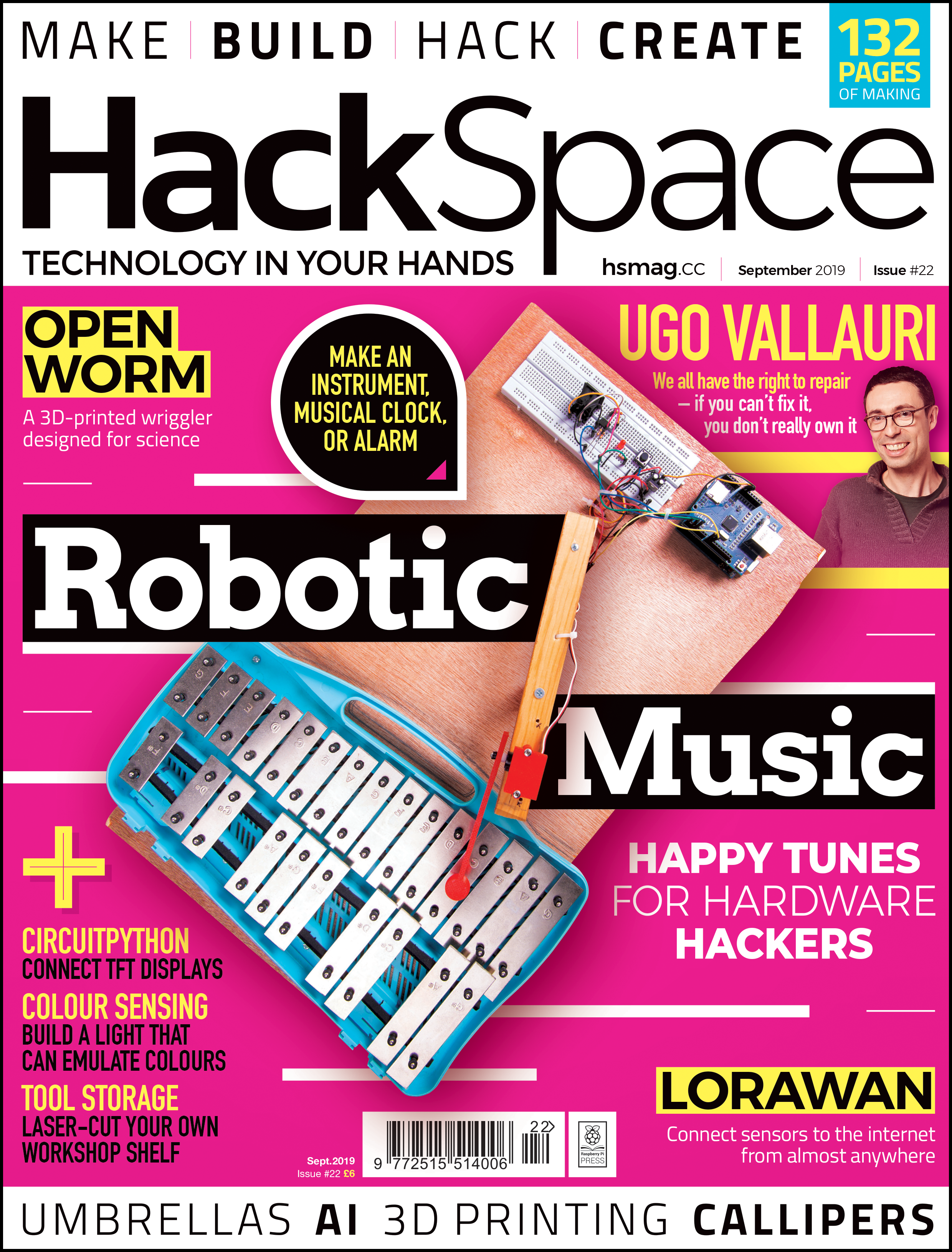
HackSpace magazine is out now, available in print from your local newsagent or from the Raspberry Pi Store in Cambridge, online from Raspberry Pi Press, or as a free PDF download. Click here to find out more and, while you’re at it, why not have a look at the subscription offers available, including the 12-month deal that comes with a free Adafruit Circuit Playground!
Yes, I know it’s a glockenspiel in the video.
The post Build a xylophone-playing robot | HackSpace magazine #22 appeared first on Raspberry Pi.


 Lateo.net - Flux RSS en pagaille (pour en ajouter : @ moi)