 Connexion


Around the world, governments are grappling with the same question: how do you prepare young people for careers shaped by emerging technologies? In the UK, part of the answer is TechFirst, and we’re proud to be playing a central role in it.
Through the new TechFirst partnership with the Department for Digital, Culture, Media and Sport (DCMS), we are expanding Ada Computer Science, the free computing education platform we have built with the University of Cambridge for UK students and teachers. It’s one of the ways the UK government plans to bring frontier tech education to a million secondary students (11- to 18-year-olds) over the next three years.
TechFirst is the UK government’s £187 million tech skills initiative, designed to open up pathways into the country’s tech sector. It supports people at every stage, from students in school to university researchers and career changers.
Backed by major tech employers, the programme focuses on six frontier technologies: cybersecurity, artificial intelligence, quantum computing, engineering biology, semiconductors, and advanced connectivity technologies.
Ada Computer Science sits at the heart of TechFirst’s schools strand. With DCMS funding, we’re adding new content and features to the platform, and everything stays completely free.
For the first time, Ada Computer Science now covers ages 11 to 19, with new teaching and learning materials for 11- to 14-year-olds added alongside everything we already offer for ages 14 to 19. Thanks to the new materials, students can start exploring computing and frontier technologies earlier, and build on that learning all the way through to the end of secondary education.
Alongside the expansion of the Ada CS platform, DCMS is funding Regional Delivery Partners to bring hands-on technology activities into secondary schools across the UK, giving students practical experience and a real sense of where a tech career could take them.
Beyond the economic opportunities that understanding frontier technologies opens up for young people, gaining this knowledge and skills helps young people have agency and power in a world where technology plays an ever greater role in their lives.
We are pleased to offer the new frontier technologies materials, like all our teaching and learning resources, at no cost to teachers and students. This is one way in which we support equal access to a high-quality computing and AI education for all young people.
We will add new content and features to Ada CS in phases, including:
If you’re a teacher or student in the UK, you can explore the first TechFirst content release on the Ada Computer Science website. Create a free account to be first to hear about the new content and features.
The post Preparing young people for frontier technologies: Our new partnership with the UK government appeared first on Raspberry Pi Foundation.
Walk into Allison Knoph’s fifth grade classroom in Edina, Minnesota in October and the creative writing station will be the loudest place in the room.
That is by design. “I use it at my creative writing station,” she says of Experience CS, which she has run each fall for the past couple of years. Kids use the station computers to be creative as they work on their programming projects, building characters and testing jokes they have written. Some laugh hard enough that a visitor might wonder if anyone is working.
“Giggling,” Allison says, “is a good problem to have.”
Experience CS is a standards-aligned computer science curriculum for grades 3 to 8 (ages 8 to 14) that integrates computing into core subjects like math, science, and art. Allison has completed two units with her students, The me project, designed for ages 9 to 10, and Ecosystems, designed for ages 12 to 13.
Of the two units, the storywriting-themed The me project was the stronger fit. It mapped cleanly onto language arts work her students were already doing. Students hit the signposts the unit lays out, but what they did inside that structure was theirs. One wrote the minimum and moved on. Another built a multi-scene story with custom sound effects, spending three weeks developing their project and making improvements.
The Ecosystems unit was more challenging for her students, and the students who finished “were the ones who were kind of the more gung-ho ones that were really into it.” She is not dismissing it, but she is clear that placement matters.
Allison highlighted that some of the students who were thriving in the Experience CS lessons were students who were experiencing difficulties in other areas of the curriculum. “The kids who don’t normally shine often do here,” she says. Describing one experience from her classroom, she shared that a student who had difficulties with reading quickly understood how a program should be sequenced. Within a week, classmates were walking to that desk for help. The peer support model is not something she engineers. It builds itself.
Running the lessons in October sets a tone she draws on all year. Something breaks, a student gets stuck, and the answer in her room becomes “We can figure it out.” That carries into math, into writing, into everything after.
Allison is not arguing that every student will grow up to write code. Her argument is that computational thinking transfers, and that it looks a lot like the writing instruction she is already doing: syntax, structure, sequence. Debugging a story and debugging a program are closer cousins than most people think.
In the age of AI, computational thinking and coding skills are especially important. Access to AI tools makes it easier for more people to generate code. Fewer people can read it, judge whether it is any good, and change it. Allison saw this on her son’s robotics team: the students who understood their code could adapt it when the robot did something unexpected. The ones who had generated code and dropped it in could not. Same tools, different outcomes, and the difference was comprehension.
Minnesota ranks near the bottom nationally for computer science access. In the most recent state-by-state accounting, 34 percent of its public high schools offered a foundational CS course, against a national average of 60 percent.
As a fifth grade teacher, Allison believes that if students may not have opportunities to learn CS in high school, the introduction has to happen earlier, in a classroom not labeled computer science.
She is candid that the barrier for elementary teachers is not interest. It is time, cost, and the fear of being asked a question they cannot answer. She sums up the Experience CS offering to her colleagues in a few words: free, little direct instruction, fits standards she is already teaching, and the kids like it enough to be loud about it.
“We can figure it out” is a good thing for a teacher to say out loud. It is a better thing for a room of ten-year-olds to start saying back.
Find out more about introducing Experience CS in your classroom: head to experience-cs.org today.
The post “We can figure it out”: How one Minnesota teacher uses Experience CS to set the tone for her whole year appeared first on Raspberry Pi Foundation.
Young people see and use artificial intelligence (AI) systems frequently, and hear a lot about how they are applied across many areas of life. That makes them understandably eager to find out more about how AI works. For some, this interest extends to wanting to experiment with the technology to investigate their own questions and build something themselves. How can schools support learners who want to take their interest further and gain recognition for the knowledge and skills they develop along the way?
For learners in the UK, there is currently no established qualification that develops technical AI skills. This can make it difficult to create space in the curriculum for dedicated AI learning, especially for learners from age 14, for whom preparation for high-stakes exams is prioritised over non-examined learning.
We have been working over the past year to develop a research-informed curriculum framework for data science, which lays out many of the foundational skills and knowledge needed to understand and develop AI models. Alongside this, we have been making the case in England for a Level 3 qualification in data science and AI. However, establishing a new qualification can take years.
In the meantime, we are starting to support students in England who choose an established route for extending their skills and getting that effort recognised: the Extended Project Qualification (EPQ).
The EPQ is a well-established qualification for 16- to 19-year-olds offered in England, Northern Ireland, and Wales by several exam boards (including AQA, Pearson Edexcel, OCR, Eduqas/WJEC, and City & Guilds). It is completed by around 1 in 10 learners at this stage of education.
Learners pursuing an EPQ undertake an extended, self-directed investigation or project. They choose an area of interest where they want to develop their own project and take responsibility for planning, completing, and evaluating the project work.
Its self-directed nature makes the EPQ particularly well suited to learners who want to explore emerging areas, such as artificial intelligence and data science. For students fascinated by AI, an EPQ offers an opportunity to do more than simply learn about the technology. With the right foundations and support, they can investigate a question of their own, build a machine learning model, and use that work to gain a recognised qualification.
We are now working to offer those foundations through a new introductory ‘Data Science and AI’ course that will enable learners to build a machine learning model as their EPQ artefact.
Creating a machine learning model involves much more than choosing a statistical technique and using easily available training data. It involves understanding the problem being addressed, deciding what data to use, exploring and preparing that data, building and evaluating a model, and interpreting the model’s outputs.
Learners who want to do this work for their EPQ need not only technical knowledge and skills, but also skills for critical thinking, research, decision-making, evaluation, and reflection — skills that are valuable for any further study and future career.
To help learners develop these foundations, we are creating an introductory ‘Data Science and AI’ course, based on our curriculum framework for data science and designed to be completed before learners begin their AI-focused EPQ.
The course will guide students through a structured investigation based on a recognised data science lifecycle. By working through it, students will:
The course will consist of 10 units, each involving 2 to 3 hours of independent study for learners. We are designing the activities with a no-code approach to allow students to focus on understanding data science concepts and processes.
Importantly, the work learners produce during this course won’t be the EPQ investigation itself. Working through ‘Data Science and AI’ will give learners the knowledge and skills they need to undertake an AI-focused project with greater independence and confidence.
After they have completed the course, when they begin their EPQ project pursuing a question that interests them, students can apply their new skills and knowledge to make decisions about their AI investigation and document their progress.
We are looking forward to supporting learners in England to turn their interest in one of today’s most significant technologies into the opportunity to develop independent research and project skills through a recognised qualification.
The ‘Data Science and AI’ course will be available to selected schools in England from September 2026, where students and teachers will test the materials and we will learn from their feedback to improve the course materials. We plan to make the course freely available in 2027.
The post Supporting a technical AI-focused qualification for young people in England appeared first on Raspberry Pi Foundation.
The development of AI and data science has transformed how we gain insights from data. In healthcare, AI tools are being used in the development of new treatments as researchers apply machine learning methods to datasets. However, applying AI in healthcare also brings risks, particularly when systems amplify existing biases in data or design.
In our fourth seminar in our current series on teaching about AI in the arts, humanities, and sciences, Kathy Jessen Eller (The Concord Consortium) introduced the Data Science, AI & You (DSAIY) programme, a high school curriculum that helps students critically evaluate the role of data and AI in healthcare.
Kathy began her seminar by arguing that for many students who use AI tools in their coursework, questions remain about whether they are critically evaluating the tools’ outputs. Students may or may not check an AI-generated answer against primary sources to see if the answer is accurate. There is also growing concern that students’ use of AI tools lets them offload cognitive work rather than engage in deeper thinking. This presents a challenge for educators: how do we help students use AI productively while still supporting them to develop the critical judgement needed to evaluate its outputs?
To tackle this challenge, Kathy and her colleagues have developed the Data Science, AI & You (DSAIY) programme (pronounced ‘Daisy’). DSAIY is a semester-long high school curriculum designed to introduce students to AI by actively engaging them in the machine learning process.
The programme introduces machine learning as the engine behind many AI tools, and introduces the concept of bias through real-world examples. Students use a variety of tools to collect and prepare data, train, test, and evaluate models. It culminates in an ‘AI-a-thon’ where young people work in cross-disciplinary teams alongside data scientists, clinicians, and their own teachers to gain real-world experience.
At the time of the seminar, 11 teachers had delivered the programme to over 800 students across a variety of settings in Rhode Island, USA. Teachers are heavily supported with four days of professional development and ongoing technical assistance throughout implementation. The students that took part had a wide variety of prior experience, including many with no prior background in computer science or statistics. Female participation is notably high; one teacher even remarked that the course saw more girls enrolled than any of his other computer science classes.
In DSAIY, students experience the full machine learning pipeline from data collection and data preparation, to modeling and deployment. Using Python, they train and test simple machine learning models on authentic healthcare data. The aim of the programme is to move students from basic graphing to evaluating complex models, transitioning them from merely plotting data to deeply reasoning about it.
The programme makes use of CODAP (the Common Online Data Analysis Platform), a free, web-based tool developed by The Concord Consortium. CODAP provides an interactive, highly visual environment that lowers the barrier to entry. Students can visualise large datasets and click into individual data points, allowing them to see individual cases within a larger dataset.
The curriculum uses real-world examples from healthcare to introduce concepts of bias and fairness. For example, students learn about pulse oximeters, which estimate blood oxygen levels. However, as these use red and infrared light, readings can vary depending on skin pigmentation, which can lead to inaccurate readings.
Students also collect their own blood oxygen data and plot it using CODAP to observe variability. They consider the accuracy of their measurements and grapple with the ethics of removing outliers from a dataset. This led to students asking critical questions about the makeup of their datasets, the context in which data are collected, and the implications of how data are used in healthcare.
Through the DSAIY programme, Kathy reported that students developed stronger data reasoning skills, gained a deeper awareness of inherent AI biases and risks, and built confidence in public speaking and collaborating with others. Students were also highly engaged and appreciated the focus on real-world healthcare applications and their social implications.
Kathy concluded the seminar by arguing that AI literacy must start with data literacy. When students learn to examine, question, and reason about the data behind AI technologies, they develop the critical thinking skills needed to engage with outputs from real-world systems or everyday technologies like ChatGPT. This can then help them evaluate both the trustworthiness of these tools and their role in important decision-making processes.
You can watch the seminar here:
If you are interested in learning more about Kathy’s work, you can read about the DSAIY programme here or you can read the paper here. You can also learn about CODAP, the data visualisation tool featured in this seminar here.
In our current seminar series, we’re exploring how AI is taught across the curriculum. In our next seminar on Tuesday 14 July at 17:00–18:30 BST, we welcome Dan Verständig (Goethe University Frankfurt) who will explore the connection between Social explainable AI (Social XAI) and Critical Computational Literacy (CCL). To take part in the seminar, click the button below to register. We hope to see you there.
The schedule of our upcoming seminars is available online. You can catch up on past seminars on our blog and on the previous seminars and recordings page.
The post AI literacy begins with data literacy: An example from healthcare appeared first on Raspberry Pi Foundation.
At the Raspberry Pi Foundation, we believe that alongside learning to code, a crucial part of computing education is building AI literacy skills. Amidst the rapid pace of development and the growing impact of AI tools, it is increasingly important for educators everywhere to feel equipped to address the topic of AI with their learners, to help young people understand their world, be responsible users of AI technologies, and prepare to become the future creators of these technologies.
We work at the leading edge of AI education, combining research and industry expertise with practical classroom experience to define what AI means for computing education, and how to best support teachers and learners to understand these technologies.
Whether you are a teacher, a Code Club mentor, or a parent, we have a wide range of free resources to help you teach your young people about AI, and learn more about it yourself.
We offer a variety of teaching materials to help you bring AI into your setting. You do not need to be a professional educator or have a background in computer science to use these resources, and we provide everything you need to guide your learners with confidence.
Experience AI is our free AI literacy programme, developed in collaboration with Google DeepMind. Through ready-to-use classroom resources, including lesson plans, presentations, and hands-on activities, the programme helps educators all over the world teach their learners about how AI works, as well as its wider social and ethical implications. You and your learners will investigate AI tools, explore real-world uses of AI, and engage with critical issues such as bias, fairness, and transparency, helping learners to understand AI and use it responsibly. The lessons currently available are designed for learners aged 11–14, and we are releasing resources for other age groups this year.
To help bring Experience AI to more educators and learners around the world, we work with a global network of partner organisations, who help us provide tailored and translated resources and offer localised, high-quality training and support for educators in their regions. Experience AI resources are currently available in 19 languages, and have already been downloaded in more than 180 countries. In recognition of its impact, in 2025 Experience AI was named a laureate of the UNESCO King Hamad Bin Isa Al-Khalifa Prize for the Use of ICT in Education.
“[Experience AI] has definitely changed my outlook on AI. I went from knowing nothing about it to understanding how it works, why it acts in certain ways, and how to actually create my own AI models and what data I would need for that. I would 100% recommend others who don’t know much about AI to try it out.” – Student, Arthur Mellows Village College, UK
If you are looking to introduce school-aged young people to AI with short, beginner-friendly coding and digital making projects, take a look at our collection of Code Club projects about AI and machine learning. These projects are a great way to spark curiosity and investigate how AI and machine learning works.
In the projects, learners get hands-on with a range of AI tools and platforms, and explore different applications of AI, such as image recognition, voice recognition, and (for learners aged 13 and over) generative AI. For example, in Doodle detector, learners use Machine Learning for Kids with Scratch to create a machine learning application that can identify what they have drawn.
The projects feature clear step-by-step instructions, and many include video tutorials, to help learners work at their own pace and in a style that suits them. We also provide mentor guidance to help you prepare.
For resources to support older learners to build their understanding of AI, head to Ada Computer Science. Ada Computer Science is our free online platform for computer science students and teachers, developed in partnership with the University of Cambridge. It provides comprehensive resources for learners aged 14–19 across the breadth of computer science, including detailed learning materials about AI and machine learning. The materials include helpful definitions, clear explanations, and carefully designed self-marking questions to support young people’s learning.
To help you build your knowledge around AI technologies and grow your confidence to teach your young people about this important topic, we offer a range of learning resources and professional development opportunities, all for free. They are open to everyone, so we invite you to dive into any that interest you.
For flexible, self-paced learning options, take a look at the following free online courses, which cover a range of topics within AI:
You might also be interested in Hello World, our free magazine and podcast for educators teaching computing and AI. Each magazine is packed with resources, discussions, news, and ideas, and you can subscribe to receive each issue as soon as it is released. The next issue, coming in July, will focus on critical thinking in the age of AI. You can download our previous issues to explore articles about a variety of topics within AI too. What’s more, you can continue your learning with the Hello World podcast, which accompanies the magazine and features discussions with educators and researchers from around the world. Visit the podcast page to discover previous episodes exploring vibe coding and programming education, AI education around the world, and more.
To learn about research-informed teaching strategies to help you as you explore AI with your learners, you can read these short Pedagogy Quick Reads:
For more insights from computing education research, you can join our monthly online research seminars. Our 2026 research seminar series focuses on teaching about AI across the curriculum, delving into research on teaching and learning about AI from disciplines beyond computer science, including the arts, sciences, and humanities. Our next seminar takes place on 16 June, and you can catch up on previous seminars from our current series here. You can also explore our archive of recordings from previous seminar series, with themes including teaching about AI and data science, teaching programming (with or without AI), and more.
All of these resources and learning opportunities are available to anyone interested in educating young people about AI, anywhere in the world. We hope they help you gain understanding, confidence, and inspiration to guide your young learners to engage with AI safely and responsibly, and to learn valuable skills that will help them navigate their world.
“Let the students explore, advance, and grow. And who knows — maybe one of our students will go on to become a mentor or leader in this field someday.” – Ana Judith Zavaleta, computer science teacher, Mexico, speaking about Experience AI
If you are in the UK, you can also use these resources to get involved with the first-ever AI Awareness Day, a new nationwide campaign designed to build AI literacy across UK schools, which is taking place on 4 June.
The post Support your young people with our AI literacy resources appeared first on Raspberry Pi Foundation.
The complete set of Experience CS units is now available.
With the release of the final six units, Experience CS now provides 18 cross-curricular, project-based computer science units for grades 3–8. It offers educators a collection of free, standards-aligned units to bring computing into their classrooms with confidence.
This milestone marks the culmination of a year of development, iteration, and collaboration with educators. The result is a set of learning resources designed by educators for educators, for real classrooms and real teaching needs.
Experience CS is built to make computer science (CS) accessible, engaging, and relevant for all learners, and teachable for all educators.
Rather than treating CS as a standalone subject, Experience CS integrates computing into core subjects like science, math, and the arts. Students learn key concepts such as sequencing, loops, cybersecurity, and networks while exploring meaningful, real-world themes. The Experience CS platform includes a school-safe version of Scratch that is easy for teachers to use and where students can explore making coding projects.
Every Experience CS unit includes:
No prior computer science experience is required — Experience CS makes it easier than ever for schools to get started.
Since we launched Experience CS in June 2025 with the first 6 units, we’ve worked steadily to create more resources, guided by feedback from educators and classroom testing.
Now complete, Experience CS offers:
Along the way, we have also added:
The final Experience CS units give students more opportunities to create, explore, and apply their learning:
While the curriculum is now complete, our work to expand access is just getting started.
Throughout 2026, we will host sessions, workshops, and conference events to support educators across the US in bringing Experience CS into their classrooms. These free professional development opportunities will help teachers build confidence, explore best practices, and connect with a growing community of educators.
We will host a webinar on April 30 at 3pm CT / 4pm ET to highlight the new units. Register today to join:
And you’ll find us at the following events this spring and summer:
And more! Keep up with us on social media to stay in the loop with conference appearances and sign up for Experience CS mailing updates to hear about upcoming PD opportunities.
Experience CS is already being implemented in schools and districts across the United States. With Data Privacy Agreements (DPAs) now in place in multiple states, even more districts can adopt the curriculum.If you have any questions about DPAs or district expansion, please reach out to experience-cs@raspberrypi.org.
The completion of Experience CS marks a big step forward in making computer science education accessible, creative, and inclusive.
The cross-curricular design of each unit empowers non-specialist teachers to confidently introduce computer science in their subject and help students connect it to the world around them.
The complete Experience CS curriculum is now available.
Visit experience-cs.org to explore all 18 units and get started in your classroom.
The post Experience CS: The complete set of units is live appeared first on Raspberry Pi Foundation.
Measuring student understanding in computing education is not an easy task. As AI literacy becomes an important pillar in computing education, defining and accurately measuring students’ understanding of concepts and their skills is an even greater challenge.
In a recent seminar in our series on teaching about AI and data science, researcher Jesús Moreno-León (Universidad de Sevilla) talked about his work in developing assessment tools for computational thinking (CT) and AI literacy. Jesús is also co-founder of Programamos, a non-profit organisation that promotes the development of computational thinking, supporting teachers through training and sharing resources.
Jesús began by discussing the recent development of computer science assessment tools. Together with Gregorio Robles (Universidad Rey Juan Carlos), they created Dr Scratch, a web-based tool to assess the quality of Scratch projects and detect errors and bad programming habits (e.g. dead code). Projects are scored on the use of computational thinking concepts (e.g. parallelism, conditional logic) and the use of desirable programming practices (e.g. naming sprites, removing duplicate scripts) in order to give feedback to students and teachers to iteratively improve their Scratch projects.
Alongside measuring students’ programming skills, Jesús also shared work by Marcos Román-González (Universidad Nacional de Educación a Distancia) to develop the Computational Thinking test (CTt), a 28-item assessment tool designed to measure the computational thinking skills of students aged 10 to 16 years old. Two collaborators, María Zapata and Estafanía Martín (Universidad Rey Juan Carlos) further adapted these items to create the Beginners Computational Thinking test (or BCTt), an unplugged assessment suitable for younger learners aged 5 to 10 years old.
Jesús also described his more recent work at the Ministry of Education and Vocational Training in Spain to promote computer science at all educational levels. One initiative, La Escuela de Pensamiento Computacional e Inteligencia Artificial (or the School of Computational Thinking and Artificial Intelligence), supported Spanish teachers through training and resources to introduce CT and AI into the classroom. Over 400 teachers and 7000 teachers took part across Spain through unplugged activities and tools such as Machine Learning for Kids and LearningML, allowing students to classify text and images using machine learning. Older students created apps using the MIT App Inventor. When evaluating the design of the curriculum, they found they had strong instruments to measure the development of CT — such as the assessment tools described above — yet nothing to measure AI literacy.
The lack of valid AI literacy assessment tools led the team to develop the AI Knowledge Test (or AIKT), a 14-item survey consisting of multiple-choice questions designed to measure students’ understanding of AI. The instrument was inspired by previous work in the field and relevant research (e.g. the AI4K12 framework).
An example of one of these items is presented below. Can you solve it? The answer is at the bottom of this article.
Q1. Which of the following strategies would be most appropriate for teaching a computer to recognise photos of apples?
In a study on the impact of programming activities on computational thinking and AI literacy in Spanish schools, the authors tested these knowledge-based items with over 2000 students to assess the reliability (e.g. internal consistency), or a measure of the quality of a survey or test. They found one item (“As a user, the legal regulation that is approved regarding AI systems will affect my life”) did not correlate with the other items. This left a total of 13 items which were found to have sufficient internal consistency — meaning how well each item correlated with one another to measure an underlying construct (i.e. “AI knowledge”). They concluded that the assessment tool needed a higher ceiling and needed to address common misconceptions. The authors also learned that teachers needed free and open-source tools with low barriers for entry, such as not needing registration, and were suitable for classroom use, such as limiting data sent to the cloud.
With the rise of generative AI tools like ChatGPT or Google’s Gemini, Jesús and his colleagues felt their AI literacy assessment tool needed to focus on the capabilities of generative AI tools. They also felt they needed to take a broader view of AI and focus on additional dimensions, such as the social and ethical implications of AI tools. They are, therefore, currently revising their assessment items to align with several common frameworks, including the SEAME framework and AI Learning Priorities for All K–12 Students.
One of the revised items is presented below. Can you solve it? The answer is revealed below.
Q2. You have asked your students to design a decision tree to classify different fruits based on three characteristics: color, size, and shape. To check whether the following proposed solution is correct, you are going to test it. As what fruit does the decision tree classify a small, round, yellow apple?
Jesús concluded the seminar by describing his intentions to collaborate with others to test the revised AI literacy instrument with students in early 2026. We look forward to hearing about their results!
You can watch Jesús’s whole seminar here:
If you are interested to learn more about Jesús and his work, you can read about his development of the AI Knowledge Test (or AIKT) here and the Computational Thinking test (CTt) here or look at the original items here. You can also learn about the Beginners Computational Thinking test (BCTt) by watching a Raspberry Pi research seminar about it or reading about it here.
In our current seminar series, we’re exploring applied AI and how AI can be taught across the curriculum. In our next seminar in this series on 17 March at 17.00 UK time, we welcome Rebecca Fiebrink (University of the Arts London) who will explore the questions of how and why we might teach AI for creative practitioners, including children, students, and professionals.
To take part in the seminar, click the button below to register. We hope to see you there.
The schedule of our upcoming seminars is available online. You can catch up on past seminars on our blog and on the previous seminars and recordings page.
The post The challenges of measuring AI literacy appeared first on Raspberry Pi Foundation.
At the end of last year, Professor Becky Francis published her long-awaited Curriculum and Assessment Review for England, accompanied by the UK government’s official response. Buried within that response — and not actually proposed in the Review itself — was a notable commitment: to “explore introducing a new Level 3 qualification* in data science and AI, to ensure that more young people can secure high-value skills for the future and that we cement the UK’s position as a global leader in AI and technology.”
This announcement reflects a growing global recognition that young people need more than basic digital literacy — they need a deeper understanding of data, automation, and the rapidly evolving capabilities of AI. Countries around the world, from Singapore to the United States, are already wrestling with how to embed AI education into secondary schooling. England now joins that international conversation.
AI is an everyday technology now. Young people interact with AI systems constantly, often without realising it. Whether they pursue careers in medicine, engineering, the creative industries, or public policy, they will need a foundational understanding of how AI systems work, what their limitations are, and the ethical implications around them.
Yet in England — and in many education systems globally — very few students receive formal teaching about AI. The English national curriculum makes no explicit reference to AI, and specifications for exams taken at the end of high school include only scattered mentions. This gap leaves young people navigating one of the most transformative technologies of their generation with limited guidance.
In 2025, we joined forces with Professor Lord Lionel Tarassenko, one of the UK’s foremost researchers in AI and machine learning, and Simon Peyton Jones, a world-renowned computer scientist and long-time champion of computing education. Together with teachers, school leaders, universities, industry specialists, and exam boards, we have been exploring how we might begin to close the emerging gap in AI and data science education for 16- to 18-year-olds.
Over the past eight months, this collaboration has allowed us to refine our shared thinking and gather insights from a wide network of experts and practitioners. We are delighted that England’s Department for Education has recognised the potential of this work by appointing us to draft the subject content for a possible new qualification in Data Science and AI.
We are delighted that England’s Department for Education has recognised the potential of [the work we’ve been doing] by appointing us to draft the subject content for a possible new qualification in Data Science and AI.
Designing a qualification of this kind raises important questions — not just for the UK, but for any country considering a similar path.
A meaningful qualification must go beyond the use of tools. It should help students understand data literacy, model behaviour, bias, ethics, and the societal implications of AI. Balancing technical understanding with critical thinking is challenging but essential.
AI should not become the preserve of already-advantaged students. Any qualification must be designed with equity in mind, recognising differences in school capacity, teacher expertise, and students’ prior experience.
Teacher professional development is a major challenge worldwide. Delivering a qualification in AI will require confidence with concepts that are not yet common in teacher training. Sustainable delivery models — supported by high-quality resources and professional development — will be crucial.
There is an active debate about whether the best route for students in England is a high-stakes qualification or a supplementary course that broadens a core programme of study:
Different countries will make different choices based on their systems, but the underlying questions are the same: how do we create something rigorous, scalable, and future-proof?
In October, the Foundation hosted a workshop with representatives from schools, industry, universities, exam boards, and the Department for Education. Together, we explored key questions including:
The feedback we received has been invaluable and will continue to shape the next stage of development. We believe the UK has a significant opportunity to contribute meaningfully to the global conversation about AI education. You can read the latest version of our discussion paper here.
Although the current proposal focuses on England, the underlying challenge is international: how do we prepare young people everywhere to engage thoughtfully and confidently with AI?
We would love to hear from educators, researchers, and policymakers across the world:
To share your ideas or feedback, please get in touch. We’d be delighted to learn from your experience as this important work progresses.
* Level 3 in England is the stage of learning for 16- to 19-year-olds, typically ending in qualifications that pave the way for higher study or advanced apprenticeships.
The post A new qualification in data science and AI for students in England? appeared first on Raspberry Pi Foundation.
In Germany, as in many countries, AI topics are rapidly entering formal computer science education. Yet, this haste often risks us focusing on fleeting technological developments rather than fundamental concepts. As computer science educator Viktoriya Olari, from Free University of Berlin, discovered in her research, the fundamental role of data, which powers most modern AI systems, is critically underestimated in many existing frameworks. If students are to become responsible designers of such systems, they can’t afford to treat AI as an opaque box. Rather, they must first master the messy, human process that begins with the data itself.
In our October research seminar, Viktoriya shared the results of her work over the last four years on how schools can shift the focus from the latest technologies to the underlying data. Her research offers a clear structure for what young people should learn about data and how teachers can make it work inside ordinary classrooms.
Viktoriya’s analysis of existing AI education frameworks found the data domain is underrepresented, with essentials such as data cleaning often not addressed at all. She argues that, because modern AI systems are data driven, students need both language and routines for working with data: being able to name concepts like training vs test data, data quality, and bias, and to explain practices such as collection, cleaning, and pre-processing. That’s the rationale for teaching data concepts and practices first, and then placing modelling inside an explicit, staged lifecycle.

Her talk presented this argument in the German school context, where AI topics are entering state curricula quickly. Her critique targets how existing frameworks fail to address data and how that gap undermines responsible evaluation and design. The proposed model centres data by pairing an eight-stage, data-driven lifecycle with a curated set of key concepts and practices, and by making “data-based judgment skills” a key outcome.
Viktoriya’s work organises this understanding into two foundational components: data concepts (the vocabulary, e.g. training/test data, data quality, overfitting) and data practices (the actions, e.g. collect, clean, train, evaluate).
Viktoriya’s framework is built around an eight-stage data lifecycle, stretching from defining a task through gathering, preparing, modeling, evaluating, and finally sharing or archiving results. Inside that backbone she has identified two layers of learning targets:
More details are available in her work on data-related concepts and practice.
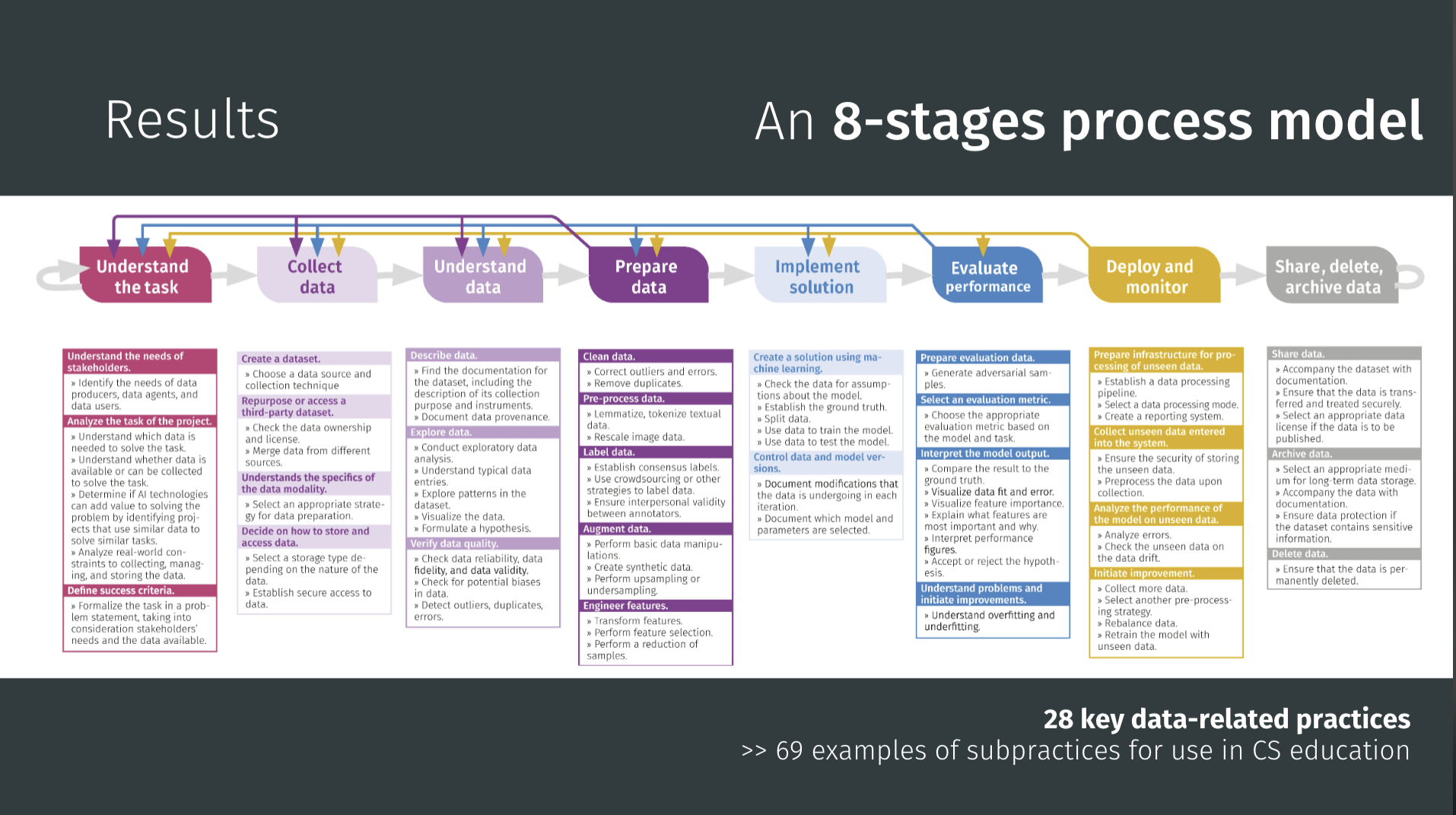
Viktoriya’s 8-stage process model of the data-driven lifecycle. It serves as a guide for curriculum developers and teachers, outlining 28 key data-related practices and providing 69 examples of subpractices for use in K–12 computer science education.
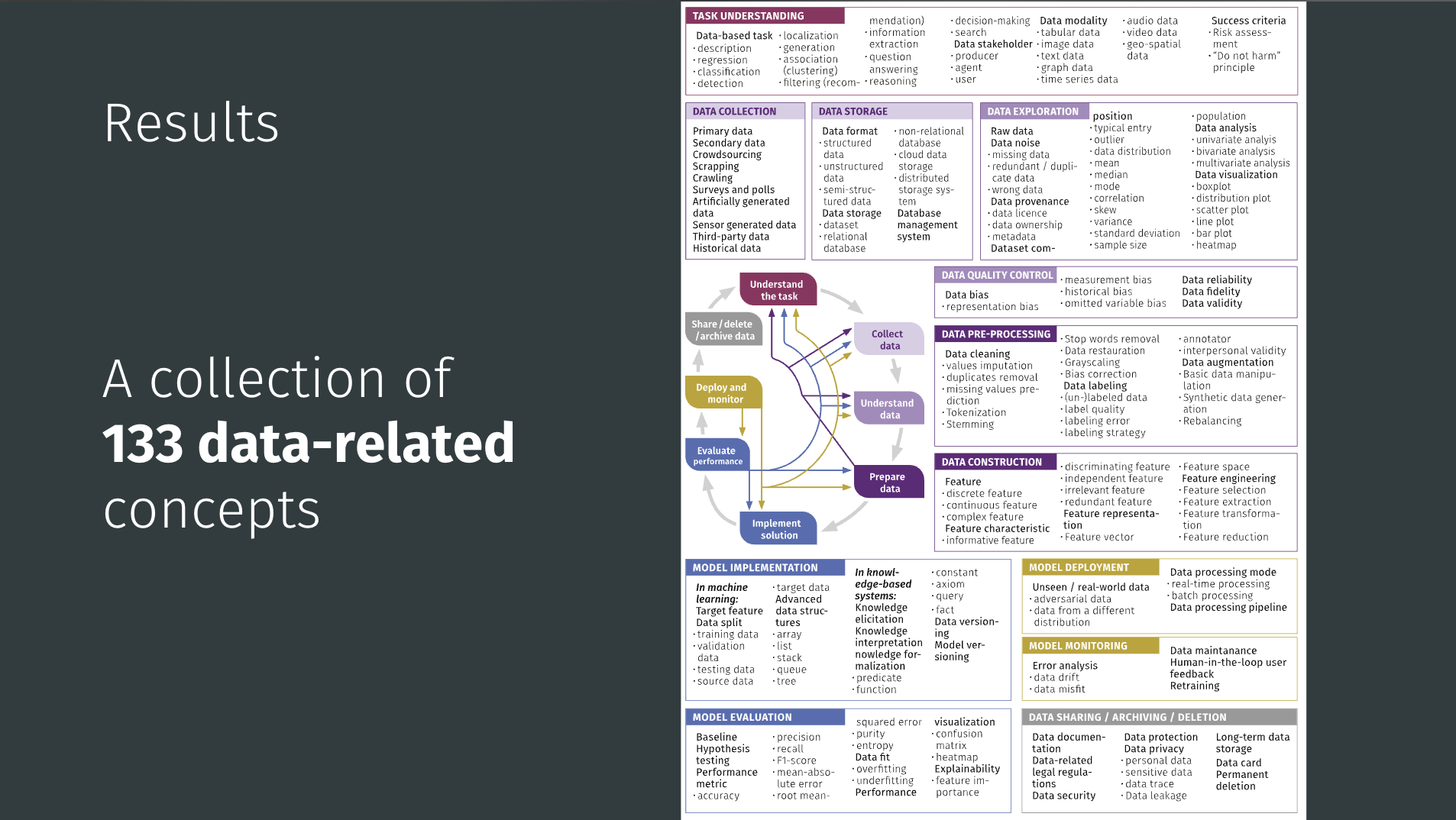
A collection of 133 key data-related concepts. These concepts are organised according to the eight stages of the data-driven lifecycle and provide the foundational vocabulary for teaching AI education.
Viktoriya’s team set out to redesign the format so that real data work could happen within ordinary lessons. They ended up with three “Data Case Study” architectures, each using authentic datasets and domain questions. The materials are supported by Orange 3, an unplugged machine learning and data visualisations tool familiar to the teachers participating. Variants emerged across three design cycles to address specific challenges, but teachers choose among them based on learning objectives and class context.
The data case study method uses real-world data and context to help students achieve three key learning outcomes: go through the data-driven lifecycle, reflect on data practices and concepts in a criteria-guided manner, and develop data-based problem-solving and judgment skills.
Viktoriya’s team ran three design cycles with small groups in Germany, with students aged 14 to 15. Each cycle lasted around 48 hours of teaching. Because participating teachers already knew Orange 3, the emphasis was on pedagogy rather than software training.
The projects drew on manageable real-world data: spreadsheets, time-series sets, a few geographical samples. Two examples are:
Some groups experimented with collecting their own sensor data, a plan that occasionally failed when the hardware didn’t cooperate. However, even that became part of the lesson: reliability, risk, and missing data are real features of data science, not mistakes to hide.
Student work reflected the three architectures. In the bottom-up groups, guided builds produced complete workflows and concise reflections, while top-down groups submitted annotated screenshots and critiques, and the puzzle-based lessons ended with posters and verbal presentations. Across them all, assessment focused on reasoning: not whether the “right” model appeared, but whether students could explain the stage they were in and justify their choices.
Everything Viktoriya described is open and classroom-ready (currently in German). The computingeducation.de/proj-datacases hub hosts teacher guides, student tasks, and sample Orange 3 files. The growing library of data cases covers topics from climate data to air quality analytics.
In the UK, a curriculum review has been recently released and along with the Government’s response. Across Europe and beyond, education systems are racing to add AI content to their curricula. Tools will come and go, and benchmarks will keep moving. What endures is the capacity to reason about data: to know what stage of work you’re in, what evidence supports your decisions, and what trade-offs you’re making. That is why Viktoriya’s contribution is unique — it gives teachers a map, a shared vocabulary, and practical ways to make data visible and the focus of discussion in schools.
You can read this blog to see how we’ve used Viktoriya’s framework in our work designing a data science curriculum for schools.
Join us at our seminar on Tuesday 27 January from 17:00 to 18:30 GMT to hear Salomey Afua Addo talk about how to teach about neural networks in Junior High Schools in Ghana.
To sign up and take part, click the button below. We’ll then send you information about joining.
We hope to see you there. This will be the final seminar in our series on teaching about AI and data science — the next series focuses on how to teach about applied AI across subjects and disciplines.
You can view the schedule of our upcoming seminars, and catch up on past seminars on our previous seminars page.
WKS2 teachers, participate in our new study!
We’re launching a new study to explore how to teach learners aged 9 to 11 about data-driven computing. The study will take place in collaboration with KS2 teachers (Y4/Y5/Y6) in England, Scotland and Wales and look at:
Our goal is to find practical ways to help teachers build children’s confidence in working with data in computing lessons. The study will be collaborative, with two workshops held throughout 2026, and we’re inviting KS2 teachers (Y4/Y5/Y6) to take part.
You can express your interest in participating by filling in this form: rpf.io/data-science-study-blog
The post How to put data first in K–12 AI education by using data case studies appeared first on Raspberry Pi Foundation.
For the last five years, once a month, we have hosted an online seminar sharing computing education research. Seminars are organised as usually year-long series with changing themes. In 2025, for example, our theme was ‘Teaching about AI and data science’. In 2024, it was ‘Teaching programming (with or without AI)’.
It is not surprising that for the last few years our focus has been on AI technology, and for 2026 we will continue this. But we will shift from showcasing how computing education research is changing teaching and learning in computing lessons, to showcasing how computing education research in other disciplines, such as art or geography, is starting to include teaching about AI. For example, art lessons may change so that learners find out how professional artists are using AI tools to create arts. Or geography lessons may change so that learners discover how professional geographers are using AI to make predictions about physical or human aspects of geography, such as volcanic activity and global warming.
Our series for 2026 is called ‘Applied AI’. This title recognises that AI technology is applied across contexts, across careers, across disciplines, and this means what we teach across school subjects will change.
The majority of resources and professional development material related to teaching about AI have been developed by the computer science community. For example, we have developed the popular Experience AI resources in collaboration with Google DeepMind. In these resources, the contexts were carefully selected to represent real-world examples across disciplines, and to to enable the teaching of particular technical or social and ethical concepts. This could be described as “a push” of content from computing towards other disciplines. For example, to enable teaching about the ethical issues around plagiarism, an art context is used in the Experience AI resources; to enable teaching about the potential benefits of using AI tools, an ecological geography context is used.
AI applications are always situated within a particular topic. Most current AI applications are data-driven: vast amounts of data are collected and processed to produce models that can then either be used to generate outputs or make predictions. For example, data about artworks can be collected and used to train a model for generating outputs similar to the artworks; this is an application of AI in the art discipline. Or data on wild fires can be collected and used to train a model for making predictions about current or prospective fires; this is an application of AI in the geography discipline.
In reality, the best people to recognise how AI technology is being applied in a discipline and what students in that discipline should be taught about these applications are the people working in the discipline, for example the art and geography teachers. Computer science educators can work to build the technical understanding and the general social and ethical understanding that is common across applications. But the detail of how AI technology is changing a discipline can only truly be understood by the respective community, by the artists and art educators, by the geographers and the geography educators.
At present, though, most educators are grappling with how they can use AI tools for productivity, such as creating lesson plans, or answering emails. Or they are looking at how they can use AI for general teaching and learning, for example for personalisation, say for students with additional needs. The idea that their underpinning discipline is changing is, perhaps, not yet on teachers’ radar. But at universities, such as in undergraduate courses, and in the world of work, education and training are changing. Data science courses are now being offered across faculties, including science, geography, language, and art faculties. These changes will start to filter down to school-based education via curriculum change. While some resources and professional development materials addressing this shift are already becoming available, change is still fragile and patchy.
The aims of our Applied AI research seminar series in 2026 are to start to:
If we can start to agree on what common concepts could be taught in the arts, sciences and humanities, it gives us a better chance to:
To make our 2026 series a success, we need to spread the word about our seminars to groups of educators, researchers, industry and policy makers across the arts, sciences, and humanities.
Please tell those you know in these groups about the seminar series, and share it through your social media and other networks. If you have ideas for subject associations we could connect with or publications where we can write about our series, please let us know.
We have already arranged the following seminars across 2026 and will add more speakers for the remaining monthly slots soon. Seminars always take place online on Tuesdays at 17:00 to 18:30 UK time.
To sign up and take part, click the button below. We’ll then send you information about joining. We hope to see you there.
You can view the schedule and details of our upcoming seminars on this page, and catch up on past seminars on our previous seminars page.
PS If you are teaching upper primary school learners in England, you can currently register your interest in our upcoming collaborative study on data science education. You’ll find out more about some of the research we’ve done in this area in this blog post.
The post How can we teach about AI in the arts, humanities and sciences? Research seminar series 2026 appeared first on Raspberry Pi Foundation.
Research indicates that teaching learners to use and create with data-driven technologies such as AI and machine learning (ML) requires an entirely different approach for solving problems compared to traditional programming activities.
In this blog, we share the new data paradigms framework that we have developed through research and used to help improve our understanding about how to teach and learn about AI and data science. We also invite you to register your interest in participating in our next collaborative study on the topic.
Let’s start by highlighting an important distinction between different approaches to designing systems. In a knowledge-based approach to system design, a set of rules (e.g., if-then statements) are written for the system to execute. Every rule is explicitly defined. This approach is called ‘rule-based’, ‘symbolic’, or ‘logic-based’. For example, a developer could create a program that simulates dialogue by writing specific lines of code to handle a greeting, such as “IF user says “Hello” THEN output “Hi!”. If the user types “Greetings!” instead, the program fails because it has no rule for that specific word.
Knowledge-based models are often said to be explainable by design. This means the logic is accessible and interpretable and developers can trace the exact steps taken to produce an output. For example, if developers manually classify restaurant reviews as positive or negative using a pre-defined set of criteria, the rules their restaurant classifying system follows are entirely explicit, and the path from input to output is clear and explainable.
By contrast, in a data-driven approach to system design developers do not write specific rules. Instead, they collect lots of data and train a model. In the dialogue simulator example, they would collect hundreds of examples of greetings and train a model to the pattern of a greeting. If the user types “Greetings!”, the system generates a response based on the patterns in its training data.
Data-driven models are often opaque. In other words, the internal workings of these ML models are hidden. While we can see our input and the system’s output, the internal mathematical process is so complex — often involving layers of calculations and abstractions — that we cannot simply “explain” why a specific output was produced. For example, developers can create a classification model by training a neural network using thousands of images. Due to the large quantity of data used to train the model, and complex internal parameters and hidden layers, developers and users of the system cannot understand or explain the logic or features that lead to a specific output. These kinds of models are often referred to as a “black box” (as opposed to a “glass” or “clear” box).
Researchers have argued that the move from knowledge-based (or rule-based) programming to data-driven system design represents a paradigm shift and creates unique challenges for educators. The challenge is helping students shift from the expectation that a system produces a single ‘right’ answer — characteristic of traditional rule-based programming — toward an understanding that systems trained on large quantities of data produce outcomes that aren’t always fixed or explainable. If the current instruction in the classroom still relies heavily on traditional rule-based programming approaches, we might be setting students up for misconceptions.
In our research work on AI and data science at the Raspberry Pi Computing Education Research Centre, we analysed 84 research studies about the teaching and learning of data science. We categorised learning activities used in the studies to understand whether they were (i) knowledge-based or data-driven, and (ii) the extent to which the underlying models used were transparent or opaque. This led us to define four distinct data paradigms:
The data paradigms framework helps us to distinguish between different kinds of modeling activities students take part in and how instructional approaches could be classified across one or more paradigms. For instance, we found that most data-driven activities were also opaque (DD + O), usually meaning that students collected and used data to train a model, but how the system worked was opaque. This pattern, where the data is visible but the model is not explainable, risks students forming misconceptions about the capabilities and limitations of data-driven systems. Without understanding how outputs are generated, students may expect data-driven ML systems to operate like fully explainable (or transparent) ones.
We think that lessons are needed in the data-driven opaque (DD + O) quadrant to explicitly teach students about how data-driven systems work and the role they play in everyday contexts. However, when teaching data-driven opaque (DD + O) activities, learners’ attention needs to be directed to concepts such as model confidence, data quality, and model evaluation. Since an ML model is not inherently explainable, we need to teach students to use post-hoc explanation methods, such as testing different inputs to see how a system’s output changes. To prepare students for this learning experience, we think that first introducing activities about rule-based systems (knowledge-based + transparent; KB + T) or simple data exploration, such as linear regression or data visualisation (data-driven + transparent; DD + T) may serve as a ‘bridge’ to understanding data-driven modeling by helping students to distinguish between systems built from specific logical rules and systems trained on data.
We believe the idea of data paradigms can serve as a way of framing teaching activities about data science and help educators and students to consider the transition between different paradigms when engaging with the systems we interact with every day.
KS2 teachers, participate in our new study!
We’re launching a new study to explore how to teach learners aged 9 to 11 about data-driven computing. The study will take place in collaboration with KS2 teachers (Y4/Y5/Y6) in England, Scotland and Wales and look at:
Our goal is to find practical ways to help teachers build children’s confidence in working with data in computing lessons. The study will be collaborative, with two workshops held throughout 2026, and we’re inviting KS2 teachers (Y4/Y5/Y6) to take part.
You can express your interest in participating by filling in this form:
The post A research-led framework for teaching about models in AI and data science appeared first on Raspberry Pi Foundation.
Listening to the voices of young people is crucial in creating genuinely effective learning resources. That’s why we recently ran a survey of students who use Ada Computer Science, our platform designed to help students learn and revise key computer science concepts.
“The different topics are nicely categorised and it is easy to find the information I wish to revise.” – Ada Computer Science student
We were delighted to hear from 103 students, most of whom are 16–19 years old and studying in England, and their insights are invaluable in helping us to continue to develop Ada CS.
The most common ways students use Ada CS are for revision and to check whether they understand concepts. The majority of respondents are building Ada CS into their regular study habits, with over half of respondents using the platform every week.
We were pleased to see the benefits of updates we’ve made, including a redesign of the question finder released in March 2025 — students reported that it is easy to navigate the platform and find what they need: 81% reported being able to find relevant content, and 77% could find the questions they were looking for.
“It’s SO EASY to find exactly what I want.” – Ada Computer Science student
Overall, students perceive Ada CS as both useful for learning about computer science concepts and of high quality. They reported finding the content clear, with a good level of detail.
“The topics are broken down into easily digestible sections, and the provided diagrams really help with understanding the topics.” – Ada Computer Science student
“The resource is really well designed, short and concise.” – Ada Computer Science student
We also received helpful suggestions for future improvements. Students shared feedback on how the information on the platform is presented, asking for more concise, revision-friendly content as well as guidance for exploring concepts in more depth. We’ll therefore be looking into alternative ways to structure content as we continue to develop Ada CS.
The most popular feature is the quizzes and practice questions, including the immediate feedback and hints provided. Students value how these resources help them solidify their knowledge, learn from mistakes, and prepare for assessments.
“The questions are clear and make me think, they’re relevant to my studies and the hints for the questions are very useful.” – Ada Computer Science student
We also appreciated the suggestions we received for how we can further develop this feature, for example, creating more questions, extending the range of question types per topic, and making improvements to the hints.
Students also feel that using Ada CS has a tangible impact on their learning. 82% agreed they were more confident that they understand CS concepts as a result of using Ada CS and 79% feel more confident learning about computer science concepts without a teacher to explain.
“I do CS A level but I hadn’t done the GCSE and I found that all of the resources gave me enough information to learn the concepts from scratch and now I’m much more confident in my knowledge of the theory.” – Ada Computer Science student
Students provided us with lots of useful feedback and suggestions for how we can further improve Ada CS, especially relating to practice questions. We’re already working on adding more questions across topics, creating more challenging questions, and adding more question types that will enhance students’ learning experience. We’ve got some other exciting developments in the pipeline too, which we’ll announce soon!
Thank you to everyone who took the time to complete the survey. These findings are invaluable for shaping the future of Ada Computer Science, helping us to continue to provide the best possible learning platform for students.
The post How Ada Computer Science empowers students: Survey findings appeared first on Raspberry Pi Foundation.
One of the things I love most about my role as Chief Learning Officer at the Raspberry Pi Foundation is hearing from teachers around the world. A teacher in Kenya told me how their students debugged their first programming projects on a shared laptop. In Scotland, another explained how our resources gave them the confidence to teach computing for the very first time. These stories remind me daily why our work matters: every young person, no matter where they live, should have the chance to explore the power of computing.
But creating resources that work in such different contexts is not easy. How do we design materials that work in a wide range of learning environments, from a bustling city classroom to a rural school where internet access can vary? How do we make sure that every learner sees themselves reflected in the examples we choose?
That’s where our teaching and learning design principles come in.
Over the past decade, we’ve learned a huge amount about what teachers and learners need from us. We’ve made mistakes, we’ve listened, and we’ve refined our practice again and again. The result is a set of design principles that guide the creation of everything we make, from full curricula to one-off projects.
These principles are practical and based on real classroom experience. They’re our way of making sure our resources are reliable, inspiring, and flexible, wherever and however teachers use them.
Here’s what that looks like in action:
For us, being transparent about our approach is about trust. Teachers make daily decisions about which resources to use, often with limited preparation time. By showing you the principles behind our work, we want to give you the confidence that our content is not only free and adaptable, but also designed with care, expertise, and your learners at the heart.
The world of computing education is moving fast, from new programming software, to artificial intelligence tools. Our design principles give us a strong foundation to keep innovating while staying true to our mission of enabling young people to realise their full potential through the power of computing and digital technologies.
And we’d love to hear from you! How do these principles resonate with your teaching? What helps you most in the classroom? Your feedback is what keeps making our work better.
The post Designing for every learner in every classroom appeared first on Raspberry Pi Foundation.
Current artificial intelligence (AI) methods, especially machine learning (ML), rely heavily on data. To complement our work on AI literacy, we have been investigating what data science teaching resources and education research are currently available. Our goal is to work out what data science concepts should be taught in a data science curriculum for schools.
Read on to find out what resources and materials we have reviewed, and what concept themes we have identified.
Data science is an interdisciplinary science of learning from large datasets, aided by modern computational tools and methods (Ow‑Yeong et al., 2023). We see data science skills as fundamental for using, creating, and thinking critically about:
To navigate a world where decision making in many areas is influenced by data-driven insights and predictions, young people need to be taught about data science. Data science skills empower young people to become critical thinkers, discerning consumers, adaptable professionals, and informed citizens.
Worldwide, countries are taking a variety of approaches to introducing data science into their education systems, as highlighted in a 2024 report from the coalition Data Science 4 Everyone.

In some countries, such as India and Israel, data science education is an established school subject. It is taught as part of the curriculum in at least one of the primary, secondary, or post-16 age phases. Meanwhile in other countries, for example Canada, Germany, and Poland, data science is a very new school subject, or there are still only recommendations to develop it into a school subject.
While we are currently considering what a comprehensive data science curriculum should include, we already offer several resources to support you with your teaching about data science and data-driven technologies. You can find a list of these resources at the end of this blog. Now, however, I’ll give you an overview of our recent work to identify concepts for a data science curriculum that fits with our approach to AI literacy.
To answer the question ‘What should we teach about data science to learners aged 5 to 19?’, we undertook a grey literature review of data science teaching materials. A grey literature review is structured like an academic literature review and conducted with the same rigour. The difference is that a grey literature review also considers publications that have not been peer-reviewed, including reports, white papers, curriculum materials, and similar resources.
To orient our work, we combined four frameworks for data science and AI/ML education:
With these combined frameworks as our map, we reviewed 79 data science learning resources. The resources varied:
From among the 79 resources, we chose 9 that included clear learning outcomes, and that together covered a wide field of concepts. We examined these 9 in detail to extract 181 explicit and implicit data science concepts. Next, we grouped the concepts into themes, and finally we refined these themes by comparing them against the four frameworks listed above.
The themes we have identified for a data science curriculum are:
This set of themes both fits with the frameworks by Olari and Romeike and Data Science 4 Everyone, and expands them by covering ML principles and programming approaches and calling out data bias and ethics.
Through our grey literature review on data science education, we’ve:
Our next step is to shape these candidate concepts into a progression framework to describe their relationships and establish which concepts could be taught at each age or phase of schooling.
The literature review also gave us an overview of the pedagogical approaches and tools used for teaching data science concepts. These findings will become useful once we start designing learning activities.
You’ll hear more about how this work is going here on our blog and on our social channels. In the meantime, comment below to let us know what you think about the themes, or to tell us what you’d like to see in a data science curriculum for the learners you work with.
You can read about our thinking behind the data science-related teaching resources we’ve created so far in our ‘Data and information within the computing curriculum’ report from 2019.
You might also be interested in exploring the Experience AI programme, which offers everything teachers need to help students develop a foundational understanding of data-driven AI technologies, their social and ethical implications, and the role that AI can play in their lives.
Our free online course ‘Teach teens computing: Machine learning and AI‘ helps teachers understand and explain the types of problems that ML can help to solve, discuss how AI is changing the world, and think about the ethics of collecting data to train a ML model.
Teaching young people to understand data-driven AI technologies means teaching them thinking skills that are different to those needed to understand rule-based computer systems. You can read about these Computational Thinking 2.0 skills in our Quick Read PDF.
Our current research seminar series focuses on teaching about AI and data science. Sign up for an upcoming seminar session (the next one is on 11 November) or catch up on past sessions to find out what the latest research findings are in this area. You can also revisit our 2021/22 series on the same topic to see how work in this area has developed. The Raspberry Pi Computing Education Research Centre also has ongoing projects in the area of AI education for you to explore.
The post What should be included in a data science curriculum for schools? appeared first on Raspberry Pi Foundation.
In June, we launched the first set of content for Experience CS, our integrated computer science curriculum for students ages 8–14. Experience CS was designed for all educators, including those without a computer science background, so that anyone can bring engaging, creative computer science learning into their classroom.
Since launch, we’ve seen educators across the US and beyond implement the first six integrated units, explore the tutorials, and join our webinars. We’re incredibly grateful to our early adopters who are already helping to shape the program’s future. With so much exciting content already available, what’s next for Experience CS?
We’re delighted to share that the initial six units are now available in Spanish and French. From the beginning, our goal has been to make Experience CS accessible to as many educators and learners as possible. We will continue translating new materials so more communities can integrate computer science into their classrooms.
Educators asked us for more units — and we listened. Three brand-new units for grades 3, 4, and 7 are now available, with additional units on the way. These new resources give educators and students the chance to go deeper into computing concepts while connecting them to other subject areas.
The new units are currently available in English, with Spanish and French translations coming soon!
Experience CS is a platform built by teachers, for teachers. We’ve been listening closely to your feedback and making improvements to streamline the classroom experience. With new updates, educators can:
Our focus is on making it easier than ever for you to bring computer science into your teaching.
Bringing Experience CS into your classroom is simple and always free.
Need additional help? Everything you need to get started is right on our Getting Started page.
We’re just getting started with Experience CS. New curriculum units, more translations, and additional platform improvements are already in the works. Join our mailing list to stay informed about the latest updates. Also, sign up for this month’s webinar to get a deeper look at what’s next for Experience CS.
We can’t wait to keep bringing the power of computer science to more classrooms with you.
The post What’s next for Experience CS? appeared first on Raspberry Pi Foundation.
Experience CS is a brand-new, free, integrated computer science curriculum for elementary and middle school educators and anyone working with students aged 8 to 14. A key design principle for Experience CS is that any educator can use it. You don’t need a computer science qualification or previous experience in teaching computer science classes to deliver engaging and creative learning experiences for your students. That’s why, as US Executive Director, I’m especially pleased to announce the launch of the first six units in the curriculum today.
Read on to explore the new learning materials available and how you can start using them in your school.
Experience CS enables educators to teach computer science through a curriculum that integrates CS concepts and knowledge into core subjects such as math, science, and social studies. Ashly Tritch, computer science immersion specialist at Olson Middle School in Bloomington, MN, USA, said, “Cross-curricular computer science is important because it shows students how coding and tech skills can be used in other subjects like math, science, or even art. It helps make learning more interesting and helps kids understand how computer science connects to real life. The lessons that the Raspberry Pi Foundation is creating will be super engaging, with fun and creative activities that keep students curious and excited to learn.”
Six integrated computer science units are available to access, with more on the way. The units have been released in beta, and we would love to hear your feedback as we continue to make updates to the lesson materials. Each of the units includes an overview with a summary of the topics covered and a series of six to eight lessons, including lesson plans, slide decks, student-facing materials, and starter projects within our Code Editor for Education.
We have designed the units to be cross-curricular, so students can learn about computer science concepts while deepening their understanding of related subject area content. For example, in “The me project,” grade 4 students (ages 9–10) explore the basics of Scratch, personalise sprites, and develop programs to create an animation that tells a story all about them. The project could be integrated into language arts lessons, enabling young learners to explore visual representation and write their own unique stories. In the “Smart communities” unit, students in grade 6 (ages 11–12) explore ways in which computing and technology can be used to create environments that are responsive to the needs of community members; this could be included within science or technology lessons.
Initially, the curriculum and resources have been mapped to national and local standards in the US and Canada, including the K–12 Computer Science Teachers Association Standards for Students, but they are available for teachers and students anywhere in the world to use.
You can register for a free Raspberry Pi Foundation account to start downloading the learning materials, including lesson plans, slide decks, student activity sheets and assessment criteria.
Experience CS has been built from the ground up to support safe, confident computing lessons in real classrooms. It includes self-directed creative projects using the popular programming language Scratch. We have built a version of Scratch that is especially for schools. That means it doesn’t have the community and sharing features that are central to the full Scratch platform. Instead, everything runs in a closed, classroom-ready environment that supports safeguarding policies and fits with school filtering systems. Simple and intuitive learning management features enable teachers to create accounts, set assignments, and review progress.
On the “Getting Started” page, teachers will find everything they need, including helpful videos and tutorials. The next webinar takes place on 16th July, where we will walk you through all six units available at launch and show you how easy it is to get started with the learning materials. Whether you’re a CS teacher, general education teacher, administrator, or someone who works with school-aged young people, this session will give you the practical tools and guidance you need to bring Experience CS to life in your classroom or program.
No matter your experience or skill level, the Experience CS content has been designed to be easy to use. However, we also provide professional development (PD) opportunities to help build confidence in teaching computer science.
Teachers anywhere in the world can access free online courses offering flexible, self-paced learning to help you confidently teach block-based programming with effective, inclusive computing pedagogy. Our new course will develop your understanding of semantic waves while highlighting research-backed activities and examples directly from Experience CS units.
Experience CS is supported by Google and builds on the fantastic work they have done to support educators and students through CS First. The team behind Experience CS includes educators with significant experience in teaching CS in elementary and middle school settings, and it is based on extensive classroom testing and research. We will continue to develop and improve the curriculum and resources in response to feedback from teachers and students. If you would like to help shape the future of Experience CS by testing new features and providing valuable feedback to improve the programme, sign up for the mailing list.
We can’t wait for you to explore Experience CS. We will continue to release more curriculum units as well as make the materials available in French and Spanish. Get a head start ready for the next school year by registering for a free Raspberry Pi Foundation account, which will allow you immediate access to all the lesson materials, and then create your school account to begin creating classes, add a scratch project to a class, manage student accounts and view student work.
The post Experience CS: A free integrated curriculum for computer science appeared first on Raspberry Pi Foundation.
As data and data-driven technologies become a bigger part of everyday life, it’s more important than ever to make sure that young people are given the chance to learn data science concepts and skills.
In our April research seminar, David Weintrop, Rotem Israel-Fishelson, and Peter Moon from the University of Maryland introduced API Can Code, a data science curriculum designed with high school students for high school students. Their talk explored how their innovative work uses real-world data and students’ own experiences and interests to create meaningful, authentic learning experiences in data science.
Quick note for educators: Are you interested in joining our free, exploratory data science education workshop for teachers on 10 July 2025 in Cambridge, UK? Then find out the details here.
David started by explaining the motivation behind the API Can Code project. The team’s goal was not to turn students into future data scientists, but to offer students the data literacy they need to explore and critically engage with a data-driven world.
The work was also guided by a shared view among leading teachers’ organisations that data science should be taught across all subjects in the K–12 curriculum. It also draws on strong research showing that when educational experiences connect with students’ own lives and interests, it leads to deeper engagement and better learning outcomes.
To prepare for the design of the curriculum, David, Rotem, and Peter wanted to understand what data science education options already exist for K–12 students. Rotem described how they compared four major K–12 data science curricula and examined different aspects, such as the topics they covered and the datasets they used. Their findings showed that many datasets were quite small in size, and that the datasets used were not always about topics that students were interested in.
The team also looked at 30 data science tools used across different K–12 platforms and analysed what each could do. They found that tools varied in how effective they were and that many lacked accessibility features to support students with diverse learning needs.
This analysis helped to refine the team’s objective: to create a data science curriculum that students find interesting and that is informed by their values and voices.
To work towards this goal, the team used a methodology called participatory design. This is an approach that actively involves the end users — in this case, high school students — in the design process. During several in-person sessions with 28 students aged 15 to 18 years old, the researchers facilitated low-tech, hands-on activities exploring the students’ identities and interests and how they think about data.
One activity, Empathy Map, involved students working together to create a persona representing a student in their school. They were asked to describe the persona’s daily life, interests, and concerns about technology and data:
The students’ involvement in the design process gave the team a better understanding of young people’s views and interests, which helped create the design of the API Can Code curriculum.
Peter provided an overview of the API Can Code curriculum. It follows a three-unit flow covering different concepts and tools in each unit:
Peter described an example activity carried out by the students, showing how these three units flow together and build both technical skills and an understanding of the real-world uses of data science. Students were tasked with analysing a dataset from Zillow, a property website, to explore the question “How much does a house in my neighbourhood cost?” The images below show the process the students followed, which uses the data science skills and tools from all three units of the curriculum.
A central tenet of API Can Code is that students should explore data that matters to them. A diverse range of student interests was identified during the design work, and the curriculum uses these areas of interest, such as music, movies, sports, and animals, throughout the lessons.
The curriculum also features an open-ended final project, where students can choose a research question that is important to them and their lives, and answer it using data science skills.
The team shared two examples of memorable final projects. In one, a student set out to answer the question “Is Jhené Aiko a star?” The student found a publicly available dataset through an API provided by Deezer, a music streaming platform. She wrote a program that retrieved data on the artist’s longevity and collaborations, analysed the data, and concluded that Aiko is indeed a star. What stood out about this project wasn’t just the fact that the student independently defined stardom and answered their research question using real data, but that this was a truly personal, interest-driven project. David noted that the researchers could never have come up with this activity, since they had never previously heard of Jhené Aiko!
Another student’s project analysed data about housing in Washington DC to answer the question “Which ward in DC has the most affordable houses?” Rotem explained that this student was motivated by her family thinking about moving away from the city. She wanted to use her project to persuade her parents to stay by identifying the most affordable ward in DC that they could move to. She was excited by the outcome of her project, and she presented her findings to other students and her parents.
These projects underscore the power of personally important data science projects driven by students’ interests. When students care about the questions they are exploring, they’re more invested in the process and more likely to keep using the skills and concepts they learn.
API Can Code is available online and completely free to use. Teachers can access lesson plans, tutorial videos, assessment rubrics, and more from the curriculum’s website https://apicancode.umd.edu/. The site also provides resources to support students, including example programs and glossaries.
In our current seminar series, we’re exploring teaching about AI and data science. Join us at our next seminar on Tuesday, 17 June from 17:00 to 18:30 BST to hear Netta Iivari (University of Oulu) introduce transformative agency and its importance for children’s computing education in the age of AI.
To sign up and take part in our research seminars, click below:
You can also view the schedule of our upcoming seminars, and catch up on past seminars on our previous seminars and recordings page.
The post Bringing data science to life for K–12 students with the ‘API Can Code’ curriculum appeared first on Raspberry Pi Foundation.
Are you a teacher who is interested in data science education for key stage 5 (age 16 to 18)? Then we invite you to join our free, in-person workshop exploring the topic, taking place in Cambridge, UK on 10 July 2025.
You will be among the very first educators to see some of our first test activities for teacher training to build data science concepts, and your contributions will feed into our future work. Sign up by 20 June to take part.
Current artificial intelligence (AI) methods, especially machine learning (ML), rely heavily on data. While young people learn mathematics, and some statistics, at school, data science concepts are not commonly taught.
To complement our work on AI literacy, we have been investigating what data science teaching resources and education research are currently available.
Our goals for this work are:
If you are interested in data science education for young people, and maybe even have experience of teaching it to learners aged 16 to 18 in your school (in any subject, including computer science, social sciences, mathematics, statistics, and ethics), please join our free workshop on Thursday 10 July in our office in Cambridge. We are able to reimburse some travel expenses.
At the workshop:
You’ll be the first group of working teachers we will share these activities with — your feedback will be invaluable, and you’ll have the chance to shape our work going forward.
If you are interested, please fill in this form by Friday 20 June:
You will then receive more information from us by 27 June. Spaces in the workshop are limited, so please do not book any travel until we confirm your space.
We’re looking forward to shaping the future of data science education with you.
PS In our current seminar series, researchers from around the world are presenting their latest work on teaching about AI and data science. You can catch up on past sessions and sign up for upcoming ones on our website.
The post Join our free data science education workshop for teachers appeared first on Raspberry Pi Foundation.
Experience CS is our new free curriculum that helps elementary and middle school educators (working with students aged 8 to 14) teach computer science with confidence through creative, cross-curricular lessons and projects. Designed for teachers, by teachers, Experience CS is built to be easy to use in classrooms, with everything you need integrated into one safe, school-friendly platform.
In this blog post, we will share more about the safety features of Experience CS, and the steps we’ve taken to make the platform a great fit for your school.
Experience CS supports young people to develop their understanding of computer science through engaging, interactive projects using the programming language Scratch. Scratch is a popular block-based language that helps young people get started with coding, and Experience CS includes a version of Scratch that we have built especially for schools. With our version, which is fully integrated into the Experience CS platform, students can explore coding in a teacher-managed, closed environment that aligns with schools’ safeguarding policies and gives you full control over what your students see and do.
Student safety and privacy are at the forefront in Experience CS, which means:
We have designed every part of the Experience CS platform with school environments in mind, making it easier for teachers to manage and for students to use.
Here’s how:
Experience CS gives you the tools and peace of mind to deliver creative, engaging computer science lessons and activities in a way that works for your school. You will be able to effortlessly manage students’ work, with everything you and your students need provided within a simple, intuitive interface.
Experience CS is launching soon, and we can’t wait to see what you and your students create with it.
If you would like early access, want to stay up to date, or are interested in trying Experience CS out in your classroom, sign up for updates and we’ll keep you in the loop.
We’re also planning ahead: in the coming months, we’ll make our version of Scratch available to all schools and clubs via our Code Editor. That means whether or not you use the Experience CS curriculum, you’ll be able to run safe, creative coding sessions using Scratch in a school-friendly environment.
The post Experience CS: A safe, creative way to teach computing appeared first on Raspberry Pi Foundation.
I am delighted to announce Experience CS, a free, integrated computer science curriculum for elementary and middle school students (8–14 years old) that will be available in June 2025.
Experience CS enables educators to teach computer science through a standards-aligned curriculum that integrates computer science concepts and knowledge into core subjects like maths, science, languages, and the arts.
This cross-curricular and integrated approach is one of the most effective ways to provide younger students with an introduction to computer science and is increasingly important as the impact of digital technology reaches every corner of our lives. We also know that embedding CS in real-world contexts helps make it meaningful and relevant for students, which is essential if we are going to inspire kids from different backgrounds to want to learn more about computer science and technology.
The team behind Experience CS includes educators with significant experience of teaching CS in elementary and middle school settings and everything we do is being informed by the world’s leading research into effective pedagogy as well as extensive testing and research in classrooms. This won’t stop when we launch. We will continue to develop and improve the curriculum and resources in response to feedback from teachers and students.
One of the most important design principles for Experience CS is that it can be used by any educator. You don’t need a CS qualification or any previous experience in teaching CS classes to deliver engaging and creative learning experiences for your students.
We will provide lesson plans, classroom resources, and an online platform that is designed to be easy and safe to use. We will also provide educators with professional development to help build their confidence, knowledge, and skills. You don’t need to adapt or amend the resources to use them, but you will be able to if you want to. We trust teachers to know what is best for their classrooms.
Crucially, Experience CS will be a creative learning experience. We’ve all seen those apps and platforms that purport to teach computer science by having young people direct their favourite pop culture character around a maze. While those types of games can be fun, we think that they fail to convey the creative potential of computer science and leave more students feeling “why bother” rather than being inspired to learn more.
That’s why Experience CS includes self-directed creative projects using the popular programming platform Scratch, with clear instructions and endless opportunities for young people to express themselves creatively.
We know that online safety is the most important consideration for schools, teachers, and parents, which is why we have built a version of Scratch that is safe for schools. That means it won’t have the community and sharing features that are so central to the full Scratch platform. It will come with simple and intuitive classroom management features that enable teachers to create accounts, set assignments, review progress, and provide feedback to students.
Our promise is that Experience CS will be available for teachers and students anywhere in the world to use for free, for as long as you need it.
Initially, we are developing the curriculum and resources for the US and Canadian education systems and we will be mapping the lessons to national and local standards in both countries. The materials will all be available in English, French, and Spanish. We will also be focusing our professional development and support for schools in the US and Canada, including working with a fantastic network of educational partners.
We are delighted that Experience CS is supported by Google and that we are able to build on the fantastic work that they have done over many years to support educators and students through CS First.
Google has today announced that CS First will no longer be available from June 30, 2025 and that they are recommending that their users should move over to Experience CS for the next school year. That is a huge vote of confidence from a team that really knows what they are talking about. I want to pay tribute to everyone at Google who has worked so hard over the years to support teachers and inspire students through CS First.
We are looking forward to working with all of the CS First community to make sure that you are supported through the transition and set up ready to go for the start of the new school year. You can find out more about the support we will be offering by registering here.
The post Experience CS: a new way to teach computer science appeared first on Raspberry Pi Foundation.
As artificial intelligence continues to shape our world, understanding how to teach about AI has never been more important. Our new research seminar series brings together educators and researchers to explore approaches to AI and data science education. In the first seminar, we welcomed Shuchi Grover, Director of AI and Education Research at Looking Glass Ventures. Shuchi began by exploring the theme of teaching using AI, then moved on to discussing teaching about AI in K–12 (primary and secondary) education. She emphasised that it is crucial to teach about AI before using it in the classroom, and this blog post will focus on her insights in this area.
From her research, Shuchi has developed a framework for teaching about AI that is structured as four interlocking components, each representing a key area of understanding:
This framework shows the multifaceted nature of AI literacy, which involves an understanding of both technical aspects and ethical and societal considerations.
Shuchi emphasised the importance of learning about AI ethics, highlighting the topic of bias. There are many ways that bias can be embedded in applications of AI and machine learning, including through the data sets that are used and the design of machine learning models. Shuchi discussed supporting learners to engage with the topic through exploring bias in facial recognition software, sharing activities and resources to use in the classroom that can prompt meaningful discussion, such as this talk by Joy Buolamwini. She also highlighted the Kapor Foundation’s Responsible AI and Tech Justice: A Guide for K–12 Education, which contains questions that educators can use with learners to help them to carefully consider the ethical implications of AI for themselves and for society.
In computer science education, computational thinking is generally associated with traditional rule-based programming — it has often been used to describe the problem-solving approaches and processes associated with writing computer programs following rule-based principles in a structured and logical way. However, with the emergence of machine learning, Shuchi described a need for computational thinking frameworks to be expanded to also encompass data-driven, probabilistic approaches, which are foundational for machine learning. This would support learners’ understanding and ability to work with the models that increasingly influence modern technology.
Shuchi shared that a variety of pedagogies have been used in recent research projects on AI education, ranging from hands-on experiences, such as using APIs for classification, to discussions focusing on ethical aspects. You can find out more about these pedagogies in her award-winning paper Teaching AI to K-12 Learners: Lessons, Issues and Guidance. This plurality of approaches ensures that learners can engage with AI and machine learning in ways that are both accessible and meaningful to them.
Shuchi shared examples of activities from two research projects that she has led:
At the end of her talk, Shuchi shared some final thoughts addressing teaching about AI to K–12 learners:
In our current seminar series, we are exploring teaching about AI and data science. Join us at our next seminar on Tuesday 11 March at 17:00–18:30 GMT to hear Lukas Höper and Carsten Schulte from Paderborn University discuss supporting middle school students to develop their data awareness.
To sign up and take part in the seminar, click the button below — we will then send you information about joining. We hope to see you there.
I want to join the next seminarThe schedule of our upcoming seminars is online. You can catch up on past seminars on our previous seminars and recordings page.
The post Teaching about AI in K–12 education: Thoughts from the USA appeared first on Raspberry Pi Foundation.
AI, machine learning (ML), and data science infuse our daily lives, from the recommendation functionality on music apps to technologies that influence our healthcare, transport, education, defence, and more.
What jobs will be affected by AL, ML, and data science remains to be seen, but it is increasingly clear that students will need to learn something about these topics. There will be new concepts to be taught, new instructional approaches and assessment techniques to be used, new learning activities to be delivered, and we must not neglect the professional development required to help educators master all of this.
As AI and data science are incorporated into school curricula and teaching and learning materials worldwide, we ask: What’s the research basis for these curricula, pedagogy, and resource choices?
In 2024, we showcased researchers who are investigating how AI can be leveraged to support the teaching and learning of programming. But in 2025, we look at what should be taught about AI, ML, and data science in schools and how we should teach this.
We are very excited that we have already secured several key researchers in the field.
On 21 January, Shuchi Grover will kick off the seminar series by giving an important overview of AI in the K–12 landscape, including developing both AI literacy and AI ethics. Shuchi will provide concrete examples and recently developed frameworks to give educators practical insights on the topic.
Our second session will focus on a teacher professional development (PD) programme to support the introduction of AI in Upper Bavarian schools. Franz Jetzinger from the Technical University of Munich will summarise the PD programme and share how teachers implemented the topic in their classroom, including the difficulties they encountered.
Again from Germany, Lukas Höper from Paderborn University, with Carsten Schulte will describe important research on data awareness and introduce a framework that is likely to be key for learning about data-driven technology. The pair will talk about the Data Awareness Framework and how it has been used to help learners explore, evaluate, and be empowered in looking at the role of data in everyday applications.
Our April seminar will see David Weintrop from the University of Maryland introduce, with his colleagues, a data science curriculum called API Can Code, aimed at high-school students. The group will highlight the strategies needed for integrating data science learning within students’ lived experiences and fostering authentic engagement.
Later in the year, Jesús Moreno-Leon from the University of Seville will help us consider the thorny but essential question of how we measure AI literacy. Jesús will present an assessment instrument that has been successfully implemented in several research studies involving thousands of primary and secondary education students across Spain, discussing both its strengths and limitations.
Our seminars are designed to be accessible to anyone interested in the latest research about AI education — whether you’re a teacher, educator, researcher, or simply curious. Each session begins with a presentation from our guest speaker about their latest research findings. We then move into small groups for a short discussion and exchange of ideas before coming back together for a Q&A session with the presenter.
Attendees of our 2024 series told us that they valued that the talks “explore a relevant topic in an informative way“, the “enthusiasm and inspiration”, and particularly the small-group discussions because they “are always filled with interesting and varied ideas and help to spark my own thoughts”.
The seminars usually take place on Zoom on the first Tuesday of each month at 17:00–18:30 GMT / 12:00–13:30 ET / 9:00–10:30 PT / 18:00–19:30 CET.
You can find out more about each seminar and the speakers on our upcoming seminar page. And if you are unable to attend one of our talks, you can watch them from our previous seminar page, where you will also find an archive of all of our previous seminars dating back to 2020.
To attend the seminars, please register here. You will receive an email with the link to join our next Zoom call. Once signed up, you will automatically be notified of upcoming seminars. You can unsubscribe from our seminar notifications at any time.
We hope to see you at a seminar soon!
The post How can we teach students about AI and data science? Join our 2025 seminar series to learn more about the topic appeared first on Raspberry Pi Foundation.
It’s been over a year since we launched Ada Computer Science, and we continue to see the numbers of students and teachers using the platform all around the world grow. Our recent year in review shared some of the key developments we’ve made since launching, many of which are a direct result of feedback from our community.
Today, we are publishing an impact report that includes some of this feedback, along with what users are saying about the impact Ada Computer Science is having.
Ada Computer Science is a free learning platform for computer science students and teachers. It provides high-quality, online learning materials to use in the classroom, for homework, and for revision. Our experienced team has created resources that cover every topic in the leading GCSE and A level computer science specifications.
From May to July 2024, we invited users to provide feedback via an online survey, and we got responses from 163 students and 27 teachers. To explore the feedback further, we also conducted in-depth interviews with three computer science teachers in September 2024.
The most common ways students use Ada Computer Science — as reported by more than two thirds of respondents — is for revision and/or to complete work set by their teacher. Similarly, teachers most commonly said that they direct students to use Ada outside the classroom.
“I recommend my students use Ada Computer Science as their main textbook.” — Teacher
Most respondents agreed or strongly agreed that Ada is useful for learning (82%) and high quality (79%).
“Ada Computer Science has been very effective for independent revision, I like how it provides hints and pointers if you answer a question incorrectly.” — Student
Ada users were generally positive about their overall experience of the platform and using it to find the information they were looking for.
“Ada is one of the best for hitting the nail on the head. They’ve really got it in tune with the depth that exam boards want.” — Ian Robinson, computer science teacher (St Alban’s Catholic High School, UK)
Around half of the teachers agreed that Ada had reduced their workload and/or increased their subject knowledge. Across all respondents, teachers estimated that the average weekly time saving was 1 hour 8 minutes.
Additionally, 81% of students agreed that as a result of using Ada, they had become better at understanding computer science concepts. Other benefits were reported too, with most students agreeing that they had become better problem-solvers, for example.
“I love Ada! It is an extremely helpful resource… The content featured is very comprehensive and detailed, and the visual guides… are particularly helpful to aid my understanding.” — Student
Since receiving this feedback, we have already released updated site navigation and new question finder designs. In 2025, we are planning improvements to the markbook (for example, giving teachers an overview of the assignments they’ve set) and to how assignments can be created.
If you’d like to read more about the findings, there’s a full report for you to download. Thank you to everyone who took the time to take part — we really value your feedback!
The post Ada Computer Science: What have we learnt so far appeared first on Raspberry Pi Foundation.
With the new academic year fully under way in many parts of the world, it’s the perfect time to reflect on the growth and innovations we’ve achieved with the Ada Computer Science platform. Your feedback has helped us make improvements to better support teachers and students — here’s a look back at some of the key developments for Ada from the past 12 months.
We made significant improvements throughout the year to support students with exam preparation and personalised learning. We introduced over 145 new self-marking questions and updated 50 existing ones, bringing the total to more than 1000. A new type of question was also launched to help students practise writing longer responses: they label parts of a sample answer and apply a mark scheme, simulating a peer review process. You can read more about this work in the AI section below.
We updated the question finder tool with an intuitive new design. Instead of seeing ten questions at random, students can now see all the questions we have on any given topic, and can use the filters to refine their searches by qualification and difficulty level. This enables students to better personalise their revision and progress tracking
“Ada Computer Science has been very effective for my revision. I like how it provides hints and pointers if you answer a question incorrectly.”
– Ada Computer Science student
The ‘Representation of sound’ topic received a major update, with clearer explanations, new diagrams, and improved feedback to support students as they tackle common misconceptions in sound physics. We also refreshed the ‘Representation of numbers’ topic, adding new content and interactive quizzes to support teachers in assessing students’ understanding more effectively.
We introduced a new database scenario titled ‘Repair & Reform’, offering an entity relationship diagram, a data dictionary, and a new SQL editor and question set to help students prepare for project-based assessments. We’ve further expanded this scenario into a full project covering all stages of development, including requirements analysis and evaluation.
April was dedicated to gearing up for the exam season, with the introduction of revision flashcards and ready-made quizzes on key topics like bitmapped graphics and sorting algorithms. We also launched a student revision challenge, which ran from April to June and attracted over 600 participants.
“Ada Computer Science is an excellent resource to help support teachers and students. The explanations are clear and relevant, and the questions help students test their knowledge and understanding in a structured way, providing links to help them reconcile any discrepancies or misunderstandings.”
– Patrick Kennedy, Computer Science teacher
We expanded our efforts to support new computer science teachers with the launch of a teacher mentoring programme that offers free online drop-in sessions. We also hosted a teacher training event at the Raspberry Pi Foundation office in Cambridge (as seen in the picture below), where educators saw previews of upcoming content on AI and machine learning and contributed their own questions to the platform.
We continued our focus on AI and machine learning, releasing new learning resources that explore the ethical and social implications of AI alongside the practical applications of AI and machine learning models.
To expand the Ada platform’s features, we also made considerable progress in integrating a large language model (LLM) to mark free-text responses. Our research showed that, as of June, LLM marks matched real teachers’ marks 82% of the time. In July, we received ethics approval from the University of Cambridge to add LLM-marked questions to the Ada platform.
We made significant strides towards supporting Scottish teachers and students with resources tailored to the SQA Computing Science curriculum. From September to November last year, we piloted a new set of materials specifically designed for Scottish teachers, receiving valuable feedback that we’ve used in 2024 to develop new content. More than half of the theory content for the National 5 and Higher specifications is now available on the platform.
Our ‘Reform & Repair’ database scenario and project align with both SQA Higher and A level standards, providing a comprehensive resource for students preparing for project-based assessments.
We have big plans for Ada for the next 12 months. Our focus will remain on continuously improving our resources and supporting the needs of both educators and students.
After the positive response to our ‘Repair & Reform’ database project, our content experts are planning additional practical projects to support students and teachers. The next one will be a web project that covers HTML, CSS, JavaScript, and PHP, supporting students taking SQA qualifications in Scotland or undertaking the non-examined assessment (NEA) at A level.
We’ll be working on a number of teacher-focused improvements to the platform, which you’ll also see on Ada’s sibling site, Isaac Physics. These will include an overhaul of the markbook to make it more user-friendly, and updates to the ‘Assignments’ tool so assignments better meet the needs of teachers in schools.
We’ll be welcoming the next cohort of computer science students to the STEM SMART programme in January 2025 where, in partnership with the University of Cambridge, we’ll offer free, complementary teaching and support to UK students at state schools. Applications are now open.
Thank you to every teacher and student who has given their time in the last year to share feedback about Ada Computer Science — your insights are invaluable as we work to make high-quality computer science materials easily accessible. Here’s to another fantastic year of learning and growth!
The post Ada Computer Science: A year in review appeared first on Raspberry Pi Foundation.
One of our favourite things is sharing the stories of amazing young people, volunteers, and educators who are using their passion for technology to create positive change in the world around them.
Recently, we had the pleasure of speaking with Isabel, a computer science teacher at Barton Peveril Sixth Form College in Eastleigh, England. She told us her fascinating journey from industry to education, along with how she is helping to make the tech space inviting to all.
Isabel’s path to working in the tech sector started with her early exposure to engineering thanks to her father’s career in telecoms.
“I find this is true for a lot of female engineers my age: you will find that their dad or their uncle was an engineer. I remember that when I made the decision to study engineering, my teachers asked me if I was sure that it was something I wanted to do.”
Isabel pursued a degree in engineering because she loved the technical aspects, and during her studies she found a passion for programming. She went to work as a software engineer in Hampshire, contributing to the development of 3G mobile phone technology.
Despite enjoying her career in tech, Isabel felt a strong pull towards teaching due to her long-standing involvement with youth groups and a desire to give back to the community.
“While I was at university in London, I took part in a scheme where we could go into local primary schools and help with their science teaching. At the time, I just thought this was my way of giving back, I hadn’t really thought of it as a career. But actually, after a while, I thought ‘I’m enjoying this programming, but I really liked helping the young kids as well’.”
The transition wasn’t easy, as Computer Science was not widely taught in schools at the time, but Isabel persevered, teaching IT and Media to her classes as well.
Once Isabel settled into her teaching role, she began thinking about how she could tackle a problem she noticed in the STEM field.
Having experienced first-hand what it was like to be the only woman in STEM spaces, Isabel’s commitment to diversity in technology is at the core of her teaching philosophy. She works hard to create an inclusive environment and a diversity of opportunities in her classroom, making sure girls feel encouraged to pursue careers in tech through exploring various enrichment activities.
Isabel focuses on enrichment activities that bridge the gap between academic learning and real-world application. She runs various projects and competitions, ensuring a balanced representation of girls in these initiatives, and gives her students the opportunity to participate in programs like the Industrial Cadets, Student Robotics, and Coolest Projects.
Isabel told us that she feels these opportunities provide essential soft skills that are crucial for success in any career.
“The A level environment is so academic; it is heavily focused on working on your own on very abstract topics. Having worked in industry and knowing the need to collaborate, I found that really hard. So I’ve always made sure to do lots of projects with my students where we actually work with real engineers, do real-world projects. I believe strongly in teaching soft skills like team working, project management, and time management.”
A key resource in Isabel’s teaching toolkit is the Ada Computer Science platform. She values its reliability and the timely updates to the topics, which are crucial in a rapidly evolving subject like Computer Science.
She said she encourages both her students and fellow teachers, especially those who have retrained in Computer Science, to use the platform as a resource.
“Ada Computer Science is amazing. We know we can rely on saying to the students ‘look on Ada, the information will be correct’ because I trust the people creating the resources. And we even found ourselves as teachers double-checking things on there. We struggle to get Computer science teachers, so actually only two of us are Computer Science teachers, and the other three are Maths teachers we have trained up. To be able to say ‘if you are not sure about something, look on Ada’ is a really nice thing to have.”
Despite her efforts, Isabel acknowledges that progress in getting more girls to pursue tech careers is slow. Many girls still view tech as an uninviting space and feel like they don’t belong when they find themselves as one of a few girls — if not the only one — in a class. But Isabel remains hopeful that continuous exposure and positive experiences can change these perceptions.
“I talk to students who are often the only girl in the class and they find that really hard. So, if at GCSE they are the only girl in the class, they won’t do [the subject] at A level. So, if we leave it until A level, it is almost too late. Because of this, I try as much as I can to get as many girls as possible onto my engineering enrichment projects to show them as many opportunities in engineering as possible early on.”
Her work with organisations like the UK Electronics Skills Foundation reflects her commitment to raising awareness about careers in electronics and engineering. Through her outreach and enrichment projects, Isabel educates younger students about the opportunities in these fields, hoping to inspire more girls to consider them as viable career paths.
As new technology continues to be built, Isabel recognises the challenges in keeping up with rapid changes, especially with fields like artificial intelligence (AI). She stays updated through continuous learning and collaborating with her peers, and encourages her students to be adaptable and open to new developments. “The world of AI is both exciting and daunting,” she admits. “We need to prepare our students for a future that we can hardly predict.”
Isabel’s dedication to teaching, her advocacy for diversity, and her efforts to provide real-world learning opportunities make her an inspiring educator. Her commitment was recognised by the Era Foundation in 2023: Isabel was named as one of their David Clark Prize recipients. The award recognises those who “have gone above and beyond the curriculum to inspire students and showcase real-world engineering in the classroom”.
Isabel not only imparts technical knowledge — she inspires her students to believe in their potential, encouraging a new generation of diverse tech professionals.
If Isabel’s story has inspired you to encourage the next generation of young tech creators, check out the free teaching and training resources we provide to support your journey.
If you are working in Computer Science teaching for learners age 14 and up, take a look at how Ada Computer Science will support you.
The post Celebrating the community: Isabel appeared first on Raspberry Pi Foundation.
As educators, it’s important that we showcase the wide range of career opportunities available in the field of computing, not only to inspire learners, but also to help them feel sure they’re choosing to study a subject that is useful for their future. For example, a survey from the BBC in September 2023 found that more than a quarter of UK teenagers often feel anxious, with “exams and school life” among the main causes. To help young people chart their career paths, we recently hosted two live webinars for National Careers Week in the UK.
Our goal for the webinars was to highlight the breadth of careers within computing and to provide insights from professionals who are pursuing their own diverse and rewarding paths. Each webinar featured engaging discussions and an interactive Q&A session with learners who use our Ada Computer Science platform. The learners could ask their own questions to get firsthand knowledge and perspectives from our guest speakers.
Jess Van Brummelen is a Human–Computer Interaction Research Scientist at Niantic, the video games company behind augmented reality game Pokémon Go. After developing an interest in programming during her undergraduate degree in mechanical engineering, she went on to complete a Master’s degree and PhD in computer science at MIT.
Ashley Edwards is a Senior Research Scientist at Google DeepMind, working on reinforcement learning. She received her PhD in 2019 from Georgia Tech, spent time as an intern at Google Brain, and worked as a research scientist at Uber AI Labs.
You can read extracts from our interviews with Jess and Ashley and watch the full videos below. Teachers have contacted us to say they’ll be using the webinars for careers-focused sessions with their students. We hope you will do the same!
Please note that we have edited the extracts below to add clarity.
Hi Jess. What advice would you give to a student who is thinking about a career in human–computer interaction in the gaming industry?
In terms of HCI and gaming, I’d actually recommend that you keep gaming! It’s a small part of my job but it’s really important to understand what’s fun and enjoyable in games. Not only that; gaming can be great for learning to problem-solve — there’s been all sorts of research on the positive impact of gaming.
A second thing, going back to how I felt in my mechanical engineering classes, I really felt like an ‘other’ and not someone who is the standard computer scientist or engineer. I would encourage students to pursue their dreams anyway because it’s so important to have diversity in these types of careers, especially technology, because it goes out to so many different people and it can really affect society. It’s really important that the people who make it come from many different backgrounds and cultures so we can create technology that is better for everyone.
[From Owen, a student on the livestream] What’s the most impossible idea you’ve come up with while working at Niantic?
I’m currently publishing a paper addressing the question, ‘Can we guide people without using anything visual on their phone?’ That means using audio and haptic (technology that transmits information via touch, e.g. vibrations) prompts instead. We tried out different commands where the phone said ‘turn left’ and ‘turn right’, but we really wanted to test how to guide someone more specifically in a game environment. For example, if there was a hidden object on a wall in a game that a person couldn’t see, could we guide them to that object while they’re walking? So I ran a study where I guided people to scan a statue by moving around it. Scanning is the process of using the camera on your phone to scan an object in real life, which is then reconstructed on your phone. Scanning objects can trigger other augmented reality experiences within a game. For example, you might scan a real-life box in a room and this might trigger an animation of that box opening to reveal a secret within the game. We tested a lot of different things. For example, test subjects listened to music as they were walking and when they were on the right path, the music sounded really good. But when they were off the path, it sounded terrible. So it helped them to look for the right path. Then if you were pointing the phone in the wrong direction for scanning objects, you would get warning vibrations on the phone. So we did the study and we were hoping it would improve safety. It turns out it was neutral on improving safety — I think this is because it was such a novel system. People weren’t used to using it and still bumped into things! But it did make people better at scanning the objects, which was interesting.
Watch Jess’s full interview:
Hi Ashley. Is there something you studied in school that you found to be more useful now than you ever thought it would be?
Maths! I always enjoyed doing maths, but I didn’t realise I would need it as a computer scientist. You see it popping up all the time, especially in machine learning. Having a strong knowledge of calculus and linear algebra is really helpful.
How do you train an AI model using machine learning?
You start by asking the question, ‘What is the problem I’m trying to solve?’ Then typically you need input data and the outputs you want to achieve, so you ask two more questions, ‘What data do I want to come in?’ and ‘What do I want to come out?’ Let’s say you decide to use a supervised learning model (a category of machine learning where labelled data sets are used to train algorithms to detect patterns and predict outcomes) to predict whether a photo contains a cat. You train the model using a giant set of images with labels that say either ‘This is a cat’ or ‘This isn’t a cat’. By training the model with the images, you get to a point where your model can analyse the features of any image and predict whether it contains a cat or not.
In my field of research, I work on something called reinforcement learning, which is where you train your model through trial and error and the use of ‘rewards’. Let’s imagine we are trying to train a robot. We might write a program that tells the robot, ‘I am going to give you a reward if you take the right step forward and it’s going to be a positive reward. If you fall over, I’m going to give you a negative reward.’ So you train the robot to prioritise the right behaviours to optimise the rewards it’s getting.
[From a student] Will I still need to learn to code in the future?
I think it is going to be very different in the future, but we’ll still need to learn how to build different types of algorithms and we’re going to need to understand the concepts behind coding as well. We’ll still need to ask questions like, ‘What is it that I want to build?’ and ‘Is this actually doing the correct thing?’
Watch Ashley’s full interview:
Jess and Ashley are forging successful careers not only through a combination of smart choices, hard work, talent, and a passion for technology; they also had access to opportunities to discover their passion and receive an education in this field. Too many young people around the world still don’t have these opportunities.
That is why we provide free resources and training to help schools broaden access to computing education. For example, our free learning platform, Ada Computer Science, provides students aged 14 to 19 with high-quality computing resources and interactive questions, written by experts from our team. To learn more, visit adacomputerscience.org.
The post Careers in computer science: Two perspectives appeared first on Raspberry Pi Foundation.
We offer Ada Computer Science as a platform to support educators and learners alike. But we don’t take its usefulness for granted: as part of our commitment to impact, we regularly gather user feedback and evaluate all of our products, and Ada is no exception. In this blog, we share some of the feedback we’ve gathered from surveys and interviews with the people using Ada.
Ada Computer Science is our online learning platform designed for teachers, students, and anyone interested in learning about computer science. If you’re teaching or studying a computer science qualification at school, you can use Ada Computer Science for classwork, homework, and revision.
Launched last year as a partnership between us and the University of Cambridge, Ada’s comprehensive resources cover topics like algorithms, data structures, computational thinking, and cybersecurity. It also includes 1,000 self-marking questions, which both teachers and students can use to assess their knowledge and understanding.
Throughout 2023, we continued to develop the support Ada offers. For example, we:
A few weeks ago we launched two all-new topics about artificial intelligence (AI) and machine learning.
So far, all the content on Ada Computer Science is mapped to GCSE and A level exam boards in England, and we’ve just released new resources for the Scottish Qualification Authority’s Computer Systems area of study to support students in Scotland with their National 5 and Higher qualifications.
Ada is being used by a wide variety of users, from at least 127 countries all across the globe. Countries where Ada is most popular include the UK, US, Canada, Australia, Brazil, India, China, Nigeria, Ghana, Kenya, China, Myanmar, and Indonesia.
Just over half of students using Ada are completing work set by their teacher. However, there are also substantial numbers of young people benefitting from using Ada for their own independent learning. So far, over half a million question attempts have been made on the platform.
Students use Ada for a wide variety of purposes. The most common response in our survey was for revision, but students also use it to complete work set by teachers, to learn new concepts, and to check their understanding of computer science concepts.
Teachers also use Ada for a combination of their own learning, in the classroom with their students, and for setting work outside of lessons. They told us that they value Ada as a source of pre-made questions.
“I like having a bank of questions as a teacher. It’s tiring to create more. I like that I can use the finder and create questions very quickly.” — Computer science teacher, A level
“I like the structure of how it [Ada] is put together. [Resources] are really easy to find and being able to sort by exam board makes it really useful because… at A level there is a huge difference between exam boards.” — GCSE and A level teacher
Students and teachers alike were very positive about the quality and usefulness of Ada Computer Science. Overall, 89% of students responding to our survey agreed that Ada is useful for helping them to learn about computer science, and 93% of teachers agreed that it is high quality.
“The impact for me was just having a resource that I felt I always could trust.” — Head of Computer Science
Most teachers also reported that using Ada reduces their workload, saving an average of 3 hours per week.
“[Quizzes] are the most useful because it’s the biggest time saving…especially having them nicely self-marked as well.” — GCSE and A level computer science teacher
Even more encouragingly, Ada users report a positive impact on their knowledge, skills, and attitudes to computer science. Teachers report that, as a result of using Ada, their computer science subject knowledge and their confidence in teaching has increased, and report similar benefits for their students.
“They can easily…recap and see how they’ve been getting on with the different topic areas.” — GCSE and A level computer science teacher
“I see they’re answering the questions and learning things without really realising it, which is quite nice.” — GCSE and A level computer science teacher
Our content team is made up of experienced computer science teachers, and we’re always updating the site in response to feedback from the teachers and students who use our resources. We receive feedback through support tickets, and we have a monthly meeting where we comb through every wrong answer that students entered to help us identify new misconceptions. We then use all of this to improve the content, and the feedback we give students on the platform.
We’ll be conducting another round of surveys later this year, so when you see the link, please fill in the form. In the meantime, if you have any feedback or suggestions for improvements, please get in touch.
And if you’ve not signed up to Ada yet as a teacher or student, you can take a look right now over at adacomputerscience.org
The post How we’re creating more impact with Ada Computer Science appeared first on Raspberry Pi Foundation.
Every day, most of us both consume and create data. For example, we interpret data from weather forecasts to predict our chances of a good weather for a special occasion, and we create data as our carbon footprint leaves a trail of energy consumption information behind us. Data is important in our lives, and countries around the world are expanding their school curricula to teach the knowledge and skills required to work with data, including at primary (K–5) level.
In our most recent research seminar, attendees heard about a research-based initiative called Data Education in Schools. The speakers, Kate Farrell and Professor Judy Robertson from the University of Edinburgh, Scotland, shared how this project aims to empower learners to develop data literacy skills and succeed in a data-driven world.
“Data literacy is the ability to ask questions, collect, analyse, interpret and communicate stories about data.”
– Kate Farrell & Prof. Judy Robertson
Scotland’s national curriculum does not explicitly mention data literacy, but the topic is embedded in many subjects such as Maths, English, Technologies, and Social Studies. Teachers in Scotland, particularly in primary schools, have the flexibility to deliver learning in an interdisciplinary way through project-based learning. Therefore, the team behind Data Education in Schools developed a set of cross-curricular data literacy projects. Educators and education policy makers in other countries who are looking to integrate computing topics with other subjects may also be interested in this approach.
The Data Education in Schools projects are aimed not just at giving learners skills they may need for future jobs, but also at equipping them as data citizens in today’s world. A data citizen can think critically, interpret data, and share insights with others to effect change.
Kate and Judy shared an example of data citizenship from a project they had worked on with a primary school. The learners gathered data about how much plastic waste was being generated in their canteen. They created a data visualisation in the form of a giant graph of types of rubbish on the canteen floor and presented this to their local council.
As a result, the council made changes that reduced the amount of plastic used in the canteen. This shows how data citizens are able to communicate insights from data to influence decisions.
Across its projects, the Data Education in Schools initiative uses a problem-solving cycle called the PPDAC cycle. This cycle is a useful tool for creating educational resources and for teaching, as you can use it to structure resources, and to concentrate on areas to develop learner skills.
The five stages of the cycle are:
Smaller data literacy projects may focus on one or two stages within the cycle so learners can develop specific skills or build on previous learning. A large project usually includes all five stages, and sometimes involves moving backwards — for example, to refine the problem — as well as forwards.
At primary school, the aim of data literacy projects is to give learners an intuitive grasp of what data looks like and how to make sense of graphs and tables. Our speakers gave some great examples of playful approaches to data. This can be helpful because younger learners may benefit from working with tangible objects, e.g. LEGO bricks, which can be sorted by their characteristics. Kate and Judy told us about one learner who collected data about their clothes and drew the results in the form of clothes on a washing line — a great example of how tangible objects also inspire young people’s creativity.
As learners get older, they can begin to work with digital data, including data they collect themselves using physical computing devices such as micro:bit microcontrollers or Raspberry Pi computers.
You can access the seminar slides here.
For many attendees, one of the highlights of the seminar was seeing the range of high-quality teaching resources for learners aged 3–18 that are part of the Data Education in Schools project. These include:
More resources are due to be published later in 2023, including a set of prompt cards to guide learners through the PPDAC cycle, a handbook for teachers to support the teaching of data literacy, and a set of virtual data-themed escape rooms.
You may also be interested in the units of work on data literacy skills that are part of The Computing Curriculum, our complete set of classroom resources to teach computing to 5- to 16-year-olds.
At our next seminar we welcome Aim Unahalekhaka from Tufts University, USA, who will share research about a rubric to evaluate young learners’ ScratchJr projects. If you have a tablet with ScratchJr installed, make sure to have it available to try out some activities. The seminar will take place online on Tuesday 6 June at 17.00 UK time, sign up now to not miss out.
To find out more about connecting research to practice for primary computing education, you can see a list of our upcoming monthly seminars on primary (K–5) teaching and learning and watch the recordings of previous seminars in this series.
The post Introducing data science concepts and skills to primary school learners appeared first on Raspberry Pi Foundation.
We are excited to launch Ada Computer Science, the new online learning platform for teachers, students, and anyone interested in learning about computer science.
With the rapid advances being made in AI systems and chatbots built on large language models, such as ChatGPT, it’s more important than ever that all young people understand the fundamentals of computer science.
Our aim is to enable young people all over the world to learn about computer science through providing access to free, high-quality and engaging resources that can be used by both students and teachers.
A partnership between the Raspberry Pi Foundation and the University of Cambridge, Ada Computer Science offers comprehensive resources covering everything from algorithms and data structures to computational thinking and cybersecurity. It also has nearly 1000 rigorously researched and automatically marked interactive questions to test your understanding. Ada Computer Science is improving all the time, with new content developed in response to user feedback and the latest research. Whatever your interest in computer science, Ada is the place for you.
If you’re teaching or studying a computer science qualification at school, you can use Ada Computer Science for classwork, homework, and revision. Computer science teachers can select questions to set as assignments for their students and have the assignments marked directly. The assignment results help you and your students understand how well they have grasped the key concepts and identify areas where they would benefit from further tuition. Students can learn with the help of written materials, concept illustrations, and videos, and they can test their knowledge and prepare for exams.
Ada Computer Science builds on work we’ve done to support the English school system as part of the National Centre for Computing Education, funded by the Department for Education.
The topics on the website map to exam board specifications for England’s Computer Science GCSE and A level, and will map to other curricula in the future.
In addition, we want to make it easy for educators and learners across the globe to use Ada Computer Science. That’s why each topic is aligned to our own comprehensive taxonomy of computing content for education, which is independent of the English curriculum, and organises the content into 11 strands, including programming, computing systems, data and information, artificial intelligence, creating media, and societal impacts of digital technology.
If you are interested in how we can specifically adapt Ada Computer Science for your region, exam specification, or specialist area, please contact us.
Ada Computer Science enables teachers to:
Students get:
In addition:
Get started with Ada Computer Science today by visiting adacomputerscience.org.
The post Launching Ada Computer Science, the new platform for learning about computer science appeared first on Raspberry Pi Foundation.
For our seminar series on cross-disciplinary computing, it was a delight to host Genevieve Smith-Nunes this September. Her research work involving ballet and augmented reality was a perfect fit for our theme.
Genevieve has a background in classical ballet and was also a computing teacher for several years before starting Ready Salted Code, an educational initiative around data-driven dance. She is now coming to the end of her doctoral studies at the University of Cambridge, in which she focuses on raising awareness of data ethics using ballet and brainwave data as narrative tools, working with student Computing teachers.
You may be surprised that there are links between dance, particularly ballet, and computing. Genevieve explained that classical ballet has a strict repetitive routine, using rule-based choreography and algorithms. Her work on data-driven dance had started at the time of the announcement of the new Computing curriculum in England, when she realised the lack of gender balance in her computing classroom. As an expert in both ballet and computing, she was driven by a desire to share the more creative elements of computing with her learners.
Genevieve has been working with a technologist and a choreographer for several years to develop ballets that generate biometric data and include visualisation of such data — hence her term ‘data-driven dance’. This has led to her developing a second focus in her PhD work on how Computing students can discuss questions of ethics based on the kind of biometric and brainwave data that Genevieve is collecting in her research. Students need to learn about the ethical issues surrounding data as part of their Computing studies, and Genevieve has been working with student teachers to explore ways in which her research can be used to give examples of data ethics issues in the Computing curriculum.
Throughout her talk, Genevieve described several examples of dances she had created. One example was [arra]stre, a project that involved a live performance of a dance, plus a series of workshops breaking down the computer science theory behind the performance, including data visualisation, wearable technology, and images triggered by the dancers’ data.
Much of Genevieve’s seminar was focused on the technologies used to capture movement data from the dancers and the challenges this involves. For example, some existing biometric tools don’t capture foot movement — which is crucial in dance — and also can’t capture movements when dancers are in the air. For some of Genevieve’s projects, dancers also wear headsets that allow collection of brainwave data.
Due to interruptions to her research design caused by the COVID-19 pandemic, much of Genevieve’s PhD research took place online via video calls. New tools had to be created to capture dance performances within a digital online setting. Her research uses webcams and mobile phones to record the biometric data of dancers at 60 frames per second. A number of processes are then followed to create a digital representation of the dance: isolating the dancer in the raw video; tracking the skeleton data; using post pose estimation machine learning algorithms; and using additional software to map the joints to the correct place and rotation.
It’s clear from Genevieve’s research that she is collecting a lot of data from her research participants, particularly the dancers. The projects include collecting both biometric data and brainwave data. Ethical issues tied to brainwave data are part of the field of neuroethics, which comprises the ethical questions raised by our increasing understanding of the biology of the human brain.
Teaching learners to be mindful about how to work with personal data is at the core of the work that Genevieve is doing now. She mentioned that there are a number of ethics frameworks that can be used in this area, and highlighted the UK government’s Data Ethics Framework as being particularly straightforward with its three guiding principles of transparency, accountability, and fairness. Frameworks such as this can help to guide a classroom discussion around the security of the data, and whether the data can be used in discriminatory ways.
Data ethics provides lots of material for discussion in Computing classrooms. To exemplify this, Genevieve recorded her own brainwaves during dance, research, and rest activities, and then shared the data during workshops with student computing teachers. In our seminar Genevieve showed two visualisations of her own brainwave data (see the images above) and discussed how the student computing teachers in her workshops had felt that one was more “personal” than the other. The same brainwave data can be presented as a spreadsheet, or a moving graph, or an image. Student computing teachers felt that the graph data (shown above) felt more medical, and more like permanent personal data than the visualisation (shown above), but that the actual raw spreadsheet data felt the most personal and intrusive.
Watch the recording of Genevieve’s seminar to see her full talk:
You can also access her slides and the links she shared in her talk.
There are a variety of online tools you can use to explore augmented reality: for example try out Posenet with the camera of your device.
Genevieve’s seminar used the title ME++, which refers to the data self and the human self: both are important and of equal value. Genevieve’s use of this term is inspired by William J. Mitchell’s book Me++: The Cyborg Self and the Networked City. Within his framing, the I in the digital world is more than the I of the physical world and highlights the posthuman boundary-blurring of the human and non-human.
Genevieve’s work is also inspired by Luciani Floridi’s philosophical work, and his book Ethics of Information might be something you want to investigate further. You can also read ME++ Data Ethics of Biometrics Through Ballet and AR, a paper by Genevieve about her doctoral work
In our final two seminars for this year we are exploring further aspects of cross-disciplinary computing. Just this week, Conrad Wolfram of Wolfram Technologies joined us to present his ideas on maths and a core computational curriculum. We will share a summary and recording of his talk soon.
On 8 November, Tracy Gardner and Rebecca Franks from the Raspberry Pi Foundation team will close out this series by presenting work we have been doing on computing education in non-formal settings. Sign up now to join us for this session:
We will shortly be announcing the theme of a brand-new series of seminars starting in January 2023.
The post Data ethics for computing education through ballet and biometrics appeared first on Raspberry Pi.
The summer months are an exciting time at the Foundation: you can feel the buzz of activity as we prepare for the start of a new school year in many parts of the world. Across our range of fantastic (and free) programmes, everyone works hard to create new and improved resources that help teachers and students worldwide.
We’ve asked some of our programme leads to tell you what’s new in their respective areas. We hope that you’ll come away with a good idea of the breadth and depth of teacher support that’s on offer. Is there something we aren’t doing yet that we should be? Tell us in the comments below.
Sway Grantham has been at the forefront of writing resources for our Teach Computing Curriculum over the last three years. The Curriculum is part of the wider National Centre for Computing Education (NCCE) and provides hundreds of free classroom resources for teachers, from Key Stage 1 to 4. Each resource includes lesson plans, slides, activity sheets, homework, and assessments. Since we published the Curriculum in 2020, all lessons have been reviewed and updated at least once. Managing the process of continuously improving these resources is a key part of Sway’s work.
We make changes to the Teach Computing Curriculum all the time! However, specific things we are excited about ahead of the new school year are updates to how our content is presented on the website so that it’s really easy to see which unit you should be teaching in each half term. We’ve also renamed some of the units to make it clearer what they cover. And to help Key Stage 3 teachers launch Computing in secondary school with skills that are foundational for progress through the requirements of the Key Stage 3 curriculum, we’ve updated the first Year 7 unit, now called Clear messaging in digital media.
We are still in the process of looking through the feedback in detail, but I can share some high-level insights. 96% of teachers who responded to the survey gave a score between 7 and 10 for recommending that other teachers use the Teach Computing Curriculum. Over 80% reported that the Teach Computing Curriculum has improved their confidence, subject knowledge, and the quality of their teaching ‘a little’ or ‘a lot’. Finally, over 90% of respondents said the Curriculum is effective at supporting teachers, developing teachers’ subject knowledge, and saving teachers’ time.
We are grateful to the 907 people who took part in the survey! You have all helped us to ensure the Curriculum has a positive impact on teachers and learners throughout England and beyond.
James Robinson dedicates his work at the Foundation to creating free pedagogical resources that underpin the classroom practice of computing teachers worldwide. He has led the creation of the Pedagogy Quick Reads and the Research Bytes newsletter for the NCCE, and the development of our 12 principles of computing pedagogy, available as a handy poster. He also works on our Hello World magazine, produces the associated Hello World podcast, and curates Hello World’s special issues, such as The Big Book of Computing Pedagogy.
In order to teach any area of the curriculum effectively, educators need to understand both the content they are teaching and the most effective ways to deliver that content. Computing is a broad discipline made up of lots of inter-connected knowledge. Different areas of the subject benefit from different approaches, and this may vary depending on the experience of the learners and the context within which they are learning. Understanding which approaches are best suited to different content helps educators support learners effectively.
Computing education research related to school-aged learners is still in its early stages compared to other subjects, and new approaches and pedagogies are being developed, tested, and evaluated. Staying aware of these developments is important for educators and that’s why it’s something the Foundation is dedicated to supporting.
This year we continue to share best practice and hear from educators applying new ideas in their classroom through Hello World magazine and podcast. Educators should also keep a look out for our second Hello World special edition exploring the breadth and depth of Computing. To get hold of a copy of this later this year, make sure you’re subscribed to Hello World.
Allen Heard and his team have very recently completed a huge project: creating a full curriculum of GCSE topics and associated questions for Isaac Computer Science, our free online learning platform for teachers and students. The new topics cover the entirety of the GCSE exam board specifications for AQA, Edexcel, Eduqas, OCR, and WJEC, and are integrated with our existing A level computer science resources. They are great to pick up and use for classwork, homework, and revision.
I think one of the biggest and most important things that’s been evident to me while working on this project is the care and thought that our content creators have put into each and every piece they worked on. To the end user it will simply be material on a web page, but sitting behind each page are countless discussions involving the whole team around how to present certain facts, concepts, or processes. Sometimes these discussions have even caused us to reevaluate our own thinking around how we deliver computer science content. We have debated the smallest things such as glossary terms, questioning every word to make sure we are as clear and concise as possible. Hopefully the care, expertise, and dedication of the team shines through in what really is a fantastic source of information for teachers and learners.
With 96% of teachers and 88% of students reporting that the content is of high quality and easily accessible, we still need to continue to support them to ultimately enable learners to achieve their potential. Looking ahead, there is still lots of work to do to make sure Isaac offers the best possible user experience. And we plan to add a lot more questions to really bolster the numbers of questions at varying levels of difficulty for learners. This will have the added benefit of being useful for any teachers wanting to up-skill too! A massive strength of the platform is its questions, and we are really keen to give as wide a range of them as possible.
Tamasin Greenough Graham leads the team at Code Club, our global network of free, in-school coding clubs for young people aged 9 to 13. In Code Clubs, participants learn to code while having fun getting creative with their new skills. Clubs can be run by anyone who wants to help young people explore digital technologies — you don’t need coding experience at all. The Code Club team offers everything you need, including coding projects with easy-to-follow, step-by-step instructions, and lots of resources to help you support your club members. They are also on hand to answer your questions.
Running a Code Club really is simple and a lot of fun! We have free training to suit everyone, including webinars that guide you through getting started, a self-study online course you can take to prepare for running your Code Club, and drop-in online Q&A sessions where you can chat about your questions to our friendly team or to other educators who run clubs.
Once you have registered your Code Club, you’ll get access to an online dashboard packed with useful resources: from guidance on preparing and delivering your first session, to certificates to celebrate your club members’ successes, and unplugged activities for learners to do away from the screen.
You don’t need to have any coding experience to run a club, as we provide a giant range of fun coding projects and support materials that can be easily followed by educators and young people alike. You just need to support and encourage your young coders, and you can get in touch with the Code Club team if you need any help!
The project paths we offer provide a framework for young coders to develop their skills, whatever their starting point is. Each path starts with three Explore projects, where coders learn new coding concepts and skills. The next two Design projects in the path help them practise these skills through creating fun games, animations, or websites. The final Invent project of the path gives a design brief, and based on this learners have the space to use their new skills and their creativity to code something based on their own ideas.
Our project paths start with the basics of Scratch, and work through to creating websites in HTML and CSS, and to text-based coding in Python. For more advanced or adventurous coders, we also offer project paths to make physical projects with Raspberry Pi Pico, create 3D models in Blender, or even build 3D worlds in Unity.
Lots of primary-aged children use digital technology every day, whether that be a TV, a phone, playing video games, or a computer at school. But they don’t have to be just consumers of technology. Through learning to code, young people become able to create their own technology, and our projects are designed to help them see how these new skills allow them to express themselves and solve problems that matter to them.
What young people do with their new skills is up to them – that’s the exciting part! Computing skills open paths to a wide range of projects and work where digital skills are helpful. And while learning coding is fun and useful, it also helps learners develop a many other important skills to do with problem solving, teamwork, and creativity.
Martin O’Hanlon heads the team that produces our free online courses programme. If you’re looking for continued professional development in computer science, look no further than to our more than 35 courses. (For teachers in England, a large number of the courses count towards the NCCE’s Primary, Secondary, or GCSE certificates.) Curated in 13 curated learning pathways, all of our courses provide high-quality training that you can take at home, at a time that suits you.
Our online computing courses are free and have something for everyone who is interested in computing. We offer pathways for learning to program in Python or Scratch, teaching computing in the classroom, getting started with physical computing, and many more.
We vary the materials and formats used in our courses, including videos, written articles, quizzes, and discussions to help learners get the most out of the experience. You will find a lot of practical activities and opportunities to practice what you learn. There are loads of opportunities to interact with and learn from others who are doing the course at the same time as you. And educators from the Raspberry Pi Foundation join the courses during facilitation periods to give their advice, support, and encouragement.
We have a large catalogue of online training courses, and the pathways give learners a starting point. They group the courses into useful collections, offering a recommended path for everyone, whether that’s people who are brand-new to computing or who have identified a gap in their existing computing skills or knowledge.
Our aim is that these pathways help people find the right course at the right point in their computing journey.
We’re also very excited to work on new research projects this school year, to help deepen the computing education community’s understanding of how to teach the subject in schools. Are you a primary teacher in England who is interested in making computing culturally relevant for your pupils?
We’re currently looking for teachers to take part in our research project around primary school culturally adapted resources, running from October 2022 to July 2023. Find out more about what taking part involves.
The post Back to school 2022: Our support for teachers appeared first on Raspberry Pi.
From experience, being connected to a community of fellow computing educators is really important, especially given that some members of the community may be the only computing educator in their school, district, or country. These professional connections enable educators to share and learn from each other, develop their practice, and importantly reduce any feelings of isolation.
It was great to see the return of the Computer Science Teachers Association (CSTA) Annual Conference to an in-person event this year, and I was really excited to be able to attend.
Our small Raspberry Pi Foundation team headed to Chicago for four and a half days of meetups, professional development, and conversations with educators from all across the US and around the world. Over the week our team ran workshops, delivered a keynote talk, gave away copies of Hello World magazine, and signed up many new subscribers. You too can subscribe to Hello World magazine for free at helloworld.cc/subscribe.
We spoke to so many educators about all parts of the Raspberry Pi Foundation’s work, with a particular focus on the Hello World magazine and podcast, and of course The Big Book of Computing Pedagogy. In collaboration with CSTA, we were really proud to be able to provide all attendees with their own physical copy of this very special edition.
It was genuinely exciting to see how pleased attendees were to receive their copy of The Big Book of Computing Pedagogy. So many came to talk to us about how they’d used the digital copy already and their plans for using the book for training and development initiatives in their schools and districts. We gave away every last spare copy we had to teachers who wanted to share the book with their colleagues who couldn’t attend.
Don’t worry if you couldn’t make it to the conference, The Big Book of Computing Pedagogy is available as a free PDF, which due to its Creative Commons licence you are welcome to print for yourself.
Another goal for us at CSTA was to support and encourage new authors to the magazine in order to ensure that Hello World continues to be the magazine for computing educators, by computing educators. Anyone can propose an article idea for Hello World by completing this form. We’re confident that every computing educator out there has at least one story to tell, lessons or learnings to share, or perhaps a cautionary tale of something that failed.
We’ll review any and all ideas and will support you to craft your idea into a finished article. This is exactly what we began to do at the conference with our workshop for writers led by Gemma Coleman, our fantastic Hello World Editor. We’re really excited to see these ideas flourish into full-blown articles over the coming weeks and months.
Our week culminated in a keynote talk delivered by Sue, Jane, and James, exploring how we developed our 12 pedagogy principles that underpin The Big Book of Computing Pedagogy, as well as much of the content we create at the Raspberry Pi Foundation. These principles are designed to describe a set of approaches that educators can add to their toolkit, giving them a shared language and the agency to select when and how they employ each approach. This was something we explored with teachers in our final breakout session where teachers applied these principles to describe a lesson or activity of their own.
We found the experience extremely valuable and relished the opportunity to talk about teaching and learning with educators and share our work. We are incredibly grateful to the entire CSTA team for organising a fantastic conference and inviting us to participate.
Subscribe now to get each new Hello World straight to your digital inbox, for free! And if you’re based in the UK and do paid or unpaid work in education, you can subscribe for free print issues.
The post What we learnt from the CSTA 2022 Annual Conference appeared first on Raspberry Pi.
Connecting face to face with educators around the world is a key part of our mission at the Raspberry Pi Foundation, and it’s something that we’ve sorely missed doing over the last two years. We’re therefore thrilled to be joining over 1000 computing educators in the USA at the Computer Science Teachers Association (CSTA) Annual Conference in Chicago in July.
You will find us at booth 521 in the expo hall throughout the conference, as well as running four sessions. Gemma, Kevin, James, Sue, and Jane are team members representing Hello World magazine, the Raspberry Pi Computing Education Research Centre, and our other free programmes and education initiatives. We thank the team at CSTA for involving us in what we know will be an amazing conference.
Developing and sharing effective computing pedagogy is our theme for CSTA 2022. We’ll be talking to you about our 12 pedagogy principles, laid out in The Big Book of Computing Pedagogy, available to download for free.
An exciting piece of news is that everyone attending CSTA 2022 will find a free print copy of the Big Book in their conference goodie bag!
We’re really looking forward to sharing and discussing the book and all our work with US educators, and to seeing some familiar faces. We’re also hoping to interview lots of old and new friends about your approaches to teaching computing and computer science for future Hello World podcast episodes.
Our team will also be running a number of sessions where you can join us to learn, discuss, and prepare lesson plans.
Thursday 14 July, 9am–12pm: Pre-conference workshop (booking required) with James Robinson and Jane Waite
If you enjoy explaining concepts using unplugged activities, analogy, or storytelling, then this practical pre-conference session is for you. In the session, we’ll introduce the idea of semantic waves, a learning theory that supports learners in building knowledge of new concepts through careful consideration of vocabulary and contexts. Across the world, this approach has been successfully used to teach topics ranging from ballet to chemistry — and now computing.
You’ll learn how this theory can be applied to deliver powerful explanations that connect abstract ideas and concrete experiences. By taking part in the session, you’ll gain a solid understanding of semantic wave theory, see it in practice in some freely available lesson plans, and apply it to your own planning.
Friday 15 July, 1–2pm: Workshop with Gemma Coleman
Do you enjoy sharing your teaching ideas, successes, and challenges with others? Do you want to connect with a global community of over 30,000 computing educators? Have you always wanted to be a published author? Then come along to this workshop session.
Every single computing or CS teacher out there has at least one lesson to share, idea to voice, or story to tell. In the session, you’ll discuss what makes a good article with Gemma Coleman, Hello World’s Editor, and you’ll learn top tips for how to communicate your ideas in writing. Gemma will also guide you through writing a plan for your very own article. Even if you’re not sure whether you want to write an article, doing this is a powerful way to reflect on your teaching practice.
Saturday 16 July, 4–5pm: Keynote talk by Sue Sentance
To teach any subject requires good teaching skills, knowledge about the subject being taught, and specific knowledge that a teacher gains about how to teach a particular topic, to their particular students, in a particular context. Teaching computer science is no different, and it’s a challenge for teachers to develop a go-to set of pedagogical strategies for such a new subject, especially for elements of the subject matter that they are just getting to grips with themselves.
In this keynote talk, our Chief Learning Officer Sue Sentance will focus on some of the 12 pedagogy principles that we developed to support the teaching of computer science. We created this set of principles together with other teachers and researchers to help us and everyone in computing and computer science education reflect on how we teach our learners. Sue will share how we arrived at the principles, and she’ll use classroom examples to illustrate how you can apply them in practice.
Sunday 17 July, 9–10am: Workshop with Sue Sentance
The set of 12 pedagogy principles we’ve developed for teaching computing are presented in our Hello World Big Book of Computing Pedagogy. The book includes summaries, teachers’ perspectives, and lesson plans for each of the 12 principles.
All CSTA attendees will get their own print copy of the Big Book, and in this practical session, we will use the book to explore together how you can use the 12 principles in the planning and delivery of your lessons. The session will be very hands-on, so bring along something you know you want or need to teach.
CSTA is now just a month away, and we can’t wait to meet old friends, make new connections, and learn from each other! Come find us at booth 521 or at our sessions to meet the team, discover Hello World magazine and the Hello World podcast, and find out more about our educational work. We hope to see you soon.
The post We’ll see you at CSTA 2022 Annual Conference appeared first on Raspberry Pi.
At the Raspberry Pi Foundation, we believe everyone belongs in computer science, and that it is a much more varied field than is commonly assumed. One of the ways we want to promote inclusivity and highlight the variety of skills and interests needed in computer science is through our ‘I belong’ campaign. We do this because the tech sector lacks diversity. Similarly, in schools, there is underrepresentation of students in computing along the axes of gender, ethnicity, and economic situation. (See how researchers describe data from England, and data from the USA.)
The ‘I belong’ campaign is part of our work on Isaac Computer Science, our free online learning platform for GCSE and A level students (ages 14 to 18) and their teachers, funded by the Department for Education. The campaign celebrates young computer scientists and how they came to love the subject, what their career journey has been so far, and what their thoughts are about inclusivity and belonging in their chosen field.
These people are role models who demonstrate that everyone belongs in computer science, and that everyone can bring their interests and skills to bear in the field. In this way, we want to show young people that they can do much more with computing than they might think, and to inspire them to consider how computing could be part of their own life and career path.
Salome is studying Computer Science with Digital Technology Solutions at the University of Leeds and doing a degree apprenticeship with PricewaterhouseCoopers (PwC).
“I was quite lucky, as growing up I saw a lot about women in STEM which inspired me to take this path. I think to improve the online community, we need to keep challenging stereotypes and getting more and more people to join, thereby improving the diversity. This way, a larger number of people can have role models and identify themselves with someone currently there.”
“Another thing is the assumption that computer science is just coding and not a wide and diverse field. I still have to explain to my friends what computer science involves and can become, and then they will say, ‘Wow, that’s really interesting, I didn’t know that.'”
Devyani is a third-year degree apprentice at Cisco.
“It was at A level where I developed my programming skills, and it was more practical rather than theoretical. I managed to complete a programming project where I utilised PHP, JavaScript, and phpMyAdmin (which is a database). It was after this that I started looking around and applying for degree apprenticeships. I thought that university wasn’t for me, because I wanted a more practical and hands-on approach, as I learn better that way.”
“At the moment, I’m currently doing a product owner role, which is where I hope to graduate into. It’s a mix between both a business role and a technical role. I have to stay up to speed with the current technologies we are using and developing for our clients and customers, but also I have to understand business needs and ensure that the team is able to develop and deliver on time to meet those needs.”
Omar is a Mexican palaeontologist who uses computer science to study dinosaur bones.
“I try to bring aspects that are very well developed in computer science and apply them in palaeontology. For instance, when digitising the vertebrae, I use a lot of information theory. I also use a lot of data science and integrity to make sure that what we have captured is comparable with what other people have found.”
“What drove me to computers was the fact you are always learning. That’s what keeps me interested in science: that I can keep growing, learn from others, and I can teach people. That’s the other thing that makes me feel like I belong, which is when I am able to communicate the things I know to someone else and I can see the face of the other person when they start to grasp a theory.”
Tasnima is a computer science graduate from Queen Mary University of London, and is currently working as a software engineer at Credit Suisse.
“During the pandemic, one of the good things to come out of it is that I could work from home, and that means working with people all over the world, bringing together every race, religion, gender, etc. Even though we are all very different, the one thing we all have in common is that we’re passionate about technology and computer science. Another thing is being able to work in technology in the real world. It has allowed me to work in an environment that is highly collaborative. I always feel like you’re involved from the get-go.”
“I think we need to also break the image that computer science is all about coding. I’ve had friends that have stayed away from any tech jobs because they think that they don’t want to code, but there’s so many other roles within technology and jobs that actually require no coding whatsoever.”
Aleena is a software engineer who works at a health tech startup in London and is also studying for a master’s degree in AI ethics at the University of Cambridge.
“I do quite a lot of different things as an engineer. It’s not just coding, which is part of it but it is a relatively small percentage, compared to a lot of other things. […] There’s a lot of collaborative time and I would say a quarter or third of the week is me by myself writing code. The other time is spent collaborating and working with other people and making sure that we’re all aligned on what we are working on.”
“I think it’s actually a very diverse field of tech to work in, once you actually end up in the industry. When studying STEM subjects at a college or university level it is often not very diverse. The industry is the opposite. A lot of people come from self-taught or bootcamp backgrounds, there’s a lot of ways to get into tech and software engineering, and I really like that aspect of it. Computer science isn’t the only way to go about it.”
Alice is a final-year undergraduate student of Computer Science with Artificial Intelligence at the University of Brighton. She is also the winner of the Global Challenges COVID-19 Research Scholarship offered by Santander Universities.
“[W]e need to advertise computer science as more than just a room full of computers, and to advertise computer sciences as highly collaborative. It’s very creative. If you’re on a team of developers, there’s a lot of communication involved.”
“There’s something about computer science that I think is so special: the fact that it is a skill anybody can learn, regardless of who they are. With the right idea, anybody can build anything.”
Help us spread the message that everyone belongs in computer science: share this blog with schools, teachers, STEM clubs, parents, and young people you want to inspire.
Whether you’re studying or teaching computer science GCSE or A levels in the UK (or thinking about doing so!), or you’re a teacher or student in another part of the world, Isaac Computer Science is here to help you achieve your computer science goals. Our high-quality learning platform is free to use and open to all. As a student, you can register to keep track of your progress. As a teacher, you can sign up to guide your students’ learning.
And for younger learners, we have lots of fun project guides to try out coding and creating with digital technologies.
The post I belong in computer science appeared first on Raspberry Pi.
Last summer, the Raspberry Pi Foundation and the University of Cambridge Department of Computer Science and Technology created a new research centre focusing on computing education research for young people in both formal and non-formal education. The Raspberry Pi Computing Education Research Centre is an exciting venture through which we aim to deliver a step-change for the field.
Computing education research that focuses specifically on young people is relatively new, particularly in contrast to established research disciplines such as those focused on mathematics or science education. However, computing is now a mandatory part of the curriculum in several countries, and being taken up in education globally, so we need to rigorously investigate the learning and teaching of this subject, and do so in conjunction with schools and teachers.
To celebrate the official launch of the Raspberry Pi Computing Education Research Centre, we will be holding an in-person event in Cambridge, UK on Weds 20 July from 15.00. This event is free and open to all: if you are interested in computing education research, we invite you to register for a ticket to attend. By coming together in person, we want to help strengthen a collaborative community of researchers, teachers, and other education practitioners.
The launch event is your opportunity to meet and mingle with members of the Centre’s research team and listen to a series of short talks. We are delighted that Prof. Mark Guzdial (University of Michigan), who many readers will be familiar with, will be travelling from the US to join us in cutting the ribbon. Mark has worked in computer science education for decades and won many awards for his research, so I can’t think of anybody better to be our guest speaker. Our other speakers are Prof. Alastair Beresford from the Department of Computer Science and Technology, and Carrie Anne Philbin MBE, our Director of Educator Support at the Foundation.
The event will take place at the Department of Computer Science and Technology in Cambridge. It will start at 15.00 with a reception where you’ll have the chance to talk to researchers and see the work we’ve been doing. We will then hear from our speakers, before wrapping up at 17.30. You can find more details about the event location on the ticket registration page.
The aim of the Raspberry Pi Computing Education Research Centre is to increase our understanding of teaching and learning computing, computer science, and associated subjects, with a particular focus on young people who are from backgrounds that are traditionally under-represented in the field of computing or who experience educational disadvantage.
We have been establishing the Centre over the last nine months. In October, I was appointed Director, and in December, we were awarded funding by Google for a one-year research project on culturally relevant computing teaching, following on from a project at the Raspberry Pi Foundation. The Centre’s research team is uniquely positioned, straddling both the University and the Foundation. Our two organisations complement each other very well: the University is one of the highest-ranking universities in the world and renowned for its leading-edge academic research, and the Raspberry Pi Foundation works with schools, educators, and learners globally to pursue its mission to put the power of computing into the hands of young people.
In our research at the Centre, we will make sure that:
We are excited to work with a large community of teachers and researchers, and we look forward to meeting you at the launch event.
At the end of June, we’ll be launching a new website for the Centre at computingeducationresearch.org. This will be the place for you to find out more about our projects and events, and to sign up to our newsletter. For announcements on social media, follow the Raspberry Pi Foundation on Twitter or Linkedin.
The post Join us at the launch event of the Raspberry Pi Computing Education Research Centre appeared first on Raspberry Pi.
We are excited to announce our second new Python learning path, ‘More Python’, which shows young coders how to add real data to their programs while creating projects from a chart of Olympic medals to an interactive world map. The six guided Python projects in this free learning path are designed to enable young people to independently create their own Python projects about the topics that matter to them.
In this post, we’ll show you how kids use the projects in the ‘More Python’ path, what they can make by following the path, and how the path structure helps them become confident and independent digital makers.
Our ‘Introduction to Python’ learning path is the perfect place to start learning how to use Python, a text-based programming language. When we launched the Intro path in February, we explained why Python is such a popular, useful, and accessible programming language for young people.
Because Python has so much to offer, we have created a second Python path for young people who have learned the basics in the first path. In this new set of six projects, learners will discover new concepts and see how to add different types of real data to their programs.
We have written the projects in this path with young people around the age of 10 to 13 in mind. To code in a text-based language, a young person needs to be familiar with using a keyboard, due to the typing involved. Learners should have already completed the ‘Introduction to Python’ project path, as they will build on the learning from that path.
Young people need access to a web browser to complete our project paths. Each project contains step-by-step instructions for learners to follow, and tick boxes to mark when they complete each step. On top of that, the projects have steps for learners to:
Young people also have the option to sign up for an account with us so they can save their progress at any time and collect badges.
While learners follow the project instructions in this project path, they write their code into Trinket, a free web-based coding platform accessible in a browser. Each project contains a link to a starter Trinket, which includes everything to get started writing Python code — no need to install any additional software.
If they prefer, however, young people also have the option of instead writing their code in a desktop-based programming environment, such as Thonny, as they work through the projects.
To use data in their Python programs, the project instructions show learners how to:
The projects support learners as they explore new concepts of digital visual media and:
In each project, learners reflect and answer questions about their work, which is important for connecting the project’s content to their pre-existing knowledge.
As they work through the projects, learners see different ways to present data and then decide how they want to present their data in the final project in the path. You’ll find out what the projects are on the path page, or at the bottom of this blog post.
The project path helps learners become independent coders and digital makers, as each project contains slightly less support than the one before. You can read about how our project paths are designed to increase young people’s independence, and explore our other free learning paths for young coders
We’ve designed the path to be completed in around six one-hour sessions, with one hour per project, at home, in school, or at a coding club. The project instructions encourage learners to add code to upgrade their projects and go further if they wish. This means that young people might want to spend a little more time getting their projects exactly as they imagine them.
Unity is a free development environment for creating 3D virtual environments, including games, visual novels, and animations, all with the text-based programming language C#. Our ‘Introduction to Unity’ project path for keen coders shows how to make 3D worlds and games with collectibles, timers, and non-player characters.
At the end of the ‘More Python’ path, learners are encouraged to register a project they’ve made using their new coding skills for Coolest Projects Global, our free and world-leading online technology showcase for young tech creators. The project they register will become part of the online gallery, where members of the Coolest Projects community can celebrate each other’s creations.
We welcome projects from all young people, whether they are beginners or experienced coders and digital makers. Coolest Projects Global is a unique opportunity for young people to share their ingenuity with the world and with other young people who love coding and creating with digital technology.
The post Python coding for kids: Moving beyond the basics appeared first on Raspberry Pi.
At the Raspberry Pi Foundation, we’ve been thinking about questions relating to artificial intelligence (AI) education and data science education for several months now, inviting experts to share their perspectives in a series of very well-attended seminars. At the same time, we’ve been running a programme of research trials to find out what interventions in school might successfully improve gender balance in computing. We’re learning a lot, and one primary lesson is that these topics are not discrete: there are relationships between them.
We can’t talk about AI education — or computer science education more generally — without considering the context in which we deliver it, and the societal issues surrounding computing, AI, and data. For this International Women’s Day, I’m writing about the intersection of AI and gender, particularly with respect to gender bias in machine learning.
Gender inequality is everywhere, and researchers, activists, and initiatives, and governments themselves, have struggled since the 1960s to tackle it. As women and girls around the world continue to suffer from discrimination, the United Nations has pledged, in its Sustainable Development Goals, to achieve gender equality and to empower all women and girls.
While progress has been made, new developments in technology may be threatening to undo this. As Susan Leavy, a machine learning researcher from the Insight Centre for Data Analytics, puts it:
Artificial intelligence is increasingly influencing the opinions and behaviour of people in everyday life. However, the over-representation of men in the design of these technologies could quietly undo decades of advances in gender equality.
Susan Leavy, 2018 [1]
In her 2019 award-winning book Invisible Women: Exploring Data Bias in a World Designed for Men [2], Caroline Criado Perez discusses the effects of gender-biased data. She describes, for example, how the designs of cities, workplaces, smartphones, and even crash test dummies are all based on data gathered from men. She also discusses that medical research has historically been conducted by men, on male bodies.
Looking at this problem from a different angle, researcher Mayra Buvinic and her colleagues highlight that in most countries of the world, there are no sources of data that capture the differences between male and female participation in civil society organisations, or in local advisory or decision making bodies [3]. A lack of data about girls and women will surely impact decision making negatively.
Machine learning (ML) is a type of artificial intelligence technology that relies on vast datasets for training. ML is currently being use in various systems for automated decision making. Bias in datasets for training ML models can be caused in several ways. For example, datasets can be biased because they are incomplete or skewed (as is the case in datasets which lack data about women). Another example is that datasets can be biased because of the use of incorrect labels by people who annotate the data. Annotating data is necessary for supervised learning, where machine learning models are trained to categorise data into categories decided upon by people (e.g. pineapples and mangoes).
In order for a machine learning model to categorise new data appropriately, it needs to be trained with data that is gathered from everyone, and is, in the case of supervised learning, annotated without bias. Failing to do this creates a biased ML model. Bias has been demonstrated in different types of AI systems that have been released as products. For example:
Facial recognition: AI researcher Joy Buolamwini discovered that existing AI facial recognition systems do not identify dark-skinned and female faces accurately. Her discovery, and her work to push for the first-ever piece of legislation in the USA to govern against bias in the algorithms that impact our lives, is narrated in the 2020 documentary Coded Bias.
Natural language processing: Imagine an AI system that is tasked with filling in the missing word in “Man is to king as woman is to X” comes up with “queen”. But what if the system completes “Man is to software developer as woman is to X” with “secretary” or some other word that reflects stereotypical views of gender and careers? AI models called word embeddings learn by identifying patterns in huge collections of texts. In addition to the structural patterns of the text language, word embeddings learn human biases expressed in the texts. You can read more about this issue in this Brookings Institute report.
There is much debate about the level of bias in systems using artificial intelligence, and some AI researchers worry that this will cause distrust in machine learning systems. Thus, some scientists are keen to emphasise the breadth of their training data across the genders. However, other researchers point out that despite all good intentions, gender disparities are so entrenched in society that we literally are not aware of all of them. White and male dominance in our society may be so unconsciously prevalent that we don’t notice all its effects.
As sociologist Pierre Bourdieu famously asserted in 1977: “What is essential goes without saying because it comes without saying: the tradition is silent, not least about itself as a tradition.” [4]. This view holds that people’s experiences are deeply, or completely, shaped by social conventions, even those conventions that are biased. That means we cannot be sure we have accounted for all disparities when collecting data.
Developers and researchers of AI systems have been trying to establish rules for how to avoid bias in AI models. An example rule set is given in an article in the Harvard Business Review, which describes the fact that speech recognition systems originally performed poorly for female speakers as opposed to male ones, because systems analysed and modelled speech for taller speakers with longer vocal cords and lower-pitched voices (typically men).
The article recommends four ways for people who work in machine learning to try to avoid gender bias:
The above points can help people in the AI industry, which is of course important — but what about the rest of us? It’s important to raise awareness of the issues around gender data bias and AI lest we find out too late that we are reintroducing gender inequalities we have fought so hard to remove. Awareness is a good start, and some other suggestions, drawn out from others’ work in this area are:
Having more women in AI and data science, particularly in both technical and leadership roles, will help to reduce gender bias. A 2020 report by the World Economic Forum (WEF) on gender parity found that women account for only 26% of data and AI positions in the workforce. The WEF suggests five ways in which the AI workforce gender balance could be addressed:
We need high-quality dataset on women and girls, with good coverage, including country coverage. Data needs to be comparable across countries in terms of concepts, definitions, and measures. Data should have both complexity and granularity, so it can be cross-tabulated and disaggregated, following the recommendations from the Data2x project on mapping gender data gaps.
At the Raspberry Pi Foundation we believe that introducing some of the potential (positive and negative) impacts of AI systems to young people through their school education may help to build awareness and understanding at a young age. The jury is out on what exactly to teach in AI education, and how to teach it. But we think educating young people about new and future technologies can help them to see AI-related work opportunities as being open to all, and to develop critical and ethical thinking.
In our AI education seminars we heard a number of perspectives on this topic, and you can revisit the videos, presentation slides, and blog posts. We’ve also been curating a list of resources that can help to further AI education — although there is a long way to go until we understand this area fully.
We’d love to hear your thoughts on this topic.
References
[1] Leavy, S. (2018). Gender bias in artificial intelligence: The need for diversity and gender theory in machine learning. Proceedings of the 1st International Workshop on Gender Equality in Software Engineering, 14–16.
[2] Perez, C. C. (2019). Invisible Women: Exploring Data Bias in a World Designed for Men. Random House.
[3] Buvinic M., Levine R. (2016). Closing the gender data gap. Significance 13(2):34–37
[4] Bourdieu, P. (1977). Outline of a Theory of Practice (No. 16). Cambridge University Press. (p.167)
The post Bias in the machine: How can we address gender bias in AI? appeared first on Raspberry Pi.
In Hello World issue 12, our free magazine for computing educators, George Boukeas, DevOps Engineer for the Astro Pi Challenge here at the Foundation, introduces big moments in the history of artificial intelligence (AI) to share with your learners:
The story of artificial intelligence (AI) is a story about humans trying to understand what makes them human. Some of the episodes in this story are fascinating. These could help your learners catch a glimpse of what this field is about and, with luck, compel them to investigate further.
In 1950, Alan Turing published a philosophical essay titled Computing Machinery and Intelligence, which started with the words: “I propose to consider the question: Can machines think?” Yet Turing did not attempt to define what it means to think. Instead, he suggested a game as a proxy for answering the question: the imitation game. In modern terms, you can imagine a human interrogator chatting online with another human and a machine. If the interrogator does not successfully determine which of the other two is the human and which is the machine, then the question has been answered: this is a machine that can think.
This imitation game is now a fiercely debated benchmark of artificial intelligence called the Turing test. Notice the shift in focus that Turing suggests: thinking is to be identified in terms of external behaviour, not in terms of any internal processes. Humans are still the yardstick for intelligence, but there is no requirement that a machine should think the way humans do, as long as it behaves in a way that suggests some sort of thinking to humans.
In his essay, Turing also discusses learning machines. Instead of building highly complex programs that would prescribe every aspect of a machine’s behaviour, we could build simpler programs that would prescribe mechanisms for learning, and then train the machine to learn the desired behaviour. Turing’s text provides an excellent metaphor that could be used in class to describe the essence of machine learning: “Instead of trying to produce a programme to simulate the adult mind, why not rather try to produce one which simulates the child’s? If this were then subjected to an appropriate course of education one would obtain the adult brain. We have thus divided our problem into two parts: the child-programme and the education process.”
It is remarkable how Turing even describes approaches that have since been evolved into established machine learning methods: evolution (genetic algorithms), punishments and rewards (reinforcement learning), randomness (Monte Carlo tree search). He even forecasts the main issue with some forms of machine learning: opacity. “An important feature of a learning machine is that its teacher will often be very largely ignorant of quite what is going on inside, although he may still be able to some extent to predict his pupil’s behaviour.”
The term ‘artificial intelligence’ was coined in 1956, at an event called the Dartmouth workshop. It was a gathering of the field’s founders, researchers who would later have a huge impact, including John McCarthy, Claude Shannon, Marvin Minsky, Herbert Simon, Allen Newell, Arthur Samuel, Ray Solomonoff, and W.S. McCulloch.
The simple and ambitious definition for artificial intelligence, included in the proposal for the workshop, is illuminating: ‘making a machine behave in ways that would be called intelligent if a human were so behaving’. These pioneers were making the assumption that ‘every aspect of learning or any other feature of intelligence can in principle be so precisely described that a machine can be made to simulate it’. This assumption turned out to be patently false and led to unrealistic expectations and forecasts. Fifty years later, McCarthy himself stated that ‘it was harder than we thought’.
Modern definitions of intelligence are of distinctly different flavour than the original one: ‘Intelligence is the quality that enables an entity to function appropriately and with foresight in its environment’ (Nilsson). Some even speak of rationality, rather than intelligence: ‘doing the right thing, given what it knows’ (Russell and Norvig).
In the full article, which you can read in the free PDF copy of the issue, George looks at:
In your free PDF of Hello World issue 12, you’ll also find:
You can also read many of these articles online on the Hello World website.
In Hello World issue 16, the focus is on all things data science and data literacy for your learners. As always, you can download a free copy of the issue. And on our Hello World podcast, we chat with practicing computing educators about how they bring AI, AI ethics, machine learning, and data science to the young people they teach.
If you want a practical introduction to the basics of machine learning and how to use it, take our free online course.
There are still many open questions about what good AI and data science education looks like for young people. To learn more, you can watch our panel discussion about the topic, and join our monthly seminar series to hear insights from computing education researchers around the world.
We are also collating a growing list of educational resources about these topics based on our research seminars, seminar participants’ recommendations, and our own work. Find the resource list here.
The post Snapshots from the history of AI, plus AI education resources appeared first on Raspberry Pi.
Between September 2021 and March 2022, we’re partnering with The Alan Turing Institute to host a series of free research seminars about how to teach AI and data science to young people.
In the second seminar of the series, we were excited to hear from Professor Carsten Schulte, Yannik Fleischer, and Lukas Höper from the University of Paderborn, Germany, who presented on the topic of teaching AI and machine learning (ML) from a data-centric perspective. Their talk raised the question of whether and how AI and ML should be taught differently from other themes in the computer science curriculum at school.
The rationale behind the speakers’ work is a concept they call hybrid interaction system, referring to the way that humans and machines interact. To explain this concept, Carsten referred to a 2019 article published in Nature by Iyad Rahwan and colleagues: Machine hehaviour. The article’s authors propose that the study of AI agents (complex and simple algorithms that make decisions) should be a separate, cross-disciplinary field of study, because of the ubiquity and complexity of AI systems, and because these systems can have both beneficial and detrimental impacts on humanity, which can be difficult to evaluate. (Our previous seminar by Mhairi Aitken highlighted some of these impacts.) The authors state that to study this field, we need to draw on scientific practices from across different fields, as shown below:
In establishing their argument, the authors compare the study of animal behaviour and machine behaviour, citing that both fields consider aspects such as mechanism, development, evolution and function. They describe how part of this proposed machine behaviour field may focus on studying individual machines’ behaviour, while collective machines and what they call ‘hybrid human-machine behaviour’ can also be studied. By focusing on the complexities of the interactions between machines and humans, we can think both about machines shaping human behaviour and humans shaping machine behaviour, and a sort of ‘co-behaviour’ as they work together. Thus, the authors conclude that machine behaviour is an interdisciplinary area that we should study in a different way to computer science.
Carsten and his team said that, as educators, we will need to draw on the parameters and frameworks of this machine behaviour field to be able to effectively teach AI and machine learning in school. They argue that our approach should be centred on data, rather than on code. I believe this is a challenge to those of us developing tools and resources to support young people, and that we should be open to these ideas as we forge ahead in our work in this area.
In the interpretation of computational thinking popularised in 2006 by Jeanette Wing, she introduces computational thinking as being about ‘ideas, not artefacts’. When we, the computing education community, started to think about computational thinking, we moved from focusing on specific technology — and how to understand and use it — to the ideas or principles underlying the domain. The challenge now is: have we gone too far in that direction?
Carsten argued that, if we are to understand machine behaviour, and in particular, human-machine co-behaviour, which he refers to as the hybrid interaction system, then we need to be studying artefacts as well as ideas.
Throughout the seminar, the speakers reminded us to keep in mind artefacts, issues of bias, the role of data, and potential implications for the way we teach.
In addition, Carsten highlighted a number of differences between learning ML and learning other areas of computer science, including traditional programming:
These differences imply that our teaching should adapt too.
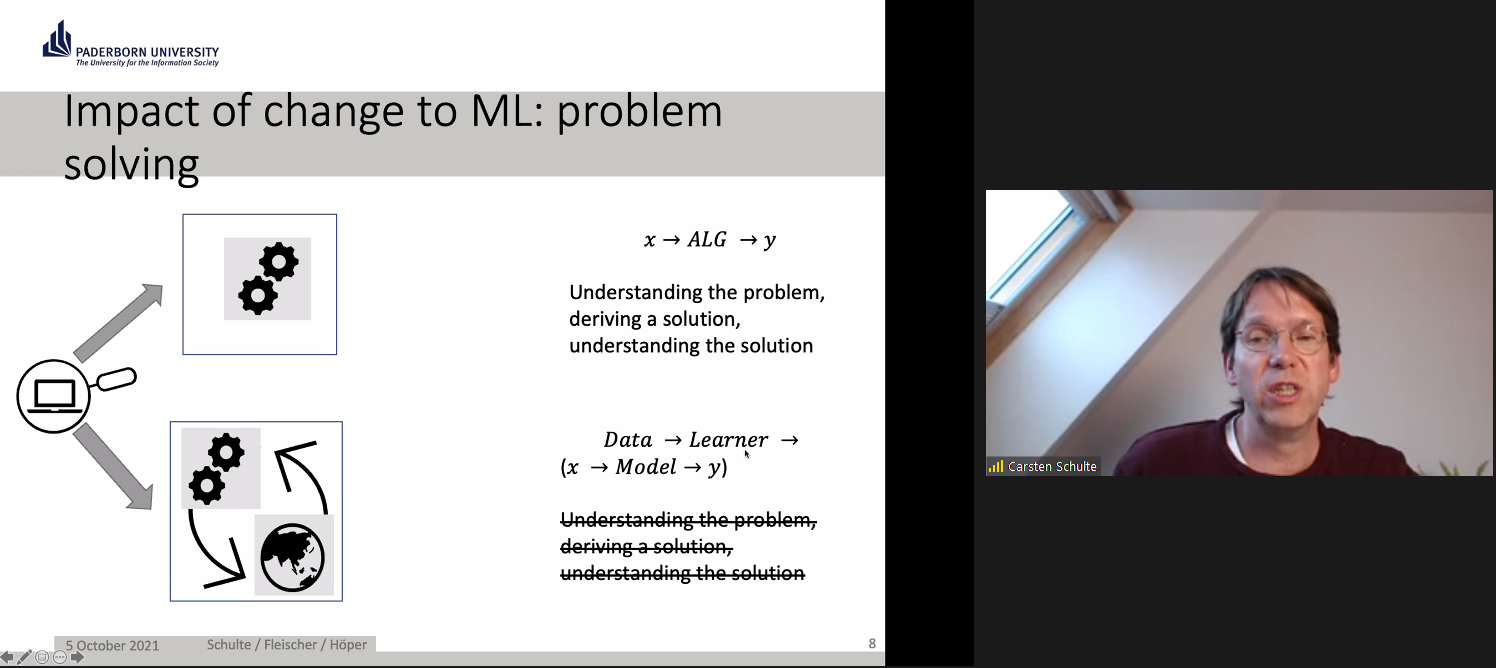
In Germany, education is devolved to state governments. Although computer science (known as informatics) was only last year introduced as a mandatory subject in lower secondary schools in North Rhine-Westphalia, where Paderborn is located, it has been taught at the upper secondary levels for many years. ProDaBi is a project that researchers have been running at Paderborn University since 2017, with the aim of developing a secondary school curriculum around data science, AI, and ML.
The ProDaBi curriculum includes:
Although the ProDaBi project site is in German, an English translation is available.
Our speakers described example activities from three of the modules:
There was a lot to digest in this seminar: challenging ideas and some new concepts, for me anyway. An important takeaway for me was how much we do not yet know about the concepts and skills we should be teaching in school around AI and ML, and about the approaches that we should be using to teach them effectively. Research such as that being carried out in Paderborn, demonstrating a data-centric approach, can really augment our understanding, and I’m looking forward to following the work of Carsten and his team.
Carsten and colleagues ended with this summary and discussion point for the audience:
“‘AI education’ requires developing an adequate picture of the hybrid interaction system — a kind of data-driven, emergent ecosystem which needs to be made explicitly to understand the transformative role as well as the technological basics of these artificial intelligence tools and how they are related to data science.”
You can catch up on the seminar, including the Q&A with Carsten and his colleagues, here:
This seminar really extended our thinking about AI education, and we look forward to introducing new perspectives from different researchers each month. At our next seminar on Tuesday 2 November at 17:00–18:30 BST / 12:00–13:30 EDT / 9:00–10:30 PDT / 18:00–19:30 CEST, we will welcome Professor Matti Tedre and Henriikka Vartiainen (University of Eastern Finland). The two Finnish researchers will talk about emerging trajectories in ML education for K-12. We look forward to meeting you there.
Carsten and their colleagues are also running a series of seminars on AI and data science: you can find out about these on their registration page.
You can increase your own understanding of machine learning by joining our latest free online course!
[1] Rahwan, I., Cebrian, M., Obradovich, N., Bongard, J., Bonnefon, J. F., Breazeal, C., … & Wellman, M. (2019). Machine behaviour. Nature, 568(7753), 477-486.
The post Should we teach AI and ML differently to other areas of computer science? A challenge appeared first on Raspberry Pi.
A recent Forbes article reported that over the last four years, the use of artificial intelligence (AI) tools in many business sectors has grown by 270%. AI has a history dating back to Alan Turing’s work in the 1940s, and we can define AI as the ability of a digital computer or computer-controlled robot to perform tasks commonly associated with intelligent beings.
Four key areas of AI are machine learning, robotics, computer vision, and natural language processing. Other advances in computing technology mean we can now store and efficiently analyse colossal amounts of data (big data); consequently, data science was formed as an interdisciplinary field combining mathematics, statistics, and computer science. Data science is often presented as intertwined with machine learning, as data scientists commonly use machine learning techniques in their analysis.
AI and data science have recently received huge amounts of attention in the media, as machine learning systems are now used to make decisions in areas such as healthcare, finance, and employment. These AI technologies cause many ethical issues, for example as explored in the film Coded Bias. This film describes the fallout of researcher Joy Buolamwini’s discovery that facial recognition systems do not identify dark-skinned faces accurately, and her journey to push for the first-ever piece of legislation in the USA to govern against bias in the algorithms that impact our lives. Many other ethical issues concerning AI exist and, as highlighted by UNESCO’s examples of AI’s ethical dilemmas, they impact each and every one of us.
So how do such advances in technology impact the education of young people? In the UK, a recent Royal Society report on machine learning recommended that schools should “ensure that key concepts in machine learning are taught to those who will be users, developers, and citizens” — in other words, every child. The AI Roadmap published by the UK AI Council in 2020 declared that “a comprehensive programme aimed at all teachers and with a clear deadline for completion would enable every teacher confidently to get to grips with AI concepts in ways that are relevant to their own teaching.” As of yet, very few countries have incorporated any study of AI and data science in their school curricula or computing programmes of study.
Here at the Raspberry Pi Foundation, AI, machine learning, and data science are important topics both in our learning resources for young people and educators, and in our programme of research. So we are delighted to announce that starting this autumn we are hosting six free, online seminars on the topic of AI, machine learning, and data science education, in partnership with The Alan Turing Institute.
The Alan Turing Institute is the UK’s national institute for data science and artificial intelligence and does pioneering work in data science research and education. The Institute conducts many different strands of research in this area and has a special interest group focused on data science education. As such, our partnership around the seminar series enables us to explore our mutual interest in the needs of young people relating to these technologies.
This promises to be an outstanding series drawing from international experts who will share examples of pedagogic best practice […].
Dr Matt Forshaw, The Alan Turing Institute
Dr Matt Forshaw, National Skills Lead at The Alan Turing Institute and Senior Lecturer in Data Science at Newcastle University, says: “We are delighted to partner with the Raspberry Pi Foundation to bring you this seminar series on AI, machine learning, and data science. This promises to be an outstanding series drawing from international experts who will share examples of pedagogic best practice and cover critical topics in education, highlighting ethical, fair, and safe use of these emerging technologies.”
At our computing education research seminars, we hear from a range of experts in the field and build an international community of researchers, practitioners, and educators interested in this important area. Our new free series of seminars runs from September 2021 to February 2022, with some excellent and inspirational speakers:
All seminars start at 17:00 UK time (18:00 Central European Time, 12 noon Eastern Time, 9:00 Pacific Time) and take place in an online format, with a presentation, breakout discussion groups, and a whole-group Q&A.
Sign up now and we’ll send you the link to join on the day of each seminar — don’t forget to put the dates in your diary!
In the meantime, you can explore some of our educational resources related to machine learning and data science:
The post Educating young people in AI, machine learning, and data science: new seminar series appeared first on Raspberry Pi.
In our brand-new issue of Hello World magazine, editor Gemma Coleman speaks to Kate Farrell from Data Education in Schools to discuss the importance of teaching data to help students navigate the world.
When I was searching for contributors for this issue of Hello World, a pattern quickly began to emerge: “Data? You want to speak to Kate.” Kate Farrell is director of curriculum development and professional learning on the Data Education in Schools project, part of the Data-Driven Innovation Skills Gateway in Scotland. With the project developing teaching materials, professional development, and even qualifications for schools that want to teach data education to learners aged 3–18, “It’s not the kind of role that fits easily on a business card,” she laughs.
The project started in 2019, with the team looking at the Scottish curriculum and mapping out where data could be embedded and how it could be used to support various subjects. “We know that teachers are under stress and won’t be able to deliver extra stuff, so we’re looking to understand how we get better at doing data literacy within the rest of the curriculum,” Kate explains. “How do we provide and support opportunities to look at data in the rest of the curriculum in cool new ways?”
“We like taking topics that you wouldn’t instantly think are about data science.”
The team runs monthly seminars drawing upon this theme, to help teachers see its applicability across all subjects. “We like taking topics that you wouldn’t instantly think are about data science. Yes, the sciences, computer science, and maths are where you would expect it, but there are huge amounts of data and data use in geography, music, social studies, and even PE.”
One example is the DataFit series of lessons for upper primary and lower secondary students, with a mission to simultaneously increase data literacy and physical activity literacy. This includes an introduction to activity-monitoring devices, such as step counters on phones. The lesson has the twin aims of teaching students how monitoring steps or sleep activity can be a positive thing, and also encouraging them to reflect on how they feel about their phone collecting their personal data.
“A lot of students don’t realise their phone is keeping track of their step count, just by virtue of it sitting in their pockets,” Kate muses. “It’s been interesting to see just how little some learners know about the data that’s being kept and tracked about them.”
Data Education in Schools ran a similarly themed workshop for students aged 10–11, with a series of events in an imagined Data Town being examined, to investigate how data can impact our lives. The day started by giving each student a cardboard mobile phone on which they could install apps in the form of stickers if they gave the town certain pieces of information about themselves, such as their favourite colour or football team. “Some kids would just install anything, give up any data, because they wanted the stickers – just like many kids will just download any app,” Kate explains. The apps and associated products then developed as they gathered more data, which was then presented back to the students. The purpose was to get students to reflect on how they felt about the products and how they used their data.
“[…] a series of ‘aha’ moments for students, as they realised what sharing their data meant.”
Later in the workshop, the mayor of Data Town announced that the town had sold the data to an advertising company who wanted to know people’s favourite colour, and to a gym who wanted to know their fitness data to help them decide the location of a new branch. “This meant a series of ‘aha’ moments for students, as they realised what sharing their data meant. Some of the kids who had opted not to collect the stickers were suddenly very smug!”
The project keeps a balance in the story it tells about data, with teaching materials encompassing both the risks of data collection and the huge benefits it can bring. “That is our main aim: how can we help learners use data to make their lives and the lives of their communities better — data for social good.” In the Data Town workshop, students also chose to share data with hospitals and researchers, and later found that this had helped them to develop new medicines. “We didn’t just want to send across the message that sharing data is bad. Yes, you can share your data, but be aware who you’re sharing it with, who you’re trusting with it.”
“How can we help learners use data to make their lives and the lives of their communities better?”
The materials that Data Education in Schools has produced use a framework called PPDAC: Problem, Plan, Data, Analysis, and Conclusion. This is an established approach to statistical literacy, and using this data problem-solving cycle in a real-world context is a powerful way to engage learners with data topics. “The aim is to empower students with the tools to be campaigning, to be making real-world changes to their lives and their communities using data.”
Kate gives a simple example of how a class could look at how much plastic their canteen is using, collecting the data on plastic products and then using that data to make the case to reduce their plastic consumption.
The project has also worked with Scottish exam board SQA to develop a National Progression Award in Data Science; they believe it is the world’s first data science school qualification. The award is aimed at upper secondary students, colleges, and workplaces as an introductory qualification in data science. It carries the same ethos as their materials for younger learners: to help students understand how data is used in society, both negatively and positively, and develop skills to help them make better decisions.
“We need learners to be able to look at the news, and their social media stream, and question what they’re looking at, or ask: where is the evidence?”
“I want people to realise that although data science sounds scary, it’s so important to learners’ lives these days. We’ve seen it with the pandemic. Being able to interpret and analyse data is hugely important. We need learners to be able to look at the news, and their social media stream, and question what they’re looking at, or ask: where is the evidence? This is so important, whether or not they go on to become a data scientist… although we’d love it if they did!”
Issue 16 of Hello World focuses on data science and data literacy; it is full of teaching ideas and inspiration to help you and your students use data to make decisions and to make sense of the world. Also in this issue:
Subscribe now to get each new digital issue straight to your inbox! And if you’re based in the UK and do paid or unpaid work in education, you can subscribe for free print issues.
PS Have you listened to our Hello World podcast yet? Episode 4 has just come out, and it’s great! Listen and subscribe wherever you get your podcasts.
The post How do you use data to solve a real-world problem? | Hello World #16 appeared first on Raspberry Pi.
Over the nine-ish years since the release of our first model, we’ve watched grow a thriving global community of Raspberry Pi enthusiasts, hobbyists, and educators. But did you know that Raspberry Pi is also increasingly used in scientific research?
Dr Jolle Jolles, a behavioural ecologist at the Center for Ecological Research and Forestry Applications (CREAF) near Barcelona, Spain, and a passionate Raspberry Pi user, has recently published a detailed review of the uptake of Raspberry Pi in biological sciences. He found that well over a hundred published studies have made use of Raspberry Pi hardware in some way.
The list of applications is almost endless. Here are just a few:
Jolle’s review shows that use of Raspberry Pi is on the up, with more studies documenting the use of Raspberry Pi hardware every year, but he’s keen to see it employed even more widely.
“It is really great to see the broad range of applications that already exist, with Raspberry Pi’s helping biologists in the lab, the field, and in the classroom. However, Raspberry Pi is still not the common research tool that it could be”.
Jolle Jolles
To stimulate the uptake of Raspberry Pi and help researchers integrate it into their work, the review paper offers guidelines and recommendations. Jolle also maintains a dedicated website with over 30 tutorials: raspberrypi-guide.github.io
“I believe low-cost micro-computers like the Raspberry Pi are a powerful tool that can help transform and democratize scientific research, and will ultimately help push the boundaries of science.”
Jolle Jolles
The paper, Broad-scale Applications of the Raspberry Pi: A Review and Guide for Biologists, is currently under review, but a preprint is available here.
Jolle has also previously published a very handy software package especially with biological scientists in mind. It’s called pirecorder and helps with automated image and video recording using Raspberry Pi. You can check it out here: https://github.com/JolleJolles/pirecorder.
You can keep up with Jolle on Instagram, where he documents all the dreamy outdoor projects he’s working on.
Drop a comment below if you’ve seen an interesting scientific application of Raspberry Pi, at work, on TV, or maybe just in your imagination while you wait to find the time to build it!
The post Raspberry Pi: a versatile tool for biological sciences appeared first on Raspberry Pi.
We are delighted to announce that we’re expanding our free Isaac Computer Science online learning platform in response to overwhelming demand from teachers and students for us to cover GCSE content.
Thanks to our contract with England’s Department for Education which is funding our work as part of the National Centre for Computing Education (NCCE) consortium, we’ve been able to collaborate with the University of Cambridge’s Department of Computer Science and Technology to build the Isaac Computer Science platform, and to create an events programme, for A level students and teachers. Now we will use this existing funding to also provide content and events for learning and teaching GCSE computer science.
With content designed by our expert team of computer science teachers and researchers, the Isaac Computer Science platform is already being used by 2000 teachers and 18,000 students at A level. The platform houses a rich set of interactive study materials and reflective questions, providing full coverage of exam specifications.
Within the Teach Computing Curriculum we built as part of our NCCE work, we’ve already created free classroom resources to support teachers with the delivery of GCSE computer science (as well as the rest of the English computing curriculum from Key Stages 1 to 4). Expanding the Isaac Computer Science platform to offer interactive learning content to GCSE students, and running events specifically for GCSE students, will perfectly complement the Teach Computing Curriculum and support learners to continue their computing education beyond GCSE.
We’ll use our tried and tested process of content design, implementation of student and teacher feedback, and continual improvements based on evidence from platform usage data, to produce an educational offering for GCSE computer science that is of the highest quality.
Isaac Computer Science GCSE will support students and teachers of GCSE computer science across the OCR, AQA, Pearson Edexcel, Eduqas, and WJEC exam bodies, covering the whole of the national curriculum. The content will be aimed at ages 14 to 16, and it will be suitable for students of all experience levels and backgrounds — from those who have studied little computer science at Key Stage 3 and are simply interested, to those who are already set to pursue a career related to computer science.
Students will be able to:
Teachers will be able to:
As part of Isaac Computer Science GCSE, we’ll also organise an events programme for GCSE students to get support with specific topics, as well as inspiration about opportunities to continue their computer science education beyond GCSE into A level and higher education or employment.
For teachers, we’ll continue to provide a wide spectrum of free CPD training events and courses through the National Centre for Computing Education.
As is the case for the Isaac Computer Science A level content, we’ll create content for this project to suit the English national curriculum and exam bodies. However, anyone anywhere in the world will be able to access and use the platform for free. The content will be published under an Open Government License v3.0.
Our launch will be in January of 2022, with the full suite of content available by September of 2022.
We’ll be putting out calls to the teaching community in England, asking for your help to guide the design and quality assurance of the Isaac Computer Science GCSE materials.
Follow Isaac Computer Science on social media and sign up on the Isaac Computer Science platform to be the first to hear news!
The post Expanding our free Isaac Computer Science platform with new GCSE content appeared first on Raspberry Pi.
Look at our lovely friends over at This is not Rocket Science (TiNRS) – they’ve wasted no time at all in jumping in with our new chips. In this guest post, Stijn of TiNRS shares their fishily musical application of our new toy.
The new RP2040 chip by Raspberry Pi is amazing. When we got our hands on this beautiful little thing, we did what we always do with new chips and slapped on a Goldfish, our favourite acid bassline synthesiser (we make fish and chips, hahahaha).
While benchmarking the performance by copy/pasting instances of our entire Goldfish in search of the chip’s limits, we suddenly found ourselves with a polyphonic synth. We have since rewritten these multiple instances into a 16-voice Poly-Goldfish with 4 oscillators per voice. To celebrate we designed a PCB and brightly coloured frontpanel to give this new Goldfish some dedicated controls.
Bring-up was trivial due to the amazing documentation and the extremely flexible PIO-blocks. RP2040 is a dream to work with. Childlike giddiness ensued while lying on the carpet and programming in VSCode on a Raspberry Pi 400 talking directly to the RP2040. This is the way to release a chip into the world: with fantastic documentation, an open toolchain and plenty of examples of how to use everything.
Once these chips hit general availability we will probably share some designs on our Github. This chip is now part of our go-to set of tools to make cool stuff and will very bloody likely be inside our next three modules.
It fits perfectly in our Open Source attitude. Because of the easy, high quality, multi-platform, free and even beginner-friendly toolchain they have built around this chip, we can expand the accessibility to the insides of our designs. With these chips it is way easier for us to have you do things like adding your own algorithms, building extra modes or creating personal effects. We can lean on the quality of the Raspberry Pi platform and this amazing chip.
TiNRS approves.
Keep an eye on the TiNR blog for more adventures in technology. You can also find them on Twitter @rocket_not and on Instagram.
The post Raspberry fish & RP2040 chip appeared first on Raspberry Pi.
A sci-fi writer wanted to add some realism to his fiction. The result: a Raspberry Pi-based Martian timepiece. Rosie Hattersley clocks in from the latest issue of The MagPi Magazine.
Ever since he first clapped eyes on Mars through the eyepiece of a telescope, Philip Ide has been obsessed with the Red Planet. He’s written several books based there and, many moons ago, set up a webpage showing the weather on Mars. This summer, Phil adapted his weather monitor and created a Raspberry Pi-powered Mars Clock.
After writing several clocks for his Mars Weather page, Phil wanted to make a physical clock: “something that could sit on my desk or such like, and tell the time on Mars.” It was to tell the time at any location on Mars, with presets for interesting locations “plus the sites of all the missions that made it to the surface – whether they pancaked or not.”
Another prerequisite was that the clock had to check for new mission file updates and IERS bulletins to see if a new leap second had been factored into Universal Coordinated Time.
“Martian seconds are longer,” explains Phil, “so everything was pointing at software rather than a mechanical device. Raspberry Pi was a shoo-in for the job”. However, he’d never used one.
“I’d written some software for calculating orbits and one of the target platforms was Raspberry Pi. I’d never actually seen it run on a Raspberry Pi but I knew it worked, so the door was already open.” He was able to check his data against a benchmark NASA provided. Knowing that the clocks on his Mars Weather page were accurate meant that Phil could focus on getting to grips with his new single-board computer.
He chose a 2GB Raspberry Pi 4 and official-inch touchscreen with a SmartiPi Touch 2 case. “Angles are everything,” he reasons. He also added a fan to lower the CPU temperature and extend the hardware’s life. Along with a power lead, the whole setup cost £130 from The Pi Hut.
Since his Mars Clock generates a lot of data, he made it skinnable so the user can choose which pieces of information to view at any one time. It can display two types of map – Viking or MOLA – depending on the co-ordinates for the clock. NASA provides a web map-tile service with many different data sets for Mars, so it should be possible to make the background an interactive map, allowing you to zoom in/out and scroll around. Getting these to work proved rather a headache as he hit incompatibilities with the libraries.
Phil wrote most of the software himself, with the exception of libraries for the keyboard and FTP which he pulled from GitHub. Here’s all the code.
He used JavaScript running on the Node.js/Electron framework. “This made for rapid development and is cross-platform, so I could write and test it on Windows and then move it to the Raspberry Pi,” he says. With the basic code written, Phil set about paring it back, reducing the number and duration of CPU time-slices the clock needed when running. “I like optimised software,” he explains.
His decades as a computer programmer meant other aspects were straightforward. The hardware is more than capable, he says of his first ever experience of Raspberry Pi, and the SmartiPi case makers had done a brilliant job. Everything fit together and in just a few minutes his Raspberry Pi was working.
Since completing his Mars Clock Phil has added a pi-hole and a NAS to his Raspberry Pi setup and says his confidence using them is such that he’s now contemplating challenging himself to build an orrery (a mechanical model of the solar system). “I have decades of programming experience, but I was still learning new things as the project progressed,” he says. “The nerd factor of any given object increases exponentially if you make it yourself.”
Check out page 26 in the latest issue of The MagPi Magazine for a step-by-step and to learn more about the maker, Phillip. You can read a PDF copy for free on The MagPi Magazine website if you’re not already a subscriber.
The post Mars Clock appeared first on Raspberry Pi.
We’re pleased to share that Dr Sue Sentance, our Chief Learning Officer, is receiving a Suffrage Science award for Mathematics and Computing today.
The Suffrage Science award scheme celebrates women in science. Sue is being recognised for her achievements in computer science and computing education research, and for her work promoting computing to the next generation.
Sue is an experienced teacher and teacher educator with an academic background in artificial intelligence, computer science, and education. She has made a substantial contribution to research in computing education in school over the last ten years, publishing widely on the teaching of programming, teacher professional development, physical computing, and curriculum change. In 2017 Sue received the BERA Public Engagement and Impact Award for her services to computing education. Part of Sue’s role at the Raspberry Pi Foundation is leading our Gender Balance in Computing research programme, which investigates ways to increase the number of girls and young women taking up computing at school level.
As Dr Hannah Dee, the previous award recipient who nominated Sue, says: “[…] The work she does is important — researchers need to look at what happens in schools, particularly when we consider gender. Girls are put off computing long before they get to universities, and an understanding of how children learn about computing and the ways in which we can support girls in tech is going to be vital to reverse this trend.”
Sue says, “I’m delighted and honoured that Hannah nominated me for this award, and to share this honour with other women also dedicated to furthering the fields of mathematics, computing, life sciences, and engineering. It’s been great to see research around computing in school start to gather pace (and also rigour) around the world over the last few years, and to play a part in that. There is still so much to do — many countries have now introduced computing or computer science into their school curricula as a mandatory subject, and we need to understand better how to make the subject fully accessible to all, and to inspire and motivate the next generation.”
Aside from her role in the Gender Balance in Computing research programme, Sue has led our work as part of the consortium behind the National Centre for Computing Education and is now our senior adviser on computing subject knowledge, pedagogy, and the Foundation’s computing education research projects. Sue also leads the programme of our ongoing computing education research seminar series, where academics and educators from all over the world come together online to hear about and discuss some of the latest work in the field.
We are currently inviting primary and secondary schools in England to take part in the Gender Balance in Computing project.
Congratulations from all your colleagues at the Foundation, Sue!
The post Sue Sentance recognised with Suffrage Science award appeared first on Raspberry Pi.
Meet Callum Fawcett, who shares his journey from tinkering with the first Raspberry Pi while he was at school, to a Master’s degree in computer science and a real-life job in programming. We also get to see some of the awesome projects he’s made along the way.
Most of my learning was done through two sources. I learnt Linux and how the terminal worked using online resources such as Stack Overflow. I would have a problem that I needed to solve, look up solutions online, and try out commands that I found. This was perhaps the hardest part of learning how to use a Raspberry Pi, as it was something I had never done before, but it really helped me in later years when I would use Linux more than Windows. For learning programming, I preferred to use books. I had a book for C++ and a book for Python that I would work through. These were game-based books, so many of the fun projects that I did were simple text-based games where you typed in responses to questions.
The first robot Callum made using a Raspberry Pi
By far the coolest project I did with the Raspberry Pi was to build a small robot (shown above). This was a joint project between myself and my dad. He sorted out the electronics and I programmed the robot. It was a great opportunity to learn about robotics and refine my programming skills. By the end, the robot was capable of moving around by itself, driving into objects, and then reversing and trying a new direction. It was almost like an unintelligent Roomba that couldn’t hoover, but I spent many hours improving small bits and pieces to make it as easy to use as possible. My one wish that I never managed to achieve with my robot was allowing it to map out its surroundings. This was a very ambitious project at the time, since I was still quite inexperienced in programming. The biggest problem with this was calibrating the robot’s turning circle, which was never consistent so it was very hard to have the robot know where in the room it was.
Another fun project that I worked on used the Sense HAT developed for the Astro Pi computers for use on the International Space Station. Using this, I was able to make a memory maze game (shown below), in which a player is shown a maze for several seconds and then has to navigate that maze from memory by shaking the device. This was my first introduction to using more interactive types of input, and this eventually led to my final-year project, which used these interesting interactions to develop another way of teaching.
I have now just finished my Master’s degree in computer science at the University of Bristol. Before going to university, I had no experience of being taught programming in a formal environment. It was not a taught subject at my secondary school or sixth form. I wanted to get more people at my school interested in this area of study though, which I did by running a coding club for people. I would help others debug their code and discuss interesting problems with them. The reason that I chose to study computer science is largely because of my experiences with Raspberry Pi and other programming I did in my own time during my teenage years. I likely would have studied history if it weren’t for the programming I had done by myself making robots and other games.
Raspberry Pi has continued to play a part in my degree and extra-curricular activities; I used them in two large projects during my time at university and used a similar device in my final project. My robot experience also helped me to enter my university’s ‘Robot Wars’ competition which, though we never won, was a lot of fun.
Having a Raspberry Pi is always useful during a hackathon, because it’s such a versatile component. Tech like Raspberry Pi will always be useful for beginners to learn the basics of programming and electronics, but these computers are also becoming more and more useful for people with more experience to make fun and useful projects. I could see tech like Raspberry Pi being used in the future to help quickly prototype many types of electronic devices and, as they become more powerful, even being used as an affordable way of controlling many types of robots, which will become more common in the future.
Our guest blogger Callum
Now I am going on to work on programming robot control systems at Ocado Technology. My experiences of robot building during my years before university played a large part in this decision. Already, robots are becoming a huge part of society, and I think they are only going to become more prominent in the future. Automation through robots and artificial intelligence will become one of the most important tools for humanity during the 21st century, and I look forward to being a part of that process. If it weren’t for learning through Raspberry Pi, I certainly wouldn’t be in this position.
Cheers for your story, Callum! Has tinkering with our tiny computer inspired your educational or professional choices? Let us know in the comments below.
The post Learning with Raspberry Pi — robotics, a Master’s degree, and beyond appeared first on Raspberry Pi.
Did you know: the first machine to break the exaflop barrier (one quintillion floating‑point operations per second) wasn’t a huge dedicated IBM supercomputer, but a bunch of interconnected PCs with ordinary CPUs and gaming GPUs.
With that in mind, welcome to the Folding@home project, which is targeting its enormous power at COVID-19 research. It’s effectively the world’s fastest supercomputer, and your PC can be a part of it.
The Folding@home project is now targeting COVID-19 research
Put simply, Folding@home runs hugely complicated simulations of protein molecules for medical research. They would usually take hundreds of years for a typical computer to process. However, by breaking them up into smaller work units, and farming them out to thousands of independent machines on the Internet, it’s possible to run simulations that would be impossible to run experimentally.
Back in 2004, Custom PC magazine started its own Folding@home team. The team is currently sitting at number 12 on the world leaderboard and we’re still going strong. If you have a PC, you can join us (or indeed any Folding@home team) and put your spare clock cycles towards COVID-19 research.
Getting your machine folding is simple. First, download the client. Your username can be whatever you like, and you’ll need to put in team number 35947 to fold for the Custom PC & bit-tech team. If you want your PC to work on COVID-19 research, select ‘COVID-19’ in the ‘I support research finding’ pulldown menu.
Enter team number 35947 to fold for the Custom PC & bit-tech team
You’ll get the most points per Watt from GPU folding, but your CPU can also perform valuable research that can’t be done on your GPU. ‘There are actually some things we can do on CPUs that we can’t do on GPUs,’ said Professor Greg Bowman, Director of Folding@home, speaking to Custom PC in the latest issue.
‘With the current pandemic in mind, one of the things we’re doing is what are called “free energy calculations”. We’re simulating proteins with small molecules that we think might be useful starting points for developing therapeutics, for example.’
If you want your PC to work on COVID-19 research, select ‘COVID-19’ in the ‘I support research finding’ pulldown menu
Bear in mind that enabling folding on your machine will increase power consumption. For reference, we set up folding on a Ryzen 7 2700X rig with a GeForce GTX 1070 Ti. The machine consumes around 70W when idle. That figure increases to 214W when folding on the CPU and around 320W when folding on the GPU as well. If you fold a lot, you’ll see an increase in your electricity bill, so keep an eye on it.
Could we also see Folding@home running on Arm machines, such as Raspberry Pi? ‘Oh I would love to have Folding@home running on Arm,’ says Bowman. ‘I mean they’re used in Raspberry Pis and lots of phones, so I think this would be a great future direction. We’re actually in contact with some folks to explore getting Folding@home running on Arm in the near future.’
In the meantime, you can still recruit your Raspberry Pi for the cause by participating in Rosetta@home, a similar project also working to help the fight against COVID-19. For more information, visit the Rosetta@home website.
You’ll also find a full feature about Folding@home and its COVID-19 research in Issue 202 of Custom PC, available from the Raspberry Pi Press online store.
The post Help medical research with folding@home appeared first on Raspberry Pi.
Raspberry Pi devices are often used by scientists, especially in biology to capture and analyse data, and a particularly striking – and sobering – project has made the news this week. Researchers at UMass Amherst have created FluSense, a dictionary-sized piece of equipment comprising a cheap microphone array, a thermal sensor, an Intel Movidius 2 neural computing engine, and a Raspberry Pi. FluSense monitors crowd sounds to forecast outbreaks of viral respiratory disease like seasonal flu; naturally, the headlines about their work have focused on its potential relevance to the COVID-19 pandemic.
Forsad Al Hossain and Tauhidur Rahman with the FluSense device. Image courtesy of the University of Massachusetts Amherst
The device can distinguish coughing from other sounds. When cough data is combined with information about the size of the crowd in a location, it can provide an index predicting how many people are likely to be experiencing flu symptoms.
It was successfully tested in in four health clinic waiting rooms, and now, PhD student Forsad Al Hossain and his adviser, assistant professor Tauhidur Rahman, plan to roll FluSense out in other large spaces to capture data on a larger scale and strengthen the device’s capabilities. Privacy concerns are mitigated by heavy encryption, and Al Hossain and Rahman explain that the emphasis is on aggregating data, not identifying sickness in any single patient.
The researchers believe the secret to FluSense’s success lies in how much of the processing work is done locally, via the neural computing engine and Raspberry Pi: “Symptom information is sent wirelessly to the lab for collation, of course, but the heavy lifting is accomplished at the edge.”
Image courtesy of the University of Massachusetts Amherst
FluSense offers a different set of advantages to other tools, such as the extremely popular self-reporting app developed by researchers at Kings College Hospital in London, UK, together with startup Zoe. Approaches like this rely on the public to sign up, and that’s likely to skew the data they gather, because people in some demographic groups are more likely than others to be motivated and able to participate. FluSense can be installed to capture data passively from groups across the entire population. This could be particularly helpful to underprivileged groups who are less likely to have access to healthcare.
Makers, engineers, and scientists across the world are rising to the challenge of tackling COVID-19. One notable initiative is the Montreal General Hospital Foundation’s challenge to quickly design a low-cost, easy to use ventilator which can be built locally to serve patients, with a prize of CAD $200,000 on offer. The winning designs will be made available to download for free.
There is, of course, loads of chatter on the Raspberry Pi forum about the role computing has in beating the virus. We particularly liked this PSA letting you know how to free up some of your unused processing power for those researching treatments.
Screenshot via @deeplocal on Instagram
And to end on a cheering note, we *heart* this project from @deeplocal on Instagram. They’ve created a Raspberry Pi-powered soap dispenser which will play 20 seconds of your favourite song to keep you at the sink and make sure you’re washing your hands for long enough to properly protect yourself.
The post FluSense takes on COVID-19 with Raspberry Pi appeared first on Raspberry Pi.
The Edwards Lab at the University of Reading has developed a flexible, low-cost, open source lab robot for capturing images of microbiology samples with a Raspberry Pi camera module. It’s called POLIR, for Raspberry Pi camera Open-source Laboratory Imaging Robot. Here’s a timelapse video of them assembling it.
The robot is useful for all kinds of microbiology imaging, but at the moment the lab is using it to measure antimicrobial resistance in bacteria. They’re doing this by detecting the colour change in a dye called resazurin, which changes from blue to pink in the presence of metabolically active cells: if bacteria incubated with antibiotics grow, their metabolic activity causes the dye to turn pink. However, if the antibiotics stop or impede the growth of the bacteria, their lower levels of metabolic activity will cause less colour change, or none at all. In the photo below, the colourful microtitre plate holds bacterial samples with and without resistance to the antibiotics against which they’re being tested.
POLIR, an open source 3D printer-based Raspberry Pi lab imaging robot
The researchers adapted existing open source 3D printer designs and used v-slot aluminium extrusion (this stuff) with custom 3D-printed joints to make a frame. Instead of a printer extrusion head, a Raspberry Pi and camera module are mounted on the frame. An Arduino running open-source Repetier software controls x-y-z stepper motors to adjust the position of the computer and camera.
Front and top views of POLIR
Open-source OctoPrint software controls the camera position by supplying scripts from the Raspberry Pi to the Arduino. OctoPrint also allows remote access and control, which gives researchers flexibility in when they run experiments and check progress. Images are acquired using a Python script configured with the appropriate settings (eg image exposure), and are stored on the Raspberry Pi’s SD card. From there, they can be accessed via FTP.
Off-the-shelf lab automation systems are extremely expensive and remain out of the reach of most research groups. POLIR cost just £600.
The system has a number of advantages over higher-cost off-the-shelf imaging systems. One is its flexibility: the robot can image a range of sample formats, including agar plates like those in the video above, microtitre plates like the one in the first photograph, and microfluidic “lab-on-a-comb” devices. A comb looks much like a small, narrow rectangle of clear plastic with striations running down its length; each striation is a microcapillary with capacity for a 1μl sample, and each comb has ten microcapillaries. These microfluidic devices let scientists run experiments on a large number of samples at once, while using a minimum of space on a lab bench, in an incubator, or in an imaging robot like POLIR.
POLIR accommodates 2160 individual capillaries and a 96 well plate, with room to spare
For lab-on-a-comb images, POLIR gives the Reading team four times the spatial resolution they get with a static camera. The moveable Raspberry Pi camera with a short focus yields images with 6 pixels per capillary, compared to 1.5 pixels per capillary using a $700 static Canon camera with a macro lens.
Because POLIR is automated, it brings higher temporal resolution within reach, too. A non-automated system, by contrast, can only be used for timelapse imaging if a researcher repeatedly intervenes at fixed time intervals. Capturing kinetic data with timelapse imaging is valuable because it can be significant if different samples reach the same endpoint but at different rates, and because some dyes can give a transient signal that would be missed by an endpoint measurement alone.
Dr Alexander Edwards of the University of Reading comments:
We built the robot with a simple purpose, to make antimicrobial resistance testing more robust without resorting to expensive and highly specialised lab equipment […] The beauty of the POLIR kit is that it’s based on open source designs and we have likewise published our own designs and modifications, allowing everyone and anyone to benefit from the original design and the modifications in other contexts. We believe that open source hardware is a game changer that will revolutionise microbiological and other life science lab work by increasing data production whilst reducing hands-on labour time in the lab.
You can find POLIR on GitLab here. You can also read more, and browse more figures, in the team’s open-access paper, Exploiting open source 3D printer architecture for laboratory robotics to automate high-throughput time-lapse imaging for analytical microbiology.
The post Raspberry Pi vs antibiotic resistance: microbiology imaging with open source hardware appeared first on Raspberry Pi.


 Lateo.net - Flux RSS en pagaille (pour en ajouter : @ moi)