Connexion


Many technology items are disposed of each year, either because they are broken, are no longer needed, or have been upgraded. Researchers from Germany have identified this as an opportunity to develop a scheme of work for Computing, while at the same time highlighting the importance of sustainability in hardware and software use. They hypothesised that by repairing defective devices, students would come to understand better how these devices work, and therefore meet some of the goals of their curriculum.

The research team visited three schools in Germany to deliver Computing lessons based around the concept of a repair café, where defective items are repaired or restored rather than thrown away. This idea was translated into a series of lessons about using and repairing smartphones. Learners first of all explored the materials used in smartphones and reflected on their personal use of these devices. They then spent time moving around three repair workstations, examining broken smartphones and looking at how they could be repaired or repurposed. Finally, learners reflected on their own ecological footprint and what they had learnt about digital hardware and software.
In the classroom, repair workstations were set up for three different categories of activity: fixing cable breaks, fixing display breaks, and tinkering to upcycle devices. Each workstation had a mentor to support learners in investigating faults themselves by using the question prompt, “Why isn’t this feature or device working?” At the display breaks and cable breaks workstations, a mentor was on hand to provide guidance with further questions about the hardware and software used to make the smartphone work. On the other hand, the tinkering workstation offered a more open-ended approach, asking learners to think about how a smartphone could be upcycled to be used for a different purpose, such as a bicycle computer. It was interesting to note that students visited each of the three workstations equally.
The feedback from the participants showed there had been a positive impact in prompting learners to think about the sustainability of their smartphone use. Working with items that were already broken also gave them confidence to explore how to repair the technology. This is a different type of experience from other Computing lessons, in which devices such as laptops or tablets are provided and are expected to be carefully looked after. The researchers also asked learners to complete a questionnaire two weeks after the lessons, and this showed that 10 of the 67 participants had gone on to repair another smartphone after taking part in the lessons.
The project drew on a theory called duality reconstruction that has been developed by a researcher called Carsten Schulte. This theory argues that in computing education, it is equally important to teach learners about the function of a digital device as about the structure. For example, in the repair café lessons, learners discovered more about the role that smartphones play in society, as well as experimenting with broken smartphones to find out how they work. This brought a socio-technical perspective to the lessons that helped make the interaction between the technology and society more visible.
Using this approach in the Computing classroom may seem counter-intuitive when compared to the approach of splitting the curriculum into topics and teaching each topic sequentially. However, the findings from this project suggest that learners understand better how smartphones work when they also think about how they are manufactured and used. Including societal implications of computing can provide learners with useful contexts about how computing is used in real-world problem-solving, and can also help to increase learners’ motivation for studying the subject.
The final aspect of this research project looked at collaborative problem-solving. The lessons were structured to include time for group work and group discussion, to acknowledge and leverage the range of experiences among learners. At the workstations, learners formed small groups to carry out repairs. The paper doesn’t mention whether these groups were self-selecting or assigned, but the researchers did carry out observations of group behaviours in order to evaluate whether the collaboration was effective. In the findings, the ideal group size for the repair workstation activity was either two or three learners working together. The researchers noticed that in groups of four or more learners, at least one learner would become disinterested and disengaged. Some groups were also observed taking part in work that wasn’t related to the task, and although no further details are given about the nature of this, it is possible that the groups became distracted.
The findings from this project suggest that learners understand better how smartphones work when they also think about how they are manufactured and used.
Further investigation into effective pedagogies to set group size expectations and maintain task focus would be helpful to make sure the lessons met their learning objectives. This research was conducted as a case study in a small number of schools, and the results indicate that this approach may be more widely helpful. Details about the study can be found in the researchers’ paper (in German).
If you’re thinking about setting up a repair café in your school to promote sustainable computing, either as a formal or informal learning activity, here are ideas on where to begin:
This article is from our free computing education magazine Hello World. Every issue is written by educators for educators and packed with resources, ideas, and insights to inspire your learners and your own classroom practice.
For more about computing education in the context of sustainability, climate change, and environmental impact, download issue 19 of Hello World, which focuses on these topics.
You can subscribe to Hello World for free to never miss a digital issue, and if you’re an educator in the UK, a print subscription will get you free print copies in the post.
PS If you’re interested in facilitating productive classroom discussions with your learners about ethical, legal, cultural, and environmental concerns surrounding computer science, take a look at our free online course ‘Impacts of Technology: How To Lead Classroom Discussions’.
The post Repair cafés in computing education | Hello World #19 appeared first on Raspberry Pi.
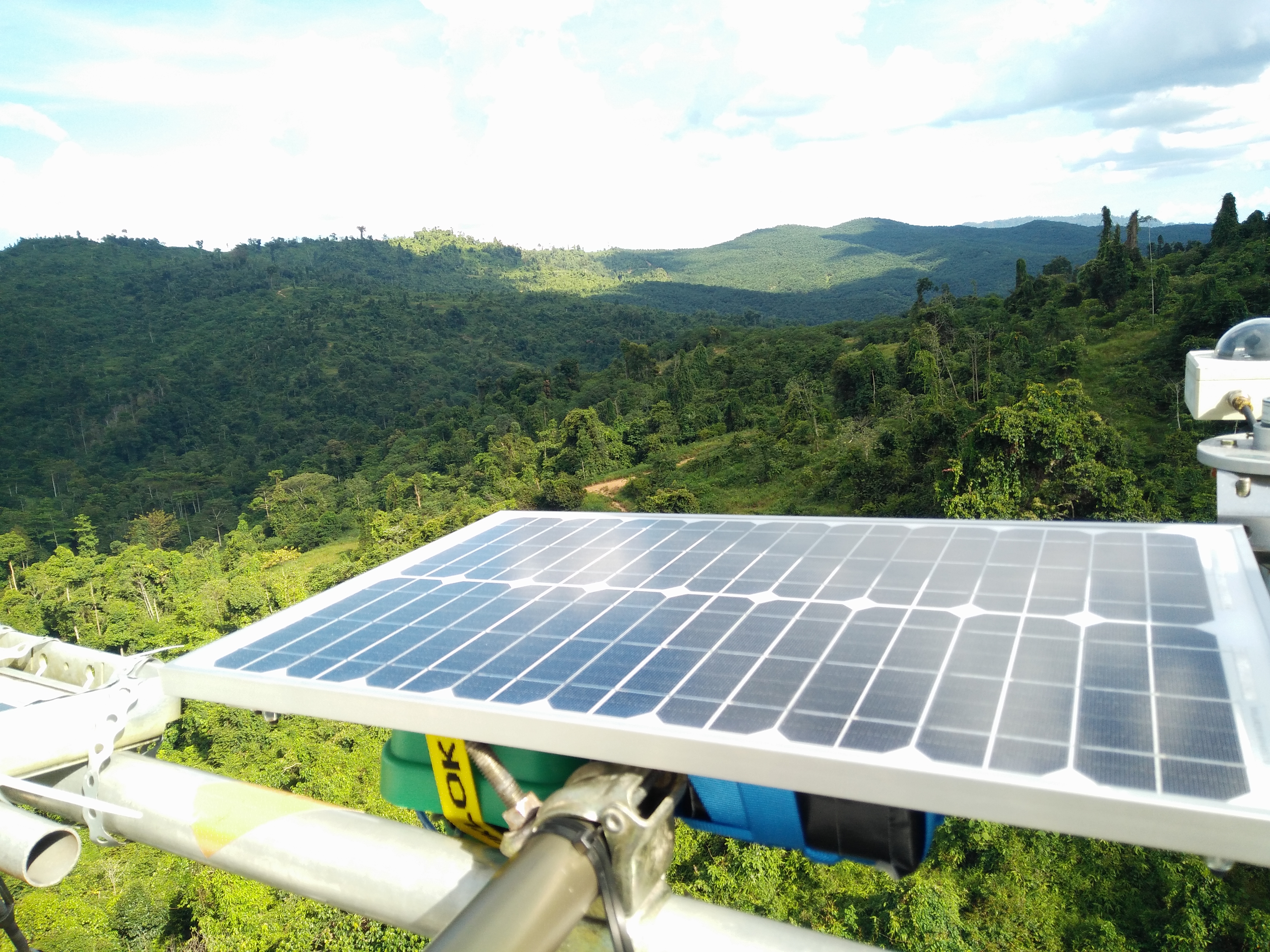
These award-winning, solar-powered audio recorders, built on Raspberry Pi, have been installed in the Borneo rainforest so researchers can listen to the local ecosystem 24/7. The health of a forest ecosystem can often be gaged according to how much noise it creates, as this signals how many species are around.
And you can listen to the rainforest too! The SAFE Acoustics website, funded by the World Wide Fund for Nature (WWF), streams audio from recorders placed around a region of the Bornean rainforest in Southeast Asia. Visitors can listen to live audio or skip back through the day’s recording, for example to listen to the dawn chorus.
The device records data in the field and uploads it to a central server continuously and robustly over long time-periods. And it was built for around $305.
Here’s all the code for the platform, on GitHub.
The Imperial College London team behind the project has provided really good step-by-step photo instructions for anyone interested in the fine details.
The recorders have been installed by Imperial College London researchers as part of the SAFE Project – one of the largest ecological experiments in the world.
Dr Sarab Sethi designed the audio recorders with Dr Lorenzo Picinali. They wanted to quantify the changes in rainforest soundscape as land use changes, for example when forests are logged. Sarab is currently working on algorithms to analyse the gathered data with Dr Nick Jones from the Department of Mathematics.
Let the creators of the project tell you more on the Imperial College London website.
The post Raspberry Pi listening posts ‘hear’ the Borneo rainforest appeared first on Raspberry Pi.
We love seeing Raspberry Pi being used to push industry forward. Here’s an example of how our tiny computers are making an impact in agriculture.
Directed Machines is a small company on a mission to remove pollution and minimise human labour in land care. Their focus is to do more with less, so the affordable power of our robust computers matches perfectly with their goals.
You’ll find a Raspberry Pi 4 at the heart of their solar-powered, autonomous, electric tractors called Land Care Robots.
Here are a few of the robot’s specs:
Directed Machine’s COO Wayne Pearson explains: “Rather than opting for the most advanced components (often the simplest solution), we endeavour to find affordable, easily sourced components. We then enable these components to accomplish more by ensuring efficient uses of compute/memory resources through our software stack, which we built from the ground up.”
“All in all,” Wayne continues, “this approach helps minimise unnecessarily inflated component costs (as well as the corresponding complexities) from being passed along to our customers — which keeps our prices lower and enables rapid field repair/maintenance.”
Here’s a practical example of that. This is a custom HAT Directed Machine’s ‘Electrical Engineering Guy’ Chris Doughty shared on LinkedIn. It was specially created to expand the functionality of the Raspberry Pi 4s they were using:
The HAT includes:
• 7-port USB 2.0 hub (six ports off-board) with individual port-power control
• 5A of 5.45V power to keep Pi running stable with high-current peripherals
• 9-axis IMU LSM9DS1
• Precision ‘M8P’ UBLOX GNSS receiver (capable of supporting RTK) SMA connection for external GPS antenna including DC for LNA
• 7–15V DC input to support automotive and accessory-port applications • Connects to standard Raspberry Pi 3 and 4 via pin-header and standoffs
Directed Machine’s founder George Chrysanthakopoulos shared the video at the top of this post on LinkedIn to demonstrate how the land care robots see the world while autonomously navigating. The combined power of Raspberry Pi 4 and their own built-from-the-ground software stack lets the robots see dual depth and colour streams at 15Hz. This is all made possible with a cheap GPS plus an Inertial Measurement Unit (IMU) for just $15 combined.
With a base price of the Land Care Robot is in the thousands, we’re not suggesting you should pick up one for your back garden — cutting the lawn is a childhood chore for the ages. But, for industry, the robot is a fine example of how businesses are using Raspberry Pi to cut both cost and environmental impact.
Also see Liz’s favourite project, the Cucumber Counter, and the popular CNC FarmBot, for more examples of ‘Down on the farm with Raspberry Pi’.
The post Raspberry Pi–powered robot farmers appeared first on Raspberry Pi.
Keeping an eye on bee life cycles is a brilliant example of how Raspberry Pi sensors help us understand the world around us.
The setup featuring an Arduino, RF receiver, USB cable and Raspberry Pi
Getting to design and build things for a living sounds like a dream job, especially if it also involves Raspberry Pi and wildlife. Glyn Hudson has always enjoyed making things and set up a company manufacturing open-source energy monitoring tools shortly after graduating from university. With access to several hives at his keen apiarist parents’ garden in Snowdonia, Glyn set up BeeMonitor using some of the tools he used at work to track the beehives’ inhabitants.
Glyn checking the original BeeMonitor setup
“The aim of the project was to put together a system to monitor the health of a bee colony by monitoring the temperature and humidity inside and outside the hive over multiple years,” explains Glyn. “Bees need all the help and love they can get at the moment and without them pollinating our plants, weíd struggle to grow crops. They maintain a 34∞C core brood temperature (± 0.5∞C) even when the ambient temperature drops below freezing. Maintaining this temperature when a brood is present is a key indicator of colony health.”
BeeMonitor has been tracking the hives’ population since 2012 and is one of the earliest examples of a Raspberry Pi project. Glyn built most of the parts for BeeMonitor himself. Open-source software developed for the OpenEnergyMonitor project provides a data-logging and graphing platform that can be viewed online.
BeeMonitor complete with solar panel to power it. The Snowdonia bees produce 12 to 15 kg of honey per year
The hives were too far from the house for WiFi to reach, so Glyn used a low-power RF sensor connected to an Arduino which was placed inside the hive to take readings. These were received by a Raspberry Pi connected to the internet.
Diagram showing what information BeeMonitor is trying to establish
At first, there was both a DS18B20 temperature sensor and a DHT22 humidity sensor inside the beehive, along with the Arduino (setup info can be found here). Data from these was saved to an SD card, the obvious drawback being that this didn’t display real-time data readings. In his initial setup, Glyn also had to extract and analyse the CSV data himself. “This was very time-consuming but did result in some interesting data,” he says.
Almost as soon as BeeMonitor was running successfully, Glyn realised he wanted to make the data live on the internet. This would enable him to view live beehive data from anywhere and also allow other people to engage in the data.
“This is when Raspberry Pi came into its own,” he says. He also decided to drop the DHT22 humidity sensor. “It used a lot of power and the bees didn’t like it – they kept covering the sensor in wax! Oddly, the bees don’t seem to mind the DS218B20 temperature sensor, presumably since it’s a round metal object compared to the plastic grille of the DHT22,” notes Glyn.
Unlike the humidity sensor, the bees don’t seem to mind the temperature probe
The system has been running for eight years with minimal intervention and is powered by an old car battery and a small solar PV panel. Running costs are negligible: “Raspberry Pi is perfect for getting projects like this up and running quickly and reliably using very little power,” says Glyn. He chose it because of the community behind the hardware. “That was one of Raspberry Pi’s greatest assets and what attracted me to the platform, as well as the competitive price point!” The whole setup cost him about £50.
Glyn tells us we could set up a basic monitor using Raspberry Pi, a DS28B20 temperature sensor, a battery pack, and a solar panel.
The post Monitoring bees with a Raspberry Pi and BeeMonitor appeared first on Raspberry Pi.
At Raspberry Pi, we’re interested in all things to do with technology, from building new tools and helping people teach computing, to researching how young people learn to create with technology and thinking about the role tech plays in our lives and society. Today, I’m writing about our habit of replacing devices with newer versions just for the sake of it.
Technology is involved in more of our lives than ever before: most of us carry a computer in our pocket everywhere we go. On the other hand, the length of time for which we use each individual piece of technology has grown very short. This is what’s referred to as upgrade culture, a cycle which sees most of us replacing our most trusted devices every two years with the latest products offered by tech giants like Apple and Samsung.
How we got to this point is hard to determine, and there does not seem to be a single root cause for upgrade culture. This is why I want to start a conversation about it, so we can challenge our current perspectives and establish fact-based attitudes. I think it’s time that we, as individuals and as a collective, examine our relationship with new technology.
Digital technology is still so new that there is really no benchmark for how long digital devices should last. This means that the decision power has by default landed in the hands of device manufacturers and mobile network carriers, and for their profit margins, a two-year lifecycle of devices is beneficial.
Where do you see your role in this process as a consumer? Is it wrong to want to upgrade your phone after two years of constant use? Should phone companies slow their development, and would this hinder innovation? And, if you really need to upgrade, is there a better use for your old device than living in a drawer? These questions defy simple answers, and I want to hear what you think.
As with all our behaviours as consumers, the impact that upgrade culture has on the environment is an important concern. Environmental issues and climate change aren’t anything new, but they’re currently at the forefront of the global conversation, and for good reason.
Mobile devices are of course made in factories, and the concerns this raises have been covered well in many other places. The same goes for the energy needed to build technology. This energy could, at least in theory, be produced from renewable sources. Here I would like to focus on another aspect of the environmental impact device production has, which relates to the materials necessary to create the tiny components that form our technological best friends.
Some components of your phone cannot be created without rare chemical elements, such as europium and dysprosium. (In fact, there are 83 stable non-radioactive elements in the periodic table, and 70 of them are used in some capacity in your phone.) Upgrade culture means there is high demand for these materials, and deposits are becoming more and more depleted. If you’re hoping there are renewable alternatives, you’ll be disappointed: a study by researchers working at Yale University found that there are currently no alternative materials that are as effective.
Then there’s the issue of how the materials are mined. The market trading these materials is highly competitive, and more often than not manufacturers buy from the companies offer the lowest prices. To maintain their profit margin, these companies have to extract as much material as possible as cheaply as they can. As you can imagine, this leads to mining practices that are less than ethical or environmentally friendly. As many of the mines are located in distant areas of developing countries, these problems may feel remote to you, but they affect a lot of people and are a direct result of the market we are creating by upgrading our devices every two years.
Many of us agree that we need to do what we can to counteract climate change, and that, to achieve anything meaningful, we have to start looking at the way we live our lives. This includes questioning how we use technology. It will be through discussion and opinion gathering that we can start to make more informed decisions — as individuals and as a society.
You probably also have that one friend/colleague/family member who swears by their five year old mobile phone and scoffs at the prices of the newest models. These people are often labeled as sticklers who are afraid to join the modern age, but is there another way to see them? The truth is, if you’ve bought a phone in the last five years, then — barring major accidents — it will most likely still function and be just as effective as it was when it came out of the box. So why are so many consumers upgrading to new devices every two years?
Again there isn’t a single reason, but I think marketing departments should shoulder much of the responsibility. Using marketing strategies, device manufacturers and mobile network carriers purposefully make us see the phones we currently own in a negative light. A common trope of mobile phone adverts is the overwrought comparison of your current device with a newly launched version. Thus, each passing day after a new model is released, our opinion of our current device worsens, even if it’s just on a subconscious level.
This marketing strategy is related to a business practice called planned obsolescence, which sees manufacturers purposefully limit the durability of their products in order to sell more units. An early example of planned obsolescence is the lightbulb, invented at the Edison company: it was relatively simple for the company to create a lightbulb that lasted 2500 hours, but it took years and a coalition of manufacturers to make a version that reliably broke after 1000 hours. We’re all aware that the lightbulb revolutionised many aspects of life, but it turns out it also had a big influence on consumer habits and what we see as acceptable practices of technology companies.
The final aspect of the impact of upgrade culture that I want to examine relates to the digital divide. This term describes the societal gap between the people with access to, and competence with, the latest technology, and the people without these privileges. To be able to upgrade, say, your mobile phone to the latest model every two years, you either need a great degree of financial freedom, or you need to tie yourself to a 24-month contract that may not be easily within your means. As a society, we revere the latest technology and hold people with access to it in high regard. What does this say to people who do not have this access?
Inadvertently, we are widening the digital divide by placing more value on new technology than is warranted. Innovation is exciting, and commercial success is celebrated — but do you ever stop and ask who really benefits from this? Is your new phone really that much better than the old one, or could it be that you’re mostly just basking in feeling the social rewards of having the newest bit of kit?
Obviously, this blog post wouldn’t be complete if we didn’t share our perspective as a technology company as well. So here’s Raspberry Pi Trading CEO Eben Upton:
“Raspberry Pi tries very hard to avoid obsoleting older products. Obviously the latest Raspberry Pi 4 runs much faster than a Raspberry Pi 1 (something like forty times faster), but a Raspbian image we release today will run on the very earliest Raspberry Pi prototypes from the summer of 2011. Cutting customers off from software support after a couple of years is unethical, and bad for business in the long term: fool me once, shame on you; fool me twice, shame on me. The best companies respect their customers’ investment in their platforms, even if that investment happened far in the past.”
“What’s even more unusual about Raspberry Pi is that we aim to keep our products available for a long period of time. So you can’t just run a 2020 software build on a 2014 Raspberry Pi 1B+: you can actually buy a brand-new 1B+ to run it on.”
“We’re constantly working to reduce the environmental footprint of Raspberry Pi. If you look next to the USB connectors on Raspberry Pi 4, you’ll see a chunky black component. This is the reservoir capacitor, which prevents the 5V rail from dropping too far when a new USB device is plugged in. By using a polymer electrolytic capacitor, from our friends at Panasonic, we’ve been able to avoid the use of tantalum.”
“When we launched the official USB-C power supply for Raspberry Pi 4, one or two people on Twitter asked if we could eliminate the single-use plastic bag which surrounded the cable and plug assembly inside the box. Working with our partners at Kuantech, we found that we could easily do this for the white supplies, but not for the black ones. Why? Because when the box vibrates in transit, the plug scuffs against the case; this is visible on the black plastic, but not on the white.”
Raspberry Pi power supply with scuff mark
“So for now, if you want to eliminate single-use plastic, buy a white supply. In the meantime, we’ll be working to find a way (probably involving cunning origami) to eliminate plastic from the black supply.”
Time for you to discuss! I want to hear from you about upgrade culture.
Share your thoughts in the comments!
Upgrade culture is one of the topics for which we offer you a discussion forum on our free online course Impact of Technology. For educators, the course also covers how to facilitate classroom discussions about these topics, and a new course run has just begun — sign up today to take part for free!
The Impact of Technology online course is one of many courses developed by us with support from Google.
The post Is upgrade culture out of date? appeared first on Raspberry Pi.


 Lateo.net - Flux RSS en pagaille (pour en ajouter : @ moi)