 Connexion


Around the world, governments are grappling with the same question: how do you prepare young people for careers shaped by emerging technologies? In the UK, part of the answer is TechFirst, and we’re proud to be playing a central role in it.
Through the new TechFirst partnership with the Department for Digital, Culture, Media and Sport (DCMS), we are expanding Ada Computer Science, the free computing education platform we have built with the University of Cambridge for UK students and teachers. It’s one of the ways the UK government plans to bring frontier tech education to a million secondary students (11- to 18-year-olds) over the next three years.
TechFirst is the UK government’s £187 million tech skills initiative, designed to open up pathways into the country’s tech sector. It supports people at every stage, from students in school to university researchers and career changers.
Backed by major tech employers, the programme focuses on six frontier technologies: cybersecurity, artificial intelligence, quantum computing, engineering biology, semiconductors, and advanced connectivity technologies.
Ada Computer Science sits at the heart of TechFirst’s schools strand. With DCMS funding, we’re adding new content and features to the platform, and everything stays completely free.
For the first time, Ada Computer Science now covers ages 11 to 19, with new teaching and learning materials for 11- to 14-year-olds added alongside everything we already offer for ages 14 to 19. Thanks to the new materials, students can start exploring computing and frontier technologies earlier, and build on that learning all the way through to the end of secondary education.
Alongside the expansion of the Ada CS platform, DCMS is funding Regional Delivery Partners to bring hands-on technology activities into secondary schools across the UK, giving students practical experience and a real sense of where a tech career could take them.
Beyond the economic opportunities that understanding frontier technologies opens up for young people, gaining this knowledge and skills helps young people have agency and power in a world where technology plays an ever greater role in their lives.
We are pleased to offer the new frontier technologies materials, like all our teaching and learning resources, at no cost to teachers and students. This is one way in which we support equal access to a high-quality computing and AI education for all young people.
We will add new content and features to Ada CS in phases, including:
If you’re a teacher or student in the UK, you can explore the first TechFirst content release on the Ada Computer Science website. Create a free account to be first to hear about the new content and features.
The post Preparing young people for frontier technologies: Our new partnership with the UK government appeared first on Raspberry Pi Foundation.
Millions of young people and educators around the world use our technology to teach, learn, and create with code. Building it safely and responsibly is intrinsic to who we are and what we stand for.
A growing body of research and public commentary links the use of social media, smartphones, and algorithmic platforms to declining mental health and attention in young people. Public attitudes are shifting in response, and parents, teachers, and governments are increasingly demanding action. Phone bans in schools and restrictions on social media are spreading across many countries. The technology sector can no longer take public trust for granted.
None of this is new territory for researchers, who have argued for decades that technology is not neutral, and that the choices made in designing it can either embed harm or help prevent it (1). We think this moment calls for a calm, evidence-led response, and we want to be open about how we are approaching it and to do this work alongside others rather than on our own.
We have always been a research-led organisation. When we face a difficult question, we look at the evidence and learn from the people who have studied it.
Children’s digital rights is a rich and well-established field. Researchers and experts have spent years thinking carefully about what children need from the technology they use, and how their rights apply in a digital world. The United Nations set out a clear framework in 2021 with General Comment No. 25, which describes how children’s rights apply to the digital environment. Organisations like UNICEF and the 5Rights Foundation have built on this with practical guidance for the people who design and build products.
This body of work gives us firm ground to stand on. Rather than starting from scratch, we have used it to shape our own approach. We have drawn in particular on UNICEF’s Responsible Innovation in Technology for Children framework, UNICEF’s EdTech for Good Framework 1.0, the UN’s General Comment No. 25, and the Digital Futures Commission’s Child Rights by Design principles.
We have begun by writing eight principles, designed to guide the decisions we make as we build and run our products.
Our principles:
1. The best interests of the child come first. We design for children’s wellbeing, which means more than safety and privacy. It includes their agency, their emotional health, their relationships, and the space to create. Sometimes putting that first means choosing against growth, engagement, or speed.
2. Our technology supports human relationships. It does not replace them. Any personalised or AI-supported features we build are there to strengthen the relationships between young people, educators, and caregivers. People stay in control, and we do not hand decisions about a child’s learning or wellbeing to a machine.
3. We only collect the data we need. By the time a child turns 13, more than 72 million pieces of personal data will have been collected about them. We collect the minimum we need to help children learn and to measure our impact. We do not sell data, and we never will.
4. We design for learning, and we prove its impact. Our products are grounded in evidence about how children learn, and we evaluate whether they actually work. We avoid designs that keep learners hooked rather than helping them learn.
5. We design with children and educators, not for them. The people who use our products are the experts on their own needs. We involve them in research, testing, and feedback, and we make sure what they tell us shapes the product, not just a report at the end.
6. We design for diverse needs, abilities, and contexts. Our technology adapts to people, not the other way around. We do not assume constant connectivity, confidence with digital technologies, or a classroom that looks like anyone else’s.
7. We are transparent and accountable. We use plain language to explain how our products work, how data is used, and what rights people have. And we give people clear ways to question or challenge the decisions our systems make.
8. We apply the highest standards of children’s rights everywhere we work. Where local rules fall short of international best practice, we choose the higher standard. A child’s rights should not depend on where they happen to live.
You can read the full set of draft principles, and the research behind each one, in this PDF:
Publishing these principles is a statement of intent, not a claim that we have got everything right. This is a fast-moving area. Regulation is changing quickly, the research keeps developing, and we grow and change our own products. There are areas where we know we have work to do, and almost certainly areas we have not yet spotted.
These principles are how we hold ourselves to account, and they are only a start. Alongside them, we are mapping the regulatory landscape across the countries where we work, developing ways to assess our products against these principles, and building these commitments into how we make decisions. We will keep listening to the people who use our products, and making sure children themselves have a voice in shaping the technology built for them.
We also know we cannot do this alone, so we have two asks for you:
If you have a view on these principles, tell us. Whether you are a researcher, educator, parent, young person, or policymaker, we want to hear where you think we have got it right, where we have not, and what we have missed. Honest challenge is genuinely useful to us. Give your feedback and sign up to be involved in shaping them.
If you are part of a non-profit or organisation working on similar questions, get in touch. We would like to build a coalition of like-minded organisations to share what we are learning and raise standards across the sector.
(1) See for example:
The post Building education technology that children can trust appeared first on Raspberry Pi Foundation.
As adults, it’s easy for us to see the impact technology has had on society and on our lives. Yet when I tell pupils that, within my lifetime, it wasn’t always illegal to hold your mobile phone to your ear and have a call while driving, they are horrified. They are living in the now and don’t yet have the perspective to allow them to see the change that has happened.
With the greater understanding we now have of technology and its impact, we can better learn from previous mistakes, make decisions around ethical behaviour (such as whether to use a phone while driving), and critically engage in real-world issues.
As teachers, allocating some time to this topic throughout the year can seem challenging, but by implementing a few small changes, the benefits might be more than you imagine. Here are three ways you can help your students explore the impact of technology.
As teachers know, some computing lessons work best when students don’t use devices, whether it’s a matter of students designing programs before starting to code them, drawing maps of their school network, or discussing the implications of bias in AI training models. It’s important that learners recognise that computers are tools — sometimes they allow us to do and achieve great things, but sometimes there are other approaches that are more suitable.
Spending time discussing the impact of technology can help learners decide for themselves when technology is an asset, and when it is a burden. Another advantage of changing the format of your computing lessons away from device usage is that they may appeal to a wider range of students. While some students may not be interested in using technology, they may enjoy debating ethics, discussing world events, or finding solutions to real-world problems — all of which can take centre stage in a more discussion-focused computing lesson.
This approach can also demonstrate to your class that lots of different skill sets are needed in the computing industry, and inspire your learners to consider career paths they might have otherwise dismissed. In addition, open, discussion-based lessons can give your learners food for thought, encouraging them to approach tasks in subsequent lessons with a greater appreciation of broader issues — whether they’re designing a program, deciding what features to build into a website, or how to structure a database.
Young people exist in an interesting space when it comes to world events. Even if they’re not engaged in current affairs, they’ll probably still encounter a lot of content about what’s happening in the world. They may see snippets of news footage on television, hear adults talking about a big event, or — with so much of their lives now happening online — stumble across trending stories and associated opinions while using social media, apps, and websites.
Young people will often try to make sense of all these bits of information, filling in the blanks. The problem is that if we don’t talk to young people about what they’re hearing, they may fill in the blanks incorrectly. Before you know it, they might be anxious that artificial intelligence will take over the world, or that adults hate TikTok for no reason.
It’s important to equip young people with the skills to think about real-world events — and developments related to technology — critically and calmly.
Headlines such as “Why the USA is banning TikTok” or self-help articles with titles like “Why muting people on social media will change your life” could make brilliant focus points for a lesson or activity about the impact of technology. Discussing these kinds of headlines and articles can help your learners consider their own opinions, apply what they know about how technology works, and gain a sense of grounding in our often turbulent world.
By encouraging your learners to articulate what they know and apply it to real-world situations, you’ll enrich their computing education while also nurturing responsible digital citizens.
The role of a computing teacher is often broad. Beyond curriculum and teaching responsibilities, it will usually involve providing tech support (changing ink in printers, for instance) and dealing with safeguarding incidents that have happened between pupils at the weekend.
Safeguarding is a key part of teaching. Effective safeguarding should include teaching your learners about what to do in difficult scenarios, like when a WhatsApp group goes awry, when an image is shared on social media when it shouldn’t have been, or when a game becomes popular that your learners aren’t old enough to play.
Each of these scenarios is an example of technology’s impact on our lives. It’s important that your learners know how to deal with these scenarios and can have different opinions while talking and listening to each other. Also, if your learners can do these things, it will make things easier in the future if you need to talk to a particular learner about something inappropriate they’ve done.
By encouraging your learners to have difficult conversations, you’ll practise how to navigate the tension between legality, rules from home, and best-practice advice from external sources. You’ll also have lessons that you can refer back to: “Remember when we were discussing the TikTok ban? How might some of those conversations relate to this situation? What about when we discussed when to block people on games or on social media? Would that be appropriate here?”
Technology is going to continue to impact the lives of the pupils we work with, whether they can recognise that or not. Increasing their awareness of the impact technology is having, in both positive and negative ways, will enrich your lessons, show that content is relevant to your learners, and help protect them when they have to make their own critical decisions.
There are suggestions in this article to use with learners of all ages, but if you want more support on how to teach the topic with older learners, we have an online course for educators (helloworld.cc/impactoftech) and a unit of work for 14-year-olds (helloworld.cc/ks4impact).
A version of this article also appears in Hello World issue 24.
The post Three ways to help students learn about the impact of technology appeared first on Raspberry Pi Foundation.
Over the past months, we’ve been working with two partner organisations, Team4Tech and Kenya Connect, to support computing education across the rural county of Machakos, Kenya.
In line with our 2025 strategy, we have started work to improve computing education for young people in Kenya and South Africa. We are especially eager to support communities that experience educational disadvantage. One of our projects in this area is in partnership with Team4Tech and Kenya Connect. Together we have set up the Dr Isaac Minae EdTech Hub in the community Kenya Connect supports in the rural county of Machakos, and we are training teachers so they can equip their learners with coding and physical computing skills.
“Watching teachers and students find joy and excitement in learning has been tremendous! The Raspberry Pi Foundation’s hands-on approach is helping learners make connections through seeing how technology can be used for innovation to solve problems. We are excited to be partnering with Raspberry Pi Foundation and Team4Tech in bringing technology to our rural community.”
– Sharon Runge, Executive Director, Kenya Connect
We are providing the Wamunyu community with the hardware and the skills and knowledge training they need to use digital technology to create solutions to problems they see. The training will make sure that teachers across Machakos can sustain the EdTech Hub and computing education activities independently. This is important because we want the community to be empowered to solve problems that matter to them and for all the local young people to have opportunities that are open to their peers in Nairobi, Kisumu, Mombasa, and other cities in Kenya.
In October this year, we travelled to Wamunyu to help Kenya Connect set up and launch the Dr Isaac Minae EdTech Hub, for which we provided hardware including Raspberry Pi 400 computers and physical computing kits with Raspberry Pi Pico microcontrollers, LEDs, buzzers, buttons, motors and more. We also held a teacher training session to start setting up the local educators with the skills and knowledge they need to teach coding and physical computing. In the training, educators brought a range of experiences with using computers. Some were unfamiliar with computer hardware, but at the end of the training session, they all had designed and created physical computing projects using electronic circuits and code. It was hugely inspiring to work with these teachers and see their enthusiasm and commitment to learning.
Through our two-year partnership with Kenya Connect, we aim to reach at least 1000 learners between the ages of 9 to 14 from 62 schools in Machakos county. We will work with at least 150 teachers to build their knowledge, skills, and confidence to teach coding, digital making, and robotics, and to run after-school Code Clubs. We’ll help teachers offer learning experiences based on our established learning paths to their students, and these experiences will include basic coding skills aligned to Kenya’s Competency Based Curriculum (CBC). We are putting particular focus on adapting our learning content so that teachers in Machakos can offer culturally relevant educational activities in their community.
“Our partnership with the Raspberry Pi Foundation will open up new avenues for teachers to learn coding and physical computing. This is in line with the current Competency Based Curriculum that requires students to start learning coding at an early age. Though coding is entrenched in the curriculum, teachers are ill-prepared and schools lack devices. We are so grateful to the Raspberry Pi Foundation for providing teachers and students access to devices and the Raspberry Pi learning paths.”
– Patrick Munguti, Director of Education and Technology, Kenya Connect
Next up for our work on this project is to continue supporting Kenya Connect to scale the program in the county.
In all our work in Sub-Saharan Africa, we are committed to strengthening and growing our partnerships with locally led youth and community organisations, the private sector, and the public sector, in line with our mission to open up more opportunities for young people to realise their full potential through the power of computing and digital technologies.
Our work in Sub-Saharan Africa is generously funded by the Ezrah Charitable Trust.
The post Training teachers and empowering students in Machakos, Kenya appeared first on Raspberry Pi.
When we teach children and young people about computing, do we consider how the subject has developed over time, how it relates to our students’ lives, and importantly, what our values are? Professor Pratim Sengupta shared some of the research he and his colleagues have been working on related to these questions in our June 2022 research seminar.
Pratim revealed a complex landscape where we as educators can be easily trapped by what may seem like good intentions, thereby limiting learning and excluding some students. His presentation, entitled Computational heterogeneity in STEM education, introduced me to the concept of technocentrism and profoundly impacted my thinking about the essence of programming and how I research it. In this blog post, particularly for those unable to attend this stimulating seminar, I give my simplified view of the rich philosophy shared by Pratim, and my fledgling steps to admit to my technocentrism and overcome it.
Between May 2022 and November 2022, we are hosting a new series of free research seminars about teaching computing in different ways and in different contexts. This second seminar of the series was well attended with participants from the USA, Asia, Africa, and Europe, including teachers, researchers, and industry professionals, who contributed to a lively and thought-provoking discussion.
Pratim is a learning scientist based in Canada with a long and distinguished career. He has studied how to teach computational modelling in K-12 STEM classrooms and investigates the complexity of learning. Grounded in working with teachers and students, he brings together computing, science, education, and social justice. Based on his work at Northwestern University, Vanderbilt University, and now with the Mind, Matter and Media lab at the University of Calgary, Pratim has published hundreds of academic papers over some 20 years. Pratim and his team challenge how we focus on making technological artefacts — code for code’s sake — in computing education, and refocuses us on the human experience of coding and learning to code.
Pratim started the seminar by giving us an overview of some of the key ideas that underpin the way that computing is usually taught in schools, including technocentrism (Figure 1).
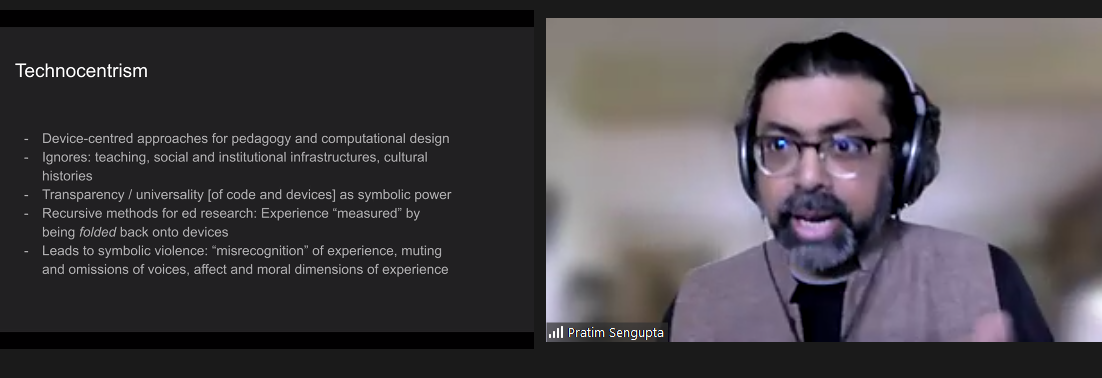
I have come to a simplified understanding of technocentrism. To me, it appears to be a way of looking at how we learn about computer science, where one might:
Pratim recounted several research activities that he and his team have engaged with. These examples highlight instances of potential technocentrism and investigate how we might overcome it.
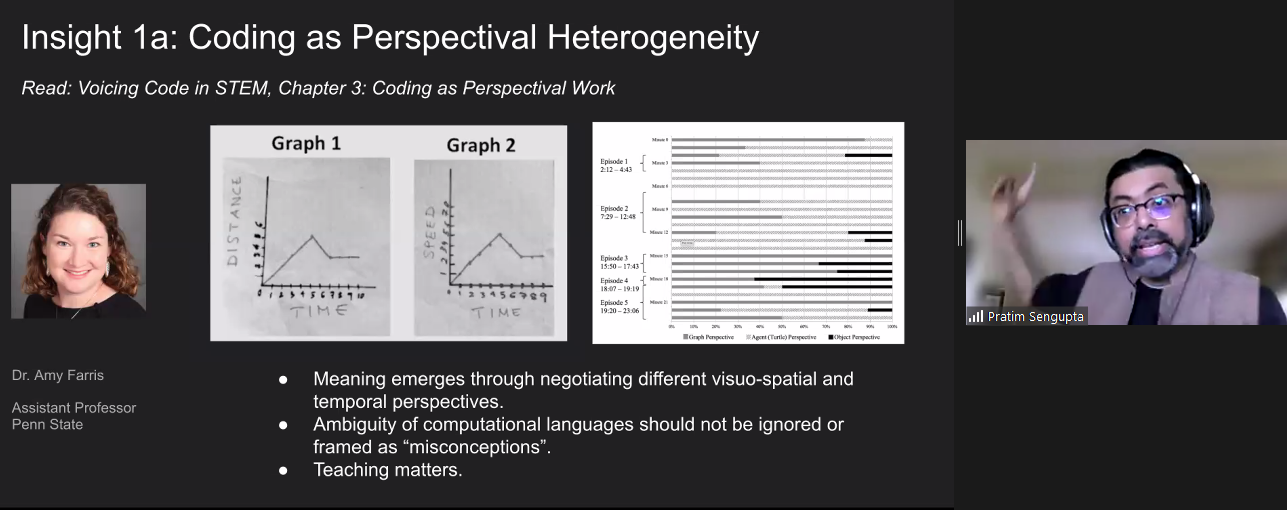
In the first example research activity, Pratim explained how in maths and physics lessons, middle school students were asked to develop models to solve time and distance problems. Rather than immediately coding a potential solution, the researcher and teacher supported the learners to spend much time developing a shared perspective to understand and express the problems first. Students grappled with different ways of representing the context, including graphs and diagrams (see Figure 2). Gradually and carefully, teachers shifted students to recognise what was important and what was not, to move them toward a meaningful language to describe and solve the problems.
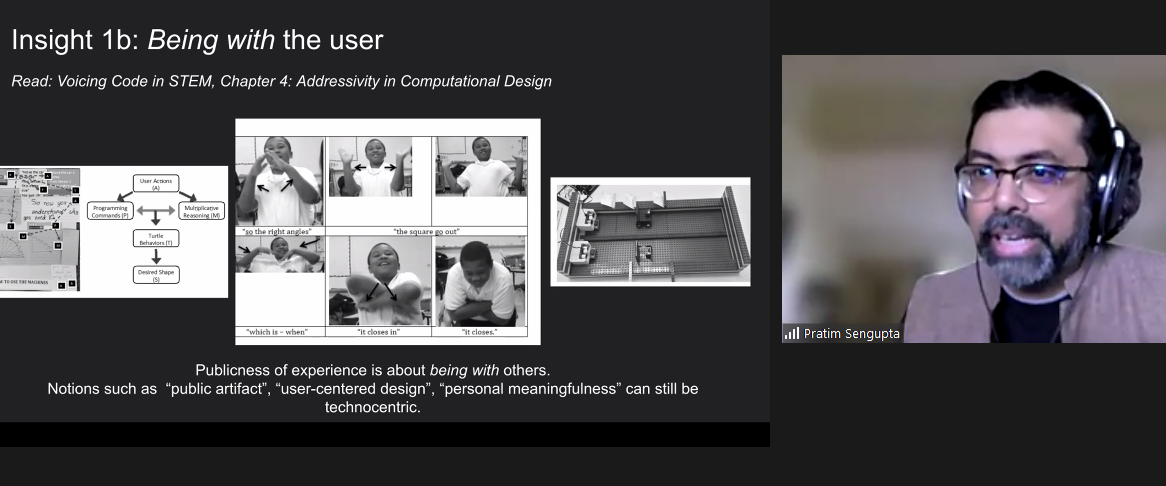
In a second example research activity, students were asked to build a machine that draws shapes using sensors, motors, and code. Rather than jumping straight to a solution, the students spent time with authentic users of their machines. Throughout the process, students worked with others, expressing the context through physical movement, clarifying their thoughts by drawing diagrams, and finding the sweet spot between coding, engineering design, and maths (see Figure 3).
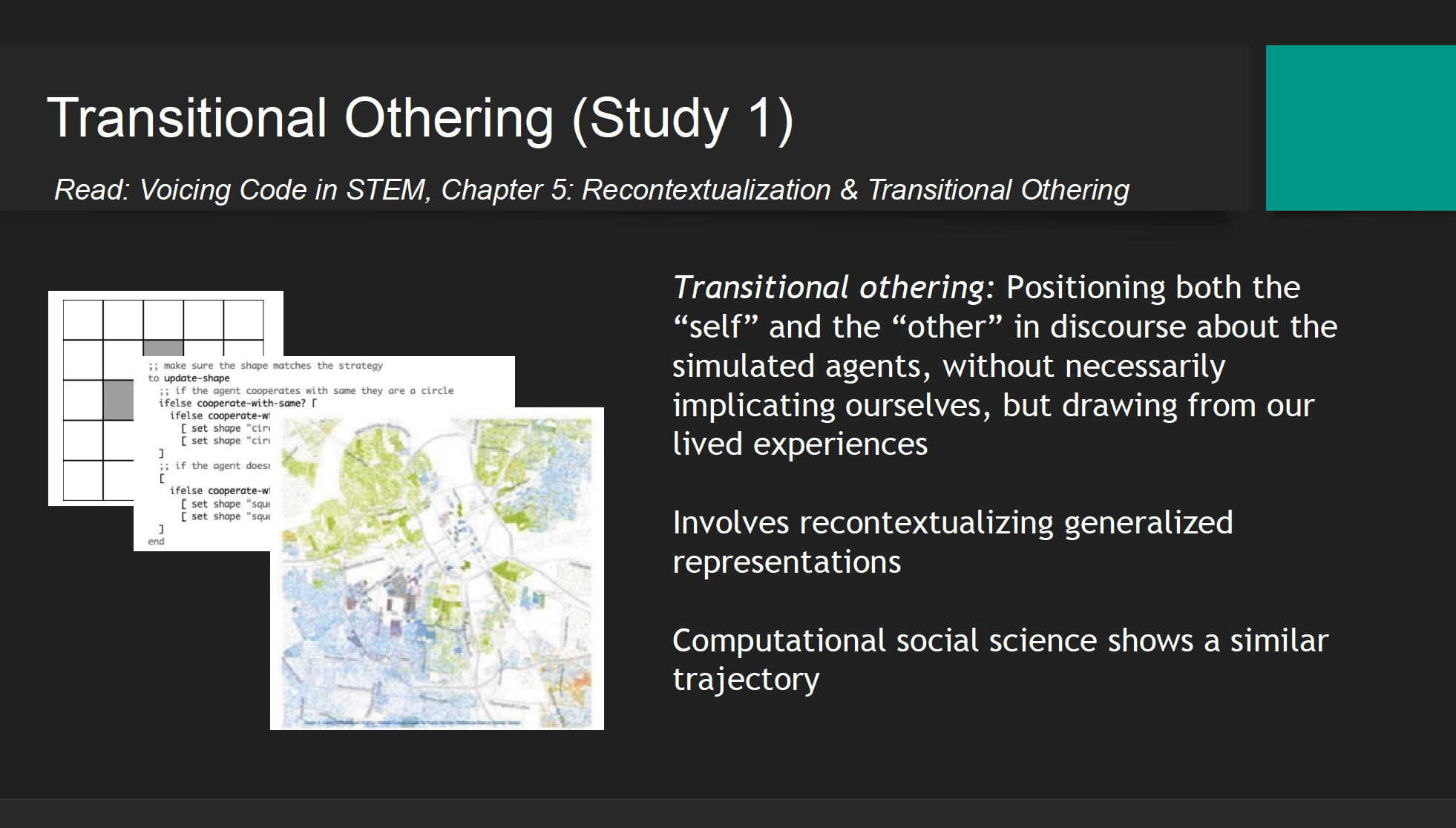
In a third example research activity, racial segregation of US communities was discussed with pre-service teachers. The predominately white teachers found talking about the topic very difficult at the beginning of the activity. To overcome this hesitancy, teachers were first asked to work with a simulation that modelled the process of segregation through abstracted dots (or computational agents), a transitional other. Following this hypothetical representation, the context was then recontextualised through a map of real data points of the ethnicity of residents in an area of the US. This kind of map is called a Racial Dot Map based on US census data. When the teachers were able to interpret the link between the abstracted dot simulation and the real-world data they were able to talk about racism and segregation in a way they could not do before. The initial simulation and the recontextualisation were a pedagogical tool to reveal racism and provide a space where students felt comfortable discussing their values and beliefs that would otherwise have remained implicit.
Pratim shared four implications of this research for computing pedagogy (see Figure 5).
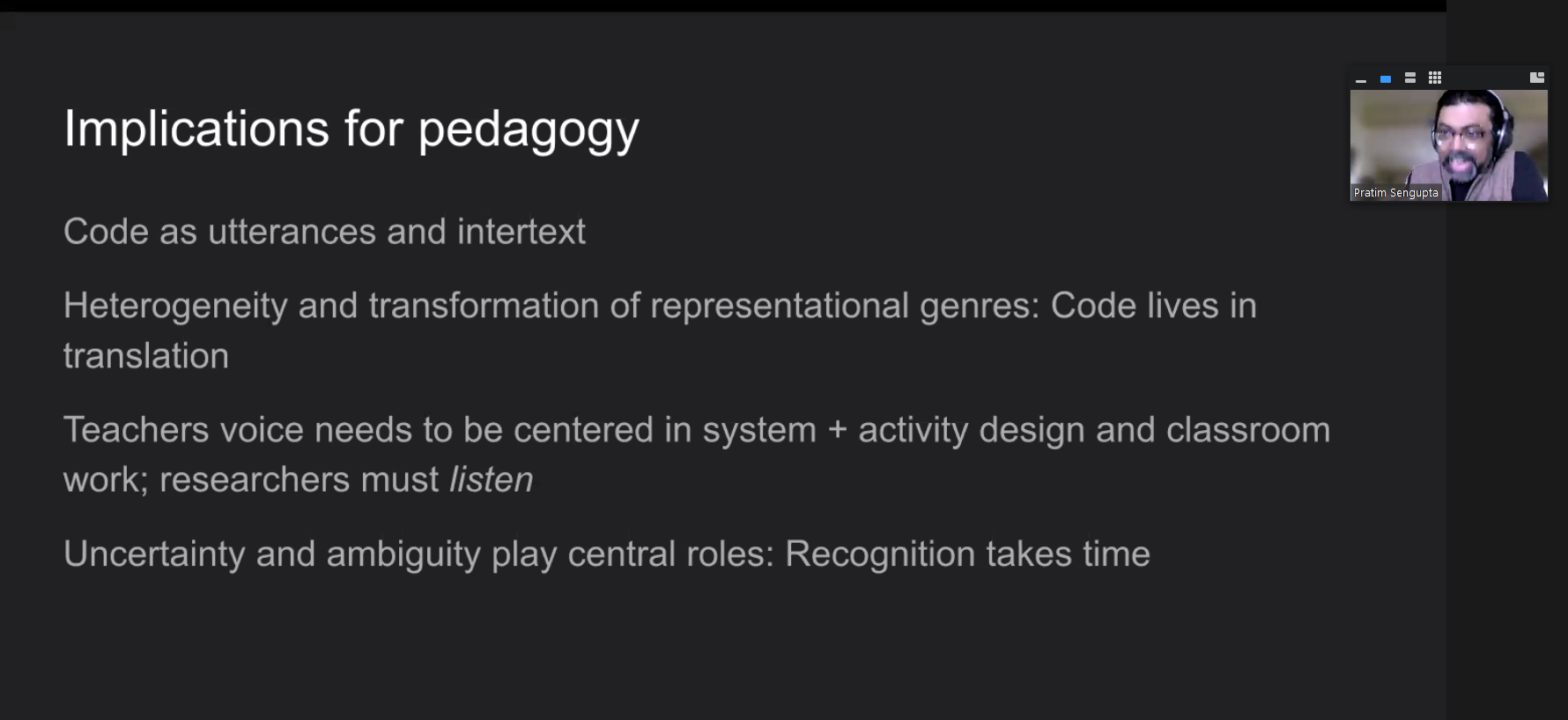
As a researcher of pedagogy, these points provide takeaways that I can relate to my own research practice:
Listening to Pratim share his research on the teaching and learning of computing and the pitfalls of technocentrism has made me think deeply about how I view computer science as a subject and do research about it. I have shared some of my reflections in this blog, and I plan to incorporate the underlying theory and ideas in my ongoing research projects.
If you would like to find out more about Pratim’s work, please look over his slides, watch his presentation, read the upcoming chapter in our seminar proceedings, or respond to this blog by leaving a comment so we can discuss!
We have another four seminars in our current series on cross-disciplinary computing.
At our next seminar on 12 July 2022 at 17:00–18:30 BST / 12:00–13:30 EDT / 9:00–10:30 PDT / 18:00–19:30 CEST, we will welcome Prof. Yasmin Kafai and Elaine Griggs, who are going to present research on introductory equity-oriented computer science with electronic textiles for high school students.
We look forward to meeting you there.
[1] You can learn more in the Hello World article where our Chief Learning Officer Sue Sentance talks about the block model.
The post Are you technocentric? Shifting from technology to people appeared first on Raspberry Pi.
Last summer, the Raspberry Pi Foundation and the University of Cambridge Department of Computer Science and Technology created a new research centre focusing on computing education research for young people in both formal and non-formal education. The Raspberry Pi Computing Education Research Centre is an exciting venture through which we aim to deliver a step-change for the field.
Computing education research that focuses specifically on young people is relatively new, particularly in contrast to established research disciplines such as those focused on mathematics or science education. However, computing is now a mandatory part of the curriculum in several countries, and being taken up in education globally, so we need to rigorously investigate the learning and teaching of this subject, and do so in conjunction with schools and teachers.
To celebrate the official launch of the Raspberry Pi Computing Education Research Centre, we will be holding an in-person event in Cambridge, UK on Weds 20 July from 15.00. This event is free and open to all: if you are interested in computing education research, we invite you to register for a ticket to attend. By coming together in person, we want to help strengthen a collaborative community of researchers, teachers, and other education practitioners.
The launch event is your opportunity to meet and mingle with members of the Centre’s research team and listen to a series of short talks. We are delighted that Prof. Mark Guzdial (University of Michigan), who many readers will be familiar with, will be travelling from the US to join us in cutting the ribbon. Mark has worked in computer science education for decades and won many awards for his research, so I can’t think of anybody better to be our guest speaker. Our other speakers are Prof. Alastair Beresford from the Department of Computer Science and Technology, and Carrie Anne Philbin MBE, our Director of Educator Support at the Foundation.
The event will take place at the Department of Computer Science and Technology in Cambridge. It will start at 15.00 with a reception where you’ll have the chance to talk to researchers and see the work we’ve been doing. We will then hear from our speakers, before wrapping up at 17.30. You can find more details about the event location on the ticket registration page.
The aim of the Raspberry Pi Computing Education Research Centre is to increase our understanding of teaching and learning computing, computer science, and associated subjects, with a particular focus on young people who are from backgrounds that are traditionally under-represented in the field of computing or who experience educational disadvantage.
We have been establishing the Centre over the last nine months. In October, I was appointed Director, and in December, we were awarded funding by Google for a one-year research project on culturally relevant computing teaching, following on from a project at the Raspberry Pi Foundation. The Centre’s research team is uniquely positioned, straddling both the University and the Foundation. Our two organisations complement each other very well: the University is one of the highest-ranking universities in the world and renowned for its leading-edge academic research, and the Raspberry Pi Foundation works with schools, educators, and learners globally to pursue its mission to put the power of computing into the hands of young people.
In our research at the Centre, we will make sure that:
We are excited to work with a large community of teachers and researchers, and we look forward to meeting you at the launch event.
At the end of June, we’ll be launching a new website for the Centre at computingeducationresearch.org. This will be the place for you to find out more about our projects and events, and to sign up to our newsletter. For announcements on social media, follow the Raspberry Pi Foundation on Twitter or Linkedin.
The post Join us at the launch event of the Raspberry Pi Computing Education Research Centre appeared first on Raspberry Pi.
Our seminars in this series on AI and data science education, co-hosted with The Alan Turing Institute, have been covering a range of different topics and perspectives. This month was no exception. We were delighted to be able to host Tara Chklovski, CEO of Technovation, whose presentation was called ‘Teaching youth to use AI to tackle the Sustainable Development Goals’.
Tara started Technovation, formerly called Iridescent, in 2007 with a family science programme in one school in Los Angeles. The nonprofit has grown hugely, and Technovation now runs computing education activities across the world. We heard from Tara that over 350,000 girls from more than 100 countries take part in their programmes, and that the nonprofit focuses particularly on empowering girls to become tech entrepreneurs. The girls, with support from industry volunteers, parents, and the Technovation curriculum, work in teams to solve real-world problems through an annual event called the Technovation Challenge. Working at scale with young people has given the Technovation team the opportunity to investigate the impact of their programmes as well as more generally learn what works in computing education.
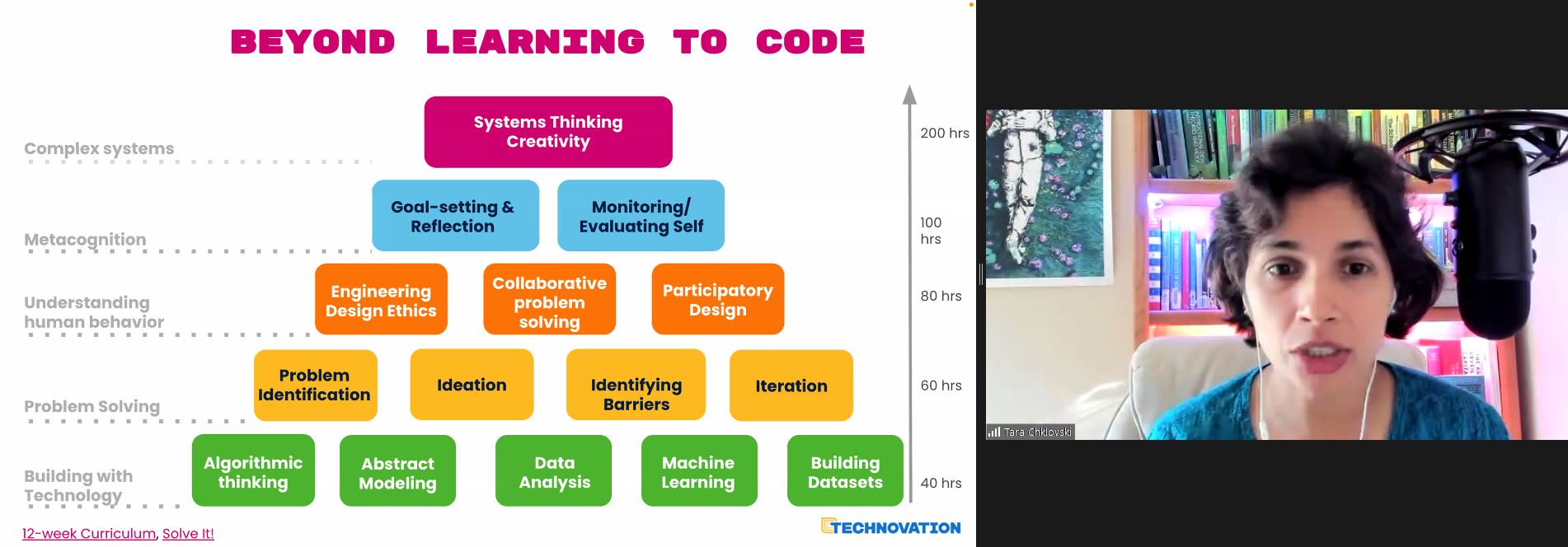
Tara’s talk was extremely engaging (you’ll find the recording below), with videos of young people who had participated in recent years. Technovation works with volunteers and organisations to reach young people in communities where opportunities may be lacking, focussing on low- and middle-income countries. Tara spoke about the 900 million teenage girls in the world, a substantial number of whom live in countries where there is considerable inequality.
To illustrate the impact of the programme, Tara gave a number of examples of projects that students had developed, including:
Early on, the Technovation Challenge had involved the creation of mobile apps, but in recent years, the projects have focused on using AI technologies to solve problems. An key message that Tara wanted to get across was that the focus on real-world problems and teamwork was as important, if not more, than the technical skills the young people were developing.
Technovation has designed an online curriculum to support teams, who may have no prior computing experience, to learn how to design an AI project. Students work through units on topics such as data analysis and building datasets. As well as the technical activities, young people also work through activities on problem-solving approaches, design, and system thinking to help them tackle a real-world problem that is relevant to them. The curriculum supports teams to identify problems in their community and find a path to prototype and share an invention to tackle that problem.

While working through the curriculum, teams develop AI models to address the problem that they have chosen. They then submit them to a global competition for beginners, juniors, and seniors. Many of the girls enjoy the Technovation Challenge so much that they come back year on year to further develop their team skills.
Technovation runs another programme, AI Families, that focuses on families working together to learn AI concepts and skills and use them to develop projects together. Families worked together with the help of educators to identify meaningful problems in their communities, and developed AI prototypes to address them.
There were 20,000 participants from under-resourced communities in 17 countries through 2018 and 2019. 70% of them were women (mothers and grandmothers) who wanted their children to participate; in this way the programme encouraged parents to be role models for their daughters, as well as enabling families to understand that AI is a tool that could be used to think about what problems in their community can be solved with the help of AI skills and principles. Tara was keen to emphasise that, given the importance of AI in the world, the more people know about it, the more impact they can make on their local communities.
Tara shared links to the curriculum to demonstrate what families in this programme would learn week by week. The AI modules use tools such as Machine Learning for Kids.
The results of the AI Families project as investigated over 2018 and 2019 are reported in this paper. The findings of the programme included:
The research describes how the programme worked pre-pandemic. Tara highlighted that although the pandemic has prevented so much face-to-face team work, it has allowed some young people to access education online that they would not have otherwise had access to.
Our goal is to listen to a variety of perspectives through this seminar series, and I felt that Tara really offered something fresh and engaging to our seminar audience, many of them (many of you!) regular attendees who we’ve got to know since we’ve been running the seminars. The seminar combined real-life stories with videos, as well as links to the curriculum used by Technovation to support learners of AI. The ‘question and answer’ session after the seminar focused on ways in which people could engage with the programme. On Twitter, one of the seminar participants declared this seminar “my favourite thus far in the series”. It was indeed very inspirational.
As we near the end of this series, we can start to reflect on what we’ve been learning from all the various speakers, and I intend to do this more formally in a month or two as we prepare Volume 3 of our seminar proceedings. While Tara’s emphasis is on motivating children to want to learn the latest technologies because they can see what they can achieve with them, some of our other speakers have considered the actual concepts we should be teaching, whether we have to change our approach to teaching computer science if we include AI, and how we should engage young learners in the ethics of AI.
I’m really looking forward to our final seminar in the series, with Stefania Druga, on Tuesday 1 March at 17:00–18:30 GMT. Stefania, PhD candidate at the University of Washington Information School, will also focus on families. In her talk ‘Democratising AI education with and for families’, she will consider the ways that children engage with smart, AI-enabled devices that they are becoming part of their everyday lives. It’s a perfect way to finish this series, and we hope you’ll join us.
Thanks to our seminars series, we are developing a list of AI education resources that seminar speakers and attendees share with us, plus the free resources we are developing at the Foundation. Please do take a look.
You can find all blog posts relating to our previous seminars on this page.
The post Linking AI education to meaningful projects appeared first on Raspberry Pi.
The global IT industry generates as much CO2 as the aviation industry. In Hello World issue 17, we learn about the hidden impact of our IT use and the changes we can make from Beverly Clarke, national community manager for Computing at School and author of Computer Science Teacher: Insight Into the Computing Classroom.
With the onset of the pandemic, the world seemed to shut down. Flights were grounded, fewer people were commuting, and companies and individuals increased their use of technology for work and communication. On the surface, this seemed like a positive time for the environment. However, I soon found myself wondering about the impact that this increased use of technology would have on our planet, in particular the increases in energy consumption and e-waste. This is a major social, moral, and ethical issue that is hiding in plain sight — green IT is big news.
This is a major social, moral, and ethical issue that is hiding in plain sight — green IT is big news.
Thinking that online is always better for the planet is not always as straightforward as it seems. If we choose to meet via conference call rather than travelling to a meeting, there are hidden environmental impacts to consider. If there are 50 people on a call from across the globe, all of the data generated is being routed around the world through data centres, and a lot of energy is being used. If all of those people are also using video, that is even more energy than audio only.
Not only is the amount of energy being used a concern, but we must also ask ourselves how these data centres are being powered. Is the energy they are using coming from a renewable source? If not, we may be replacing one environmental problem with another.
What about other areas of our lives, such as taking photos or filming videos? These two activities have probably increased as we have been separated from family and friends. They use energy, especially when the image or video is then shared with others around the world and consequently routed through data centres. A large amount of energy is being used, and more is used the further the image travels.
Not only is the amount of energy being used a concern, but we must also ask ourselves how these data centres are being powered.
Similarly, consider social media and the number of posts individuals and companies make on a daily basis. All of these are travelling through data centres and using energy, yet for the most part this is not visible to the user.
E-waste is another green IT issue, and one that will only get worse as we rely on electronic devices more. As well as the potential eyesore of mountains of e-waste, there is also the impact upon the planet of mining the precious metals used in these electronics, such as gold, copper, aluminium, and steel.
The processes used to mine these metals lead to pollution, and we should also consider that some of the precious metals used in our devices could run out, as there is not an endless supply in the Earth’s surface.
It is also problematic that a lot of e-waste is sent to developing countries with limited recycling plants […].
It is also problematic that a lot of e-waste is sent to developing countries with limited recycling plants, and so much of the e-waste ends up in landfill. This can lead to toxic substances being leaked into the Earth’s surface.
With my reflective hat on, I started to think about discussions we as teachers could have with pupils around this topic, and came up with the following:
UK-based educators can watch a recent episode of TV programme Dispatches that investigates the carbon footprint of the IT industry. You can add the following tips from the programme to your discussions:
These lists are not exhaustive, but provide a good starting point for discussions with learners. We should all play our small part in ensuring that we #RestoreOurEarth — this year’s Earth Day theme — and having an awareness and understanding of the impact of our use of electronic devices is part of the way forward.
What about you? In the comments below, share your thoughts, tips, and resources on green IT and how we can bring awareness of it to our learners and young people at home.
The post Green information technology and classroom discussions appeared first on Raspberry Pi.
During lockdown, Stuart (aka JamHamster) wanted to keep busy whilst between jobs, and ended up building a mini empire of rescued retro systems. Cassette tapes, Game Boys, and floppy disks were all among the treasures he reclaimed.
Stuart got started by fitting a TZXDuino tape loader into a cassette tape shell. Remember those? This allows him to load software onto a ZX Spectrum by inserting a tape into the tape deck, just as Nature intended. He has since improved the design (check out V2 on YouTube) and carefully documented it on GitHub, so people can build their own.
With that first project in the bag and getting attention on a Facebook group (Spectrum for Everyone), Stuart went forth and sourced more retro tech to revive with tiny pieces of new technology.
Then Stuart discovered our tiny computer and realised there was heaps of scope for hiding them inside older tech. Although we can’t quite officially endorse Stuart’s method of “carefully” removing a port on his Raspberry Pi – it’ll void your warranty – we will say that we like people who go about intentionally voiding their warranties. It’s a cool video.
He has since created loads of retrofit projects with Raspberry Pi. Let’s take a quick look at a few of them.
First up is a Game Boy build with a Raspberry Pi 3 Model A+. Stuart built an aluminium chassis from scrap, and this sandwiches the Raspberry Pi to hold it in place inside the Game Boy enclosure, as well as acting as a heatsink. There’s a grille in the cartridge and he also added four rear buttons. The hardest part of this build, apparently, was soldering the custom HDMI cable.
Stuart liked the look of an old-fashioned CRT (cathode-ray tube) screen for playing retro games on, but they chew through energy and aren’t that portable. So he had the idea to make a space-efficient LCD system that sits on a desktop and just looks like a retro TV.
This project features a 3.5-inch screen of the type that’s usually found on a car dashboard to help the driver to reverse. Stuart converted it to 5V, and added a cut-down Raspberry Pi 3 and a custom-machined chassis. A custom-ground curved lens makes it look like a real CRT, and he added ports on the back for two Atari joysticks, as well as an external composite input and USB.
The build process for this project is also documented on Github. Here are some extra pictures.
Stuart’s sister gave him her Game Gear to fix, but the batteries leaked and killed it so he converted it to a Raspberry Pi 3B portable gaming system. And because it was for his sister, he went all out, spending six weeks refining it.
He also ended up rewriting elements of the Arduino Joystick library for responsiveness and ease of configuration. Here’s the Github link for those interested in that part of the build.
Stuart’s latest cassette build features a Raspberry Pi Zero running RetroPie. He wanted to make one with a transparent case, so he encased the Raspberry Pi in a heatsink sandwich to hide the wiring. He added a full-size USB port and a 3.5 mm media connector for sound and visuals. Here are some shots of the inside.
There were far too many cracking retro builds for us to list here, so follow Stuart on Twitter @RealJamHamster and subscribe to JamHamster on YouTube to properly check everything out.
Makers, tinkerers, and crafters don’t always have a practical reason for embarking on projects, and Stuart is no different. Here’s what he had to say about why projects like this make him happy:
“I will be happy to admit that I have no clue what I’m doing most of the time, and I am by no means an expert, but I believe everyone should try new things as you never know what you’ll be good at. 9 out of 10 of my ideas don’t work but that tenth one is generally pretty good. I’ve been between roles during lockdown so I am building these out of scrap metal and whatever I have lying around, which is an extra challenge. My philosophy is to try new things, expect failure, learn to enjoy the process and that it’ll be done when it’s done.”
The post Collection of Raspberry Pi retro tech projects appeared first on Raspberry Pi.
If you don’t want to be tied to a video screen during home workouts, Llum Acosta, Samreen Islam, and Alfred Gonzalez shared this great Raspberry Pi–powered alternative on hackster.io: their voice-activated project announces each move of your workout routine and how long you need to do it for.
This LED-lit, compact solution means you don’t need to squeeze yourself in front of a TV or crane to see what your video instructor is doing next. Instead you can be out in the garden or at a local park and complete your own, personalised workout on your own terms.
The makers shared these setup guides to get MATRIX working with your Raspberry Pi. Our tiny computer doesn’t have a built-in microphone, so here’s where the two need to work together.
Once that’s set up, ensure you enable SSH on your Raspberry Pi.
The three sweet Hackster angels shared a four-step guide to running the software of your own customisable workout routine buddy in their original post. Happy hacking!
Follow the steps below in order for Rhasspy to work on your Raspberry Pi.
Access Rhasspy’s web interface by opening a browser and navigating to http://YOUR_PI_IP_HERE:12101. Then click on the Sentences tab. All intents and sentences are defined here.
By default, there are a few example sentences in the text box. Remove the default intents and add the following:
[Workout]start [my] workoutOnce created, click on Save Sentences and wait for Rhasspy to finish training.
Here, Workout is an intent. You can change the wording to anything that works for you as long as you keep [Workout] the same, because this intent name will be used in the code.
Install git on your Raspberry Pi.
sudo apt install gitDownload the repository.
git clone https://github.com/matrix-io/rhasspy-workout-timerNavigate to the folder and install the project dependencies.
cd rhasspy-workout-timernpm installRun the program.
node index.jsTo change the workout to your desired routine, head into the project folder and open workout.txt. There, you’ll see:
jumping jacks 12,plank 15, test 14To make your own workout routine, type an exercise name followed by the number of seconds to do it for. Repeat that for each exercise you want to do, separating each combo using a comma.
Whenever you want to use the Rhasspy Assistant, run the file and say “Start my workout” (or whatever it is you have it set to).
And now you’re all done — happy working out. Make sure to visit the makers’ original post on hackster.io and give it a like.
The post Raspberry Pi calls out your custom workout routine appeared first on Raspberry Pi.
This rotary phone features a built-in Raspberry Pi that communicates with radiooooo.com (a musical time machine) and an Arduino working behind the map to control the selection of the country. Just pick up the phone, choose a country and a decade, and listen to some great music!
The Raspberry Pi:
The Arduino:
We saw this project on hackster.io and loved how maker Caroline Buttet dug into the finer detail of an old-fashioned rotary phone’s pick-up/put-down mechanism, as well as how the phone knows which numbers you’re dialling. She goes into more detail about that aspect in the second build video, above.
Some countries have a jack pin – this is how you select the music
As well as a Raspberry Pi 4 and Arduino UNO, you’ll need a world map (obviously) and something to mount it on which can be drilled into. This is because the jack pins you can see in the image above need to poke out of different countries.
Caroline’s grandma donated the old rotary phone she used for this project. You should be able to pick one up from a second-hand shop or, if you can get a new handset made in the retro style online.
The shopping list for this build also includes: jumper wires; audio/video cable assembly; LED, breadboard; jack socket 3-pin; resistors
A simplified visual representation of how everything works
In her original post, Caroline explains in detail how to connect the rotary phone’s switches to the pins on your Raspberry Pi, how to build in audio sockets on the board you glue your map to, how to run the necessary Python script from the command line, and what a Chrome extension to use to make radiooooo.com work with your Raspberry Pi.
The Raspberry Pi inside the rotary phone
And yes, Caroline is one of those most magical of makers who deposits all the code needed for this build on GitHub!
And here’s the Arduino mounted onto the back of the map, with the audio jacks taped up to the holes drilled into different countries
The post Travel the world with a retro musical phone appeared first on Raspberry Pi.
At Raspberry Pi, we’re interested in all things to do with technology, from building new tools and helping people teach computing, to researching how young people learn to create with technology and thinking about the role tech plays in our lives and society. Today, I’m writing about our habit of replacing devices with newer versions just for the sake of it.
Technology is involved in more of our lives than ever before: most of us carry a computer in our pocket everywhere we go. On the other hand, the length of time for which we use each individual piece of technology has grown very short. This is what’s referred to as upgrade culture, a cycle which sees most of us replacing our most trusted devices every two years with the latest products offered by tech giants like Apple and Samsung.
How we got to this point is hard to determine, and there does not seem to be a single root cause for upgrade culture. This is why I want to start a conversation about it, so we can challenge our current perspectives and establish fact-based attitudes. I think it’s time that we, as individuals and as a collective, examine our relationship with new technology.
Digital technology is still so new that there is really no benchmark for how long digital devices should last. This means that the decision power has by default landed in the hands of device manufacturers and mobile network carriers, and for their profit margins, a two-year lifecycle of devices is beneficial.
Where do you see your role in this process as a consumer? Is it wrong to want to upgrade your phone after two years of constant use? Should phone companies slow their development, and would this hinder innovation? And, if you really need to upgrade, is there a better use for your old device than living in a drawer? These questions defy simple answers, and I want to hear what you think.
As with all our behaviours as consumers, the impact that upgrade culture has on the environment is an important concern. Environmental issues and climate change aren’t anything new, but they’re currently at the forefront of the global conversation, and for good reason.
Mobile devices are of course made in factories, and the concerns this raises have been covered well in many other places. The same goes for the energy needed to build technology. This energy could, at least in theory, be produced from renewable sources. Here I would like to focus on another aspect of the environmental impact device production has, which relates to the materials necessary to create the tiny components that form our technological best friends.
Some components of your phone cannot be created without rare chemical elements, such as europium and dysprosium. (In fact, there are 83 stable non-radioactive elements in the periodic table, and 70 of them are used in some capacity in your phone.) Upgrade culture means there is high demand for these materials, and deposits are becoming more and more depleted. If you’re hoping there are renewable alternatives, you’ll be disappointed: a study by researchers working at Yale University found that there are currently no alternative materials that are as effective.
Then there’s the issue of how the materials are mined. The market trading these materials is highly competitive, and more often than not manufacturers buy from the companies offer the lowest prices. To maintain their profit margin, these companies have to extract as much material as possible as cheaply as they can. As you can imagine, this leads to mining practices that are less than ethical or environmentally friendly. As many of the mines are located in distant areas of developing countries, these problems may feel remote to you, but they affect a lot of people and are a direct result of the market we are creating by upgrading our devices every two years.
Many of us agree that we need to do what we can to counteract climate change, and that, to achieve anything meaningful, we have to start looking at the way we live our lives. This includes questioning how we use technology. It will be through discussion and opinion gathering that we can start to make more informed decisions — as individuals and as a society.
You probably also have that one friend/colleague/family member who swears by their five year old mobile phone and scoffs at the prices of the newest models. These people are often labeled as sticklers who are afraid to join the modern age, but is there another way to see them? The truth is, if you’ve bought a phone in the last five years, then — barring major accidents — it will most likely still function and be just as effective as it was when it came out of the box. So why are so many consumers upgrading to new devices every two years?
Again there isn’t a single reason, but I think marketing departments should shoulder much of the responsibility. Using marketing strategies, device manufacturers and mobile network carriers purposefully make us see the phones we currently own in a negative light. A common trope of mobile phone adverts is the overwrought comparison of your current device with a newly launched version. Thus, each passing day after a new model is released, our opinion of our current device worsens, even if it’s just on a subconscious level.
This marketing strategy is related to a business practice called planned obsolescence, which sees manufacturers purposefully limit the durability of their products in order to sell more units. An early example of planned obsolescence is the lightbulb, invented at the Edison company: it was relatively simple for the company to create a lightbulb that lasted 2500 hours, but it took years and a coalition of manufacturers to make a version that reliably broke after 1000 hours. We’re all aware that the lightbulb revolutionised many aspects of life, but it turns out it also had a big influence on consumer habits and what we see as acceptable practices of technology companies.
The final aspect of the impact of upgrade culture that I want to examine relates to the digital divide. This term describes the societal gap between the people with access to, and competence with, the latest technology, and the people without these privileges. To be able to upgrade, say, your mobile phone to the latest model every two years, you either need a great degree of financial freedom, or you need to tie yourself to a 24-month contract that may not be easily within your means. As a society, we revere the latest technology and hold people with access to it in high regard. What does this say to people who do not have this access?
Inadvertently, we are widening the digital divide by placing more value on new technology than is warranted. Innovation is exciting, and commercial success is celebrated — but do you ever stop and ask who really benefits from this? Is your new phone really that much better than the old one, or could it be that you’re mostly just basking in feeling the social rewards of having the newest bit of kit?
Obviously, this blog post wouldn’t be complete if we didn’t share our perspective as a technology company as well. So here’s Raspberry Pi Trading CEO Eben Upton:
“Raspberry Pi tries very hard to avoid obsoleting older products. Obviously the latest Raspberry Pi 4 runs much faster than a Raspberry Pi 1 (something like forty times faster), but a Raspbian image we release today will run on the very earliest Raspberry Pi prototypes from the summer of 2011. Cutting customers off from software support after a couple of years is unethical, and bad for business in the long term: fool me once, shame on you; fool me twice, shame on me. The best companies respect their customers’ investment in their platforms, even if that investment happened far in the past.”
“What’s even more unusual about Raspberry Pi is that we aim to keep our products available for a long period of time. So you can’t just run a 2020 software build on a 2014 Raspberry Pi 1B+: you can actually buy a brand-new 1B+ to run it on.”
“We’re constantly working to reduce the environmental footprint of Raspberry Pi. If you look next to the USB connectors on Raspberry Pi 4, you’ll see a chunky black component. This is the reservoir capacitor, which prevents the 5V rail from dropping too far when a new USB device is plugged in. By using a polymer electrolytic capacitor, from our friends at Panasonic, we’ve been able to avoid the use of tantalum.”
“When we launched the official USB-C power supply for Raspberry Pi 4, one or two people on Twitter asked if we could eliminate the single-use plastic bag which surrounded the cable and plug assembly inside the box. Working with our partners at Kuantech, we found that we could easily do this for the white supplies, but not for the black ones. Why? Because when the box vibrates in transit, the plug scuffs against the case; this is visible on the black plastic, but not on the white.”
Raspberry Pi power supply with scuff mark
“So for now, if you want to eliminate single-use plastic, buy a white supply. In the meantime, we’ll be working to find a way (probably involving cunning origami) to eliminate plastic from the black supply.”
Time for you to discuss! I want to hear from you about upgrade culture.
Share your thoughts in the comments!
Upgrade culture is one of the topics for which we offer you a discussion forum on our free online course Impact of Technology. For educators, the course also covers how to facilitate classroom discussions about these topics, and a new course run has just begun — sign up today to take part for free!
The Impact of Technology online course is one of many courses developed by us with support from Google.
The post Is upgrade culture out of date? appeared first on Raspberry Pi.
Have you ever considered attaching your Raspberry Pi 4 to an Apple iPad Pro? How would you do it, and why would you want to? Here’s YouTuber Tech Craft to explain why Raspberry Pi 4 is their favourite iPad Pro accessory, and why you may want to consider using yours in the same way.
We’ve set the video to start at Tech Craft’s explanation.
My Favourite iPad Pro Accessory: The Raspberry Pi 4
The Raspberry Pi 4 is my favourite accessory to use with the iPad Pro. In this video, learn more about what the Pi can do, what gear you need to get running with one, how to connect it to your iPad and what you’ll find it useful for.
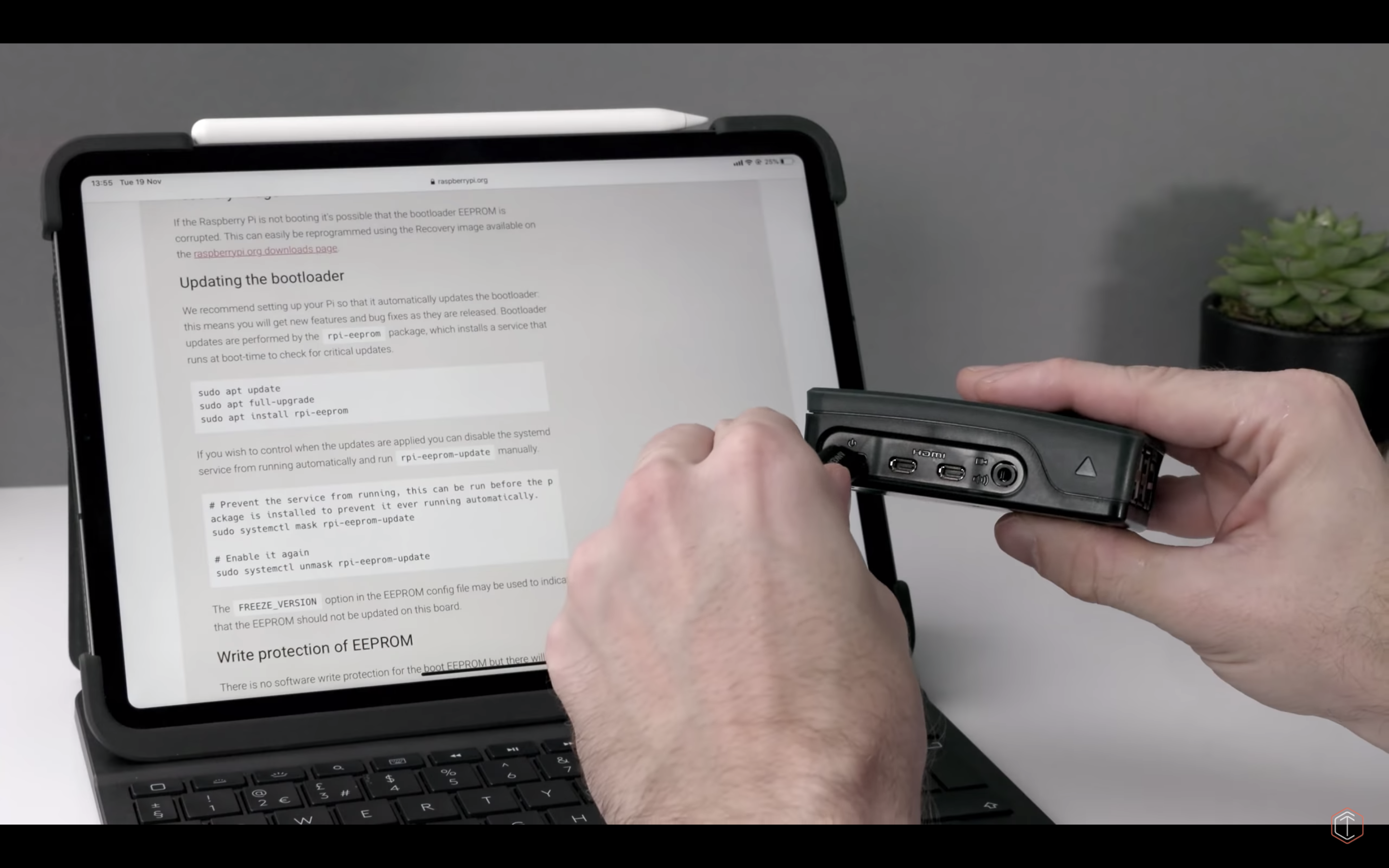
Having installed Raspbian on Raspberry Pi and configured the computer to use USB-C as an Ethernet connection (read Ben Hardill’s guide to find out how to do this), Tech Craft could select it as an Ethernet device in the iPad’s Settings menu.
So why would you want to connect your Raspberry Pi 4 to your iPad? For starters, using your iPad instead of a conventional HDMI monitor will free up desk space, and also allow you to edit your code on the move. And when you’ve connected the two devices like this, you don’t need a separate power lead for Raspberry Pi, because the iPad powers the computer. So this setup is perfect for train or plane journeys, or for that moment when your robot stops working at a Raspberry Jam, or for maker conventions.

You can also use Raspberry Pi as a bridge between your iPad and portable hard drive, for disk management.
Tech Craft uses the SSH client Blink to easily connect to their Raspberry Pi via its fixed IP address, and with Juno Connect, they connect to a running Jupyter instance on their Raspberry Pi to do data science work.
For more information on using Raspberry Pi with an iPad, make sure you watch the whole video. And, because you’re a lovely person, be sure to subscribe to Tech Craft for more videos, such as this one on how to connect wirelessly to your Raspberry Pi from any computer or tablet:
Mobile Raspberry Pi with ANY iPad. No USB-C needed.
Following on my from earlier video about pairing the Raspberry Pi 4 with the iPad Pro over USB-C, this video show how to pair any iPad (or iPhone, or Android tablet) with a Pi4 or a Pi3 over WiFi.
The post Connect your Raspberry Pi 4 to an iPad Pro appeared first on Raspberry Pi.
At Raspberry Pi, we’re interested in all things to do with technology, from building new tools and helping people teach computing, to researching how young people learn to create with technology and thinking about the role tech plays in our lives and society. One of the aspects of technology I myself have been thinking about recently is algorithms.
Technology impacts our lives at the level of privacy, culture, law, environment, and ethics.
All kinds of algorithms — set series of repeatable steps that computers follow to perform a task — are running in the background of our lives. Some we recognise and interact with every day, such as online search engines or navigation systems; others operate unseen and are rarely directly experienced. We let algorithms make decisions that impact our lives in both large and small ways. As such, I think we need to consider the ethics behind them.
Ethics are rules of conduct that are recognised as acceptable or good by society. It’s easier to discuss the ethics of a specific algorithm than to talk about ethics of algorithms as a whole. Nevertheless, it is important that we have these conversations, especially because people often see computers as ‘magic boxes’: you push a button and something magically comes out of the box, without any possibility of human influence over what that output is. This view puts power solely in the hands of the creators of the computing technology you’re using, and it isn’t guaranteed that these people have your best interests at heart or are motivated to behave ethically when designing the technology.
Who creates the algorithms you use, and what are their motivations?
You should be critical of the output algorithms deliver to you, and if you have questions about possible flaws in an algorithm, you should not discount these as mere worries. Such questions could include:
Below, I give two concrete examples to show where ethics come into the creation and use of algorithms. If you know other examples (or counter-examples, feel free to disagree with me), please share them in the comments.
Part of the ‘magic box’ mental model is the idea that computers are cold instructions followers that cannot think for themselves — so how can they be biased?
Humans aren’t born biased: we learn biases alongside everything else, as we watch the way our family and other people close to us interact with the world. Algorithms acquire biases in the same way: the developers who create them might inadvertently add their own biases.
Humans can be biased, and therefore the algorithms they create can be biased too.
An example of this is a gang violence data analysis tool that the Met Police in London launched in 2012. Called the gang matrix, the tool held the personal information of over 300 individuals. 72% of the individuals on the matrix were non-white, and some had never committed a violent crime. In response to this, Amnesty International filed a complaint stating that the makeup of the gang matrix was influenced by police officers disproportionately labelling crimes committed by non-white individuals as gang-related.
We live in a content-rich society: there is much, much more online content than one person could possibly take in. Almost every piece of content we consume is selected by algorithms; the music you listen to, the videos you watch, the articles you read, and even the products you buy.
Some of you may have experienced a week in January of 2012 in which you saw a lot of either cute kittens or sad images on Facebook; if so, you may have been involved in a global social experiment that Facebook engineers performed on 600,000 of its users without their consent. Some of these users were shown overwhelmingly positive content, and others overwhelmingly negative content. The Facebook engineers monitored the users’ actions to gage how they responded. Was this experiment ethical?
In order to select content that is attractive to you, content algorithms observe the choices you make and the content you consume. The most effective algorithms give you more of the same content, with slight variation. How does this impact our beliefs and views? How do we broaden our horizons?
People generally don’t like making decisions; almost everyone knows the discomfort of indecision. In addition, emotions have a huge effect on the decisions humans make moment to moment. Algorithms on the other hand aren’t impacted by emotions, and they can’t be indecisive.
While algorithms are not immune to bias, in general they are way less susceptible to it than humans. And if a bias is identified in an algorithm, an engineer can remove the bias by editing the algorithm or changing the dataset the algorithm uses. The same cannot be said for human biases, which are often deeply ingrained and widespread in society.
As is true for all technology, algorithms can create new problems as well as solve existing problems.
That’s why there are more and less appropriate areas for algorithms to operate in. For example, using algorithms in policing is almost always a bad idea, as the data involved is recorded by humans and is very subjective. In objective, data-driven fields, on the other hand, algorithms have been employed very successfully, such as diagnostic algorithms in medicine.
I would love to hear what you think: this conversation requires as many views as possible to be productive. Share your thoughts on the topic in the comments! Here are some more questions to get you thinking:
Feel free to respond to other people’s comments and discuss the points they raise.
The ethics of algorithms is one of the topics for which we offer you a discussion forum on our free online course Impact of Technology. The course also covers how to facilitate classroom discussions about technology — if you’re an educator teaching computing or computer science, it is a great resource for you!
The Impact of Technology online course is one of many courses developed by us with support from Google.
The post Can algorithms be unethical? appeared first on Raspberry Pi.
In this project, we’ll make a pair of NFC data cufflinks, ideal for storing a website URL, a password, or a secret message. This project is perfect for a sartorial spy who loves dry Martinis, and anyone who can’t remember their WiFi password.
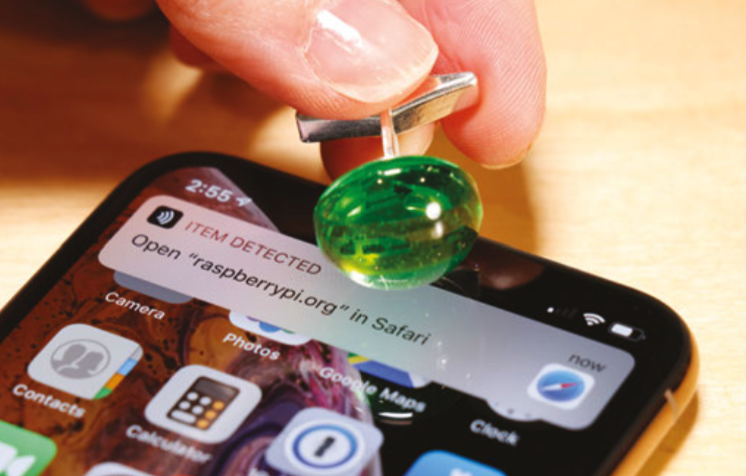
NFC stands for near-field communication, and is a protocol that allows two devices to communicate wirelessly when they are physically near each other. An evolution of RFID, NFC is becoming increasingly popular in consumer technology, and is already commonly used in contactless payment systems and identification badges. NFC wristbands are also being used to create enhanced experiences for visitors at theme parks and other venues.
The rise of NFC hasn’t bypassed hobbyists and tinkerers, and companies like Pimoroni and Adafruit sell components that make it relatively easy to add NFC functionality to your projects. Here, we’ll make use of tiny NFC tags that can be read and written to by a smartphone or external NFC reader. The tags can be read through a non-metal barrier, like plastic, so we’ll embed the tag in resin to make an elegant cabochon for our cufflink. When complete, holding the cufflink to your smartphone or NFC reader will let you read or write data to the chip inside.
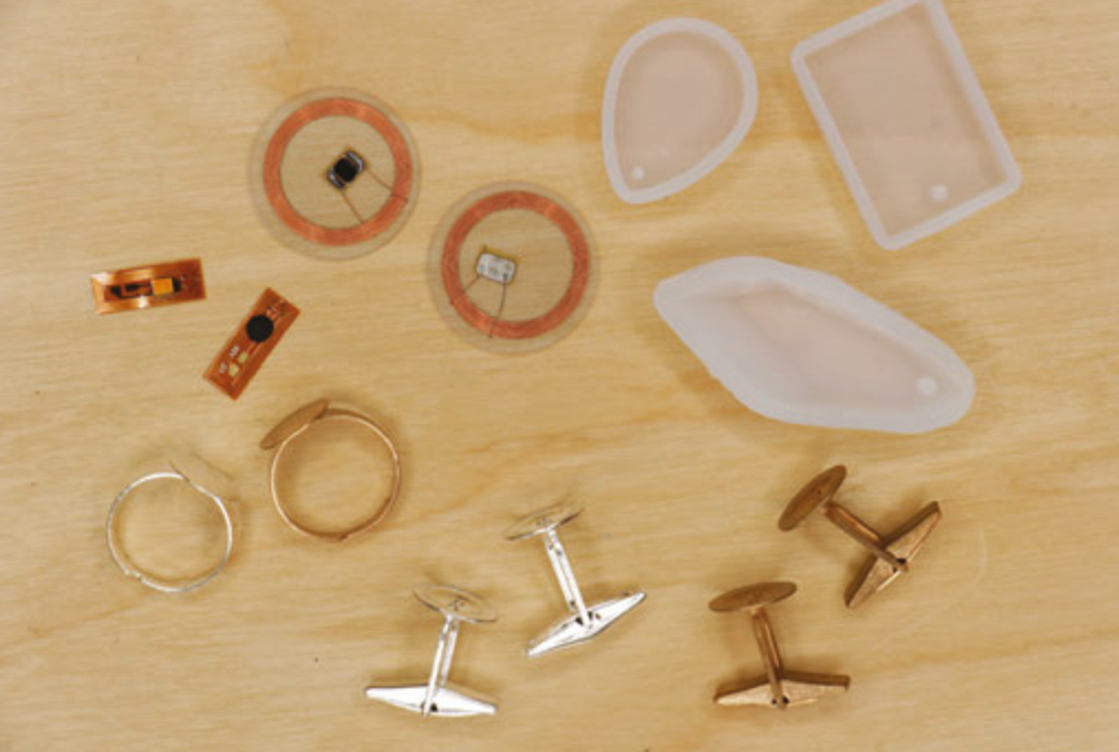
For this project we used the smallest NFC tags we could find, micro NFC/RFID transponders from Adafruit (product number 2800). These 15.6mm x 6mm flexible tags are formatted with the now standard NDEF format, and will work as-is with newer phones and most NFC readers. If you happen to pick up older Mifare Classic formatted tags, they may need to be reformatted as NDEF to work with your reader/writer. Reformatting isn’t a function of most NFC read/write apps, but it can be done with Adafruit’s PN532 NFC/RFID controller breakout board or shield.
If this is your first time working with resin epoxy, get ready for a new, fun kind of mess! Resin epoxy comes in two parts that must be mixed together in equal proportions before use. Once mixed, the resin will be workable for a short period of time before entering the curing phase and hardening completely. Figuring out exactly how much resin to mix up is definitely an art. There are even some online tools available to help calculate this. For a small project like this, just make sure you mix up a bit more than you think you’ll need.

You don’t want to run out during the pour and have to quickly mix up more at the last minute. If you’re tinting your resin, you definitely want to pour all of your pieces from the same mix, as it’s almost impossible to match the colour of one batch of resin to another.
All of this means you’ll undoubtedly end up with more than just two cabochons for one pair of cufflinks, and if you’re going to make a mess anyway, why not go big? Pick up a few extra NFC tags and plan to pour some other pieces, like pendants or key chain fobs. These make great holiday or birthday gifts that are both technologically advanced and crafty at the same time!
Resin-cast jewellery has been made for decades and there are loads of options for resin moulds available at craft stores and online. The best moulds for resin are made of silicone. Flexible silicone moulds make it easy to remove the hardened pieces, and produce ultra-shiny surfaces. Cufflink blanks, ring blanks, and pendant bails can also be purchased at jewellery supply stores. Refer to your moulds when choosing cufflink and ring blanks, to make sure that the blanks will work with the size of cabochon you’ve chosen to cast, and vice versa.
Start by gathering your materials and setting up your workspace for working with resin. There will be a lot of stirring, pouring, and drips, and things are likely to get messy! Cover your work surface with paper and keep some paper towels nearby. Read and heed the safety warnings on your resin and hardener. Although some resins are considered non-toxic when used as directed, it’s always a good idea to work in a well-ventilated area and wear nitrile gloves to keep the resin off of your skin while working.
Once the two-part resin is mixed together, you will have a limited amount of time to pour the resin before it hardens, so planning and timing is key. Check the ‘pot life’ indicated on your resin; this is the amount of working time you’ll have after mixing before the resin begins to harden. Our resin had a pot life of 30 minutes. It can be helpful to set up a timer so you can keep track of time while you work.
If you have multiple moulds, decide which ones you will use before mixing, and make sure your NFC tags will fit into the shapes you plan to use. If you are making matching cufflinks, remember that you’ll need two identical shapes. Our tiny 15.6mm tags fit perfectly into 16mm cabochons. Remember that you will mix more resin than you need for just two cufflink cabochons, so it’s good to have extra moulds in front of you to pour into.
Unwrap the NFC tags and make sure they are clean and ready to be embedded in the resin. For a light-up effect, you may want to combine a data tag with an LED tag, like we did in one of our extra pieces. The back of the NFC LED nail sticker is adhesive, so it was easy to stick it directly to the larger data tag.

We mixed up about 6oz (170g) of resin, then tinted it green for a tech-emerald look. This was plenty for two cabochons and three to four extra shapes. Follow the manufacturer’s instructions to mix up your resin. Generally, it’s a 1:1 ratio by volume. A good method for this is to pour each part into matching containers, up to the same measuring mark. Then, pour both into a third cup and stir. Stir slowly, but thoroughly, for at least two or three minutes, making sure to scrape the sides of your mixing cup often. If the resin is not completely and evenly mixed, it will not cure properly. If tinting your resin, add the tint to your mixed resin one drop at a time, slowly deepening the colour to your preference.

Once your resin is mixed and tinted, you’ll notice lots of tiny bubbles that have been incorporated while you were stirring. Let the mixture rest for a few minutes so the bubbles can float to the top, then use a stick to move the bubbles to the side of your container and pop them.
When you’ve removed as many bubbles as possible, it’s time to pour! Place your moulds on a level surface where they’ll be able to sit undisturbed for the amount of time required to cure (check the manufacturer’s instructions; ours specified 24 hours curing time). Pour the resin in a thin stream into the deepest point of your mould, and let it slowly rise to just below the top lip of your mould. Don’t overfill the mould, or the resin will bow and have a convex bottom when you remove it from the mould. Pouring the resin in a thin stream can help pop larger bubbles that are still in the mix.
With the resin in your mould, you can slide the NFC tag into place. Using tweezers, dip the tag into your unpoured resin to coat it first – this will help the resin in your mould accept the tag without adding too many bubbles. Then, gently slide the tag into the mould and centre it in the resin. It will want to slowly sink to the bottom of the mould, and ideally it stays centred on the way down. You may need to wiggle it back into place with your tweezers or a thin stick, but try not to introduce any new bubbles.

After your resin is poured and the NFC tags are in place, let the resin sit in the moulds for about ten minutes. This is enough time for most of the bubbles to rise to the top surface. Then, spray a fine mist of isopropyl alcohol over the resin to pop the bubbles. This step is optional, but we noticed that it really helped achieve clearer results.
Repeat this process for all the moulds you want to pour and add NFC tags to. Check them after a few minutes to make sure your tag hasn’t slid out of place, and remember to keep an eye on your pot life timer. Finish all your fiddling and bubble popping before the resin starts to harden. Then, leave your resin to cure for the amount of time specified in your resin’s instructions.
When the resin has completely hardened, it’s time for the exciting part: removing the cured resin from the moulds. If using silicone moulds, your piece should release from the mould without much fuss. Gently flex the silicone to let air seep between the hardened resin and the wall of the mould. Then you should be able to carefully pull the resin piece out of the mould.
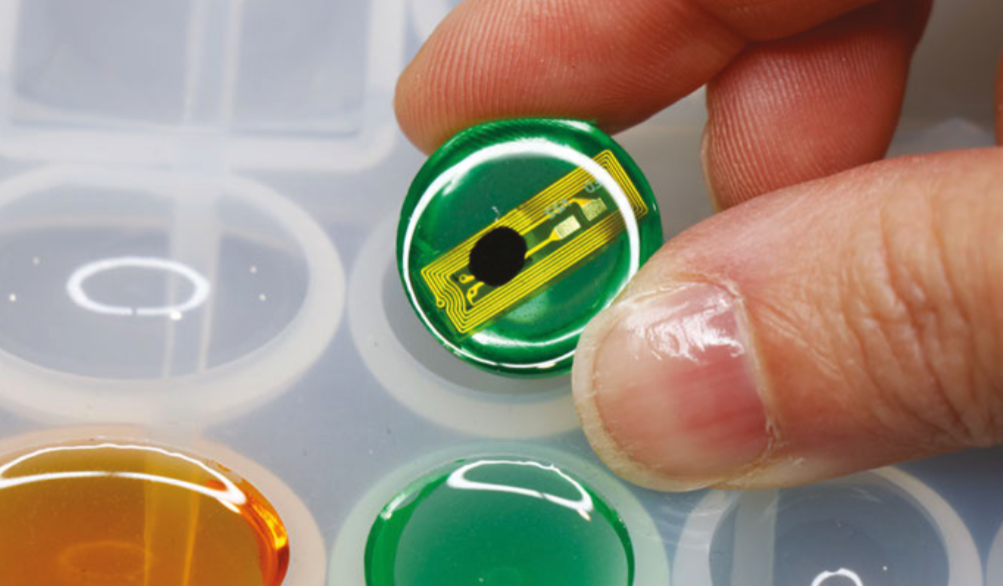
Take a moment to admire your shiny cabochons! If you discover that you’ve over-poured your moulds, or the resin has crept up the sides of the mould, making a curved back, don’t worry. Resin can be wet-sanded; just be sure to keep both the sandpaper and the piece underwater while sanding, and wear a mask to keep from inhaling resin particles.
Use glue to affix the flat-backed cabochons to the cufflink blanks. We used E6000, which is an industrial-strength adhesive that works great on plastics. Again, be sure to work in a well-ventilated area, and wear a respirator while working with E6000.

Apply the glue to the cufflink blank and hold the cabochon in place while the glue sets. Make two, and you’re done! You could also glue the cabochons to ring blanks to make NFC data rings. For pendants, you can use jewellery findings like bails and jump rings to make necklaces or key-chain fobs.
Now that you’ve made your NFC cufflinks, you can load them with data like a website, a password, or a secret message. There are a few methods for doing this. If you have an NFC-capable smartphone, such as an Android phone, you won’t need any additional hardware. You can download a free app like NFC Tools to write and read data on your cufflink. NFC Tasks, another free app, lets you create automatic actions for your phone to perform when the NFC tag is read.
If you have an iPhone, (at the time of publishing of this article) you cannot write directly to NFC tags from your phone. But don’t worry! You can still join the NFC fun by purchasing a USB NFC reader/writer. You’ll be able to read and write to NFC tags with your computer using the NFC Tools desktop app. Your author purchased the NFC reader/writer shown here for about $35 on Amazon.com. You can still use NFC Tools on your iPhone to read tags, and the latest version of iOS, 12.1, supports background NFC tag reading. Some basic actions, like opening a URL in a browser, can now be performed right from the home screen or lock screen – pretty cool!

For a more custom hardware/software approach, try Adafruit’s PN532 NFC/RFID controller breakout board, which lets you add NFC functionality to Raspberry Pi or Arduino projects. It takes some soldering and programming to set up, but this breakout gives you lower-level control of the NFC tag, and is supported by an Adafruit NFC Arduino library. The library includes handy example code for reading and writing to tags, and reformatting Mifare Classic tags with the NDEF format.
Sport your new cufflinks at your next dressy event, and you’ll be both covert and classy! Or, gift these to your favourite snappy dresser, loaded with a secret message for their eyes only. Heading to a conference? Instead of handing out a business card to connect with someone, hold your wrist over their smartphone to bring up your webpage. It’s not magic, it’s technology!
You can find more tutorials like this in Wearable Tech Projects by Sophy Wong, a HackSpace magazine publication. Wearable Tech Projects is on sale now from the Raspberry Pi Press online store, and it’s available as part of the Raspberry Pi Store Black Friday sale this weekend.
The post Make your own NFC data cufflinks appeared first on Raspberry Pi.
Technology should be for everyone, but it has to be built by everyone to be for everyone. At Raspberry Pi, we work to empower everyone to become a tech creator and shape our collective digital future, and we hope that our work will help to increase the tech sector’s diversity.
Today, part of our team is attending WeAreTheCity’s WeAreTechWomen conference to spread the word about our free programming courses and encourage more women to share their digital skills with the next generation.
I asked Carrie Anne Philbin, our Director of Educator Support, and Vanessa Vallely OBE, Managing Director at WeAreTheCity, about their thoughts on how we can make the tech sector more diverse, and what part role models, education, and professional development play in this.
Vanessa, WeAreTheCity helps organisations foster a strong female workforce, and provides opportunities for women to network and develop their skills. Why do you think it’s important for women and people from minority backgrounds to support each other in the professional world?
Vanessa Vallely: I believe it is important for everyone to support each other. It is important that we work as a collective and collaborate, as at the end of the day we are all trying to achieve the same goal. 17% women in tech [in the UK] is not enough.
“We want more women in tech, and we want them to represent all aspects of society.” – Vanessa Vallely OBE
We cannot be what we cannot see, therefore asking women who are already working in tech to stand up and own their role model status is a great start.
What can individuals do to address the lack of diversity in the tech sector?
Carrie Anne Philbin: Firstly, let’s recognise that we need the tech sector to be more representative of the population of the world. It’s problematic to have a small subsection of society be the controllers of a growing digital world.
Then, we need to be the change we want to see in the industry. Let’s try different avenues and then let’s be open about our challenges and successes.
VV: I believe every woman in the tech sector is a role model to future generations. There are a number of things individuals can do, for example go back to their schools and tell their tech stories, or contribute/write blogs. This doesn’t just raise their profile, it puts their story out there for others to aspire to. I think this is really important, especially if the individual is from a background where role models are less visible. There are lots of different organisations and networks that facilitate individuals getting involved in their school or early career initiatives which has made it easier to get involved and give back.
CAP: As a woman in the computing field, I think it is important that I hold the door open for other women coming through in my wake, and that I highlight where I can, great work by others.
Ever since I realised that my skills and knowledge in computing were useful and allowed me to be creative in a whole new way, I’ve championed computer science as a subject that everyone should experience. Once you’ve created your first computer program or built your first network, you’ll never want to stop.
Carrie Anne, how does your coding session at WATC’s WeAreTechWomen conference today tie into this?
CAP: At the Raspberry Pi Foundation, I spend a lot of time thinking about how to teach computing well, and about how young people can have great learning experiences so they can become the makers and creators of tomorrow.
“Technology is not a mystery, nor is it hard to learn. I want to dispel this myth for everyone regardless of gender, ethnicity, or economic status.” – Carrie Anne Philbin
During my session at WeAreTechWomen, I hope to support attendees to write their first creative python program, based on a project I wrote for Code Club to create a virtual pet. It is my hope that the session will be the spark of inspiration that gets more women and men from diverse backgrounds excited about being creators of technology.
You’ve built a career in tech education as a teacher, YouTuber, and Director at Raspberry Pi. How can beginners get comfortable creating with tech?
CAP: There isn’t anything magical about technology, and once you know this, you can start to explore with confidence, much like our ancestors when they learned that the earth was round and not flat.
“Phrases like ‘I’m not good with technology’ or ‘It’s all too complicated for me’ are reassuring to say in a society where the accepted view is that maths and science are hard, and where this view is reinforced by our media. But it is OK to be a beginner, it is OK to learn something new, and it is OK to play, explore, fail, and succeed on the journey.” – Carrie Anne Philbin
However you like to learn, be it on your own or with others, there is a way that suits you! I’ve always been quite project-minded: I have ideas about things I want to make, and then go and see if I can. This is how I stumbled across the Raspberry Pi in 2012 — it seemed like an accessible and cheap way to make my automation dreams come true. It also wasn’t too bad at randomly generating poems.
Aside from teacher-led instruction or independent exploration, another way is to learn with others in a relaxed and informal setting. If you’re a young person, then clubs like Code Club and CoderDojo are perfect. If you’re an adult, then attending a Raspberry Jam or conferences like WeAreTechWomen can provide a supportive environment.
“By being kinder to ourselves and seeing ourselves as life-long learners, it is easier to overcome insecurity and build confidence.” – Carrie Anne Philbin
A great way to approach new learning is at your own pace, and thanks to technology, we have access to online training courses with great videos, exercises, and discussion — many of these are completely free and let you connect with a community of learners as well.
How do you think educating the next generation about computing will change the makeup of the tech sector?
CAP: We’re in an exciting phase for computing education. The world has woken up to the importance of equipping our young people with the knowledge and skills for an ever increasing digital landscape. This means computer science is gaining more prominence in school curricula and giving all children the opportunity to discover the subject.
“Education can be democratising, and I expect to see the makeup of the tech sector reflect this movement in the next five to twenty years.” – Carrie Anne Philbin
Unlike physics or music, computing is still a relatively young field, so we need to do more research into what is encouraging and what isn’t, particularly when we work with young people in schools or clubs.
We’re still learning how to teach computing, and particularly programming, well to encourage greater diversity, so it’s great to see such a vast Gender Balance in Computing research project underway as part of the National Centre for Computing Education here in England. It’s not too late for schools in England to get involved in this project either…
The post “17% women in tech is not enough” appeared first on Raspberry Pi.
We love ‘Raspberry Pi + space’ stuff. There, I’ve said it. No taksies backsies.
From high-altitude balloon projects transporting Raspberry Pis to near space, to our two Astro Pi units living aboard the International Space Station, we simply can’t get enough.
Seriously, if you’ve created anything space-related using a Raspberry Pi, please tell us!
Surrey Satellite Technology Ltd (SSTL) sent a Raspberry Pi Zero to space as part of their Demonstration of Technology (DoT-1) satellite, launched aboard a Soyuz rocket in July.
Earth captured from Low Earth Orbit by a Raspberry Pi
Subscribe to our YouTube channel: http://rpf.io/ytsub Help us reach a wider audience by translating our video content: http://rpf.io/yttranslate Buy a Raspberry Pi from one of our Approved Resellers: http://rpf.io/ytproducts Find out more about the #RaspberryPi Foundation: Raspberry Pi http://rpf.io/ytrpi Code Club UK http://rpf.io/ytccuk Code Club International http://rpf.io/ytcci CoderDojo http://rpf.io/ytcd Check out our free online training courses: http://rpf.io/ytfl Find your local Raspberry Jam event: http://rpf.io/ytjam Work through our free online projects: http://rpf.io/ytprojects Do you have a question about your Raspberry Pi?
So, not that we’re complaining, but why did they send the Raspberry Pi Zero to space to begin with? Well, why not? As SSTL state:
Whilst the primary objective of the 17.5kg self-funded DoT-1 satellite is to demonstrate SSTL’s new Core Data Handling System (Core-DHS), accommodation was made available for some additional experimental payloads including the Raspberry Pi camera experiment which was designed and implemented in conjunction with the Surrey Space Centre.
Essentially, if you can fit a Raspberry Pi into your satellite, you should.
Managing Director of SSTL Sarah Parker went on to say that “the success of the Raspberry Pi camera experiment is an added bonus which we can now evaluate for future missions where it could be utilised for spacecraft ‘selfies’ to check the operation of key equipments, and also for outreach activities.”
SSTL’s very snazzy-looking Demonstration of Technology (DoT-1) satellite
The onboard Raspberry Pi Zero was equipped with a Raspberry Pi Camera Module and a DesignSpark M12 Mount Lens. Image data captured on the space-bound Raspberry Pi was sent back to the SSTL ground station via the Core-DHS.
So, have you sent a Raspberry Pi to space? Or anywhere else we wouldn’t expect a Raspberry Pi to go? Let us know in the comments!
The post Raspberry Pi in space! appeared first on Raspberry Pi.


 Lateo.net - Flux RSS en pagaille (pour en ajouter : @ moi)