 Connexion


What does great training for computing teachers look like?
High-quality professional development (PD) is one of the most effective ways to improve your students’ outcomes, and participating in PD is a core part of being a teacher. By changing and refining your teaching practices, you can create a direct, positive impact on the young people we teach.

In this blog, we share our new professional development Quick Read, which you can download for free to:
Professional development is vital for anyone teaching computing. In many subjects, the curriculum stays the same for decades. Computer science, however, can change quickly — as with the development of new technologies such as AI and quantum computing, and new hardware — and PD can help you stay up to date.
Another challenge is that many educators who teach computing are not necessarily subject specialists. So educators often benefit from building their own subject knowledge and learning new computing-specific pedagogical approaches through PD.
Drawing on academic research and our own expertise, we’ve identified several key principles that make professional development effective for computer science educators:
There may be factors that influence your teaching that you have little control over: you might teach computing as a standalone subject, or you may be required to weave computer science into other lessons across the curriculum. Or you might be working with older devices or limited internet access, all of which have an impact on your practice.
Effective PD should recognise these realities, and offer practical tools that work for your specific classroom and students.
You can use the principles in our latest Quick Read when you’re looking for your next training course or if you are designing a session for your team. The full list of principles is available in our Quick Read, but here are some ideas for you to consider:
You can read more about the principles of effective PD in our Quick Read.
Potential benefits for teachers:
Potential benefits for learners:
Our new Quick Read shares tips on how to best use these principles in your setting.
The post Professional development: How to stay ahead in a fast-changing subject appeared first on Raspberry Pi Foundation.
At the Raspberry Pi Foundation, we believe that learning to program equips young people with the knowledge and skills they need to thrive in an increasingly digital world. For many educators, teaching programming effectively can be challenging, particularly when their learners are at different stages in their programming journey. Ask learners to write code too early, and they might struggle or feel intimidated. Rely too heavily on step-by-step instructions, and you limit learners’ chances to explore ideas or develop deeper understanding.
The PRIMM framework — Predict, Run, Investigate, Modify, Make — provides educators with a structure for teaching programming. This research-informed teaching approach balances support with independence and helps learners build their understanding before they write their own code, whatever their starting point.
To help educators use this approach confidently, we have launched a new short online course, Using PRIMM to teach programming, which is available on our new Training Hub platform for free.
This practical, self-paced course gives educators the knowledge they need to use the PRIMM approach to design and adapt programming activities to suit their learners.
The course takes 1–2 hours to complete, and we have designed it for educators working in formal or non-formal learning environments around the world, using any block-based or text-based programming language. All you need is some experience of creating and adapting simple programs.
The course starts with considering the five stages of PRIMM, when and why to use each stage, and how they work together to support learning. It covers how PRIMM aligns with key teaching principles such as scaffolding, managing cognitive load, and progression, and examines how the approach supports formative assessment by making learners’ thinking — and any misunderstandings — more visible.
Although pedagogy forms the core of this course, we have deliberately avoided a theory-heavy approach. Instead, the course is designed to help you learn through hands-on activities. By reflecting, taking part in discussions with other computing educators, and completing practical tasks, you will explore how PRIMM works in real teaching contexts.
After an introduction to the core ideas of PRIMM, you will design a new programming activity, or adapt an existing one, using the PRIMM structure. This will support you to think carefully about what your learners know and can do, likely misconceptions, and how each stage of PRIMM can be used effectively, including when your learners have varied learning needs and levels of programming experience.
With its emphasis on activity design, the course will support you to develop resources you can use and keep adapting in your own setting. By the end, you will have a complete PRIMM activity designed specifically for your learners, and a clear sense of how to teach programming in a structured and supportive way.
Using PRIMM to teach programming is available on our new Training Hub, where we offer all our professional development courses for free. The Training Hub offers flexible, reflective learning experiences across a range of topics, helping you build your subject knowledge and bring research-informed teaching approaches into your day-to-day practice.
Whether you are an experienced computing teacher, a volunteer educator, or a parent looking to support their child’s learning, we invite you to join us there.
The post ‘Using PRIMM to teach programming’: A new short course for educators appeared first on Raspberry Pi Foundation.
Modern web design has turned websites from static and boring walls of information into ways of providing fun and engaging experiences to the user. Our new ‘More web’ project path shows young creators how to add interaction and animation to a webpage through JavaScript code.
As of 2024, JavaScript is the most popular programming language in the world. And it’s easy to see why when you look at its versatility and how it can be used to create dynamic and interactive content on websites. JavaScript lets you handle events and manipulate HTML and CSS so that you can build everything from simple animations, to forms that can be checked for missing or nonsensical answers. If you’ve ever seen a webpage continuously load more content when you reach the end, that’s JavaScript.
The six new projects in the ‘More web’ path move learners beyond the basics of HTML and CSS encountered in our ‘Introduction to web’ path. Young people will explore what JavaScript makes possible in web development, with plenty of support along the way.
By the end of the ‘More web’ path, learners will have covered the following key programming concepts:
| HTML and CSS | JavaScript |
| Navbars, grid layouts, hero images and image sliders Form design and handling user input Accessibility and responsive design Sizing elements relative to the viewport or container Creating parallax scrolling effects using background-attachment Fixing the position of elements and using z-index to layer elements | Local and global variables, and constants Selection (if, else if, and else) Repetition (for loops) Using Console log Concatenation using template literals Event listeners Use of the intersection observer API to animate elements and lazy-load images Use of the localStorage object to retain user preferencesWriting and calling functions to take advantage of the Document Object Model (DOM) Use setTimeout() to create time delaysWork with Date() functions |
We’ve designed the path to be completed in six one-hour sessions, with one hour per project. However, learners can work at their own speed and the project instructions invite them to take additional time to upgrade their projects if they wish.
All six projects use our Code Editor, which has been tailored specifically to young people’s needs. This integrated development environment (IDE) helps make learning text-based programming simple, safe, and accessible. The projects include starter code, handy code snippets, and images to help young people build their websites.
The path follows our Digital Making Framework, with its deliberate format of six projects that become less structured as learners progress. The Explore projects at the start of the path are where the initial learning takes place. Learners then develop their new skills by putting them into practice in the Design and Invent projects, which encourage them to use their imagination and make projects that matter to them.
Learners use HTML and CSS to design a website that lets people discover a place they may never get a chance to visit — Antarctica. They discover how to create a navigation bar (or navbar), set accessible colours and fonts, and add a responsive grid layout to hold beautiful images and interesting facts about this fascinating continent.
In the second Explore project, young people build an interactive website where the user can design a superhero character. Learners use JavaScript to let the user change the text on their website, show and hide elements, and create a hero image slider. They also learn how to let the user set the colour theme for the site and keep their preferences, even if they reload the page.
Young people create an interactive story with animated text and characters that are triggered when the user scrolls. They will learn how to design for accessibility and improve browser performance by only loading images when they’re needed.
This is where learners can practise their skills and bring in their own interests to make a fan website, which lets a user make choices that change the webpage content.
The final Design project invites young people to build a personalised web app that lets users test what they know about a topic. Learners choose a topic for their quiz, create and animate their questions, and then show the user their final score. They could make a quiz about history, nature, world records, science, sports, fashion, TV, movies… or anything else they’re an expert in!
In this final project, young people bring everything they’ve learnt together and use their new coding powers and modern design skills to create an interactive website to share a part of their world with others. They could provide information about their culture, interests, hobbies or expertise, share fun facts, create quizzes, or write reviews. Learners consider what makes a website useful and informative, as well as fun and accessible.
Encourage your young learners to take their next steps in web design, learn JavaScript, and try out this new path of coding projects to create interactive websites that excite and engage users.
Young people can also enter one of their Design or Invent projects into the Web category of the yearly Coolest Projects showcase by taking a short video showing the project and the code used to make it. Their creation will become part of the Coolest Projects online gallery for people all over the world to see!
The post Get young people making interactive websites with JavaScript and our ‘More web’ path appeared first on Raspberry Pi Foundation.
Underrepresentation in computing is a widely known issue, in industry and in education. To cite some statistics from the UK: a Black British Voices report from August 2023 noted that 95% of respondents believe the UK curriculum neglects black lives and experiences; fewer students from working class backgrounds study GCSE Computer Science; when they leave formal education, fewer female, BAME, and white working class people are employed in the field of computer science (Kemp 2021); only 21% of GCSE Computer Science students, 15% at A level, and 22% at undergraduate level are female (JCQ 2020, Ofqual 2020, UCAS 2020); students with additional needs are also underrepresented.
Such statistics have been the status quo for too long. Many Computing teachers already endeavour to bring about positive change where they can and engage learners by including their interests in the lessons they deliver, so how can we support them to do this more effectively? Extending the reach of computing so that it is accessible to all also means that we need to consider what formal and informal values predominate in the field of computing. What is the ‘hidden’ curriculum in computing that might be excluding some learners? Who is and who isn’t represented?
In a recent research seminar, Katharine Childs from our team outlined a research project we conducted, which included a professional development workshop to increase primary teachers’ awareness of and confidence in culturally relevant pedagogy. In the workshop, teachers considered how to effectively adapt curriculum materials to make them culturally relevant and engaging for the learners in their classrooms. Katharine described the practical steps teachers took to adapt two graphics-related units, and invited seminar participants to apply their learning to a graphics activity themselves.
Culturally relevant pedagogy is a teaching framework which values students’ identities, backgrounds, knowledge, and ways of learning. By drawing on students’ own interests, experiences and cultural knowledge educators can increase the likelihood that the curriculum they deliver is more relevant, engaging and accessible to all.
The idea of culturally relevant pedagogy was first introduced in the US in the 1990s by African-American academic Gloria Ladson-Billings (Ladson-Billings 1995). Its aim was threefold: to raise students’ academic achievement, to develop students’ cultural competence and to promote students’ critical consciousness. The idea of culturally responsive teaching was later advanced by Geneva Gay (2000) and more recently brought into focus in US computer science education by Kimberly Scott and colleagues (2015). The approach has been localised for England by Hayley Leonard and Sue Sentance (2021) in work they undertook here at the Foundation.
Katharine began her presentation by explaining that the professional development workshop in the Primary culturally adapted resources for computing project built on two of our previous research projects to develop guidelines for culturally relevant and responsive computing and understand how teachers used them in practice. This third project ran as a pilot study funded by Cognizant, starting in Autumn 2022 with a one-day, in-person workshop for 13 primary computing teachers.
Katharine then introduced us to the 10 areas of opportunity (AO) our research at the Raspberry Pi Computing Education Research Centre had identified for culturally relevant pedagogy. These 10 areas were used as practical prompts to frame the workshop discussions:
At first glance it is easy to think that you do most of those things already, or to disregard some items as irrelevant to the computing curriculum. What would your own cultural identity (see AO2) have to do with computing, you might wonder. But taking a less complacent perspective might lead you to consider all the different facets that make up your identity and then to think about the same for the students you teach. You may discover that there are many areas which you have left untapped in your lesson planning.
Katharine explained how this is where the professional development workshop showed itself as beneficial for the participants. It gave teachers the opportunity to reflect on how their cultural identity impacted on their teaching practices — as a starting point to learning more about other aspects of the culturally relevant pedagogy approach.
Our researchers were interested in how they could work alongside teachers to adapt two computing units to make them more culturally relevant for teachers’ specific contexts. They used the Computing Curriculum units on Photo Editing (Year 4) and Vector Graphics (Year 5).
Katharine illustrated some of the adaptations teachers and researchers working together had made to the emoji activity above, and which areas of opportunity (AO) had been addressed; this aspect of the research will be reported in later publications.
Although the number of participants in this pilot study was small, the findings show that the professional development workshop significantly increased teachers’ awareness of culturally relevant pedagogy and their confidence in adapting resources to take account of local contexts:
These quantitative shifts in perspective indicate a positive effect of the professional development pilot.
Katharine described that in our qualitative interviews with the participating teachers, they expressed feeling that their understanding of culturally relevant pedagogy had increased and they recognized the many benefits to learners of the approach. They valued the opportunity to discuss their contexts and to adapt materials they currently used with other teachers, because it made it a more ‘authentic’ and practical professional development experience.
The seminar ended with breakout sessions inviting viewers to consider possible adaptations that could be made to the graphics activities which had been the focus of the workshop.
In the breakout sessions, attendees also discussed specific examples of culturally relevant teaching practices that had been successful in their own classrooms, and they considered how schools and computing educational initiatives could support teachers in their efforts to integrate culturally relevant pedagogy into their practice. Some attendees observed that it was not always possible to change schemes of work without a ‘whole-school’ approach, senior leadership team support, and commitment to a research-based professional development programme.
The seminar reminds us that the education system is not culture neutral and that teachers generally transmit the dominant culture (which may be very different from their students’) in their settings (Vrieler et al, 2022). Culturally relevant pedagogy is an attempt to address the inequities and biases that exist, which result in many students feeling marginalised, disenfranchised, or underachieving. It urges us to incorporate learners’ cultures and experiences in our endeavours to create a more inclusive computing curriculum; to adopt an intersectional lens so that all can thrive.
As a pilot study, the workshop was offered to a small cohort of 13, yet the findings show that the intervention significantly increased participants’ awareness of culturally relevant pedagogy and their confidence in adapting resources to take account of local contexts.
Of course there are many ways in which teachers already adapt resources to make them interesting and accessible to their pupils. Further examples of the sort of adaptations you might make using these areas of opportunity include:
Can you see an opportunity for integrating culturally relevant pedagogy in your classroom? We would love to hear about examples of culturally relevant teaching practices that you have found successful. Let us know your thoughts or questions in the comments below.
You can watch Katharine’s seminar here:
You can download her presentation slides on our ‘previous seminars’ page, and you can read her research paper.
To get a practical overview of culturally relevant pedagogy, read our 2-page Quick Read on the topic and download the guidelines we created with a group of teachers and academic specialists.
Tomorrow we’ll be sharing a blog about how the learners who engaged with the culturally adapted units found the experience, and how it affected their views of computing. Follow us on social media to not miss it!
On 12 December we’ll host the last seminar session in our series on primary (K-5) computing. Anaclara Gerosa will share her work on how to design and structure early computing activities that promote and scaffold students’ conceptual understanding. As always, the seminar is free and takes place online at 17:00–18:30 GMT / 12:00–13:30 ET / 9:00–10:30 PT / 18:00–19:30 CET. Sign up and we’ll send you the link to join on the day.
In 2024, our new seminar series will be about teaching and learning programming, with and without AI tools. If you’re signed up to our seminars, you’ll receive the link to join every monthly seminar.
The post Engaging primary Computing teachers in culturally relevant pedagogy through professional development appeared first on Raspberry Pi Foundation.
Earlier this year, we launched our Code Editor, a free online tool to help make learning text-based programming simple and accessible for kids age 9 and up. We focus on supporting the needs of young people who are learning programming at school, in Code Clubs and CoderDojos, and at home.
Today, we have two exciting updates to share: support for web page projects with HTML/CSS, and an improved mobile and tablet experience.
Learners can use the Code Editor to write and run code in a web browser without installing any additional software. The Editor is currently available as a beta version, and we’ve already received really positive comments:
“The Editor looks really nice! I have tried the Python part, and it is intuitive and concise. My little program worked no problem, and I am sure the Editor will be easy, intuitive, and quick to learn for the young [learners].”
— Volunteer in the CoderDojo community
The Code Editor now supports the HTML and CSS web development languages, giving young people the ability to create and preview their own websites directly in the Editor interface. Learners can have their code and the preview panel side by side, and they can also preview their websites in a separate, larger tab.
We have embedded the Editor in our ‘Introduction to web‘ path on the Projects site. The path contains six HTML and CSS projects for beginners and helps them create fun websites like the ones shown here.
We want the Code Editor to be safe, age-appropriate, and suitable for use in classrooms or coding clubs. With this in mind, we have excluded certain functions, like being able to add links to external websites in the code. Rather than enabling image uploads, we provide a library of images when projects in our free learning paths contain images, in order to support multimedia projects safely.
Whether users are coding in Python or HTML/CSS, the Editor offers accessibility options so you can easily switch settings between light and dark mode, and between small, medium, and large text size. The text size feature is useful for people with visual impairments, as well as for educators who want to demonstrate something to a group of learners.
Our Code Editor now offers a new and improved experience for users of mobile and tablet devices. This improves access for learners in classrooms where tablets are used, and in low- and middle-income countries, where mobile phones are commonly used for digital learning.
The Editor now includes:
We’re continuing to develop the Code Editor and have more improvements planned. If you would like to try it out and provide us with your feedback, we’d love to hear what you think of our latest updates.
Code Editor developments have been made possible with generous support from Endless and the Cisco Foundation.
The post Code Editor update: Support for HTML and mobile devices appeared first on Raspberry Pi Foundation.
Our ‘Intro to Unity’ educational project path is a big success, sparking lots of young people’s passion for 3D game design and programming. Today we introduce the ‘More Unity‘ project path — the perfect next step for young people who have completed our ‘Intro to Unity‘ path. This new free path is designed to bridge the gap for young people before they start on the tutorials on the Unity learning platform.
Our work to create this path builds on our partnership with Unity, through which we aim to offer any young person, anywhere, the opportunity to take their first steps in creating virtual worlds using real-time 3D.
After young people have tried out the Unity Engine and C# programming through the ‘Intro to Unity’ path, they’re ready for a deeper exploration of 3D game design. ‘More Unity’ helps them build on the foundational skills they learned in the ‘Intro to Unity’ path. After completing this new path, they’ll be able to add complexity, new challenges, and heaps of fun to all their 3D creations.
We’ve prepared a comprehensive Unity Guide to assist with getting ready to start either the ‘Intro to Unity’ or ‘More Unity’ path. To create with Unity, learners need access to a computer with a graphics card, the latest version of the free Unity Games Engine, and a code editor. For the extra Blender-based projects (see below), they need the latest version of the free Blender software.
The project path consists of six projects. Like in ‘Intro to Unity’, each project introduces new skills bit by bit, enabling young people to independently code their own, next-level Unity creation in the final project.
This first project shows how to build an exciting 3D simulation. With ‘Rainbow run’, learners create colourful tracks and guide a marble to race along them. We also offer them an extra project guide where they can customise the look of their marble using Blender.
Next, with ‘Disco dance floor’, learners code an interactive, tilting dance floor that responds to a rolling ball with sound and colour. They can add their own style to the dance floor by following our extra Blender project.
‘Don’t fall through’ is the third project in the path. Here, learners code a two-player game that requires strategy and timing as marbles traverse a vanishing tiled floor.
‘Pixel art reveal’ comes next in the path. It helps learners design unique pixel art on a tiled floor and reveal their awesome artwork by rolling a ball across the surface.
In ‘Track designer’, we invite learners to truly think like game designers. This project empowers learners to design unique tilting tracks filled with obstacles, personalised effects, sounds, and more.
Finally ‘Marble mayhem’ lets young people bring to life all the principles of physics and materials in the Unity Game Engine they’ve learned about while following the ‘More Unity’ path. This is their place to create a one-of-a-kind game or digital toy that truly reflects their creativity.
‘More Unity’ promotes young people’s creativity, problem-solving, and independence. Each project presents them with the chance to create a virtual world of physics, materials, and mechanics. With each project they’ll learn lots of new skills in 3D modeling, gameplay design, and programming.
The path includes a community gallery where young people can share their new 3D creations and see what their peers all over the world have made.
The skills young people gain through the ‘Intro to Unity’ and ‘More Unity’ path provide them with a solid foundation to continue to learn and create with Unity. To follow their passion for 3D worlds, game design, and programming further, they can move on to the hundreds of tutorials available on Unity’s learning platform.
Our detailed Unity guide will help you get everything set up for your young people to start with Unity, and the ‘Intro to Unity‘ path is the place for them to begin before they move on to ‘More Unity‘.
If you or your young people want to get a taste of the fun ‘More Unity’ has in store, there’s the Collision and colours Discover project to try out. This short learning experience showcases the new components the ‘More Unity’ path introduces.
To help our community of CoderDojo and Code Club volunteers bring Unity to their learners, we will host a free Unity-focused webinar on 13 July. Sign up to get a walkthrough of the path from our Learning Manager Mac Bowley, and to ask him any questions you might have.
The post More Unity: Dive deeper into 3D worlds, game design and programming appeared first on Raspberry Pi Foundation.
Programming is becoming an increasingly useful skill in today’s society. As we continue to rely more and more on software and digital technology, knowing how to code is also more and more valuable. That’s why many parents are looking for ways to introduce their children to programming. You might find it difficult to know where to begin, with so many different kids’ coding languages and platforms available. In this blog post, we explore how children can progress through different programming languages to realise their potential as proficient coders and creators of digital technology.
Everyone needs to start somewhere, and one great option for children aged 5–7 is ScratchJr (Scratch Junior), a visual programming language with drag-and-drop blocks for creating simple programs. ScratchJr is available for free on Android and iOS mobile devices. It’s great for introducing young children to the basics of programming, and they can use it to create interactive stories and games.
Moving on from ScratchJr, there’s its web-based sibling Scratch. Scratch offers drag-and-drop blocks for creating programs and comes with an assortment of graphics, sounds, and music for your child to bring their programs to life. This visual programming language is designed specifically for children to learn programming fundamentals. Scratch is available in multiple spoken languages and is perfect for beginners. It allows kids to create interactive stories, animations, and games with ease.
The Raspberry Pi Foundation has a wealth of free Scratch resources we have created specifically for young people who are beginners, such as the ‘Introduction to Scratch’ project path. And if your child is interested in physical computing to interact with the real world using code, they can also learn how to use electronic components, such as buzzers and LEDs, with Scratch and a Raspberry Pi computer.
Another fun option for children who want to explore coding and physical computing is the micro:bit. This is a small programmable device with an LED display, buttons, and sensors, and it can be used to create games, animations, interactive projects, and lots more. To control a micro:bit, a visual programming language called MakeCode can be used. The micro:bit can also be programmed using Scratch or text-based languages such as Python, offering an easy transition for children as their coding skills progress. Have a look at our free collection of micro:bit resources to learn more.
Everyone is familiar with websites, but fewer people know how they are coded. HTML is a markup language that is used to create the webpages we use every day. It’s a great language for children to learn because they can see the results of their code in real time, in their web browser. They can use HTML and CSS to create simple webpages that include links, videos, pictures, and interactive elements, all the while learning how websites are structured and designed. We have many free web design resources for your child, including a basic ‘Introduction to web development’ project path.
If your child is becoming confident with Scratch and HTML, then using Python is the recommended next stage in their learning. Python is a high-level text-based programming language that is easy to read and learn. It is a popular choice for beginners as it has a simple syntax that often reads like plain English. Many free Python projects for young people are available on our website, including the ‘Introduction to Python’ path.
The Python community is also really welcoming and has produced a myriad of online tutorials and videos to help learners explore this language. Python can be used to do some very powerful things with ease, which is why it is so popular. For example, it is relatively simple to create Python programs to engage in machine learning and data analysis. If you wanted to explore large language models such as GPT, on which the ChatGPT chatbot is based, then Python would be the language of choice.
JavaScript is the language of the web, and if your child has become proficient in HTML, then this is the next language for them. JavaScript is used to create interactive websites and web applications. As young people become more comfortable with programming, JavaScript is a useful language to progress to, given how ubiquitous the web is today. It can be tricky to learn, but like Python, it has a vast number of libraries of functions that people have already created for it to achieve things more quickly. These libraries make JavaScript a very powerful language to use.
There are many different programming languages, and each one has its own strengths and weaknesses. Some are easy to learn and use, some are really fast, and some are very secure.
Starting with visual languages such as Scratch or MakeCode allows your child to begin to understand the basic concepts of programming without needing any developed reading and keyboard skills. Once their understanding and skills have improved, they can try out text-based languages, find the one that they are comfortable with, and then continue to learn. It’s fairly common for people who are proficient in one programming language to learn other languages quite quickly, so don’t worry about which programming language your child starts with.
Whether your child is interested in working in software development or just wants to learn a valuable — and creative — skill, helping them learn to code and try out different kids’ coding languages is a great way for you to open up new opportunities for them.
The post Kids’ coding languages appeared first on Raspberry Pi Foundation.
With our new free ‘Introduction to web development’ path, young people are able to learn HTML and create their own webpages on topics that matter to them. The path is made up of six projects that show children and teenagers how to structure pages using HTML, and style them using CSS.
Webpage creation has come a long way since the 1990s, but HTML is still the markup language that is used to display almost every page on the World Wide Web. By knowing how it works, you can deepen your understanding of the technology you use every day.
If you want to build your own website today, there are many tools to get you quickly up and running. These tools often involve dragging and dropping predefined elements and choosing from a wide collection of themed looks. Learning HTML and CSS skills is important for web designers, developers, and content creators who want to build unique webpage designs that make their content stand out.
With our new ‘Introduction to web development’ path, we want creators (the young people who use our projects) to be able to quickly make fantastic-looking websites that follow modern best practices, while they also learn how HTML and CSS work together to create a webpage. Creators write their own HTML to develop the content and structure of their webpages. And they customise our pre-built CSS style sheets to get their webpages to look like they imagine.
This really is a fun and unique approach to learning HTML and building a webpage, and we think young people will quickly engage with it. They start by finding out how to structure pages using HTML before applying CSS styles that bring their pages to life. Through the six projects, they build all the skills and independence they need to make webpages that matter to them.
We believe that young people should find out about website accessibility right from the start of their learning journey. That’s why the path for learning HTML shows creators how they can make their websites accessible to all their users regardless of the users’ needs or digital devices.
That’s why our new path uses semantic HTML. Older HTML tutorials might show you how to structure a webpage using tags like <div> and <span>. In contrast, the meaning and purpose of tags in semantic HTML is very clear. For example:
<main> is used to tag the main content for the webpage<footer> is used for content to be displayed in the footer<blockquote> contains a quote and typically the author of the quote<section> contains a portion of content that usually sits within the main part of the webpageSemantic HTML supports accessibility because it allows people who use a screen reader to more easily navigate a webpage and read it in a logical way.
Another element of accessible design that the path introduces is the colour combinations used on webpages. It is really important that contrasting colours are used for the background and the text. High contrast makes the text more readable, which means the webpage is more suitable for visually impaired users.
The path also shows creators the importance of adding meaningful alternative text for images. Good alternative text helps visually impaired users, and users who have a very low bandwidth and therefore turn images off in their web browser.
Finally, our path for learning HTML introduces creators to the concept of responsive web design. Responsive design is helpful because websites can be viewed on thousands of different devices. Some people view pages on large, high-resolution monitors, and others view them on a mobile phone screen. We show learners how they can use HTML and CSS to make their pages responsive so they display in the way that works best for the specific screen on which a user is viewing them.
We have written the projects in this path with young people of around the age from 9 to 17 in mind.
HTML and CSS are text-based markup languages. This means a young person who wants to start learning HTML needs to be familiar with typing on a keyboard. It would also be helpful to have experience of using the copy and paste function, which is useful when changing the layout of a page or copying similar pieces of code.
If a young person is unsure whether they have the right skills to get started with the path, they can first try out a short ‘Discover’ project. With this Discover project, young people can choose between the themes ‘space’, ‘sunsets’, ‘forests’, or ‘animals’ to see how they can create their first webpage in just five steps. (We’re still working on the ‘Discover’ project type, so if you have any feedback about it, let us know.)
Creators will learn how to use HTML and CSS to build webpages that have:
They will also learn about how to make their webpages accessible to all through use of:
We’ve designed the path so young people can complete it in six one-hour sessions, with one hour for each project. Since the project instructions encourage creators to upgrade their projects, they may wish to go further and spend a little more time getting their projects exactly as they imagine them.
Young people only need a standard web browser to follow the project instructions and use an online code editor to create their webpages.
There are 28 other step-by-step projects for creators to choose from on our website. They can browse through these to see what cool things they’d like to make and what new skills they want to learn.
If your kid is proud of the webpage they create with the final ‘Invent’ project in the path, they can share it with a worldwide community of young creators in our free Coolest Projects tech showcase. Project registration will open again in spring 2023. You can sign up to hear news about the showcase on the Coolest Projects homepage.
The post Get kids creating webpages with HTML and CSS appeared first on Raspberry Pi.
Introducing children to computing concepts from a young age can help develop their interest and attachment to the subject. While parents might wonder what the best tools and resources are for this, primary and K1–5 educators also need to know what approaches work with their learners.
‘Teaching computing to 5- to 11-year-olds’ is one of the new course pathways we’ve designed to help educators spark young people’s interest in the subject. Our online courses are made by a team of writers, videographers, illustrators, animators, copy editors, presenters, and subject matter experts. They work together over months of production to create high-quality educational video content for participants all over the world.
This course pathway offers advice and practical activities to:
The nine courses included give you a comprehensive understanding of teaching computing to younger learners (5- to 11-year-olds). All the courses have been written by a team of subject matter experts, education professionals, and teachers. Some of the courses cover a specific topic, such as programming or physical computing, while others help educators reflect on their teaching practice.
All of the courses include a range of ideas to use in your own programming sessions. The activities will help you to introduce concepts like computer networks and the internet to young learners in a relatable way. There are also activities to help learners progress within a topic, such as moving from a block-based programming language like Scratch to a text-based one like Python.
The courses are an opportunity to:
These courses will give you everything you need to teach computing to young learners. No computing experience is required.
There is also no specific order in which you need to complete the courses. We want educators to complete the courses in an order that makes sense to them.
If you are new to teaching computing, ‘Get started teaching computing in primary schools’ is the place to start. The four-week course will encourage you to think about why it’s important for your learners to build their understanding around computing. You’ll discover how to support learners to become digital makers who can use technology to solve problems. Everyone who registers on the course will have access to an action plan to help implement what they have learnt into their teaching practice.
These are free courses for anyone, anywhere, who is interested in teaching young people about computing.
All of the courses take between two and four weeks to complete, based on participants spending two hours a week on a course. You will have free access to each course for the length of time it takes to complete it. For example, if it’s a two week course, like ‘Creating an inclusive classroom: approaches to supporting learners with SEND in computing’, you will have two weeks of free access to the course.
Discover what you could learn with ‘Teaching computing to 5- to 11-year-olds’ today.
The post Learn how to teach computing to 5- to 11-year-olds appeared first on Raspberry Pi.
Issue 19 of our free magazine Hello World, written by and for the computing education community, focuses on the interaction between sustainability and computing, from how we can interact with technology responsibly, to its potential to mitigate climate change.
To give you a taste of this brand-new issue, here is primary school teacher Peter Gaynord’s article about his experience of using an environmental case study to develop a cross-curricular physical computing unit that gives his learners a real-life context.
The prospect of developing your own unit of work from scratch can feel very daunting. With the number of free resources available, it begs the question, why do it? Firstly, it gives you the opportunity to deliver computing that is interwoven with the rest of your curriculum. It also naturally lends itself to a constructionist approach to learning through meaningful engagement with real-world problem-solving. In this article, I am going to share my experience of developing a ten-lesson unit of physical computing for students aged nine to ten that is linked to the more general topic of the environment.
To engage children in the process of problem-solving, it is important that the problem is presented as a real and meaningful one. To introduce the topic of the environment, we showed pupils a video of the Panama Canal, including information about the staggering amount of CO2 that is saved by ships taking this route instead of the alternative, longer routes that use more fuel. However, we explained that because of the special geographical features, a moving bridge needed to be constructed over the canal. The students’ challenge was first to design a solution to the problem, and then to make a working model.
The model would use physical computing as part of the solution to the problem. The children would program a single-geared motor using a Crumble microcontroller to slowly lift and lower the bridge by the desired amount. We decided to issue a warning to drivers that the road bridge was about to close using a Sparkle, a programmable LED. Ultimately, the raising and lowering of the bridge would happen automatically when a ship approached. For this purpose, we would use an ultrasonic sensor to detect the presence of the ship.
To develop the skills required to use the Crumble microcontroller, we led some discrete computing lessons based largely on the Teach Computing Curriculum’s ‘Programming A — Selection in physical computing’ unit. In these lessons, the children developed the skill of sensing and responding differently to conditions using the selection programming construct. They learnt this key concept alongside controlling and connecting the motor, the Sparkle, and the ultrasonic sensor.
For students to succeed, we also had to teach them skills from other subjects, and consider at what stage it would be most useful to introduce them. For example, before asking children to document their designs, we first needed to teach the design technology (DT) objectives for communicating ideas through sketches. Most other DT objectives that covered the practical skills to make a model were interwoven as the project progressed. At the end of the project, we guided the children through how to evaluate their design ideas and reflect on the process of model making. Before pupils designed their solutions, we also had to introduce some science for them to apply to their designs. We covered increasing forces using levers, pulleys, and gears, as well as the greenhouse effect and how burning fossil fuels contributes to global warming.
It is very important not to specify a solution for students at the beginning, otherwise the whole project becomes craft instead of problem-solving. However, it is important to spend some time thinking about any practical aspects of the model building that may need extra scaffolding. Experience suggested that it was important to limit the scale of the children’s models. We did this by showing them a completed central bridge span and later, guiding the building of this component so that all bridges had the same scale. It also turned out to be very important that the children were limited in their model building to using one single-geared motor. This would ensure that all children engaged with actively thinking about how to utilise the lever and pulley system to increase force, instead of relying on using more motors to lift the bridge.
If you want to finish reading Peter’s article and see his unit outline, download Hello World issue 19 as a free PDF.
As always, you’ll find this new issue of Hello World packed with resources, ideas, and insights to inspire your learners and your own classroom practice:
All issues of Hello World as available as free PDF downloads. Subscribe to never miss a digital issue — and if you’re an educator in the UK, you can subscribe to receive free print copies in the post.
PS: US-based educators, if you’re at CSTA Annual Conference in Chicago this month, come meet us at booth 521 and join us at our sessions about writing for Hello World, the Big Book of Computing Pedagogy, and more. We look forward to seeing you there!
The post Computing and sustainability in your classroom | Hello World #19 appeared first on Raspberry Pi.
With our online courses programme, launched in 2017, we made it our mission to provide computing educators with the best possible free training we can design. Five years on, here are some of the key stats about the courses’ impact:
Designed and created in-house, each and every course is a real cross-team effort that involves a lot of careful planning and a number of different stages. Here we’re taking you behind the scenes to show you how we make our courses, introduce you to the people involved, and explain how we ensure our courses are of high quality.
But first, here’s some quick answers to questions you may have:
They are online training courses to help you learn about computing and computing education. The courses are hosted on the FutureLearn website. They are asynchronous, meaning you can take them whenever and wherever you want.
Yes! All our courses are free when you sign up for time-limited access, which gives you full access to the learning materials for the complete course duration. FutureLearn also has a paid-for ‘unlimited’ option, where you receive a certificate for each course you take.
They are aimed at educators, particularly classroom teachers, but they are also beneficial to anyone who wants to learn more about computing.
To help you structure your learning, our courses are divided into three or four weeks, but it’s up to you how quickly you work through them. You can complete a course in one afternoon, or spread your learning out and study for 30 minutes a day over three or four weeks. This flexibility makes it easy to fit a course into a busy schedule.
Creating our online courses is a team effort involving writers, videographers, illustrators, animators, copy editors, presenters, and subject matter experts working together over months of production. The entire process is guided by our online course producers, Martin O’Hanlon, Ross Exton, and Michael Conterio, who know a thing or two about creating high-quality learning experiences. We spoke to them about what it takes to create an engaging course.
Martin: We are driven by the needs of teachers. “What are teachers telling us they want to learn? Or what are the gaps in the curriculum where our learners need additional support?”
For example, our Introduction to Machine Learning and AI course was introduced as a result of feedback from teachers that while the subject wasn’t necessarily on the curriculum, they felt underprepared to answer questions from students or provide context when teaching other topics.
Michael: Working with the course authors, we’ll generally agree on the big topics we want to cover or questions that we want to answer. We’ll often also have individual elements that we want to fit in somewhere, for example an activity involving making a learning resource more accessible. From there it’s a case of taking the bigger topics and working out how we can split them up into smaller chunks, until we get down to individual learning activities.
Ross: But then we’ll end up shuffling things around until we are happy — not only that we’ve got everything that we wanted to cover, but that the overall structure makes sense. We often talk about the ‘narrative’ of a course.
Martin: At the Raspberry Pi Foundation we have a set of 12 pedagogy principles that we use through our learning resources (including online courses). We take particular care to lead with concepts, model processes, and activities; add variety for our learners; and include opportunities to create projects.
Michael: Because the learner is not present, you have to be incredibly precise with instructions as you can’t help learners directly as they are working through the content. And even if you think something is obvious, it’s easy for learners to accidentally miss an instruction, so it’s generally good to try to keep them together rather than spread out.
Martin: Luckily, it is often possible to tell from comments that learners have shared when something is hard to understand so we can improve future runs of the course.
Ross: It’s essential! It brings the abstract concepts of computing to life. The media in our courses helps our learners to visualise the ideas we’re presenting in ways that are engaging and relatable.
As we’re writing the course, we capture every creative idea that will best support our learners in gaining the knowledge and skills that they need. From ‘how-to’ guides with live coding, to physical computing demonstrations, or animations of robots, we think carefully about each image and video and how we’re not just telling the learner something, but showing them.
We then work with a brilliantly talented team of illustrators, animators, videographers, and presenters to create all of that media.
Ross: Social learning is a really important part of our online courses experience. Over the past year we have made significant investment to make it easier for participants to share programs they’ve written as part of their learning, for example, and for facilitators to provide support.
Martin: It is important people have the opportunity to share their learning with others. This is something often lost when taking an online course and it can feel like you are ‘on your own’.
In the Raspberry Pi Foundation’s online courses learners are given the opportunity to ask questions, share what they have created, and provide their own insight in the comments. Educators from the Foundation facilitate the courses — responding to comments and providing advice is a big part of what they do.
Thank you Martin, Michael, and Ross.
What new online course would you like us to create? Tell us in the comments below.
The post How do we create engaging online courses for computing educators? appeared first on Raspberry Pi.
We are super excited to host a livestream to introduce young coders to creating 3D worlds with Unity. Tune in at 18:30 GMT on Thursday 24 March 2022 on YouTube to find out all about our free online learning path for getting started with Unity.
If you know young coders who love gaming, digital art, or storytelling and need a new programming challenge, this is the event for them. So mark your calendars!
In January, we launched an all-new online learning path of Unity projects, in partnership with Unity. With this path, young people who enjoy writing code will learn how to start using the free Unity Real-Time Development Platform to build their own digital 3D games and worlds.
Professional developers are using Unity to create well-known games such as Mario Kart Tour and Pokémon Mystery Dungeon: Rescue Team DX. We’ve partnered with Unity to offer any young person, anywhere, the opportunity to take their first steps in creating virtual worlds using real-time 3D. The five-part Unity path we offer is educational and shows young people that if they can imagine something, then they can create it digitally with Unity.
For young people, coding in Unity can be a fun experience of creating their own 3D worlds. And it also helps them learn skills that can be useful and desirable in the tech sector.
Unity is a step up for young people who have coded in a text-based language before and are interested in creating interactive 3D games and stories. In Unity, they’ll write code in the programming language C# — pronounced ‘cee sharp’. It’s a great opportunity to build on their existing coding and problem-solving skills.
Introducing young people to Unity means that they will begin to use the same tools as professional 3D developers. Maybe attending the Unity livestream is going to be your coders’ first step towards creating the next videogame sensation.
The livestream will run for around 45 minutes. It will be the perfect introduction to Unity and our project path for you and your experienced coders.
The livestream will include:
By joining the livestream, your young people will:
The livestream takes place on Thursday 24 March at 18:30 GMT on our YouTube channel. Everyone can tune in without signing up, wherever you are in the world. If you have a Google account, you can click the ‘Set a reminder’ button to make sure you and your keen coders don’t miss a thing.
Unity is free for anyone to use. If your young people want to code along during the livestream, they need to prepare by downloading and installing all the free software beforehand. Young people will need to:
We cannot wait for you to join us and our special guests on our Unity livestream!
Whatever your young people create with Unity — or other digital tech —, they can register to share it for the world to see in the online gallery of Coolest Projects Global. This is our free and completely online tech showcase, for young people up to age 18 all over the world.
Registering to showcase their tech creation means young people will get cool swag, feedback on what they’ve made, and a chance to win recognition from our special judges. And above all, they’ll become part of a worldwide community of young tech creators who celebrate and inspire each other.
Find out more at coolestprojects.org.
The post Create 3D worlds with code on our first-ever Unity livestream appeared first on Raspberry Pi.
Our seminars in this series on AI and data science education, co-hosted with The Alan Turing Institute, have been covering a range of different topics and perspectives. This month was no exception. We were delighted to be able to host Tara Chklovski, CEO of Technovation, whose presentation was called ‘Teaching youth to use AI to tackle the Sustainable Development Goals’.
Tara started Technovation, formerly called Iridescent, in 2007 with a family science programme in one school in Los Angeles. The nonprofit has grown hugely, and Technovation now runs computing education activities across the world. We heard from Tara that over 350,000 girls from more than 100 countries take part in their programmes, and that the nonprofit focuses particularly on empowering girls to become tech entrepreneurs. The girls, with support from industry volunteers, parents, and the Technovation curriculum, work in teams to solve real-world problems through an annual event called the Technovation Challenge. Working at scale with young people has given the Technovation team the opportunity to investigate the impact of their programmes as well as more generally learn what works in computing education.
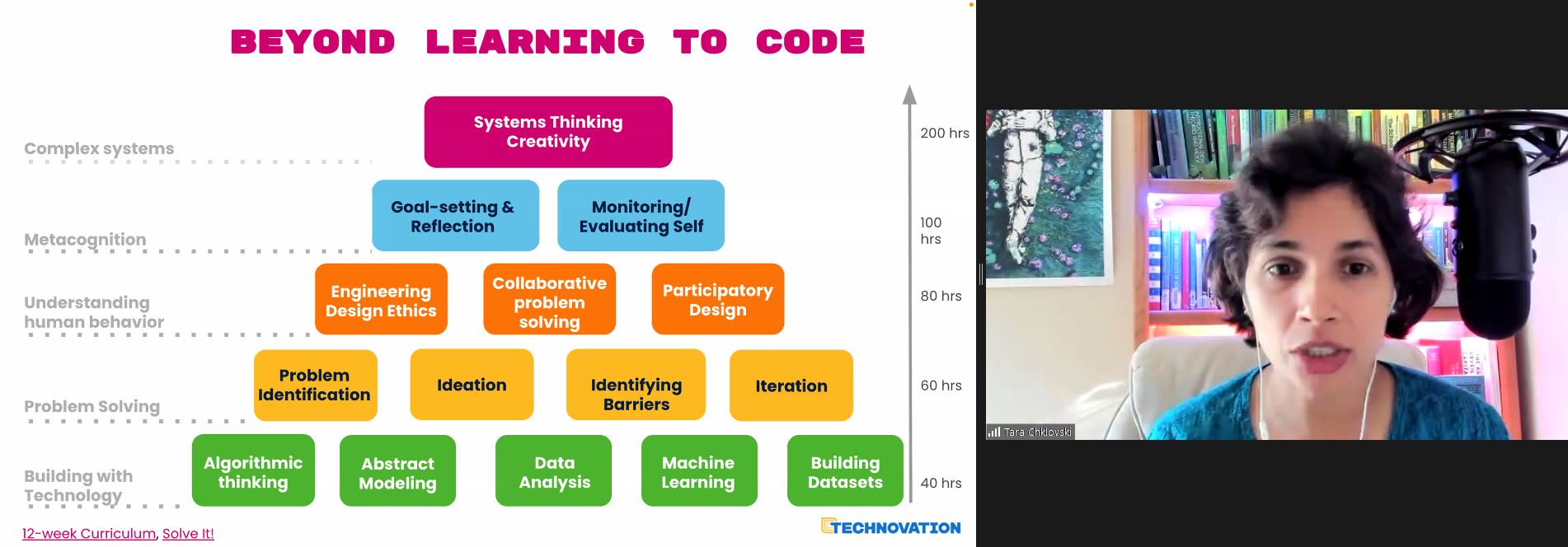
Tara’s talk was extremely engaging (you’ll find the recording below), with videos of young people who had participated in recent years. Technovation works with volunteers and organisations to reach young people in communities where opportunities may be lacking, focussing on low- and middle-income countries. Tara spoke about the 900 million teenage girls in the world, a substantial number of whom live in countries where there is considerable inequality.
To illustrate the impact of the programme, Tara gave a number of examples of projects that students had developed, including:
Early on, the Technovation Challenge had involved the creation of mobile apps, but in recent years, the projects have focused on using AI technologies to solve problems. An key message that Tara wanted to get across was that the focus on real-world problems and teamwork was as important, if not more, than the technical skills the young people were developing.
Technovation has designed an online curriculum to support teams, who may have no prior computing experience, to learn how to design an AI project. Students work through units on topics such as data analysis and building datasets. As well as the technical activities, young people also work through activities on problem-solving approaches, design, and system thinking to help them tackle a real-world problem that is relevant to them. The curriculum supports teams to identify problems in their community and find a path to prototype and share an invention to tackle that problem.
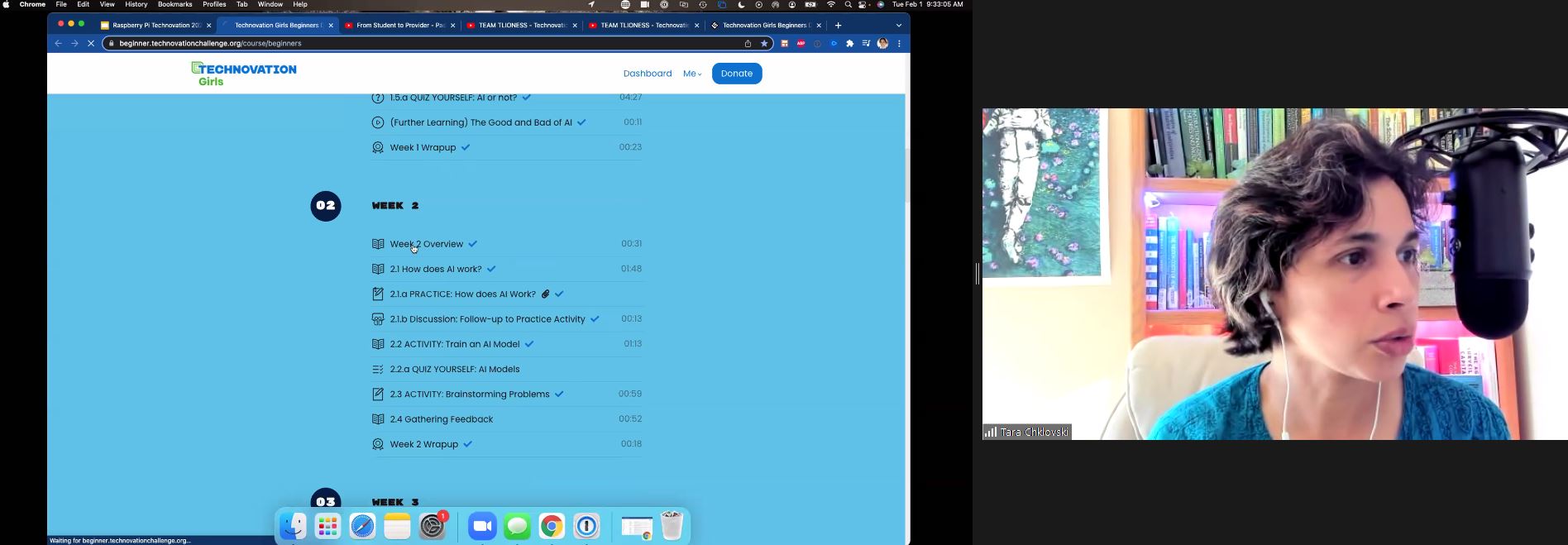
While working through the curriculum, teams develop AI models to address the problem that they have chosen. They then submit them to a global competition for beginners, juniors, and seniors. Many of the girls enjoy the Technovation Challenge so much that they come back year on year to further develop their team skills.
Technovation runs another programme, AI Families, that focuses on families working together to learn AI concepts and skills and use them to develop projects together. Families worked together with the help of educators to identify meaningful problems in their communities, and developed AI prototypes to address them.
There were 20,000 participants from under-resourced communities in 17 countries through 2018 and 2019. 70% of them were women (mothers and grandmothers) who wanted their children to participate; in this way the programme encouraged parents to be role models for their daughters, as well as enabling families to understand that AI is a tool that could be used to think about what problems in their community can be solved with the help of AI skills and principles. Tara was keen to emphasise that, given the importance of AI in the world, the more people know about it, the more impact they can make on their local communities.
Tara shared links to the curriculum to demonstrate what families in this programme would learn week by week. The AI modules use tools such as Machine Learning for Kids.
The results of the AI Families project as investigated over 2018 and 2019 are reported in this paper. The findings of the programme included:
The research describes how the programme worked pre-pandemic. Tara highlighted that although the pandemic has prevented so much face-to-face team work, it has allowed some young people to access education online that they would not have otherwise had access to.
Our goal is to listen to a variety of perspectives through this seminar series, and I felt that Tara really offered something fresh and engaging to our seminar audience, many of them (many of you!) regular attendees who we’ve got to know since we’ve been running the seminars. The seminar combined real-life stories with videos, as well as links to the curriculum used by Technovation to support learners of AI. The ‘question and answer’ session after the seminar focused on ways in which people could engage with the programme. On Twitter, one of the seminar participants declared this seminar “my favourite thus far in the series”. It was indeed very inspirational.
As we near the end of this series, we can start to reflect on what we’ve been learning from all the various speakers, and I intend to do this more formally in a month or two as we prepare Volume 3 of our seminar proceedings. While Tara’s emphasis is on motivating children to want to learn the latest technologies because they can see what they can achieve with them, some of our other speakers have considered the actual concepts we should be teaching, whether we have to change our approach to teaching computer science if we include AI, and how we should engage young learners in the ethics of AI.
I’m really looking forward to our final seminar in the series, with Stefania Druga, on Tuesday 1 March at 17:00–18:30 GMT. Stefania, PhD candidate at the University of Washington Information School, will also focus on families. In her talk ‘Democratising AI education with and for families’, she will consider the ways that children engage with smart, AI-enabled devices that they are becoming part of their everyday lives. It’s a perfect way to finish this series, and we hope you’ll join us.
Thanks to our seminars series, we are developing a list of AI education resources that seminar speakers and attendees share with us, plus the free resources we are developing at the Foundation. Please do take a look.
You can find all blog posts relating to our previous seminars on this page.
The post Linking AI education to meaningful projects appeared first on Raspberry Pi.
Today we’re releasing an exciting new path of projects for young people who want to create 3D worlds, stories, and games. We’ve partnered with Unity to offer any young person, anywhere, the opportunity to take their first steps in creating virtual worlds using real-time 3D.
The Unity Charitable Fund, a fund of the Tides Foundation, has awarded us a generous grant for $50,000 to help underrepresented youth learn to use Unity, upleveling their skills for future career success.
Our new path of six projects for Unity is a learning journey for young people who have some experience of text-based programming and now want to try out building digital 3D creations.
Unity is the world’s leading platform for creating and operating real-time 3D and is hugely popular for creating 3D video games and virtual, interactive worlds and stories. The best thing about it for young people? While professional developers use Unity to create well-known games such as Pokémon Brilliant Diamond and Shining Pearl and Among Us, it is also free for anyone to use.
Young people who learn to use Unity can do more and more complex things with it as they gain experience. Many successful indie games have been made in Unity — maybe a young person you know will create the next indie game sensation!
For young people, our new project path is the ideal introduction to Unity. The new project path:
After young people have completed the path, they’ll have:
Since Unity is a platform used by professional digital creators, young people who follow our new Unity path gain real-world skills that are sought after in the tech sector. While they learn to express their creativity with Unity, young people improve their coding and problem-solving skills and feel empowered because they get to use their imagination to bring their ideas to life.
“Providing opportunities for underrepresented youth to learn critical tech skills is essential to Unity Social Impact’s mission,” said Jessica Lindl, Vice President, Social Impact at Unity. “We’re thrilled that the Raspberry Pi Foundation’s Unity path will allow thousands of student learners to take part in game design in an accessible way, setting them up for future career success.”
The project path includes instructions for how to download and install all the necessary software to start creating with Unity.
Before they can start, young people will need to:
For club volunteers who support young people attending Code Clubs and CoderDojos with the new path, we are going to run two free online workshops in February. During the workshops, volunteers will be introduced to the path and the software setup, and we’ll try out Unity together. Keep your eyes on the CoderDojo and Code Club blogs for details!
Club volunteers, if your participants are creating Blender projects, they can import these into Unity too.
It’s really exciting for us that we can bring this new project path to young people who dream about creating interactive 3D worlds. We hope to see many of their creations in this year’s Coolest Projects Global, our free online tech showcase for young creators all over the world!
The post New free resources for young people to create 3D worlds with code in Unity appeared first on Raspberry Pi.
Explore our new free pathway of environmental digital making projects for young people! These new step-by-step projects teach learners Scratch coding and include real-world data — from data about the impact of deforestation on wildlife to sea turtle tracking information.
By following along with the digital making projects online, young people will discover how they can use technology to protect our planet, all while improving their computing skills.
In the projects, learners are introduced to 5 of the United Nations’ 17 Sustainable Development Goals (SDGs) with an environment focus:
Technology, science, maths, geography, and design all play a part in the projects. Following along with the digital making projects, young people learn coding and computing skills while drawing on a range of data from across the world. In this way they will discover how computing can be harnessed to collect environmental data, to explore causes of environmental degradation, to see how humans influence the environment, and ultimately to mitigate negative effects.
To help us develop these environmental digital making projects, we reached out to a number of organisations with green credentials:
The digital making projects, created with 9- to 11-year-old learners in mind, support young people on a step-by-step pathway to develop their skills gradually. Using the block-based visual programming language Scratch, learners build on programming foundations such as sequencing, loops, variables, and selection. The project pathway is designed so that learners can apply what they learned in earlier projects when following along with later projects!
We’re really excited to help learners explore the relationship between technology and the environment with these new digital making projects. Connecting their learning to real-world scenarios not only allows young people to build their knowledge of computing, but also gives them the opportunity to affect change and make a difference to their world!
With Green goals, learners create an animation to present the United Nations’ environment-focused Sustainable Development Goals.
Through Save the shark, young people explore sharks’ favourite food source (fish, not humans!), as well as the impact of plastic in the sea, which harms sharks in their natural ocean habitat.
With the Tree life simulator project guide, learners create a project that shows the impact of land management and deforestation on trees, wildlife, and the environment.
Computers can be used to study wildlife in areas where it’s not practical to do so in person. In Count the creatures, learners create a wildlife camera using their computer’s camera and Scratch’s new video sensing extension!
Electricity is important. After all, it powers the computer that learners are using! In Electricity generation, learners input real data about the type and amount of natural resources countries across the world use to generate electricity, and they then compare the results using an animated data visualisation.
Understanding the movements of endangered turtles helps to protect these wonderful animals. In this new Turtle tracker project, learners use tracking data from real-life turtles to map their movements off the coast of West Africa.
All of our projects are free to access online at any time and include step-by-step instructions. They can be undertaken in a club, classroom, or at home. Young people can share the project they create with their peers, friends, family, and the wider Scratch community.
Visit the Protect our planet pathway to experience the projects yourself.
The post Digital making projects about protecting our planet appeared first on Raspberry Pi.
Join us for Digital Making at Home: this week, young people can find out how to create web pages with us! Through Digital Making at Home, we invite kids all over the world to code and make along with us and our new videos every week.
So get ready to contribute to the World Wide Web:
Let’s create web pages this week! Watch our video to get coding now.
And tune in on Wednesday 2pm BST / 9am EDT / 7.30pm IST at rpf.io/home to code along with our live stream session and ask us all your question about the World Wide Web, the internet, and web development.
The post Try web development with Digital Making at Home appeared first on Raspberry Pi.
Join us for Digital Making at Home: this week, young people can explore the graphics side of video game design! Through Digital Making at Home, we invite kids all over the world to code along with us and our new videos every week.
So get ready to design video game graphics with us:
Check out this week’s code-along projects!
And tune in on Wednesday 2pm BST / 9am EDT / 7.30pm IST at rpf.io/home to code along with our live stream session to make a Space Invaders–style shooter game in Scratch!
The post Design game graphics with Digital Making at Home appeared first on Raspberry Pi.
Join us for Digital Making at Home: this week, young people can recreate classic* video games with us! Through Digital Making at Home, we invite kids all over the world to code along with us and our new videos every week.
So get ready to code some classic retro games with us:
Check out this week’s code-along projects!
And tune in on Wednesday 2pm BST / 9am EDT / 7.30pm IST at rpf.io/home to code along with our live stream session!
* Be warned that we’re using the terms ‘classic/retro’ in line with the age of our young digital makers — a LOT of games are retro for them ?
The post Code retro games with Digital Making at Home appeared first on Raspberry Pi.
When you’re part of the Raspberry Pi Foundation community, you’re a part of a global family of young creators who bring things to life with the power of digital making. We imagine that, given the current changes we’re all navigating, there are probably more of you who are interested in creating new and exciting things at home. And we want to help you! One of the best things we can do right now is to tap into what connects us as a community, and that’s digital making. So, welcome to Digital Making at Home from the Raspberry Pi Foundation!
Welcome to Digital Making at Home from the Raspberry Pi Foundation
Find out more about Digital Making at Home at http://rpf.io/home Find more digital making projects at http://rpf.io/projects Find out more about the #Raspber…
Whether you wrote your first line of code years ago or minutes ago, or you’ve yet to get started, with Digital Making at Home we’re inviting you on a digital making adventure each week.
At the start of each week, we will share a theme that’s designed to jumpstart your journey of creative expression and problem solving where you create a digital making project you’re proud of. Every week, we’ll have code-along videos led by people from our team. They will walk you through projects from our free projects collection, to give you a place to start and a friendly face to accompany you!
For those of you whose mother language isn’t English, our free project guides are available in up to 30 languages so far.
Each week, when you’ve made something you love using digital making, you can share it with us! Just make sure you have your parent’s or guardian’s permissions first. Then share your project by filling out this form. You might find one of your projects featured in a future blog post for the whole community to see, but no matter what, we want to see what you created!
Just because we’re all at home, that doesn’t mean we can’t create together, so let’s kick off Digital Making at Home with this week’s theme:
Playing a game is a fun way to pass the time, but why not take it to the next level and make your own game? This week, we invite you to create a game that you can play with your friends and family!
Let your imagination run free, and if you’re not sure where to start, here are three code-along videos to help you.
If you’re new to coding, we want to introduce you to Scratch, a block-based coding language that is perfect to start with.
Try out Archery, led by Mr C and his sidekick Xavier:
Digital Making at Home – Archery (beginner)
Access the project guide at http://rpf.io/archery Find out more about Digital Making at Home at http://rpf.io/home Share your thoughts about this content: ht…
Go to the free Archery project guide (also available in Polish).
If you’re looking to go beyond the Scratch surface, dive a little deeper into the coding language with.
Try out CATS!, led by Christina:
Digital Making at Home – CATS! (intermediate)
Access the project guide at http://rpf.io/cats Find out more about Digital Making at Home at http://rpf.io/home Share your thoughts about this content: https…
Go to the free CATS! project guide.
If you’re all Scratched out, move on to Python, a text-based coding language, to take things up a notch.
Try out Turtle Race, led by Marc:
Digital Making at Home – Turtle Race (advanced)
Access the project guide at http://rpf.io/turtle-race Find out more about Digital Making at Home at http://rpf.io/home Share your thoughts about this content…
Go to the free Turtle Race project guide (available in 16 languages).
If you’re creating a game in Scratch, check out the extra videos from Mr C in the ‘Digital Making at Home: Making games’ playlist. These will show you how to add a timer, or a score, or a game over message, or a cool starter screen to any Scratch game!
And if you’re into Python coding and hungry for more creative inspiration, we’ve got you covered. Our own Wireframe magazine, which you can download for free, has a ton of resources about making games. The magazine’s Source Code series shows you how to recreate an aspect of a classic game with a snippet of Python code, and you can read articles from that series on the Raspberry Pi blog. And if that’s still not enough, take a look at our Code the Classics book, which you can also download for free!
Alright friends, you’ve got all you need, so let’s get digital making!
We’d love to know what you think of Digital Making at Home, so that we can make it better for you! Let us know your thoughts by filling in this form.
The post Digital Making at Home: Making games appeared first on Raspberry Pi.


 Lateo.net - Flux RSS en pagaille (pour en ajouter : @ moi)