 Connexion


Can AI support creativity? The technology is often framed as threatening creative work either by automating it or by encouraging imitation. But Professor Rebecca Fiebrink’s work in creative machine learning suggests a more useful way to think about this relationship. In our March research seminar, she showed how machine learning can help people work with meaningful data, communicate ideas through examples, and build new kinds of creative projects.

Our current seminar series focuses on teaching applied AI and how educators of subjects beyond computing can make AI and machine learning relevant in their classroom. We were delighted to have Rebecca join us to share insights about the place of machine learning in artistic creation. In her talk, Rebecca explored three connected questions:
One of the seminar’s key ideas was that machine learning can help creators work with forms of data that already matter to them. Rebecca showed that useful data can come from many sources, including microphones, webcams, phones, wearables, sensors, and body movement. She argued that collecting data is often relatively easy, while interpreting and using it is much harder.
This suggests a different starting point for AI education. Instead of beginning with a large dataset prepared by somebody else, learners can start with data that is meaningful in their own context. For instance, data about hand gestures can be linked to different musical rhythms, colours, or game actions.
The seminar also points to a broader shift in how we think about input if we consider creative work. Traditional computing often treats input as something abstract and controlled: a click, a typed command, or a button press. But many creative practices do not work like that. They depend on timing, gesture, rhythm, touch, sound, and movement.
Instead of asking learners to translate everything into words or code first, Fiebrink suggested that educators can use machine learning to allow learners to begin with movement, demonstration, or sound. This is especially relevant in art forms shaped by flow and physical expression, such as music, dance, performance, and interactive media.
Educators can use machine learning to allow learners to begin with movement, demonstration, or sound [instead of with code].
That creates interesting possibilities for teaching. AI does not have to be explored only through screens, prompts, and abstract models. It can also be approached through embodied activities, where learners use gestures, performance, and experimentation to see how an AI system responds. This can make machine learning feel more connected to forms of making that young people already understand.
A second important theme in the seminar was that machine learning allows people to instruct computers through data and examples. Rebecca suggested that this can be especially valuable in creative and embodied work, where what a person wants to express may be difficult to describe in words, maths, or code alone.
One of the strongest examples in the seminar was ‘Wekinator‘, a tool Rebecca has been developing since 2008. She described the tool’s approach as ‘interactive machine learning’: users demonstrate training examples, train a model, test it in real time, then modify their examples and repeat the process.
This is a useful example for the classroom because it shows that training a machine learning model is not a single event, after which the model is trained and finished. Instead it is an iterative process. With Wekinator, learners can try something out, observe the result, and improve the system by changing the examples they provide. That makes ideas such as testing, evaluation, and bias much easier to discuss.
Rebecca also argued that machine learning can help more people become creators. She contrasted large, one-size-fits-all systems that encourage users to imitate existing styles with smaller, more personal systems that can be trained on new data for specific purposes. She captured this contrast clearly, from prompts such as ‘Write music like Bach!’ to examples of personalised tools and interfaces.
This is an important distinction in teaching and learning. If learners only use AI tools to reproduce familiar outputs, then creative work can become narrow and formulaic. But if they can build or train systems around their own interests, intentions, and materials, then machine learning can support experimentation and authorship.
If [learners] can build or train systems around their own interests, intentions, and materials, then machine learning can support experimentation and authorship.
In the final part of the seminar, Rebecca moved from examples to teaching principles. One of the clearest was that machine learning should be taught at a high level with minimal maths, but not as a black box.
Learners do not need advanced mathematics to start exploring machine learning meaningfully, but they do need to understand that:
Rebecca also argued that small data and interactive machine learning can be highly effective. She highlighted quick experimentation, creative usefulness, and the opportunity to build intuition about ideas such as outliers, features, regularisation, and bias in data. Small-scale activities can make technical ideas more visible and manageable for learners.
Rebecca ended on an inspiring note: she argued that learning and teaching creative machine learning is both worth doing and possible. She pointed to a growing set of tools that support experimentation and original creative work without much maths or coding, including Wekinator, Teachable Machine, Micro:bit CreateAI, and more.
The seminar also addressed some important limitations. Rebecca warned that commercial tools are not always good at supporting learning or genuine creative work. She also discussed the difficulty of making generative AI tools safe for children, noting the need for built-in filters, moderation, prompt design, and extensive testing. Therefore, what’s important is to think about what learners are actually learning, and to make space for experimentation without losing sight of safety and critical thinking.
Our research seminars brings together educators and researchers to explore key questions in computing education.
Next in our series on applied AI, Prof. Gianfranco Polizzi (University of Birmingham, UK) will talk about media literacy in the age of AI. Sign up now to join the seminar on 16 June, 17:00 BST:
The post Can AI support creativity? What educators can learn from creative machine learning appeared first on Raspberry Pi Foundation.
At a time when artificial intelligence (AI) systems and tools based on large language models (LLMs) are being rapidly introduced into industries and daily life, the basic definition of ‘thinking’ and the essential skills we teach the next generation are being called into question.
In this interview, Dr Shuchi Grover, a leading voice in computing education who has recently become our Director of Research and Impact, shares how her work in computational thinking is evolving.
Most people in the education and CS education world know me from my research in computational thinking and K–12 CS education over the last 15 years. What is less known, perhaps, is that I started my career as a software engineer after completing my undergraduate and graduate studies in CS. About 25 years ago, I made a concerted shift to education, completing a Masters in Education from Harvard University in 2003, and then after a gap earning a PhD in the learning sciences (with a focus on K–12 CS education) from Stanford University in 2014.
Over these last two and a half decades, I have trained my efforts on helping young learners and school-aged children develop 21st-century competencies in computer science, data science, AI, and cybersecurity; as well as on STEM and non-STEM learning experiences that integrate computational thinking, AI, CS, and data science. My research has also attended to promoting interest and a sense of belonging in CS among learners from historically underrepresented groups.
I recently joined the Raspberry Pi Foundation as Director of Research and Impact. I feel very fortunate, as this role builds on all the work I have done over the course of my professional life and also affords me an unparalleled opportunity on a global scale to continue this work I’ve been so passionate about in both formal and non-formal learning settings.
This question is deep and thorny, and I’m not sure we have a complete answer to it yet. I believe that thinking as a human endeavour continues to be valid and means what it always has meant: a cognitive process that involves making new connections and creating meaning. In the education literature, thinking is often equated to problem solving. So teaching students ‘thinking skills’ has meant teaching them logic and ways to solve problems — typically in the context of a domain. In the context of K–12 CS education, computational thinking essentially means computational problem solving.
What changes with LLMs is not the definition of thinking itself, but rather what thinking skills students need most urgently. For students, the idea of ‘critical thinking’ has become much more critical (no pun intended) in an era when LLM-based tools offer quick and easy ways to produce answers. Students need to be equipped with the skills to evaluate AI outputs, and to follow up in deliberate and mindful ways to ensure that the AI-generated answer they ultimately take away is factually accurate, unbiased (to the extent that it can be), and valid for their context. They should also have the ability to recognise when an output is not suitable for their purposes, and when they would be better off approaching a problem or project as they would have in the pre-LLM era. These kinds of metacognition and evaluation skills must be crucial elements of AI literacy training.
Over the past 5 to 10 years, the scope, pervasiveness, and complexity of computing applications have grown substantially. This growth has been propelled by developments in AI and machine learning (ML). Many of the ML methods that underpin these developments have been in existence for much longer, but two key ingredients were still needed: large quantities of data, and the requisite computational power to process those quantities of data efficiently. Around 10 years ago, these became a reality. Combining so-called ‘big data’ captured from the countless human activities on the World Wide Web with new, powerful graphics processing units (GPUs) enabled AI scientists to build powerful prediction, classification and, most recently, generative AI models. Thus these scientists ushered in a new paradigm of computing that is data-driven.
This has expanded the scope of what we need to teach students as part of CS education. In the context of AI and ML, you now have traditional programs that follow the algorithmic, deterministic paradigm of programming, but also ML applications that follow a data-driven, non-deterministic/probabilistic paradigm. CS curricula must help students develop an understanding of both. And data and data science are the crucial connective tissue between CS and AI/ML, so data literacy (which also captures elements of data agency and data equity) is critical to CS and AI learning experiences.
Ethical issues in the context of data and AI have become more heightened and pertinent: issues of data privacy, safety, bias, responsible and explainable AI, and most importantly, impacts of AI systems on society. Understanding of these issues — what we can call ‘sociotechnical literacy’ — needs to be much more central to CS education now.
Let me begin by saying that there is no AI without CS. So understanding CS is important and foundational even in this age of AI and LLMs. The rationale for teaching CS and coding to learners aged 5 to 18 has always been primarily about (a) preparing the next generation to understand, and thrive in, a world where countless aspects of day-to-day life are driven by computing, and (b) providing them with the tools and skills for problem solving and creative expression. That goal has not changed. Foundational coding skills are still important and relevant for learners.
However, there is the new reality we must contend with: it is now easy to produce accurate code using LLM-based tools. We need good research on what this means in terms of how we teach coding. There are many questions related to this issue for which we need empirical evidence: What are the foundational skills for programming effectively with AI tools? What CS topics, skills, and concepts must we emphasise or de-emphasise? Could teachers be supported by generative AI tools in teaching coding, and if so, how? Will use of AI tools result in poor learning for students? How might students leverage LLM tools in ways that don’t harm their foundational understanding of coding concepts, and at what age and stage? What kinds of LLM tools are safe and suitable, and what preparation must students have before they use them? What bigger, more sophisticated projects might students create with the help of an LLM tool? How might LLM tools aid student learning through formative feedback? Can LLM tools aid in metacognition by prompting reflection at the right moments in a project? These are just some of the many, many questions we need to answer to shape CS education over the coming years.
A version of this interview also appears in issue 29 of Hello World, available as a free download. Subscribe to the magazine to never miss an upcoming issue.
The post What does ‘thinking’ mean now? appeared first on Raspberry Pi Foundation.
Where do great research ideas come from in computer science education? We might think of research breakthroughs as a single moment of genius, but in reality impactful research is often the result of many years of iterative development. In November’s research seminar, we heard from Karl-Emil Kjær Bilstrup, a researcher at the University of Copenhagen, about his work to develop ML-Machine. This work uses embodied learning principles and the BBC micro:bit to introduce learners to machine learning concepts. Findings from this research have been used to develop the micro:bit CreateAI resources, and in this blog, we will explain the research journey from initial small-scale work to educational resources used by many young learners around the world.
In Karl-Emil’s first research study, students used prompt cards to develop ideas for machine learning applications that could solve real-world problems, and to discuss the ethical dilemmas associated with their solutions. Students found it difficult to address these ethical dilemmas in their designs; for example, their ideas often featured a trade-off of user privacy. The findings from this research informed Karl-Emil’s next study, which moved from hypothetical scenarios to implementing machine learning in real-world settings.
The ‘Machine Learning Machine’ study made machine learning processes tangible for students through the use of two physical boxes, shown in the picture below. Students created drawings and fed them into the first box to train a model, and then tested the model by placing new drawings under a camera in the second box and having the model produce predictions of what the drawings showed. For example, students could draw pictures of the sun to represent daytime and the moon to represent nighttime to train a model to predict whether new drawings represented day or night. The machine was built for slow interaction, giving students time to think about the concepts and practices that they were developing. In a follow-up study, a new version of the Machine Learning Machine had been designed, which was controlled using a graphical user interface (GUI). This allowed users to “unbox” and influence parts of the machine learning process. For example, students could adjust the number of complete passes (called ‘epochs’) through the training data to improve the model’s accuracy.
The two studies with the Machine Learning Machines provided many useful findings for teaching about machine learning with K–12 (primary and secondary) learners. However, two constraints remained: firstly, there were limited opportunities for whole-class work because there was only one Machine Learning Machine, and secondly, learning experiences needed to be better connected to examples from students’ daily lives. As a result, the next iteration in Karl-Emil’s research involved using the micro:bit, which ensured access to a tangible device for every student, and a new graphical platform called ML-Machine that students could interact with.
The micro:bit is a small, programmable computing device that features sensors to gather data from the immediate environment. For example, the accelerometer is a motion sensor that can detect when the micro:bit is tilted from left to right, backwards and forwards, and up and down. Using the micro:bit with ML-Machine and some common household objects, students can create simple machine learning models that use data from the micro:bit’s accelerometer to detect whether the micro:bit is moving. This is a very different approach from rule-based programs on the micro:bit, where students might use programming constructs such as if statements to detect movement if the numerical reading from the accelerometer is above a certain value. Here, a machine learning model trained using a set of 20 examples is used to analyse live data readings and produce predictions about whether the micro:bit is moving.
In our seminar, Karl-Emil gave a live demonstration of the ML-Machine toolkit, so we highly recommend watching the recording to see how this toolkit brings machine learning concepts to life.
ML-Machine is the precursor to the micro:bit CreateAI resources, and the software is fully open-source. However, the innovation doesn’t stop there: Karl-Emil also explained that he is currently developing a new tool called math.ml-machine.org, where students can train a neural network and see a visualised k-nearest neighbour model to explore how a model makes predictions. The research journey is continuing, with new possibilities for educational opportunities to teach about machine learning.
The idea of embodied learning is interwoven throughout all of Karl-Emil’s research projects and is a cornerstone of all of his work. Embodied learning suggests that we learn more effectively when our whole body is involved in the learning process, not just our minds. For example, in the work described in this seminar, the Machine Learning Machines and the micro:bit were all tangible devices that students could touch and see.
Embodied learning is particularly important in activities that involve working with data-driven systems. In traditional programming activities, the flow of code can be traced transparently through a program. However, machine learning models are more opaque, and their outputs cannot be traced step by step. Students can benefit from using bodily movements and sensorimotor information to help understand machine learning concepts.
The ML-Machine toolkit was designed to support students to learn through embodied learning in three different ways:
Embodied learning helped students grasp concepts such as data quality. They could see how their bodily movements were being translated into digital data, and could spot when movements that appeared different to them were being classified as similar by the ML-Machine model. One case study participant described that the immediate feedback on screen made the concept of machine learning feel as if it were “coming to life as they [the students] manipulate something themselves and they’ve got control over it”.
Karl-Emil’s work shows how research ideas can be used in the classroom through a cycle of discovery, design, and reflection. From prompt cards exploring ethics to tangible machines and the micro:bit-based ML-Machine, his research shows how embodied learning can make complex ideas like machine learning not only understandable, but deeply engaging for young learners. The micro:bit CreateAI resources are a great example of how research findings can evolve into accessible, hands-on tools that empower educators and students alike. As this work continues to grow, it invites us to imagine new ways for learners to experience machine learning not as abstract theory, but as something they can see, feel, and shape with their own hands.
If you’d like to try out some of the ideas from this seminar, here are some useful resources:
Join us at our next seminar on Tuesday 17 March from 17:00 to 18:30 GMT to hear Rebecca Fiebrink (University of the Arts London speak about teaching AI for creative practitioners. This will be the second seminar in our new series on how to teach about AI across disciplines. We hope to see you there!
To sign up and take part in our research seminars, click below:
You can also view the schedule of our upcoming seminars, and catch up on past seminars on our previous seminars page.
The post Embodied machine learning: From research ideas to classroom activities appeared first on Raspberry Pi Foundation.
Research indicates that teaching learners to use and create with data-driven technologies such as AI and machine learning (ML) requires an entirely different approach for solving problems compared to traditional programming activities.
In this blog, we share the new data paradigms framework that we have developed through research and used to help improve our understanding about how to teach and learn about AI and data science. We also invite you to register your interest in participating in our next collaborative study on the topic.
Let’s start by highlighting an important distinction between different approaches to designing systems. In a knowledge-based approach to system design, a set of rules (e.g., if-then statements) are written for the system to execute. Every rule is explicitly defined. This approach is called ‘rule-based’, ‘symbolic’, or ‘logic-based’. For example, a developer could create a program that simulates dialogue by writing specific lines of code to handle a greeting, such as “IF user says “Hello” THEN output “Hi!”. If the user types “Greetings!” instead, the program fails because it has no rule for that specific word.
Knowledge-based models are often said to be explainable by design. This means the logic is accessible and interpretable and developers can trace the exact steps taken to produce an output. For example, if developers manually classify restaurant reviews as positive or negative using a pre-defined set of criteria, the rules their restaurant classifying system follows are entirely explicit, and the path from input to output is clear and explainable.
By contrast, in a data-driven approach to system design developers do not write specific rules. Instead, they collect lots of data and train a model. In the dialogue simulator example, they would collect hundreds of examples of greetings and train a model to the pattern of a greeting. If the user types “Greetings!”, the system generates a response based on the patterns in its training data.
Data-driven models are often opaque. In other words, the internal workings of these ML models are hidden. While we can see our input and the system’s output, the internal mathematical process is so complex — often involving layers of calculations and abstractions — that we cannot simply “explain” why a specific output was produced. For example, developers can create a classification model by training a neural network using thousands of images. Due to the large quantity of data used to train the model, and complex internal parameters and hidden layers, developers and users of the system cannot understand or explain the logic or features that lead to a specific output. These kinds of models are often referred to as a “black box” (as opposed to a “glass” or “clear” box).
Researchers have argued that the move from knowledge-based (or rule-based) programming to data-driven system design represents a paradigm shift and creates unique challenges for educators. The challenge is helping students shift from the expectation that a system produces a single ‘right’ answer — characteristic of traditional rule-based programming — toward an understanding that systems trained on large quantities of data produce outcomes that aren’t always fixed or explainable. If the current instruction in the classroom still relies heavily on traditional rule-based programming approaches, we might be setting students up for misconceptions.
In our research work on AI and data science at the Raspberry Pi Computing Education Research Centre, we analysed 84 research studies about the teaching and learning of data science. We categorised learning activities used in the studies to understand whether they were (i) knowledge-based or data-driven, and (ii) the extent to which the underlying models used were transparent or opaque. This led us to define four distinct data paradigms:
The data paradigms framework helps us to distinguish between different kinds of modeling activities students take part in and how instructional approaches could be classified across one or more paradigms. For instance, we found that most data-driven activities were also opaque (DD + O), usually meaning that students collected and used data to train a model, but how the system worked was opaque. This pattern, where the data is visible but the model is not explainable, risks students forming misconceptions about the capabilities and limitations of data-driven systems. Without understanding how outputs are generated, students may expect data-driven ML systems to operate like fully explainable (or transparent) ones.
We think that lessons are needed in the data-driven opaque (DD + O) quadrant to explicitly teach students about how data-driven systems work and the role they play in everyday contexts. However, when teaching data-driven opaque (DD + O) activities, learners’ attention needs to be directed to concepts such as model confidence, data quality, and model evaluation. Since an ML model is not inherently explainable, we need to teach students to use post-hoc explanation methods, such as testing different inputs to see how a system’s output changes. To prepare students for this learning experience, we think that first introducing activities about rule-based systems (knowledge-based + transparent; KB + T) or simple data exploration, such as linear regression or data visualisation (data-driven + transparent; DD + T) may serve as a ‘bridge’ to understanding data-driven modeling by helping students to distinguish between systems built from specific logical rules and systems trained on data.
We believe the idea of data paradigms can serve as a way of framing teaching activities about data science and help educators and students to consider the transition between different paradigms when engaging with the systems we interact with every day.
KS2 teachers, participate in our new study!
We’re launching a new study to explore how to teach learners aged 9 to 11 about data-driven computing. The study will take place in collaboration with KS2 teachers (Y4/Y5/Y6) in England, Scotland and Wales and look at:
Our goal is to find practical ways to help teachers build children’s confidence in working with data in computing lessons. The study will be collaborative, with two workshops held throughout 2026, and we’re inviting KS2 teachers (Y4/Y5/Y6) to take part.
You can express your interest in participating by filling in this form:
The post A research-led framework for teaching about models in AI and data science appeared first on Raspberry Pi Foundation.
Over the first weekend in November, members of the global Code Club community came together for two inspiring days of learning, creativity and connection. The annual event celebrates the people who make Code Clubs happen, allowing them to share ideas, explore new tools, and connect with others who help young people learn to code.
Saturday began with hands-on sessions that brought creativity and technology together, exploring large language models and prompt engineering in Collaborating with LLMs and being a prompt boss. There was a lot of laughter from attendees about how large language models can produce confident but incorrect answers if given vague prompts, but many left inspired to experiment with new technologies in their own clubs.
“First time there and it was amazing. Met loads of great people and the amazing code club crew. I learnt loads of new skills around AI and Arduino.” – An attendee
Explore AI with creators in your club using our AI and machine learning projects.
Collaboration that counts brought mentors together to discuss common challenges like volunteer retention, limited resources, and communication barriers. A crowd favourite was a shared volunteer toolkit, as well as event checklists and safeguarding resources.
“What I enjoyed most about the Clubs Conference was the opportunity to meet other facilitators and hear their stories — their successes and challenges. These conversations validated the volunteer work I do and reminded me of the impact of our clubs.” – An attendee
From the theatre sessions, you can watch Inclusive learning – Supporting Deaf learners in clubs which was both moving and insightful. We learnt that visual demonstrations, colour cues, and repetition were key to supporting Deaf learners. One memorable quote captured the spirit of the session:
“The children couldn’t speak to us. The children — we couldn’t hear their voices but by the eighth week we were able to hear their voices from what they built on the screen and it was echoing all around the classroom.” – Chidi Duru
Find out more about Chidi’s joy of coding alongside Deaf creators.
The weekend’s talks showcased the reach of Code Club worldwide, with volunteers sharing their experiences of collaboration, sustainability, and creativity.
Watch Lessons from resourceful Code Clubs in India, which highlighted the ingenuity of young learners in under-resourced settings, while Hands-on with the Raspberry Pi Pico showcased low-cost, high-impact projects from Kenya and South Africa.
Speakers showed how community clubs adapt to local needs with unplugged activities and coding games inspired by cricket and kabaddi, empowering young people to solve real problems and celebrate curiosity through play. Excitingly, these new resources will be launching early next year; keep an eye on our activities page to be among the first to try them out!
In the session Code Club Projects Unplugged, facilitators shared the idea of “hiding the vegetables” — hiding the learning inside the fun. Whether through a collaborative Scratch game, a micro:bit prop on stage, or a Pico gadget solving a real problem, this approach helps young people learn through play. They remember the joy, and the skills come naturally.
Teaching tech away from the computer screen shared a fun unplugged cybersecurity activity, The Chicken Shop, where learners role-play social engineering scenarios. Its success came from clear printed instructions, movement, humour, and strong debriefing.
Learning coding outside the box explored how to engage young people with diverse learning styles while the Arduino crash course gave attendees a taste of physical computing and C++ programming in action. Workshops on AI, sustainability, and youth empowerment with Raspberry Pi computers and Unlocking Code Club resources helped club leaders discover practical ways to inspire problem-solving and make use of all the support available through Code Club.
The message from the sessions was clear: young people learn best when technology is human and hands-on.
Coolest Projects – get involved! championed creativity over competition. Any young person under 18 can submit their project, including unfinished ideas. In-person and online showcases celebrate progress, imagination, and teamwork.
Speaking on the closing panel, Code Club leader Rachael Coultart talked about the importance of Coolest Projects as a rare platform for children to talk about their learning. She spoke about the experience of one particular child, explaining that it had made a powerful impression on her, saying:
“It had such a huge impact. I felt so proud of her and what she’d achieved. Afterwards, her parents told me that they felt it was the first time she had really been seen.”
The community is united in its commitment to making Code Clubs inclusive, creative, and sustainable.
“Thank you. Clubs Conference is a highlight of my year.” – An attendee
If you want to stay up to date with the latest news, events and opportunities from Code Club, sign up for our newsletter and be part of the growing global community.
The post Code Club Conference 2025: Creativity, community, and collaboration in Cambridge appeared first on Raspberry Pi Foundation.
Current artificial intelligence (AI) methods, especially machine learning (ML), rely heavily on data. To complement our work on AI literacy, we have been investigating what data science teaching resources and education research are currently available. Our goal is to work out what data science concepts should be taught in a data science curriculum for schools.
Read on to find out what resources and materials we have reviewed, and what concept themes we have identified.
Data science is an interdisciplinary science of learning from large datasets, aided by modern computational tools and methods (Ow‑Yeong et al., 2023). We see data science skills as fundamental for using, creating, and thinking critically about:
To navigate a world where decision making in many areas is influenced by data-driven insights and predictions, young people need to be taught about data science. Data science skills empower young people to become critical thinkers, discerning consumers, adaptable professionals, and informed citizens.
Worldwide, countries are taking a variety of approaches to introducing data science into their education systems, as highlighted in a 2024 report from the coalition Data Science 4 Everyone.

In some countries, such as India and Israel, data science education is an established school subject. It is taught as part of the curriculum in at least one of the primary, secondary, or post-16 age phases. Meanwhile in other countries, for example Canada, Germany, and Poland, data science is a very new school subject, or there are still only recommendations to develop it into a school subject.
While we are currently considering what a comprehensive data science curriculum should include, we already offer several resources to support you with your teaching about data science and data-driven technologies. You can find a list of these resources at the end of this blog. Now, however, I’ll give you an overview of our recent work to identify concepts for a data science curriculum that fits with our approach to AI literacy.
To answer the question ‘What should we teach about data science to learners aged 5 to 19?’, we undertook a grey literature review of data science teaching materials. A grey literature review is structured like an academic literature review and conducted with the same rigour. The difference is that a grey literature review also considers publications that have not been peer-reviewed, including reports, white papers, curriculum materials, and similar resources.
To orient our work, we combined four frameworks for data science and AI/ML education:
With these combined frameworks as our map, we reviewed 79 data science learning resources. The resources varied:
From among the 79 resources, we chose 9 that included clear learning outcomes, and that together covered a wide field of concepts. We examined these 9 in detail to extract 181 explicit and implicit data science concepts. Next, we grouped the concepts into themes, and finally we refined these themes by comparing them against the four frameworks listed above.
The themes we have identified for a data science curriculum are:
This set of themes both fits with the frameworks by Olari and Romeike and Data Science 4 Everyone, and expands them by covering ML principles and programming approaches and calling out data bias and ethics.
Through our grey literature review on data science education, we’ve:
Our next step is to shape these candidate concepts into a progression framework to describe their relationships and establish which concepts could be taught at each age or phase of schooling.
The literature review also gave us an overview of the pedagogical approaches and tools used for teaching data science concepts. These findings will become useful once we start designing learning activities.
You’ll hear more about how this work is going here on our blog and on our social channels. In the meantime, comment below to let us know what you think about the themes, or to tell us what you’d like to see in a data science curriculum for the learners you work with.
You can read about our thinking behind the data science-related teaching resources we’ve created so far in our ‘Data and information within the computing curriculum’ report from 2019.
You might also be interested in exploring the Experience AI programme, which offers everything teachers need to help students develop a foundational understanding of data-driven AI technologies, their social and ethical implications, and the role that AI can play in their lives.
Our free online course ‘Teach teens computing: Machine learning and AI‘ helps teachers understand and explain the types of problems that ML can help to solve, discuss how AI is changing the world, and think about the ethics of collecting data to train a ML model.
Teaching young people to understand data-driven AI technologies means teaching them thinking skills that are different to those needed to understand rule-based computer systems. You can read about these Computational Thinking 2.0 skills in our Quick Read PDF.
Our current research seminar series focuses on teaching about AI and data science. Sign up for an upcoming seminar session (the next one is on 11 November) or catch up on past sessions to find out what the latest research findings are in this area. You can also revisit our 2021/22 series on the same topic to see how work in this area has developed. The Raspberry Pi Computing Education Research Centre also has ongoing projects in the area of AI education for you to explore.
The post What should be included in a data science curriculum for schools? appeared first on Raspberry Pi Foundation.
AI, machine learning (ML), and data science infuse our daily lives, from the recommendation functionality on music apps to technologies that influence our healthcare, transport, education, defence, and more.
What jobs will be affected by AL, ML, and data science remains to be seen, but it is increasingly clear that students will need to learn something about these topics. There will be new concepts to be taught, new instructional approaches and assessment techniques to be used, new learning activities to be delivered, and we must not neglect the professional development required to help educators master all of this.
As AI and data science are incorporated into school curricula and teaching and learning materials worldwide, we ask: What’s the research basis for these curricula, pedagogy, and resource choices?
In 2024, we showcased researchers who are investigating how AI can be leveraged to support the teaching and learning of programming. But in 2025, we look at what should be taught about AI, ML, and data science in schools and how we should teach this.
We are very excited that we have already secured several key researchers in the field.
On 21 January, Shuchi Grover will kick off the seminar series by giving an important overview of AI in the K–12 landscape, including developing both AI literacy and AI ethics. Shuchi will provide concrete examples and recently developed frameworks to give educators practical insights on the topic.
Our second session will focus on a teacher professional development (PD) programme to support the introduction of AI in Upper Bavarian schools. Franz Jetzinger from the Technical University of Munich will summarise the PD programme and share how teachers implemented the topic in their classroom, including the difficulties they encountered.
Again from Germany, Lukas Höper from Paderborn University, with Carsten Schulte will describe important research on data awareness and introduce a framework that is likely to be key for learning about data-driven technology. The pair will talk about the Data Awareness Framework and how it has been used to help learners explore, evaluate, and be empowered in looking at the role of data in everyday applications.
Our April seminar will see David Weintrop from the University of Maryland introduce, with his colleagues, a data science curriculum called API Can Code, aimed at high-school students. The group will highlight the strategies needed for integrating data science learning within students’ lived experiences and fostering authentic engagement.
Later in the year, Jesús Moreno-Leon from the University of Seville will help us consider the thorny but essential question of how we measure AI literacy. Jesús will present an assessment instrument that has been successfully implemented in several research studies involving thousands of primary and secondary education students across Spain, discussing both its strengths and limitations.
Our seminars are designed to be accessible to anyone interested in the latest research about AI education — whether you’re a teacher, educator, researcher, or simply curious. Each session begins with a presentation from our guest speaker about their latest research findings. We then move into small groups for a short discussion and exchange of ideas before coming back together for a Q&A session with the presenter.
Attendees of our 2024 series told us that they valued that the talks “explore a relevant topic in an informative way“, the “enthusiasm and inspiration”, and particularly the small-group discussions because they “are always filled with interesting and varied ideas and help to spark my own thoughts”.
The seminars usually take place on Zoom on the first Tuesday of each month at 17:00–18:30 GMT / 12:00–13:30 ET / 9:00–10:30 PT / 18:00–19:30 CET.
You can find out more about each seminar and the speakers on our upcoming seminar page. And if you are unable to attend one of our talks, you can watch them from our previous seminar page, where you will also find an archive of all of our previous seminars dating back to 2020.
To attend the seminars, please register here. You will receive an email with the link to join our next Zoom call. Once signed up, you will automatically be notified of upcoming seminars. You can unsubscribe from our seminar notifications at any time.
We hope to see you at a seminar soon!
The post How can we teach students about AI and data science? Join our 2025 seminar series to learn more about the topic appeared first on Raspberry Pi Foundation.
We’re pleased to share a new collection of Code Club projects designed to introduce creators to the fascinating world of artificial intelligence (AI) and machine learning (ML). These projects bring the latest technology to your Code Club in fun and inspiring ways, making AI and ML engaging and accessible for young people. We’d like to thank Amazon Future Engineer for supporting the development of this collection.
By engaging with AI and ML at a young age, creators gain a clearer understanding of the capabilities and limitations of these technologies, helping them to challenge misconceptions. This early exposure also builds foundational skills that are increasingly important in various fields, preparing creators for future educational and career opportunities. Additionally, as AI and ML become more integrated into educational standards, having a strong base in these concepts will make it easier for creators to grasp more advanced topics later on.
We’re excited to offer a range of AI and ML projects that feature both video tutorials and step-by-step written guides. The video tutorials are designed to guide creators through each activity at their own pace and are captioned to improve accessibility. The step-by-step written guides support creators who prefer learning through reading.
The projects are crafted to be flexible and engaging. The main part of each project can be completed in just a few minutes, leaving lots of time for customisation and exploration. This setup allows for short, enjoyable sessions that can easily be incorporated into Code Club activities.
The collection is organised into two distinct paths, each offering a unique approach to learning about AI and ML:
Machine learning with Scratch introduces foundational concepts of ML through creative and interactive projects. Creators will train models to recognise patterns and make predictions, and explore how these models can be improved with additional data.
The AI Toolkit introduces various AI applications and technologies through hands-on projects using different platforms and tools. Creators will work with voice recognition, facial recognition, and other AI technologies, gaining a broad understanding of how AI can be applied in different contexts.
Inclusivity is a key aspect of this collection. The projects cater to various skill levels and are offered alongside an unplugged activity, ensuring that everyone can participate, regardless of available resources. Creators will also have the opportunity to stretch themselves — they can explore advanced technologies like Adobe Firefly and practical tools for managing Ollama and Stable Diffusion models on Raspberry Pi computers.
One of the highlights of our new collection is Chomp the cheese, which uses Scratch Lab’s experimental face recognition technology to create a game students can play with their mouth! This project offers a playful introduction to facial recognition while keeping the experience interactive and fun.
Fish food uses Machine Learning for Kids, with creators training a model to control a fish using voice commands.
In Teach a machine, creators train a computer to recognise different objects such as fingers or food items. This project introduces classification in a straightforward way using the Teachable Machine platform, making the concept easy to grasp.
Apple vs tomato also uses Teachable Machine, but this time creators are challenged to train a model to differentiate between apples and tomatoes. Initially, the model exhibits bias due to limited data, prompting discussions on the importance of data diversity and ethical AI practices.
Dance detector allows creators to use accelerometer data from a micro:bit to train a model to recognise dance moves like Floss or Disco. This project combines physical computing with AI, helping creators explore movement recognition technology they may have experienced in familiar contexts such as video games.
Dinosaur decision tree is an unplugged activity where creators use a paper-based branching chart to classify different types of dinosaurs. This hands-on project introduces the concept of decision-making structures, where each branch of the chart represents a choice or question leading to a different outcome. By constructing their own decision tree, creators gain a tactile understanding of how these models are used in ML to analyse data and make predictions.
These AI projects are designed to support young people to get hands-on with AI technologies in Code Clubs and other non-formal learning environments. Creators can also enter one of their projects into Coolest Projects by taking a short video showing their project and any code used to make it. Their creation will then be showcased in the online gallery for people all over the world to see.
The post Introducing new artificial intelligence and machine learning projects for Code Clubs appeared first on Raspberry Pi Foundation.
We’re really excited to see that Experience AI Challenge mentors are starting to submit AI projects created by young people. There’s still time for you to get involved in the Challenge: the submission deadline is 24 May 2024.
If you want to find out more about the Challenge, join our live webinar on Wednesday 3 April at 15:30 BST on our YouTube channel.
During the webinar, you’ll have the chance to:
Subscribe to our YouTube channel and press the ‘Notify me’ button to receive a notification when we go live.
The Experience AI Challenge, created by the Raspberry Pi Foundation in collaboration with Google DeepMind, guides young people under the age of 18, and their mentors, through the exciting process of creating their own unique artificial intelligence (AI) project. Participation is completely free.
Central to the Challenge is the concept of project-based learning, a hands-on approach that gets learners working together, thinking critically, and engaging deeply with the materials.
In the Challenge, young people are encouraged to seek out real-world problems and create possible AI-based solutions. By taking part, they become problem solvers, thinkers, and innovators.
And to every young person based in the UK who creates a project for the Challenge, we will provide personalised feedback and a certificate of achievement, in recognition of their hard work and creativity. Any projects considered as outstanding by our experts will be selected as favourites and its creators will be invited to a showcase event in the summer.
You don’t need to be an AI expert to bring this Challenge to life in your classroom or coding club. Whether you’re introducing AI for the first time or looking to deepen your young people’s knowledge, the Challenge’s step-by-step resource pack covers all you and your young people need, from the basics of AI, to training a machine learning model, to creating a project in Scratch.
In the resource pack, you will find:
The pack offers a safety net of scaffolding, support, and troubleshooting advice.
By bringing the Experience AI Challenge to young people, you’re inspiring the next generation of innovators, thinkers, and creators. The Challenge encourages young people to look beyond the code, to the impact of their creations, and to the possibilities of the future.
You can find out more about the Experience AI Challenge, and download the resource pack, from the Experience AI website.
The post The Experience AI Challenge: Find out all you need to know appeared first on Raspberry Pi Foundation.
In the rapidly evolving digital landscape, students are increasingly interacting with AI-powered applications when listening to music, writing assignments, and shopping online. As educators, it’s our responsibility to equip them with the skills to critically evaluate these technologies.
A key aspect of this is understanding ‘explainability’ in AI and machine learning (ML) systems. The explainability of a model is how easy it is to ‘explain’ how a particular output was generated. Imagine having a job application rejected by an AI model, or facial recognition technology failing to recognise you — you would want to know why.
Establishing standards for explainability is crucial. Otherwise we risk creating a world where decisions impacting our lives are made by opaque systems we don’t understand. Learning about explainability is key for students to develop digital literacy, enabling them to navigate the digital world with informed awareness and critical thinking.
AI models can have a significant impact on people’s lives in various ways. For instance, if a model determines a child’s exam results, parents and teachers would want to understand the reasoning behind it.
Artists might want to know if their creative works have been used to train a model and could be at risk of plagiarism. Likewise, coders will want to know if their code is being generated and used by others without their knowledge or consent. If you came across an AI-generated artwork that features a face resembling yours, it’s natural to want to understand how a photo of you was incorporated into the training data.
Explainability is about accountability, transparency, and fairness, which are vital lessons for children as they grow up in an increasingly digital world.
There will also be instances where a model seems to be working for some people but is inaccurate for a certain demographic of users. This happened with Twitter’s (now X’s) face detection model in photos; the model didn’t work as well for people with darker skin tones, who found that it could not detect their faces as effectively as their lighter-skinned friends and family. Explainability allows us not only to understand but also to challenge the outputs of a model if they are found to be unfair.
In essence, explainability is about accountability, transparency, and fairness, which are vital lessons for children as they grow up in an increasingly digital world.
Some models, like decision trees, regression curves, and clustering, have an in-built level of explainability. There is a visual way to represent these models, so we can pretty accurately follow the logic implemented by the model to arrive at a particular output.
By teaching students about AI explainability, we are not only educating them about the workings of these technologies, but also teaching them to expect transparency as they grow to be future consumers or even developers of AI technology.
A decision tree works like a flowchart, and you can follow the conditions used to arrive at a prediction. Regression curves can be shown on a graph to understand why a particular piece of data was treated the way it was, although this wouldn’t give us insight into exactly why the curve was placed at that point. Clustering is a way of collecting similar pieces of data together to create groups (or clusters) with which we can interrogate the model to determine which characteristics were used to create the groupings.
However, the more powerful the model, the less explainable it tends to be. Neural networks, for instance, are notoriously hard to understand — even for their developers. The networks used to generate images or text can contain millions of nodes spread across thousands of layers. Trying to work out what any individual node or layer is doing to the data is extremely difficult.
Regardless of the complexity, it is still vital that developers find a way of providing essential information to anyone looking to use their models in an application or to a consumer who might be negatively impacted by the use of their model.
One suggested strategy to add transparency to these models is using model cards. When you buy an item of food in a supermarket, you can look at the packaging and find all sorts of nutritional information, such as the ingredients, macronutrients, allergens they may contain, and recommended serving sizes. This information is there to help inform consumers about the choices they are making.
Model cards attempt to do the same thing for ML models, providing essential information to developers and users of a model so they can make informed choices about whether or not they want to use it.
Model cards include details such as the developer of the model, the training data used, the accuracy across diverse groups of people, and any limitations the developers uncovered in testing.
Model cards should be accessible to as many people as possible.
A real-world example of a model card is Google’s Face Detection model card. This details the model’s purpose, architecture, performance across various demographics, and any known limitations of their model. This information helps developers who might want to use the model to assess whether it is fit for their purpose.
As the world settles into the new reality of having the amazing power of AI models at our disposal for almost any task, we must teach young people about the importance of transparency and responsibility.
As a society, we need to have hard discussions about where and when we are comfortable implementing models and the consequences they might have for different groups of people. By teaching students about explainability, we are not only educating them about the workings of these technologies, but also teaching them to expect transparency as they grow to be future consumers or even developers of AI technology.
Most importantly, model cards should be accessible to as many people as possible — taking this information and presenting it in a clear and understandable way. Model cards are a great way for you to show your students what information is important for people to know about an AI model and why they might want to know it. Model cards can help students understand the importance of transparency and accountability in AI.
This article also appears in issue 22 of Hello World, which is all about teaching and AI. Download your free PDF copy now.
If you’re an educator, you can use our free Experience AI Lessons to teach your learners the basics of how AI works, whatever your subject area.
The post Teaching about AI explainability appeared first on Raspberry Pi Foundation.
What do we talk about when we talk about artificial intelligence (AI)? It’s becoming a cliche to point out that, because the term “AI” is used to describe so many different things nowadays, it’s difficult to know straight away what anyone means when they say “AI”. However, it’s true that without a shared understanding of what AI and related terms mean, we can’t talk about them, or educate young people about the field.
So when we started designing materials for the Experience AI learning programme in partnership with leading AI unit Google DeepMind, we decided to create short explanations of key AI and machine learning (ML) terms. The explanations are doubly useful:
As an example, here is our explanation of the term “artificial intelligence” for learners aged 11–14:
Artificial intelligence (AI) is the design and study of systems that appear to mimic intelligent behaviour. Some AI applications are based on rules. More often now, AI applications are built using machine learning that is said to ‘learn’ from examples in the form of data. For example, some AI applications are built to answer questions or help diagnose illnesses. Other AI applications could be built for harmful purposes, such as spreading fake news. AI applications do not think. AI applications are built to carry out tasks in a way that appears to be intelligent.
You can find 32 explanations in the glossary that is part of the Experience AI Lessons. Here’s an insight into how we arrived at the explanations.
In order to ensure the explanations are as precise as possible, we first identified reliable sources. These included among many others:
Vocabulary is an important part of teaching and learning. When we use vocabulary correctly, we can support learners to develop their understanding. If we use it inconsistently, this can lead to alternate conceptions (misconceptions) that can interfere with learners’ understanding. You can read more about this in our Pedagogy Quick Read on alternate conceptions.
Some of our principles for writing explanations of AI terms were that the explanations need to:
We engaged in an iterative process of writing explanations, gathering feedback from our team and our Experience AI project partners at Google DeepMind, and adapting the explanations. Then we went through the feedback and adaptation cycle until we all agreed that the explanations met our principles.
An important part of what emerged as a result, aside from the explanations of AI terms themselves, was a blueprint for how not to talk about AI. One aspect of this is avoiding anthropomorphism, detailed by Ben Garside from our team here.
As part of designing the the Experience AI Lessons, creating the explanations helped us to:
One of the ways education research informed the explanations was that we used semantic waves to structure each term’s explanation in three parts:
Most explanations also contain ‘middle of the wave’ sentences, which add additional abstract content, bridging the ‘bottom of the wave’ concrete example to the ‘top of the wave’ abstract content.
Here’s the “artificial intelligence” explanation broken up into the parts of the semantic wave:
Some of the explanations went through 10 or more iterations before we agreed they were suitable for publication. After months of thinking about, writing, correcting, discussing, and justifying the explanations, it’s tempting to wonder whether I should have just prompted an AI chatbot to generate the explanations for me.
I tested this idea by getting a chatbot to generate an explanation of “artificial intelligence” using the prompt “Explain what artificial intelligence is, using vocabulary suitable for KS3 students, avoiding anthropomorphism”. The result included quite a few inconsistencies with our principles, as well as a couple of technical inaccuracies. Perhaps I could have tweaked the prompt for the chatbot in order to get a better result. However, relying on a chatbot’s output would mean missing out on some of the value of doing the work of writing the explanations in collaboration with my team and our partners.
The visible result of that work is the explanations themselves. The invisible result is the knowledge we all gained, and the coherence we reached as a team, both of which enabled us to create high-quality resources for Experience AI. We wouldn’t have gotten to know what resources we wanted to write without writing the explanations ourselves and improving them over and over. So yes, it was worth our time.
The process of creating and iterating the AI explanations highlights how opaque the field of AI still is, and how little we yet know about how best to teach and learn about it. At the Raspberry Pi Foundation, we now know just a bit more about that and are excited to share the results with teachers and young people.
You can access the Experience AI Lessons and the glossary with all our explanations at experience-ai.org. The glossary of AI explanations is just in its first published version: we will continue to improve it as we find out more about how to best support young people to learn about this field.
Let us know what you think about the explanations and whether they’re useful in your teaching. Onwards with the exciting work of establishing how to successfully engage young people in learning about and creating with AI technologies.
The post How we’re learning to explain AI terms for young people and educators appeared first on Raspberry Pi Foundation.
We are delighted to announce that we’ve launched Experience AI, our new learning programme to help educators to teach, inspire, and engage young people in the subject of artificial intelligence (AI) and machine learning (ML).
Experience AI is a new educational programme that offers cutting-edge secondary school resources on AI and machine learning for teachers and their students. Developed in partnership by the Raspberry Pi Foundation and DeepMind, the programme aims to support teachers in the exciting and fast-moving area of AI, and get young people passionate about the subject.
Artificial intelligence and machine learning applications are already changing many aspects of our lives. From search engines, social media content recommenders, self-driving cars, and facial recognition software, to AI chatbots and image generation, these technologies are increasingly common in our everyday world.
Young people who understand how AI works will be better equipped to engage with the changes AI applications bring to the world, to make informed decisions about using and creating AI applications, and to choose what role AI should play in their futures. They will also gain critical thinking skills and awareness of how they might use AI to come up with new, creative solutions to problems they care about.
The AI applications people are building today are predicted to affect many career paths. In 2020, the World Economic Forum estimated that AI would replace some 85 million jobs by 2025 and create 97 million new ones. Many of these future jobs will require some knowledge of AI and ML, so it’s important that young people develop a strong understanding from an early age.
Something we get asked a lot is: “How do I teach AI and machine learning with my class?”. To answer this question, we have developed a set of free lessons for secondary school students (age 11 to 14) that give you everything you need including lesson plans, slide decks, worksheets, and videos.
The lessons focus on relatable applications of AI and are carefully designed so that teachers in a wide range of subjects can use them. You can find out more about how we used research to shape the lessons and how we aim to avoid misconceptions about AI.
The lessons are also for you if you’re an educator or volunteer outside of a school setting, such as in a coding club.
As part of this exciting first phase, we’re inviting teachers to participate in research to help us further develop the resources. All you need to do is sign up through our website, download the lessons, use them in your classroom, and give us your valuable feedback.
We’ve designed the Experience AI lessons with teacher support in mind, and so that you can deliver them to your learners aged 11 to 14 no matter what your subject area is. Each of the lesson plans includes a section that explains new concepts, and the slide decks feature embedded videos in which DeepMind’s AI researchers describe and bring these concepts to life for your learners.
We will also be offering you a range of new teacher training opportunities later this year, including a free online CPD course — Introduction to AI and Machine Learning — and a series of AI-themed webinars.
We will be inviting schools across the UK to test and improve the Experience AI lessons through feedback. We are really looking forward to working with you to shape the future of AI and machine learning education.
Visit the Experience AI website today to get started.
The post Experience AI: The excitement of AI in your classroom appeared first on Raspberry Pi Foundation.
In the 1950s, Alan Turing explored the central question of artificial intelligence (AI). He thought that the original question, “Can machines think?”, would not provide useful answers because the terms “machine” and “think” are hard to define. Instead, he proposed changing the question to something more provable: “Can a computer imitate intelligent behaviour well enough to convince someone they are talking to a human?” This is commonly referred to as the Turing test.
It’s been hard to miss the newest generation of AI chatbots that companies have released over the last year. News articles and stories about them seem to be everywhere at the moment. So you may have heard of machine learning (ML) chatbots such as ChatGPT and LaMDA. These chatbots are advanced enough to have caused renewed discussions about the Turing Test and whether the chatbots are sentient.
Without any knowledge of how people create such chatbots, it’s easy to imagine how someone might develop an incorrect mental model around these chatbots being living entities. With some awareness of Sci-Fi stories, you might even start to imagine what they could look like or associate a gender with them.
The reality is that these new chatbots are applications based on a large language model (LLM) — a type of machine learning model that has been trained with huge quantities of text, written by people and taken from places such as books and the internet, e.g. social media posts. An LLM predicts the probable order of combinations of words, a bit like the autocomplete function on a smartphone. Based on these probabilities, it can produce text outputs. LLM chatbots run on servers with huge amounts of computing power that people have built in data centres around the world.
AI applications are often described as “black boxes” or “closed boxes”: they may be relatively easy to use, but it’s not as easy to understand how they work. We believe that it’s fundamentally important to help everyone, especially young people, to understand the potential of AI technologies and to open these closed boxes to understand how they actually work.
As always, we want to demystify digital technology for young people, to empower them to be thoughtful creators of technology and to make informed choices about how they engage with technology — rather than just being passive consumers.
That’s the goal we have in mind as we’re working on lesson resources to help teachers and other educators introduce KS3 students (ages 11 to 14) to AI and ML. We will release these Experience AI lessons very soon.
Our researchers at the Raspberry Pi Computing Education Research Centre have started investigating the topic of AI and ML, including thinking deeply about how AI and ML applications are described to educators and learners.
To support learners to form accurate mental models of AI and ML, we believe it is important to avoid using words that can lead to learners developing misconceptions around machines being human-like in their abilities. That’s why ‘anthropomorphism’ is a term that comes up regularly in our conversations about the Experience AI lessons we are developing.
To anthropomorphise: “to show or treat an animal, god, or object as if it is human in appearance, character, or behaviour”
https://dictionary.cambridge.org/dictionary/english/anthropomorphize
Anthropomorphising AI in teaching materials might lead to learners believing that there is sentience or intention within AI applications. That misconception would distract learners from the fact that it is people who design AI applications and decide how they are used. It also risks reducing learners’ desire to take an active role in understanding AI applications, and in the design of future applications.
Avoiding anthropomorphism helps young people to open the closed box of AI applications. Take the example of a smart speaker. It’s easy to describe a smart speaker’s functionality in anthropomorphic terms such as “it listens” or “it understands”. However, we think it’s more accurate and empowering to explain smart speakers as systems developed by people to process sound and carry out specific tasks. Rather than telling young people that a smart speaker “listens” and “understands”, it’s more accurate to say that the speaker receives input, processes the data, and produces an output. This language helps to distinguish how the device actually works from the illusion of a persona the speaker’s voice might conjure for learners.
Another example is the use of AI in computer vision. ML models can, for example, be trained to identify when there is a dog or a cat in an image. An accurate ML model, on the surface, displays human-like behaviour. However, the model operates very differently to how a human might identify animals in images. Where humans would point to features such as whiskers and ear shapes, ML models process pixels in images to make predictions based on probabilities.
The Experience AI lesson resources we are developing introduce students to AI applications and teach them about the ML models that are used to power them. We have put a lot of work into thinking about the language we use in the lessons and the impact it might have on the emerging mental models of the young people (and their teachers) who will be engaging with our resources.
It’s not easy to avoid anthropomorphism while talking about AI, especially considering the industry standard language in the area: artificial intelligence, machine learning, computer vision, to name but a few examples. At the Foundation, we are still training ourselves not to anthropomorphise AI, and we take a little bit of pleasure in picking each other up on the odd slip-up.
Here are some suggestions to help you describe AI better:
| Avoid using | Instead use |
| Avoid using phrases such as “AI learns” or “AI/ML does” | Use phrases such as “AI applications are designed to…” or “AI developers build applications that…” |
| Avoid words that describe the behaviour of people (e.g. see, look, recognise, create, make) | Use system type words (e.g. detect, input, pattern match, generate, produce) |
| Avoid using AI/ML as a countable noun, e.g. “new artificial intelligences emerged in 2022” | Refer to ‘AI/ML’ as a scientific discipline, similarly to how you use the term “biology” |
If we are correct in our approach, then whether or not the young people who engage in Experience AI grow up to become AI developers, we will have helped them to become discerning users of AI technologies and to be more likely to see such products for what they are: data-driven applications and not sentient machines.
If you’d like to get involved with Experience AI and use our lessons with your class, you can start by visiting us at experience-ai.org.
The post How anthropomorphism hinders AI education appeared first on Raspberry Pi Foundation.
In Hello World issue 18, available as a free PDF download, teacher Michael Jones shares how to use Teachable Machine with learners aged 13–14 in your classroom to investigate issues of accuracy and ethics in machine learning models.
The landscape for working with machine learning/AI/deep learning has grown considerably over the last couple of years. Students are now able to develop their understanding from the hard-coded end via resources such as Machine Learning for Kids, get their hands dirty using relatively inexpensive hardware such as the Nvidia Jetson Nano, and build a classification machine using the Google-driven Teachable Machine resources. I have used all three of the above with my students, and this article focuses on Teachable Machine.
For this module, I’m more concerned with the fuzzy end of AI, including how credible AI decisions are, and the elephant-in-the-room aspect of bias and potential for harm.
Michael Jones
For the worried, there is absolutely no coding involved in this resource; the ‘machine’ behind the portal does the hard work for you. For my Year 9 classes (students aged 13 to 14) undertaking a short, three-week module, this was ideal. The coding is important, but was not my focus. For this module, I’m more concerned with the fuzzy end of AI, including how credible AI decisions are, and the elephant-in-the-room aspect of bias and potential for harm.
There are three possible routes to use in Teachable Machine, and my focus is the ‘Image Project’, and within this, the ‘Standard image model’. From there, you are presented with a basic training scenario template — see Hello World issue 16 (pages 84–86) for a step-by-step set-up and training guide. For this part of the project, my students trained the machine to recognise different breeds of dog, with border collie, labrador, saluki, and so on as classes. Any AI system devoted to recognition requires a substantial set of training data. Fortunately, there are a number of freely available data sets online (for example, download a folder of dog photos separated by breed by accessing helloworld.cc/dogdata). Be warned, these can be large, consisting of thousands of images. If you have more time, you may want to set students off to collect data to upload using a camera (just be aware that this can present safeguarding considerations). This is a key learning point with your students and an opportunity to discuss the time it takes to gather such data, and variations in the data (for example, images of dogs from the front, side, or top).
Once you have downloaded your folders, upload the images to your Teachable Machine project. It is unlikely that you will be able to upload a whole subfolder at once — my students have found that the optimum number of images seems to be twelve. Remember to build this time for downloading and uploading into your lesson plan. This is a good opportunity to discuss the need for balance in the training data. Ask questions such as, “How likely would the model be to identify a saluki if the training set contained 10 salukis and 30 of the other dogs?” This is a left-field way of dropping the idea of bias into the exploration of AI — more on that later!
If you have got this far, the heavy lifting is complete and Google’s training engine will now do the work for you. Once you have set your model on its training, leave the system to complete its work — it takes seconds, even on large sets of data. Once it’s done, you should be ready to test you model. If all has gone well and a webcam is attached to your computer, the Output window will give a prediction of what is being viewed. Again, the article in Hello World issue 16 takes you through the exact steps of this process. Make sure you have several images ready to test. See Figure 1a for the response to an image of a saluki presented to the model. As you might expect, it is showing as a 100 percent prediction.
It will spark an interesting discussion if you now try the same operation with an image with items other than the one you’re testing in it. For example see Figure 1b, in which two people are in the image along with the Samoyed dog. The model is undecided, as the people are affecting the outcome. This raises the question of accuracy. Which features are being used to identify the dogs as border collie and saluki? Why are the humans in the image throwing the model off the scent?
Getting closer to home, training a model on human faces provides an opportunity to explore AI accuracy through the question of what might differentiate a female from a male face. You can find a model at helloworld.cc/maleorfemale that contains 5418 images almost evenly spread across male and female faces (see Figure 2). Note that this model will take a little longer to train.
Once trained, try the model out. Props really help — a top hat, wig, and beard give the model a testing time (pun intended). In this test (see Figure 3), I presented myself to the model face-on and, unsurprisingly, I came out as 100 percent male. However, adding a judge’s wig forces the model into a rethink, and a beard produces a variety of results, but leaves the model unsure. It might be reasonable to assume that our model uses hair length as a strong feature. Adding a top hat to the ensemble brings the model back to a 100 percent prediction that the image is of a male.
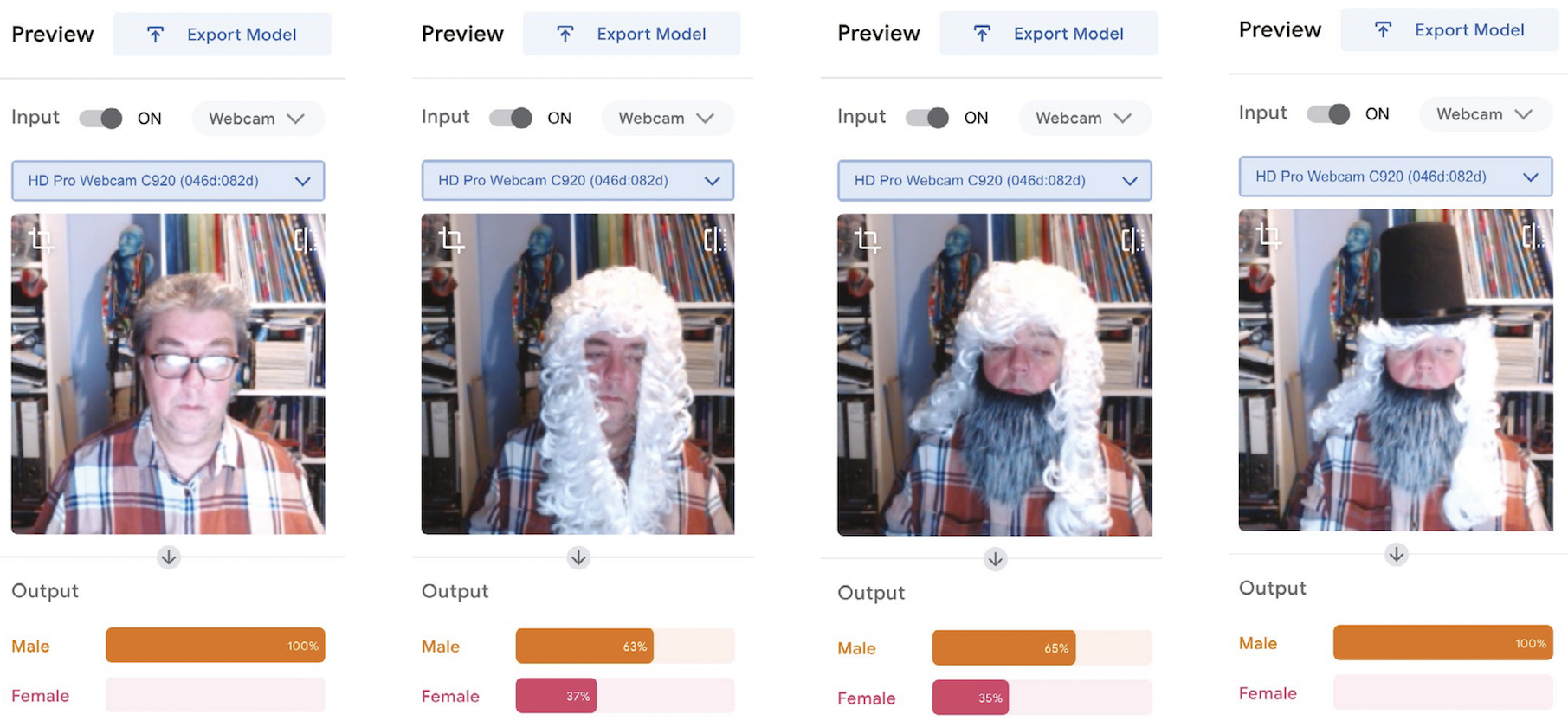
Machine learning uses a best-fit principle. The outputs, in this case whether I am male or female, have a greater certainty of male (65 percent) versus a lesser certainty of female (35 percent) if I wear a beard (Figure 3, second image from the right). Remove the beard and the likelihood of me being female increases by 2 percent (Figure 3, second image from the left).
Within a fairly small set of parameters, most human faces are similar. However, when you start digging, the research points to there being bias in AI (whether this is conscious or unconscious is a debate for another day!). You can exemplify this by firstly creating classes with labels such as ‘young smart’, ‘old smart’, ‘young not smart’, and ‘old not smart’. Select images that you think would fit the classes, and train them in Teachable Machine. You can then test the model by asking your students to find images they think fit each category. Run them against the model and ask students to debate whether the AI is acting fairly, and if not, why they think that is. Who is training these models? What images are they receiving? Similarly, you could create classes of images of known past criminals and heroes. Train the model before putting yourself in front of it. How far up the percentage scale are you towards being a criminal? It soon becomes frighteningly worrying that unless you are white and seemingly middle class, AI may prove problematic to you, from decisions on financial products such as mortgages through to mistaken arrest and identification.
It soon becomes frighteningly worrying that unless you are white and seemingly middle class, AI may prove problematic to you, from decisions on financial products such as mortgages through to mistaken arrest and identification.
Michael Jones
Encourage your students to discuss how they could influence this issue of race, class, and gender bias — for example, what rules would they use for identifying suitable images for a data set? There are some interesting articles on this issue that you can share with your students at helloworld.cc/aibias1 and helloworld.cc/aibias2.
In the classroom, you could then follow the route of building models that identify letters for words, for example. One of my students built a model that could identify a range of spoons and forks. You may notice that Teachable Machine can also be run on Arduino boards, which adds an extra dimension. Why not get your students to create their own AI assistant that responds to commands? The possibilities are there to be explored. If you’re using webcams to collect photos yourself, why not create a system that will identify students? If you are lucky enough to have a set of identical twins in your class, that adds just a little more flavour! Teachable Machine offers a hands-on way to demonstrate the issues of AI accuracy and bias, and gives students a healthy opportunity for debate.
Michael Jones is director of Computer Science at Northfleet Technology College in the UK. He is a Specialist Leader of Education and a CS Champion for the National Centre for Computing Education.
At the Foundation, AI education is one of our focus areas. Here is how we are supporting you and your learners in this area already:
The post Classroom activities to discuss machine learning accuracy and ethics | Hello World #18 appeared first on Raspberry Pi.
We and our partners at ESA Education are excited to announce that 299 teams of young people who entered Mission Space Lab this year have achieved flight status as part of the 2021/22 European Astro Pi Challenge. This means that these young people’s programs are the first ever to run on the two upgraded Astro Pi units on board the International Space Station (ISS).
Mission Space Lab gives teams of young people up to age 19 the opportunity to design and conduct their own scientific experiments that run on board the ISS. It’s an eight-month long activity that follows the European school year. The exciting hardware upgrades inspired a record number of young people to send us their Mission Space Lab experiment ideas.
Teams who want to take on Mission Space Lab choose between two themes for their experiments, investigating either ‘Life in space’ or ‘Life on Earth’. From this year onwards, thanks to the new Astro Pi hardware, teams can also choose to use new sensors and a Coral machine learning accelerator during their experiment time.
Using the Astro Pi units’ sensors, teams can investigate life inside the Columbus module of the ISS. This year, 71 ‘Life in space’ experiments are running on the Astro Pi units. The 71 teams are investigating a wide range of topics: for example, how the Earth’s magnetic field is experienced on the ISS in space, how the environmental conditions that the astronauts experience compare with those on Earth beneath the ISS on its orbit, or whether the conditions in the ISS might be suitable for other lifeforms, such as plants or bacteria.
For ‘Life in space’ experiments, teams can collect data about factors such as the colour and intensity of cabin light (using the new colour and luminosity sensor included in the upgraded hardware), astronaut movement in the cabin (using the new PIR sensor), and temperature and humidity (using the Sense HAT add-on board’s standard sensors).
Using the camera on an Astro Pi unit when it’s positioned to view Earth from a window of the ISS, teams can investigate features on the Earth’s surface. This year, for the first time, teams had the option to use visible-light instead of infrared (IR) photography, thanks to the new Astro Pi cameras.
228 teams’ ‘Life on Earth’ experiments are running this year. Some teams are using the Astro Pis’ sensors to determine the precise location of the ISS when images are captured, to identify whether the ISS is flying over land or sea, or which country it is passing over. Other teams are using IR photography to examine plant health and the effects of deforestation in different regions. Some teams are using visible-light photography to analyse clouds, calculate the velocity of the ISS, and classify biomes (e.g. desert, forest, grassland, wetland) it is passing over. The new hardware available from this year onward has helped to encourage 144 of the teams to use machine learning techniques in their experiments.
We received 88% more idea submissions for Mission Space Lab this year compared to last year: during Phase 1, 799 teams sent us their experiment ideas. We invited 502 of the teams to proceed to Phase 2 based on the quality of their ideas. 386 teams wrote their code and submitted computer programs for their experiments during Phase 2 this year. Achieving flight status, and thus progressing to Phase 3 of Mission Space Lab, is really a huge accomplishment for the 299 successful teams.
For us, Phase 2 involved putting every team’s program through a number of tests to make sure that it follows experiment rules, doesn’t compromise the safety and security of the ISS, and will run without errors on the Astro Pi units. Testing means that April is a very busy time for us in the Astro Pi team every year. We run these tests on a number of exact replicas of the new Astro Pis, including a final test to run every experiment that has passed every test for the full 3 hours allotted to each team. The 299 experiments with flight status will run on board the ISS for over 5 weeks in total during Phase 3, and once they have started running, we can’t rely on astronaut intervention to resolve issues. So we have to make sure that all of the programs will run without any problems.

Thanks to the team at ESA, we are delighted that 67 more Mission Space Lab experiments are running on the ISS this year compared to last year. In fact, teams’ experiments using the Astro Pi units are underway right now!
The 299 teams awarded flight status this year represent 23 countries and 1205 young people, with 32% female participants and an average age of 15. Spain has the most teams with experiments progressing to Phase 3 (38), closely followed by the UK (34), Italy (27), Romania (23), and Greece (22).

Unfortunately, it isn’t possible to run every Mission Space Lab experiment submitted, as there is only limited time for the Astro Pis to be positioned in the ISS window. We wish we could run every experiment that is submitted, but unfortunately time on the ISS, especially on the nadir window, is limited. Eliminating programs was very difficult because of the high quality of this year’s submissions. Many unsuccessful teams’ programs were eliminated based on very small issues. 87 teams submitted programs this year which did not pass testing and so could not be awarded flight status.
The teams whose experiments are not progressing to Phase 3 should still be very proud to have designed experiments that passed Phase 1, and to have made a Phase 2 submission. We recognise how much work all Mission Space Lab teams have done, and we hope to see you again in next year’s Astro Pi Challenge.
Once the programs for all the experiments have run, we will send the teams the data collected by their experiments for Phase 4. In this final phase of Mission Space Lab, teams analyse their data and write a short report to describe their findings. Based on these reports, the ESA Education and Raspberry Pi Foundation teams will determine the winner of this year’s Mission Space Lab. The winning and highly commended teams will receive special prizes.
Congratulations to all Mission Space Lab teams who’ve achieved flight status! We are really looking forward to reading your reports.
The post 299 experiments from young people run on the ISS in Astro Pi Mission Space Lab 2021/22 appeared first on Raspberry Pi.
At the Raspberry Pi Foundation, we’ve been thinking about questions relating to artificial intelligence (AI) education and data science education for several months now, inviting experts to share their perspectives in a series of very well-attended seminars. At the same time, we’ve been running a programme of research trials to find out what interventions in school might successfully improve gender balance in computing. We’re learning a lot, and one primary lesson is that these topics are not discrete: there are relationships between them.
We can’t talk about AI education — or computer science education more generally — without considering the context in which we deliver it, and the societal issues surrounding computing, AI, and data. For this International Women’s Day, I’m writing about the intersection of AI and gender, particularly with respect to gender bias in machine learning.
Gender inequality is everywhere, and researchers, activists, and initiatives, and governments themselves, have struggled since the 1960s to tackle it. As women and girls around the world continue to suffer from discrimination, the United Nations has pledged, in its Sustainable Development Goals, to achieve gender equality and to empower all women and girls.
While progress has been made, new developments in technology may be threatening to undo this. As Susan Leavy, a machine learning researcher from the Insight Centre for Data Analytics, puts it:
Artificial intelligence is increasingly influencing the opinions and behaviour of people in everyday life. However, the over-representation of men in the design of these technologies could quietly undo decades of advances in gender equality.
Susan Leavy, 2018 [1]
In her 2019 award-winning book Invisible Women: Exploring Data Bias in a World Designed for Men [2], Caroline Criado Perez discusses the effects of gender-biased data. She describes, for example, how the designs of cities, workplaces, smartphones, and even crash test dummies are all based on data gathered from men. She also discusses that medical research has historically been conducted by men, on male bodies.
Looking at this problem from a different angle, researcher Mayra Buvinic and her colleagues highlight that in most countries of the world, there are no sources of data that capture the differences between male and female participation in civil society organisations, or in local advisory or decision making bodies [3]. A lack of data about girls and women will surely impact decision making negatively.
Machine learning (ML) is a type of artificial intelligence technology that relies on vast datasets for training. ML is currently being use in various systems for automated decision making. Bias in datasets for training ML models can be caused in several ways. For example, datasets can be biased because they are incomplete or skewed (as is the case in datasets which lack data about women). Another example is that datasets can be biased because of the use of incorrect labels by people who annotate the data. Annotating data is necessary for supervised learning, where machine learning models are trained to categorise data into categories decided upon by people (e.g. pineapples and mangoes).
In order for a machine learning model to categorise new data appropriately, it needs to be trained with data that is gathered from everyone, and is, in the case of supervised learning, annotated without bias. Failing to do this creates a biased ML model. Bias has been demonstrated in different types of AI systems that have been released as products. For example:
Facial recognition: AI researcher Joy Buolamwini discovered that existing AI facial recognition systems do not identify dark-skinned and female faces accurately. Her discovery, and her work to push for the first-ever piece of legislation in the USA to govern against bias in the algorithms that impact our lives, is narrated in the 2020 documentary Coded Bias.
Natural language processing: Imagine an AI system that is tasked with filling in the missing word in “Man is to king as woman is to X” comes up with “queen”. But what if the system completes “Man is to software developer as woman is to X” with “secretary” or some other word that reflects stereotypical views of gender and careers? AI models called word embeddings learn by identifying patterns in huge collections of texts. In addition to the structural patterns of the text language, word embeddings learn human biases expressed in the texts. You can read more about this issue in this Brookings Institute report.
There is much debate about the level of bias in systems using artificial intelligence, and some AI researchers worry that this will cause distrust in machine learning systems. Thus, some scientists are keen to emphasise the breadth of their training data across the genders. However, other researchers point out that despite all good intentions, gender disparities are so entrenched in society that we literally are not aware of all of them. White and male dominance in our society may be so unconsciously prevalent that we don’t notice all its effects.
As sociologist Pierre Bourdieu famously asserted in 1977: “What is essential goes without saying because it comes without saying: the tradition is silent, not least about itself as a tradition.” [4]. This view holds that people’s experiences are deeply, or completely, shaped by social conventions, even those conventions that are biased. That means we cannot be sure we have accounted for all disparities when collecting data.
Developers and researchers of AI systems have been trying to establish rules for how to avoid bias in AI models. An example rule set is given in an article in the Harvard Business Review, which describes the fact that speech recognition systems originally performed poorly for female speakers as opposed to male ones, because systems analysed and modelled speech for taller speakers with longer vocal cords and lower-pitched voices (typically men).
The article recommends four ways for people who work in machine learning to try to avoid gender bias:
The above points can help people in the AI industry, which is of course important — but what about the rest of us? It’s important to raise awareness of the issues around gender data bias and AI lest we find out too late that we are reintroducing gender inequalities we have fought so hard to remove. Awareness is a good start, and some other suggestions, drawn out from others’ work in this area are:
Having more women in AI and data science, particularly in both technical and leadership roles, will help to reduce gender bias. A 2020 report by the World Economic Forum (WEF) on gender parity found that women account for only 26% of data and AI positions in the workforce. The WEF suggests five ways in which the AI workforce gender balance could be addressed:
We need high-quality dataset on women and girls, with good coverage, including country coverage. Data needs to be comparable across countries in terms of concepts, definitions, and measures. Data should have both complexity and granularity, so it can be cross-tabulated and disaggregated, following the recommendations from the Data2x project on mapping gender data gaps.
At the Raspberry Pi Foundation we believe that introducing some of the potential (positive and negative) impacts of AI systems to young people through their school education may help to build awareness and understanding at a young age. The jury is out on what exactly to teach in AI education, and how to teach it. But we think educating young people about new and future technologies can help them to see AI-related work opportunities as being open to all, and to develop critical and ethical thinking.
In our AI education seminars we heard a number of perspectives on this topic, and you can revisit the videos, presentation slides, and blog posts. We’ve also been curating a list of resources that can help to further AI education — although there is a long way to go until we understand this area fully.
We’d love to hear your thoughts on this topic.
References
[1] Leavy, S. (2018). Gender bias in artificial intelligence: The need for diversity and gender theory in machine learning. Proceedings of the 1st International Workshop on Gender Equality in Software Engineering, 14–16.
[2] Perez, C. C. (2019). Invisible Women: Exploring Data Bias in a World Designed for Men. Random House.
[3] Buvinic M., Levine R. (2016). Closing the gender data gap. Significance 13(2):34–37
[4] Bourdieu, P. (1977). Outline of a Theory of Practice (No. 16). Cambridge University Press. (p.167)
The post Bias in the machine: How can we address gender bias in AI? appeared first on Raspberry Pi.
What is AI thinking? What concepts should we introduce to young people related to AI, including machine learning (ML), and data science? Should we teach with a glass-box or an opaque-box approach? These are the questions we’ve been grappling with since we started our online research seminar series on AI education at the Raspberry Pi Foundation, co-hosted with The Alan Turing Institute.
Over the past few months, we’d already heard from researchers from the UK, Germany, and Finland. This month we virtually travelled to the USA, to hear from Prof. Dave Touretzky (Carnegie Mellon University) and Prof. Fred G. Martin (University of Massachusetts Lowell), who have pioneered the influential AI4K12 project together with their colleagues Deborah Seehorn and Christina Gardner-McLure.
The AI4K12 project focuses on teaching AI in K-12 in the US. The AI4K12 team have aligned their vision for AI education to the CSTA standards for computer science education. These Standards, published in 2017, describe what should be taught in US schools across the discipline of computer science, but they say very little about AI. This was the stimulus for starting the AI4K12 initiative in 2018. A number of members of the AI4K12 working group are practitioners in the classroom who’ve made a huge contribution in taking this project from ideas into the classroom.
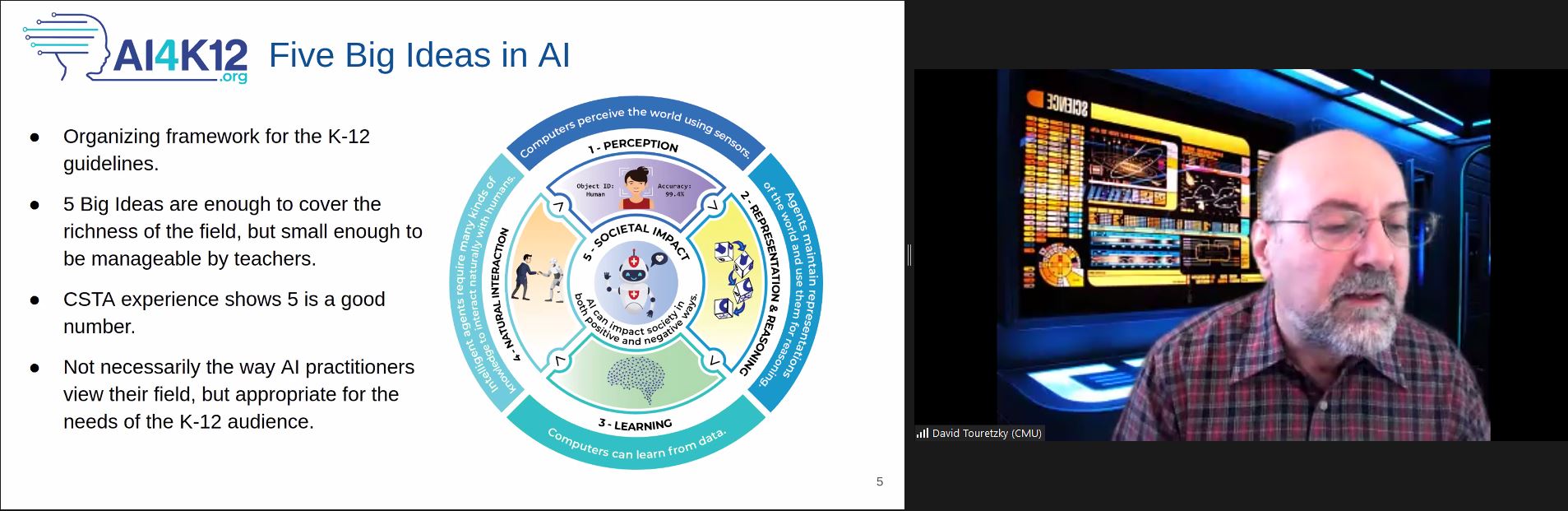
The project has a number of goals. One is to develop a curated resource directory for K-12 teachers, and another to create a community of K-12 resource developers. On the AI4K12.org website, you can find links to many resources and sign up for their mailing list. I’ve been subscribed to this list for a while now, and fascinating discussions and resources have been shared.
If you’ve heard of AI4K12 before, it’s probably because of the Five Big Ideas the team has set out to encompass the AI field from the perspective of school-aged children. These ideas are:
Sometimes we hear concerns that resources being developed to teach AI concepts to young people are narrowly focused on machine learning, particularly supervised learning for classification. It’s clear from the AI4K12 Five Big Ideas that the team’s definition of the AI field encompasses much more than one area of ML. Despite being developed for a US audience, I believe the description laid out in these five ideas is immensely useful to all educators, researchers, and policymakers around the world who are interested in AI education.
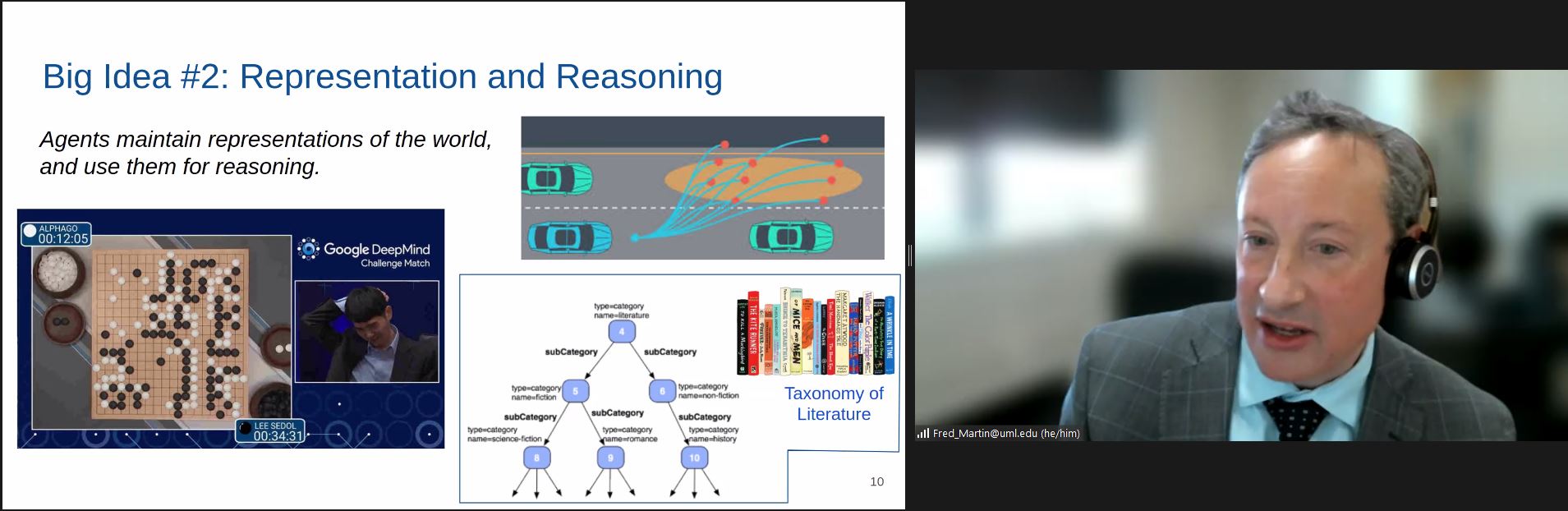
During the seminar, Dave and Fred shared some great practical examples. Fred explained how the big ideas translate into learning outcomes at each of the four age groups (ages 5–8, 9–11, 12–14, 15–18). You can find out more about their examples in their presentation slides or the seminar recording (see below).
I was struck by how much the AI4K12 team has thought about progression — what you learn when, and in which sequence — which we do really need to understand well before we can start to teach AI in any formal way. For example, looking at how we might teach visual perception to young people, children might start when very young by using a tool such as Teachable Machine to understand that they can teach a computer to recognise what they want it to see, then move on to building an application using Scratch plugins or Calypso, and then to learning the different levels of visual structure and understanding the abstraction pipeline — the hierarchy of increasingly abstract things. Talking about visual perception, Fred used the example of self-driving cars and how they represent images.
Dave and Fred support teaching AI to children using a glass-box approach. By ‘glass-box approach’ we mean that we should give students information about how AI systems work, and show the inner workings, so to speak. The opposite would be a ‘opaque-box approach’, by which we mean showing students an AI system’s inputs and the outputs only to demonstrate what AI is capable of, without trying to teach any technical detail.
Our speakers are keen for learners to understand, at an age-appropriate level, what is going on “inside” an AI system, not just what the system can do. They believe it’s important for young people to build mental models of how AI systems work, and that when the young people get older, they should be able to use their increasing knowledge and skills to develop their own AI applications. This aligns with the views of some of our previous seminar speakers, including Finnish researchers Matti Tedre and Henriikka Vartiainen, who presented at our seminar series in November.
Dave addressed the question of what AI thinking looks like in school. His approach was to start with computational thinking (he used the example of the Barefoot project’s description of computational thinking as a starting point) and describe AI thinking as an extension that includes the following skills:
Dave described AI thinking as furthering the ideas of abstraction and algorithmic thinking commonly associated with computational thinking, stating that in the case of AI, computation actually is thinking. My own view is that to fully define AI thinking, we need to dig a bit deeper into, for example, what is involved in developing an understanding of perception and representation.
Thinking back to Matti Tedre and Henriikka Vartainen’s description of CT 2.0, which focuses only on the ‘Learning’ aspect of the AI4K12 Five Big Ideas, and on the distinct ways of thinking underlying data-driven programming and traditional programming, we can see some differences between how the two groups of researchers describe the thinking skills young people need in order to understand and develop AI systems. Tedre and Vartainen are working on a more finely granular description of ML thinking, which has the potential to impact the way we teach ML in school.
There is also another description of AI thinking. Back in 2020, Juan David Rodríguez García presented his system LearningML at one of our seminars. Juan David drew on a paper by Brummelen, Shen, and Patton, who extended Brennan and Resnick’s CT framework of concepts, practices, and perspectives, to include concepts such as classification, prediction, and generation, together with practices such as training, validating, and testing.
What I take from this is that there is much still to research and discuss in this area! It’s a real privilege to be able to hear from experts in the field and compare and contrast different standpoints and views.
The AI4K12 project has already made a massive contribution to the field of AI education, and we were delighted to hear that Dave, Fred, and their colleagues have just been awarded the AAAI/EAAI Outstanding Educator Award for 2022 for AI4K12.org. An amazing achievement! Particularly useful about this website is that it links to many resources, and that the Five Big Ideas give a framework for these resources.
Through our seminars series, we are developing our own list of AI education resources shared by seminar speakers or attendees, or developed by us. Please do take a look.
Through these seminars, we’re learning a lot about AI education and what it might look like in school, and we’re having great discussions during the Q&A section.
On Tues 1 February at 17:00–18:30 GMT, we’ll hear from Tara Chklovski, who will talk about AI education in the context of the Sustainable Development Goals. To participate, click the button below to sign up, and we will send you information about joining. I really hope you’ll be there for this seminar!
The schedule of our upcoming seminars is online. You can also (re)visit past seminars and recordings on the blog.
The post The AI4K12 project: Big ideas for AI education appeared first on Raspberry Pi.
In Hello World issue 12, our free magazine for computing educators, George Boukeas, DevOps Engineer for the Astro Pi Challenge here at the Foundation, introduces big moments in the history of artificial intelligence (AI) to share with your learners:
The story of artificial intelligence (AI) is a story about humans trying to understand what makes them human. Some of the episodes in this story are fascinating. These could help your learners catch a glimpse of what this field is about and, with luck, compel them to investigate further.
In 1950, Alan Turing published a philosophical essay titled Computing Machinery and Intelligence, which started with the words: “I propose to consider the question: Can machines think?” Yet Turing did not attempt to define what it means to think. Instead, he suggested a game as a proxy for answering the question: the imitation game. In modern terms, you can imagine a human interrogator chatting online with another human and a machine. If the interrogator does not successfully determine which of the other two is the human and which is the machine, then the question has been answered: this is a machine that can think.
This imitation game is now a fiercely debated benchmark of artificial intelligence called the Turing test. Notice the shift in focus that Turing suggests: thinking is to be identified in terms of external behaviour, not in terms of any internal processes. Humans are still the yardstick for intelligence, but there is no requirement that a machine should think the way humans do, as long as it behaves in a way that suggests some sort of thinking to humans.
In his essay, Turing also discusses learning machines. Instead of building highly complex programs that would prescribe every aspect of a machine’s behaviour, we could build simpler programs that would prescribe mechanisms for learning, and then train the machine to learn the desired behaviour. Turing’s text provides an excellent metaphor that could be used in class to describe the essence of machine learning: “Instead of trying to produce a programme to simulate the adult mind, why not rather try to produce one which simulates the child’s? If this were then subjected to an appropriate course of education one would obtain the adult brain. We have thus divided our problem into two parts: the child-programme and the education process.”
It is remarkable how Turing even describes approaches that have since been evolved into established machine learning methods: evolution (genetic algorithms), punishments and rewards (reinforcement learning), randomness (Monte Carlo tree search). He even forecasts the main issue with some forms of machine learning: opacity. “An important feature of a learning machine is that its teacher will often be very largely ignorant of quite what is going on inside, although he may still be able to some extent to predict his pupil’s behaviour.”
The term ‘artificial intelligence’ was coined in 1956, at an event called the Dartmouth workshop. It was a gathering of the field’s founders, researchers who would later have a huge impact, including John McCarthy, Claude Shannon, Marvin Minsky, Herbert Simon, Allen Newell, Arthur Samuel, Ray Solomonoff, and W.S. McCulloch.
The simple and ambitious definition for artificial intelligence, included in the proposal for the workshop, is illuminating: ‘making a machine behave in ways that would be called intelligent if a human were so behaving’. These pioneers were making the assumption that ‘every aspect of learning or any other feature of intelligence can in principle be so precisely described that a machine can be made to simulate it’. This assumption turned out to be patently false and led to unrealistic expectations and forecasts. Fifty years later, McCarthy himself stated that ‘it was harder than we thought’.
Modern definitions of intelligence are of distinctly different flavour than the original one: ‘Intelligence is the quality that enables an entity to function appropriately and with foresight in its environment’ (Nilsson). Some even speak of rationality, rather than intelligence: ‘doing the right thing, given what it knows’ (Russell and Norvig).
In the full article, which you can read in the free PDF copy of the issue, George looks at:
In your free PDF of Hello World issue 12, you’ll also find:
You can also read many of these articles online on the Hello World website.
In Hello World issue 16, the focus is on all things data science and data literacy for your learners. As always, you can download a free copy of the issue. And on our Hello World podcast, we chat with practicing computing educators about how they bring AI, AI ethics, machine learning, and data science to the young people they teach.
If you want a practical introduction to the basics of machine learning and how to use it, take our free online course.
There are still many open questions about what good AI and data science education looks like for young people. To learn more, you can watch our panel discussion about the topic, and join our monthly seminar series to hear insights from computing education researchers around the world.
We are also collating a growing list of educational resources about these topics based on our research seminars, seminar participants’ recommendations, and our own work. Find the resource list here.
The post Snapshots from the history of AI, plus AI education resources appeared first on Raspberry Pi.
AI is a broad and rapidly developing field of technology. Our goal is to make sure all young people have the skills, knowledge, and confidence to use and create AI systems. So what should AI education in schools look like?
To hear a range of insights into this, we organised a panel discussion as part of our seminar series on AI and data science education, which we co-host with The Alan Turing Institute. Here our panel chair Tabitha Goldstaub, Co-founder of CogX and Chair of the UK government’s AI Council, summarises the event. You can also watch the recording below.
As part of the Raspberry Pi Foundation’s monthly AI education seminar series, I was delighted to chair a special panel session to broaden the range of perspectives on the subject. The members of the panel were:
The session explored the UK government’s commitment in the recently published UK National AI Strategy stating that “the [UK] government will continue to ensure programmes that engage children with AI concepts are accessible and reach the widest demographic.” We discussed what it will take to make this a reality, and how we will ensure young people have a seat at the table.
It was clear that the Minister felt it is very important for young people to understand AI. He said, “The government takes the view that AI is going to be one of the foundation stones of our future prosperity and our future growth. It’s an enabling technology that’s going to have almost universal applicability across our entire economy, and that is why it’s so important that the United Kingdom leads the world in this area. Young people are the country’s future, so nothing is complete without them being at the heart of it.”
Our panelist Caitlin Glover, an A level student at Sandon School, reiterated this from her perspective as a young person. She told us that her passion for AI started initially because she wanted to help neurodiverse young people like herself. Her idea was to start a company that would build AI-powered products to help neurodiverse students.
A theme of the Foundation’s seminar series so far has been how learning about AI early may impact young people’s career choices. Our panelist Alice Ashby, who studies Computer Science and AI at Brighton University, told us about her own process of deciding on her course of study. She pointed to the fact that terms such as machine learning, natural language processing, self-driving cars, chatbots, and many others are currently all under the umbrella of artificial intelligence, but they’re all very different. Alice thinks it’s hard for young people to know whether it’s the right decision to study something that’s still so ambiguous.
When I asked Alice what gave her the courage to take a leap of faith with her university course, she said, “I didn’t know it was the right move for me, honestly. I took a gamble, I knew I wanted to be in computer science, but I wanted to spice it up.” The AI ecosystem is very lucky that people like Alice choose to enter the field even without being taught what precisely it comprises.
We also heard from Danielle Belgrave, a Research Scientist at DeepMind with a remarkable career in AI for healthcare. Danielle explained that she was lucky to have had a Mathematics teacher who encouraged her to work in statistics for healthcare. She said she wanted to ensure she could use her technical skills and her love for math to make an impact on society, and to really help make the world a better place. Danielle works with biologists, mathematicians, philosophers, and ethicists as well as with data scientists and AI researchers at DeepMind. One possibility she suggested for improving young people’s understanding of what roles are available was industry mentorship. Linking people who work in the field of AI with school students was an idea that Caitlin was eager to confirm as very useful for young people her age.
The AI Council’s Roadmap stresses how important it is to not only teach the skills needed to foster a pool of people who are able to research and build AI, but also to ensure that every child leaves school with the necessary AI and data literacy to be able to become engaged, informed, and empowered users of the technology. During the panel, the Minister, Chris Philp, spoke about the fact that people don’t have to be technical experts to come up with brilliant ideas, and that we need more people to be able to think creatively and have the confidence to adopt AI, and that this starts in schools.
Caitlin is a perfect example of a young person who has been inspired about AI while in school. But sadly, among young people and especially girls, she’s in the minority by choosing to take computer science, which meant she had the chance to hear about AI in the classroom. But even for young people who choose computer science in school, at the moment AI isn’t in the national Computing curriculum or part of GCSE computer science, so much of their learning currently takes place outside of the classroom. Caitlin added that she had had to go out of her way to find information about AI; the majority of her peers are not even aware of opportunities that may be out there. She suggested that we ensure AI is taught across all subjects, so that every learner sees how it can make their favourite subject even more magical and thinks “AI’s cool!”.
Philip Colligan, the CEO here at the Foundation, also described how AI could be integrated into existing subjects including maths, geography, biology, and citizenship classes. Danielle thoroughly agreed and made the very good point that teaching this way across the school would help prepare young people for the world of work in AI, where cross-disciplinary science is so important. She reminded us that AI is not one single discipline. Instead, many different skill sets are needed, including engineering new AI systems, integrating AI systems into products, researching problems to be addressed through AI, or investigating AI’s societal impacts and how humans interact with AI systems.
On hearing about this multitude of different skills, our discussion turned to the teachers who are responsible for imparting this knowledge, and to the challenges they face.
When we shifted the focus of the discussion to teachers, Philip said: “If we really want to equip every young person with the knowledge and skills to thrive in a world that shaped by these technologies, then we have to find ways to evolve the curriculum and support teachers to develop the skills and confidence to teach that curriculum.”
I asked the Minister what he thought needed to happen to ensure we achieved data and AI literacy for all young people. He said, “We need to work across government, but also across business and society more widely as well.” He went on to explain how important it was that the Department for Education (DfE) gets the support to make the changes needed, and that he and the Office for AI were ready to help.
Philip explained that the Raspberry Pi Foundation is one of the organisations in the consortium running the National Centre for Computing Education (NCCE), which is funded by the DfE in England. Through the NCCE, the Foundation has already supported thousands of teachers to develop their subject knowledge and pedagogy around computer science.
A recent study recognises that the investment made by the DfE in England is the most comprehensive effort globally to implement the computing curriculum, so we are starting from a good base. But Philip made it clear that now we need to expand this investment to cover AI.
Philip described how brilliant it is to witness young people who choose to get creative with new technologies. As an example, he shared that the Foundation is seeing more and more young people employ machine learning in the European Astro Pi Challenge, where participants run experiments using Raspberry Pi computers on board the International Space Station.
Philip also explained that, in the Foundation’s non-formal CoderDojo club network and its Coolest Projects tech showcase events, young people build their dream AI products supported by volunteers and mentors. Among these have been autonomous recycling robots and AI anti-collision alarms for bicycles. Like Caitlin with her company idea, this shows that young people are ready and eager to engage and create with AI.
We closed out the panel by going back to a point raised by Mhairi Aitken, who presented at the Foundation’s research seminar in September. Mhairi, an Alan Turing Institute ethics fellow, argues that children don’t just need to learn about AI, but that they should actually shape the direction of AI. All our panelists agreed on this point, and we discussed what it would take for young people to have a seat at the table.
Alice advised that we start by looking at our existing systems for engaging young people, such as Youth Parliament, student unions, and school groups. She also suggested adding young people to the AI Council, which I’m going to look into right away! Caitlin agreed and added that it would be great to make these forums virtual, so that young people from all over the country could participate.
The panel session was full of insight and felt very positive. Although the challenge of ensuring we have a data- and AI-literate generation of young people is tough, it’s clear that if we include them in finding the solution, we are in for a bright future.
In the coming months, our goal at the Foundation is to increase our understanding of the concepts underlying AI education and how to teach them in an age-appropriate way. To that end, we will start to conduct a series of small AI education research projects, which will involve gathering the perspectives of a variety of stakeholders, including young people. We’ll make more information available on our research pages soon.
In the meantime, you can sign up for our upcoming research seminars on AI and data science education, and peruse the collection of related resources we’ve put together.
The post How do we develop AI education in schools? A panel discussion appeared first on Raspberry Pi.
How does teaching children and young people about machine learning (ML) differ from teaching them about other aspects of computing? Professor Matti Tedre and Dr Henriikka Vartiainen from the University of Eastern Finland shared some answers at our latest research seminar.
Their presentation, titled ‘ML education for K-12: emerging trajectories’, had a profound impact on my thinking about how we teach computational thinking and programming. For this blog post, I have simplified some of the complexity associated with machine learning for the benefit of readers who are new to the topic.
We’re currently partnering with The Alan Turing Institute to host a series of free research seminars about how to teach artificial intelligence (AI) and data science to young people.
The seminar with Matti and Henriikka, the third one of the series, was very well attended. Over 100 participants from San Francisco to Rajasthan, including teachers, researchers, and industry professionals, contributed to a lively and thought-provoking discussion.
Representing a large interdisciplinary team of researchers, Matti and Henriikka have been working on how to teach AI and machine learning for more than three years, which in this new area of study is a long time. So far, the Finnish team has written over a dozen academic papers based on their pilot studies with kindergarten-, primary-, and secondary-aged learners.
Matti and Henriikka started by giving an overview of classical programming and how it is currently taught in schools. Classical programming can be described as rule-driven. Example features of classical computer programs and programming languages are:
When we teach this type of programming, we show learners how to use a deductive problem solving approach or workflow: defining the task, designing a possible solution, and implementing the solution by writing a stepwise program that is then run on a computer. We encourage learners to avoid using trial and error to write programs. Instead, as they develop and test a program, we ask them to trace it line by line in order to predict what will happen when each line is run (glass-box testing).
Classical programming underpins the current view of computational thinking (CT). Our speakers called this version of CT ‘CT 1.0’. So what’s the alternative Matti and Henriikka presented, and how does it affect what computational thinking is or may become?
Rule-based programming languages are not being eradicated. Instead, software systems are being augmented through the addition of machine learning (data-driven) elements. Many of today’s successful software products, such as search engines, image classifiers, and speech recognition programs, combine rule-driven software and data-driven models. However, the workflows for these two approaches to solving problems through computing are very different.
Significantly, while in rule-based programming (and CT 1.0), the focus is on solving problems by creating algorithms, in data-driven approaches, the problem solving workflow is all about the data. To highlight the profound impact this shift in focus has on teaching and learning computing, Matti introduced us to a new version of computational thinking for machine learning, CT 2.0, which is detailed in a forthcoming research paper.
Because of the focus on data rather than algorithms, developing a machine learning model is not at all like developing a classical rule-driven program. In classical programming, programs can be traced, and we can predict what will happen when they run. But in data-driven development, there is no flow of rules, and no absolutely right or wrong answer.
Machine learning models are created iteratively using training data and must be cross-validated with test data. A tiny change in the data provided can make a model useless. We rarely know exactly why the output of an ML model is as it is, and we cannot explain each individual decision that the model might have made. When evaluating a machine learning system, we can only say how well it works based on statistical confidence and efficiency.
The ethical and societal implications of computer science have always been important for students to understand. But machine learning models open up a whole new set of topics for teachers and students to consider, because of these models’ reliance on large datasets, the difficulty of explaining their decisions, and their usefulness for automating very complex processes. This includes privacy, surveillance, diversity, bias, job losses, misinformation, accountability, democracy, and veracity, to name but a few.
I see the shift in problem solving approach as a chance to strengthen the teaching of computing in general, because it opens up opportunities to teach about systems, uncertainty, data, and society.
Jane Waite
For teaching classical rule-driven programming, much time and effort has been put into researching learners’ understanding of what a program will do when it is run. This kind of understanding is called a learner’s mental model or notional machine. An approach teachers often use to help students develop a useful mental model of a program is to hide the detail of how the program works and only gradually reveal its complexity. This approach is described with the metaphor of hiding the detail of elements of the program in a box.
Data-driven models in machine learning systems are highly complex and make little sense to humans. Therefore, they may appear like magic boxes to students. This view needs to be banished. Machine learning is not magic. We have just not figured out yet how to explain the detail of data-driven models in a way that allows learners to form useful mental models.
Some existing ML tools aim to help learners form mental models of ML, for example through visual representations of how a neural network works (see above). But these explanations are still very complex. Clearly, we need to find new ways to help learners of all ages form useful mental models of machine learning, so that teachers can explain to them how machine learning systems work and banish the view that machine learning is magic.
Matti and Henriikka’s team piloted different tools and pedagogical approaches with different age groups of learners. In terms of tools, since large amounts of data are needed for machine learning projects, our presenters suggested that tools that enable lots of data to be easily collected are ideal for teaching activities. Media-rich education tools provide an opportunity to capture still images, movements, sounds, or sense other inputs and then use these as data in machine learning teaching activities. For example, to create a machine learning–based rock-paper-scissors game, students can take photographs of their hands to train a machine learning model using Google Teachable Machine.
Similar to tools that teach classic programming to novice students (e.g. Scratch), some of the new classroom tools for teaching machine learning have a drag-and-drop interface (e.g. Cognimates). Using such tools means that in lessons, there can be less focus on one of the more complex aspects of learning to program, learning programming language syntax. However, not all machine learning education products include drag-and-drop interaction, some instead have their own complex languages (e.g. Wolfram Programming Lab), which are less attractive to teachers and learners. In their pilot studies, the Finnish team found that drag-and-drop machine learning tools appeared to work well with students of all ages.
The different pedagogical approaches the Finnish research team used in their pilot studies included an exploratory approach with preschool children, who investigated machine learning recognition of happy or sad faces; and a project-based approach with older students, who co-created machine learning apps with web-based tools such as Teachable Machine and Learn Machine Learning (built by the research team), supported by machine learning experts.
What impact these pedagogies have on students’ long-term mental models about machine learning has yet to be researched. If you want to find out more about the classroom pilot studies, the academic paper is a very accessible read.
We all learned a tremendous amount from Matti and Henriikka and their perspectives on this important topic. Our seminar participants asked them many questions about the pedagogies and practicalities of teaching machine learning in class, and raised concerns about squeezing more into an already packed computing curriculum.
For me, the most significant take-away from the seminar was the need to shift focus from algorithms to data and from CT 1.0 to CT 2.0. Learning how to best teach classical rule-driven programming has been a long journey that we have not yet completed. We are forming an understanding of what concepts learners need to be taught, the progression of learning, key mental models, pedagogical options, and assessment approaches. For teaching data-driven development, we need to do the same.
The question of how we make sure teachers have the necessary understanding is key.
Jane Waite
I see the shift in problem solving approach as a chance to strengthen the teaching of computing in general, because it opens up opportunities to teach about systems, uncertainty, data, and society. I think it will help us raise awareness about design, context, creativity, and student agency. But I worry about how we will introduce this shift. In my view, there is a considerable risk that we will be sucked into open-ended, project-based learning, with busy and fun but shallow learning experiences that result in restricted conceptual development for students.
I also worry about how we can best help teachers build up the knowledge and experience to support their students. In the Q&A after the seminar, I asked Matti and Henriikka about the role of their team’s machine learning experts in their pilot studies. It seemed to me that without them, the pilot lessons would not have worked, as the participating teachers and students would not have had the vocabulary to talk about the process and would not have known what was doable given the available time, tools, and student knowledge.
The question of how we make sure teachers have the necessary understanding is key. Many existing professional development resources for teachers wanting to learn about ML seem to imply that teachers will all need a PhD in statistics and neural network optimisation to engage with machine learning education. This is misleading. But teachers do need to understand the machine learning concepts that their students need to learn about, and I think we don’t yet know exactly what these concepts are.
In summary, clearly more research is needed. There are fundamental questions still to be answered about what, when, and how we teach data-driven approaches to software systems development and how this impacts what we teach about classical, rule-based programming. But to me, that is exciting, and I am very much looking forward to the journey ahead.
To find out what others recommend about teaching AI and ML, catch up on last month’s seminar with Professor Carsten Schulte and colleagues on centring data instead of code in the teaching of AI.
We have another four seminars in our monthly series on AI, machine learning, and data science education. Find out more about them on this page, and catch up on past seminar blogs and recordings here.
At our next seminar on Tuesday 7 December at 17:00–18:30 GMT, we will welcome Professor Rose Luckin from University College London. She will be presenting on what it is about AI that makes it useful for teachers and learners.
We look forward to meeting you there!
The post The machine learning effect: Magic boxes and computational thinking 2.0 appeared first on Raspberry Pi.
Join our free online course Introduction to Machine Learning and AI to discover the fundamentals of machine learning and learn to train your own machine learning models using free online tools.
Although artificial intelligence (AI) was once the province of science fiction, these days you’re very likely to hear the term in relation to new technologies, whether that’s facial recognition, medical diagnostic tools, or self-driving cars, which use AI systems to make decisions or predictions.
By the end of this free, online, self-paced course, you will have an appreciation for what goes into machine learning and artificial intelligence systems — and why you should think carefully about what comes out.
You’ll also often hear about AI systems that use machine learning (ML). Very simply, we can say that programs created using ML are ‘trained’ on large collections of data to ‘learn’ to produce more accurate outputs over time. One rather funny application you might have heard of is the ‘muffin or chihuahua?’ image recognition task.
More precisely, we would say that a ML algorithm builds a model, based on large collections of data (the training data), without being explicitly programmed to do so. The model is ‘finished’ when it makes predictions or decisions with an acceptable level of accuracy. (For example, it rarely mistakes a muffin for a chihuahua in a photo.) It is then considered to be able to make predictions or decisions using new data in the real world.
But how does all this actually work? If you don’t know, it’s hard to judge what the impacts of these technologies might be, and how we can be sure they benefit everyone — an important discussion that needs to involve people from across all of society. Not knowing can also be a barrier to using AI, whether that’s for a hobby, as part of your job, or to help your community solve a problem.
For teachers and educators it’s particularly important to have a good foundational knowledge of AI and ML, as they need to teach their learners what the young people need to know about these technologies and how they impact their lives. (We’ve also got a free seminar series about teaching these topics.)
To help you understand the fundamentals of AI and ML, we’ve put together a free online course: Introduction to Machine Learning and AI. Over four weeks in two hours per week, learning at your own pace, you’ll find out how machine learning can be used to solve problems, without going too deeply into the mathematical details. You’ll also get to grips with the different ways that machines ‘learn’, and you will try out online tools such as Machine Learning for Kids and Teachable Machine to design and train your own machine learning programs.
As well as finding out how these AI systems work, you’ll look at the different types of tasks that they can help us address. One of these is classification — working out which group (or groups) something fits in, such as distinguishing between positive and negative product reviews, identifying an animal (or a muffin) in an image, or spotting potential medical problems in patient data.
You’ll also learn about other types of tasks ML programs are used for, such as regression (predicting a numerical value from a continuous range) and knowledge organisation (spotting links between different pieces of data or clusters of similar data). Towards the end of the course you’ll dive into one of the hottest topics in AI today: neural networks, which are ML models whose design is inspired by networks of brain cells (neurons).
Before an ML program can be trained, you need to collect data to train it with. During the self-paced course you’ll see how tools from statistics and data science are important for ML — but also how ethical issues can arise both when data is collected and when the outputs of an ML program are used.
By the end of the course, you will have an appreciation for what goes into machine learning and artificial intelligence systems — and why you should think carefully about what comes out.
The Introduction to Machine Learning and AI course is open for you to sign up to now. Sign-ups will pause after 12 December. Once you sign up, you’ll have access for six weeks. During this time you’ll be able to interact with your fellow learners, and before 25 October, you’ll also benefit from the support of our expert facilitators. So what are you waiting for?
As part of our research on computing education, we would like to find out about educators’ views on machine learning. Before you start the course, we will ask you to complete a short survey. As a thank you for helping us with our research, you will be offered the chance to take part in a prize draw for a £50 book token!
To develop your computing knowledge and skills, you might also want to:
If you are a teacher in England, you can develop your teaching skills through the National Centre for Computing Education, which will give you free upgrades for our courses (including Introduction to Machine Learning and AI) so you’ll receive certificates and unlimited access.
The post Learn the fundamentals of AI and machine learning with our free online course appeared first on Raspberry Pi.
Between September 2021 and March 2022, we’re partnering with The Alan Turing Institute to host a series of free research seminars about how to teach AI and data science to young people.
In the second seminar of the series, we were excited to hear from Professor Carsten Schulte, Yannik Fleischer, and Lukas Höper from the University of Paderborn, Germany, who presented on the topic of teaching AI and machine learning (ML) from a data-centric perspective. Their talk raised the question of whether and how AI and ML should be taught differently from other themes in the computer science curriculum at school.
The rationale behind the speakers’ work is a concept they call hybrid interaction system, referring to the way that humans and machines interact. To explain this concept, Carsten referred to a 2019 article published in Nature by Iyad Rahwan and colleagues: Machine hehaviour. The article’s authors propose that the study of AI agents (complex and simple algorithms that make decisions) should be a separate, cross-disciplinary field of study, because of the ubiquity and complexity of AI systems, and because these systems can have both beneficial and detrimental impacts on humanity, which can be difficult to evaluate. (Our previous seminar by Mhairi Aitken highlighted some of these impacts.) The authors state that to study this field, we need to draw on scientific practices from across different fields, as shown below:
In establishing their argument, the authors compare the study of animal behaviour and machine behaviour, citing that both fields consider aspects such as mechanism, development, evolution and function. They describe how part of this proposed machine behaviour field may focus on studying individual machines’ behaviour, while collective machines and what they call ‘hybrid human-machine behaviour’ can also be studied. By focusing on the complexities of the interactions between machines and humans, we can think both about machines shaping human behaviour and humans shaping machine behaviour, and a sort of ‘co-behaviour’ as they work together. Thus, the authors conclude that machine behaviour is an interdisciplinary area that we should study in a different way to computer science.
Carsten and his team said that, as educators, we will need to draw on the parameters and frameworks of this machine behaviour field to be able to effectively teach AI and machine learning in school. They argue that our approach should be centred on data, rather than on code. I believe this is a challenge to those of us developing tools and resources to support young people, and that we should be open to these ideas as we forge ahead in our work in this area.
In the interpretation of computational thinking popularised in 2006 by Jeanette Wing, she introduces computational thinking as being about ‘ideas, not artefacts’. When we, the computing education community, started to think about computational thinking, we moved from focusing on specific technology — and how to understand and use it — to the ideas or principles underlying the domain. The challenge now is: have we gone too far in that direction?
Carsten argued that, if we are to understand machine behaviour, and in particular, human-machine co-behaviour, which he refers to as the hybrid interaction system, then we need to be studying artefacts as well as ideas.
Throughout the seminar, the speakers reminded us to keep in mind artefacts, issues of bias, the role of data, and potential implications for the way we teach.
In addition, Carsten highlighted a number of differences between learning ML and learning other areas of computer science, including traditional programming:
These differences imply that our teaching should adapt too.
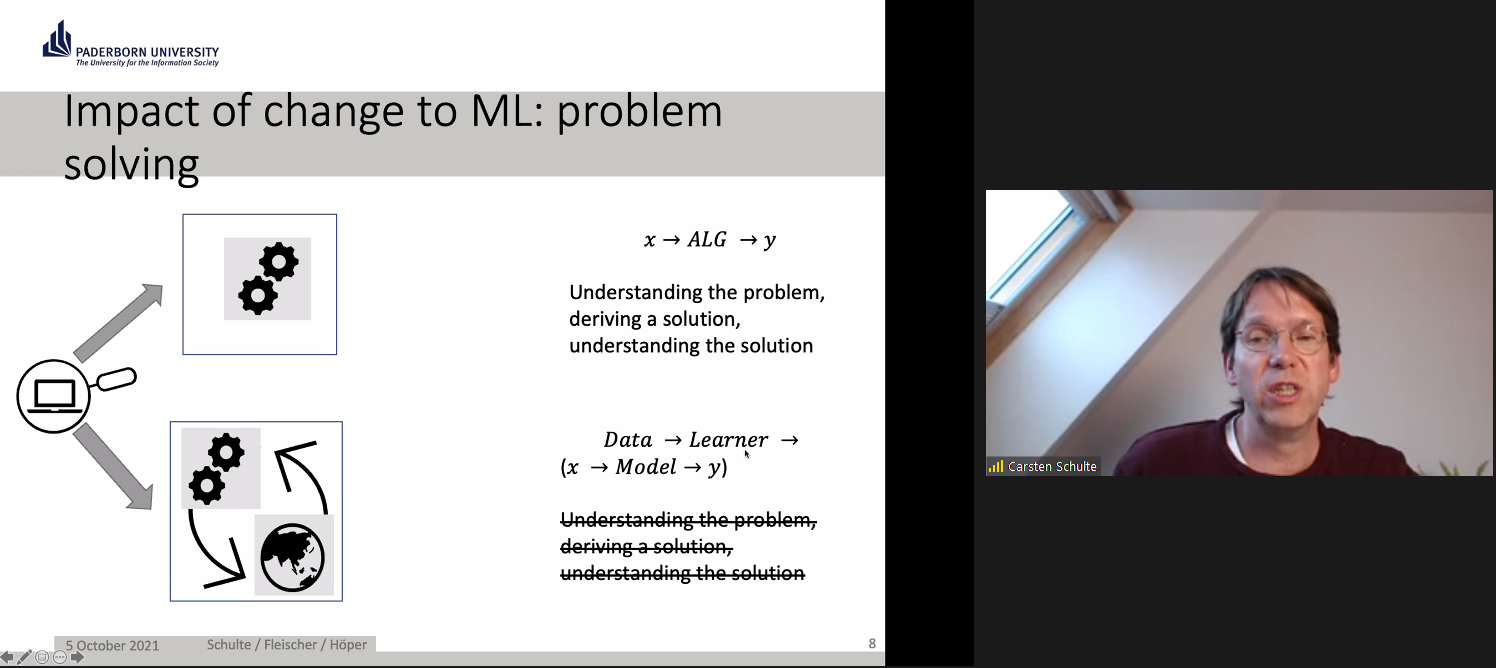
In Germany, education is devolved to state governments. Although computer science (known as informatics) was only last year introduced as a mandatory subject in lower secondary schools in North Rhine-Westphalia, where Paderborn is located, it has been taught at the upper secondary levels for many years. ProDaBi is a project that researchers have been running at Paderborn University since 2017, with the aim of developing a secondary school curriculum around data science, AI, and ML.
The ProDaBi curriculum includes:
Although the ProDaBi project site is in German, an English translation is available.
Our speakers described example activities from three of the modules:
There was a lot to digest in this seminar: challenging ideas and some new concepts, for me anyway. An important takeaway for me was how much we do not yet know about the concepts and skills we should be teaching in school around AI and ML, and about the approaches that we should be using to teach them effectively. Research such as that being carried out in Paderborn, demonstrating a data-centric approach, can really augment our understanding, and I’m looking forward to following the work of Carsten and his team.
Carsten and colleagues ended with this summary and discussion point for the audience:
“‘AI education’ requires developing an adequate picture of the hybrid interaction system — a kind of data-driven, emergent ecosystem which needs to be made explicitly to understand the transformative role as well as the technological basics of these artificial intelligence tools and how they are related to data science.”
You can catch up on the seminar, including the Q&A with Carsten and his colleagues, here:
This seminar really extended our thinking about AI education, and we look forward to introducing new perspectives from different researchers each month. At our next seminar on Tuesday 2 November at 17:00–18:30 BST / 12:00–13:30 EDT / 9:00–10:30 PDT / 18:00–19:30 CEST, we will welcome Professor Matti Tedre and Henriikka Vartiainen (University of Eastern Finland). The two Finnish researchers will talk about emerging trajectories in ML education for K-12. We look forward to meeting you there.
Carsten and their colleagues are also running a series of seminars on AI and data science: you can find out about these on their registration page.
You can increase your own understanding of machine learning by joining our latest free online course!
[1] Rahwan, I., Cebrian, M., Obradovich, N., Bongard, J., Bonnefon, J. F., Breazeal, C., … & Wellman, M. (2019). Machine behaviour. Nature, 568(7753), 477-486.
The post Should we teach AI and ML differently to other areas of computer science? A challenge appeared first on Raspberry Pi.
This intelligent arm learns how to move naturally, based on what the wearer is doing, as Phil King discovers in the latest issue of The MagPi, out now.
Known for his robotic creations, popular YouTuber James Bruton is also a keen Iron Man cosplayer, and his latest invention would surely impress Tony Stark: an intelligent prosthetic arm that can move naturally and autonomously, depending on the wearer’s body posture and limb movements.
“It’s a project I’ve been thinking about for a while, but I’ve never actually attempted properly,” James tells us. “I thought it would be good to have a work stream of something that could be useful.”
To obtain the body movement data on which to base the arm’s movements, James considered using a brain computer, but this would be unreliable without embedding electrodes in his head! So, he instead opted to train it with machine learning.
For this he created a motion capture suit from 3D-printed parts to gather all the data from his body motions: arms, legs, and head. The suit measures joint movements using rotating pieces with magnetic encoders, along with limb and head positions – via a special headband – using MPU-6050 inertial measurement units and Teensy LC boards.
Collected by a Teensy 4.1, this data is then fed into a machine learning model running on the suit’s Raspberry Pi Zero using AOgmaNeo, a lightweight C++ software library designed to run on low-power devices such a microcontrollers.
“AOgmaNeo is a reinforcement machine learning system which learns what all of the data is doing in relation to itself,” James explains. “This means that you can remove any piece of data and, after training, the software will do its best to replace the missing piece with a learned output. In my case, I’m removing the right arm and using the learned output to drive the prosthetic arm, but it could be any limb.”
While James notes that AOgmaNeo is actually meant for reinforcement learning,“in this case we know what the output should be rather than it being unknown and learning through binary reinforcement.”
To train the model, James used distinctive repeated motions, such as walking, so that the prosthetic arm would later be able to predict what it should do from incoming sensor data. He also spent some time standing still so that the arm would know what to do in that situation.
With the machine learning model trained, Raspberry Pi Zero can be put into playback mode to control the backpack-mounted arm’s movements intelligently. It can then duplicate what the wearer’s real right arm was doing during training depending on the positions and movements of other body parts.
So, as he demonstrates in his YouTube video, if James starts walking on the spot, the prosthetic arm swings the opposite way to his left arm as he strides along, and moves forward as raises his left leg. If he stands still, the arm will hang down by his side. The 3D-printed hand was added purely for aesthetic reasons and the fingers don’t move.
James admits that the project is highly experimental and currently an early work in progress. “I’d like to develop this concept further,” he says, “although the current setup is slightly overambitious and impractical. I think the next step will be to have a simpler set of inputs and outputs.”
While he generally publishes his CAD designs and code, the arm “doesn’t work all that well, so I haven’t this time. AOgmaNeo is open-source, though (free for personal use), so you can make something similar if you wished.” What would you do with an extra arm?
You can grab the brand-new issue right now from the Raspberry Pi Press store, or via our app on Android or iOS. You can also pick it up from supermarkets and newsagents. There’s also a free PDF you can download.
The post Machine Learning Prosthetic Arm | The MagPi #110 appeared first on Raspberry Pi.
Between September 2021 and March 2022, we’re partnering with The Alan Turing Institute to host speakers from the UK, Finland, Germany, and the USA presenting a series of free research seminars about AI and data science education for young people. These rapidly developing technologies have a huge and growing impact on our lives, so it’s important for young people to understand them both from a technical and a societal perspective, and for educators to learn how to best support them to gain this understanding.
In our first seminar we were beyond delighted to hear from Dr Mhairi Aitken, Ethics Fellow at The Alan Turing Institute. Mhairi is a sociologist whose research examines social and ethical dimensions of digital innovation, particularly relating to uses of data and AI. You can catch up on her full presentation and the Q&A with her in the video below.
The increased use of AI in society and industry is bringing some amazing benefits. In healthcare for example, AI can facilitate early diagnosis of life-threatening conditions and provide more accurate surgery through robotics. AI technology is also already being used in housing, financial services, social services, retail, and marketing. Concerns have been raised about the ethical implications of some aspects of these technologies, and Mhairi gave examples of a number of controversies to introduce us to the topic.
“Ethics considers not what we can do but rather what we should do — and what we should not do.”
Mhairi Aitken
One such controversy in England took place during the coronavirus pandemic, when an AI system was used to make decisions about school grades awarded to students. The system’s algorithm drew on grades awarded in previous years to other students of a school to upgrade or downgrade grades given by teachers; this was seen as deeply unfair and raised public consciousness of the real-life impact that AI decision-making systems can have.
Another high-profile controversy was caused by biased machine learning-based facial recognition systems and explored in Shalini Kantayya’s documentary Coded Bias. Such facial recognition systems have been shown to be much better at recognising a white male face than a black female one, demonstrating the inequitable impact of the technology.
There is a clear need to consider both the positive and negative impacts of AI in society. Mhairi stressed that using AI effectively and ethically is not just about mitigating negative impacts but also about maximising benefits. She told us that bringing ethics into the discussion means that we start to move on from what AI applications can do to what they should and should not do. To outline how ethics can be applied to AI, Mhairi first outlined four key ethical principles:
Mhairi shared a number of concrete questions that ethics raise about new technologies including AI:
To mitigate negative impacts and maximise benefits of an AI system in practice, it’s crucial to consider the context in which the system is developed and used. Mhairi illustrated this point using the story of an autonomous vehicle, a self-driving car, developed in Sweden in 2017. It had been thoroughly safety-tested in the country, including tests of its ability to recognise wild animals that may cross its path, for example elk and moose. However, when the car was used in Australia, it was not able to recognise kangaroos that hopped into the road! Because the system had not been tested with kangaroos during its development, it did not know what they were. As a result, the self-driving car’s safety and reliability significantly decreased when it was taken out of the context in which it had been developed, jeopardising people and kangaroos.
Mhairi used the kangaroo example as a metaphor to illustrate ethical issues around AI: the creators of an AI system make certain assumptions about what an AI system needs to know and how it needs to operate; these assumptions always reflect the positions, perspectives, and biases of the people and organisations that develop and train the system. Therefore, AI creators need to include metaphorical ‘kangaroos’ in the design and development of an AI system to ensure that their perspectives inform the system. Mhairi highlighted children as an important group of ‘kangaroos’.
AI may have far-reaching consequences in children’s lives, where it’s being used for decision-making around access to resources and support. Mhairi explained the impact that AI systems are already having on young people’s lives through these systems’ deployment in children’s education, in apps that children use, and in children’s lives as consumers.
Children can be taught not only that AI impacts their lives, but also that it can get things wrong and that it reflects human interests and biases. However, Mhairi was keen to emphasise that we need to find out what children know and want to know before we make assumptions about what they should be taught. Moreover, engaging children in discussions about AI is not only about them learning about AI, it’s also about ethical practice: what can people making decisions about AI learn from children by listening to their views and perspectives?
UNICEF, the United Nations Children’s Fund, has expressed concerns about the impact of new AI technologies used on children and young people. They have developed the UNICEF Requirements for Child-Centred AI.
Together with UNICEF, Mhairi and her colleagues working on the Ethics Theme in the Public Policy Programme at The Alan Turing Institute are engaged in new research to pilot UNICEF’s Child-Centred Requirements for AI, and to examine how these impact public sector uses of AI. A key aspect of this research is to hear from children themselves and to develop approaches to engage children to inform future ethical practices relating to AI in the public sector. The researchers hope to find out how we can best engage children and ensure that their voices are at the heart of the discussion about AI and ethics.
We all learned a tremendous amount from Mhairi and her work on this important topic. After her presentation, we had a lively discussion where many of the participants relayed the conversations they had had about AI ethics and shared their own concerns and experiences and many links to resources. The Q&A with Mhairi is included in the video recording.
What we love about our research seminars is that everyone attending can share their thoughts, and as a result we learn so much from attendees as well as from our speakers!
It’s impossible to cover more than a tiny fraction of the seminar here, so I do urge you to take the time to watch the seminar recording. You can also catch up on our previous seminars through our blogs and videos.
We have six more seminars in our free series on AI, machine learning, and data science education, taking place every first Tuesday of the month. At our next seminar on Tuesday 5 October at 17:00–18:30 BST / 12:00–13:30 EDT / 9:00–10:30 PDT / 18:00–19:30 CEST, we will welcome Professor Carsten Schulte, Yannik Fleischer, and Lukas Höper from the University of Paderborn, Germany, who will be presenting on the topic of teaching AI and machine learning (ML) from a data-centric perspective (find out more here). Their talk will raise the questions of whether and how AI and ML should be taught differently from other themes in the computer science curriculum at school.
Sign up now and we’ll send you the link to join on the day of the seminar — don’t forget to put the date in your diary.
I look forward to meeting you there!
In the meantime, we’re offering a brand-new, free online course that introduces machine learning with a practical focus — ideal for educators and anyone interested in exploring AI technology for the first time.
The post What’s a kangaroo?! AI ethics lessons for and from the younger generation appeared first on Raspberry Pi.
Today, it’s easy to run Edge Impulse machine learning on any operating system, like Raspberry Pi OS, and on every cloud, like Microsoft’s Azure IoT. Evan Rust, Technology Ambassador for Edge Impulse, walks us through it.
Building enterprise-grade IoT solutions takes a lot of practical effort and a healthy dose of imagination. As a foundation, you start with a highly secure and reliable communication between your IoT application and the devices it manages. We picked our favorite integration, the Microsoft Azure IoT Hub, which provides us with a cloud-hosted solution backend to connect virtually any device. For our hardware, we selected the ubiquitous Raspberry Pi 4, and of course Edge Impulse, which will connect to both platforms and extend our showcased solution from cloud to edge, including device authentication, out-of-box device management, and model provisioning.
Edge machine learning devices fall into two categories: some are able to run very simple models locally, and others have more advanced capabilities that allow them to be more powerful and have cloud connectivity. The second group is often expensive to develop and maintain, as training and deploying models can be an arduous process. That’s where Edge Impulse comes in to help to simplify the pipeline, as data can be gathered remotely, used effortlessly to train models, downloaded to the devices directly from the Azure IoT Hub, and then run – fast.
This reference project will serve you as a guide for quickly getting started with Edge Impulse on Raspberry Pi 4 and Azure IoT, to train a model that detects lug nuts on a wheel and sends alerts to the cloud.
To begin, you’ll need a Raspberry Pi 4 with an up-to-date Raspberry Pi OS image which can be found here. After flashing this image to an SD card and adding a file named wpa_supplicant.conf
ctrl_interface=DIR=/var/run/wpa_supplicant GROUP=netdev
update_config=1
country=<Insert 2 letter ISO 3166-1 country code here>

network={
	ssid="<Name of your wireless LAN>"
	psk="<Password for your wireless LAN>"
}
along with an empty file named ssh (both within the /boot directory), you can go ahead and power up the board. Once you’ve successfully SSH’d into the device with
$ ssh pi@<IP_ADDRESS>and the password raspberry, it’s time to install the dependencies for the Edge Impulse Linux SDK. Simply run the next three commands to set up the NodeJS environment and everything else that’s required for the edge-impulse-linux wizard:
$ curl -sL https://deb.nodesource.com/setup_12.x | sudo bash -$ sudo apt install -y gcc g++ make build-essential nodejs sox gstreamer1.0-tools gstreamer1.0-plugins-good gstreamer1.0-plugins-base gstreamer1.0-plugins-base-apps$ npm config set user root && sudo npm install edge-impulse-linux -g --unsafe-permSince this project deals with images, we’ll need some way to capture them. The wizard supports both the Pi Camera modules and standard USB webcams, so make sure to enable the camera module first with
$ sudo raspi-configif you plan on using one. With that completed, go to the Edge Impulse Studio and create a new project, then run the wizard with
$ edge-impulse-linuxand make sure your device appears within the Edge Impulse Studio’s device section after logging in and selecting your project.
Training accurate machine learning models requires feeding plenty of varied data, which means a lot of images are required. For this use case, I captured around 50 images of a wheel that had lug nuts on it. After I was done, I headed to the Labeling queue in the Data Acquisition page and added bounding boxes around each lug nut within every image, along with every wheel.
To add some test data, I went back to the main Dashboard page and clicked the Rebalance dataset button, which moves 20% of the training data to the test data bin.
So now that we have plenty of training data, it’s time to do something with it, namely train a model. The first block in the impulse is an Image Data block, and it scales each image to a size of 320 by 320 pixels. Next, image data is fed to the Image processing block which takes the raw RGB data and derives features from it.
Finally, these features are sent to the Transfer Learning Object Detection model which learns to recognize the objects. I set my model to train for 30 cycles at a learning rate of .15, but this can be adjusted to fine-tune the accuracy.
As you can see from the screenshot below, the model I trained was able to achieve an initial accuracy of 35.4%, but after some fine-tuning, it was able to correctly recognize objects at an accuracy of 73.5%.
In order to verify that the model works correctly in the real world, we’ll need to deploy it to our Raspberry Pi 4. This is a simple task thanks to the Edge Impulse CLI, as all we have to do is run
$ edge-impulse-linux-runnerwhich downloads the model and creates a local webserver. From here, we can open a browser tab and visit the address listed after we run the command to see a live camera feed and any objects that are currently detected.
With the model working locally on the device, let’s add an integration with an Azure IoT Hub that will allow our Raspberry Pi to send messages to the cloud. First, make sure you’ve installed the Azure CLI and have signed in using az login. Then get the name of the resource group you’ll be using for the project. If you don’t have one, you can follow this guide on how to create a new resource group. After that, return to the terminal and run the following commands to create a new IoT Hub and register a new device ID:
$ az iot hub create --resource-group <your resource group> --name <your IoT Hub name>$ az extension add --name azure-iot$ az iot hub device-identity create --hub-name <your IoT Hub name> --device-id <your device id>Retrieve the connection string with
$ az iot hub device-identity connection-string show --device-id <your device id> --hub-name <your IoT Hub name>and set it as an environment variable with
$ export IOTHUB_DEVICE_CONNECTION_STRING="<your connection string here>" in your Raspberry Pi’s SSH session, as well as
$ pip install azure-iot-deviceto add the necessary libraries. (Note: if you do not set the environment variable or pass it in as an argument, the program will not work!) The connection string contains the information required for the device to establish a connection with the IoT Hub service and communicate with it. You can then monitor output in the Hub with
$ az iot hub monitor-events --hub-name <your IoT Hub name> --output tableor in the Azure Portal.
To make sure it works, download and run this example to make sure you can see the test message. For the second half of deployment, we’ll need a way to customize how our model is used within the code. Thankfully, Edge Impulse provides a Python SDK for this purpose. Install it with
$ sudo apt-get install libatlas-base-dev libportaudio0 libportaudio2 libportaudiocpp0 portaudio19-dev$ pip3 install edge_impulse_linux -i https://pypi.python.org/simpleThere’s some simple code that can be found here on Github, and it works by setting up a connection to the Azure IoT Hub and then running the model.
Once you’ve either downloaded the zip file or cloned the repo into a folder, get the model file by running
$ edge-impulse-linux-runner --download modelfile.eiminside of the folder you just created from the cloning process. This will download a file called modelfile.eim. Now, run the Python program with
$ python lug_nut_counter.py ./modelfile.eim -c <LUG_NUT_COUNT>where <LUG_NUT_COUNT> is the correct number of lug nuts that should be attached to the wheel (you might have to use python3 if both Python 2 and 3 are installed).
Now whenever a wheel is detected the number of lug nuts is calculated. If this number falls short of the target, a message is sent to the Azure IoT Hub.
And by only sending messages when there’s something wrong, we can prevent an excess amount of bandwidth from being taken due to empty payloads.
Imagine utilizing object detection for an industrial task such as quality control on an assembly line, or identifying ripe fruit amongst rows of crops, or detecting machinery malfunction, or remote, battery-powered inferencing devices. Between Edge Impulse, hardware like Raspberry Pi, and the Microsoft Azure IoT Hub, you can design endless models and deploy them on every device, while authenticating each and every device with built-in security.
You can set up individual identities and credentials for each of your connected devices to help retain the confidentiality of both cloud-to-device and device-to-cloud messages, revoke access rights for specific devices, transmit code and services between the cloud and the edge, and benefit from advanced analytics on devices running offline or with intermittent connectivity. And if you’re really looking to scale your operation and enjoy a complete dashboard view of the device fleets you manage, it is also possible to receive IoT alerts in Microsoft’s Connected Field Service from Azure IoT Central – directly.
Feel free to take the code for this project hosted here on GitHub and create a fork or add to it.
The complete project is available here. Let us know your thoughts at hello@edgeimpulse.com. There are no limits, just your imagination at work.
The post IoT gets a machine learning boost, from edge to cloud appeared first on Raspberry Pi.
This Raspberry Pi-based build aims to deter porch pirates from stealing packages left at your front door. In recent times, we’ve all relied on home-delivered goods more than ever, and more often than not we ask our delivery drivers to stash our package somewhere if we’re not home, leaving them vulnerable to thieves.
When internet shopper and AI project maker Ryder had a package stolen from his porch, he wanted to make sure that didn’t happen again. He figured that package stealers would be deterred by blaring sirens and flashing red lights. He also went one step further, wanting to hamper the thief’s escape with motion-activated water sprinklers and a blast of flour ready to catch them as they run away.
A simple motion detector wouldn’t work because it would set off Ryder’s booby traps whenever an unsuspecting cat or legitimate visitor happened across his porch, or if Ryder himself arrived home and didn’t fancy a watery flour bath. So some machine learning and a Python script needed to be employed.
The camera keeps an eye on Ryder’s porch and is connected wirelessly to a Raspberry Pi 4, which works with a custom TensorFlow machine learning model trained to recognise when a package is or isn’t present. If the system detects a package, it gets ready to deploy the anti-thief traps. The Raspberry Pi sets everything off if it detects that someone other than Ryder has removed the package from the camera’s view.
And Ryder had an interesting technique to train the machine learning model to recognise him:
If you want to make your own anti-porch pirate device, Ryder has shared everything you need on GitHub.
We can always rely on Ryder Calm Down’s YouTube channel for unique and quasi-bonkers builds.
If you’re not familiar with Ryder’s dog-detecting (and happiness-boosting) build, check it out below. We also blogged about this project when we needed a good dopamine boost during lockdown.
The post Deter package thieves from your porch with Raspberry Pi appeared first on Raspberry Pi.
A recent Forbes article reported that over the last four years, the use of artificial intelligence (AI) tools in many business sectors has grown by 270%. AI has a history dating back to Alan Turing’s work in the 1940s, and we can define AI as the ability of a digital computer or computer-controlled robot to perform tasks commonly associated with intelligent beings.
Four key areas of AI are machine learning, robotics, computer vision, and natural language processing. Other advances in computing technology mean we can now store and efficiently analyse colossal amounts of data (big data); consequently, data science was formed as an interdisciplinary field combining mathematics, statistics, and computer science. Data science is often presented as intertwined with machine learning, as data scientists commonly use machine learning techniques in their analysis.
AI and data science have recently received huge amounts of attention in the media, as machine learning systems are now used to make decisions in areas such as healthcare, finance, and employment. These AI technologies cause many ethical issues, for example as explored in the film Coded Bias. This film describes the fallout of researcher Joy Buolamwini’s discovery that facial recognition systems do not identify dark-skinned faces accurately, and her journey to push for the first-ever piece of legislation in the USA to govern against bias in the algorithms that impact our lives. Many other ethical issues concerning AI exist and, as highlighted by UNESCO’s examples of AI’s ethical dilemmas, they impact each and every one of us.
So how do such advances in technology impact the education of young people? In the UK, a recent Royal Society report on machine learning recommended that schools should “ensure that key concepts in machine learning are taught to those who will be users, developers, and citizens” — in other words, every child. The AI Roadmap published by the UK AI Council in 2020 declared that “a comprehensive programme aimed at all teachers and with a clear deadline for completion would enable every teacher confidently to get to grips with AI concepts in ways that are relevant to their own teaching.” As of yet, very few countries have incorporated any study of AI and data science in their school curricula or computing programmes of study.
Here at the Raspberry Pi Foundation, AI, machine learning, and data science are important topics both in our learning resources for young people and educators, and in our programme of research. So we are delighted to announce that starting this autumn we are hosting six free, online seminars on the topic of AI, machine learning, and data science education, in partnership with The Alan Turing Institute.
The Alan Turing Institute is the UK’s national institute for data science and artificial intelligence and does pioneering work in data science research and education. The Institute conducts many different strands of research in this area and has a special interest group focused on data science education. As such, our partnership around the seminar series enables us to explore our mutual interest in the needs of young people relating to these technologies.
This promises to be an outstanding series drawing from international experts who will share examples of pedagogic best practice […].
Dr Matt Forshaw, The Alan Turing Institute
Dr Matt Forshaw, National Skills Lead at The Alan Turing Institute and Senior Lecturer in Data Science at Newcastle University, says: “We are delighted to partner with the Raspberry Pi Foundation to bring you this seminar series on AI, machine learning, and data science. This promises to be an outstanding series drawing from international experts who will share examples of pedagogic best practice and cover critical topics in education, highlighting ethical, fair, and safe use of these emerging technologies.”
At our computing education research seminars, we hear from a range of experts in the field and build an international community of researchers, practitioners, and educators interested in this important area. Our new free series of seminars runs from September 2021 to February 2022, with some excellent and inspirational speakers:
All seminars start at 17:00 UK time (18:00 Central European Time, 12 noon Eastern Time, 9:00 Pacific Time) and take place in an online format, with a presentation, breakout discussion groups, and a whole-group Q&A.
Sign up now and we’ll send you the link to join on the day of each seminar — don’t forget to put the dates in your diary!
In the meantime, you can explore some of our educational resources related to machine learning and data science:
The post Educating young people in AI, machine learning, and data science: new seminar series appeared first on Raspberry Pi.
Raspberry Pi is probably the most affordable way to get started with embedded machine learning. The inferencing performance we see with Raspberry Pi 4 is comparable to or better than some of the new accelerator hardware, but your overall hardware cost is just that much lower.
However, training custom models on Raspberry Pi — or any edge platform, come to that — is still problematic. This is why today’s announcement from Edge Impulse is a big step, and makes machine learning at the edge that much more accessible. With full support for Raspberry Pi, you now have the ability to take data, train against your own data in the cloud on the Edge Impulse platform, and then deploy the newly trained model back to your Raspberry Pi.
Today’s announcement includes new SDKs: for Python, Node.js, Go, and C++. This allows you to integrate machine learning models directly into your own applications. There is also support for object detection, exclusively on the Raspberry Pi; you can train a custom object detection model using camera data taken on your own Raspberry Pi, and then deploy and use this custom model, rather than relying on a pretrained stock image classification model.
Because the importance of bananas to machine learning researchers can not be overstated. To test it out, we’re going to train a very simple model that can tell the difference between a banana🍌 and an apple🍎.
If you don’t already have an Edge Impulse account you should open up a browser on your laptop and then create an account, along with a test project. I’m going to to call mine “Object detection”.
We’re going to be building an image classification project, one that can tell the difference between a banana 🍌 and an apple 🍎, but Edge Impulse will also let you build an object detection project, one that will identify multiple objects in an image.
After creating your project, you should see something like this:
Now log in to your Raspberry Pi, open up a Terminal window, and type
$ curl -sL https://deb.nodesource.com/setup_12.x | sudo bash -
$ sudo apt install -y gcc g++ make build-essential nodejs sox gstreamer1.0-tools gstreamer1.0-plugins-good gstreamer1.0-plugins-base gstreamer1.0-plugins-base-apps
$ sudo npm install edge-impulse-linux -g --unsafe-perm
to install the local toolchain. Then type
$ edge-impulse-linux
Edge Impulse Linux client v1.1.5
? What is your user name or e-mail address (edgeimpulse.com)? alasdair
? What is your password? [hidden]
This is a development preview.
Edge Impulse does not offer support on edge-impulse-linux at the moment.


? To which project do you want to connect this device? Alasdair Allan / Object d
etection
? Select a microphone USB-Audio - Razer Kiyo
[SER] Using microphone hw:1,0
? Select a camera Razer Kiyo
[SER] Using camera Razer Kiyo starting...
[SER] Connected to camera
[WS ] Connecting to wss://remote-mgmt.edgeimpulse.com
[WS ] Connected to wss://remote-mgmt.edgeimpulse.com
? What name do you want to give this device? raspberrypi
[WS ] Device "raspberrypi" is now connected to project "Object detection"
[WS ] Go to https://studio.edgeimpulse.com/studio/XXXXX/acquisition/training to build your machine learning model!
and log in to your Edge Impulse account. You’ll then be asked to choose a project, and finally to select a microphone and camera to connect to the project. I’ve got a Razer Kiyo connected to my own Raspberry Pi so I’m going to use that.
If you still have your project open in a browser you might see a notification telling you that your Raspberry Pi is connected. Otherwise you can click on “Devices” in the left-hand menu for a list of devices connected to that project. You should see an entry for your Raspberry Pi.
If you look in your Terminal window on your Raspberry Pi you’ll see a URL that will take you to the “Data acquisition” page of your project. Alternatively you can just click on “Data acquisition” in the left-hand menu.
Go ahead and select your Raspberry Pi if it isn’t already selected, and then select the Camera as the sensor. You should see a live thumbnail from your camera appear to the right-hand side. If you want to follow along, position your fruit (I’m starting with with the banana 🍌), add a text label in the “Label” box, and hit the “start sampling” button. This will take and save an image to the cloud. Reposition the banana and take ten images. Then do it all again with the apple 🍎.
Since we’re building an incredibly simplistic model, and we’re going to leverage transfer learning, we probably now have enough training data with just these twenty images. So let’s go and create a model.
Click on “Impulse design” in the left-hand menu. Start by clicking on the “Add an input block” box and click on the “Add” button next to the “Images” entry. Next click on the “Add a processing block” box. Then click on the “Add” button next to the “Image” block to add a processing block that will normalise the image data and reduce colour depth. Then click on the “Add a learning block” box and select the “Transfer Learning (images)” block to grab a pretrained model intended for image classification, on which we will perform transfer learning to tune it for our banana 🍌 and apple 🍎 recognition task. You should see the “Output features” block update to show 2 output features. Now hit the “Save Impulse” button.
Next click on the “Images” sub-item under the “Impulse design” menu item, switch to the “Generate features” tab, and then hit the green “Generate features” button.
Finally, click on the “Transfer learning” sub-item under the “Impulse design” menu item, and hit the green “Start training” button at the bottom of the page. Training the model will take some time. Go get some coffee ☕.
We can now test our trained model against the world. Click on the “Live classification” entry in the left-hand menu, and then hit then the green “Start sampling” button to take a live picture from your camera.
You might want to go fetch a different banana 🍌, just for testing purposes.
If you want to do multiple tests, just scroll up and hit the “Start sampling” button again to take another image.
Now we’ve (sort of) tested our model, we can deploy it back to our Raspberry Pi. Go to the Terminal window where the edge-impulse-linux command connecting your Raspberry Pi to Edge Impulse is running, and hit Control-C to stop it. Afterwards we can do a quick evaluation deployment using the edge-impulse-runner command.
$ edge-impulse-linux-runner
This is a development preview.
Edge Impulse does not offer support on edge-impulse-linux-runner at the moment.

Edge Impulse Linux runner v1.1.5

[RUN] Already have model /home/pi/.ei-linux-runner/models/24217/v2/model.eim not downloading...
[RUN] Starting the image classifier for Alasdair Allan / Object detection (v2)
[RUN] Parameters image size 96x96 px (3 channels) classes [ 'apple', 'banana' ]
[RUN] Using camera Razer Kiyo starting...
[RUN] Connected to camera

Want to see a feed of the camera and live classification in your browser? Go to http://XXX.XXX.XXX.XXX:XXXX

classifyRes 31ms. { apple: '0.0097', banana: '0.9903' }
classifyRes 29ms. { apple: '0.0082', banana: '0.9918' }
 .
 .
 .
classifyRes 23ms. { apple: '0.0078', banana: '0.9922' }
This will connect to the Edge Impulse cloud, download your trained model, and start up an application that will take the video stream coming from your camera and look for bananas 🍌 and apples 🍎. The results of the model inferencing will be shown frame by frame in the Terminal window. When the runner application starts up you’ll also see a URL: copy and paste this into a browser, and you’ll see the view from the camera in real time along with the inferencing results.
Success! We’ve taken our training data and trained a model in the cloud, and we’re now running that model locally on our Raspberry Pi. Because we’re running the model locally, we no longer need network access. No data needs to leave the Raspberry Pi. This is a huge privacy advantage for edge computing compared to cloud-connected devices.
While we’re running our model inside Edge Impulse’s “quick look” application, we can deploy the exact same model into our own applications, as today’s announcement includes new SDKs: for Python, Node.js, Go, and C++. These SDKs let us build standalone applications to collect data not just from our camera and microphone, but from other sensors like accelerometers, magnetometers, or anything else you can connect to a Raspberry Pi.
Performance metrics for Edge Impulse are promising, although still somewhat below what we’ve seen using TensorFlow Lite directly on Raspberry Pi 4, for inferencing using similar models. That said, it’s really hard to compare performance across even very similar models as it depends so much on the exact situation you’re in and what data you’re dealing with, so your mileage may vary quite a lot here.
However, the new Edge Impulse announcement offers two very vital things: a cradle-to-grave framework for collecting data and training models then deploying these custom models at the edge, together with a layer of abstraction. Increasingly we’re seeing deep learning eating software as part of a general trend towards increasing abstraction, sometimes termed lithification, in software. Which sounds intimidating, but means that we can all do more, with less effort. Which isn’t a bad thing at all.
The post Edge Impulse and TinyML on Raspberry Pi appeared first on Raspberry Pi.
You can always rely on Ryder’s YouTube channel to be full of weird and wonderful makes. This latest offering aims to boost dopamine levels with dog spotting. Looking at dogs makes you happier, right? But you can’t spend all day looking out of the window waiting for a dog to pass, right? Well, a Raspberry Pi Camera Module and machine learning can do the dog spotting for you.
Ryder’s Raspberry Pi and camera sit on a tripod pointing out of a window looking over a street. Live video of the street is taken by the camera and fed through a machine learning model. Ryder chose the YOLO v3 object detection model, which can already recognise around 80 different things — from dogs to humans, and even umbrellas.
But how would Ryder know that his Raspberry Pi had detected a dog? They’re so sneaky — they work in silence. A megaphone and some text-to-speech software make sure that Ryder is alerted in time to run to the window and see the passing dog. The megaphone announces: “Attention! There is a cute dog outside.”
Ryder wanted to share the love and show his appreciation to the owners of cute dogs, so he added a feature for when he is out of the house. With the megaphone poking out of a window, the Raspberry Pi does its dog-detecting as usual, but instead of alerting Ryder, it announces: “I like your dog” when a canine is walked past.
Also, we’d like to learn more about this ‘Heather’ who apparently once scaled a six-foot fence to pet a dog and for whom Ryder built this. Ryder, spill the story in the comments!
The post Raspberry Pi dog detector (and dopamine booster) appeared first on Raspberry Pi.
One of our engineers, David Plowman, describes machine learning and shares news of a Raspberry Pi depth estimation challenge run by ETH Zürich (Swiss Federal Institute of Technology).
Spoiler alert – it’s all happening virtually, so you can definitely make the trip and attend, or maybe even enter yourself.
Machine Learning (ML) and Artificial Intelligence (AI) are some of the top engineering-related buzzwords of the moment, and foremost among current ML paradigms is probably the Artificial Neural Network (ANN).
They involve millions of tiny calculations, merged together in a giant biologically inspired network – hence the name. These networks typically have millions of parameters that control each calculation, and they must be optimised for every different task at hand.
This process of optimising the parameters so that a given set of inputs correctly produces a known set of outputs is known as training, and is what gives rise to the sense that the network is “learning”.
A number of well known companies produce free ML frameworks that you can download and use on your own computer. The network training procedure runs best on machines with powerful CPUs and GPUs, but even using one of these pre-trained networks (known as inference) can be quite expensive.
One of the most popular frameworks is Google’s TensorFlow (TF), and since this is rather resource intensive, they also produce a cut-down version optimised for less powerful platforms. This is TensorFlow Lite (TFLite), which can be run effectively on Raspberry Pi.
ANNs have proven very adept at a wide variety of image processing tasks, most notably object classification and detection, but also depth estimation. This is the process of taking one or more images and working out how far away every part of the scene is from the camera, producing a depth map.
Here’s an example:
The image on the right shows, by the brightness of each pixel, how far away the objects in the original (left-hand) image are from the camera (darker = nearer).
We distinguish between stereo depth estimation, which starts with a stereo pair of images (taken from marginally different viewpoints; here, parallax can be used to inform the algorithm), and monocular depth estimation, working from just a single image.
The applications of such techniques should be clear, ranging from robots that need to understand and navigate their environments, to the fake bokeh effects beloved of many modern smartphone cameras.
We were very interested then to learn that, as part of the CVPR (Computer Vision and Pattern Recognition) 2021 conference, Andrey Ignatov and Radu Timofte of ETH Zürich were planning to run a Monocular Depth Estimation Challenge. They are specifically targeting the Raspberry Pi 4 platform running TFLite, and we are delighted to support this effort.
For more information, or indeed if any technically minded readers are interested in entering the challenge, please visit:
The conference and workshops are all taking place virtually in June, and we’ll be sure to update our blog with some of the results and models produced for Raspberry Pi 4 by the competing teams. We wish them all good luck!
The post Machine learning and depth estimation using Raspberry Pi appeared first on Raspberry Pi.
We’ve all been able to check on our kitties’ outdoor activities for a while now, thanks to motion-activated cameras. And the internet’s favourite cat flap even live-tweets when it senses paws through the door.
“Did you already make dinner? I stopped on the way home to pick this up for you.”
But what’s eluded us “owners” of felines up until now is the ability to stop our furry companions from bringing home mauled presents we neither want nor asked for.
Now this Raspberry Pi–powered machine learning build, shared by reddit user u/eee_bume, can help us out: at its heart, there’s a convolutional neural network cascade that detects whether a cat is trying to enter a cat flap with something in its maw. (No word from the creators on how many half-consumed rodents the makers had to dispose of while training the machine learning model.)
The neural network first detects the whole cat in an image; then it hones in on the cat’s maw. Image classification is performed to detect whether there is anything in or around the maw. If the network thinks the cat is trying to smuggle caught contraband into the house, it’s a “no” from this virtual door bouncer.
The system runs on Raspberry Pi 4 with an infrared camera at an average detection rate of around 1 FPS. The PC-Val value, representing the certainty of the prey classification => prey/no_prey certainty threshold, is 0.5.
The infrared camera setup, powered by Raspberry Pi
This project formed Nicolas Baumann’s and Michael Ganz’s spring semester thesis at the Swiss Federal Institute of Technology. One of the problems they ran into while trying to train their device is that cats are only expected to enter the cat flap carrying prey 3% of the time, which leads to a largely imbalanced classification problem. It would have taken a loooong time if they had just waited for Nicolas and Michael’s pets to bring home enough decomposing gifts.
The cutest mugshots you ever did see
To get around this, they custom-built a scalable image data gathering network to simplify and maximise the collection of training data. It features multiple distributed Camera Nodes (CN), a centralised main archive, and a custom labeling tool. As a result of the data gathering network, 40GB of training data have been amassed.
The makers also took the time to train their neural network to classify different types of prey. So far, it recognises mice, lizards, slow-worms, and birds.
“Come ooooon, it’s not even a *whole* mouse, let me in!”
It’s still being tweaked, but at the moment the machine learning model correctly detects when a cat has prey in its mouth 93% of the time. But it still falsely accuses kitties 28% of the time. We’ll leave it to you to decide whether your feline companion will stand for that kind of false positive rate, or whether it’s more than your job’s worth.
The post Deep learning cat prey detector appeared first on Raspberry Pi.
“In the near future, perhaps sooner than we think, virtually everyone will need a basic understanding of the technologies that underpin machine learning and artificial intelligence.” — from the 2018 Informatics Europe & EUACM report about machine learning
As the quote above highlights, AI and machine learning (ML) are increasingly affecting society and will continue to change the landscape of work and leisure — with a huge impact on young people in the early stages of their education.
But how are we preparing our young people for this future? What skills do they need, and how do we teach them these skills? This was the topic of last week’s online research seminar at the Raspberry Pi Foundation, with our guest speaker Juan David Rodríguez Garcia. Juan’s doctoral studies around AI in school complement his work at the Ministry of Education and Vocational Training in Spain.
Juan started his presentation by sharing numerous current examples of AI and machine learning, which young people can easily relate to and be excited to engage with, and which will bring up ethical questions that we need to be discussing with them.
Of course, it’s not enough for learners to be aware of AI applications. While machine learning is a complex field of study, we need to consider what aspects of it we can make accessible to young people to enable them to learn about the concepts, practices, and skills underlying it. During his talk Juan demonstrated a tool called LearningML, which he has developed as a practical introduction to AI for young people.
Juan demonstrates image recognition with his LearningML tool
LearningML takes inspiration from some of the other in-development tools around machine learning for children, such as Machine Learning for Kids, and it is available in one integrated platform. Juan gave an enticing demo of the tool, showing how to use visual image data (lots of pictures of Juan with hats, glasses on, etc.) to train and test a model. He then demonstrated how to use Scratch programming to also test the model and apply it to new data. The seminar audience was very positive about the LearningML, and of course we’d like it translated into English!
Juan’s talk generated many questions from the audience, from technical questions to the key question of the way we use the tool to introduce children to bias in AI. Seminar participants also highlighted opportunities to bring machine learning to other school subjects such as science.
Machine learning demonstrates that computers can learn from data. This is just one of the five big ideas in AI that the AI4K12 group has identified for teaching AI in school in order to frame this broad domain:
One general concern I have is that in our teaching of computing in school (if we touch on AI at all), we may only focus on the fifth of the ‘big AI ideas’: the implications of AI for society. Being able to understand the ethical, economic, and societal implications of AI as this technology advances is indeed crucial. However, the principles and skills underpinning AI are also important, and how we introduce these at an age-appropriate level remains a significant question.
There are some great resources for developing a general understanding of AI principles, including unplugged activities from Computer Science For Fun. Yet there’s a large gap between understanding what AI is and has the potential to do, and actually developing the highly mathematical skills to program models. It’s not an easy issue to solve, but Juan’s tool goes a little way towards this.
At the Raspberry Pi Foundation, we’re also developing resources to bridge this educational gap, including new online projects building on our existing machine learning projects, and an online course. Watch this space!
All in all, we seem to be a long way off introducing AI into the school curriculum. Looking around the world, in the USA, Hong Kong, and Australia there have been moves to introduce AI into K-12 education through pilot initiatives, and hopefully more will follow. In England, with a computing curriculum that was written in 2013, there is no requirement to teach any AI or machine learning, or even to focus much on data.
Let’s hope England doesn’t get left too far behind, as there is a massive AI skills shortage, with millions of workers needing to be retrained in the next few years. Moreover, a recent House of Lords report outlines that introducing all young people to this area of computing also has the potential to improve diversity in the workforce — something we should all be striving towards.
We look forward to hearing more from Juan and his colleagues as this important work continues.
If you missed the seminar, you can find Juan’s presentation slides and a recording of his talk on our seminars page.
In our next seminar on Tuesday 2 June at 17:00–18:00 BST / 12:00–13:00 EDT / 9:00–10:00 PDT / 18:00–19:00 CEST, we’ll welcome Dame Celia Hoyles, Professor of Mathematics Education at University College London. Celia will be sharing insights from her research into programming and mathematics. To join the seminar, simply sign up with your name and email address and we’ll email the link and instructions. If you attended Juan’s seminar, the link remains the same.
The post Learning AI at school — a peek into the black box appeared first on Raspberry Pi.
Machine learning is everywhere. It’s used for image and voice recognition, predictions, and even those pesky adverts that always seem to know what you’re thinking about!
If you’ve ever wanted to know more about machine learning, or if you want to help you learners get started with machine learning, then our new free projects are for you!
Spoiler alert: we won’t show you how to build your own Terminator. Trust us, it’s for the best.
When we hosted Scratch Conference Europe this summer, machine learning was the talk of the town: all of the machine learning talks and workshops were full with educators eager to learn more and find out how to teach machine learning. So this is the perfect time to bring some free machine learning resources to our projects site!
Smart classroom assistant is about creating your own virtual smart devices. You will create a machine learning model that recognises text commands, such as “fan on”, “Turn on my fan”, or my personal favourite, “It’s roasting in here!”.
In the project, you will be guided through setting up commands for a desk fan and lamp, but you could pick all sorts of virtual devices — and you can even try setting up a real one! What will you choose?
Journey to school lets you become a psychic! Well, not exactly — but you will be able to predict how your friends travel from A to B.
By doing a survey and collecting lots of information from your friends about how they travel around, you can train the computer to look for patterns in the numbers and predict how your friends travel between places. When you have perfected your machine learning model, you can try using it in Scratch too!
Did you ever make up your own secret language that only you understood? Just me? Well, in the Alien language project you can teach your computer to understand your made-up words. You can record lots of examples to teach it to understand ‘left’ and ‘right’ and then use your model in Scratch to move a character with your voice!
Train your model to recognise as many sounds as you like, and then create games where the characters are voice-controlled!
In the Did you like it? project, you create a character in Scratch that will recognise whether you enjoyed something or not, based on what you type. You will train your character by giving it some examples of positive and negative comments, then watch it determine how you are feeling. Once you have mastered that, you can train it to reply, or to recognise other types of messages too. Soon enough, you will have made your very own sentiment analysis tool!
We’d like to extend a massive thank you to Dale from Machine Learning for Kids for his help with bringing these projects to our projects site. Machine Learning for Kids is a fantastic website for finding out more about machine learning, and it has loads more great projects for you to try, so make sure you check it out!
The post Try our new free machine learning projects for Scratch appeared first on Raspberry Pi.


 Lateo.net - Flux RSS en pagaille (pour en ajouter : @ moi)