 Connexion


Are you a primary school teacher in England, Scotland or Wales interested in AI and data science and how students learn about AI and data in computing?

The Raspberry Pi Computing Education Research Centre is starting an exciting new research project investigating how to teach about AI and data in the primary computing classroom, and we would like you to get involved.
The study will look at:
The study involves attending a workshop in Cambridge, co-designing a unit of work, and then teaching it. Where necessary, we can reimburse you for reasonable expenses, such as supply cover, travel, and accommodation.
Our aim for the study is to understand how primary school teachers approach teaching about data-driven technologies, and to find suitable methods for building young people’s confidence in working with data in computing lessons.
Research has suggested that new data-driven technologies such as AI and machine learning (or ML) require a different approach to teaching about problem-solving in the computing classroom. Instead of defining a set of rules (e.g. if-then-else statements, or a rule-based approach), learners must instead collect lots of data to train a model (a data-driven approach) such as using Google’s Teachable Machine to classify image data.
For educators and resource developers, we still lack a clear understanding of how to teach young people about how rule-based and data-driven systems differ, how we can talk about them, and how we develop young people’ mental models. We hope this study will help us to find practical ways for primary teachers to build young people’s understanding of AI data in the primary computing classroom.
If you teach at primary level (Years 4, 5 and 6 or P5–P7) in England, Scotland or Wales and are keen to shape how we teach young people about data-driven computing, we invite you to join our new study.
As part of the study, you will attend a workshop with us in Cambridge to co-design a series of data-driven computing lessons to teach in your classroom.
Following the workshop, you will teach the unit of work in your classroom and we will observe one of your lessons and interview you about your experiences.
If you are interested in taking part, register your interest by clicking the link below:
If you have any questions about the project, you can email bobby.whyte@raspberrypi.org.
The post Join our new study on AI and data-driven computing in UK primary classrooms appeared first on Raspberry Pi Foundation.
One of the things I love most about my role as Chief Learning Officer at the Raspberry Pi Foundation is hearing from teachers around the world. A teacher in Kenya told me how their students debugged their first programming projects on a shared laptop. In Scotland, another explained how our resources gave them the confidence to teach computing for the very first time. These stories remind me daily why our work matters: every young person, no matter where they live, should have the chance to explore the power of computing.
But creating resources that work in such different contexts is not easy. How do we design materials that work in a wide range of learning environments, from a bustling city classroom to a rural school where internet access can vary? How do we make sure that every learner sees themselves reflected in the examples we choose?
That’s where our teaching and learning design principles come in.
Over the past decade, we’ve learned a huge amount about what teachers and learners need from us. We’ve made mistakes, we’ve listened, and we’ve refined our practice again and again. The result is a set of design principles that guide the creation of everything we make, from full curricula to one-off projects.
These principles are practical and based on real classroom experience. They’re our way of making sure our resources are reliable, inspiring, and flexible, wherever and however teachers use them.
Here’s what that looks like in action:
For us, being transparent about our approach is about trust. Teachers make daily decisions about which resources to use, often with limited preparation time. By showing you the principles behind our work, we want to give you the confidence that our content is not only free and adaptable, but also designed with care, expertise, and your learners at the heart.
The world of computing education is moving fast, from new programming software, to artificial intelligence tools. Our design principles give us a strong foundation to keep innovating while staying true to our mission of enabling young people to realise their full potential through the power of computing and digital technologies.
And we’d love to hear from you! How do these principles resonate with your teaching? What helps you most in the classroom? Your feedback is what keeps making our work better.
The post Designing for every learner in every classroom appeared first on Raspberry Pi Foundation.
Worldwide, the use of generative AI systems and related technologies is transforming our lives. From marketing and social media to education and industry, these technologies are being used everywhere, even if it isn’t obvious. Yet, despite the growing availability and use of generative AI tools, governments are still working out how and when to regulate such technologies to ensure they don’t cause unforeseen negative consequences.
How, then, do we equip our young people to deal with the opportunities and challenges that they are faced with from generative AI applications and associated systems? Teaching them about AI technologies seems an important first step. But what should we teach, when, and how?
The researchers at the Raspberry Pi Foundation have been looking at research that will help inform curriculum design and resource development to teach about AI in school. As part of this work, a number of research themes have been established, which we would like to explore with educators at a face-to-face symposium.
These research themes include the SEAME model, a simple way to analyse learning experiences about AI technology, as well as anthropomorphisation and how this might influence the formation of mental models about AI products. These research themes have become the cornerstone of the Experience AI resources we’ve co-developed with Google DeepMind. We will be using these materials to exemplify how the research themes can be used in practice as we review the recently published UNESCO AI competencies.
Most importantly, we will also review how we can help teachers and learners move from a rule-based view of problem solving to a data-driven view, from computational thinking 1.0 to computational thinking 2.0.
Over ten years ago, teachers in England experienced a large-scale change in what they needed to teach in computing lessons when programming was more formally added to the curriculum. As we enter a similar period of change — this time to introduce teaching about AI technologies — we want to hear from teachers as we collectively start to rethink our subject and curricula.
We think it is imperative that educators’ voices are heard as we reimagine computer science and add data-driven technologies into an already densely packed learning context.
On Saturday, 1 February 2025, we are running a Research and Educator Community Symposium in collaboration with the Raspberry Pi Computing Education Research Centre.
In this symposium, we will bring together UK educators and researchers to review research themes, competency frameworks, and early international AI curricula and to reflect on how to advance approaches to teaching about AI. This will be a practical day of collaboration to produce suggested key concepts and pedagogical approaches and highlight research needs.
This symposium focuses on teaching about AI technologies, so we will not be looking at which AI tools might be used in general teaching and learning or how they may change teacher productivity.
It is vitally important for young people to learn how to use AI technologies in their daily lives so they can become discerning consumers of AI applications. But how should we teach them? Please help us start to consider the best approach by signing up for our Research and Educator Community Symposium by 9 December 2024.
When: Saturday, 1 February 2025 (10am to 5pm)
Where: Raspberry Pi Foundation Offices, Cambridge
Who: If you have started teaching about AI, are creating related resources, are providing professional development about AI technologies, or if you are planning to do so, please apply to attend our symposium. Travel funding is available for teachers in England.
Please note we expect to be oversubscribed, so book early and tell us about why you are interested in taking part. We will notify all applicants of the outcome of their application by 11 December.
The post Teaching about AI in schools: Take part in our Research and Educator Community Symposium appeared first on Raspberry Pi Foundation.
Thousands of learners worldwide take their first steps into text-based programming using the Python programming language. Python is not only beginner-friendly, but is also used extensively in industry.
In 2015, Python developer Daniel Pope, who has a keen interest in education, noticed that beginners often have great ideas for creating projects but struggle because the software libraries they need to use are aimed at more confident programmers. To address this, he created Pygame Zero — a simplified version of the popular PyGame software. Since then, various developers have expanded the range of ‘zero’ libraries for Python.
The Raspberry Pi Foundation has a long history of supporting Python zero libraries. GPIO Zero was launched back in 2015, followed by guizero and then picozero. The goal of all ‘zero’ libraries is the same: to help beginner programmers create amazing projects using simple, understandable code, supported by useful documentation.
The Picamera2 library is a powerful tool for advanced users, but beginners — such as Astro Pi: Mission Space Lab programme participants — would benefit from a zero library to allow them to use the Raspberry Pi Camera module.
The Code Club Projects and Youth Programmes teams at the Raspberry Pi Foundation have joined forces to create picamzero: a new library that makes it simple for beginners to use the Raspberry Pi Camera board.
As with the other ‘zero’ libraries, it’s straightforward to get started. You can install picamzero by typing two commands in your Raspberry Pi’s terminal:
sudo apt update
sudo apt install python3-picamzero
Once it’s installed, setting up your program to communicate with your camera is easy:
from picamzero import Camera
cam = Camera()
You can ask picamzero to take a time-lapse sequence and make a video of your images using a single line of code.
cam.capture_sequence("mysequence.jpg", make_video=True)
Picamzero also makes it easy to add text and image overlays to your images.
We’ve written beginner-friendly documentation for the new library so that you can explore what you can create using just a few lines of code. We’ve also updated our resources so that you can start making exciting projects using picamzero straight away:
We hope you enjoy using picamzero. Please get in touch if you have any feedback or suggestions. Happy coding!
The post Introducing picamzero: Simplifying Raspberry Pi Camera projects for beginners appeared first on Raspberry Pi Foundation.
It’s been nearly two years since the launch of the Raspberry Pi Computing Education Research Centre. Today, the Centre’s Director Dr Sue Sentance shares an update about the Centre’s work.
The Raspberry Pi Computing Education Research Centre (RPCERC) is unique for two reasons: we are a joint initiative between the University of Cambridge and the Raspberry Pi Foundation, with a team that spans both; and we focus exclusively on the teaching and learning of computing to young people, from their early years to the end of formal education.
We’ve been very busy at the RPCERC since we held our formal launch event in July 2022. We would love everyone who follows the Raspberry Pi Foundation’s work to keep an eye on what we are up to too: you can do that by checking out our website and signing up to our termly newsletter.
As the name implies, our work is focused on research into computing education and all our research projects align to one of the following themes:
These themes encompass substantial research questions, so it’s clear we have a lot to do! We have only been established for a few years, but we’ve made a good start and are grateful to those who have funded additional projects that we are working on.
In our work, we endeavour to maintain two key principles that are hugely important to us: sharing our work widely and working collaboratively. We strive to engage in the highest quality rigorous research, and to publish in academic venues. However, we make sure these are available openly for those outside academia. We also favour research that is participatory and collaborative, so we work closely with teachers and other stakeholders.
Within our six themes we are running a number of projects, and I’ll outline a few of these here.
Physical computing is more engaging than simply learning programming and computing skills on screen because children can build interactive and tangible artefacts that exist in the real world. But does this kind of engagement have any lasting impact? Do positive experiences with technology lead to more confidence and creativity later on? These are just some of the questions we aim to answer.
We are delighted to be starting a new longitudinal project investigating the experience of young people who have engaged with the BBC micro:bit and other physical computing devices. We aim to develop insights into changes in attitudes, agency, and creativity at key points as students progress from primary through to secondary education in the UK.
To do this, we will be following a cohort of children over the course of five years — as they transition from primary school to secondary school — to give us deeper insights into the longer-term impact of working with physical computing than has been possible previously with shorter projects. This longer-term project has been made possible through a generous donation from the Micro:bit Educational Foundation, the BBC, and Nominet.
Do follow our research to see what we find out!
We are conducting a range of projects in the general area of artificial intelligence (AI), looking both at how to teach and learn AI, and how to learn programming with the help of AI. In our work, we often use the SEAME framework to simplify and categorise aspects of the teaching and learning of AI. However, for many teachers, it’s the use of AI that has generated the most interest for them, both for general productivity and for innovative ways of teaching and learning.
In one of our AI-related projects, we have been working with a group of computing teachers and the Faculty of Education to develop guidance for schools on how generative AI can be useful in the context of computing teaching. Computing teachers are at the forefront of this potential revolution for school education, so we’ve enjoyed the opportunity to set up this researcher–teacher working group to investigate these issues. We hope to be publishing our guidance in June — again watch this space!
We’ve carried out a few different projects in the last few years around culturally responsive computing teaching in schools, which to our knowledge are unique for the UK setting. Much of the work on culturally responsive teaching and culturally relevant pedagogy (which stem from different theoretical bases) has been conducted in the USA, and we believe we are the only research team in the UK working on the implications of culturally relevant pedagogy research for computing teaching here.
In one of our studies, we worked with a group of teachers in secondary and primary schools to explore ways in which they could develop and reflect on the meaning of culturally responsive computing teaching in their context. We’ve published on this work, and also produced a technical report describing the whole project.
In another project, we worked with primary teachers to explore how existing resources could be adapted to be appropriate for their specific context and children. These projects have been funded by Cognizant and Google.
As well as research that is externally funded, it’s important that we work on more long-term projects that build on our research expertise and where we feel we can make a contribution to the wider community.
We have four projects that I would put into this category:
We are currently looking for a research associate to lead on one or more of these core projects, so if you’re interested, get in touch.
One of our most important goals is to support new researchers in computing education, and this involves recruiting and training PhD students. During 2022–2023, we welcomed our very first PhD students, Laurie Gale and Salomey Afua Addo, and we will be saying hello to two more in October 2024. PhD students are an integral part of RPCERC, and make a great contribution across the team, as well as focusing on their own particular area of interest in depth. Laurie and Salomey have also been out and about visiting local schools too.
Laurie’s PhD study focuses on debugging, a key element of programming education. He is looking at lower secondary school students’ attitudes to debugging, their debugging behaviour, and how to teach debugging. If you’d like to take part in Laurie’s research, you can contact us at rpcerc-enquiries@cst.cam.ac.uk.
Salomey’s work is in the area of AI education in K–12 and spans the UK and Ghana. Her first study considered the motivation of teachers in the UK to teach AI and she has spent some weeks in Ghana conducting a case study on the way in which Ghana implemented AI into the curriculum in 2020.
We are very grateful to the Raspberry Pi Foundation for providing a donation which established the RPCERC and has given us financial security for the next few years. We’d also like to express our thanks for other donations and project funding we’ve received from Google, Google DeepMind, the Micro:bit Educational Foundation, BBC, and Nominet. If you would like to work with us, please drop us a line at rpcerc-enquiries@cst.cam.ac.uk.
The post An update from the Raspberry Pi Computing Education Research Centre appeared first on Raspberry Pi Foundation.
From 27 to 29 September 2023, we and the University of Cambridge are hosting the WiPSCE International Workshop on Primary and Secondary Computing Education Research for educators and researchers. This year, this annual conference will take place at Robinson College in Cambridge. We’re inviting all UK-based teachers of computing subjects to apply for one of five ‘all expenses paid’ places at this well-regarded annual event.
WiPSCE is where teachers and researchers discuss research that’s relevant to teaching and learning in primary and secondary computing education, to teacher training, and to related topics. You can find more information about the conference, including the preliminary programme, at wipsce.org.
As a teacher at the conference, you will:
We are delighted to welcome Google as a sponsor of WiPSCE. Google believes that every student deserves the opportunity to access the benefits of a computing education to help shape their future. However, many students aren’t getting the education they need, and teachers don’t have sufficient resources to provide it. Google recognises the responsibility they have to support organisations, universities, and schools with deep expertise and a commitment to computing education, especially within communities that have been historically underserved.
With support from Google, we will offer free places to five UK computing teachers, covering:
To apply, you just need to fill in a short form. The application deadline is Wednesday 19 July.
To be eligible to apply:
The application form will ask your for:
After the 19 July deadline, we’re aiming to inform you of the outcome of your application on Friday 21 July.
Your application will be reviewed by the 2023 WiPSCE Chairs:
Sue and Mareen will:
We’d be delighted to receive your application. Being able to facilitate teachers’ attendance at the conference is very much aligned with our approach to research. Both at the Foundation and the Raspberry Pi Computing Education Research Centre, we’re committed to conducting research that’s directly relevant to schools and teachers, and to working in close collaboration with teachers.
We hope you are interested in attending WiPSCE and becoming an advocate for research-informed computing education practice. If your application is unsuccessful, we hope you consider coming along anyway. We’re looking forward to meeting you there. In the meantime, you can keep up with WiPSCE news on Twitter.
The post Apply for a free UK teacher’s place at the WiPSCE conference appeared first on Raspberry Pi Foundation.
People have many different reasons to think that children and teenagers need to learn about artificial intelligence (AI) technologies. Whether it’s that AI impacts young people’s lives today, or that understanding these technologies may open up careers in their future — there is broad agreement that school-level education about AI is important.
But how do you actually design lessons about AI, a technical area that is entirely new to young people? That was the question we needed to answer as we started Experience AI, our exciting collaboration with DeepMind, a leading AI company.
As part of Experience AI, we are creating a free set of lesson resources to help teachers introduce AI and machine learning (ML) to KS3 students (ages 11 to 14). In England this area is not currently part of the national curriculum, but it’s starting to appear in all sorts of learning materials for young people.
While developing the six Experience AI lessons, we took a research-informed approach. We built on insights from the series of research seminars on AI and data science education we had hosted in 2021 and 2022, and on research we ourselves have been conducting at the Raspberry Pi Computing Education Research Centre.
We reviewed over 500 existing resources that are used to teach AI and ML.
As part of this research, we reviewed over 500 existing resources that are used to teach AI and ML. We found that the vast majority of them were one-off activities, and many claimed to be appropriate for learners of any age. There were very few sets of lessons, or units of work, that were tailored to a specific age group. Activities often had vague learning objectives, or none at all. We rarely found associated assessment activities. These were all shortcomings we wanted to avoid in our set of lessons.
To analyse the content of AI education resources, we use a simple framework called SEAME. This framework is based on work I did in 2018 with Professor Paul Curzon at Queen Mary University of London, running professional development for educators on teaching machine learning.
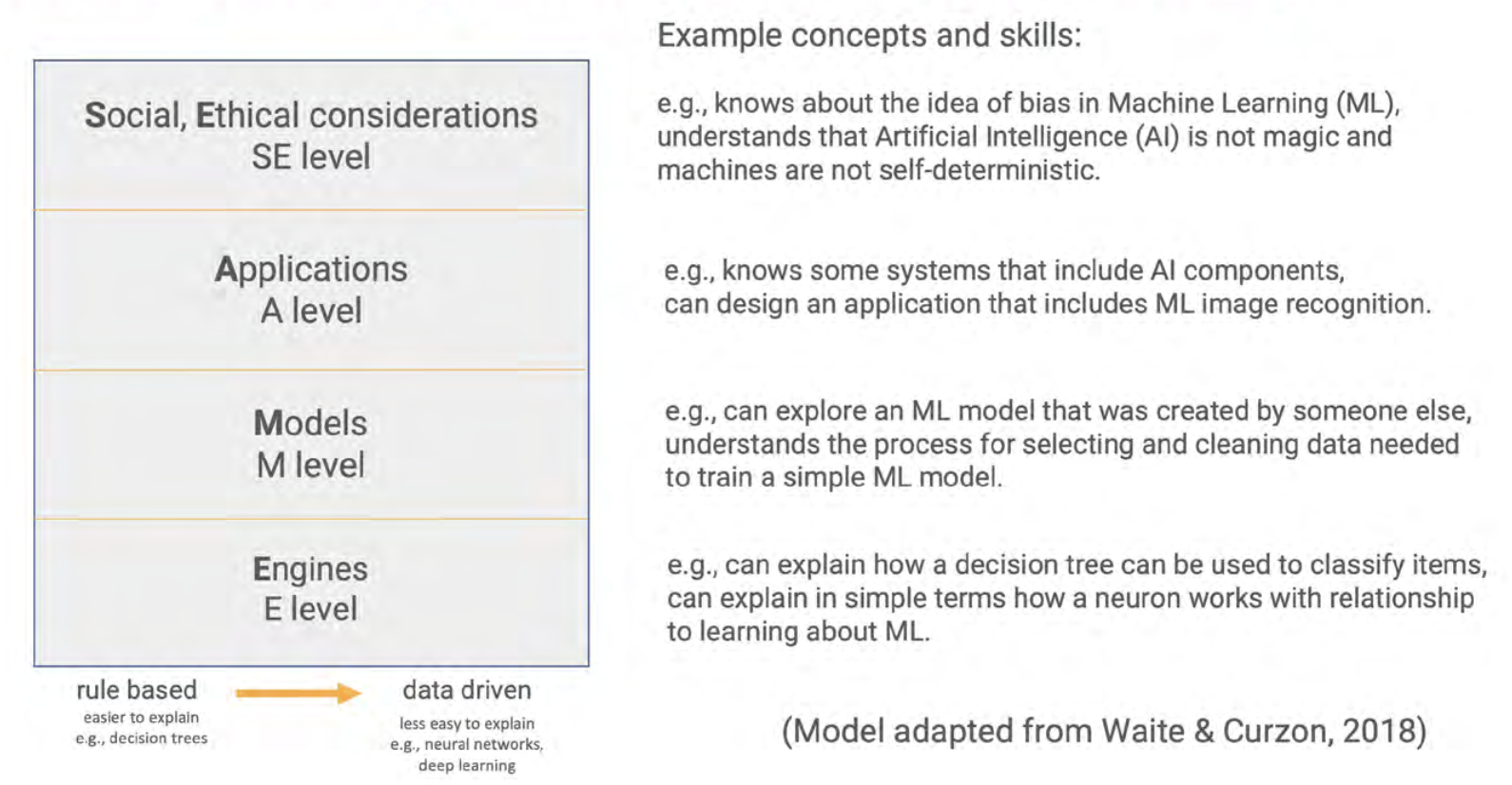
The SEAME framework gives you a simple way to group learning objectives and resources related to teaching AI and ML, based on whether they focus on social and ethical aspects (SE), applications (A), models (M), or engines (E, i.e. how AI works). We hope that it will be a useful tool for anyone who is interested in looking at resources to teach AI.
The four levels of the SEAME framework do not indicate a hierarchy or sequence. Instead, they offer a way for teachers, resource developers, and researchers to talk about the focus of AI learning activities.
The SE level covers activities that relate to the impact of AI on everyday life, and to its implications for society. Learning objectives and their related resources categorised at this level introduce students to issues such as privacy or bias concerns, the impact of AI on employment, misinformation, and the potential benefits of AI applications.
The A level refers to activities related to applications and systems that use AI or ML models. At this level, learners do not learn how to train models themselves, or how such models work. Learning objectives at this level include knowing a range of AI applications and starting to understand the difference between rule-based and data-driven approaches to developing applications.
The M level concerns the models underlying AI and ML applications. Learning objectives at this level include learners understanding the processes used to train and test models. For example, through resources focused on the M level, students could learn about the different learning paradigms of ML (i.e., supervised, unsupervised, or reinforcement learning).
The E level is related to the engines that make AI models work. This is the most hidden and complex level, and for school-aged learners may need to be taught using unplugged activities and visualisations. Learning objectives could include understanding the basic workings of systems such as data-driven decision trees and artificial neural networks.
Some learning activities may focus on a single level, but activities can also span more than one level. For example, an activity may start with learners trying out an existing ‘rock-paper-scissors’ application that uses an ML model to recognise hand shapes. This would cover the applications level. If learners then move on to train the model to improve its accuracy by adding more image data, they work at the models level.
Other activities cover several SEAME levels to address a specific concept. For example, an activity focussed on bias might start with an example of the societal impact of bias (SE level). Learners could then discuss the AI applications they use and reflect on how bias impacts them personally (A level). The activity could finish with learners exploring related data in a simple ML model and thinking about how representative the data is of all potential application users (M level).
The set of lessons on AI we are developing in collaboration with DeepMind covers all four levels of SEAME.
The set of Experience AI lessons we are developing in collaboration with DeepMind covers all four levels of SEAME. The lessons are based on carefully designed learning objectives and specifically targeted to KS3 students. Lesson materials include presentations, videos, student activities, and assessment questions.
For researchers, we think the SEAME framework will, for example, be useful to analyse school curriculum material to see whether some age groups have more learning activities available at one level than another, and whether this changes over time. We may find that primary school learners work mostly at the SE and A levels, and secondary school learners move between the levels with increasing clarity as they develop their knowledge. It may also be the case that some learners or teachers prefer activities focused on one level rather than another. However, we can’t be sure: research is needed to investigate the teaching and learning of AI and ML across all year groups.
That’s why we’re excited to welcome Salomey Afua Addo to the Raspberry Pi Computing Education Research Centre. Salomey joined the Centre as a PhD student in January, and her research will focus on approaches to the teaching and learning of AI. We’re looking forward to seeing the results of her work.
If you’d like to get involved with Experience AI as an educator and use our lessons with your class, you can start by visiting us at experience-ai.org.
The post AI education resources: What do we teach young people? appeared first on Raspberry Pi Foundation.
Last summer, the Raspberry Pi Foundation and the University of Cambridge Department of Computer Science and Technology created a new research centre focusing on computing education research for young people in both formal and non-formal education. The Raspberry Pi Computing Education Research Centre is an exciting venture through which we aim to deliver a step-change for the field.
Computing education research that focuses specifically on young people is relatively new, particularly in contrast to established research disciplines such as those focused on mathematics or science education. However, computing is now a mandatory part of the curriculum in several countries, and being taken up in education globally, so we need to rigorously investigate the learning and teaching of this subject, and do so in conjunction with schools and teachers.
To celebrate the official launch of the Raspberry Pi Computing Education Research Centre, we will be holding an in-person event in Cambridge, UK on Weds 20 July from 15.00. This event is free and open to all: if you are interested in computing education research, we invite you to register for a ticket to attend. By coming together in person, we want to help strengthen a collaborative community of researchers, teachers, and other education practitioners.
The launch event is your opportunity to meet and mingle with members of the Centre’s research team and listen to a series of short talks. We are delighted that Prof. Mark Guzdial (University of Michigan), who many readers will be familiar with, will be travelling from the US to join us in cutting the ribbon. Mark has worked in computer science education for decades and won many awards for his research, so I can’t think of anybody better to be our guest speaker. Our other speakers are Prof. Alastair Beresford from the Department of Computer Science and Technology, and Carrie Anne Philbin MBE, our Director of Educator Support at the Foundation.
The event will take place at the Department of Computer Science and Technology in Cambridge. It will start at 15.00 with a reception where you’ll have the chance to talk to researchers and see the work we’ve been doing. We will then hear from our speakers, before wrapping up at 17.30. You can find more details about the event location on the ticket registration page.
The aim of the Raspberry Pi Computing Education Research Centre is to increase our understanding of teaching and learning computing, computer science, and associated subjects, with a particular focus on young people who are from backgrounds that are traditionally under-represented in the field of computing or who experience educational disadvantage.
We have been establishing the Centre over the last nine months. In October, I was appointed Director, and in December, we were awarded funding by Google for a one-year research project on culturally relevant computing teaching, following on from a project at the Raspberry Pi Foundation. The Centre’s research team is uniquely positioned, straddling both the University and the Foundation. Our two organisations complement each other very well: the University is one of the highest-ranking universities in the world and renowned for its leading-edge academic research, and the Raspberry Pi Foundation works with schools, educators, and learners globally to pursue its mission to put the power of computing into the hands of young people.
In our research at the Centre, we will make sure that:
We are excited to work with a large community of teachers and researchers, and we look forward to meeting you at the launch event.
At the end of June, we’ll be launching a new website for the Centre at computingeducationresearch.org. This will be the place for you to find out more about our projects and events, and to sign up to our newsletter. For announcements on social media, follow the Raspberry Pi Foundation on Twitter or Linkedin.
The post Join us at the launch event of the Raspberry Pi Computing Education Research Centre appeared first on Raspberry Pi.
Raspberry Pi Pico is a low-cost microcontroller that can be connected to another computer to be programmed using MicroPython. We think it’s a great tool for exploring physical computing in classrooms and coding clubs. Pico has been available since last year, amid school closures, reopenings, isolation periods, and restrictions for students and teachers. Recently, I spoke to some teachers in England about how their reception of Raspberry Pi Pico, and how they have found using it to teach physical computing to their learners.
This blog post is adapted from issue 18 of Hello World, our free magazine written by computing educators for computing educators.
At secondary schools, a key use of Raspberry Pi Pico was in teacher-led lunchtime or after-school clubs. One teacher from a girls’ secondary school in Liverpool described how he introduced it to his Women in Tech club, which he runs for 11- to 12-year-old students for half an hour per week at lunchtime. As this teacher has free rein over the club content and a personal passion for Raspberry Pi, his eventual aim for the club participants was to build a line-following car using Pico.
The group started by covering the basics of Pico, such as connecting it with a breadboard and making LEDs flash, using our ‘Getting started with Raspberry Pi Pico’ project guide. The teacher described how walking into a room with Picos and physical computing kits grabs students’ attention: “It’s massively more engaging than programming Python on a screen… They love the idea of building something physical, like a car.” He has to remind them that phones aren’t allowed at school, as they’re keen to take photos of the flashing lights to show their parents. His overall verdict? “Once the software had been installed, [Picos are] just plug and play. As a tool in school, it gives you something physical, enthuses interest in the subject. If it gets just one person choosing the subject, who wouldn’t have done otherwise, then job done.”
“If it gets just one person choosing the subject, who wouldn’t have done otherwise, then job done.”
Teacher at a Liverpool girls’ secondary school
Another teacher from a school in Hampshire used Picos at an after-school club with students aged 13 to 15. After about six sessions of less than 50 minutes last term, the students have almost finished building motorised buggies. The first two sessions were spent familiarising students with the Picos, making LEDs flash, and using sensors. In the next four sessions, the students made their way through the Pico-focused physical computing unit from our Teach Computing Curriculum. The students worked in pairs, and initially some learners had trouble getting the motors to turn the wheels on their buggies. Rather than giving them the correct code, the teacher gave them duplicate sets of the hardware and suggested that they test each piece in turn to ‘debug’ the hardware. Thus the students quickly worked out what they needed to do to make the wheels turn.
For non-formal learning settings such as computing and coding clubs, we’ve just released a six-project learning path called ‘Introduction to Raspberry Pi Pico’ for beginner digital makers. You can check out the path directly, or learn more about how we’ve designed it to encourage learners’ independence.
Another key theme that came through in my conversations with teachers was how Raspberry Pi Pico can be used to reinforce learners’ existing computing skills. One teacher I interviewed, from a school in Essex, has been using Picos to teach computing to 12- to 14-year-olds in class, and talked about the potential for physical computing as a pedagogical tool for recapping topics that have been covered before. “If [physical computing] is taught well, it enhances students’ understanding of programming. If they just copy code from the board, it becomes about the kit and not how you solve a problem, it’s not as effective at helping them develop their computational thinking. Teaching Python on Pico really can strengthen existing understanding of using Python libraries and subroutines, as well as passing subroutine arguments.”
“If [physical computing] is taught well, it enhances students’ understanding of programming.”
Teacher at an Essex secondary school
Another teacher I spoke to, working at a Waterlooville school and relatively new to teaching, talked about the benefits of using Pico to teach Python: “It takes some of the anxiety away from computing for some of the younger students and makes them more resilient. They can be wary of making mistakes, and see them as a hurdle, but working towards a tangible output can help some students to see the value of learning through their mistakes.”
This teacher was keen for his students to get a sense of the variety of jobs that are available in the computing sector, and not just in software. He explained how physical computing can demonstrate to students how you can make inputs, outputs, and processing very real: “Give students a Pico and make them thirsty about what they could do with it — the device allows them to interact with it and work out how to bend it to what they want to do. You can be creative in computing without just writing code, you can capture information and output it again in a more useful way.”
“Working towards a tangible output can help some students to see the value of learning through their mistakes.”
Teacher at a Waterlooville school
One of the teachers we spoke to was initially a bit cynical about Pico, but had a much better experience of using it in the classroom than expected: “It’s not such a big progression from block-based microcontrollers to Pico — it could be a good stepping stone between, for example, a micro:bit and a Raspberry Pi computer.”
Why not try out Raspberry Pi Pico in your classroom or club? It might be the engagement booster you’ve been looking for!
Teachers at state schools in England can borrow physical computing kits with class sets of Raspberry Pi Picos from their local Computing Hub. We’ve made these kits available through our work as part of the National Centre for Computing Education. The Pico kit is perfect for teaching the Pico-focused physical computing unit from our Teach Computing Curriculum.
Qualified US-based educators can still get their hands on 1 of 1000 free Raspberry Pi Pico hardware kits if they sign up to our free course Design, build, and code a rover with Raspberry Pi Pico. This course shows you how to introduce Pico in your classroom. We’ve designed the course on the Pathfinders Online Institute platform, specifically for US-based educators, thanks to our partners at Infosys Foundation USA. These Raspberry Pi Pico kits are also available at PiShop.us.
For non-formal learning settings, such as Code Clubs and CoderDojos, we’ve created a six-project learning path: ‘Introduction to Raspberry Pi Pico’. This path is for beginner digital makers to follow and create Pico projects, all the while learning the skills to independently design, code, and build their own projects. All of the components for the path are available as a kit from Pimoroni.
The post Teaching with Raspberry Pi Pico in the computing classroom appeared first on Raspberry Pi.
Since the release of the Raspberry Pi Pico microcontroller in 2021, we have seen people all over the world come up with creative Pico-based inventions.
Now, thanks to our brand-new and free ‘Introduction to Raspberry Pi Pico’ learning path, young coders can easily join in and make their own cool Pico projects! This free learning path has six guided projects to help kids to independently develop their coding skills, and their skills in physical computing and electronics.
In this post, I’ll tell you about Raspberry Pi Pico, what kids can make by following our free ‘Intro to Pico’ path, and what skills they will be learning.
Raspberry Pi Pico is a physical computing device that is low-cost and easy to use. It’s much smaller than any Raspberry Pi computer, and it needs much less power. That’s because it’s not a full computer but instead a microcontroller. That means Pico is a device that you program by writing code on any computer, and then sending that code to Pico via a USB cable.
In the ‘Intro to Raspberry Pi Pico’ path, we’ve designed new digital making projects specifically using Pico. By following the projects in the path, young people learn to make things with different electronic components. They’ll bring to life their own LED fireflies; they’ll make music with a sound machine and dial (a potentiometer); they’ll look after themselves and people around them by making a mood indicator and a heart rate visualiser. To find out more, visit the path, or scroll to the bottom of this post and click on ‘Details about the projects’.
The specially designed structure of our learning paths helps kids become confident and independent coders and digital makers. Through this project path, we want to show young people what is possible with Raspberry Pi Pico and inspire them to continue their digital making journey beyond the six projects. Seeing tech creations from our amazing community is super special to us, and we would love to hear about what your young coders have made with Pico. Kids can share their projects in the path gallery, or you can tag us on social media if you post photos!
While young people make all these Raspberry Pi Pico projects, they will learn the skills and independence to make and code their very own, unique creations with a Pico. We have designed our new project paths to help kids become independent digital makers. As they progress through a path, kids gain new skills, practise what they have learnt, and finally write and follow their own project brief.
Our learning paths help kids develop many of the skills that are important to all coders and digital makers, no matter how much experience they have:
The learning paths also encourage kids to make projects about the things that matter to them.
We have written the projects in this path with young people around the age of 9 to 13 in mind.
Programs for Raspberry Pi Pico are written in a text-based language called MicroPython. That means a young person who wants to start the ‘Intro to Pico’ path needs to be familiar with typing on a keyboard.
If your kid has never coded in a text-based language before, they could complete our free ‘Introduction to Python‘ project path first, but this is not a prerequisite.
To help with the programming aspects of the projects, the instructions in the path tell young people about:
One of the great things about this project path is that it helps young people explore physical computing and electronics. In the ‘Intro to Pico’ path, they’ll use:
We’ve designed the path to be completed in around six one-hour sessions, with one hour per project. However, the project instructions encourage kids to upgrade their projects and go further if they wish. This means that they might want to spend a little more time getting their projects exactly as they imagine.
Young people need a web browser so they can follow the project instructions. The first two projects in the path provide detailed instructions for how to install the free software needed for the projects.
The first step of each project lists what components are needed to create the project. You can purchase a kit from Pimoroni that includes all of the components used in the path:
If your young coders enjoy MicroPython, they’ll also love our Python learning paths: ‘Introduction to Python‘ and ‘More Python‘. Both are structured in the same way as our Pico path, and will help young people learn Python while creating their own visual designs.
The post Get kids coding and learning electronics with Raspberry Pi Pico appeared first on Raspberry Pi.
Since last year, we have been investigating culturally relevant pedagogy and culturally responsive teaching in computing education. This is an important part of our research to understand how to make computing accessible to all young people. We are now continuing our work in this area with a new project called Roots, bridging our research team here at the Foundation and the team at the Raspberry Pi Computing Education Research Centre, which we jointly created with the University of Cambridge in its Department of Computer Science and Technology.
Across both organisations, we’ve got great ambitions for the Centre, and I’m delighted to have been appointed as its Director. It’s a great privilege to lead this work.
Culturally relevant pedagogy is a framework for teaching that emphasises the importance of incorporating and valuing all learners’ knowledge, ways of learning, and heritage. It promotes the development of learners’ critical consciousness of the world and encourages them to ask questions about ethics, power, privilege, and social justice. Culturally relevant pedagogy emphasises opportunities to address issues that are important to learners and their communities.
Culturally responsive teaching builds on the framework above to identify a range of teaching practices that can be implemented in the classroom. These include:
The overall objective of our work in this area is to further our understanding of ways to engage underrepresented groups in computing. In 2021, funded by a Special Projects Grant from ACM’s Special Interest Group in Computer Science Education (SIGCSE), we established a working group of teachers and academics who met up over the course of three months to explore and discuss culturally relevant pedagogy. The result was a collaboratively written set of practical guidelines about culturally relevant and responsive teaching for classroom educators.
The video below is an introduction for teachers who may not be familiar with the topic, showing the perspectives of three members of the working group and their students. You can also find other resources that resulted from this first phase of the work, and read our Special Projects Report.
We’re really excited that, having developed the guidelines, we can now focus on how culturally responsive computing teaching can be implemented in English schools through the Roots project, a new, related project supported by funding from Google. This funding continues Google’s commitment to grow the impact of computer science education in schools, which included a £1 million donation to support us and other organisations to develop online courses for teachers.
In our new Roots project, we want to learn from practitioners how culturally responsive computing teaching can be implemented in classrooms in England, by supporting teachers to plan activities, and listening carefully to their experiences in school. Our approach is similar to the Research-Practice-Partnership (RPP) approach used extensively in the USA to develop research in computing education; this approach hasn’t yet been used in the UK. In this way, we hope to further develop and improve the guidelines with exemplars and case studies, and to increase our understanding of teachers’ motivations and beliefs with respect to culturally responsive computing teaching.
The pilot phase of the Roots project starts this month and will run until December 2022. During this phase, we will work with a small group of schools around London, Essex, and Cambridgeshire. Longer-term, we aim to scale up this work across the UK.
The project will be centred around two workshops held in participating teachers’ schools during the first half of the year. In the first workshop, teachers will work together with facilitators from the Foundation and the Raspberry Pi Computing Education Research Centre to discuss culturally responsive computing teaching and how to make use of the guidelines in adapting existing lessons and programmes of study. The second workshop will take place after the teachers have implemented the guidelines in their classroom, and it will be structured around a discussion of the teachers’ experiences and suggestions for iteration of the guidelines. We will also be using a visual research methodology to create a number of videos representing the new knowledge gleaned from all participants’ experiences of the project. We’re looking forward to sharing the results of the project later on in the year.
We’re delighted that Dr Polly Card will be leading the work on this project at the Raspberry Pi Computing Education Research Centre, University of Cambridge, together with Saman Rizvi in the Foundation’s research team and Katie Vanderpere-Brown, Assistant Headteacher, Saffron Walden County High School, Essex and Computing Lead of the NCCE London, Hertfordshire and Essex Computing Hub.
We hold monthly research seminars here at the Foundation, and in the first half of 2021, we invited speakers who focus on a range of topics relating to equity, diversity, and inclusion in computing education.
As well as holding seminars and building a community of interested people around them, we share the insights from speakers and attendees through video recordings of the sessions, blog posts, and the speakers’ presentation slides. We also publish a series of seminar proceedings with referenced chapters written by the speakers.
You can download your copy of the proceedings of the equity, diversity, and inclusion series now.
The post The Roots project: Implementing culturally responsive computing teaching in schools in England appeared first on Raspberry Pi.
As so many CoderDojos around the world, our office-based CoderDojo hadn’t been able to bring learners together in person since the start of the coronavirus pandemic. So we decided that our first time back in the Raspberry Pi Foundation headquarters should be something special. Having literally just launched the new Raspberry Pi Build HAT for programming LEGO® projects with Raspberry Pi computers, we wanted to celebrate our Dojo’s triumphant return to in-person session by offering a ‘LEGO bricks and Raspberry Pi’ activity!
The Raspberry Pi Build HAT allows learners to build and program projects with Raspberry Pi computers and LEGO® Technic™ motors and sensors from the LEGO® Education SPIKE™ Portfolio.
What better way could there be to get the more experienced coders among our Dojo’s young people (Ninjas) properly excited to be back? We knew they were fond of building things with LEGO bricks, as so many young people are, so we were sure they would have great fun with this activity!
For our beginners, we set up Raspberry Pi workstations and got them coding the projects on the Home island on our brand-new Code Club World platform, which they absolutely loved, so their jealousy was mitigated somewhat.
Being able to rely on your learners’ existing skills in making the physical build leaves you a lot more time to support them with what they’re actually here to learn: the coding and digital making skills.
We wanted to keep our first Dojo back small, so for the ‘LEGO bricks and Raspberry Pi’ activity, we set up just four workstations, each with a Raspberry Pi 4, with 4GB RAM and a Raspberry Pi Build HAT on top, and a LEGO Education SPIKE Prime set. We put eight participants into teams of two, and made sure that all of them brought a little experience with text-based coding, because we wanted them to be able to focus on making projects in their own style, rather than first learning the basics of coding in Python. Then we offered our Ninjas the choice of the first two projects in the Introduction to the Raspberry Pi Build HAT and LEGO path: make Pong game controllers, or make a remote-controlled robot buggy. As I had predicted, all the teams chose to make a robot buggy!
The teams of Ninjas were immediately off and making — in fact, they couldn’t wait to get the lids off the boxes of brightly coloured bricks and beams!
Our project instructions focus primarily on supporting learners through coding and testing the mechanics of their creations, leaving the design and build totally up to them. This was evidenced by the variety of buggy designs we saw at the project showcase at the end of the two-hour Dojo session!
One of the amazing things Raspberry Pi makes possible when you use it with the Raspberry Pi Build HAT and SPIKE™ Prime set: it’s simple to make the Raspberry Pi at the heart of the creation talk to a mobile device via Bluetooth, and off you go controlling what you’ve created via a phone or tablet.
While beginner-friendly, the projects in the Introduction path involve a mix of coding, testing, designing, and building. So it required focus and solid teamwork for the Ninjas to finish their buggies in time for the project showcase. And this is where building with LEGO pieces was really helpful.
Having LEGO bricks and the Build HAT available to create their Raspberry Pi–powered robot buggies made it easy for our Ninjas to focus on writing the code to get their buggies to work. They weren’t relying on crafting skills or duct tape and glue guns to make a chassis in the relatively short time they had, and the coding could be front and centre for them.
The most exciting part for the Ninjas was that they were building remote-controlled robot buggies. This is one of the amazing things Raspberry Pi makes possible when you use it with the Build HAT and SPIKE™ Prime set: it’s simple to make the Raspberry Pi at the heart of the creation talk to a mobile device via Bluetooth, and off you go controlling what you’ve created via a phone or tablet.
The LEGO Technic motors that are part of the LEGO Education SPIKE Prime set are of really high quality, and they’re super easy to program with the Build HAT and its Python library! You can change the motors’ speed by setting a single parameter in your code. You can also easily write code to set or read the motors’ exact angle (their absolute position). That allows you to finely control the motors’ movements, or to use them as sensors.
Some of our teams, inspired by everything the SPIKE Prime set has to offer, tried out programming the set’s sensors, to switch their robot buggy on or help it avoid obstacles. Because we only had about 90 minutes of digital making, not all teams managed to finish adding the extra features they wanted — but next time for sure!
With a little more time (or another Dojo session), it would have been possible for the Ninjas to make some very advanced remote-controlled buggies indeed, complete with headlights, brake lights, sensors, and sound.
If you have access to LEGO Education SPIKE Prime sets for your learners, then the Raspberry Pi Build HAT is a great addition that allows them to build complex robotics projects with very simple code — but I think that’s not its main benefit.
Because the Build HAT allows your learners to work with LEGO elements, you know that many of them already understand one aspect of the creation process: they’ve got experience of using LEGO bricks to solve a problem. In a coding or STEM club session, or in a classroom lesson, you can only give your learners limited amount of time to complete a project, or get their project prototype to a stable point. So being able to rely on your learners’ existing skills in making the physical build leaves you a lot more time to support them with what they’re actually here to learn: the coding and digital making skills.
The projects using the Raspberry Pi Build HATs were such a hit, we’ll be getting them and the LEGO Education SPIKE Prime sets out at every Dojo session from now on! We’re excited to see what young people around the world will be creating thanks to our new collaboration with LEGO Education.
Have you used the Raspberry Pi Build HAT with your learners or young people at home yet? Share their stories and creations in the comments here, or on social media using #BuildHAT.
The post The Raspberry Pi Build HAT and LEGO® components at our CoderDojo appeared first on Raspberry Pi.
A portable, affordable Raspberry Pi-powered blood analyser is helping to “establish a robust healthcare ecosystem” in remote parts of India. Samples can be tested in just 30 seconds, and the cost and size of the parts make it an attractive solution for rural and resource-strapped areas.
It is the work of researchers Sangeeta Palekar and Jayu Kalambe from the Department of Electronics Engineering at Shri Ramdeobaba College of Engineering and Management.
Regular blood tests are vital in the tracking and elimination of many diseases, but there is a huge time and monetary cost currently tied to this type of laboratory work.
The researchers’s device measures light absorbance through a blood sample, a common type of analysis, and they harnessed the processing capability of Raspberry Pi 4 Model B to analyse the absorbance data. Their Raspberry Pi-powered solution was found to perform on a par with the kind of expensive lab-based blood test typically used.
Sangeeta and Jayu’s analyser is not only cheaper to build and maintain than the lab-based version, it also does the job better. Using the lab-based method means that samples from patients in rural areas must be sent away for analysis, with results communicated back to patients at a much later date. In contrast, Sangeeta and Jayu’s device can process blood samples there and then. All you need is an electricity source. Patients get their results immediately, and there is no need to transport delicate samples across rural terrain.
Incorporating an IoT element into their design, which would allow for remote monitoring, is the next step for the researchers. They also intend to develop their invention to allow it to carry out different types of blood analyses.
The full research paper is behind a paywall, but the abstract does a great job succinctly explaining all the science. Sangeeta herself also explains a lot of the magic behind her creation in this interview with IEEE Spectrum.
The post 30-second blood analysis with Raspberry Pi appeared first on Raspberry Pi.
Raspberry Pi Pico powers this real-time audio spectrogram visualiser using a digital microphone to pick up the sound and an LCD display to show us what those sounds “look” like.
First off, let’s make sure we know what all of those words mean, because “audio spectrogram visualiser” is a bit of a mouthful:
This pocket-sized device can be carried around with you and lets you see a visual representation of your surrounding audio environment in real time. So, if you wander into a peaceful bird reserve or something, the LCD display will show you something very different to what you’d see if you were in, say, Wembley Stadium during an FA Cup final.
Above, you can see Sandeep’s creation in action in the vicinity of a crying baby.
That is a satisfyingly affordable hardware list.
In the video below, you can see there is a direct correlation between the original audio signal’s amplitude (on the left) and the audio spectrogram’s representation of the signal on the right.
The Microphone Library for Pico captures data from Sandeep’s digital microphone. Arm’s CMSIS-DSP library processes the audio in real-time, then transforms it into spectrograms. These are then displayed one row at a time on the LCD screen, using the ST7789 Library for Pico.
Maker Sandeep Mistry created the original project guide on behalf of the Arm Software Developers team. Check out his other tutorial on how to create a USB Microphone with the Raspberry Pi Pico.
The post See what sounds look like with Raspberry Pi Pico appeared first on Raspberry Pi.
So far in our series of community stories, we’ve collaborated with young people from the UK, India, and Romania who are getting creative with technology to change the world around them.
Our next community story comes from a highly regarded community member who has been connecting young people with opportunities to learn and create with technology throughout her career. A US-based educator with over twenty years of experience, Yolanda Payne shares our mission to put computing and digital making into the hands of people all over the world.
“The biggest reason I’m so invested in technology is because people invested in me.”
Yolanda Payne
Yolanda Payne is an educator you might recognise from our online courses. Based in Atlanta, Georgia in the USA, she’s passionate about making technology accessible to all and helping young people become technology creators.
Yolanda says, “The biggest reason I’m so invested in technology is because people invested in me. They saw something that I was good at, showed me opportunities, and so in turn, that was my philosophy in teaching.”
Yolanda got her first computer at a young age and was hooked instantly: it opened up many new opportunities and led her to choosing a career in education. She says, “The computer gives me the tools to be an artist, it gives me the tools to create things, and if it does that for me, then just imagine what it will do for kids!”
“If you give a teacher a Raspberry Pi and show them these resources, they’re going to be hooked.”
Yolanda Payne
Yolanda has spent her entire professional life dedicated to education. She gained a bachelor’s degree in Elementary Education from Mississippi University for Women; a master’s degree in Instructional Technology from Mississippi State University; and Educational Specialist degrees from the University of Florida and the University of Georgia in Curriculum and Instruction, and in Language and Literacy.
Throughout her twenty-one years as a classroom teacher and her time running Code Clubs, Yolanda found joy in supporting students who have multiple challenges or complex needs, and in seeing them thrive in the subject of computer science. Yolanda points out, “I worked with both students that were considered to be in special education and students that were gifted. And one of the biggest things that I saw that I don’t think people realise, especially about students in special education: they are used to solving problems. […] You’d be very surprised at how real-life problem-solving skills flow very easily into computer science.”
Yolanda now works as a Research Associate at the Georgia Institute of Technology. We are tremendously thankful for her contributions as an educator and an advocate for technology and young people.
Please join us in celebrating her story by sharing it on Twitter, LinkedIn, and Facebook!
The post Celebrating the community: Yolanda appeared first on Raspberry Pi.
Get the Official Raspberry Pi Handbook 2022 right now! Over 200 pages of Raspberry Pi projects, tutorials, tips, and reviews.
Hey folks, Rob from The MagPi here. It’s been a while! I hope you’re doing well.
We’ve been on double duty this month. As well as making an amazing new issue of The MagPi (out next week), we’ve also put together a brand new book: the Official Raspberry Pi Handbook 2022, which is on sale now!
The new Handbook is crammed full of incredible community projects, some of our best build guides, an introduction to Raspberry Pi Pico, and reviews of cool Raspberry Pi kits and accessories – all stuffed into 200 pages. Here are some highlights from the book:
Lunchbox Arcade Game – make lunchtime far more exciting by busting out some Street Fighter II and having someone eat your hadoukens. Make sure to eat between rounds for maximum satisfaction.
We Still Fax – one part escape room, one part performance theatre, this relic of office technology has been hacked with a Raspberry Pi to be the centrepiece of a special show in your own living room.
iPod Classic Spotify Player – using a Raspberry Pi Zero W, this old-school iPod has been upgraded with Spotify access. The interface has even been recreated to work the same way as the old iPod, scroll wheel and all.
Play classic console games legally on Raspberry Pi – there are a surprising number of ways to get legal ROMs for Raspberry Pi-powered consoles, as well as a plethora of modern games made for the older hardware.
Build the ultimate media centre – get TV, movies, games, streaming, music, and more on one incredible Raspberry Pi build. It looks good too, thanks to the excellent case.
Stellina – this automated telescope is powered by Raspberry Pi and connects to a tablet to look at planets and other distant celestial objects.
… And much, much more!
You can grab the Official Raspberry Pi Handbook 2022 from our online store, the Raspberry Pi Store in Cambridge, from our Android and iOS app, and in the real world at some newsagents. It will make an excellent stocking stuffer in a few months time. You can also get the PDF free from our website.
Until next time, take care of yourselves!
The post The Official Raspberry Pi Handbook 2022 appeared first on Raspberry Pi.
You sit down with your six-string, ready to bash out that new song you recently mastered, but find you’re out of tune. Redditor u/thataintthis (Guyrandy Jean-Gilles) has taken the pain out of tuning your guitar, so those of us lacking this necessary skill can skip the boring bit and get back to playing.
Before you dismiss this project as just a Raspberry Pi Pico-powered guitar tuning box, read on, because when the maker said this is a fully automatic tuner, they meant it.
Guyrandy’s device listens to the sound of a string being plucked and decides which note it needs to be tuned to. Then it automatically turns the tuning keys on the guitar’s headstock just the right amount until it achieves the correct note.
Genius.
If this were a regular tuning box, it would be up to the musician to fiddle with the tuning keys while twanging the string until they hit a note that matches the one being made by the tuning box.
It’s currently hardcoded to do standard tuning, but it could be tweaked to do things like Drop D tuning.
Commenters were quick to share great ideas to make this build even better. Issues of harmonics were raised, and possible new algorithms to get around it were shared. Another commenter noticed the maker wrote their own code in C and suggested making use of the existing ulab FFT in MicroPython. And a final great idea was training the Raspberry Pi Pico to accept the guitar’s audio output as input and analyse the note that way, rather than using a microphone, which has a less clear sound quality.
These upgrades seemed to pique the maker’s interest. So maybe watch this space for a v2.0 of this project…
(Watch out for some spicy language in the comments section of the original reddit post. People got pretty lively when articulating their love for this build.)
This project was inspired by the Roadie automatic tuning device. Roadie is sleek but it costs big cash money. And it strips you of the hours of tinkering fun you get from making your own version.
All the code for the project can be found here.
The post Automatically tune your guitar with Raspberry Pi Pico appeared first on Raspberry Pi.
Today we’re announcing two brand-new, fantastic, free online courses for educators in the USA. And to kickstart their learning journey, we are giving qualified US-based educators the chance to get a free Raspberry Pi Pico microcontroller hardware kit. This is all thanks to our partners at Infosys Foundation USA, who are committed to expanding access to computer science and maker education in public schools across the United States.
You can find both new courses on the Pathfinders Online Institute platform, which supports US classroom educators to bring high-quality computer science and maker education content to their kindergarten through 12th grade students. And best of all, the platform is completely free!
The first course we’ve created for you is called Programming essentials in Scratch. It supports teachers to introduce the essentials of programming to fourth to eighth grade students. The course covers the key concepts of programming, such as variables, selection, and iteration. In addition to learning how to teach programming effectively, teachers will also discover how to inspire their students and help them create music, interactive quizzes, dance animations, and more.
Our second new course for you is called Design, build, and code a rover with Raspberry Pi Pico. It gives teachers of fourth to eighth grade students everything they need to start teaching physical computing in their classroom. Teachers will develop their students’ knowledge of the subject by using basic circuits, coding a Raspberry Pi Pico microcontroller to work with motors and LEDs, and designing algorithms to navigate a rover through a maze. By the end of the course, teachers will have all the resources they need to inspire students and help them explore practical programming, system design, and prototyping.
And thanks to the generous support of Infosys Foundation USA, we’re able to provide qualified educators with a FREE kit of materials to participate in the Design, build, and code a rover with Raspberry Pi Pico course. We’re especially excited about this because the kit includes our first-ever microcontroller, Raspberry Pi Pico. This offer is available to 1,000 US-based K–12 public or charter school teachers on a first-come, first-served basis.
To claim your kit, just create a free account on Pathfinders Online Institute and start the course. On the first page of the course, you’ll receive instructions on how to apply for a free kit.
If you’re not a qualified educator, or if you’ve missed out on the opportunity to get the free hardware, we still welcome you to join the course! You can find the materials yourself, or purchase the kit from our partners at PiShop.us.
All of us at the Raspberry Pi Foundation want to thank the Infosys Foundation USA team for collaborating with us on this new resource and learning opportunity for educators. We appreciate and share their commitment to support computer science and maker education.
The post Free computer science courseware and hardware for American educators appeared first on Raspberry Pi.
Maker Mellow was inspired by watching the progress of NASA’s Perseverance Mars rover and wanted in on the interplanetary robot scene. Their first idea was to build a scale version of Perseverance, but when their partner stepped in to suggest that starting smaller might be a little easier, Zippy was born.
ProtoTank (a bolt-together modular tank-style robotics platform)
Zippy’s basic parts haven’t changed much through its three iterations. You can follow the journey of Zippy 1.0 through 3.0 on Mellow’s website. You’ll see that some additional hardware was required when Mellow made some improvements.
The first version of Mellow’s mini Mars rover was just a motor on a 3D-printed body, controlled by plugging in wires to the battery. But Mellow was desperate to level up their robot and build something that could be controlled by an Xbox controller. They reached that goal with Zippy 2.0 and can drive the mini Mars rover remotely via Bluetooth. However, the range is quite tight, so slow runners need not apply for the job of pilot.
Zippy 3.0 comes complete with a DJI Osmo Action camera to capture its adventures.
Our favourite part of Mellow’s original project post is the list rating how good Zippy is at navigating various types of terrain (some of which are showcased in the video up top):
Sand – NO it gets stuck in the wheels
Big rocks – NO the robot is too low to the ground and gets stuck
Pebbles – with determination
Grass – only very short grass
Human bodies – surprisingly well
Carpets – Zippy loves carpets
Flat terrain – definitely
Here’s all the code you need to build your own mini Mars rover.
Keep up with NASA’s Perseverance Mars rover on Twitter. Perseverance spent its summer drilling into rocks, and has photos to prove it.
Next step: drilling. I’ve checked out my new target rock from all different angles, and I’m ready to try again for my first core sample. #SamplingMars https://t.co/fFOqkM5Lsj pic.twitter.com/FbxmO6VUy2
— NASA's Perseverance Mars Rover (@NASAPersevere) August 31, 2021
The post Zippy the Raspberry Pi Zero-powered mini Mars Rover appeared first on Raspberry Pi.
The maker of this robotic waiter had almost all of the parts for this project just sat around collecting dust on a shelf. We’re delighted they decided to take the time to pick up the few extra bits they needed online, then take the extra hour (just an hour?!) to write a program in Python to get this robotic waiter up and running.
We are also thrilled to report (having spotted it in the reddit post we found this project on) that the maker had “so much fun picking up and sometimes crushing small things with this claw.” The line between serving drinks and wanting to crush things is thinner than you might imagine.
And in even better news, all the code you need to recreate this build is on GitHub.
One of our favourite things about finding Raspberry Pi-powered projects on reddit is the comments section. It’s (usually) the perfect mix of light adoration, constructive suggestions, and gateways to tangents we cannot ignore.
Like this one recalling the Rick and Morty sketch in which a cute tiny robot realises their sole purpose is to pass butter:
And also this one pointing us to another robotic arm having a grand old time picking up a tiny ball, sending it down a tiny slide, and then doing it all over again. Because it’s important we know how to make our own fun:
We also greatly enjoyed the fact that the original maker couldn’t use the Rick and Morty “what is my purpose” line to share this project because they are such an uber fan that they already used it for a project they posted just the day before. This cute creation’s sole reason for existing is to hold an Apple pencil while looking fabulous. And we are HERE for it:
The post Robotic waiter learning to serve drinks appeared first on Raspberry Pi.
It hurts our aged soul to think how many of you won’t know what a teasmade is. So here is a quick overview of this classic 20th-century technology. Now we will tell you how VEEB brought such a contraption back to life with Raspberry Pi.
Yeah, we love the project video as much as you do. The clattering trolley rolling in with this ancient tea-making machine on top. Then loudly making a Google calendar note to brew the tea for you while you do something more useful. Genius.
Raspberry Pi reads your Google calendar and automatically activates the kettle ten minutes before the time when you’ve said you want a coffee.
Then it gets super noisy. Teasmades are like that. But it’s worth it, trust me. To cover the sound of the janky old machine, VEEB has added a speaker that plays God save the Queen as the water heats up and pours into the clever dripper with the coffee filter in it. I’m not sure there is anything more English than that, other than if this project actually made tea and not coffee. I think coffee belongs to Seattle, but I’m not sure Seattle has a national anthem of its own. Correct me in the comments. Maybe Nirvana?
Anywho, then you sprinkle your coffee grounds into the hot water, give it a stir with a spoon, and hey presto, you have [kind of automatically brewed] coffee!
File this in the list of projects we love because engineers like to spend several hours building something to automate an activity that takes one second. In this case, switching on a kettle to boil water for your coffee.
For more of VEEBs wonderful projects, check out their YouTube channel.
A quick PSA to share with those not in the know the wonder that is the limited television series Father Ted. The Mrs Doyle character was infamous for her fervent insistence on making everyone a cup of tea and she was crushed when her parochial employer, Father Ted, gave her a Teasmade for Christmas to take the “misery” out of making tea. It is not a miserable task. It is a calming, soothing ritual. Stupid Father Ted.
The post Teasmade comes back to life with Raspberry Pi appeared first on Raspberry Pi.
We came across this ‘Top 15 Raspberry Pi Zero Projects’ video and realised that it’s been a while since we showed our tiniest computer some love on this blog.
The compilation features full build videos for 15 Raspberry Pi Zero projects. Too many to go into detail about here, so we’ve picked out a few of our favourites to share.
This Sunrise lamp doubles as a psychedelic night light, and is built with snapology origami. Raspberry Pi Zero W powers an Adafruit NeoPixel ring and does a great job of letting maker Russell Eveleigh sleep in past 5am.
Russell coded different sequences to make the NeoPixel lights turn to a calming blue at bedtime, and then brighten up to sunshine yellow when it’s time for the kids to wake up.
How could we not share a retro gaming device hidden in an Altoids tin? Raspberry Pi Zero runs RetroPie software, and gameplay lasts up to five hours!
mintyPi is a nice simple do-it-yourself project, and you can find links for the parts at sudomod.com. Good luck finding an Altoids tin in the UK though. If you’ve found a good alternative, let us know in the comments.
We picked this project because Raspberry Pi Towers coffee drinkers have been thinking about making something similar.
Caleb Brewer made his office coffee machine smart by building an alert system that sends notifications when someone brews a fresh pot. A waterproof temperature sensor constantly monitors the coffee pot, and Raspberry Pi Zero W turns on an alert light and sends a Slack notification when a new hot tasty brew is ready.
If you’re into compilation videos featuring Raspberry Pi and Arduino projects, follow Top Projects Compilation on YouTube, Facebook or Instagram for more.
The post Top project ideas for Raspberry Pi Zero appeared first on Raspberry Pi.
Ever wondered what to do with Raspberry Pi boards you haven’t used in a while? Do you tend to upgrade your projects to newer models, leaving previous ones languishing at the back of a drawer? There are a lot of venerable Raspberry Pis out there doing useful stuff just as well as ever, and we take great care to make sure new versions of Raspberry Pi OS continue to run on these models, but we’re realists: we understand that ending up with older boards lying around doing nothing is a thing. Rather than leave them to gather dust, you now have a sustainable way to get your unused tech back in the hands of makers who’ll put it to work.
OKdo has partnered with Sony to launch the first official Raspberry Pi recycling initiative. OKdo Renew gives you rewards in return for your preloved boards.
If you have any of these boards sitting around unused, you can recycle them:
Our Raspberry Pi boards are manufactured at the Sony Technology Centre in Wales, and that’s where OKdo returns all the hardware you donate. When it gets there, it’ll be tested, reconditioned, and repackaged, ready to be sold to its new home. OKdo will be offering the refurbished boards at a lower price than new boards, and they all come with a twelve-month warranty.
If you have one of the boards listed above and it’s still in working order, you can register to renew your Raspberry Pi. Print the prepaid label so you can return you board for free! Then package up your board to avoid damage, being careful not to exceed the dimensions listed here.
Make sure you remove your memory card before posting your board. Sony can’t return them and we don’t want you to lose any important stuff you’ve got stored.
In return for recycling your board, you will get a £10 voucher to use towards your next OKdo purchase. You could upgrade to a faster board than the one you recycled, or pick up a new accessory.
The post Recycle your old Raspberry Pi boards with OKdo appeared first on Raspberry Pi.
In the latest issue of HackSpace magazine, Ben Everard tests whether a bit of kit from Spotpear can turn Raspberry Pi Pico into a games machine.
The snappily named Raspberry Pi Pico display 1.54-inch LCD by Spotpear ($11.89) brings in a 240×240 pixel IPS screen and ten buttons in a joypad-like arrangement. There’s four for direction, four for action, a select, and a start. At least, they’re labelled like this. You can use them for anything you like.
To help you get started, there’s a short manual, which includes example code for MicroPython and C.
This example code is easy enough to use, but it is a little messy. The mechanism for controlling the hardware isn’t separated into its own module, so you’re left with either the task of building the library yourself or having slightly untidy code. Not the biggest inconvenience, but compared to how neatly some maker hardware companies manage their code, we found ourselves off to a disappointing start.
There are also some sample UF2 files included along with the C example code, but these appear to have been built for different hardware and work either partially or not at all. The actual example code did compile and work properly.
When we ran the example code, we were impressed with the quality of the screen. With 240×240 pixels in just 1.54 inches, there’s a high pixel density that can give crisp graphics. Obviously, high pixel densities are a double-edged sword. While they can look great, it does mean higher RAM use, more time transferring data, and more data to process.
Fortunately, Pico is well-suited to the task of driving screens. Each pixel can take 16 bits of colour data, so a full-frame buffer is just 115,200 bytes. The display data is transferred by SPI, and Pico has a maximum SPI frequency of half the clock speed. For MicroPython, that means 62.5MHz. The actual data transfer rate is a little less than this because of overhead of the protocol, but we were able to drive full-frame refreshes at over 40 fps, which is plenty for smooth animations.
Obviously, if you’re looking to do animations, sending the data is only half the story. You also need to calculate the frame before it’s displayed. If you’re using MicroPython, you are quite limited by the amount of processing you can do and still keep a high frame rate (though you could use the second core to offload some of the processing). With C, you’ve got much more scope, especially as you could potentially offload the data transfer using direct memory access (DMA).
The one disappointing thing about the screen is that there’s no control over the backlight. According to the documentation, it should be attached to pin 13, but it isn’t. You can’t turn it on or off – it’s just permanently on, and quite bright. That’s a deal-breaker for anything running off battery power, as it will suck up a lot of power. However, if you want a display permanently on, this might be perfectly acceptable.
While we were quite impressed by the screen, we can’t say the same for the other part of the hardware – the buttons. They’re small, stiff, and have very little movement. The end result is a button that is hard to press, and hard to know if you’ve pressed it. They’re the sort of buttons that are commonly used as reset buttons as they’re hard to accidentally press.
We had hoped that this screen would make a good base for a games console, but unfortunately these buttons would just make for a frustrating experience. They might be OK for a menu-driven user interface, but that’s about it.
Another minor annoyance in this is the lack of any mounting holes. This makes it hard to embed into a project as the user interface.
We wanted to like this project. It’s got a good, high-res screen and a nice layout of buttons. However, the choice of components makes it hard to see how we’ll use this in our projects. We’re considering removing the surface-mount buttons and soldering wires onto them to make a more useful device, but if you’re going to go to that level of surgery, it’s probably better to start with a plain screen and work your way up from there.
5/10
Good screen, but awful buttons
Price: $11.89
Each month, HackSpace magazine brings you the best projects, tips, tricks and tutorials from the makersphere. You can get it from the Raspberry Pi Press online store or your local newsagents.
As always, every issue is free to download from the HackSpace magazine website.
The post Add 57,600 pixels to your Raspberry Pi Pico appeared first on Raspberry Pi.
This Raspberry Pi-powered weather station is a vital tool for Nepalese farmers, who work in remote, changeable conditions, and rely heavily on monitoring the environment.
It’s hard to forecast the weather in Nepal. Conditions can vary a lot within a small area because the country is so mountainous. Plus, there is no national weather service. This makes life even harder for farmers working in remote villages. There were a few essentials elements that any solution had to have:
Prabesh Sapkota and Binod Kandel from the Robotics Association of Nepal led the team that built the solar-powered weather station with battery back-up. They were able to complete the project affordably using Raspberry Pi. Prabesh and his team wrote the software and created a display dashboard in Raspberry Pi OS Jessie.
One of the challenges they faced was being able to power the Raspberry Pi and Arduino reliably, and that’s where the BitScope Blade Uno came in to play (more on that later).
The weather station sensors measure temperature, barometric pressure, humidity, wind direction and wind speed, and all of the sensors are connected to the Arduino, which records the data and sends it to the Raspberry Pi to display on the dashboard.
The team is working with an Australian sponsor to run workshops on basic electronics, with the intention of helping people build more of these affordable weather stations for rural schools and remote areas.
This weather station is an inspiring application of BitScope Blade, available to buy from element14. BitScope developed these power and mounting solutions for people working in challenging conditions, making them perfect for remote areas of Nepal without access to reliable power. They’re designed for industrial deployment as well as being suitable for off-grid hobbyist and educational applications.
You can choose from three variants, according to how many Raspberry Pi computers you need to support: BitScope Blade Uno for one Raspberry Pi and optional HAT, useful for makers and students; Duo for a pair of Raspberry Pis, ideal for building a standalone desktop and server system; and Quattro for four Raspberry Pis in applications such as compute clusters, private clouds or build farms.
Read more on the BitScope blog.
The post Raspberry Pi powers weather station in Nepal appeared first on Raspberry Pi.
A whole lot of super free hands-on activities are happening at the Raspberry Pi Store this summer.
We have teamed up with the Centre for Computing History to create an interactive learning space that’s accessible to all ages and abilities. Best of all, everything is free. It’s all happening in a big space new space we’ve borrowed a few doors down from the Raspberry Pi Store in the Grand Arcade in Cambridge, UK.
Everyone aged seven to 107 can get hands-on and creative with our free beginner-friendly workshops. You can make games with Scratch on Raspberry Pi, learn simple electronics for beginners, or get hands-on with the Raspberry Pi camera and Python programming.
If you don’t know anything about coding, don’t worry: there are friendly people on hand to help you learn.
The workshops take place every Monday, Wednesday and Friday until 3 September. Pre-booking is highly advisable. If the one you want is fully booked, it’s well worth dropping by if you’re in the neighbourhood, because spaces often become available at the last minute. And if you book and find you can no longer come along, please do make sure you cancel, because there will be lots of people who would love to take your space!
Book your place at one of our workshops.
Come and celebrate thirty years of the World Wide Web and see how things have changed over the last three decades.
This interactive exhibition celebrates the years since Tim Berners-Lee changed the world forever by publishing the very first website at CERN in 1991. You can trace the footsteps of the early web, and have a go on some original hardware.
Here are some of the things you can do:
While we would love to have a Raspberry Pi store in every town in every country all over the world (cackles maniacally), we are sticking with just the one in our hometown for now. But we make lots of cool stuff you can access online to relieve the FOMO.
The Raspberry Pi Foundation’s livestreamed Digital Making at Home videos are all still available for young people to watch and learn along with. You can chat, code together, hear from cool people, and see amazing digital making projects from kids who love making with technology.
There are also more than thirty Raspberry Pi courses available for free on FutureLearn. There’s something for every type of user and level of learner, from coders looking to move from Scratch to Python programming, to people looking to start up their own CoderDojo. Plus tons of materials for teachers sharing practical resources for the classroom.
If you like to tinker away in your own time, there are loads of books for all abilities available from the Raspberry Pi Press online store. The Official Raspberry Pi Beginner’s Guide comes in five languages. Game designers can Code the Classics. And fashion-forward makers can create Wearable Tech Projects.
The post Summer at the Raspberry Pi Store with The Centre for Computing History appeared first on Raspberry Pi.
A whole lot of super free hands-on activities are happening at the Raspberry Pi Store this summer.
We have teamed up with the Centre for Computing History to create an interactive learning space that’s accessible to all ages and abilities. Best of all, everything is free. It’s all happening in a big space new space we’ve borrowed a few doors down from the Raspberry Pi Store in the Grand Arcade in Cambridge, UK.
Everyone aged seven to 107 can get hands-on and creative with our free beginner-friendly workshops. You can make games with Scratch on Raspberry Pi, learn simple electronics for beginners, or get hands-on with the Raspberry Pi camera and Python programming.
If you don’t know anything about coding, don’t worry: there are friendly people on hand to help you learn.
The workshops take place every Monday, Wednesday and Friday until 3 September. Pre-booking is highly advisable. If the one you want is fully booked, it’s well worth dropping by if you’re in the neighbourhood, because spaces often become available at the last minute. And if you book and find you can no longer come along, please do make sure you cancel, because there will be lots of people who would love to take your space!
Book your place at one of our workshops.
Come and celebrate thirty years of the World Wide Web and see how things have changed over the last three decades.
This interactive exhibition celebrates the years since Tim Berners-Lee changed the world forever by publishing the very first website at CERN in 1991. You can trace the footsteps of the early web, and have a go on some original hardware.
Here are some of the things you can do:
While we would love to have a Raspberry Pi store in every town in every country all over the world (cackles maniacally), we are sticking with just the one in our hometown for now. But we make lots of cool stuff you can access online to relieve the FOMO.
The Raspberry Pi Foundation’s livestreamed Digital Making at Home videos are all still available for young people to watch and learn along with. You can chat, code together, hear from cool people, and see amazing digital making projects from kids who love making with technology.
There are also more than thirty Raspberry Pi courses available for free on FutureLearn. There’s something for every type of user and level of learner, from coders looking to move from Scratch to Python programming, to people looking to start up their own CoderDojo. Plus tons of materials for teachers sharing practical resources for the classroom.
If you like to tinker away in your own time, there are loads of books for all abilities available from the Raspberry Pi Press online store. The Official Raspberry Pi Beginner’s Guide comes in five languages. Game designers can Code the Classics. And fashion-forward makers can create Wearable Tech Projects.
The post Summer at the Raspberry Pi Store appeared first on Raspberry Pi.
This Raspberry Pi-based build aims to deter porch pirates from stealing packages left at your front door. In recent times, we’ve all relied on home-delivered goods more than ever, and more often than not we ask our delivery drivers to stash our package somewhere if we’re not home, leaving them vulnerable to thieves.
When internet shopper and AI project maker Ryder had a package stolen from his porch, he wanted to make sure that didn’t happen again. He figured that package stealers would be deterred by blaring sirens and flashing red lights. He also went one step further, wanting to hamper the thief’s escape with motion-activated water sprinklers and a blast of flour ready to catch them as they run away.
A simple motion detector wouldn’t work because it would set off Ryder’s booby traps whenever an unsuspecting cat or legitimate visitor happened across his porch, or if Ryder himself arrived home and didn’t fancy a watery flour bath. So some machine learning and a Python script needed to be employed.
The camera keeps an eye on Ryder’s porch and is connected wirelessly to a Raspberry Pi 4, which works with a custom TensorFlow machine learning model trained to recognise when a package is or isn’t present. If the system detects a package, it gets ready to deploy the anti-thief traps. The Raspberry Pi sets everything off if it detects that someone other than Ryder has removed the package from the camera’s view.
And Ryder had an interesting technique to train the machine learning model to recognise him:
If you want to make your own anti-porch pirate device, Ryder has shared everything you need on GitHub.
We can always rely on Ryder Calm Down’s YouTube channel for unique and quasi-bonkers builds.
If you’re not familiar with Ryder’s dog-detecting (and happiness-boosting) build, check it out below. We also blogged about this project when we needed a good dopamine boost during lockdown.
The post Deter package thieves from your porch with Raspberry Pi appeared first on Raspberry Pi.
Meet Eli’s WeatherClock, a digital–analogue timepiece that displays the weather at each hour of the day as well as the time. Here’s an example: every day at 3pm, instead of the hour hand just pointing to a number three on the clock’s face, it also points to a visual representation of what the weather is doing. Obviously, Eli’s WeatherClock still tells the time using the standard positions of the hour and minute hands, but it does two jobs in one, and it looks much more interesting than a regular clock.
You can also press on every hour position of the watch’s touchscreen display to see more detailed meteorological information, such as temperature and the likelihood of rain. Then once you’ve gotten all the detail you need, you return to the simple analogue resting face to by pressing the centre of the touchscreen.
The device uses the openWeatherMap API to fetch weather data for your location. It’s a simple build powered by Raspberry Pi Zero W with a Pimoroni 4″ HyperPixel Hi-Res Display providing the user interface. And its slim, pocket-sized design means you can take it with you on your travels.
We found this creation on The Digital Vagrant‘s YouTube channel. A friend named Eli gave them the idea so the maker named the project after him. The Digital Vagrant liked the idea of being able to quickly check the weather before leaving the house — no need to check a computer or get your phone out of your bag.
Want to make your own WeatherClock? The lovely maker has deposited everything you need on GitHub.
The post Raspberry Pi ‘WeatherClock’ shows you the hour’s forecast appeared first on Raspberry Pi.
Safely catching mice is a better way of fixing a problem, and using Raspberry Pi means it needs less supervision. In the new issue of The MagPi magazine, Rob Zwetsloot takes a look with the maker, Andrew Taylor.
With some IoT projects, it’s the little things that help. For example, take Andrew Taylor, who did the good thing of setting up a humane mousetrap. However, checking it to see if any mice had been caught in it, while necessary, was getting a little boring.
“If a mouse had gone in and I did not check it, the mouse would quickly run out of food and water!” Andrew tells us. “Having been interested in Raspberry Pi for a couple of years and having recently begun learning Python using the Enviro+ environment sensors, I figured a Raspberry Pi with a motion sensor would be an ideal way to check.”
It’s a fairly simple setup, one commonly used in CCTV builds and some fun ‘parent detectors’ on the Raspberry Pi Foundation’s projects site.
Mouse motion
“I came across a couple of automated mousetraps that people had made from scratch, but wanting to keep it simple and cheap,” Andrew explains. “I wanted to use off-the-shelf parts where possible and keep costs down. The Pi Hut had a tutorial for a DIY burglar alarm utilising a PIR sensor, IFTTT, and Pushbullet, which seemed like an ideal starting point.”
IFTTT – If This Then That – is an online service popular with IoT folks. It’s great for small things like cross-posting images on social media services, or sending a push notification when motion is detected in a mousetrap.
“I have only had one mouse since, but it worked!” Andrew says. “I was averaging about 800 detections a day and suddenly got well over a 1000. Sure enough, there was a mouse in the trap which I released shortly afterwards. I do tend to notice that the values fluctuate a bit, so it is always worth checking over the previous day’s results to see if it is notably higher.”
You might think that 800 push notifications a day is far worse than just occasionally checking your garage, and you’d be right, so Andrew tweaked the code a bit: “The code examples I found sent a notification for each movement detection – which I knew would be rather annoying, considering how randomly PIR sensors sometimes seem to trigger. My script instead logs any hits at a max of 1 per 30 seconds and then triggers a notification once every 24 hours, meaning I just get one notification a day.”
Beat a path
There’s always room for improvement, as Andrew explains: “I intend to improve the code so that it can record running averages and give an indication as to whether it believes there has been a significant spike that might necessitate me checking it out.”
Whilst the aim of the project was to keep costs down, Andrew is tempted to experiment by adding a camera, and possibly a light, so he can have a peek remotely when there has been a spike in the readings and to see if it is a false alarm. Which, as he admits, is “a new height in laziness!”
You can grab the brand-new issue right now from the Raspberry Pi Press store, or via our app on Android or iOS. You can also pick it up from supermarkets and newsagents. There’s also a free PDF you can download.
The post Humane mouse trap | The MagPi #108 appeared first on Raspberry Pi.
Befinitiv has built a custom film cartridge, using a Raspberry Pi Zero W, that turned their gorgeous old analogue camera into a digital one, and enabled it to take digital photos, videos, and even wirelessly live stream to the Internet.
The analogue camera they used in the build was considered state-of-the-art around fifty years ago, but it lives on to capture another day, all thanks to a tiny computer we made just a few years ago.
The maker replaced the old-fashioned camera film roll with a digital cartridge housing a tiny Raspberry Pi camera — with the lens removed — and a Raspberry Pi Zero W. The housing was designed to fit in the back of the camera where original photographers would have clipped the film roll in, and then spooled it over.
Along with the camera and the Raspberry Pi Zero W, the custom-built cartridge also houses a LiPo battery and a DC to DC converter, used to boost the power supply to the Raspberry Pi up to +5V.
The whole project took just two hours to complete from start to finish, everything worked first time. Befinitiv had wanted to use the Raspberry Pi High Quality Camera, but space inside the housing was just too tight. Maybe next time? Perhaps they can use one of those giant ancient cameras, where the photographer had to flip a blanket over their head, all while holding a stick in the air with the flash.
Fancy more where this retrofit goodness came from? The maker has also upgraded a flip phone from the year 2000. Oh! I just realised the year 2000 was more than 20 years ago. Watch the build video while I go and burn all of my skater boy jeans and slogan t-shirts…
They also did something weird but cool sounding with this noisy teletype machine. Is it a teletype machine? What’s a teletype machine? I saw a fax machine once..?
The post Raspberry Pi makes your retro analogue camera digital appeared first on Raspberry Pi.
(Buckle yourselves in: this is a long one.)
I had an email last month from UKScone, a Raspberry Pi user I met ten years ago at a Maker Faire in New York.
“Just had a thought. It’ll be 10 years soon since you setup the blog/forums :) Going to do a blog piece about it?
Damn, I feel old.”
Scone was one of a surprisingly large group of people who’d travelled surprisingly long distances to look at a prototype of this Raspberry Pi thing we’d been writing about. That group of people had coalesced around this blog and the Raspberry Pi forums, which both got set up exactly ten years ago tomorrow.
Back in 2011, we thought that perhaps we might sell a few thousand computers.
As of today, we’ve sold more than 40 million of the things.
We’ve kept every single blog post we’ve ever written up on this site, starting way back in July 2011. Ten years is a long time in internet terms, so you’ll find some dead links in some earlier posts; and this website has undergone a number of total redesigns, so early stuff doesn’t tend to have the pretty thumbnail associated with it to show you what it’s all about. (Our page design didn’t use them back then.) But all the same, for the internet archeologists among you, or those interested in the beginnings of Raspberry Pi, those posts from before we even had hardware are worth flicking through.
When we started doing this, I was a freelance writer and copy-editor, writing for several fragrance industry clients alongside the food and travel businesses I drummed work up for through a blog that worked as a kind of portfolio, alongside a food-trivia Twitter account. Blogs were awfully modern back then – I was one of the top three food bloggers by visitor numbers in the country – and Twitter was not yet a cesspool. Because it was modern. (In short, I was not anything approaching a tech writer, although I was a giant nerd already.) Then, one day in 2011, Eben Upton and David Braben showed Rory Cellan-Jones at the BBC a prototype, his YouTube video about it went viral – and Raspberry Pi found itself suddenly in need of somebody to run social media and press. I thought I’d do it for free for a few months, then hand over to someone else and go back to a life of being paid to eat nice things and go on holidays.
I never went back. Ten years on, Eben and I (who met in the 90s and married a few years before the Raspberry Pi project kicked off in 2009) are still here. Raspberry Pi is now two organisations: Raspberry Pi Trading, where I work, which makes the computers, the magazines, the peripherals and all that good stuff; and the Foundation, which is headed up by Philip Colligan, and which runs all our charitable programs. The Foundation trains teachers, gives hardware to deprived kids, advises on the curriculum, offers training programs for free to everybody, allows children to send their code to space, and much more. I’m immensely proud of what Philip’s built over there: it’s more than we could have imagined when we were raising money by selling keyboard stickers from our kitchen table in 2011. (Before you ask, no, we don’t make them any more.) I still remember the envelope-stuffing paper cuts. Let us know in the comments if you’d like us to start making them again. We’re in a position to pay someone who isn’t me to cut them all out this time.
We’re a big team of photographers, videographers, editors, writers and social media people now, producing all the words, videos and pictures that come out of the organisation: Ashley looks after this blog these days, while I look after the team. One thing I’ve always missed about the early days, when I was doing everything (bad photography, social media, press, PR and all the public-facing writing we produced), has been the ability to talk more publicly about hardware development, hiccups in the very early development, and about how the business behind Raspberry Pi was built. Once Raspberry Pi was actually on the market and we started work on follow-up devices, we had to stop talking about that development work in order to avoid getting hit by the Osborne effect – the social phenomenon where people stop or delay buying a product when they know a newer version is in the works. And blogging was so easy right at the start, when every project was new – at a point when there were only 2000 Raspberry Pis in the world, everything somebody did with one felt special! But there’s still a ton of stuff for us to talk about – so many people are doing so many wonderful things with Raspberry Pi that choosing a subject for the day’s blog is one of the hardest parts of Ashley’s job.
We have a big anniversary coming up next year, when it’ll be ten years since we sold the first Raspberry Pi. But we’re having a little, premature celebration here at Pi Towers today, as we congratulate ourselves on having kept this stream of news going for ten whole years.
The post Ten years of the Raspberry Pi blog appeared first on Raspberry Pi.
I am delighted to announce the creation of the Raspberry Pi Computing Education Research Centre at the University of Cambridge.
With computers and digital technologies increasingly shaping all of our lives, it’s more important than ever that every young person, whatever their background or circumstances, has meaningful opportunities to learn about how computers work and how to create with them. That’s our mission at the Raspberry Pi Foundation.
Compared to subjects like mathematics, computing is a relatively new field and, while there are enduring principles and concepts, it’s a subject that’s changing all the time as the pace of innovation accelerates. If we’re honest, we just don’t know enough about what works in computing education, and there isn’t nearly enough investment in high-quality research.
That’s why research and evidence has always been a priority for the Raspberry Pi Foundation, from rigorously evaluating our own programmes and running structured experiments to test what works in areas like gender balance in computing, to providing a platform for the world’s best computing education researchers to share their findings through our seminar series.
Through our research activities we hope to make a contribution to the field of computing education and, as an operating foundation working with tens of thousands of educators and millions of learners every year, we’re uniquely well-placed to translate that research into practice. You can read more about our research work here.
The new Research Centre is a joint initiative between the University of Cambridge and the Raspberry Pi Foundation, and builds on our longstanding partnership with the Department of Computer Science and Technology. That partnership goes all the way back to 2008, to the creation of the Raspberry Pi Foundation and the invention of the Raspberry Pi computer. More recently, we have collaborated on Isaac Computer Science, an online platform that is already being used by more than 2500 teachers and 36,000 students of A level Computer Science in England, and that we will shortly expand to cover GCSE content.
Through the Raspberry Pi Computing Education Research Centre, we want to increase understanding of what works in teaching and learning computing, with a particular focus on young people who come from backgrounds that are traditionally underrepresented in the field of computing or who experience educational disadvantage.
The Research Centre will combine expertise from both institutions, undertaking rigorous original research and working directly with teachers and other educators to translate that research into practice and effect positive change in young peoples’ lives.
The scope will be computing education — the teaching and learning of computing, computer science, digital making, and wider digital skills — for school-aged young people in primary and secondary education, colleges, and non-formal settings.
We’re starting with three broad themes:
While we’re based in the UK and expect to run a number of research projects here, we are eager to establish collaborations with universities and researchers in other countries, including the USA and India.
We’re really excited about this next chapter in our research work, and doubly excited to be working with the brilliant team at the Department of Computer Science and Technology.
If you’d like to find out more or get involved in supporting the new Computing Education Research Centre, please subscribe to our research newsletter or email research@raspberrypi.org.
You can also join our free monthly research seminars.
The post Introducing the Raspberry Pi Computing Education Research Centre appeared first on Raspberry Pi.
Holy cyberdecks! Redditor Holistech (aka Sören Gebbert) really leaned in to the “more is more” idiom when building this big orange cyberdeck using three Raspberry Pis. Why use just one screen to manipulate enemy cyberware and take down your cyberpunk foes, when you can have six?
We first came across Sören’s work on hackster.io and we were impressed with what we found, which was this four‑screen creation running Linux Mint on a dual Raspberry Pi setup:
So imagine our surprise when we clicked through to check out Holistech on reddit, only to be confronted with this six‑screen monstrosity of brilliance:
He’s only gone and levelled up his original creation already. And before we even had the chance to properly swoon over the original.
Originally, Sören wanted to use Raspberry Pi Zero because they’re tiny and easily hidden away inside projects. He needed more power though, so he went with Raspberry Pi 4 instead.
Sören 3D-printed the distinctive orange frame. On the back of the rig are openings for a fan for active cooling and a mini control display that shows the CPU temperature and the fan speed.
Six 5.5″ HD resolution screens are the eyes of the project. And everything is powered by hefty 26,000 mAh battery power banks.
And it gets even better: this whole multi-screen thing is portable. Yes, portable. You can fold it up, pack it away in its suitably steampunk metal box, and carry it with you.
There are plenty more photos. Head to Instagram to take a closer look at how Sören’s genius design folds in on itself to enable portability.
The post Mega six-screen cyberdeck appeared first on Raspberry Pi.
It’s the worst feeling in the world: waking up and realising you forgot to put your electric car on charge overnight. What do you do now? Dig a bike out of the shed? Wait four hours until there’s enough juice in the battery to get you where you need to be? Neither option works if you’re running late. If only there were a way to automate the process, so that when you park up, the charger find its way to the charging port on its own. That would make life so much easier.
Of course, this is all conjecture, because I drive a car made in the same year I started university. Not even the windows go up and down automatically. But I can dream, and I still love this automatic Tesla charger built with Raspberry Pi.
Back in 2015 Tesla released a video of their own prototype which can automatically charge their cars. But things have gone quiet, and nothing seems to be coming to market any time soon – nothing directly from Tesla, anyway. And while we like the slightly odd snake-charmer vibes the Tesla prototype gives off, we really like Pat’s commitment to spending hours tinkering in order to automate a 20-second manual job. It’s how we do things around here.
Electric vehicle enthusiast Andrew Erickson has been keeping up with the prototype’s whereabouts, and discussed it on YouTube in 2020.
Tired of waiting on Tesla, Pat took matters into his own hands and developed a home-made solution with Raspberry Pi 4. Our tiny computer is the “brains of everything”, and is mounted to a carriage on Pat’s garage wall.
There’s a big servo at the end of the carriage, which rotates the charging arm out when it’s needed. And an ultrasonic distance sensor ensures none of the home-made apparatus hits the car.
A Raspberry Pi Camera Module takes photos and sends them back to a machine learning model (Pat used TensorFlow Lite) running on his Raspberry Pi 4. This is how the charging arm finds its way to the port. You can watch the model in action from this point in the build video.
Top stuff, Pat. Now I just need to acquire a Tesla from somewhere so I can build one for my own garage. Wait, I don’t have a garage either…
The post Charge your Tesla automatically with Raspberry Pi appeared first on Raspberry Pi.
Raspberry Pi 400 is now available with keyboard layouts for Portugal, Norway, Sweden, and Denmark. You can buy these four new variants from our lovely Raspberry Pi Approved Resellers. Happy Friday!
Raspberry Pi 400 hasn’t even celebrated its first birthday yet (remember the launch in November?), but at only 249 days old, it already has ten variants to choose from.
At launch, users could choose between English (UK and US), French, Italian, German, and Spanish keyboard layouts, and the new variants support Portuguese, Danish, Swedish and Norwegian. With a variant for Japan coming soon, Raspberry Pi 400 will soon be available with the same range of layouts as our official keyboard.
Here are the keyboard layouts of the four new variants, so you can take a closer look.
Users in Sweden can buy Raspberry Pi 400 with the new Swedish keyboard layout from our resellers Electrokit and RaspberryPi.dk.
If you’re in Portugal, you can buy a Portuguese Raspberry Pi 400 from the good people at Robert Mauser Ltd.
If you’re looking to purchase Raspberry Pi 400 in our Norwegian layout, RaspberryPi.dk can help.
And for those of you in Denmark, RaspberryPi.dk can ship you a Danish Raspberry Pi 400 too.
All the keyboard layouts for Raspberry Pi 400 are available for your perusal from our Raspberry Pi Datasheets page.
Which Raspberry Pi 400 do you have on your desk?
The post New Raspberry Pi 400 layouts appeared first on Raspberry Pi.
Has your fitness suffered during locked down? Have you been able to keep up diligently with your usual running routine? Maybe you found it easy to recreate you regular gym classes in your lounge with YouTube coaches. Or maybe, like a lot of us, you’ve not felt able to do very much at all, and needed a really big push to keep moving.
Maker James Wong took to Raspberry Pi to develop something that would hold him accountable for his daily HIIT workouts, and hopefully keep his workouts on track while alone in lockdown.
HIIT is the best kind of exercise, in that it doesn’t last long and it’s effective. You do short bursts of high-intensity physical movement between short, regular rest periods. HIIT stands for High Intensity Interval Training.
James was attracted to HIIT during lockdown as it didn’t require any gym visits or expensive exercise equipment. He had access to endless online training sessions, but felt he needed that extra level of accountability to make sure he kept up with his at-home fitness regime. Hence, HIIT Pi.
HIIT Pi is a web app that uses machine learning on Raspberry Pi to help track your workout in real time. Users can interact with the app via any web browser running on the same local network as the Raspberry Pi, be that on a laptop, tablet, or smartphone.
HIIT Pi is simple in that it only does two things:
So, essentially, you’ve got a digital personal trainer in the room monitoring your movements and letting you know whether they’re up to standard and whether you’re likely to achieve your fitness goals.
James calls HIIT Pi an “electronic referee”, and we agree that if we had one of those in the room while muddling through a Yoga With Adriene session on YouTube, we would try a LOT harder.
A Raspberry Pi camera module streams raw image data from the sensor roughly at 30 frames per second. James devised a custom recording stream handler that works off this pose estimation model and takes frames from the video stream, spitting out pose confidence scores using pre-set keypoint position coordinates.
James’s original project post details the inner workings. You can also grab the code needed to create your own at-home Raspberry Pi personal trainer.
Get in touch with James here.
The post HIIT Pi makes Raspberry Pi your home workout buddy appeared first on Raspberry Pi.
If you loved the film Finding Dory, you might just enjoy the original story of these underwater robots, fresh out of the latest issue of The MagPi Magazine.
It’s no coincidence that the shoal of robot fish in this Raspberry Pi Zero W project look more than a little like Dory from Pixar’s movie. As with the film character, the Bluebot robot fish are based on the blue tang or surgeonfish. Unlike Dory, however, these robot fish are designed to be anything but loners. They behave collectively, which is the focus of the Blueswarm research project that began in 2016 at Harvard University.
Florian Berlinger and his PhD research project colleagues Radhika Nagpal, Melvin Gauci, Jeff Dusek, and Paula Wulko set out to investigate the behaviour of a synchronised group of underwater robots and how groups of such robot fish are co‑ordinated by observing each other’s movements. In the wild, birds, fish, and some animals co-ordinate in this way when migrating, looking for food and as a means of detecting and collectively avoiding predators. Simulations of such swarm behaviour exist, but Blueswarm has the additional challenge of operating underwater. Raspberry Pi Zero W works well here because multiple Bluebot robots can be accessed remotely over a secure wireless connection, and Raspberry Pi Zero W is physically small and light enough to fit inside a palm-sized robot.
The team designed the fish-inspired, 3D-printed robot body as well as the fin-like actuators and the on-board printed circuit board which connects to all the electronics and communicates with Raspberry Pi Zero W. Designing the robot fish took the team four years, from working out how each robot fish would move and adding sensing capabilities, to refining the design and implementing collective behaviours, coded using Python 3.
They used as many off-the-shelf electronics as possible to keep the robots simple, but adapted existing software algorithms for the purposes of their investigations, “with several clever twists on existing algorithms to make them run fast on Raspberry Pi,” adds Florian.
On-board cameras that offer “an amazing 360-degree field of view” are one of the project’s real triumphs. These cameras are connected to Raspberry Pi via a duplexer board (so two cameras can operate as one) the project team co-designed with Arducam. Each Raspberry Pi Zero W inside follows the camera images and instructs the fins to move accordingly. The team developed custom algorithms for synchronisation, flocking, milling, and search behaviours to simulate how real fish move individually and as a group. As a result, says Florian, “Blueswarm can be used to study inter-robot co-ordination in the laboratory and to learn more about collective intelligence in nature.” He suggests other robot-based projects could make use of a similar setup.
Each robot fish cost around $250 and took approximately six hours to make. To make your own, you’d need a 3D printer, Raspberry Pi Zero W, a soldering station – and a suitably large tank for your robot shoal! Although the team hasn’t made the code available, the Blueswarm project paper has recently been published in Science Robotics and by the IEEE Robots and Automation Society. Several biology researchers have also been using the Bluebot shoal as ‘fish surrogates’ in their studies of swimming and schooling.
You can grab the brand-new issue right now from the Raspberry Pi Press store, the Raspberry Pi Store, Cambridge, or via our app on Android or iOS. You can also pick it up from supermarkets and newsagents. There’s also a free PDF you can download.
The post Bluebot Shoal Fish Robot appeared first on Raspberry Pi.
I speak English. Super well. And I can read the rough, overall vibe of writing in French. I can also order beer and taxis in Spanish. Alas, my dog can do none of these things, and we are left in communication limbo. I try asking them (in English) why they’re so mean to that one Cockapoo who lives across the road, or why they don’t understand the importance of the eyedrops the vet insists I have to hold their eyelids open to administer. They just respond with a variety of noises that I cannot translate. We need to fix this, and thankfully NerdStoke has harnessed Raspberry Pi to build a solution.
The dog wears a harness with a microphone that picks up its barks. The barks get processed through a device that determines what the dog is saying and then outputs it through speakers.
Raspberry Pi Zero is the affordable brain powering NerdStoke’s solution to this age-old human-and-pup problem. But writing code that could translate the multitude of frequencies coming out of a dog’s mouth when it barks was a trickier problem. NerdStoke tried to work it through on Twitch with fellow hobbyists, but alas, the original dream had to be modified.
Spoiler alert: fast Fourier transforms did not work. You would need a clear, pure tone for that to work in a project like this, but as we said above, dogs bark in a rainbow of tones, pitches, and all the rest.
Because of this, a time-based model was devised to predict what a dog is likely to be barking about at any given time of day. For example, if it’s early morning, they probably want to go out to pee. But if it’s mid-morning, they’re probably letting you know the postman has arrived and is trying to challenge your territory by pushing thin paper squares through the flap in your front door. It’s a dangerous world out there, and dogs just want to protect us.
Nerdstoke had his good friend record some appropriate soundbites to go with each bark, depending on what time of day it happened. And now, Nugget the dog can tell you “I want to cuddle” or “Why aren’t you feeding me?”
While the final project couldn’t quite translate the actual thoughts of a dog, we love the humour behind this halfway solution. And we reckon the product name, Holler Collar, would definitely sell.
NerdStroke is all over the socials, so follow them on your platform of choice:
TWITCH – twitch.tv/nerdstoke
INSTAGRAM – instagram.com/nerdstoke
TWITTER – twitter.com/nerdstoke
GITHUB – github.com/nerdstoke
EMAIL – nerdstoke@gmail.com
The post Translate dog barks with Raspberry Pi appeared first on Raspberry Pi.
Machine learning can sound daunting even for experienced Raspberry Pi hobbyists, but Microsoft and Adafruit Industries are determined to make it easier for everyone to have a go. Microsoft’s Lobe tool takes the stress out of training machine learning models, and Adafruit have developed an entire kit around their BrainCraft HAT, featuring Raspberry Pi 4 and a Raspberry Pi Camera, to get your own machine learning project off to a flying start.
Adafruit’s BrainCraft HAT fits on top of Raspberry Pi 4 and makes it really easy to connect hardware and debug machine learning projects. The 240 x 240 colour display screen also lets you see what the camera sees. Two microphones allow for audio input, and access to the GPIO means you can connect things likes relays and servos, depending on your project.
Microsoft Lobe is a free tool for creating and training machine learning models that you can deploy almost anywhere. The hardest part of machine learning is arguably creating and training a new model, so this tool is a great way for newbies to get stuck in, as well as being a fantastic time-saver for people who have more experience.
Get started with one of three easy, medium, and hard tutorials featured on the lobe-adafruit-kit GitHub.
Lady Ada demonstrated Bakery: a machine learning model that uses an Adafruit BrainCraft HAT, a Raspberry Pi camera, and Microsoft Lobe. Watch how easy it is to train a new machine learning model in Microsoft Lobe from this point in the Microsoft Build Keynote video.
Bakery identifies different baked goods based on images taken by the Raspberry Pi camera, then automatically identifies and prices them, in the absence of barcodes or price tags. You can’t stick a price tag on a croissant. There’d be flakes everywhere.
Running this project on Raspberry Pi means that Lady Ada was able to hook up lots of other useful tools. In addition to the Raspberry Pi camera and the HAT, she is using:
All of this running on Raspberry Pi, and made super easy with Microsoft Lobe and Adafruit’s BrainCraft HAT. Adafruit’s Microsoft Machine Learning Kit for Lobe contains everything you need to get started.
And finally, watch Microsoft CTO Kevin Scott introduce Limor Fried, aka Lady Ada, owner of Adafruit Industries. Lady Ada joins remotely from the Adafruit factory in Manhattan, NY, to show how the BrainCraft HAT and Lobe work to make machine learning accessible.
The post Machine Learning made easy with Raspberry Pi, Adafruit and Microsoft appeared first on Raspberry Pi.
Maker keanuDav was always forgetting to turn on his bike lights when riding out in the dark. He also never knew how fast he was going, or how long his rides were. So he created a shareable smart bike that automatically turns the lights on or off and keeps track of where you’ve ridden. The project uses a RFID scanner so somebody else can use the bike without messing with Keanu’s personal ride data.
Here in Cambridge, if you forget to take your clip-on lights off your bike when you lock it up, chances are they won’t be there when you go back. We reckon this Raspberry Pi-powered solution could work for us here in the UK’s leading cycling city too, since there’s nothing to easily unclip and walk away with.
Keanu totted up the total price of the build, including wood and the light, at around €145.
We’re not going to lie: the smart bike looks tricky to recreate. I mean, that is a lot of wires. And several bits of hardware. But it does perform multiple functions for the rider, so we can put up with a little fiddliness.
And don’t worry, Keanu is a hero and shared this Fritzing diagram on his instructable, which is handily set out in a twelve-step format so you can follow along easily.
Keanu explains:
“The RFID scanner is used with the arduino. I read out the data from the scanner with the arduino and send it to the Raspberry Pi with Serial USB.
The GPS module is also using serial communication. The data the GPS sends to the Raspberry Pi is not that well formatted, so I used a library to parse the data and make it a lot easier to use.
The analog values from the LDR are converted using the mcp3008 (an adc), then I transform the value to a percentage.”
Keanu stores the data in a relational database in mySQL. Then the database and a python script run together on the Raspberry Pi. Here’s everything you need on GitHub.
On top of the impressive coding and electrical skills, Keanu is a dab hand at woodwork. You could use a pre-made box in another material if that’s not your thing. It just needs a hole for the LCD screen to show through.
Make sure to check out maker Keanu’s step-by-step tutorial explaining how he made the smart bike.
The post Make your bike smart with Raspberry Pi appeared first on Raspberry Pi.
Inspired by NASA’s attempt to launch a helicopter on Mars, one maker made an Earth-bound one of her own. And she tells Rosie Hattersley all about it in the latest issue of The MagPi Magazine, out now.
Like millions of us, in April Avra Saslow watched with bated breath as NASA’s Perseverance rover touched down on the surface of Mars.
Like most of us, Avra knew all about the other ground-breaking feat being trialled alongside Perseverance: a helicopter launch called Ingenuity, that was to be the first flight on another planet – “a fairly lofty goal”, says Avra, since “the atmosphere on Mars is 60 times less dense than Earth’s.”
With experience of Raspberry Pi-based creations, Avra was keen to emulate Ingenuity back here on earth.
NASA chose to use open-source products and use commercially available parts for its helicopter build. It just so happened that Avra had recently begun working at SparkFun, a Colorado-based reseller that sells the very same Garmin LIDAR-Lite v3 laser altimeter that NASA’s helicopter is based on. “It’s a compact optical distance measurement sensor that gives the helicopter ‘eyes’ to see how far it hovers above ground,” Avra explains.
NASA posted the Ingenuity helicopter’s open-source autonomous space-flight software, written specifically for use with Raspberry Pi, on GitHub. Avra took all this as a sign she “just had to experiment with the same technology they sent to Mars.”
Her plan was to see whether she could get GPS and lidar working within NASA’s framework, “and then take the sensors up on a drone and see how it all performed in the air.” Helpfully, NASA’s GitHub post included a detailed F Prime tutorial based around Raspberry Pi. Avra says understanding and using F Prime (F´) was the hardest part of her Epigone drone project. “It’s a beast to take on from an electronics enthusiast standpoint,” she says. Even so, she emphatically encourages others to explore F´ and the opportunity to make use of NASA’s code.
The Epigone Drone is built around Raspberry Pi 4 Model B; Garmin’s LIDAR-Lite v4, which connects to a Qwiic breakout board and has a laser rather than an LED; a battery pack; and a DJI Mini 2 drone borrowed from a videographer colleague. Having seen how small the drone was, Avra realised 3D-printing an enclosure case would make everything far too heavy. As it was, positioning the Epigone onto its host drone was challenging enough: the drone’s rotors passed worryingly close to the project’s Raspberry Pi, even when precisely positioned in the centre of the drone’s back. The drone has its own sensors to allow for controlled navigation, which meant Avra’s design had to diverge from NASA’s and have its lidar ‘eyes’ on its side rather than underneath.
Although her version piggybacks on an existing drone, Avra was amazed when her Epigone creation took flight:
“I honestly thought [it] would be too heavy to achieve lift, but what do ya know, it flew! It went up maybe 30 ft and we were able to check the sensors by moving it close and far from the SparkFun HQ [where she works].”
While the drone’s battery depleted in “a matter of minutes” due to its additional load, the Epigone worked well and could be deployed to map small areas of land such as elevation changes in a garden, Avra suggests.
You can grab the brand-new issue right now from the Raspberry Pi Press store, or via our app on Android or iOS. You can also pick it up from supermarkets and newsagents. There’s also a free PDF you can download.
The post ‘Epigone drone’ pays homage to NASA’s Mars Helicopter | The MagPi #107 appeared first on Raspberry Pi.
When maker Stéphane (aka HalStar) set about building this self-playing xylophone, their goal was to learn more about robotics, and to get hands-on with some mechanical parts they had never used before, in this case solenoids.
They also wanted to experiment with Raspberry Pi to build something that reflected their love of music. This automated instrument, capable of playing hundreds of MIDI files, fits the brief.
Two factors constrained the design: Stéphane wanted to be able to do it all using parts from the local DIY store, and to use as many regular modules as possible. So, no breadboard or wires everywhere, and no custom PCB. Just something simple to assemble and neat.
Raspberry Pi Zero WH is the teeny tiny brain of the self-playing xylophone. And its maker’s build details video very helpfully labels all the parts, where they sit, and what’s connected to what.
These three buttons select the tracks, set the tempo, and set the mode. Choose between playing all loaded tracks or just one. You can also decide whether you want all tracks to play on repeat in a loop, or stop after your selections have played through. A two-inch LCD screen shows you what’s going on.
While there are thousands of MIDI files freely available online, very few of them could actually be played by the xylophone. With only 32 notes, the instrument is limited in what it can play without losing any notes. Also, even when a MIDI file uses just 32 consecutive notes, they might not be the same range of 32 notes as the xylophone has, so you need to transpose. Stéphane developed a tool in Python to filter out 32-note tunes from thousands of MIDI files and automatically transpose them so the xylophone can play them. And, yes, everything you need to copy this filtering and transposing function is on GitHub.
Now, Stéphane says that whenever friends or family visit their home, they’re curious and impressed to see this strange instrument play by itself. Sadly, we are not among Stéphane’s family or friends; fortunately, though, this project has an entire YouTube playlist, so we can still have a look and a listen to see it in action up close.
We know it’s technically a glockenspiel. Stéphane acknowledges it is technically a glockenspiel. But we are firm fans of their going down the xylophone route, because way more people know what one of those is. If you’re interested, the difference between a xylophone and the glockenspiel is the material used for the bars. A xylophone has wooden bars, whereas glockenspiel bars are metal.
The post Raspberry Pi Zero makes a xylophone play itself appeared first on Raspberry Pi.
Diehard Nintendo and Star Wars fan electrouser301 is behind this customised R2D2 Raspberry Pi-powered console. Raspberry Pi 3 Model B is its brain, and a Nintendo GameCube was customised with spray paint and hand-cut stencils.
Telling the story of the build, electrouser301 said:
“When I saw what people were doing with Raspberry Pi and emulation it opened up a new world to me. If you would have shown kid-me that I could play the whole libraries of NES, N64, Arcade games, Genesis, SNES, etc. all on one console that you create yourself, to your own specifications, my mind would have been blown. That’s what this whole project was about, bringing back my inner child. I wanted to create and own something that no one else has.”
Of course, you could just deck out a GameCube case with decals or paint and keep the internals the same if you don’t want to swap a Raspberry Pi in for emulation. But where’s the fun in that?
See the machine’s power circuit plugged into the Raspberry Pi’s micro USB power slot below. The red and green wires are LED wires, and the power switch wires are pink.
And here’s a side view of the guts of the project:
Hand-cut R2D2-inspired paper stencils spray-painted onto the GameCube give it its instantly recognisable style. A unique retro device now adorns electrouser301’s gaming space, and new life has been breathed into one of Nintendo’s finest creations.
Take a look at electromaker’s list of Best Star Wars Maker Projects – it’s where we came across this R2D2 GameCube mashup. Naturally, the list features a fair few homemade lightsabers, so check it out if you’re in the market for an upgrade; however, we wanted to share a few Star Wars-themed builds we hadn’t seen before.
First up, an animated Star Wars: The Force Awakens movie poster made with NeoPixel LEDs and an Arduino Mega. Steve from Making at Home coded a built-in motion sensor and customisable brightness settings. Check it out below, because this isn’t just any old poster with a few LEDs taped in the back, oh no.
You know we love wearable tech around here, so this DIY Boba Fett helmet with a built-in LED chaser was definitely going to be a favourite. This is a fairly affordable build too, consisting of a few cheap components like LEDs and resistors, while the helmet itself is made from crafty stuff found around the house. Crazy Couple created this project and you should check out their tutorial-packed YouTube channel.
BB8 occupies a special place in our hearts, so we love this 3D-printed robot, which is controlled by an Arduino Uno over a Bluetooth connection from your smartphone. Watch maker Lewis’s video below and share in his love for this spherical droid.
Drop some links in the comments to show off your Star Wars-themed builds so we can share in your intergalactic wisdom. Then go be friends with Electromaker on YouTube. Because subscribers of them you should be.
The post Raspberry Pi R2D2 console (plus tons of other Star Wars projects) appeared first on Raspberry Pi.
We have a special blog today from one of our own design engineers, Simon Martin. He’s the designer of Raspberry Pi 400 and our High Quality Camera and spends his free time tinkering with electronic music.
Simon has wanted to make his own electronic musical instrument with Raspberry Pi for some time. He designed a circuit board for the project a year ago, but it lay around in a drawer in his desk while he finished Raspberry Pi 400. Finally, the winter months gave him the incentive to get it working.
Simon: The Synth6581 device doesn’t look much like an electronic musical instrument, but just like circuit boards stacked on top of a Raspberry Pi 4. You have to plug a musical keyboard into a USB port and a pair of speakers into the audio jack on the bottom board to make it work.
The code is written almost entirely in Python, with a little bit of C to speed up the communications to the chips. I designed and laid out the circuit boards, which were ordered online. The first six boards cost only £20, but the components were another £100. I spent more than a day soldering the components on the boards by hand. It took much more time to check every chip and connection worked, a common problem with hand-soldering new boards.
And Synth6581 is no ordinary sounding musical instrument. It’s based on the music chip inside a vintage computer: the Commodore 64. The microchips are almost forty years old and they have a quirky sound that kids in the 1980s loved and parents hated. By the way, did you know that the Commodore 64 was the inspiration for Raspberry Pi 400?
I was one of many hobby programmers in the 1980s that used to attempt to program Commodore 64s. Much like people today dabble with programming on Raspberry Pi 400s, kids and adults were dabbling with the BASIC programming language on their Commodore 64s back then. Nowadays, Raspberry Pis have video, graphics, and audio readily available, but back in the 1980s, the hardware registers had to be ‘poked’ one by one into the console window. You had to get quite technical just to get the computer to make a musical sound. Those sounds came from the MOS6581 or ‘SID’ chip. It had such a famous sound character that it formed the basis of the chiptune music genre, and people are still writing music on Commodore 64s today.
By borrowing a few chips from broken Commodore 64s, including one or two lying around Raspberry Pi Towers, I made those 1980s ping noises into a polyphonic synthesiser controlled in Python on Raspberry Pi. The registers in the SID chips are simply being ‘poked’ by Raspberry Pi instead of Commodore 64. I also reverse-engineered the music from old games and made the sound effects and instruments work across the keyboard.
This device is unique: only one of these will ever be built, so please don’t wait for a launch date. There were over 10 million chips manufactured for Commodore 64, but production of the chips ended nearly 30 years ago. The Commodore 64s and spare parts for them are still in high demand, which is pushing up second hand prices. Nonetheless, the code and schematics are available online on GitHub, and I invite other Raspberry Pi users to use them to make musical instruments out of other games consoles. I reckon Sega Megadrive has a lot of potential for a Raspberry Pi port…
For more video demos of this instrument, head to my YouTube channel.
The post Commodore 64 + Raspberry Pi 4 = Synth6581 appeared first on Raspberry Pi.
In the latest issue of HackSpace magazine, Ben Everard shows us how to create a framework for building audio devices using Raspberry Pi Pico, called PicoPicoSynth.
Raspberry Pi Pico combines processing power with the ability to shuffle data in and out quickly. This makes it a good fit for a lot of different things, but the one we’ll be looking at today is sound synthesis.
There are a huge number of ways you can make sound on a programmable electronic device, but there’s always space for one more way, isn’t there? We set about trying to create a framework for building audio devices using Raspberry Pi Pico that we’ve called PicoPicoSynth, because it’s a small synth for Pico.
The program is powered by a sequencer. This is a structure that contains (among other things) a sequence of notes that it plays on a loop. Actually, it contains several sequences of notes – one for each type of noise you want it to play. Each sequence is a series of numbers. A -1 tells the sequencer not to play that note; a 0 or higher means play the note. For every point in time (by default, 24,000 times a second), the sequencer calls a function for each type of noise with the note to play and the time since the note first sounded. From these inputs, the callback function can create the position of the sound wave at this point, and pass this back to the sequencer. All the sounds are then mixed and passed on to the Pico audio system, which plays them.
This setup lets us focus on the interesting bit (OK, the bit this author happens to find interesting – other people may disagree) of making music. That is playing with how manipulating waveforms affects the sound.
You can find the whole PicoPicoSynth project at hsmag.cc/GitHubPPSynth. While this project is
ongoing, we’ve frozen the version used in this article in release 0.1, which you can download from hsmag.cc/PPSythV1. Let’s take a look at the example_synth file, which shows off some of the features.
You can create the sound values for PicoPicoSynth however you like, but we set it up with wavetables in mind. This means that you pre-calculate values for the sound waves. Doing this means you can do the computationally heavy work at the start, and not have to do it while running (when you have to keep data flowing fast enough that you can keep generating sound).
The wavetables for our example are loaded with:
low_sine_0 = get_sinewave_table(50,24000);
low_sine_1 = get_sinewave_table(100,24000);
bongo_table = create_wavetable(9054);
for (int i = 0; i < BONGOSAMPLES; i++) {
bongo_table->samples[i] =bongoSamples[i] * 256;
}
The first two create sine waves of different frequencies. Since sine waves are useful, we’ve created a helper function to automatically generate the wavetable for a given frequency.
The third wavetable is loaded with some data that’s included in a header file. We created it by loading a bongo WAV file into hsmag.cc/WavetableEd, which converts the WAV file into a C header file. We just have to scale it up from 8 bits to 16 by multiplying it by 256. There’s no helper function to do the job here, so we have to load in the samples ourselves.
That’s the data – the other thing we need are the callback functions that return the values we want to play. These take two parameters: the first is the number of samples since the note was started, and the second is the note that’s played.
int16_t bongos(int posn, int note) {

          if (note == 0 ) {
                      return no_envelope(bongo_table,
1, posn);
}
if (note == 1 ) {
return no_envelope(bongo_table,0.5, posn);
}
else {
return 0;
}
}
int16_t low_sine(int posn, int note) {
if (note == 0 ) {
return bitcrush(envelope(low_sine_0, 1, posn, posn, 5000, 10000, 15000,40000),32768,8);
}
if (note == 1 ) {
return bitcrush(envelope(low_sine_1, 1, posn, posn, 5000, 10000, 15000,40000),32768,8);
}
else {
return 0;
}
}
The note is 0 or higher – it corresponds to the number in the sequence, and you can use this however you like in your program. As you can see, both of our functions play sounds on notes 0 and 1.
The library includes a few functions to help you work with wavetables, the main two being
no_envelope and envelope. The no_envelope function also takes a multiplier – it’s 1 in the first instance and 0.5 in the second. This lets us speed up or slow down a sample, depending on what we want to play.
An envelope may be familiar to you if you’ve worked with synths before, and it’s used to convert a constant tone into something that sounds a bit like an instrument being played. You supply four values – the attack, decay, sustain, and release times. During the attack phase, the volume ramps up. During the decay phase, it partially drops to a level that it holds during the sustain phase, and finally it drops to 0 during the release phase. This gives a much more natural sound than simply starting or stopping the sample.
The envelope function also has a multiplier, so we could use the same wavetable for both, but it’s more accurate to generate a specific wavetable for each note if you’ve got the space to store it.
There are also a few sound effects in the synth library that you can apply – BitCrunch, for example. This compresses the sample bit depth down to give the sine wave a distorted sound.
These callbacks don’t have to be sound. You could equally use them to co-ordinate a lighting effect, control physical hardware, or do almost anything else.
Now we’ve got the sounds set up, it’s time to link them all together. This is done with the code below.
int bongo_sequence[] = {1, 1, -1, -1, -1,0, -1, -1};
int low_sine_sequence[] = {-1, -1, 1, -1,-1, -1, 0, -1};
struct sequencer main_sequencer;
init_sequencer(&main_sequencer, BEATNUM,BEATFREQ);
//add up to 32 different sequences here
add_sequence(&main_sequencer, 0, bongo_sequence, bongos, 0.5);
add_sequence(&main_sequencer, 1, low_sine_sequence, low_sine, 0.5);
Sequences are stored as int arrays that have to be the same length as the sequencer (stored in the BEATNUM macro). This can be any integer up to 32. The numbers in here can be anything you like, as they’re just passed back to the callback functions defined above. The sole limitation being that only numbers 0 or greater are played. We also pass the BEATFREQ value which contains the number of samples per beat.
The final step in setting up the sound is to add up to 32 different sequences to your sequencer.
With everything set up, you can set the music playing with:
  while (true) {

     //do any processing you want here
     give_audio_buffer(ap, fill_next_
buffer(&main_sequencer, ap, SAMPLES_PER_BUFFER));
}
Each time this loops, it calculates the next 256 (as stored in the SAMPLES_PER_BUFFER macro) and passes them to the audio system. You can do any other processing you like in the loop, provided it can run fast enough to not interrupt the sound playing.
That’s all there is to it. Set this code running on a Pico that’s plugged into a Pimoroni Audio Pack (you should be able to make it work with other audio systems – see the ‘Audio output’ box, overleaf) and you’ll hear some strange bumps and wobbles.
Of course, it’s unlikely that you’ll want to listen to exactly this strange combination of distorted sine waves and low bitrate bongos. You can take this base and build your own code on top of it. The callback functions can do anything you like, provided they run quickly enough and return a 16-bit integer. How you use this is up to you.
Each month, HackSpace magazine brings you the best projects, tips, tricks and tutorials from the makersphere. You can get it from the Raspberry Pi Press online store or your local newsagents.
As always, every issue is free to download from the HackSpace magazine website.
The post Pico Pico Synth | HackSpace #44 appeared first on Raspberry Pi.
Did you catch the very cool Raspberry Pi Pico piano project shared on the latest Digital Making at Home livestream? The sibling maker group from the GurgleApps family, Amelie, Caleb, and Ziva, chatted about how they got into coding before inviting us into miniature musical mayhem.
The siblings made two separate keyboards: one coded in MicroPython and another coded in Circuit Python. The Circuit Python-coded board also has MIDI functionality! Watch the video below to learn more about the exploration process.
So how do the resistors power this project? Four resistors are connected from ground to power in series, with the highest voltage in the far right-hand resistor (see image below). The voltage drops as we move along the series to the far left-hand resistor. Analog pins sit between each resistor and act as the ‘notes’ on the piano.
You don’t even need a board like the kids made, you can just twist or solder a series of resistors together to make the base of your piano and then ‘play’ it by pressing an analog pin against the wires. With a board, the piano looks much cooler though.
A perf board would also work for this project if you don’t want to go to the trouble of making your own piano board but still want something that looks a little more ‘piano-like’ than a bunch of resistors.
To make the snazzy board you see in the video, the kids grabbed a copper-plated board and drew out designs on sticky paper (their printer was broken so this was a homely, if more time-consuming, option). Stick the paper designs to the copper board, put that board in etching solution, and you’ve got a homemade piano keyboard. They also tried using a Sharpie to draw designs straight onto the board, but the sticker designs look a lot more slick.
Resistor placement took some time to perfect: the siblings tried out a few cheap copper boards before they got it right. The video below shows you how to code your Pico piano.
Subscribe to the GurgleApps family’s channel on YouTube for more electronics and coding projects. And subscribe to our YouTube channel for young people and educators for even more fun, family-friendly coding and physical computing videos!
The post Build a Raspberry Pi Pico piano appeared first on Raspberry Pi.
If you’re a fan of the animated TV series Adventure Time, you’re already excited and scrolling to see how you can build your own Be MOre (BMO) console. And if you’re not: BMO is Adventure Time main characters Finn’s and Jake’s sentient video game system-cum-roomate.
DIY enthusiast Lazuardi Rinaldi, an Electrical & Computer Engineering student at the Georgia Institute of Technology, is behind this retrogaming build. Lazuardi notes that this build is for people with experience of working with electronic projects. You can recreate this project with whatever parts you have to hand, as the build-guide is open-ended, but Lazuardi lovingly built his using Raspberry Pi.
The ‘real’ BMO can do pretty much anything from making toast to playing detective, but this one was built especially to play RetroPie games on Raspberry Pi. So it’s even better than the original. Maybe.
Laser-cut acrylic plexiglass sheets beautifully house the electronics. Everything had to be perfectly measured to fit Lazuardi’s custom-built controller; the buttons were individually soldered to the perfboard through the already-cut plexiglass.
And the carefully-applied sticker sheets made the whole thing look just like the real BMO.
Lazuardi plans to add some speakers so they can hear the game music as they play. We reckon making BMO’s legs robotic so it can come and find you when you haven’t played in a while would be a cool addition. Creepy, but cool.
By the way, all the brilliant images and GIFs you see here are from Lazuardi’s original instructable, and I loved them so I borrowed them. This is my fave…
The post Make a Raspberry Pi-powered BMO Adventure Time console appeared first on Raspberry Pi.
Imagine walking through a doorway, and your entrance music begins playing. You’re a pro wrestler, or perhaps a character in a 1940’s hardboiled crime drama? Or the Queen, who no doubt gets to hear the national anthem on a regular basis.
Ty and Gig Builds have a tonne of cool Raspberry Pi projects on their YouTube channel, but we especially liked this one. Why? Because it’s the perfect device to welcome everyone to Raspberry Pi Towers each day. At least, once the time comes to leave our home offices and head back to Pi Towers.
A Python script running on a Raspberry Pi continuously searches for nearby Bluetooth devices in a ‘known’ list. It uses the Bluetooth MAC address of each detected phone in range to determine which entrance music its owner wants. All ‘known’ device owners have already nominated a chosen track, which is stored on the Raspberry Pi, and when it recognises one from its list, the Raspberry Pi plays the owner’s chosen audio file.
Raspberry Pi uses the Bluez stack to communicate over Bluetooth, it’s this service that lets the Raspberry Pi talk to your phone. Ty admits this was the fiddliest part of the build, but he explains it all very clearly, step-by-step, from this point in the video. A sound card, connected via USB, lets Raspberry Pi output audio through a big speaker. But you could also make the sound play through an HDMI TV.
Wanna walk into the house with your own entrance music playing? Here’s the github repo with everything you’ll need. A Raspberry Pi 4 powers this project, but any of our boards with Bluetooth support would work.
You’re also going to need a separate sound card and here’s the one used in this build.
Some suggestions from the soon-to-return to Raspberry Pi Towers team:
Comment with your entrance tune of choice.
The post How to play entrance music on your Raspberry Pi appeared first on Raspberry Pi.
Level up your Guitar Hero gaming with Nick O’Hara’s Jon Bot Jovi Guitar Hero robot. While Nick admits this is an expensive project (around $1000 to build), it’s something that was so “ridiculous, hilarious, and awesome” he felt he just needed to do it.
You’re halfway to shredding a Bon Jovi chorus perfectly on Guitar Hero and you can taste the fame. Problem is, you’re no Jon Bon Jovi. Or Peter Frampton. Or Slash. So you need Raspberry Pi to assist your rockstar dreams. Enter Jon Bot Jovi.
A solenoid is just a coil of wire, but when you pass an electric current through it acts as an electromagnet, and a magnetic field is generated. When you turn the current off, the magnetic field goes away. Inside the coil of wire is a metal rod, when the current is on and the magnetic field is present, the rod is free to move in the direction of the field. In this way, a solenoid converts electrical energy into movement and the rod moves in or out of the coil depending on the current applied.
Here, a Raspberry Pi controls a bunch of solenoids as they press and release the buttons on the guitar controller to give Nick his god-like skills. Watch the build video on YouTube for a simple walkthrough of how this all works.
Building the mechanical fingers and solenoids was one of the trickiest parts of the build. Nick ended up burning through a lot of them as he’s new to robotics and didn’t understand the relationship between power, voltage, and current, so they burnt out quickly. Luckily, he found a robotics guy to give him a 30-minute crash course, which set the project on the right path. Heroes come in all shapes and sizes.
Note recognition was also far from an easy task. Nick originally tried to look at specific pixels on the screen, which worked for slow songs, but for faster songs it would miss around 30% of the notes. He eventually turned to OpenCV, but it took a fair amount of effort to hone the perfect filtering to make the note recognition accurate. Fiddly, but worth it.
Nick’s favourite part of the project?
“Seeing Jon Bot Jovi absolutely shred on the guitar. Did you see how fast he’s strumming during Through the Fire and the Flames?!”
We love seeing a maker so happy with a final build and we wish we could come and play too! (We are similarly stunted in our guitar-playing abilities.)
Nick wrote a project post on Hacker News for those who are curious about the more technical details. And the original build video on YouTube is a wild ride, so check it out and subscribe to Nick’s channel.
The post Shred through Guitar Hero with a Raspberry Pi-powered robot appeared first on Raspberry Pi.


 Lateo.net - Flux RSS en pagaille (pour en ajouter : @ moi)